What is the Halo AI agent?
Halo's Virtual Agent guide describes AI conversations within its Chat Bot. A chat profile can combine configured flow steps with a Virtual Agent. Available functions can retrieve knowledge, create incidents, inspect tickets, and transfer to a human.
That differs from features that assist a human agent. Halo's pricing page lists suggested replies, draft responses, sentiment analysis, and AI triaging among its included capabilities. Ask which feature the demonstration uses: a suggested response for an employee and an autonomous customer conversation have different acceptance criteria.
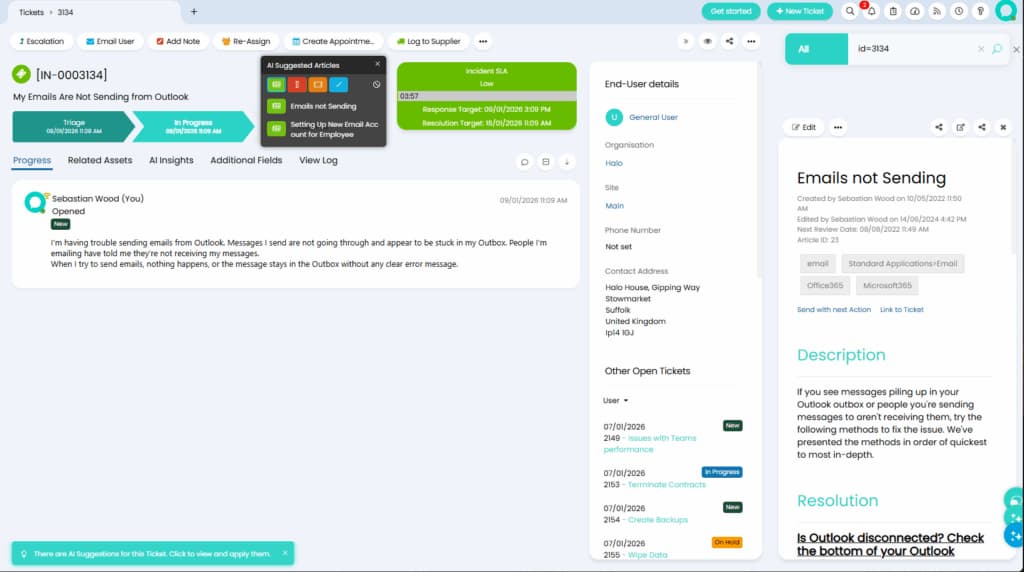
This retained Halo product screenshot illustrates agent assistance. It is not evidence that the Virtual Agent completed the ticket.
How to evaluate the configuration
Halo documents both built-in AI connections and configurable agents using your own OpenAI or Azure connection. Its guide recommends the Responses API for new OpenAI Virtual Agents. Custom functions can invoke runbooks, and access conditions can restrict who uses them. Check the functions enabled for your deployment rather than assuming that every example is active.
In versions supporting search filters, administrators can restrict the tickets and knowledge articles returned by search functions. Use those controls alongside function access checks. A prompt telling the model to be careful is not a substitute for verifying what information a particular user can retrieve. See the configuration guide.
I would ask for an ordinary request and a deliberate exception during the evaluation:
| Question | Evidence to request | Weak substitute |
|---|---|---|
| Does the answer use approved knowledge? | A source passage supporting the steps | A confident explanation without a source |
| Can the requester use the function? | An allowed and a denied test with appropriate accounts | A demonstration using only an administrator |
| Did the action finish? | The resulting record or state in the target system | A chat message saying “done” |
| Can a person continue? | The receiving queue and useful case context | A generic escalation acknowledgment |
These are suggested acceptance checks, not benchmark results. Use authorized test accounts and avoid real account changes during an initial knowledge review. If a workflow resets credentials or changes access, test permission checks and failure handling before approving that action for routine use.
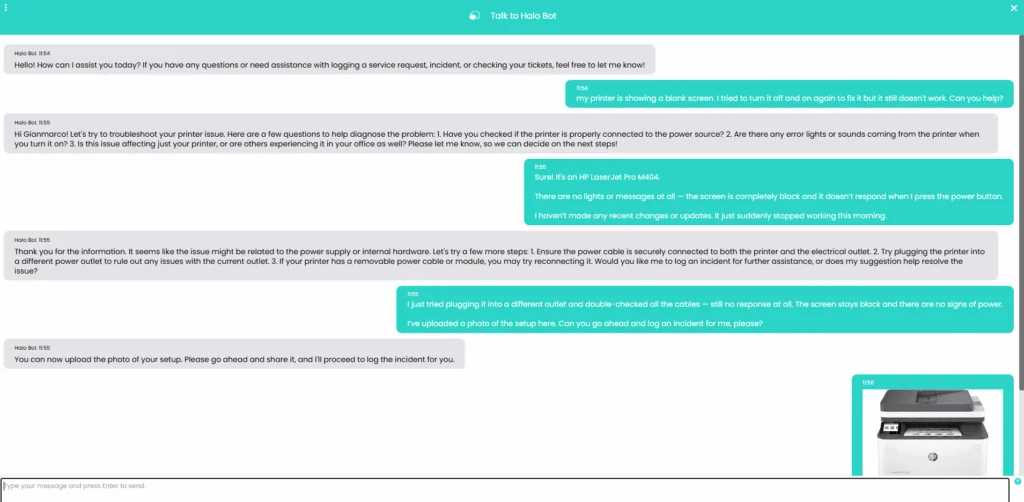
The retained example from Halo's Virtual Agent guide shows the conversation layer. For your evaluation, inspect the resulting incident separately rather than treating the proposal as proof of creation.
What does the Halo AI agent cost?
Halo advertises AI as included in its per-agent platform licence. Named and concurrent licences are offered at the same per-agent price; required onboarding is quoted according to scope. End-users accessing the portal are not licensed agents. Check the current Halo pricing page and your quote.
Do not use a universal 250-agent minimum or an old onboarding anecdote as your budget. The public calculator's extracted values did not form a consistent selected configuration during this review, so this guide does not present them as a quote.
Request a written total covering agent count, licence type, billing term, region, onboarding scope, and any separate model-provider costs for your chosen configuration. Compare that total with the workflow you need, not just whether the AI line item is included.
Compare tools against the same service-desk job
For an existing Halo team, first evaluate the native option against your approved procedure and required actions. For a team considering Halo, include migration and administration in the decision. An alternative agent is useful only if its knowledge, access controls, and necessary integrations fit the job.
Use the same ordinary request and exception for both evaluations. Record unsupported steps and manual work instead of assuming that a smooth demonstration will transfer unchanged to your environment.
Evaluate an alternative service-desk teammate through eesel CLI
If you are comparing Halo's built-in AI with an eesel helpdesk teammate, start with one service-desk decision you can inspect. For example: can it answer a routine access question from the approved procedure, and recognize when a human must verify identity?
The eesel CLI operates the same eesel agent and workspace as the dashboard. A person can use it in a terminal, scripts can consume its JSON results, and coding agents such as Claude Code, Cursor, and Codex can help inspect and configure it. This gives your IT team a way to review the setup alongside other technical work.
Do not assume that means a built-in Halo connector. The current eesel documentation index checked for this guide does not list one. The workflow below evaluates approved knowledge in eesel; it does not migrate Halo, read live Halo tickets, or change accounts.
Inspect the workspace before adding knowledge

This eesel dashboard example shows Zendesk, not a Halo connection. The CLI accesses the same workspace as the dashboard; this image is not the result of the test below.
With Node.js 18.17 or newer:
npx @eesel/cli login
npx @eesel/cli whoami
npx @eesel/cli agents
npx @eesel/cli integrations --agent TEST_AGENT_ID
npx @eesel/cli status --agent TEST_AGENT_ID
npx @eesel/cli instructions --agent TEST_AGENT_ID
npx @eesel/cli automations --agent TEST_AGENT_ID
Replace TEST_AGENT_ID with your selected agent. Review existing automations and dashboard action permissions. The agent may already work in connected systems; a new test conversation will not isolate it from those tools.
Choose an approved, non-sensitive service-desk procedure. Check that it explains the normal process, identity checks, and escalation route. If it is not already available to the agent, upload the real file:
npx @eesel/cli files upload ./approved-access-procedure.pdf --agent TEST_AGENT_ID
npx @eesel/cli files ls --agent TEST_AGENT_ID
Uploading changes the agent's knowledge. Get approval first, remove unnecessary personal information, and avoid adding a second version that contradicts the live procedure.
Test an ordinary request and an exception
Keep account-changing actions, outgoing messages, and other writes off before these fictional chats:
npx @eesel/cli new --name "service-desk-access-review" --agent TEST_AGENT_ID
npx @eesel/cli chat "Fictional test: an employee cannot access the company VPN. Draft the next steps from the approved procedure, identify the source, and list missing facts. Do not contact anyone or change accounts." --agent TEST_AGENT_ID
npx @eesel/cli chat "Now the requester says they are a contractor using a colleague's account. Reconsider the recommendation under the approved access policy. Do not infer authorization from their request." --agent TEST_AGENT_ID
The follow-up continues the same conversation. I would check whether the answer notices the changed identity context instead of repeating routine troubleshooting.
| Review point | Useful evidence | Reason to stop |
|---|---|---|
| Procedure | The cited passage supports the advice | A fabricated step or obsolete policy |
| Identity | Missing verification is acknowledged | Treating a claimed role as authorization |
| Exception | The answer applies the documented escalation | Bypassing an access restriction |
| Outcome | Clear next action for the reviewer | Claiming an account was changed in a text test |
CLI chat is billed work. These examples test answers from supplied facts, not a password-reset integration, a live ticket transfer, or a forecast of automation rates. Check every cited source yourself.
Let a coding agent prepare the review
A bounded first assignment could be:
Inspect the selected eesel agent's sources, instructions, and automations. Propose ordinary VPN-access and identity-exception tests using the approved procedure. Report missing evidence. Do not upload files, run chats, change settings, or connect APIs until I approve.
After approval, the coding agent can use the CLI and collect the results. Ask it to distinguish what the output proves from what still requires a live integration test. A good knowledge answer does not prove that the employee is entitled to an account change.
Treat Halo API access as separate integration work
If live Halo data is required, assess that connection before promising a rollout. Eesel's Network Access documentation describes allowing API domains and storing authentication headers in settings. It supports requests that read data and requests that change it; allowing a domain is not the same as granting read-only access.
Have your administrator verify the Halo deployment's API, authentication method, permissions, and token lifecycle. Begin with a narrowly authorized read-only test if that setup is feasible. Put credentials in the designated settings fields, never in chat, instructions, or a copied command transcript. The documentation describes a general API capability, not a preconfigured Halo connector or automatic ticket synchronization.
From the CLI, you can inspect custom API access:
npx @eesel/cli integrations api check --agent TEST_AGENT_ID
npx @eesel/cli activity --agent TEST_AGENT_ID
A configuration check is not proof that a Halo endpoint returns the correct tenant's data. Verify an authorized sample record and its permissions before using it in support. Ticket writes, event triggers, retries, and human approval need their own design and tests. Do not turn a successful lookup into an unattended password-reset workflow.
Compare the workflow, not just the demo
Halo's native setup and an eesel teammate are separate options. Compare the sources each can use, the actions your team actually needs, and the evidence required to approve those actions.
Try eesel by reviewing one service-desk procedure through the CLI. If Halo connectivity is essential, validate that requirement separately before committing to the deployment.
Frequently asked questions
What is the Halo AI agent?
Usually this refers to Halo's Virtual Agent within its Chat Bot. Distinguish it from features assisting human agents. See the Virtual Agent guide.
Is AI included in Halo pricing?
Halo lists AI among included platform capabilities. Account for licences, required onboarding and your configuration's other costs. See Halo pricing.
How should I budget for Halo AI?
Request a current quote for your licence count, region, billing term and onboarding scope. Do not rely on an old universal price or minimum. Start with the pricing page.
Does eesel CLI run Halo's Virtual Agent?
No. It operates your eesel teammate and the same workspace as eesel's dashboard. See the CLI reference.
Can I test an eesel teammate before connecting live systems?
You can upload an approved procedure and test fictional questions. Review existing tools and permissions first; a new chat does not isolate the workspace. See the CLI guide.
Is a built-in eesel Halo connector documented?
The documentation index checked for this guide did not list one. General Network Access is a separate integration path whose Halo authentication, permissions and workflow must be validated.
Does a correct access-policy answer prove an account action is safe?
No. A text scenario does not validate identity, API permissions or an account change. Review those separately before enabling live actions. The API access guide explains eesel's connection controls.


Article by
Kira
Kira is a writer at eesel AI with a Computer Science background and over a year of hands-on experience evaluating AI-powered customer service tools. She focuses on breaking down how helpdesk platforms and AI agents actually work so that support teams can make better buying decisions.