
What this Halo AI agent review covers
I reviewed Halo's Virtual Agent documentation and current pricing information. The conclusions below distinguish documented capabilities from questions a buyer should test. I have not measured Halo's accuracy, rollout time, or resolution rate, so I am not assigning a numerical score.
The phrase “Halo AI agent” covers more than one interaction. An employee might ask a Virtual Agent for help, while a service-desk operator uses AI assistance inside a ticket. Those are different jobs. A helpful article suggestion for an operator does not establish that an employee-facing conversation can safely resolve the same issue.
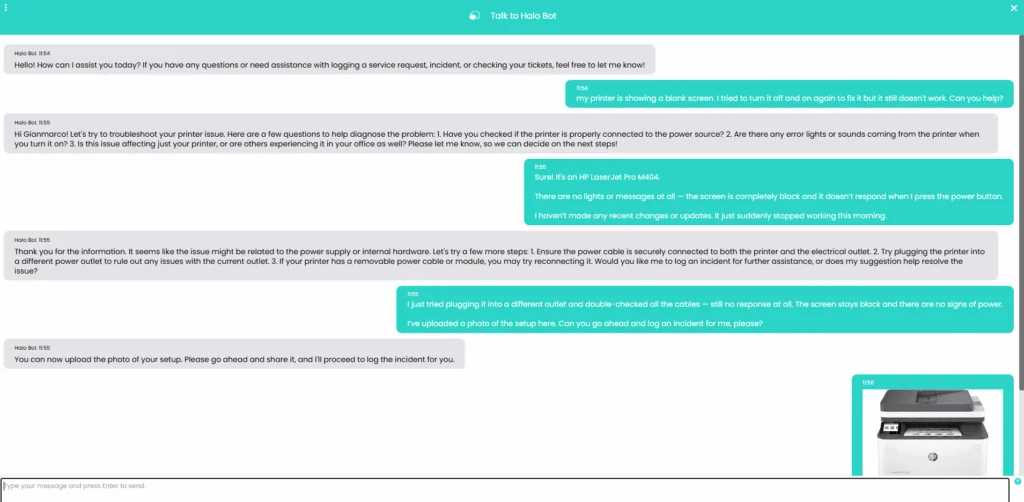
Halo's printer-support example, from Halo. The visible offer to log an incident is not evidence that an incident was created.
Where Halo could fit your service desk
The documented functions make Halo a relevant candidate when knowledge and ticket workflows already live there. Knowledge search, incident logging, ticket updates, and human transfer are useful building blocks. Configuration determines which functions are available.
My first evaluation would separate assistance from action. Ask an operator to check a suggested article against the issue. Then test the employee-facing conversation with a realistic missing detail. Finally, inspect the ticket or handover destination rather than relying on the bot's confirmation.
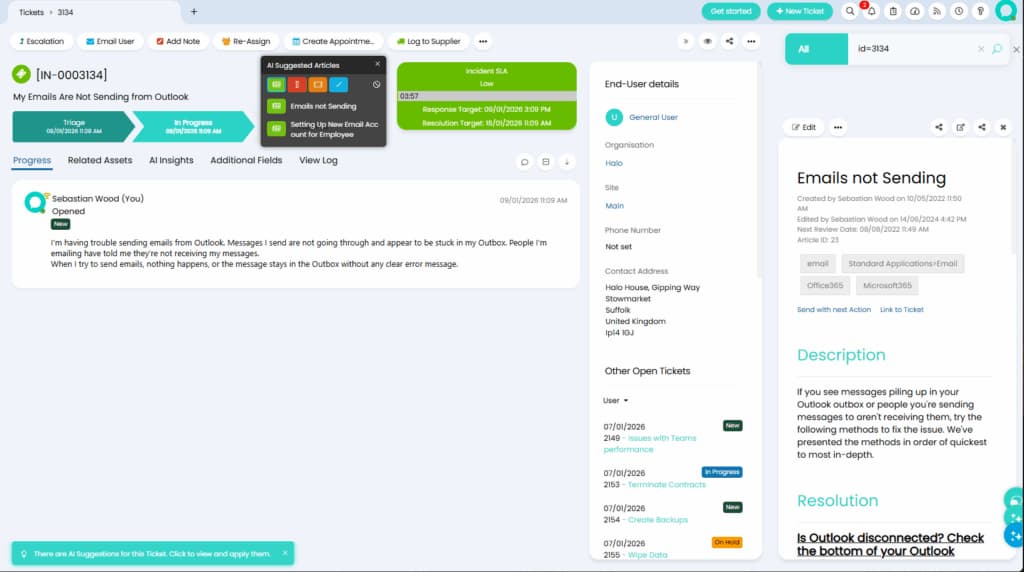
An article-suggestion panel in Halo. The AI Insights tab is visible, but its contents are not open in this screenshot.
For the broader product explanation, see the Halo AI agent guide. For this review, the important distinction is having a function versus proving the workflow.
What I would test before rollout
Use the same small set of approved cases for each candidate. Include one ordinary request, one exception, and one request the agent should not complete. The table below is a proposed review plan, not a report of Halo test results.
| Review question | Evidence to request | Why it matters |
|---|---|---|
| Does the answer follow policy? | The source passage and the proposed steps | Fluent wording can conceal an unsupported instruction |
| Does it adapt to an exception? | A follow-up with changed device access or eligibility | Repeating the first answer can make it unusable |
| Does an action reach the right record? | Ticket ID, resulting fields, and authorized user | A chat confirmation does not prove a successful write |
| Can a person continue the work? | Handover destination and a useful summary | Escalation must preserve context and ownership |
Ask the administrator to show the functions enabled for the test user. Check access restrictions and what happens when knowledge is missing. For custom actions, ask who maintains the workflow and who verifies it after changes. Do not use live password resets or production changes as an initial demonstration.
A whole-platform review score cannot answer these questions. Neither can a screenshot. Both can help you decide what to investigate, but the purchasing decision should depend on evidence from your intended setup.
Pricing and implementation questions
Halo's current pricing page describes per-agent licensing with AI included. It offers named and concurrent licenses, and monthly or annual billing. End users accessing the portal are not licensed agents.
Halo requires an onboarding package, with the cost quoted for the implementation scope. Request a written quote for your team. Ask which setup work is included, what your administrators must maintain, and whether your chosen external model configuration creates another bill. Separate recurring license costs from first-year implementation rather than treating a historical onboarding figure as universal.
If you already use Halo, compare the additional cost and effort of enabling the workflow. If you are considering a platform move, include migration and training. Neither is directly comparable to buying only an AI teammate. The Halo pricing guide goes deeper into the quote checklist.
My verdict: compare the job, then the platform
I would shortlist Halo for a team that wants AI within its existing Halo service desk, and ask for a pilot against the cases above. I would not recommend replacing a satisfactory helpdesk solely because an AI demonstration looked convincing.
An alternative should face the same standard. Can it follow the procedure, recognize a limit, and leave the next person enough context? The following eesel CLI example makes that evaluation concrete without claiming a built-in Halo connection or a measured win.
Review an alternative teammate with eesel CLI
For a service-desk evaluation, I would use the same approved procedure and the same difficult follow-up with each candidate. The useful question is whether the answer stays accurate when the easy case becomes an exception.
The eesel CLI lets you operate the same eesel teammate and workspace as the dashboard. People can use the terminal directly; scripts can process its JSON output; coding agents such as Claude Code, Cursor, and Codex can inspect the configuration and help run an approved evaluation. It is a practical way to keep the setup, test conversation, and review evidence together.
Start with sources and permissions

The eesel dashboard shows the teammate setup that the CLI also operates. This screenshot uses a Zendesk example; it does not show a Halo integration.
With Node.js 18.17 or newer:
npx @eesel/cli login
npx @eesel/cli whoami
npx @eesel/cli agents
npx @eesel/cli status --agent TEST_AGENT_ID
npx @eesel/cli integrations --agent TEST_AGENT_ID
npx @eesel/cli instructions --agent TEST_AGENT_ID
npx @eesel/cli automations --agent TEST_AGENT_ID
Replace TEST_AGENT_ID with the agent under review. Inspect existing automations and dashboard action permissions before testing; they may already affect connected systems. The selected agent is not automatically an isolated sandbox.
Pick one current, approved troubleshooting procedure, such as a printer-access guide. If it is not already available, upload the authorized file:
npx @eesel/cli files upload ./approved-printer-procedure.pdf --agent TEST_AGENT_ID
npx @eesel/cli files ls --agent TEST_AGENT_ID
Remove unnecessary personal information first and avoid conflicting policy versions. Uploading changes the workspace's knowledge; it is not a disposable attachment to a single test.
Test a follow-up that changes the available steps
Before running these chats, verify in the dashboard that outgoing messages and system-changing actions are disabled for the selected agent. These commands do not disable them. Then run the fictional evaluation:
npx @eesel/cli new --name "printer-support-review" --agent TEST_AGENT_ID
npx @eesel/cli chat "Fictional test: an employee can see the shared office printer but jobs remain queued. Use the approved procedure to suggest the next step, cite the source, and identify missing information. Do not contact anyone or change systems." --agent TEST_AGENT_ID
npx @eesel/cli chat "The employee now says this is a managed laptop and they do not have administrator rights. Revise the advice without bypassing access controls. If the procedure does not cover this case, prepare a short summary for human review." --agent TEST_AGENT_ID
The second message continues the same conversation. Compare the answer against the actual procedure. Does it adapt to the access restriction, or simply repeat a step the employee cannot perform?
| Test criterion | Evidence to inspect | Failure example |
|---|---|---|
| Source accuracy | The cited passage supports the proposed step | Invented menu or command |
| Changed context | Follow-up respects the managed-device restriction | Telling the user to bypass administrator controls |
| Missing knowledge | Gap is stated and next owner identified where documented | Guessing an escalation destination |
| Handover quality | Summary includes the symptom and steps already tried | Asking the employee to restart the entire explanation |
These examples are evaluation instructions, not reported test results. CLI chat is billed work. A new conversation does not disable tools, and a written request not to act does not replace permission settings.
Give a coding agent a review brief, not permission to deploy
An appropriate first request is:
Inspect the selected eesel agent's sources, instructions, and automations. Propose a printer-support test and a follow-up involving missing administrator rights. Explain the pass criteria from the approved procedure. Do not upload files, run chats, change settings, or create automations until I approve.
After approval, the coding agent can run the CLI and collect outputs. Have a person check the source passages and proposed changes. JSON makes the evidence easier to collect, but it does not make an unsupported answer correct.
Use activity to inspect what the agent actually did:
npx @eesel/cli activity --agent TEST_AGENT_ID
npx @eesel/cli approvals --agent TEST_AGENT_ID
A held action is not a completed action. If a later pilot includes a write, review its exact target and payload, approve only the intended operation, and verify the result in the destination system.
Verify integration requirements separately
The eesel documentation index checked for this review did not list a built-in Halo connector. This procedure test does not prove Halo ticket access or a live handover.
If your evaluation requires Halo data, assess the deployment's API and authorization separately. Eesel's Network Access guide describes domain allowlisting and stored authentication headers. It is a general capability, not an already configured Halo integration.
An administrator should verify permissions, credentials, and any token renewal requirements. Start with a narrowly authorized read-only sample if feasible. Keep secrets in the designated settings fields, never in chat or instructions. Domain access alone does not prevent writes; the external account's permissions and the allowed workflow still matter.
Before deploying, verify the actual ticket event, data returned, action result, and human ownership. A successful fictional troubleshooting conversation establishes none of those by itself.
Choose from evidence you can reproduce
Compare Halo and an eesel teammate against the job your team needs done: a supported answer, an appropriate exception, and a verifiable next step. Treat knowledge quality and live integration as separate tests.
Try eesel by reviewing one approved service-desk procedure through the CLI before expanding to live requests.
Frequently Asked Questions
Is the Halo AI agent any good?
What should a Halo AI agent review test?
How should I check Halo AI agent pricing?
Do platform ratings prove Halo AI quality?
How can eesel CLI help evaluate an alternative?
Can Claude Code or Codex run the eesel CLI review?
npx @eesel/cli to inspect setup and run approved tests. Begin with a read-only brief and require approval before uploads, chats, or configuration changes. Check the CLI documentation for current commands. Selecting an agent or starting a new conversation does not isolate it from connected systems.Does an eesel CLI test prove Halo integration?


Article by
Kira
Kira is a writer at eesel AI with a Computer Science background and over a year of hands-on experience evaluating AI-powered customer service tools. She focuses on breaking down how helpdesk platforms and AI agents actually work so that support teams can make better buying decisions.