


An email ticketing system watches support@yourcompany.com and turns every message into a ticket, complete with an owner, a status and a history. Setting it up takes about ten minutes. The two things that actually decide whether it works are threading and DNS, and neither one shows up in a demo.
Threading is how the system decides a reply belongs to ticket 1234, not a new ticket 5678. Systems that read the Message-ID and References headers get this right, generally. Systems leaning on a token in the subject line break the moment somebody edits the subject, or hits reply-all on the original email. DNS is the other half. Zendesk wants one SPF record and two DKIM CNAMEs, Freshdesk calls domain verification mandatory and hands you four, and until those resolve, your customers keep seeing the vendor's name sitting in the sender line.
The pattern underneath both is that email ticketing fails silently. Atlassian drops anything over 25 MB or older than seven days, no bounce sent. Zendesk tells you outright a blocked message may never even appear in your suspended tickets view. I've spent years putting AI on live support queues, and the ugliest incidents were never the AI itself, they were an inbound email that nobody realized had gone missing. If your queue already runs fine and email volume is the actual problem, not the software, eesel plugs into the helpdesk you have, learns from tickets you already answered, and bills per ticket handled instead of per seat.
What an email ticketing system actually does
Strip the marketing away and it comes down to three jobs, really: turn an inbound message into a record, keep every later message attached to that same record, and give a team enough structure to work it without stepping on each other.
Every vendor ships you a working mailbox before you configure anything at all, which is the part that makes the first ten minutes feel deceptively easy. Freshdesk hands you an address shaped like support@yourcompany.freshdesk.com, and per its support email docs, "any emails you receive on this address are automatically converted to tickets with the customer as the requester." Jira Service Management does much the same on your Atlassian site: pick a prefix and you get support@companyname.atlassian.net, which Atlassian describes as pre-configured, ready to send to customers straight away.
Your real address, though, isn't connected by any of that. It has to be forwarded in, or connected over IMAP, and that's where the actual work starts.

The structure you get back is the whole point of this: an assignee, a status, a due clock. If you want that vocabulary all in one place, my help desk system guide covers it, and ticketing system examples walks through what a filled-in queue actually looks like.
The part nobody demos: how a reply finds its ticket
Here's probably the single most common support-ops complaint about email ticketing, described by someone who actually lives it:
"Customer A emails in with a service request, including helpdesk, coworker B, and contact C. Ticket email is sent to Customer A. Contact C replies all to initial email and after a few replies I've got half a dozen tickets."

That isn't email doing what email does. It's a design choice, and the same thread names it precisely enough:
"CW Manage's email connector creates duplicate tickets because it cannot track by Message-ID and Related-To email headers that the emails are part of the same conversation. This is something Autotask and others have solved many years ago"
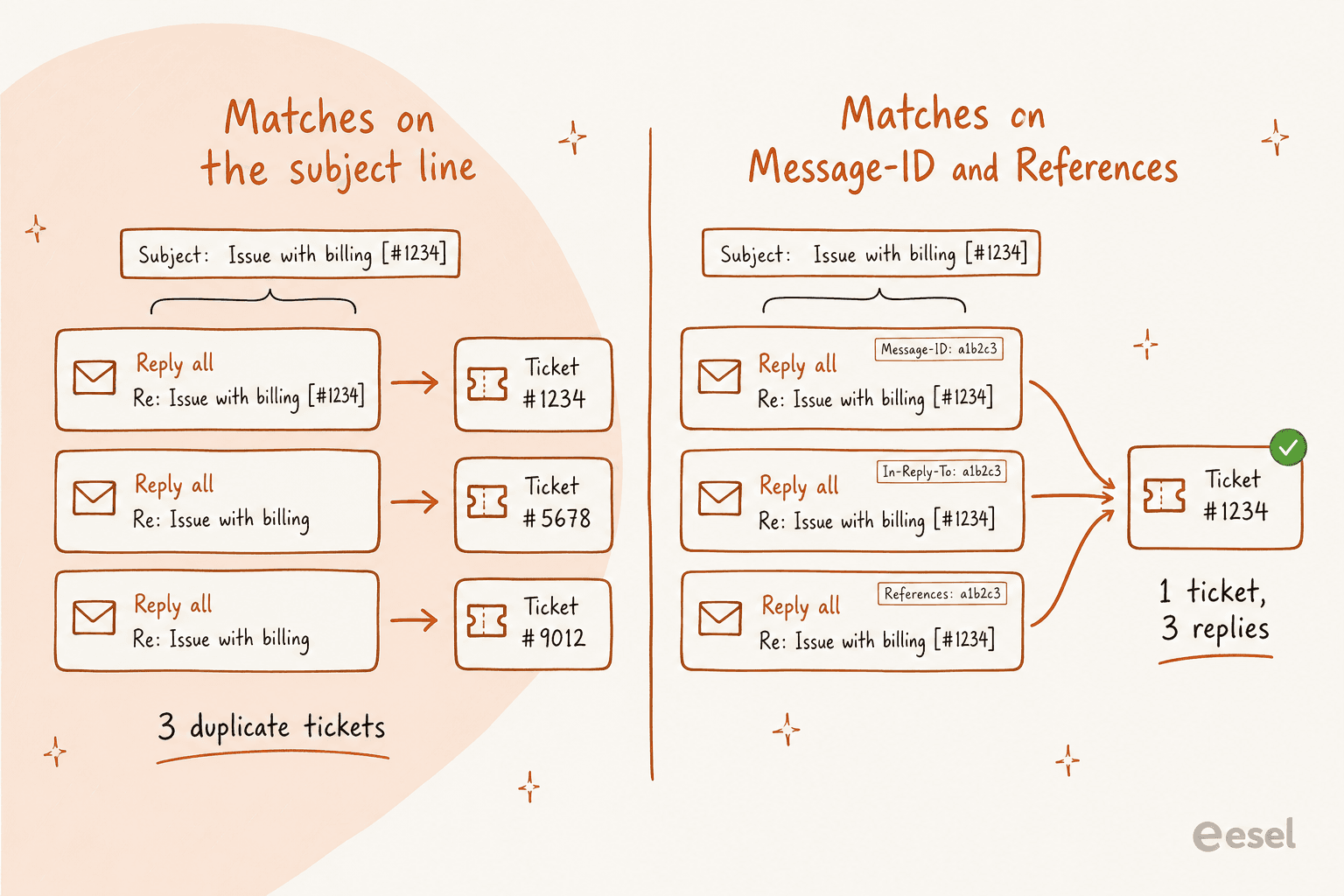
So when evaluating tools, the real question isn't "does it thread". It's what does it thread on. Freshdesk checks three email markers on each inbound message and appends a reply or a note when one of them matches, which is why a forwarded email sometimes ends up as a note on an old ticket rather than a fresh one. Atlassian blames its version of the duplicate symptom on permissions, not parsing: if replies keep opening new work items, "it usually means that the person who sent the email message couldn't be added as a request participant".
The subject-line token deserves its own warning here, because teams tend to treat it like the load-bearing piece, when actually it's the fragile one:
"Usually the issue is someone modifying the subject line and removing any of the tokens CW looks for to attach to the proper ticket, or replying to the initial email starting the ticket, where absolutely no token would be present in the subject line."
Worth saying plainly here: no major vendor requires that number for threading to work. It's a human convention, one that helps agents mostly, and hiding it from replies doesn't break anything. Once threading holds up, the rest of the queue hygiene is the familiar stuff, ticket tags and macros, plus knowing when a personal macro should be shared.
What each system publishes as a hard limit
Vendors tend to bury their real constraints deep in help docs, so I pulled the numbers together into one place. Pick a system, read the row that's going to bite you first.
Two of those rows are the ones I'd put on a whiteboard before signing anything, honestly. The Jira required-fields rule is the harsher one: Atlassian states a request type for email "must have both Summary and Description fields visible, and any other visible fields must be optional", and if extra required fields get added on top, "work items won't be created in your space from customer emails." An admin tidying up a form on some random Tuesday can stop the whole email channel dead, no error visible to anyone.
The other one is Freshdesk's mailbox count. Per its docs, "You can add multiple support emails from the Growth plan. However, if you are on the Freshdesk Free program, you can add only one email." So a team wanting support@, billing@ and returns@ split across groups is on a paid plan, by definition, worth knowing before you pencil the free tier into a budget. The Freshdesk ticketing system guide has more on how those routes get configured.
Email ticketing is a DNS project
This is the part that catches support managers off guard, the ones who thought they were just buying software. Before a single reply goes out looking like it came from your company, somebody with DNS access has some work to do first.
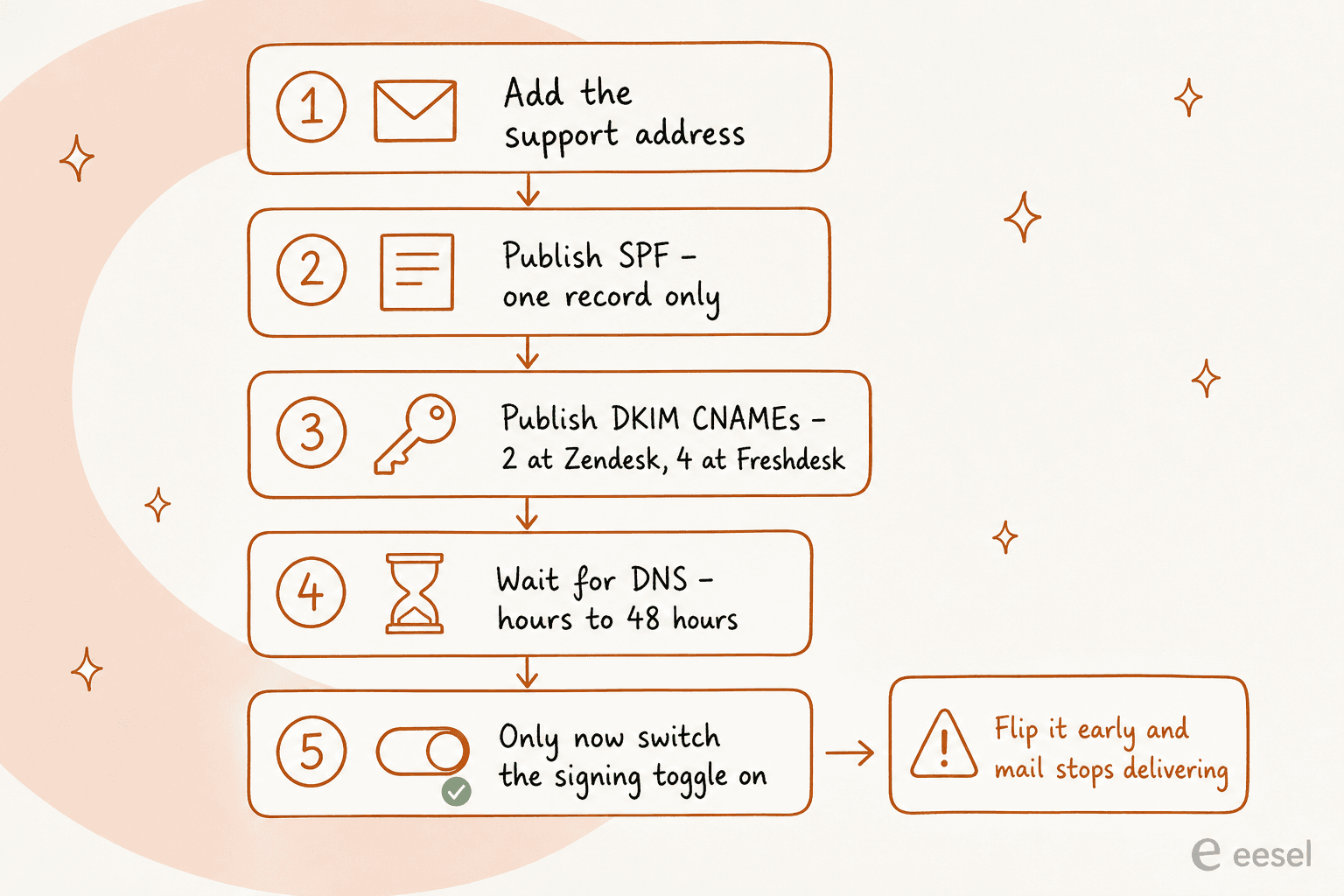
Zendesk asks for one SPF record, v=spf1 include:mail.zendesk.com -all, and warns "the SPF specification requires that you only have one SPF record on your domain", so a Google Workspace shop has to merge rather than just add one. DKIM is two CNAMEs pointing at Zendesk's own domain keys, which is actually a nice design: Zendesk rotates those keys quarterly, and you never have to touch DNS again after that. The tradeoff, though, is custom keys aren't supported, so when a Zendesk-side record has a problem, you just wait for Zendesk to fix it.
The ordering rule here is the real footgun. Zendesk states it pretty flatly: "Enabling digital signatures must be the final step in the configuration process. Enabling this feature before adding the CNAME records for your domain will cause delivery failures." Three clicks and you've got a self-inflicted outage.
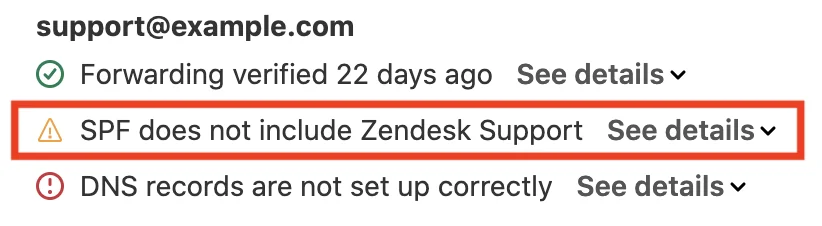
Skip the DNS work entirely and nothing breaks loudly, exactly, it just starts looking wrong. Zendesk is refreshingly blunt about who actually needs this, the short answer being no, "Only if you really don't want your customers to see the Zendesk name on their messages." Your team gets a matching warning inside the product too.
There's a trap on the SPF side nobody really plans for, and it's described best on Hacker News:
"That limit of ten is extremely easy to meet when someone casually says "Hey we've started using Freshdesk for ticket tracking, setup DNS please". Ok so you include:email.freshdesk.com. That record itself includes four other freshemail.io DNS lookups, and sendgrid.net, which includes another one. So you're seven DNS lookups in just for that."

SPF caps you at ten DNS lookups, total. Add a helpdesk onto a domain that's already carrying Google Workspace, and you can blow past the limit easily, at which point authentication breaks for your whole domain, not just the helpdesk part. Check before you add. Not after.
Where emails die quietly
Every system keeps a list of reasons an inbound message just becomes nothing at all. Reading through those lists is about the closest thing to a stress test you can run before buying.
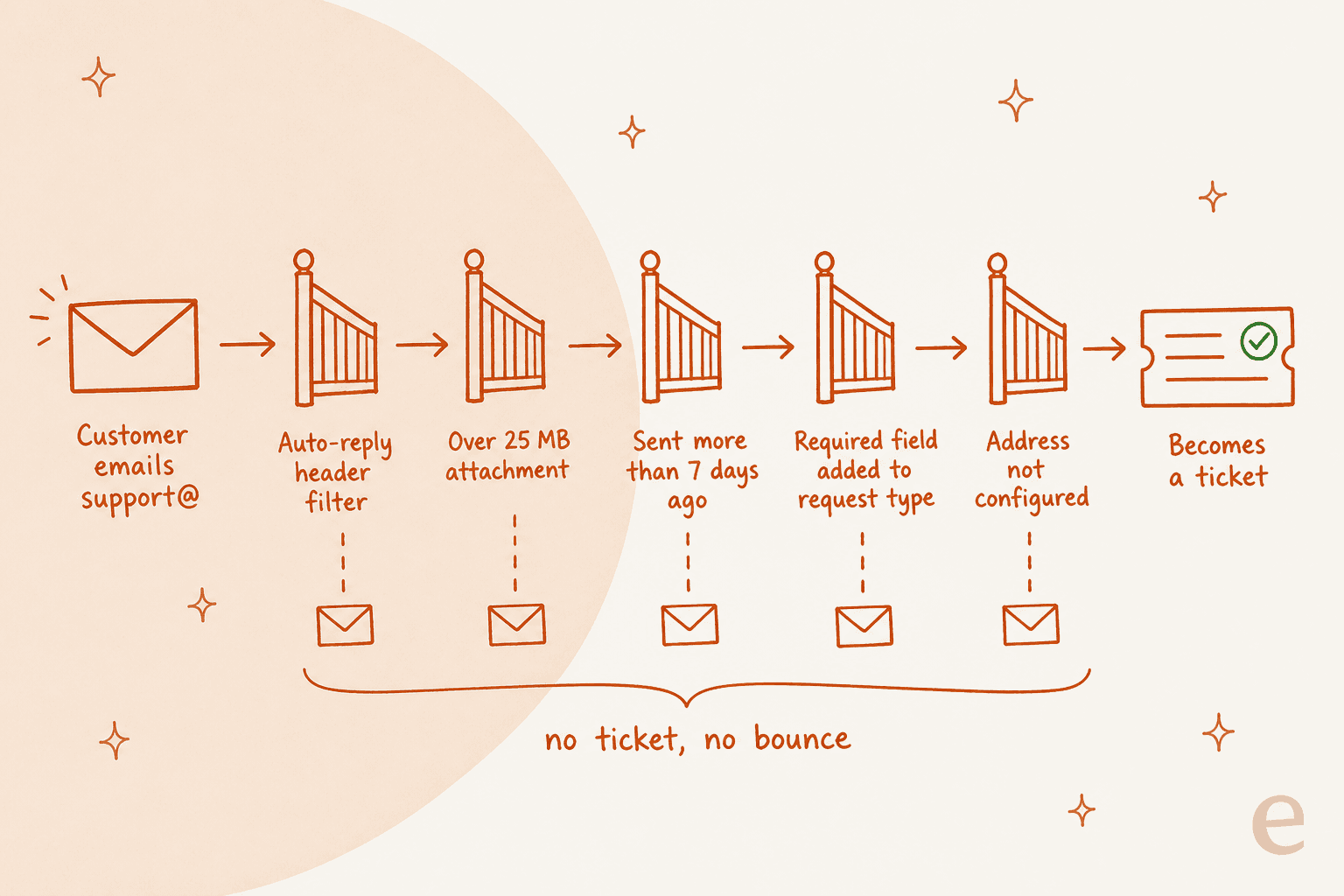
Atlassian's email processor filters on headers, dropping anything marked auto-generated, auto-replied or auto-notified, plus anything the mail server flagged as bulk, delivery status notifications, and Jira's own mail too. Over 25 MB, the outcome forks depending on the channel: those emails "remain unread in the mailbox or bounce back to the sender", which one happening depends on whether the address is yours or Atlassian's. On your own mailbox, that means no ticket, no bounce, no signal to anyone at all.
Freshdesk has its own list too. No ticket gets created if the sender is a blocked contact, if the address got deleted after forwarding was set up, if the recipient count crosses 50, or if wildcard creation is off and the mail went to a plus-address. And only mail sitting in the primary folder counts: "Only the emails received in primary folder of your support mailbox will be converted as tickets." So a tidy Gmail filter that files vendor mail into a label, that alone makes it invisible to the helpdesk.
Zendesk's version is the quiet one, really. When a recipient server blocks you, "You may not receive a bounce-back notification in your Suspended tickets view." Nothing surfaces at all. This is exactly why, when we put AI on a live queue, the first thing we do is replay historical tickets in simulation, rather than trust the queue to be complete. The ticket backlog you can actually see is rarely the whole story.
If your monitoring habit is watching the SLA clock rather than the ingestion log, none of these failures will ever page you, not really.
Auto-responder wars are real, and they are stupid
Two ticketing systems talking to each other, that's about the most expensive comedy there is in support ops:
"Customer emails us and they get our auto response, which triggers an auto response from their system, which triggers the pre-First Time Response response from ours, which triggers a new ticket from them since the pre-First Time Response response doesn't pull the ticket number from their system's subject line, which in turn triggers another response from this, all the while we're getting spammed with update emails and the case log is bogged down with non-sense."
The reason it never terminates sits right in the middle of that sentence: each side's auto-reply drops the other side's token. And the usual defence doesn't fire here, because a ticket-created confirmation isn't technically an auto-reply. One sysadmin's fix, in the end, was matching on the subject itself and appending as a comment when an open ticket already carries it, described here.
Vendors do guard against this now, at least. Freshdesk simply refuses to create a ticket when the From and To addresses match, that's the documented loop guard. Jira rejects mail that looks like it came from another Jira channel, to prevent "a never-ending loop of emails", flags a Potential mail loop status when the same address keeps flooding in, and exposes a configurable loop-detector threshold on its side too. Useful, but only partial: the loops people actually run into happen between two different vendors, and neither one can see the other end.
What that ends up costing when it happens, straight from an MSP:
"This would happen every once and a while, but after 20 tickets, we'd have to manually filter those out in office 365 to break the chain, then remove the rule"
Auto-acknowledgements are worth a second thought, generally speaking. They're the visible difference between a queue that reads like a person and one that reads like a machine, and that's the tone argument sitting behind the Freshdesk autoresponder settings, plus half the reason teams look at thread-native tools instead.
Shared mailbox or ticketing system
The honest version of this decision isn't really about features. It's about whether anyone can currently even tell you who's answering what.
Two decades of doing it both ways, and it lands in the same place:
"I've worked in IT for more close to two decades and always had a ticketing system, but recently started a job with a shared mailbox. Go with a ticketing system. So much easier to keeps this organized and know who is working on what."
The state you're usually escaping from is worse than a plain inbox anyway, in practice. One sysadmin describing the before picture: "each department had about 5 shared mailboxes and forwarding rules. Lots of forwarding loops as this got out of hand fast."
The counter-case is real too, though, and it's more about presentation than plumbing:
"We have a support@ address which customers email their problems into. It's still "ticketed" but it never appears that way to client. I've yet to have a client complain about using email unless emergency."
That's my read as well, honestly: run tickets internally, show email externally. The reference number is for your reporting, not really for the customer's inbox. From there the choice comes down mostly to who you're supporting. IT teams end up in the IT ticketing system and service desk bracket, MSPs in MSP ticketing, engineering-led teams in Jira, Salesforce shops in Salesforce. Smaller teams often start with Spiceworks or Zoho, and teams already living in chat tend to go Slack-first. If you want the shortlist instead of the category, top helpdesk software and cloud-based ticketing are the two I'd read.
What it costs, and what is actually metered
Email is rarely what you actually pay for. Seats are the thing.
| What you are buying | Zendesk | Freshdesk | Jira Service Management |
|---|---|---|---|
| Email channel | Included | Included on every plan | Included |
| DKIM / domain verification | All paid plans | Mandatory on the Freshworks server | Not applicable, DMARC check instead |
| Support mailboxes | Multiple | 1 on Free, multiple from Growth | Up to 10 per project |
| Multiple branded portals | Higher tiers | Pro and up | Per project |
| People who email in | Free | Free | Free, no license needed |
| Turning off DMARC sender checks | n/a | n/a | Paid plans only |
The Jira line at the bottom is small, but it's got a sharp edge. DMARC sender verification stops mail from participating providers reaching your project when the sender isn't certified, and the only documented escape hatch is upgrading to a paid plan. On Free, a customer with a misconfigured domain just silently loses mail, and you can't switch the check off, period.
Everything else that costs money in this category tends to be the AI meter, not the mailbox itself. That's a separate exercise though, and I've run the numbers in Zendesk pricing and Freshdesk pricing if you're budgeting a full stack rather than just the queue.
Getting AI onto an email queue without breaking it
Once the plumbing actually holds, email is the obvious place to automate: it's the highest-volume, most repetitive channel most teams run. Internally we describe email as the world's biggest helpdesk, which is exactly why the deflection math works there first. The sane order of operations is train on your knowledge base and past tickets, then tag and classify before you let anything reply, then set the handoff rules before go-live, not after the first bad answer.
Two cautions, from having actually done this on live queues. First, an inbox isn't a ticket queue: newsletters, vendor notifications and delivery receipts all sit in there too, and an AI without filtering will happily answer a newsletter. Second, measure deflection against real history, not against hope, which is exactly what the ticket deflection guide is for.
Try eesel on the email queue you already run
If the helpdesk itself is fine and email volume is the actual problem, you don't need to migrate anything at all. eesel sits on top of the queue you already have, whether that's Zendesk, Freshdesk or Jira Service Management, learns from tickets your team already answered, and holds a confidence threshold so it replies where it should and leaves the rest well alone.

The part I'd personally care about most, given everything above: you can simulate against your ticket history before anything goes live, so the first customer who meets your AI isn't also the first real test of it. One customer, Gridwise, saw it resolve 73% of tier-1 requests in the first month, and got that read during a 7-day trial rather than after signing a long contract. Billing is per ticket handled, no seats, so it doesn't stack another meter on top of the one you're already paying. Try eesel free, no card needed.
Frequently Asked Questions
What is an email ticketing system?
How does an email ticketing system decide which ticket a reply belongs to?
Message-ID, In-Reply-To and References headers first, then fall back to a token in the subject line. Freshdesk checks three email markers on every inbound message before it decides between a new ticket and a reply. The subject number is a human convention, not a requirement, which is why hiding it does not break threading. More on the tooling side in my helpdesk ticketing system guide.