

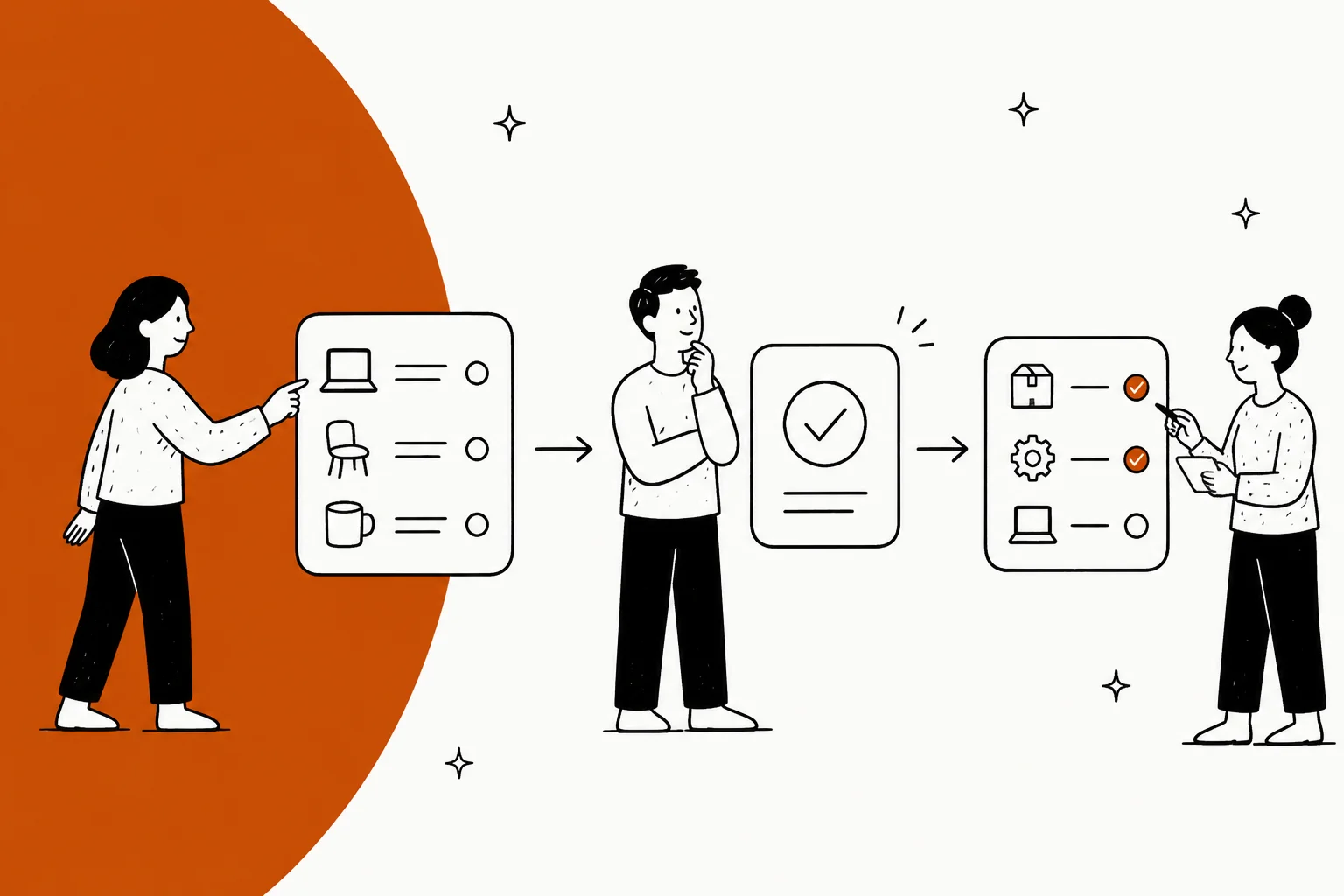
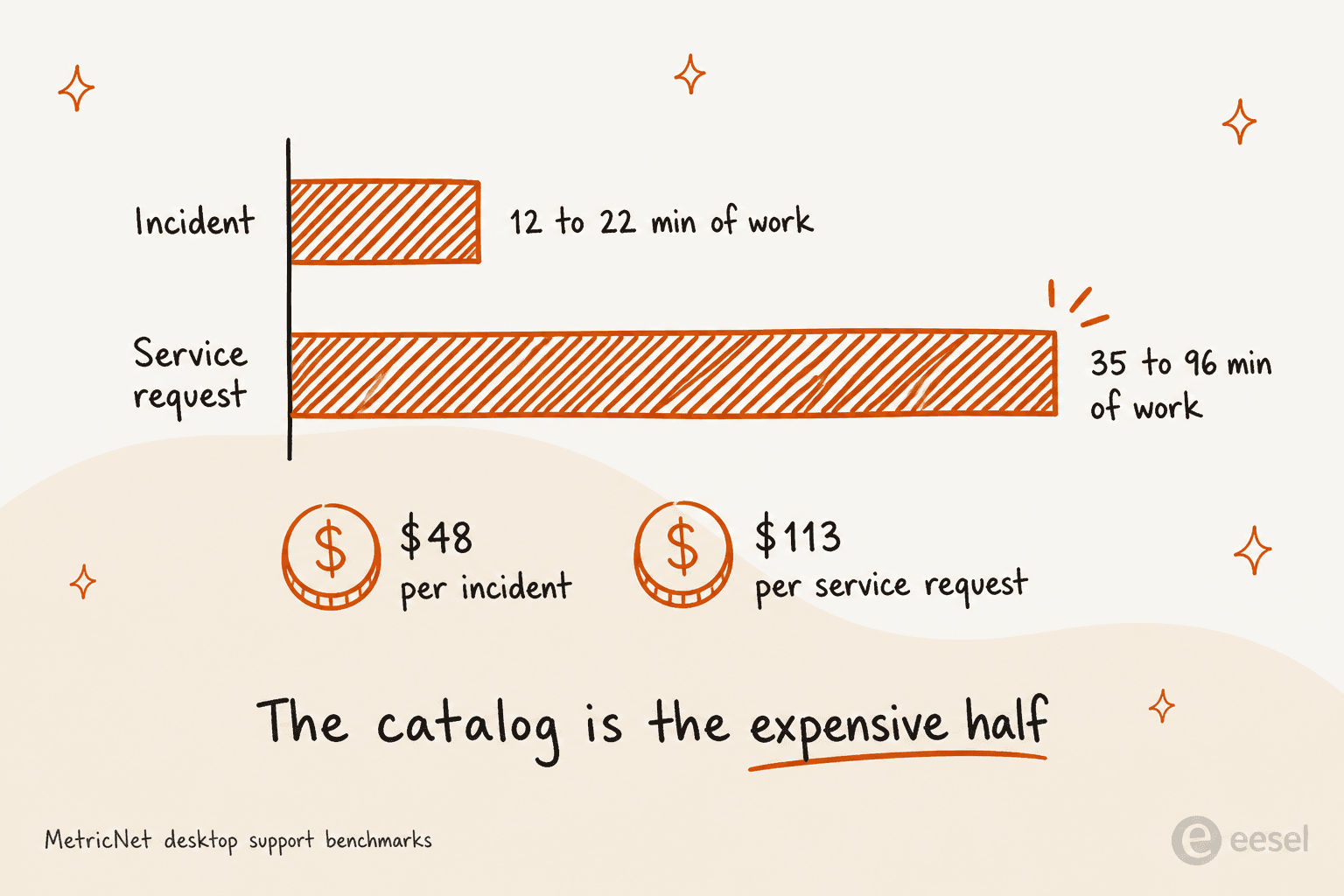
Call it a help desk with ITIL vocabulary bolted on and you will mis-budget it. It is three machines stapled together: a catalog, an approval chain and a fulfilment tree. That is the whole reason it costs more. Work time on a service request runs 35.4 to 95.9 minutes, against 12.3 to 21.5 for an incident, per MetricNet's benchmarks. Cost, $113 a request. An incident is $48.
Where the money hides is the catalog, which is also the place vendors quietly disagree. Below its $49 Growth plan, Freshservice does not include one. ManageEngine sells it as a $1,595-a-year add-on. Jira Service Management has no catalog product at all, it just calls your request type list a catalog. And ServiceNow includes it in the base tier, then meters the people who approve things as a licence class of their own.
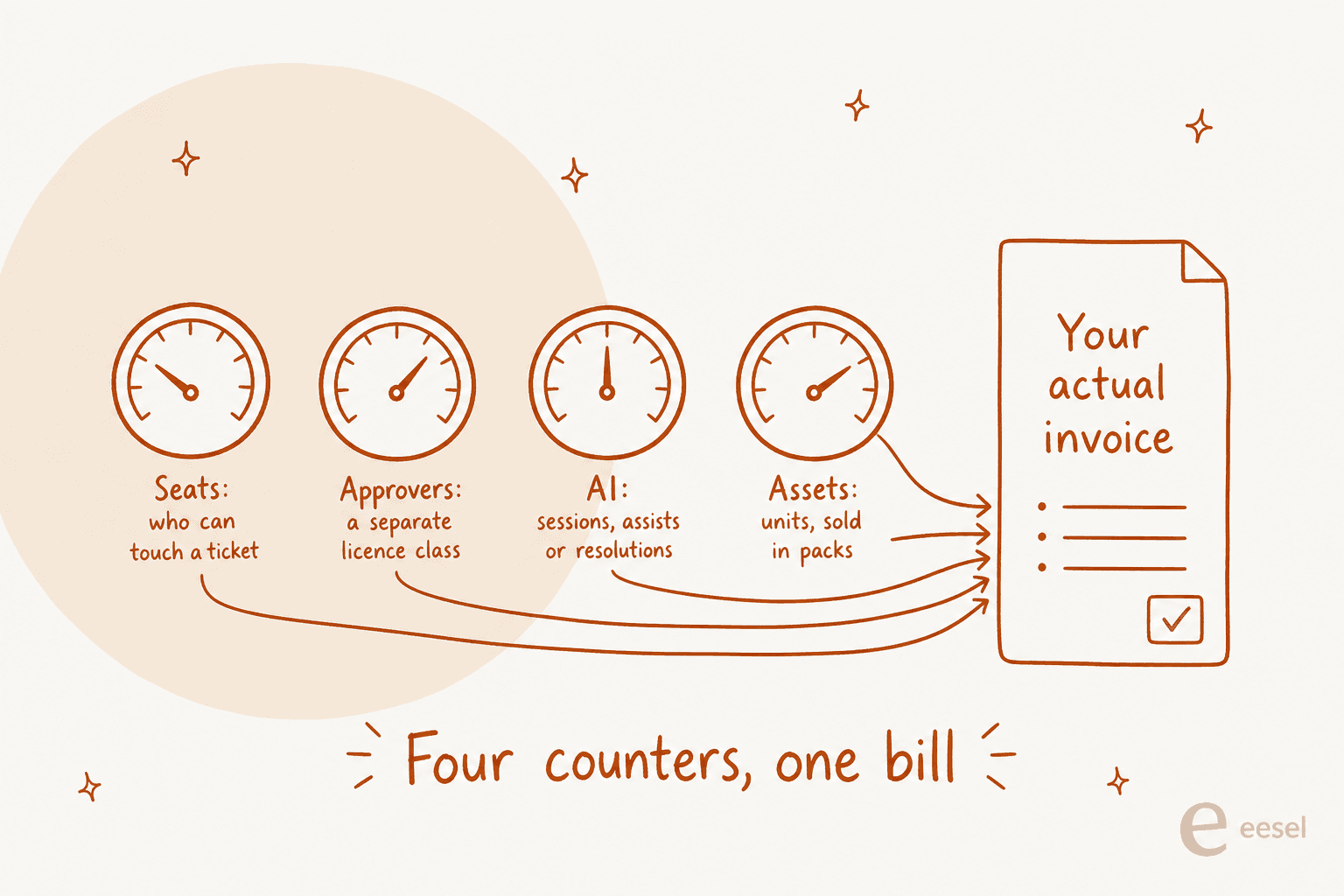
Shopping right now? Ignore the headline seat price. Count the meters instead: seats, approvers, AI actions and asset units are four separate counters on most of these tools. Then there is the other problem, the tier-1 band drowning your technicians, and the layer which fixes that one sits on top of whatever you already run. That is the thing I build at eesel. A fixed monthly price from $299/month for 500 credits (1 credit per ticket or chat), with no seat fee, so an IT team can put it in front of an existing queue without re-tendering the whole desk.
What a service desk ticketing system actually is
I ship the integrations at eesel. Which means my days go on reading these products' APIs rather than their landing pages, and right here is where the gap between the two is widest. Every vendor homepage says more or less the same sentence about streamlining IT support. What you are actually buying, the data model underneath tells you.
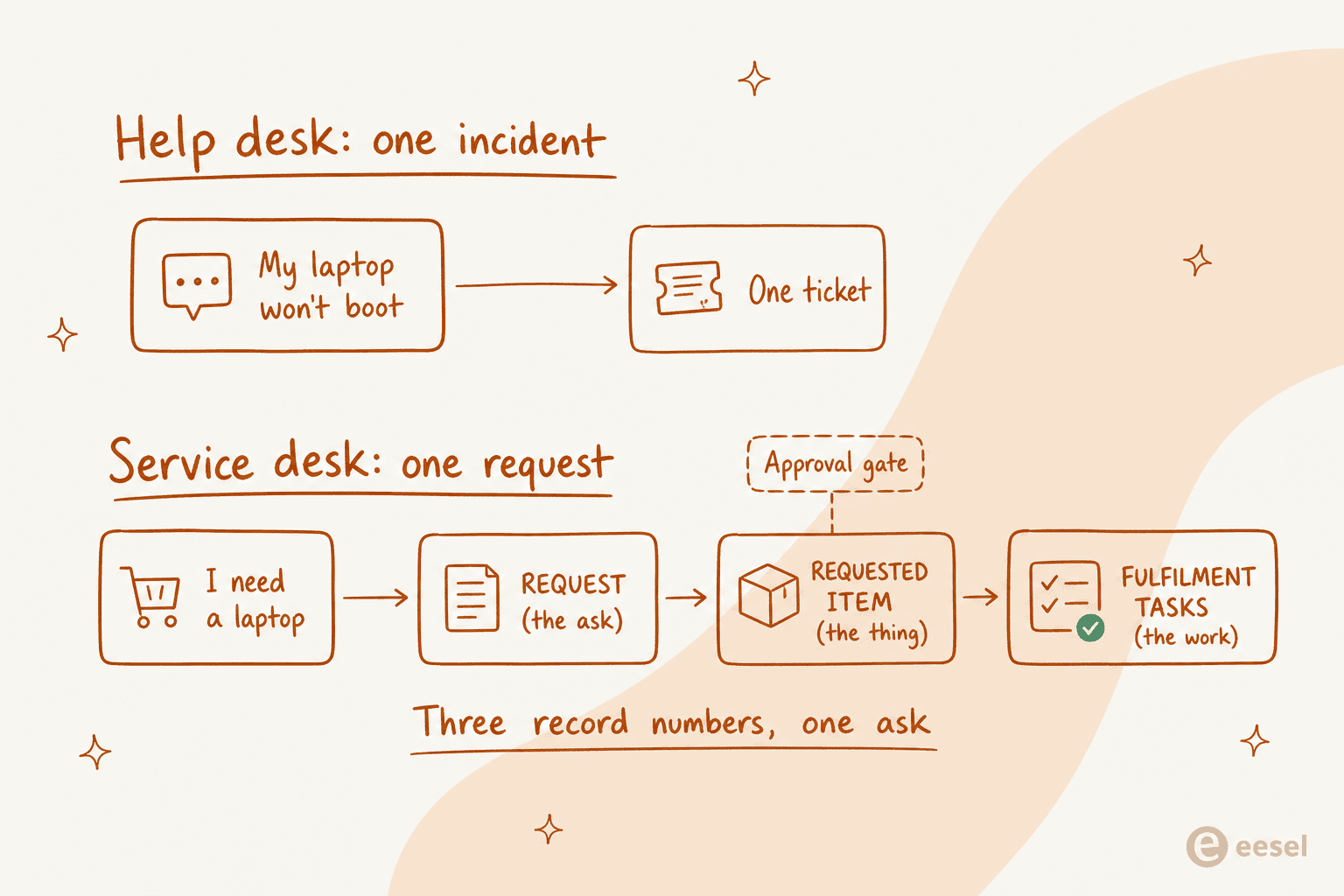
Start from the distinction that matters. A help desk fixes things that broke. A service desk also delivers things people asked for. That second half is the entire reason the category exists, and the work is structurally different: you need a published list of orderable things, then a way to gate each one behind the right human, plus a way of fanning the resulting work across teams who do not share a queue.
Atlassian is refreshingly honest that the naming is a mess. It cites HDI research which finds that 41% of desks "are called something else," and then it adds there is "no guarantee that the service desks and help desks reported in this HDI survey align to our descriptions." So, do not shop by the word on the box. Shop by whether the tool models a request as a first-class thing, with a catalog entry, an approver and child work, or only as an email carrying a status field. The longer version of that argument, I wrote it up in help desk vs service desk separately.
One ask, three record numbers
The cleanest way of seeing the difference is to watch what happens to a single sentence.
"My laptop won't boot" is an incident. One record, one assignee, one resolution. "I need a new laptop" is a request, and inside ServiceNow that becomes three records carrying three different number series. There is a Request (sc_request, prefixed REQ), the cart-level container for one checkout. There is a Requested Item (sc_req_item, prefixed RITM), one per catalog item ordered. Then the Catalog Tasks (sc_task, prefixed SCTASK), the actual fulfilment work, which the item's flow generates. ServiceNow's own Service Catalog API reference shows a checkout response that carries "number": "REQ0010012" and "table": "sc_request", so this is not a folklore.
Order a laptop and a monitor in one checkout, you get one REQ with two RITMs. Each RITM can spawn several SCTASKs, since procuring and imaging and shipping are three different people's jobs. One quirk worth to flag before you build reports: the catalog answers only live on the RITM. ServiceNow states that "variables are associated only with the Requested Item [sc_req_item] table," which is the reason a technician working the SCTASK often cannot see what the person actually asked for, unless somebody deliberately surfaced it.
One message in. How many records out?
The same sentence typed by the same employee turns into wildly different amounts of work depending on which record type your service desk ticketing system files it under. Pick a request and see the chain it actually creates.
This is the half a plain help desk already handles well. Something broke, one person fixes it, the ticket closes. If your queue is mostly this, you do not need a service desk ticketing system yet.
Same person, same inbox, more than double the cost. The catalog, the approval and the fulfilment tasks are the entire reason a service desk ticketing system exists, and they are also the reason it is priced the way it is.
Access requests are the ones that make people hate the service desk, and almost none of that is the desk's fault. The ticket sits idle waiting on two humans who are in meetings. Fixing this is a routing and reminder problem, not a ticketing problem.
Onboarding is the honest stress test for any service desk ticketing system. If a tool cannot fan one request into parallel tasks across four teams and tell you which one is still open on the Friday before, it is a help desk with an ITIL vocabulary bolted on.
Work-time and cost figures are MetricNet / HDI desktop-support benchmarks, published 2011 (2010 data). Treat the ratio between incidents and service requests as the durable signal, not the dollar amounts. Record chains reflect ServiceNow's request model; other vendors file fewer numbers for the same work.
The reason to care about record counts is not a tidiness. It is that the request half of your queue is roughly three to five times the work of the incident half, per the MetricNet tickets per technician benchmarks, and the cost per ticket follows on from there: $113 per service request against $48 per incident in desktop support. Date those dollars as 2011, and treat the ratio as the durable number rather than the amount.
The catalog is where vendors quietly disagree
Every vendor sells you "a service catalog." Almost none of them mean a same thing by it, and the differences are big enough that they change which tool you buy.
Jira Service Management does not have a catalog product. Atlassian says it directly: the ITSM template "comes with a service catalogue of common requests. These are called request types," and you view your catalogue by going to Space settings, then Request management, then Request types. No separate builder exists. The old set-up-a-service-catalog documentation URL 404s, because no such thing exists. This is not automatically a bad thing, and it also means there is no plan gate sitting on the catalog, but if you arrived expecting a shopping experience with the categories and pricing, you will be surprised. One admin reported being told on an Atlassian training call that the list should stay small:
"The answer that I got was like, 'You shouldn't have more than 8-10 requests in your help center so if they need unique workflows then it shouldn't be a problem.'"

Eight to ten items is a help desk's worth of intake. An enterprise catalog it is not. Whether that counts as guidance or as a structural ceiling depends on who you ask, still it tells you where the product's centre of gravity sits.
Freshservice puts the catalog behind its second tier. A $19 per agent Starter account gets incidents, knowledge, tasks and a portal, but no catalog and no service items, so no service requests raised from a catalog form either. The catalog starts at Growth, $49, which is a 158% step up from the entry price for the single feature that makes it a service desk. SLA management crosses on the same line, and that compounds, because child requests are enforced against "the corresponding SLAs."
ManageEngine charges for it separately. ServiceDesk Plus lists $13 per technician on Standard, $27 on Professional, and then sells the service catalog as a bolt-on: $1,595 a year on the cloud add-on table, or $1,195 on the annual one. Only in Enterprise at $67 is it bundled. The CMDB is another $1,595 a year, Professional only.
SolarWinds includes it at the bottom. Its Service Catalog and Advanced Approval Workflows are both listed as Included on Essentials, on Advanced and on Premier alike, which is what makes the $39 Essentials plan the cheapest genuine catalog-and-approvals combination on this list. Two approval-adjacent items do stay gated: Service Portal Tasks and Approvals, plus the Portal Designer. Both of them need Advanced.
ServiceNow includes it and charges you elsewhere. Service Catalog and Request Management sit inside ITSM Foundation, the base tier, together with Incident Management and Asset Management. The pricing page carries zero dollar figures and a single "Get Custom Quote" button, so the catalog being free of a plan gate is a cold comfort.
Halo bundles literally everything. One plan, £69 per agent per month billed annually, and approval workflows, CMDB, project management and AI are all of them in the base price, with the explicit line "no tiers, no bolt-ons, no locked-away features." The catch sits in the footnote. Onboarding packages are required with purchase at a bespoke cost, and the US dollar figure gets injected client-side, so only the GBP price actually renders.
Approvals, the step that decides both your elapsed time and your bill
Here is my honest read, after building against most of these APIs: approvals are the single most under-researched thing in a service desk purchase, and they are the place where both the delay and the surprise invoice live.
They are modelled completely differently by each vendor. In Jira Service Management an approval lives as a workflow status property, not as a form setting. Atlassian's workflow approval docs are blunt that the "Include approval step" checkbox is only available when the status already carries at least two transitions, one for Approve and one for Decline. Multi-step approval, then, is not really a builder feature. It is you, chaining several approval-bearing statuses by hand. Quorum is configurable, though one decline stays absolute: if any approver declines, the work item is declined whatever number you set.
Freshservice replaced its old sequential model with approval groups and chains: four group rules and four chain rules, where groups run in parallel inside a chain, but only one chain active at a time. Still on the legacy model? Mark the date. Freshservice says the final extension for the deprecation of legacy approvals is August 2026, "after which no further extensions will be provided." That migration has a nasty API tail on it as well. The old single-approver endpoint accepts one approver at a time, and after migration every call creates its own group, with the chain rule defaulting to "All groups must approve," which silently stalls the approvals that used to clear on "anyone."
Now the commercial part, which is the one I would put in front of whoever signs the contract.
On Jira Service Management, approvers are free. Atlassian states it plainly: "approvers don't need a Jira Service Management license", they only have to be customers of the service space.
On ServiceNow, they are not. Approve-only users fall into a separately metered Business Stakeholder class instead. A ServiceNow employee's own licensing guide explains how it works:
"Business Stakeholder (BSH): This one catches people off guard because it is measured across two separate tables - one for role assignment and one for approval activity. A user qualifies as a BSH if they hold an Approver role but hold no Fulfiller role. The moment a BSH user gains a Fulfiller-mapped role, they move out of BSH measurement entirely."
If your approval chains route to sixty managers who otherwise never touch a ticket, that sentence there is your budget. And the free-requester saving disappears completely once you add the good employee portal, since products like Employee Center Pro and HRSD bill on the Unrestricted User model, where every active user on the instance counts.
Practitioners hit on this at the moment they build their first catalog item. In December 2025 one admin asked the obvious question:
"I know I need the itil role for approvers to approve the requests, but, is that it? Isn't there like a 'lower' role that I can assign them that is enough for them to view the answers of the item and approve/reject the catalog task instead of assigning them the itil role?"
The old workaround was the approve-by-email, which sidestepped the role entirely. A reply in that thread reports that door closing: "Email approvals require the business stakeholder license to be assigned. This has come up for a ton of my clients recently." So you cannot design a ServiceNow approval chain without pricing every human inside it first.
Fulfilment, and the checkbox that turns one request into ten
Once the approval clears, the tool has to fan that work out. This is the layer which buyers evaluate least and then live with most.
Freshservice's mechanism is one single checkbox on the catalog item: "Create Child Requests for each of the items above." Leave it off, and every line item sits inside one ticket assigned to one agent, who then flips each item to Delivered or Cancelled by hand. Turn it on, and each item becomes an individual child ticket with System as the requester, routed to whichever department owns it, each one carrying its own SLA clock. Freshservice's own worked example is a New Employee Hire parent which spawns New CRM Account, Apple MacBook and Adobe Photoshop CS6 as children.
That checkbox is, for me, the sharpest single illustration of this whole category. One switch, and that is the difference between a shared inbox and a service desk.
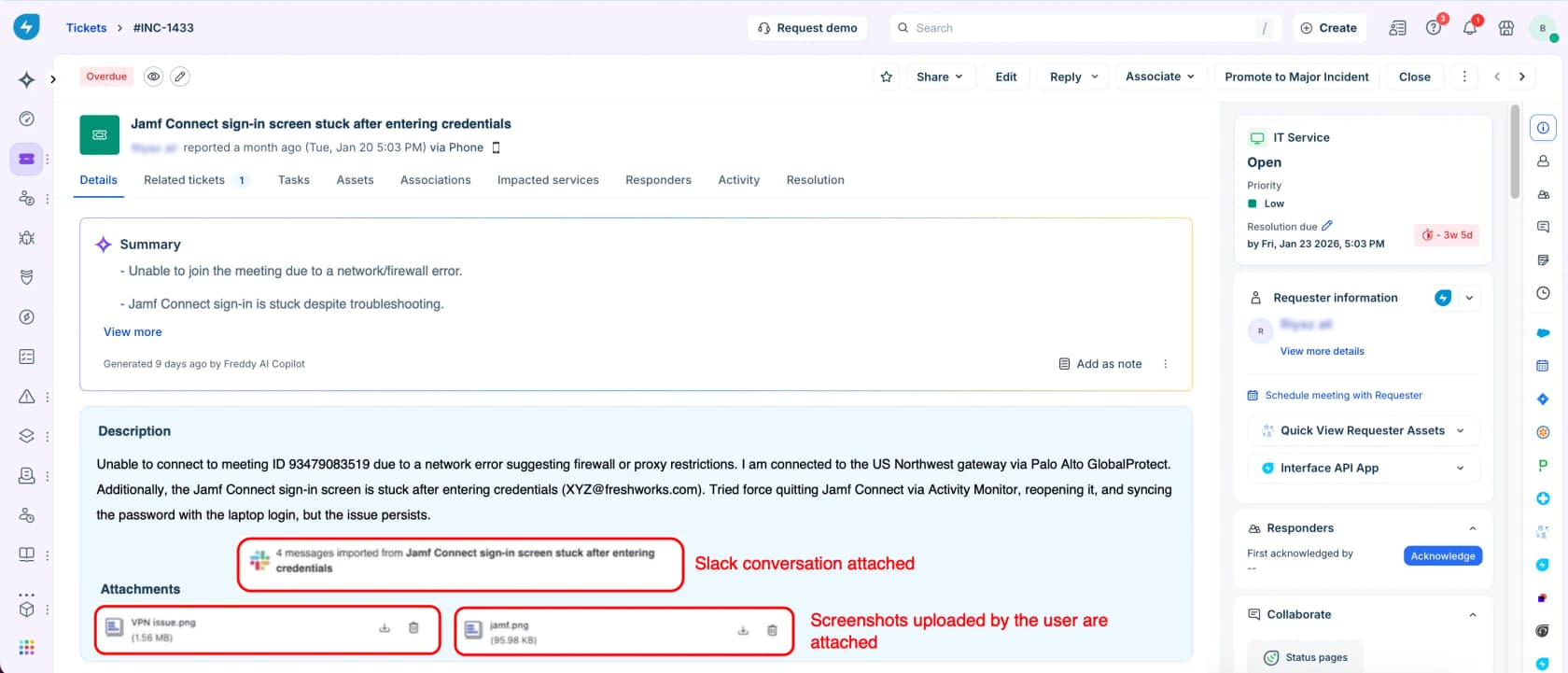
Two things about it will bite you in the production, and both of them sit in Freshservice's own docs. Closing a parent ticket auto-closes every linked child, with the warning to "ensure that all child service requests have been fulfilled before closing the parent ticket." Then there is a hard cap of 100 tasks under a parent entity, which sounds generous right up until a bulk onboarding wave hits.
ServiceNow's equivalent is the Create Catalog Task action inside the item's flow, minting an sc_task record per work step. Jira Service Management, notably, carries no native fan-out of this shape at all. You get one work item per request type, and the multi-team fulfilment is something you build yourself, with automation or child issues.
Assets are the second meter nobody budgets for
If a service desk ticketing system tracks what it hands out, then it needs a CMDB, and that CMDB comes with a price list of its own.
- Freshservice does not meter the devices. It bills Asset Units instead, its own licensing metric, which you purchase in packs of 500. Neither the pack price nor the per-plan included allowance is published anywhere on that pricing page.
- SolarWinds manages to be the most explicit and the most quote-gated at once. IT asset management is "available as an additional purchase", with "asset pricing available upon request" written on every plan card, and the counting rule is a broad one: any device with the ability to access a network counts toward your asset limit, "even if the IP address isn't actively tracked."
- Jira Service Management publishes object allowances in place of a price: 5,000 on Standard, 50,000 on Premium and 500,000 on Enterprise, and a 10 million site-wide ceiling over the top. Go over the limit and imports fail. Assets is company-managed spaces only as well, so in a team-managed space there is no CMDB.
- ManageEngine bills managed IT assets as a straightforward second dimension next to technicians, and its pricing page says exactly that: "If you use IT asset management, you pay for the number of IT assets managed."
- Halo and ServiceNow both of them include the CMDB in the base offering, at a £69 seat and at an unpublished quote respectively.
What a service desk ticketing system costs in 2026
Here is the comparison which I wish had existed when I started reading these pricing pages. Every figure is a list price from the vendor's own page, checked on 31 July 2026.
| Tool | Entry list price | Licensed unit | Requesters | Where the catalog lives | Approvers licensed? | Assets / CMDB | AI meter |
|---|---|---|---|---|---|---|---|
| ManageEngine ServiceDesk Plus | $13/technician/mo (free ≤5 techs) | Technician | Free, unlimited | $1,595/yr add-on on Standard and Pro; bundled in Enterprise | Not metered separately | CMDB $1,595/yr, Pro only; assets a second meter | Zia included, no published meter |
| Freshservice | $19/agent/mo Starter | Agent | Free | Growth, $49/agent/mo | Not metered separately | Asset Units, packs of 500, price unpublished | 1,200 Freddy sessions per Enterprise licence per year; overage unpublished |
| Jira Service Management | $25/agent/mo (1–15 agents) | Agent | Free, unlimited | No catalog product; it is the request type list | No, approvers are free | 5,000 / 50,000 / 500,000 objects by plan | Virtual service agent from $0.30/assisted conversation; Rovo Customer Service $1/resolution |
| Zendesk Employee Service | $29/agent/mo Team | Agent | Free | Growth, $59/agent/mo | Not metered separately | ITAM from Growth | Verified resolutions only; rate unpublished |
| SolarWinds Service Desk | $39/technician/mo, annual only | Technician | Free, unlimited | Essentials, the base plan | Not metered separately | ITAM a separate purchase, price on request | None published |
| HaloITSM | £69/agent/mo, annual | Agent, named or concurrent | Free | Included, no tiers | Not metered separately | Included | Included, no published rate |
| ServiceNow ITSM | No published price | Fulfiller | Free on ITSM only | ITSM Foundation, the base tier | Yes, Business Stakeholder class | Included in Foundation | Assists rate card, pooled at account level |
| eesel | From $299/mo for 500 credits (1 credit per ticket) | None, no seats | n/a | Sits on top of your existing desk | n/a | n/a | The ticket is the unit |
Two readings of that table are worth to spell out.
First, the cheapest seat and the cheapest catalog are rarely the same product. ManageEngine wins on the seat price, then charges $1,595 a year for the thing which makes it a service desk. Freshservice's real entry point for a catalog is $49, not $19. Zendesk plays the same move at $29 and $59. SolarWinds looks expensive at $39, until you notice the catalog and the approval engine are both of them already in it.
Second, the seat price stops predicting your invoice at the moment you turn on AI or assets. Four counters, not one, and only the first of them is on the pricing page in a large font.
The AI layer has its own meter, and the unit beats the rate
Every one of these vendors now sells AI on the service desk, and each of them counts it differently. The unit matters more than the number does.
ServiceNow published its assists rate card as a public legal PDF on 23 July 2026, and that makes it the most transparent of the big platforms right now. The ITSM-relevant rows: an incident summary is 1 assist, an approval recommendation is 1, pre-filling a catalog form is 1, a Virtual Agent topic executed end to end is 10, multi-turn catalog ordering is 10, and an agentic workflow is 25, 50 or 150, depending on how many tools it touches. Assists pool at the account level across production and sub-production. A workflow ends at completion, at 20 actions, or at one hour idle, meaning that action 21 starts a second billable workflow.

Worth to note on that screen: the L1 Service Desk AI Specialist, the one which actually resolves tier-1 volume, is Prime-only. Foundation and Advanced get the assistive AI.
Freshservice counts sessions, which are defined as any interaction a unique user has with the AI agent inside a 24-hour window, so it bills the attempt and not the outcome. Each Enterprise licence includes 1,200 sessions per year, a hundred a month, and the overage rate is published nowhere. Freddy AI Copilot is a separate $29 per agent per month on Pro and on Enterprise, which takes a Pro seat up to $128.
Jira Service Management runs three meters at once. There are Rovo credits bundled with the seat, and the virtual service agent from $0.30 per assisted conversation above 1,000 a month, plus Rovo Customer Service at $1 per resolution. The trap sits in the definition of "assisted": Atlassian counts any conversation matched to an intent, no matter whether the agent resolves it or escalates it, so an escalated ticket still bills.
That is the buying question in a one line. A resolution meter charges you when it worked. A session or a conversation meter charges you when it tried.
What the benchmarks say about deflection, honestly
Before you buy anything on the strength of a deflection number, go and calibrate against the research instead of the deck.
MetricNet's benchmarking database puts the average self-service completion rate for service desks worldwide at 10.4%, with a range from zero, for desks having no self-service, up to a high of 55%. Its earlier pass found 8.9%, and noted that "the vast majority of these self-resolved incidents are password resets." Net first level resolution averages 74.3%, while only 1.4% of service desks go past 95%.
In that same research there is a second-order effect which almost nobody mentions and everybody feels: as the easy tickets get deflected, "the average complexity and the average handle time of the incidents that continue to be handled by live agents will increase." Deflection does not only shrink the queue. It concentrates it. So plan your staffing around the harder mix which is left.
The escalation ladder is the reason any of this matters financially. MetricNet prices level 1 support at $22 a ticket, desktop support at $62, level 3 at $85, field support at $196 and vendor support at $471, and this ladder is cumulative: a ticket logged at level 1 and then escalated to level 2 costs $62 plus $22, not $62 alone. Date those as 2011 dollars, and read the conclusion as a durable one: "maximizing FLR is the equivalent of minimizing TCO."
What people running these desks actually say
Vendor pages will not tell you any of this, so here is a practitioner read from the last twelve months.
On whether a catalog is working, the sharpest test which I found is not a feature at all. It is a number that nobody reports:
"Every incident/request should narrow down to an obvious CSI that an idiot in a hurry could categorise, consistently and repeatedly. If everyone is just hitting other, other, other then it's failed. Capital F."
Go and check what percentage of your requests are landing in a generic bucket. If it is high, then more catalog items will not help you, and neither does AI routing on top of a taxonomy nobody can find their way around.
On the licensing side, the single most expensive misunderstanding in this category is who counts as an agent. One Atlassian buyer posted their own numbers next to their cloud engineer's:
"What I think I need (for starters): $ 8500 / year
What the cloud engineer thinks I need (for starters): $ 40,750 / year
JSM Standard - 10 agents - annual cost $2000Confluence Standard - 10 users - annual cost $ 500Atlassian access - 200 users - $6.000 (this one hurts)JSM Standard - 200 agents - annual cost $25,750Confluence Standard - 200 users - annual cost $ 9000Atlassian access - 200 users - $6.000" -- u/LooselySubtle, r/atlassian, Reddit
That is a 4.8x swing driven entirely by whether 200 employees are agents or requesters. Settle this question in writing first, before you go comparing any two tools.
And on AI: the most useful thread I read this year was a ServiceNow product designer, asking their own community for Now Assist success stories to use as references. The replies were not what they had been hoping for:
"These features all seem like things that make for a cool demo but don't actually save a company much time or money. Most of our closed incidents never get looked at again, and when they need to be looked at it's not particularly hard to read the history."
Another reply inside that same thread went at the accuracy claim directly:
"There is a persistent belief in the big tech bubble that it can, but it simply isn't good enough. It's auto prediction on steroids. Traditional automation is far more effective than chained ai agents that are only 50% accurate."
I sell AI for support queues, and I think that reply is basically a fair one. Summarisation and drafting are the features which demo best and change the least. The thing that actually moves a service desk's numbers is the boring one: answering the repeat question, correctly, before any human opens it. Everything else is a decoration on a queue that stays the same size.
What I would actually check before signing
After three-plus years of putting AI agents on live support and IT queues, the questions which I would ask a vendor look nothing like a feature matrix.
- Raise an onboarding request in the trial. Not a password reset. Order a laptop, an account and a phone inside one submission, approve it as two different people, and then look at how many records exist, and whether at a glance you can tell which fulfilment task is still open.
- Count your approvers, then ask how they are licensed. On most of the tools this comes free. On ServiceNow it is a metered class, and on ServiceNow the good employee portal also moves you onto per-active-user billing.
- Ask what the AI meter counts, in writing. Session, conversation, assist or resolution. Then ask what the overage rate is, since Freshservice and Zendesk are both publishing the allowance and not the rate.
- Ask for the asset price. SolarWinds and Freshservice both of them quote-gate it. It is not a small line.
- Check the export path before you are locked in. Freshservice has got no UI export for the catalog at all; the documented workaround is an API call. Fine when you have engineers on hand. Awful if you do not.
And one honest caveat about my own category. AI on a service desk is not magic, and I have the scars for proving it. I have had paying customers, a Danish solar-energy provider among them, whose bot fabricated answers and sent them to real customers at the times when the knowledge base had no match. That is exactly the reason every eesel rollout gets simulated against historical tickets first, and why I would not trust any deflection claim, mine included, which has not been tested on your own ticket history.
The objection which decides most of these purchases is control, not price. A CX lead at one supplements brand running around 7,000 tickets a month put it better than I could: the AI will never answer everything, but if it answers "sorry I don't know" on everything else, "I cannot go and check all my 7,000 tickets to see if the AI actually made a good answer, then the point is a little bit gone." What they wanted was an AI which handles only what it is confident about, and leaves the rest alone. I lost that deal on confidence-based routing, and it made the product better.
How I would choose in 2026
If your queue is mostly break-fix and you are under ten technicians, start on ManageEngine's free Standard tier or Freshservice Starter, and skip the catalog entirely until the requests actually outnumber incidents. Buying a catalog which you then do not populate is the most common waste in this category.
If you need a real catalog plus approvals at the cheapest honest price, SolarWinds Essentials at $39 is the pick, because the both of them are in the base plan instead of being sold back to you.
If you already run Atlassian, Jira Service Management is hard to argue with on the cost shape: free unlimited requesters, free approvers, $25 at 1 to 15 agents. Just know the pricing page defaults its calculator to 75 agents, so the $20 you see is a blended rate and not list. Go in expecting that you build your catalog as request types, and your fan-out as automation.
If you are a large enterprise carrying real change and CMDB obligations, ServiceNow is the most complete model here, and nobody seriously argues that the incident, change and CMDB design is wrong. The complaint is about cost and clicks and months, not about correctness. Its G2 rating is 4.5 out of 5 across 1,915 reviews, with 70% five-star and zero one-star, which is not the profile of a bad product.
And if what you actually want is one price with nothing gated at all, Halo is the only vendor here which commits to that, provided you can live with a bespoke onboarding cost and a GBP-only published figure.
Put eesel in front of the service desk you already run
None of the above is a reason for ripping out your ticketing system, and I would not suggest it. What changes the economics of a service desk in 2026 is not a different queue. It is what happens to a request before a technician ever opens it.
That is the thing I build. eesel plugs into the desk you already have, it learns from your past tickets and from your existing docs in Confluence, Slack, Google Docs or a knowledge base, and then answers the repeat requests as a first responder. Same shape of work whether the queue is customer-facing or internal IT.

Jason Loyola, Head of IT at InDebted, runs it on exactly this shape of desk:
"We use it to be the first responder to our Helpdesk tickets in Jira. It essentially acts just like an agent would."
Jason Loyola, Head of IT, InDebted
His team sits at 15% deflection on internal IT tickets today, and is targeting 55%. I like to quote the in-progress number rather than a finished one, because a service desk rollout is a ramp and not a switch.
Two things make it fit this particular problem. The pricing has no seat dimension at all: a fixed monthly price from $299/month for 500 credits (1 credit per ticket or chat), no per-agent fee, so adding sixty approvers, or a thousand requesters, costs you nothing. And you can route a slice instead of the whole queue, meaning you point it at the twenty repeat catalog questions eating your tier-1 time and leave the change approvals alone. If you run Jira Service Management, it takes a few minutes to connect and it is free to try.