Help Scout translation in 2026: Beacon chat, AI Assist, Scout and Docs

Kira

Katelin Teen
Last edited October 22, 2026

How translation works in Help Scout today
I build AI agents at eesel, and Help Scout is one of the helpdesks our AI teammate plugs into, so I spend a lot of time in its help docs. Translation in Help Scout isn't one feature. It's five, spread across chat, the reply editor, the AI agent and the knowledge base, each with its own plan rules. Help Scout also renamed its AI agent recently: the AI features page still calls it AI Answers, the pricing page lists an Envoy add-on, and the docs call it Scout, which they describe as "evolving from AI Answers". Same product, three names, so don't let that trip you up.
This post is the Help Scout entry in my series on customer service translation.
If you run a different helpdesk, I've done the same teardown for Zendesk translation, Freshdesk translation and HubSpot translation.
Here's every translation-related feature I found in Help Scout's own docs and pricing page:
| Feature | What it translates | Plan needed | Extra cost |
|---|---|---|---|
| Automatic Translations | Beacon chats, both directions, automatically | Pro | None listed |
| AI Assist | Text you highlight in replies, notes, chat, Docs and Messages | Standard, Plus, Pro per the pricing page | None, listed as unlimited |
| AI Drafts | Drafts a reply, usually in the customer's language | Plus, Pro | None on current plans |
| Scout | Answers customers in 50+ languages | All plans, per the docs | $0.75 per resolution |
| Docs translation | Help center labels, plus articles via AI Assist or integrations | Any plan with Docs sites | Extra Docs sites $20 per month |
| Beacon labels | Widget text, via a default language plus custom labels | Any plan with Beacon | None |
One small mismatch worth knowing: the AI Assist doc says it's on Plus and Pro for user-based plans, while the pricing page lists it on Standard too. I'd plan from the pricing page and confirm in your own account.
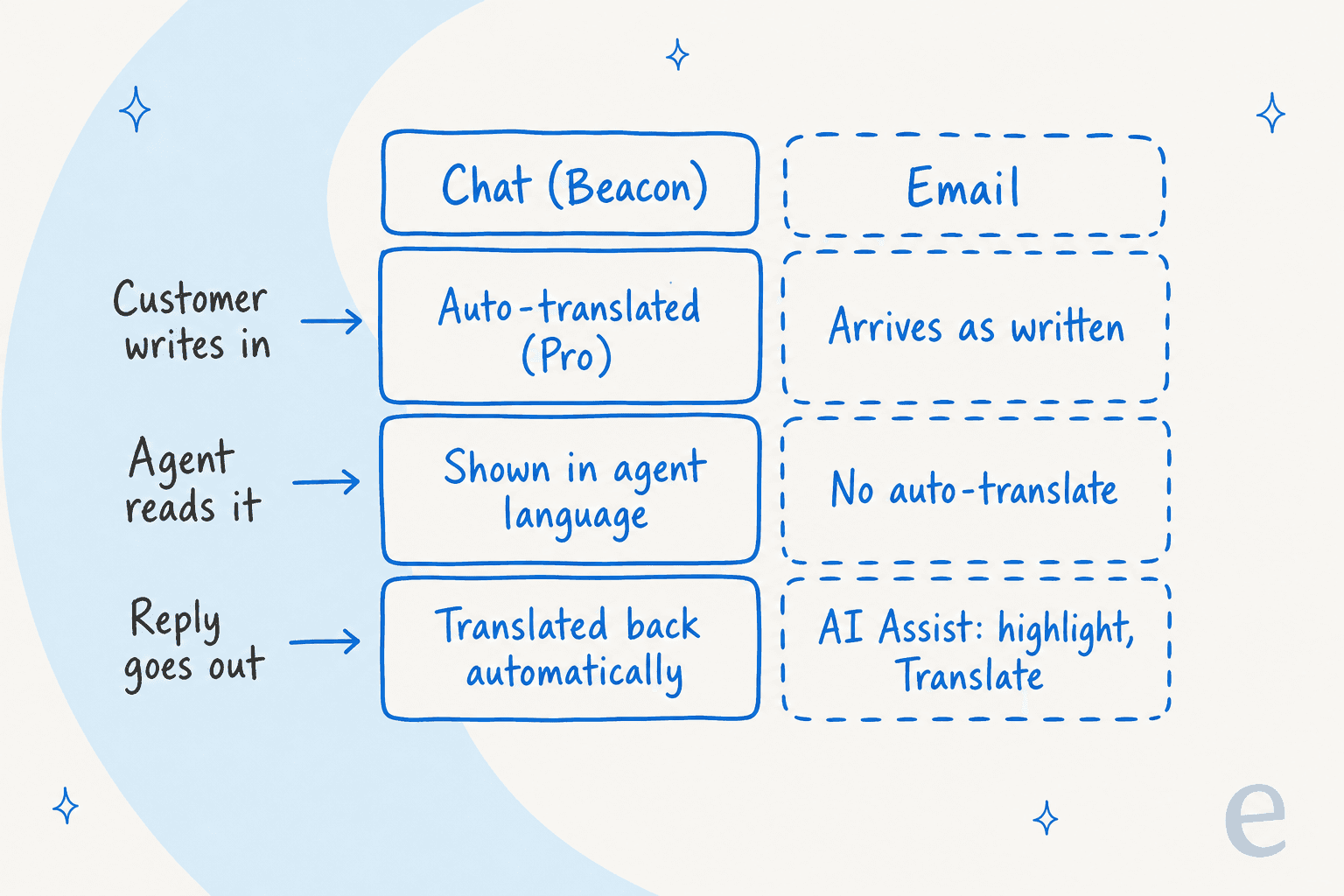
That split is the main thing to take from this section. Chat on Pro is close to hands-free. Email, which is still the main channel for most Help Scout teams, is a highlight-and-click job. If you're new to the platform, my Help Scout review covers the rest of what it does.
Automatic Translations: hands-free Beacon chat
This is the newest piece, and the one most people mean when they ask whether Help Scout can translate. Per the Automatic Translations doc, when it's on, "customer messages are automatically translated into your team's language, and your replies are translated back into theirs."
You turn it on per Beacon under Tools > Beacons > [Your Beacon] > Edit Beacon, then Contact, switch Chat on and flip the Translate messages toggle.
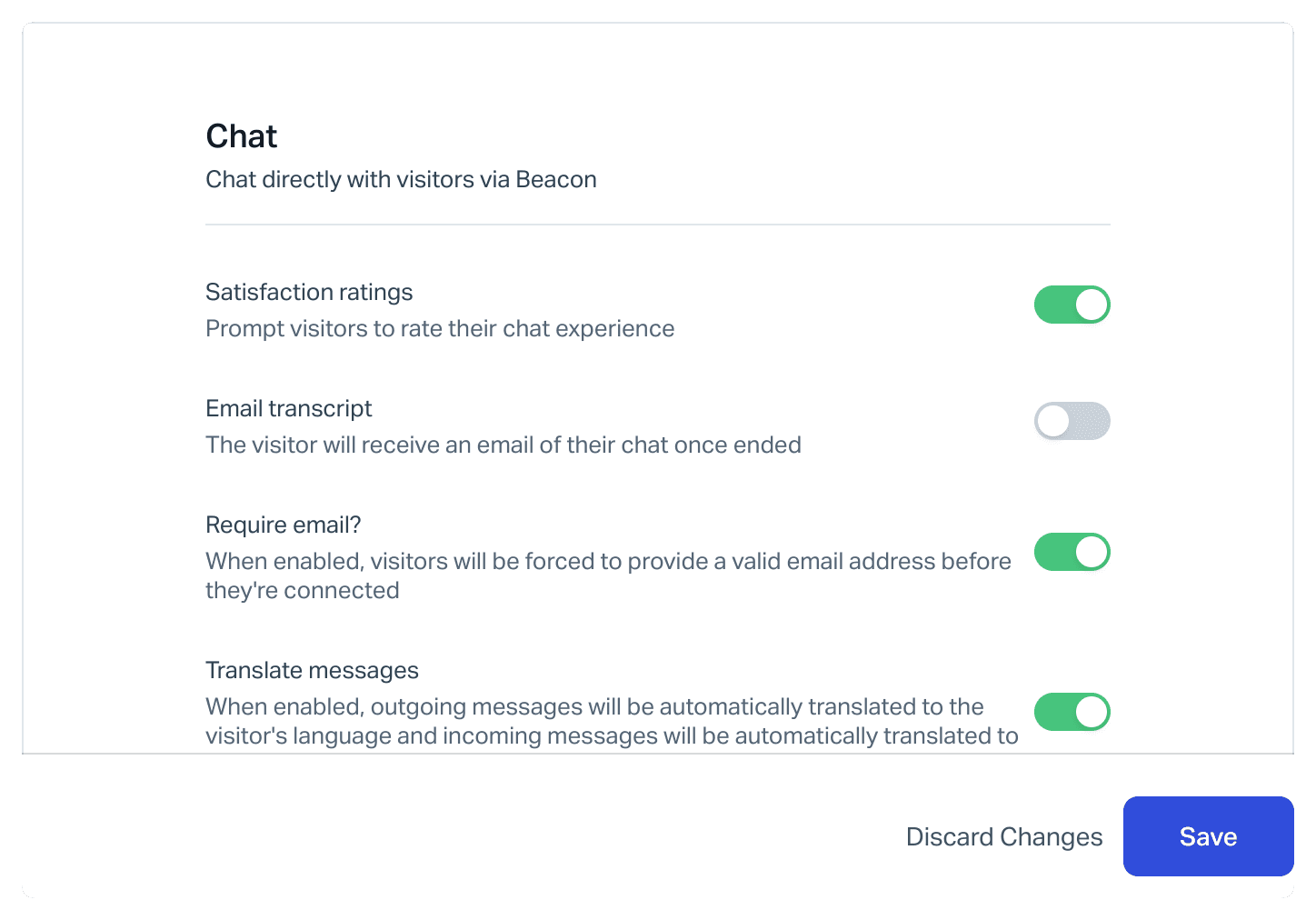
How it behaves once it's running:
- Your language comes from your browser. There's nothing to set in Help Scout. If your browser is set to Spanish, an English message shows up in Spanish. If your browser lists several languages and the customer writes in one of them, Help Scout shows the original.
- Each translated message is labelled. A "Translated from [Language]" label sits under it, with View in Original Language to flip back.
- Replies and saved replies are translated before delivery. You type in your language, the customer gets theirs.
- Failures don't block the chat. If a translation fails, Help Scout shows the original with a notice, and the message still goes through.
- Customers don't opt in. Beacon shows them a translation notice, and you can reword it, plus a second notice for the emailed transcript.
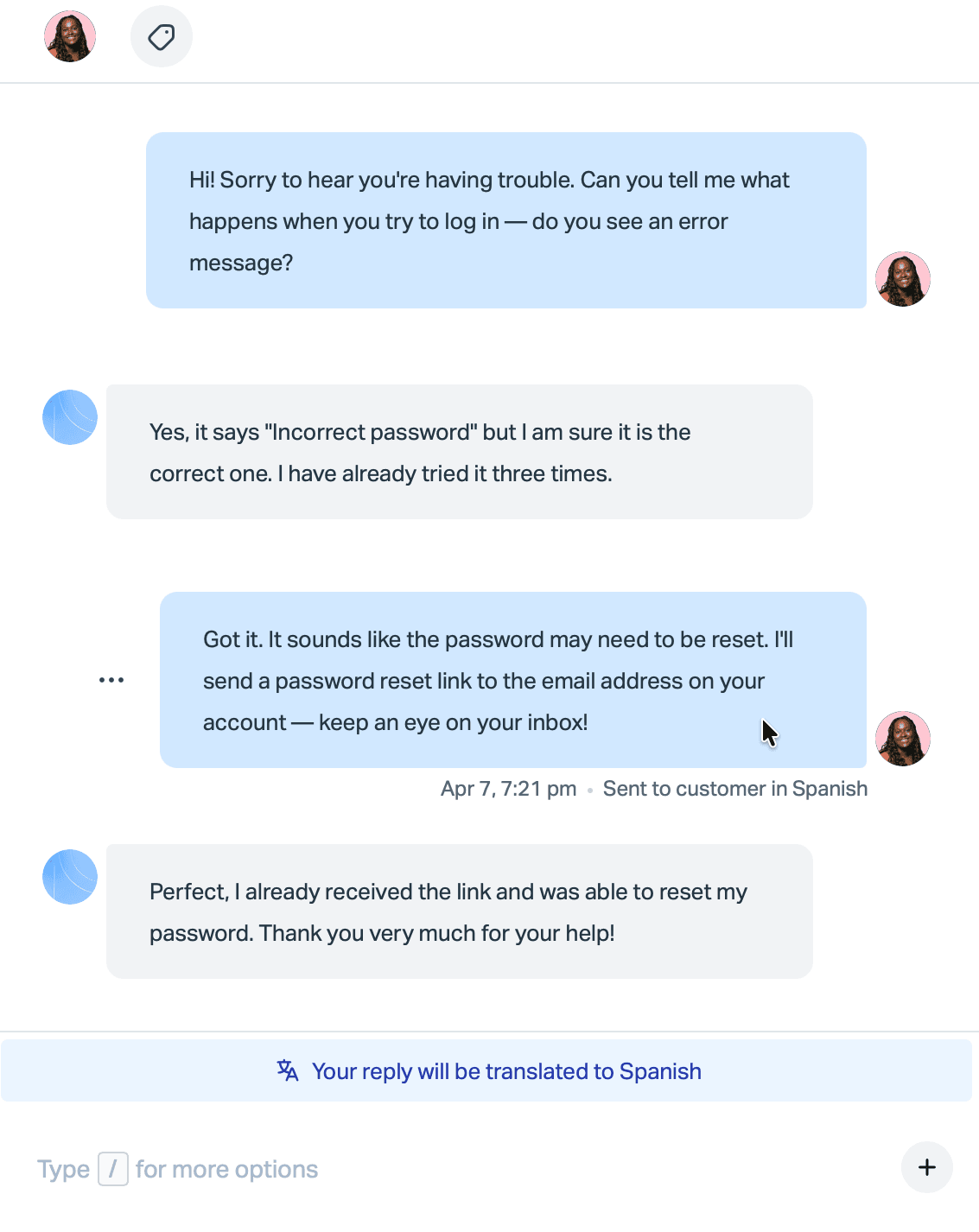
The limits are about scope rather than quality. The plan table on the doc lists Pro as the only plan with access, and the feature works on Beacon chat, not on email conversations. Chat in Beacon is also only offered while someone on your team is available, so a German customer writing at 3am gets the contact form and lands in your email queue, outside this feature. The doc doesn't publish a supported-language list either, so test your top languages before you rely on it.
My take: if you're already on Pro and chat is a big channel, turn this on today. It costs nothing extra and removes the copy-paste step completely. My multilingual live chat guide covers what to check before you lean on it. Just don't read it as "Help Scout translates support". It translates live chat.
AI Assist and AI Drafts: translation in the email editor
Email is where Help Scout puts translation in your hands. AI Assist is the sparkle button in the formatting toolbar, and it shows up in replies, notes, the chat window, the Docs editor and the Messages editor. Highlight text, click it, choose Translate and pick a language. It's powered by OpenAI, and Help Scout says the data "will be stored by OpenAI for up to 30 days" but isn't used for training.
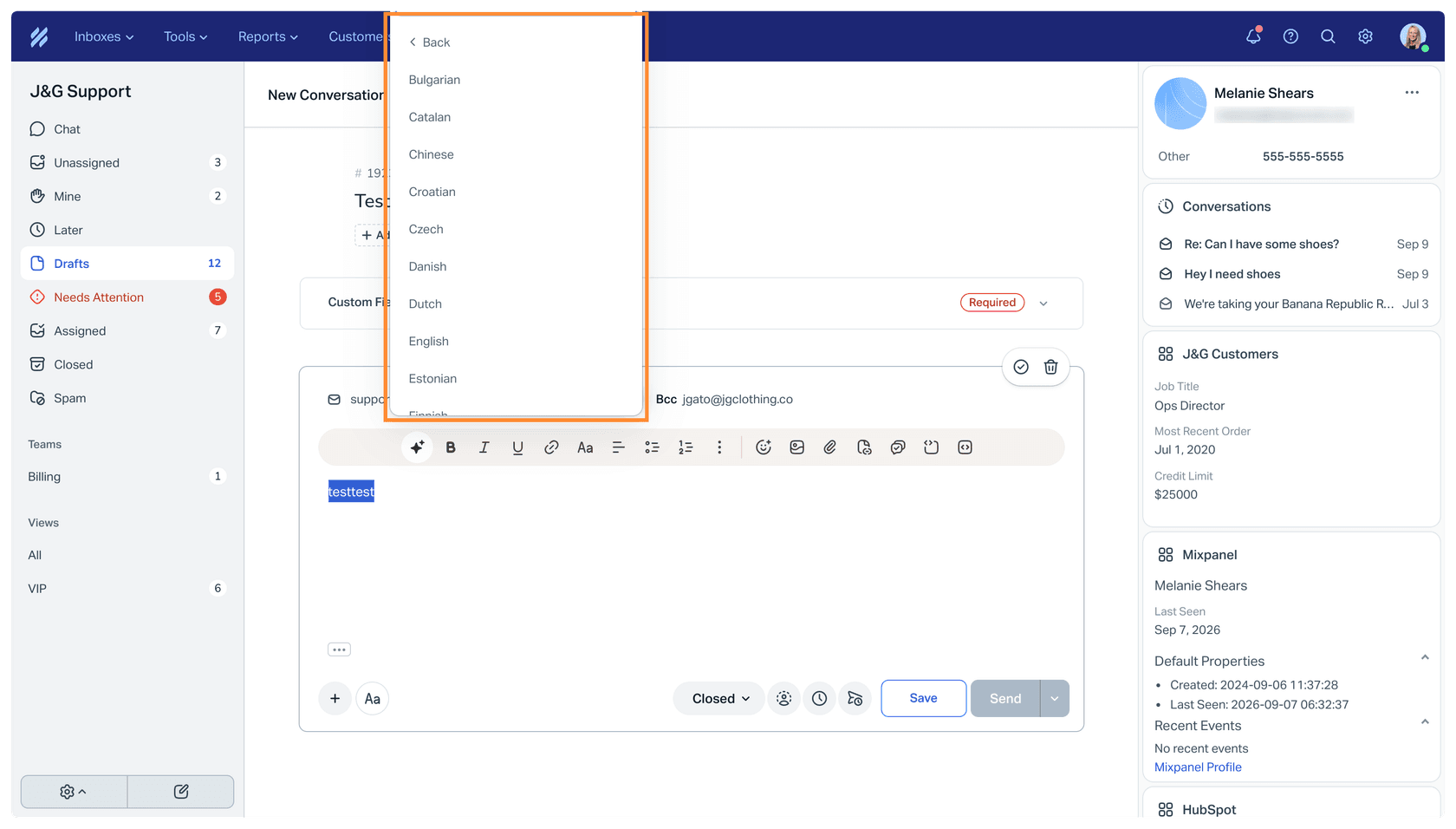
That works well for the outgoing half. The incoming half is the awkward bit: the docs describe AI Assist working on text in the editor, and I didn't find a translate button on an incoming email. So a teammate who gets a Polish email either pastes it into a note and runs AI Assist on it, or reaches for a browser translator.
AI Drafts helps more. It writes a full reply from past conversations and Docs articles, using OpenAI's GPT-5.1, and Help Scout says "in most cases, the draft will match the language of the customer's email." If it doesn't, you type a prompt like "translate that to Portuguese".
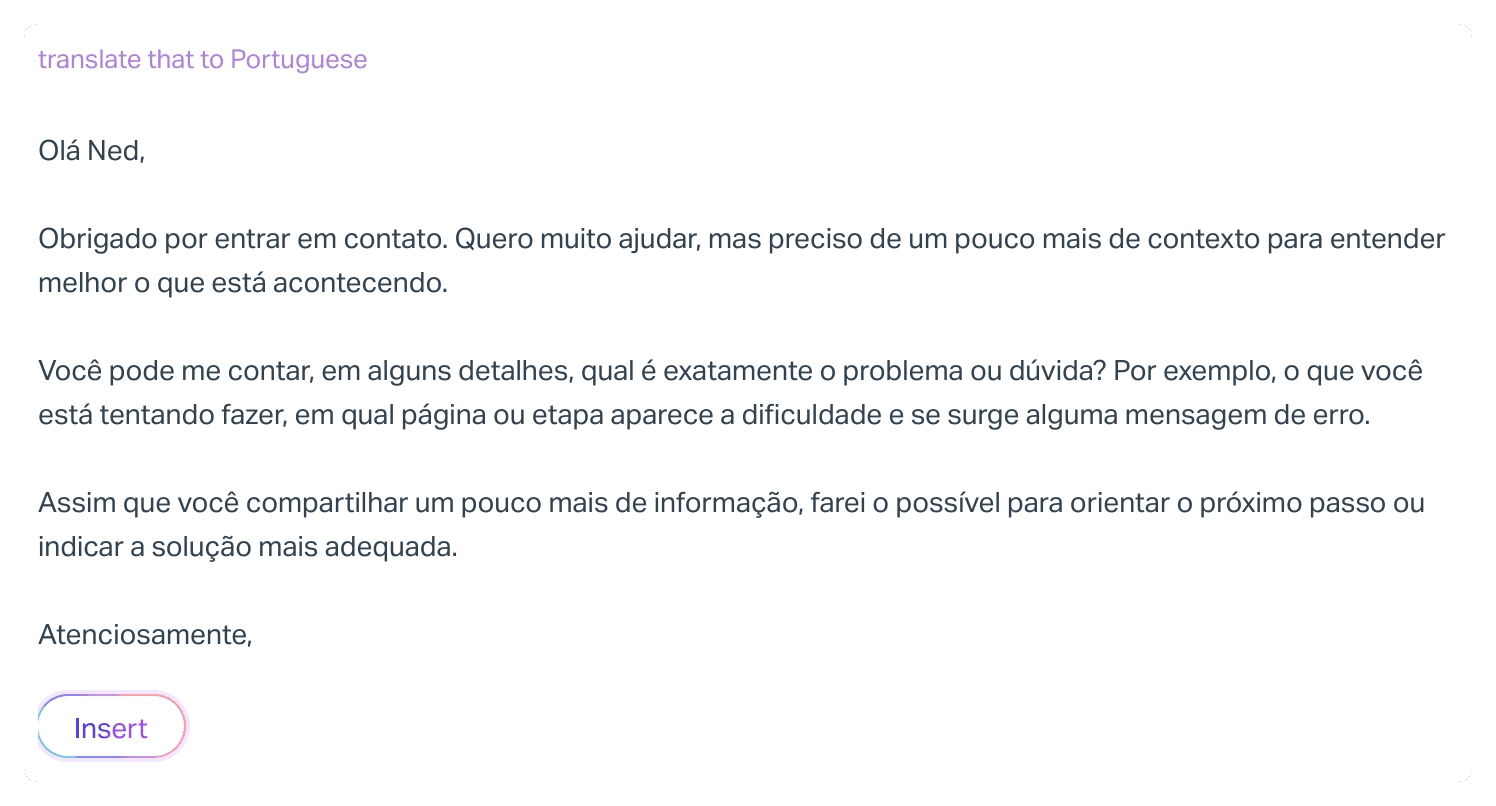
Three details from the docs that matter for multilingual teams:
- AI Drafts is on Plus and Pro. Legacy user-based plans pay
$50per100conversations with a draft, per the AI Drafts billing doc. - Help Scout warns "you may see unexpected behavior with RTL languages", so Arabic and Hebrew drafts need a careful read.
- AI Summarize reads conversations in many languages, but "the summary itself will always be in English."
My take: AI Drafts in the customer's language is the most useful translation tool Help Scout has for email. It still leaves a person reading a language they may not speak to check the draft, which is where a glossary and a review step earn their keep. I wrote up how to build a support translation glossary, and the wider Help Scout AI approach post covers the rest of the Inbox Assistant.
Scout: the AI agent that replies in 50+ languages
Scout skips translation entirely: it writes the answer in the customer's language from your knowledge sources. The AI features FAQ says it "can handle conversations in over 50 languages, including Spanish, French, and many others." Per Introducing Scout, it now works in email as well as Beacon, using roles to change behaviour by brand or audience.
Setup lives under Scout > Manage, per the Set Up Scout doc: add sources, add exclusions for topics that go straight to your team, write a role, then test in Scout > Test before going live. I'd test every language you care about here, not just English, with real past questions.
On cost, the AI resolutions doc says you're billed $0.75 per resolution, which it defines as a session where Scout answers and the customer doesn't ask for more help. New Help Scout customers get a 3-month free trial; existing customers don't. You can set a monthly cap, and when you hit it Scout switches off in Beacon until the next cycle. Language doesn't change the price.
Help Scout reports an average AI resolution rate of 73.19% on its AI features page. That's an average across its customers, so treat it as their number, not a forecast for your queue. My Help Scout AI agent guide and the Help Scout chatbot post go deeper on setup.
My take: Scout is the right call for repeat questions in languages nobody on your team speaks. The conversations it hands over still land with your team in the original language, and on email that means back to AI Assist.
Translating your Help Scout Docs site
A translated help center does two jobs: customers find answers before writing in, and Scout gets better material in each language. Help Scout's model here is simple, and a little heavier than some rivals. Per the Docs translation guide, "each Docs site has its own translation settings which allows you to maintain a separate Docs site for each language." In other words, one Docs site per language.
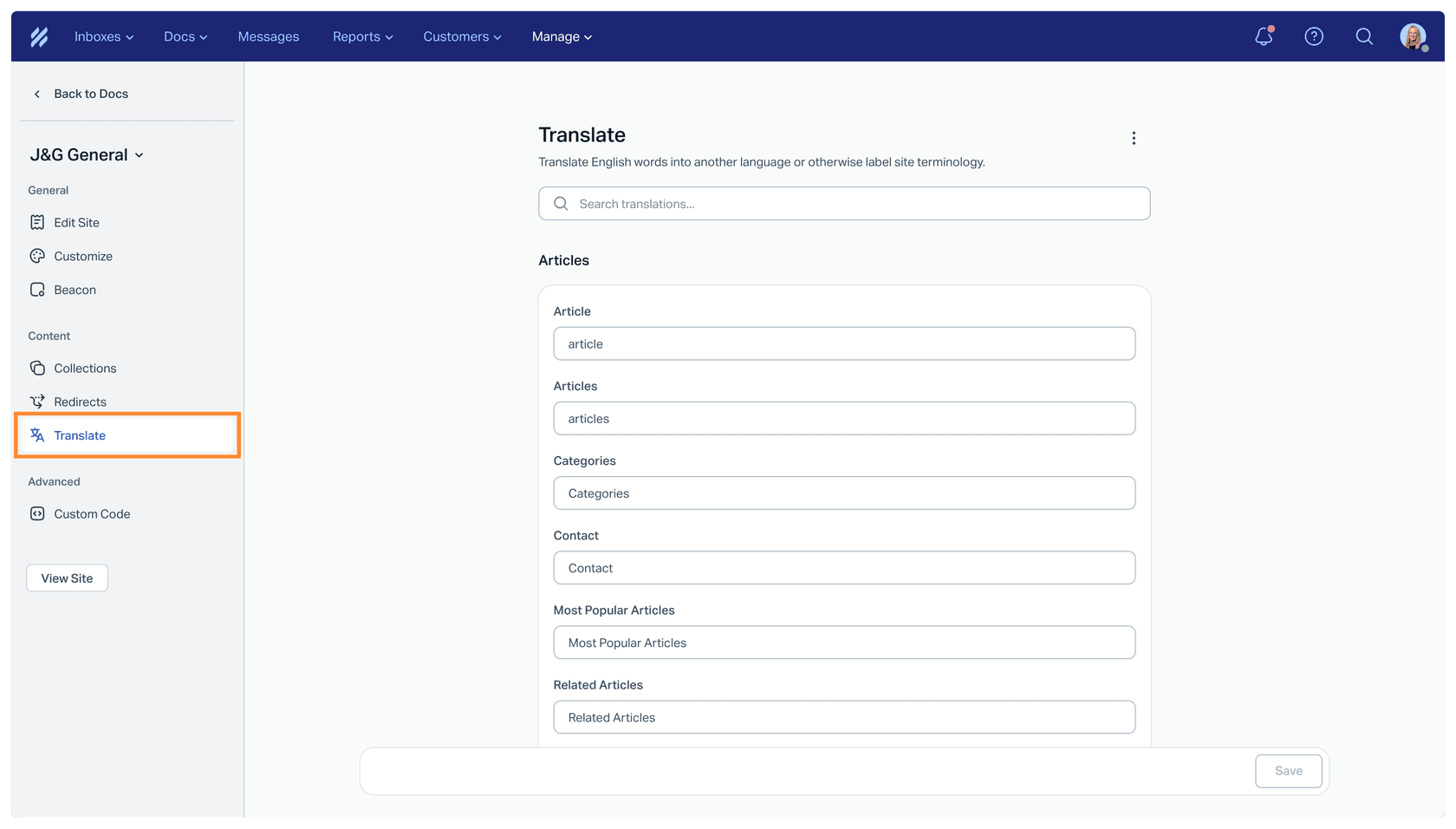
There are two parts to translate:
- Labels. Under Settings > Docs Sites > [Your site] > Translate, you type the translation for every label on the site, like "Search the knowledge base".
- Articles. You copy content into the second site and translate it. AI Assist can do the translating, though the doc marks it as beta on Plus and Pro.
The site count is where the cost shows up. The pricing page includes 1 Docs site on Free, 2 on Standard, 3 on Plus and 5 on Pro, with extras at $20 per month billed annually or $24 monthly. A Standard team that wants English, French, German and Spanish needs two extra sites, so $40 a month before anyone translates a word.
If you'd rather not run a site per language, Help Scout points to three integrations:
| Integration | How it works | Good fit |
|---|---|---|
| Weglot | Translates the Docs site on the fly, machine plus optional human translation, 110+ language options, indexed by search engines | One site, many languages, little upkeep |
| Crowdin | Syncs articles manually or on a schedule, reuses past translations, live preview | Teams that already localize their product |
| Transifex | Collects Docs content automatically for translation, no coding | Teams with a translation workflow in Transifex |
Each needs its own subscription with that vendor. The upkeep trap is the same everywhere: when the English article changes, someone has to make sure the French one follows, or the French site keeps serving last quarter's refund policy. Scout's best-practices doc makes a related point: sources other than Help Scout Docs "need to be resynced manually when the content changes."
My take: translate your top 20 articles into your top two or three languages first. I compared tools that handle this differently in multilingual knowledge base software, and Help Scout self-service covers the Docs and Beacon setup itself.
What the Help Scout app directory doesn't have
I went through the Help Scout app directory looking for ticket translation. The only translation listings are the three Docs integrations above: Crowdin, Transifex and Weglot. I didn't find a DeepL app, a Google Translate app, or a live ticket translation app like the ones other helpdesk marketplaces carry. You'll find more in my roundup of Help Scout integrations.
If DeepL is your engine of choice, the realistic routes are copy-paste, a browser extension, or a custom app on the Help Scout API. My DeepL pricing post covers its API plans if you go the build route.
Language coverage has been a sore spot for some users for a while. This review is from 2023, before Automatic Translations shipped, so read it as history:
"It has very limited features.pricing is a bit Higher and has limited language support."

Help Scout has added a lot since then. The email side is still where the gaps are.
Which Help Scout translation path fits your team
Pick your main channel and your plan to see the setup I'd start with.
Help Scout translation path picker
Plan rules and prices from Help Scout's pricing page and help docs, October 2026.
- Flip Translate messages on in each Beacon's Chat settings. No extra cost.
- Add Scout for questions outside staffed hours, at $0.75 per resolution.
- Test your top languages first, since no language list is published.
- In the chat window, use AI Assist to translate your replies (Standard and up on the pricing page).
- Let Scout take repeat questions in any language, at $0.75 per resolution.
- Pro is $75 per user per month billed annually with a 10-user minimum, so price that before upgrading just for chat translation.
- Use AI Drafts, which usually writes in the customer's language.
- Use AI Assist to check or translate the draft, and a glossary for product names.
- For volume, add an AI teammate that drafts in the customer's language from your Docs and past replies.
- AI Assist translates what you highlight in the editor; incoming emails need a paste or a browser translator.
- On Plus, AI Drafts usually writes in the customer's language. On Standard, it isn't included.
- If foreign-language email is daily, an AI teammate that drafts in the customer's language saves the most time.
- Automatic Translations on every Beacon for chat.
- AI Drafts plus AI Assist for email, with a review step for languages nobody speaks.
- Scout for repeat questions across both, at $0.75 per resolution.
- AI Assist for replies, AI Drafts if you're on Plus.
- Scout for repeat questions in chat and email.
- Weigh a Pro upgrade against an outside AI teammate before paying for both.
Resolutions are billed only when the customer doesn't ask for more help after Scout's answer.
What Help Scout translation costs
Help Scout doesn't charge for translation as a line item. It gates it by plan. Here's how the translation features line up against the plans on the Help Scout pricing page, with prices per user per month billed annually:
| Free | Standard | Plus | Pro | |
|---|---|---|---|---|
| Price | $0 | $25 | $45 | $75 |
| Users | Up to 5 | Up to 25 | Up to 50 | Unlimited, minimum 10 |
| Automatic Translations (chat) | No | No | No | Yes |
| AI Assist translate | No | Yes | Yes | Yes |
| AI Drafts | No | No | Yes | Yes |
| Docs sites included | 1 | 2 | 3 | 5 |
| Scout | Not priced on the page | $0.75 per resolution | $0.75 per resolution | $0.75 per resolution |
The number that catches teams out is the Pro minimum. Automatic Translations is Pro only, and Pro starts at 10 users, so the cheapest way to get hands-free chat translation is about $750 a month on annual billing. Monthly billing costs about 16% more, per the toggle on the pricing page. If you're comparing the full plan list, I also keep a separate Help Scout plans breakdown and a look at Help Scout features.
Translating a conversation isn't resolving it
Every option above solves the same narrow problem: the words. After Automatic Translations shows you a Spanish chat in English, someone still has to find the answer, check the account and write a reply someone will trust. In the years eesel has spent running AI on live support queues, language has rarely been the slow part. The research is.
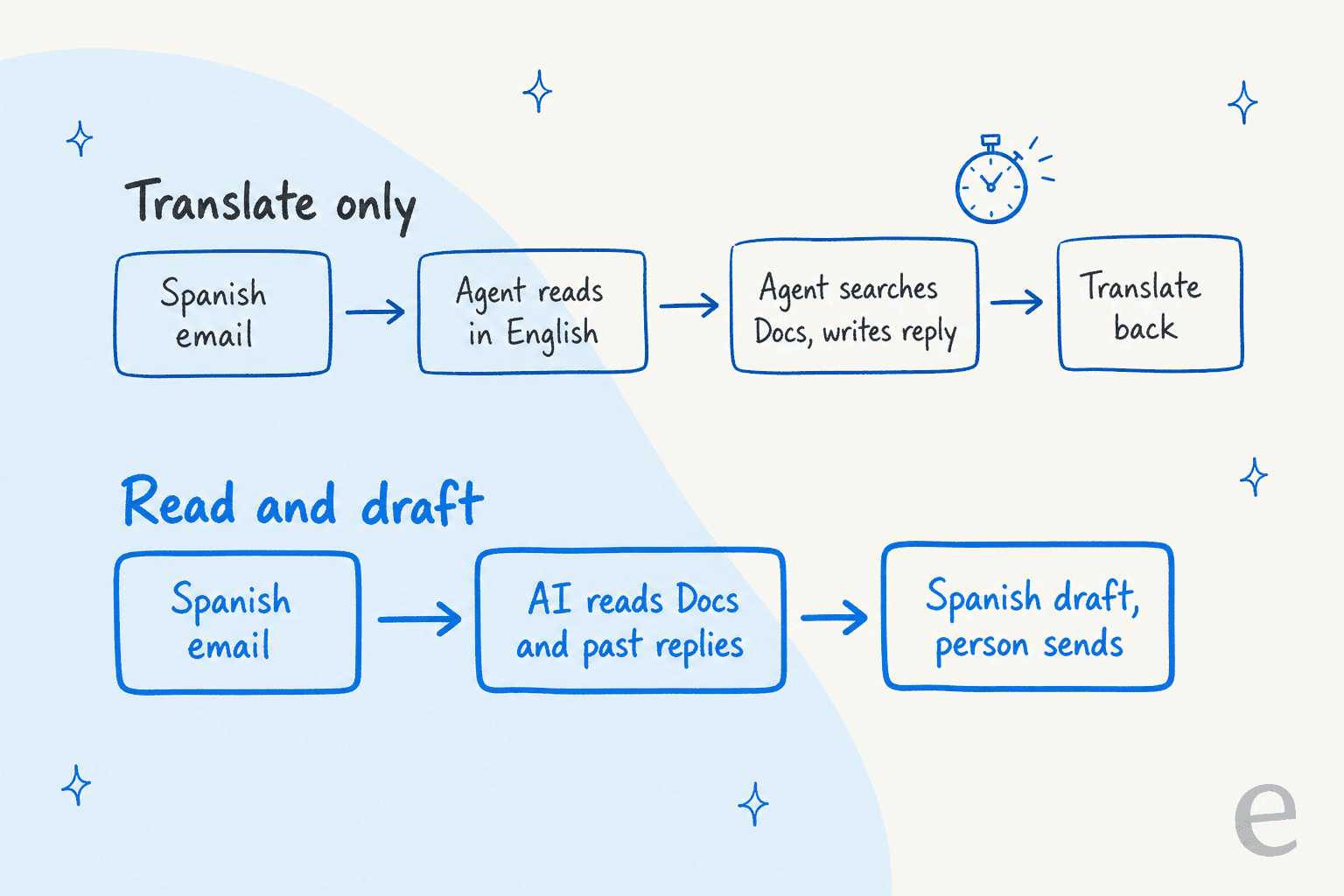
That's why I'd look at the second lane. eesel's published customer stories so far run on other helpdesks, but the way it handles language is the same in Help Scout:
- Question Beauty, a cosmetics brand on Gorgias and Shopify, gets short messages from Messenger, email and chat "in many languages", often just a product name and "price?". eesel tags each one, checks the Shopify order when there is one, and replies in the language the customer wrote in. Between 8 August and 8 September 2026 that was about
990tickets handled and960replies sent, with refunds and complaints handed to a person with a note. - Rúngne, a Norwegian climbing apparel brand, runs three eesel agents on its queue. Its draft agent left about
580draft replies in a month as internal notes, and the triage agent acknowledges every ticket in the customer's language, Norwegian or English.
Neither team runs a separate translate step. The language is handled inside the reply, and a person stays on anything that needs judgment.
The details still matter. Product names are the classic machine translation trap:
"Back in Windows 2000 days, I found instances where "Windows" the product name was translated to "vinduer", the danish word for an actual window."

And formality is a choice the tool has to make on purpose:
"You must choose formal or informal pronouns (tu/vous, du/Sie) and use them consistently."
Both are instructions you can give an AI teammate in plain language, and both are worth testing on your own past conversations before anything goes out. I covered the general case in can AI handle multilingual support and how to check language quality, and the multilingual support QA guide has a review checklist.
Where eesel isn't the right fit: if your team handles foreign-language chats on Pro and wants to write every reply themselves, Automatic Translations already does the job for free. eesel is for teams who want the research and the draft done as well as the words, especially on email.
Try eesel on your Help Scout inbox
If foreign-language emails in Help Scout keep waiting for whoever happens to read French, eesel works like a new AI helpdesk teammate that joins your existing mailbox. Per the eesel Help Scout docs, it reads your Docs site and past conversations first, then drafts or sends replies, adds notes and tags, and can answer Beacon live chats. It writes in the language the customer used, on email and chat alike, and you set rules in plain language, like "never translate the product name" or "use vous for French customers".
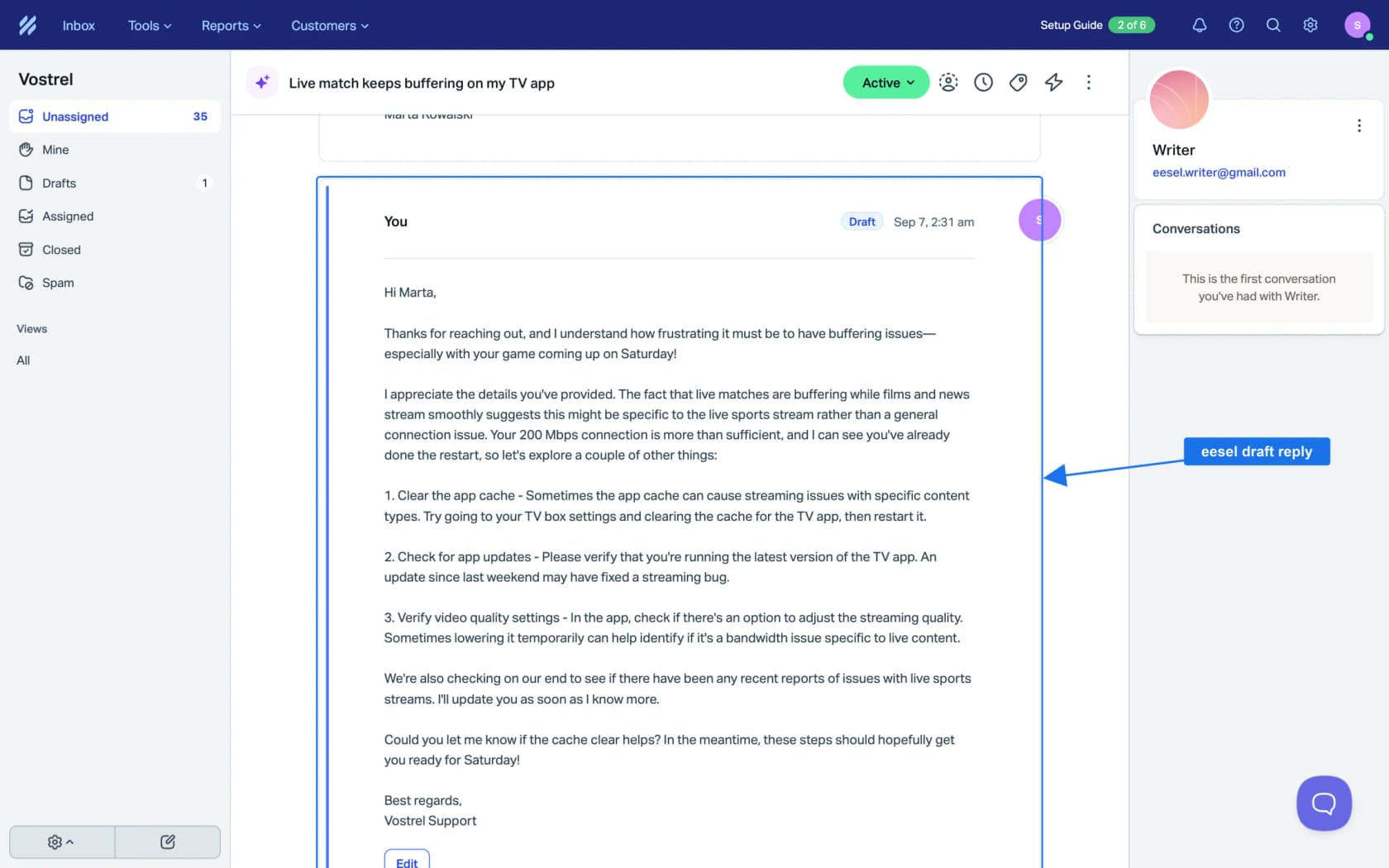
Most teams start with Leave draft reply, which saves the reply unsent in the conversation so a teammate reviews and sends it. It connects through the Help Scout integration in a few minutes, and a ticket counts as one credit whatever language it's in. eesel pricing starts free with 100 credits, then $299 a month for 500.
If you're weighing it against Help Scout's own AI, my Help Scout AI alternatives post and the best AI for Help Scout roundup lay out the options, and adding AI to Help Scout walks through the setup choices.
Try eesel on a week of your Help Scout conversations and read the drafts before you decide.
Frequently Asked Questions
Does Help Scout have built-in translation?
Yes, in a few places. Automatic Translations translates Beacon live chats both ways on the Pro plan, AI Assist translates highlighted text in the reply editor, and AI Drafts usually writes in the customer's language on Plus and Pro. Email has no automatic translation. My customer service translation guide compares other helpdesks, and Salesforce translation covers a bigger stack.
How much does Help Scout translation cost?
Translation isn't billed separately; it's gated by plan. Automatic Translations needs Pro at $75 per user per month billed annually, with a 10-user minimum. AI Assist is on Standard ($25) and up per the pricing page, and Scout costs $0.75 per resolution. See Help Scout pricing for every plan.
Can Help Scout translate emails automatically?
Not according to Help Scout's docs. Automatic Translations covers Beacon chat only. For email, AI Drafts usually drafts in the customer's language, and AI Assist translates text you highlight. An AI teammate connected through the Help Scout integration can draft email replies in the customer's language.
How many languages does Help Scout's AI support?
Help Scout says its AI agent, now called Scout and formerly AI Answers, handles conversations in over 50 languages. The Automatic Translations doc doesn't publish a language list, so test your top languages first. My Help Scout AI overview covers each feature.
How do I translate my Help Scout Docs site?
Help Scout keeps one Docs site per language. You translate the labels under Settings, then translate articles by hand, with AI Assist (beta on Plus and Pro), or through the Weglot, Crowdin or Transifex integrations. Extra Docs sites cost $20 a month billed annually. My multilingual knowledge base post compares other approaches.
Is there a DeepL integration for Help Scout?
I didn't find one in the Help Scout app directory, and no live ticket translation app either. The translation listings are Crowdin, Transifex and Weglot, which all translate Docs. For DeepL, it's copy-paste or a custom app on the API; my DeepL pricing breakdown covers its API plans.
What's the best Help Scout translation setup for a small team?
On Pro with lots of chat, turn on Automatic Translations and add Scout for repeat questions. If most of your foreign-language volume is email, an AI teammate that drafts in the customer's language saves the research as well as the translating. eesel starts free with 100 credits, then $299 a month for 500; my best AI for Help Scout roundup covers the field.