

Why Salesforce translation is hard to pin down
I build integrations at eesel, so a big part of my week goes to reading helpdesk docs, and quite often they describe one feature under three different names. Of everything I looked at this year, Salesforce translation is the worst case of that.
The first confusing part is the product name itself. Salesforce Help now says Service Cloud is Agentforce Service, but the pricing page prints editions called Core ($195), Advanced ($395) and Max ($550) per user per month, while the FAQ on that same page still lists "Starter Suite, Pro Suite, Enterprise, Unlimited, and Agentforce 1 Service." In the help docs, it's mostly the Enterprise and Unlimited names that show up. The translation feature itself is called "Real-Time Translations" today, but the rep-facing help page still links its setup as "Einstein Conversation Translate (Beta)."
Then comes the question that buyers actually show up with, and one support lead in r/salesforce put it plainly:
"I'm looking to translate communications for Service Cloud. Specifically 3000 or so cases, mostly email to case and 500 message sessions per month while protecting personal information and following GDPR. We aren't a large org. Roughly 30 service reps, one admin and one developer. [...] I know that Agentforce and perhaps Einstein for Service can do this, but the quote we got from Salesforce put this way out of budget."

Almost every multilingual conversation I see has this same shape. At eesel, the highest-volume teams run three or four languages from the first day, and one prospect on an eesel sales call asked for exactly the native model: incoming tickets translated to English for agents, replies sent back in the customer's language. What worried them was not the language as such, it was whether technical terms like "wiring harness" would survive the trip. That worry is worth keeping in mind, since it is pretty much the difference between translating a case and resolving it.
Where translation lives in Salesforce
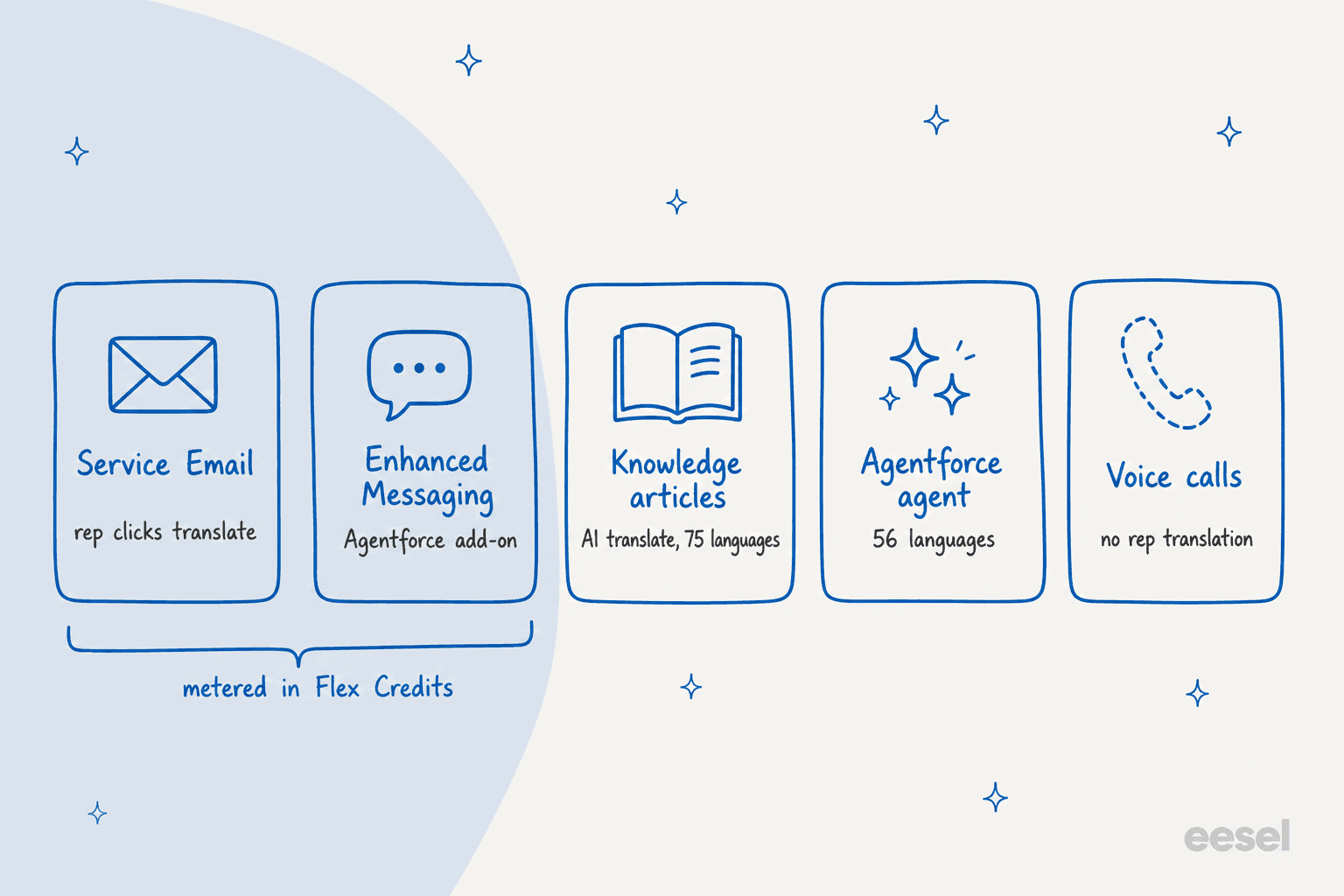
Before the detail, here's the map. Salesforce translation covers five surfaces, and they don't share a setup screen or a language list, and not a price either.
| Surface | What gets translated | Languages | What you need |
|---|---|---|---|
| Service Email | Inbound email in the case feed, reply in the composer | 75 in, 36 on the rep side | Permission set license per rep, Agentforce add-on allowance |
| Enhanced Messaging | Inbound messages and outbound replies | 75 | Agentforce for Service add-on, Enhanced channels |
| Messaging components | Buttons and questions you send | Whatever you add | Translation Workbench, manual translation |
| Knowledge articles | Article fields you pick | 75 | Multiple Languages in Knowledge, Einstein Article Translate |
| Agentforce agent | The agent's own replies | 56 (31 GA, 25 beta) | Agentforce licensing |
One thing is missing from that table. I couldn't find a Salesforce Help page that describes translating a live voice call between a human rep and a customer. The Salesforce Voice overview covers transcription, not translation.
Translating Email-to-Case with Real-Time Translations
Most Salesforce support volume lives in email, which is why this is the feature most teams start with. If you're new to how cases arrive by email, my Salesforce ticketing system walkthrough covers the Case object underneath.
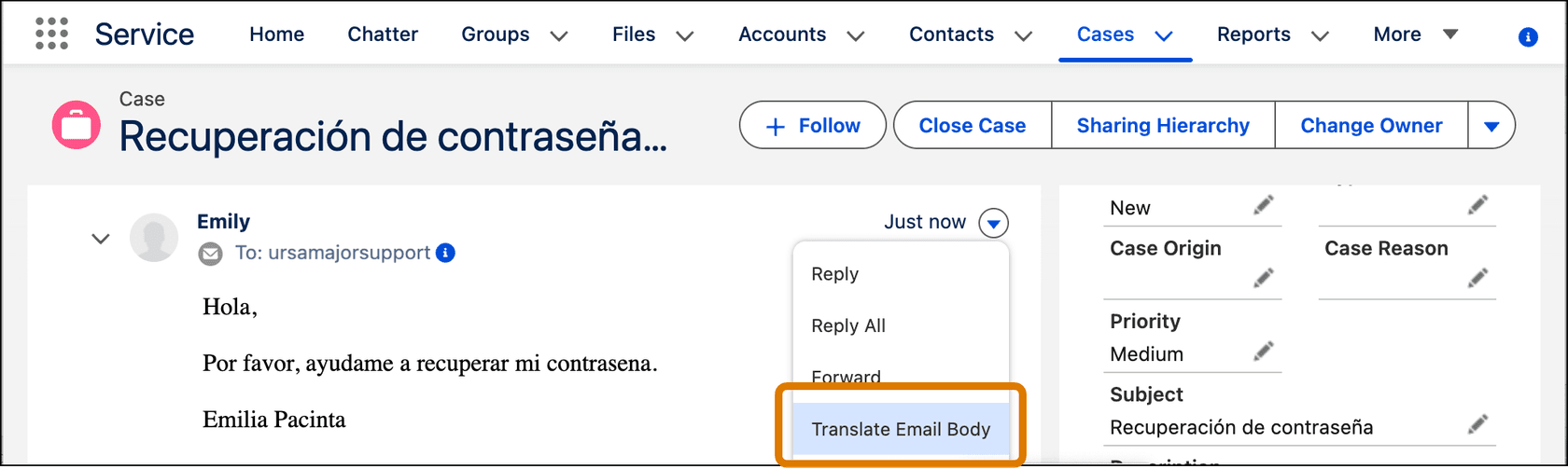
There are two places where Real-Time Translations for Service Email works. First, when a customer's email lands on a case, the rep opens the email's menu in the case feed and picks Translate Email Body.
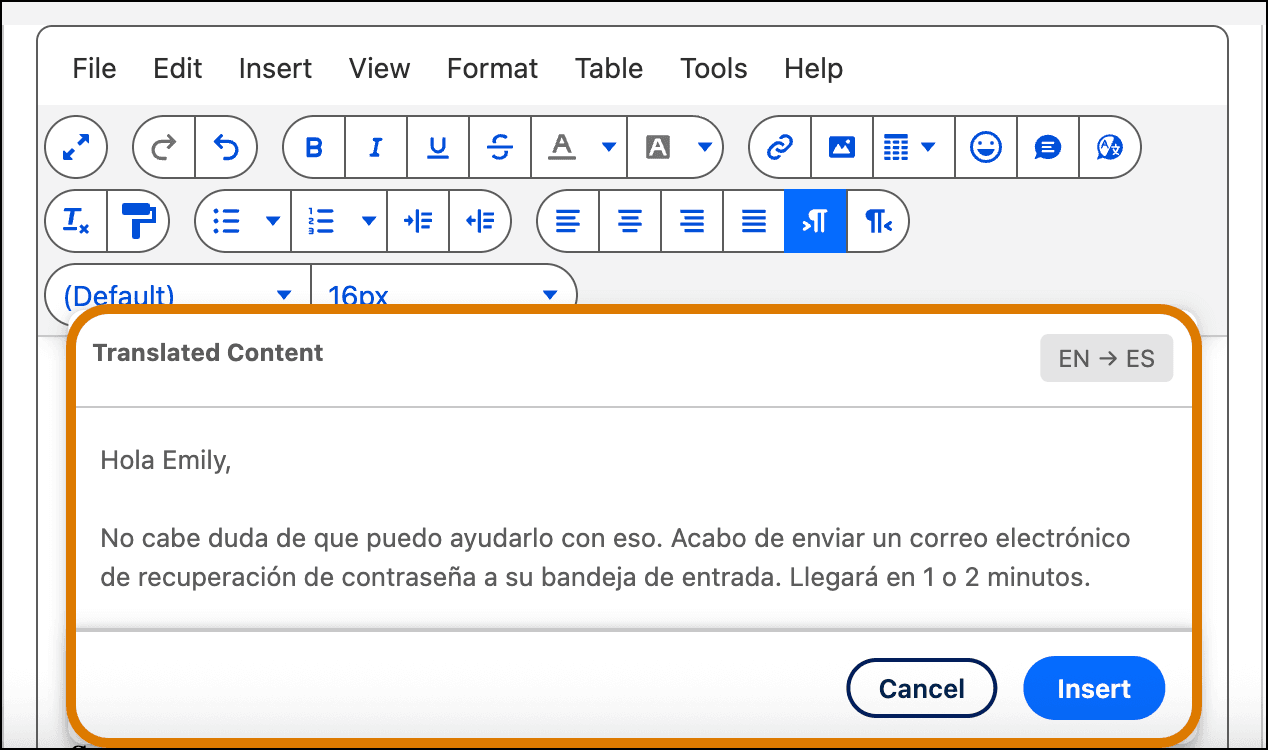
Then for the reply, the rep writes in their own language, then highlights the text in the email composer and translates it. A preview shows the translated text with an EN to ES label before the rep inserts it.
The nice part is that it keeps the rep inside the case. Still, read the limits before rollout, all of them from Salesforce's considerations page:
- Languages are lopsided. It reads 75 source languages but only 36 rep-side languages. A rep can read a Hindi email only if their own language is on the 36-language list.
- Desktop only. There's no translation in the Salesforce mobile app.
- 10 KB per translation, UTF-8 only. Formatting, tables and images don't carry over.
- Mixed-language threads are unreliable. A long reply chain that switches languages can come back muddled.
- Custom terminology is limited. You can upload one terminology file at a time, up to 10 MB and 10 target languages, and the page notes custom terminology for Service Email "isn't supported for First Party customers."
Setup happens per rep. The setup page asks for a permission set license, the "Real-Time Translations for Service Email" permission set, and the "Translate Service Emails" app permission for every rep who needs it.
What email translation costs
This is the part where the help docs make you dig a bit. The considerations page says translation usage includes "a monthly allocation of 250,000 characters per user for every Agentforce add-on license." Unused characters don't roll over, and anything over the cap "will automatically draw down Flex Credits."
Here's how that maps to Salesforce's list prices, from the Agentforce pricing page:
| Item | List price |
|---|---|
| Agentforce add-ons (Sales, Service, Field Service) | $125 per user per month |
| Flex Credits | $500 per 100,000 credits |
| Max edition (add-on included) | from $550 per user per month, 2.75M Flex Credits per org per year |
| Enhanced Messaging (Core, Advanced) | $75 per user per month extra |
Salesforce's Flex Credits rate card (dated 08.31.2026) prices a "Translation" line at 4,000 credits per million characters, which is about $20 at list. On that card it sits under Speech Foundations, so before you budget around it, ask your account rep if that's really the meter Real-Time Translations draws on. My Agentforce pricing breakdown and Service Cloud pricing post go deeper on the contracts.
To give a sense of scale, 250,000 characters is roughly 250 emails of 1,000 characters each per rep, per month, counting both directions. That's comfortable for a rep who handles a handful of foreign-language cases a day, but for a dedicated regional queue it gets tight.
Translating chat and messaging conversations
Messaging gets a sibling feature: Real-Time Translations for Enhanced Chat and Enhanced Messaging. Here the rep clicks Translate on an incoming message, and the outbound reply is translated in a preview field before they hit Send.
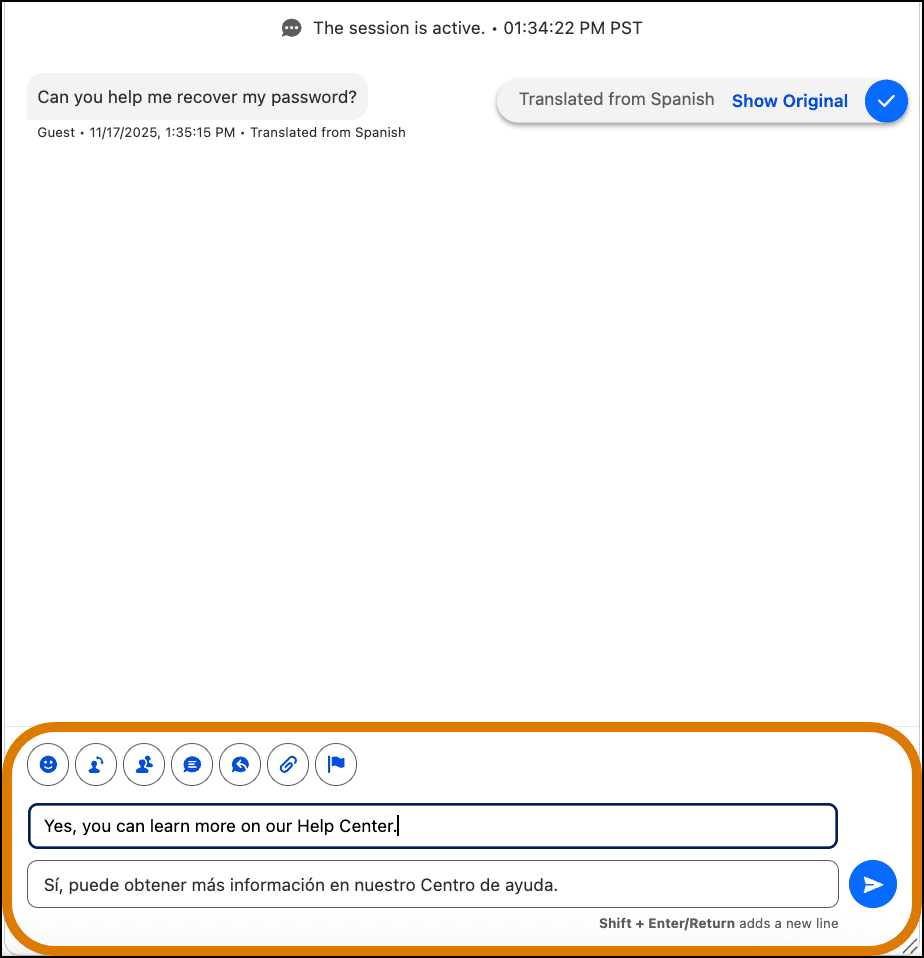
What you need to know, per the messaging considerations page:
- It states plainly: "The Agentforce for Service add-on is required." The pricing page lists "Real Time Translations for Enhanced Messaging Channels" as available for purchase on Core and Advanced, and included in Max.
- It covers 75 languages on Enhanced channels, including WhatsApp and Enhanced SMS. Standard SMS isn't supported.
- Language detection looks at up to 10 of the customer's recent messages.
- The same 250,000-character allowance and Flex Credits overage apply.
On one point, Salesforce's own pages don't agree with each other. The messaging overview and considerations pages exclude Bring Your Own Channel, while the setup page lists it as supported. I would test it in a sandbox before promising it to anyone.
The buttons and questions you send in Messaging are a separate job altogether. Messaging components get translated by hand in Translation Workbench, every constant has to be translated or none show, and the page warns that "Automated messaging doesn't yet support translated messaging components." So if a flow sends a notification, what the customer gets is the untranslated original.
A Salesforce knowledge article from April 2026 adds two more edges: Agentforce escalation messages don't translate if the customer's language changes mid-session, and WhatsApp doesn't detect the language automatically at the start of a session. My guide to multilingual live chat covers how other tools approach the same problem.
Letting an Agentforce agent answer in the customer's language
The other native path skips the rep entirely: let the Agentforce Service Agent answer. Salesforce's language support page lists 56 languages, 31 fully supported and 25 in beta, and there's a beta adaptive mode that replies in whatever language the model supports.
A few details matter more than the headline number:
- Instructions are English only. You write the agent's topics and instructions in English, whatever language it answers in.
- Switching languages mid-conversation only works in the new Agentforce Builder.
- The customer's language setting drives Knowledge lookup. Per a Salesforce article, the end user language (from a pre-chat field, user setting or the Agent API) decides which articles the agent retrieves. None of the docs I found says it will answer in German from an English-only article, so if you go this way, plan on translated Knowledge.
- The safety layer covers fewer languages. The Einstein Trust Layer masks personal data in 6 languages and runs prompt injection detection in English (US) only, per its region and language page.
- Voice is narrower. The Agentforce Voice considerations list 25 languages (7 fully supported) and state "Agentforce Voice agents are monolingual." My Salesforce AI voice agent post has the rest.
Agentforce for customers is billed per conversation ($2) or through Flex Credits, and the pricing FAQ says you can't mix the two in one org. If setup cost and timeline are your question, my Agentforce setup cost guide is the place to start.
Translating your Knowledge base
Translated help content does two jobs: it serves self-service readers, and it also gives any AI agent something to retrieve. Salesforce offers three routes for it, all inside Lightning Knowledge.
First, you switch on Multiple Languages in Knowledge Settings and set an active flag, default assignee and default reviewer per language. A language can be made inactive later but never removed, per the multilingual setup page. Then you pick a route:
- Translate inside Salesforce. "Submit for Translation" creates a draft per language and assigns it to a translator. Salesforce's own article on this is clear that those drafts start blank: someone has to write them.
- Send it to a vendor. You export articles as zipped CSV files, up to 50 exports in 24 hours with 15 pending at most, then import the translations back into the same org.
- Let AI translate it. AI Knowledge Translations, switched on as Einstein Article Translate under Real Time Translations in Setup, translates the article fields you choose. Salesforce's setup page says it "supports 75 languages and locales," and you can upload a custom terminology file so brand names come out right.
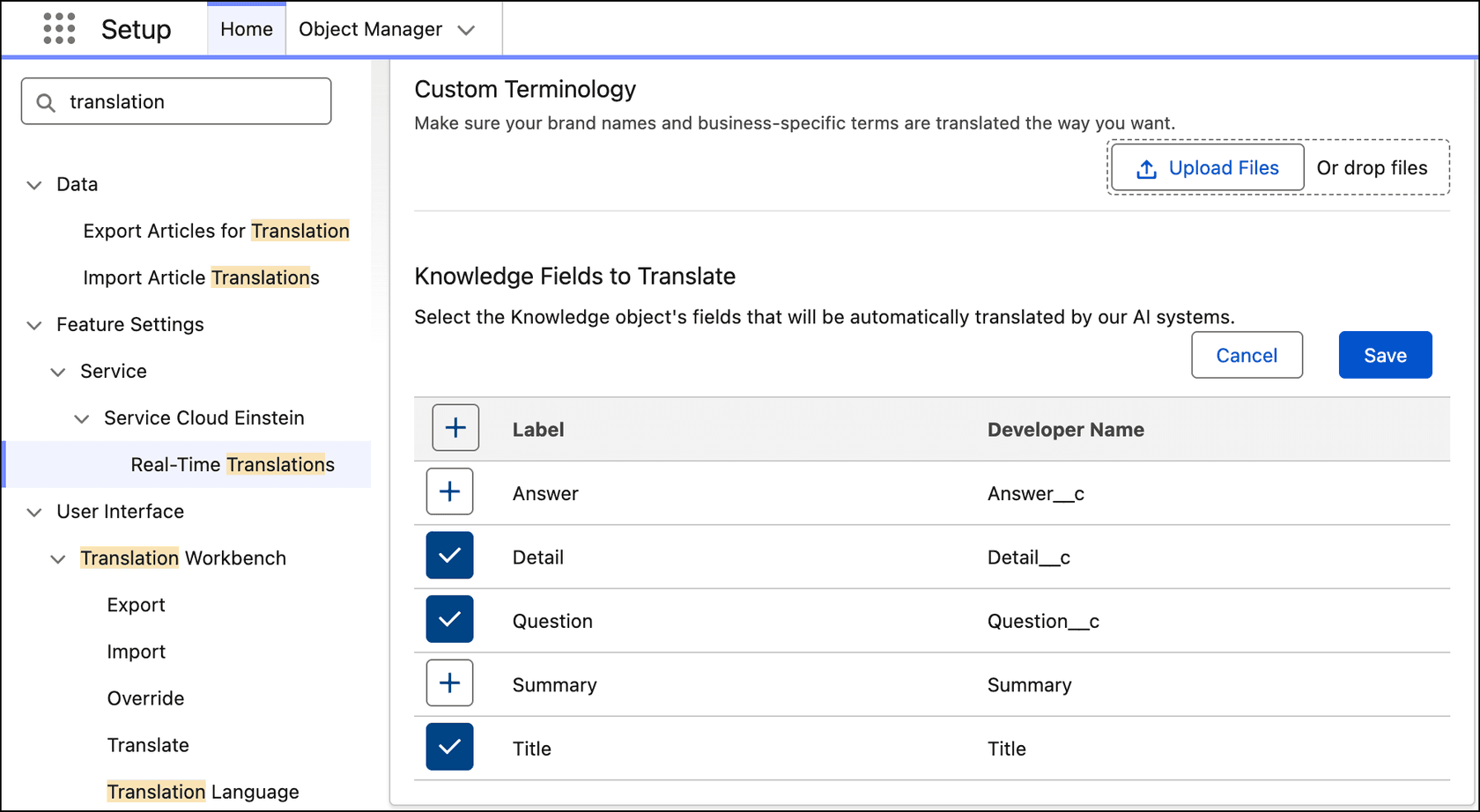
That AI option is the biggest change since 2024, back when Salesforce's own docs said articles weren't auto-translated. The setup page doesn't name an edition or a price, so it's worth checking your contract. On the pricing page, Knowledge Management is included on all five editions, while Knowledge Creation and Enterprise Knowledge are add-ons on Core and Advanced. My post on Salesforce AI knowledge creation covers the drafting side.
There's one trap that comes up often enough that I want to name it. Translation Workbench translates labels, picklists and field names, not article or case content. A Reddit thread catches the moment when people find this out:
"For translating content rather than labels you would use Gen AI."
If you're trying to keep terms consistent across all of this, a support translation glossary will save a lot of cleanup later.
AppExchange translation apps for Service Cloud
If the native features don't fit your editions or your budget, AppExchange has a real set of options, alongside the AI tools in my best AI for Service Cloud roundup. I checked each listing directly, and the prices are as printed on the listing or on the vendor's own page.
| App | What it translates | Price as listed | Rating on AppExchange |
|---|---|---|---|
| Language IO | Cases, email, Enhanced Chat, Knowledge (separate listings), 150+ languages | Starting at $958 USD per month plus pay-as-you-go, per-word pricing | Case 5 (4), Chat 4.95 (21) |
| Unbabel | Cases, Messaging and Chat, Knowledge, AI with human review | $1,200 Company/Month base | No ratings |
| Verbis by Venizum | Cases, Messaging (SMS, WhatsApp, web chat), Knowledge, voice | €1,250 including 10 users/month | 5 (22) |
| DeepL for Salesforce | Emails, notes and records, 20+ languages | 100 free translations a month, then 1,000 more for 100€, plus your DeepL API key | Not shown |
| Intento Translator | Live chat and bot conversations | Usage-based, from $75 Company/Month | Not shown |
| Translate.com | Cases, machine or human translation via a #translate note | $999 Company/Month | Not shown |
Smartling also connects to cases, Enhanced Chat and Knowledge, with pricing handled through its sales team.
Two things to note here. The DeepL app is built by cloudworx, a DeepL partner, and DeepL's own integrations page doesn't list a Salesforce app. Also, Language IO is the one with the most user voice behind it. One G2 reviewer at an enterprise broadcaster wrote:
"the key value unlock for us has been through live chat translations in Salesforce in real time. This is delivering real business value through enabling a single language service centre which can service languages and territories around Europe."

Another reviewer liked the article translation UI but noted that "Occasionally, the Article Translation app disconnects, requiring us to reauthenticate," per their G2 review. For standalone engines, my DeepL alternatives roundup compares them, and best AI for multilingual support covers the AI agents.
The DIY route: calling DeepL from Apex
Teams that have a developer on staff often end up building it themselves. In the same Reddit thread as the budget question above, one admin replied:
"we hit the same wall with agentforce pricing for translation. ended up using a simple apex callout to deepl api, way cheaper at that volume and u can strip PII before sending with a quick regex in the before-send logic."
It does work, and DeepL's API pricing is easy to model, but then the triggers, language detection, PII handling and maintenance are all yours to own. One older thread shows how quickly that grows, with an admin describing "up to 100 fields to check for language" and "between 100 and 1000 cases daily" in a 2023 post.
If you'd rather script an AI teammate than a translation call, eesel has a command-line interface that a developer, or a coding agent like Claude Code or Cursor, can drive. eesel integrations connect salesforce links the org, eesel integrations download start pulls cases and Knowledge in, and eesel automations sets what the teammate does on new cases. It's the same teammate that your support team sees in the dashboard, only operated from a terminal.
Which Salesforce translation path fits your setup?
Pick where your foreign-language conversations arrive, then follow the branch that matches your licensing.
Open a channel to see which Salesforce translation option fits your licensing and volume. Every branch is based on Salesforce's own help and pricing pages.
Translating a case isn't resolving it
This is the reframe I'd push on anyone who is scoping this, and it echoes the wider Service Cloud AI limitations I keep running into. Every native Salesforce translation feature solves one problem: a rep who doesn't read the customer's language. What none of them changes is how much work the case takes.
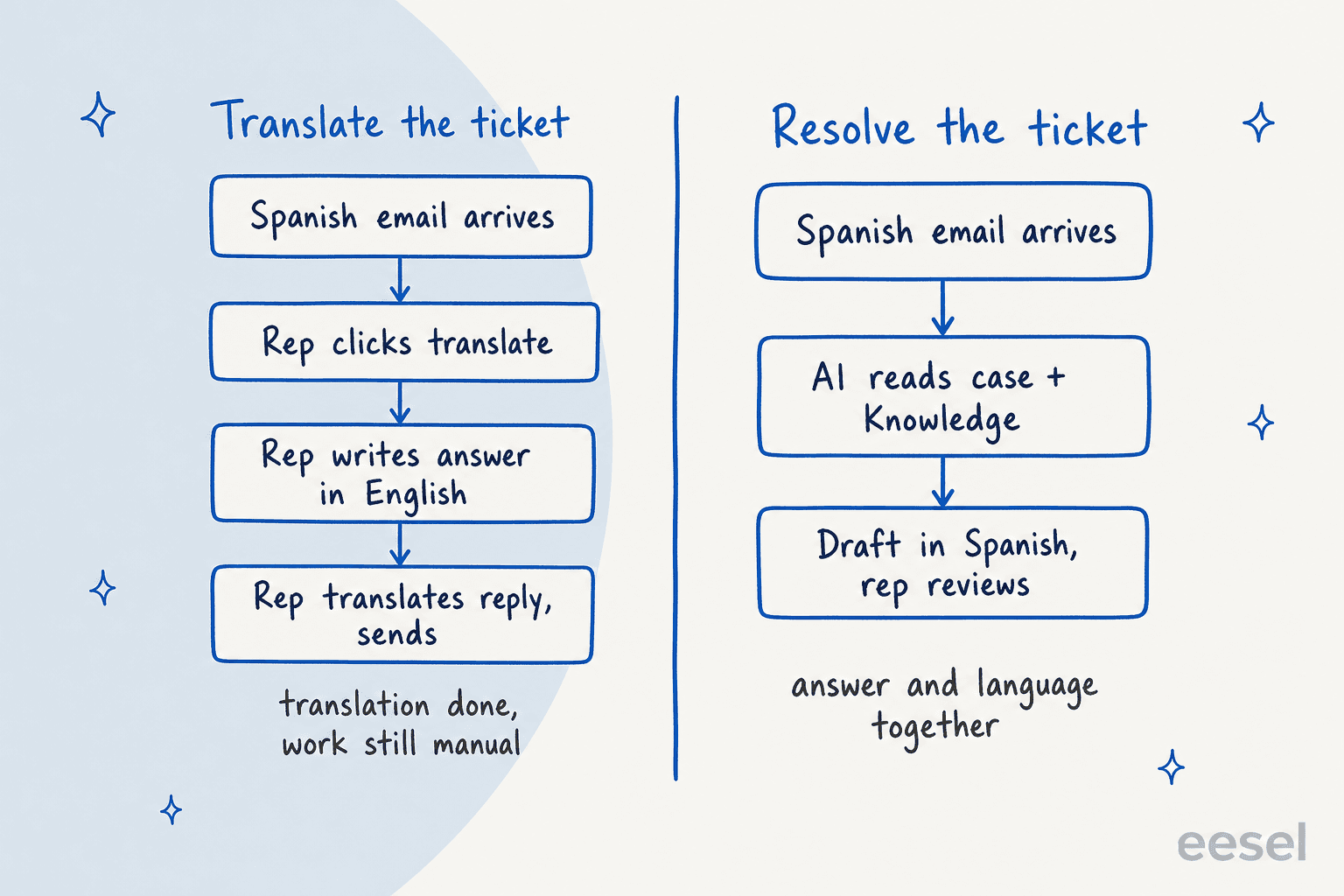
Take a Spanish password reset as the example. With Real-Time Translations, the rep translates the email, finds the answer, writes it in English, highlights it, translates it, checks the preview and sends. That's the same research and writing as an English case, plus two translation steps and a character meter. The language barrier is gone, but the workload isn't.
The alternative, covered in my guide to adding AI to Service Cloud, is an AI teammate that does the reading and research, and also the writing, in the customer's language, while the decision stays with your team. That's how eesel works on Salesforce. It reads cases and Knowledge articles through the Salesforce integration, drafts a reply as an internal case comment, and can update case fields. Per eesel's helpdesk docs, it "answers in the customer's language without translating your help center." The Salesforce page lists 80+ supported languages.
Here is what that looks like day to day in the customer stories:
- Koffer.ch, a Swiss luggage retailer, described the old routine as "finding the right macro, translating it, and typing it out again." Now eesel finds the matching macro, translates it into the customer's language if needed, and drafts it with Swiss spelling. It answers in 4 languages, and wrote 100 draft replies in a month.
- Innr, a Dutch smart lighting brand, gets drafts in Dutch, German, English or French, with German customers getting the formal "Sie" throughout. It prepared 190 tickets in a month from 1,500 articles and past tickets.
- Nordbutiker runs one bot per brand and per country across 4 countries, so "a Danish customer gets Danish answers about Danish products."
Those three are on Freshdesk and Zendesk, not Salesforce, so here's the proof that is specific to Salesforce: CartonCloud, a logistics software company on Salesforce, runs eesel on its cases. Its service desk lead put it this way on eesel's pricing page:
"It is getting us to the right articles really quickly and easily, as well as curating well-formed responses with consistent, on-brand tone, still keeping our own style and still keeping that human touch."
Eddie Stephens, Service Desk Lead, CartonCloud
Now for the honest limit. eesel's Salesforce docs say it works on records only, with no trigger for Salesforce chat or Messaging sessions. If most of your foreign-language volume is in Enhanced Messaging, Salesforce's own messaging translation or Agentforce is the closer fit, or you'd put eesel's own chat bubble on your site instead, with Salesforce supplying account context. My post on the AI multilingual support agent covers that pattern. Where eesel fits best is Email-to-Case, which is where most of the volume in that 3,000-case Reddit queue sat. Before going live, you can run it against your past Salesforce cases to see how it would have answered, in each language.
For the process side, my guides to multilingual customer support and multilingual support QA go further.
If you're comparing helpdesks, the Zendesk translation and HubSpot translation posts cover the same ground, and my customer service translation guide lines up seven of them side by side.
Try eesel on your Salesforce cases
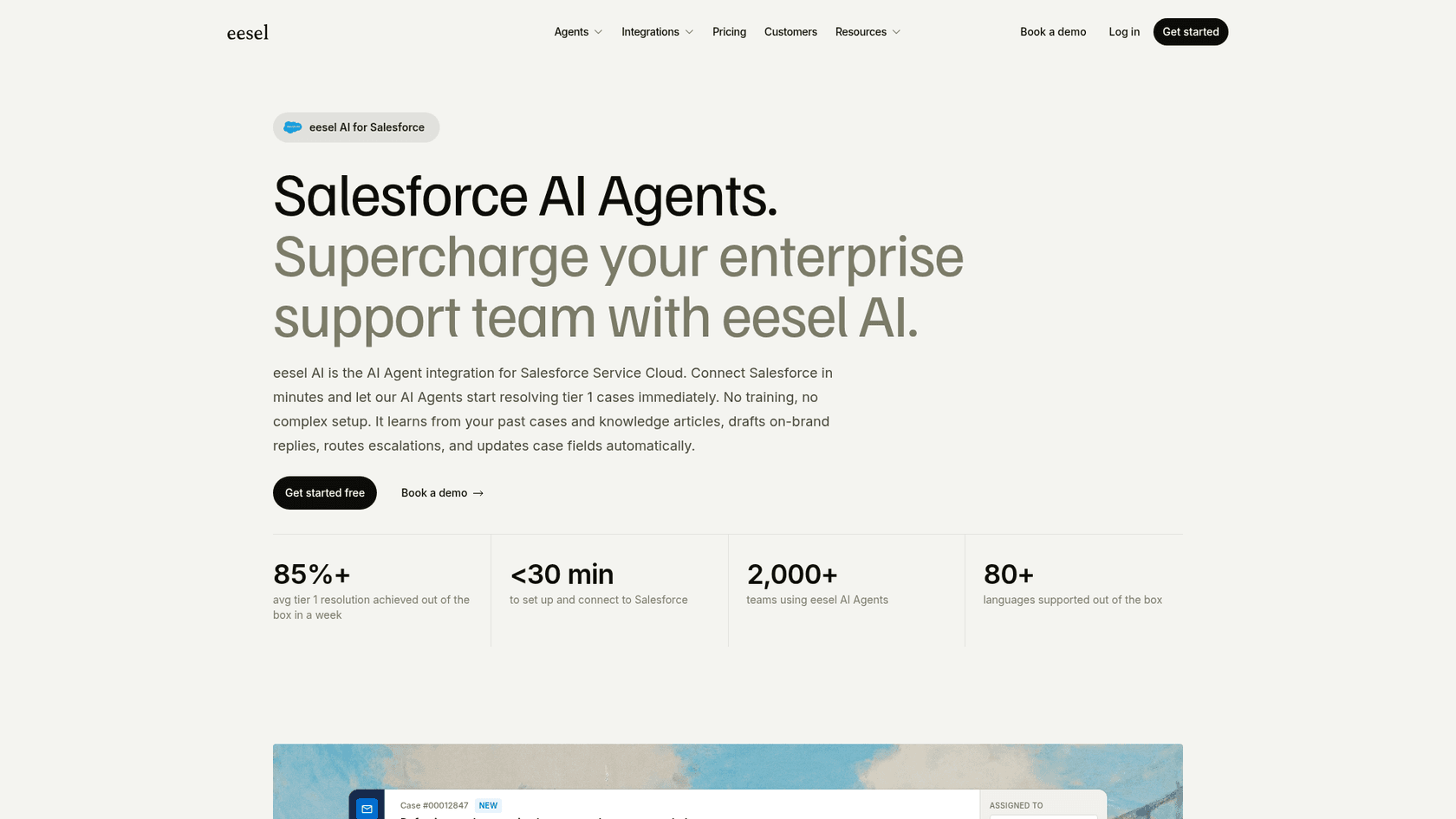
If your Salesforce queue has a growing share of cases in languages your team doesn't read, eesel is the AI helpdesk teammate that joins it. It connects to Service Cloud in under 30 minutes, learns from your Knowledge articles, past cases and email templates, and drafts replies in the customer's language as case comments your reps can send or edit. No per-language fee and no translation meter: a case is 1 credit however many languages it involves, with plans from $299 a month for 500 credits.
Start with drafts on a slice of your multilingual cases and compare them with what your team would have sent, then switch on more once you trust it. Try eesel free with 100 credits.
Frequently Asked Questions
Does Salesforce have built-in case translation?
Yes. Real-Time Translations for Service Email lets a rep translate an incoming email in the case feed and translate their reply in the composer. It reads 75 languages but translates into only 36 on the rep's side, works on desktop only, and caps each translation at 10 KB. My Salesforce customer service email guide covers the rest of the email setup.
How much does Salesforce translation cost?
Salesforce translation draws on Flex Credits. Each Agentforce add-on license includes 250,000 translated characters per user per month, and usage above that draws down Flex Credits, which list at $500 per 100,000. The Agentforce add-ons list at $125 per user per month. My Salesforce Flex Credits breakdown explains how the pool works.
Can Salesforce translate chat and messaging conversations?
On Enhanced Chat and Enhanced Messaging channels, including WhatsApp and Enhanced SMS, yes. Salesforce translation for messaging covers 75 languages and needs the Agentforce for Service add-on. Standard SMS isn't supported. My post on multilingual live chat compares how other tools handle it.
How do I translate Knowledge articles in Salesforce?
Turn on Multiple Languages in Knowledge Settings, then either translate articles yourself, export them as zipped CSV files for a translation vendor, or use AI Knowledge Translations (the Einstein Article Translate setting), which supports 75 languages. My guide to multilingual knowledge base software covers the wider options.
What languages does Agentforce support?
Salesforce's language support page lists 56 languages for Agentforce agents, 31 fully supported and 25 in beta, with agent instructions written in English. Agentforce Voice agents support 25 languages and are monolingual per session. See my Salesforce Agentforce overview for the bigger picture.
Is there a DeepL app for Salesforce?
There's a DeepL for Salesforce app on AppExchange, but it's built by cloudworx, a DeepL partner, not by DeepL itself, and it needs your own DeepL API key. Some teams skip apps and call the DeepL API from Apex. My DeepL pricing post covers the API plans.
What's the best Salesforce translation option for a small support team?
If foreign-language cases are a few a week, the built-in email translation or a low-cost app is enough. Once they're daily, translating each case still leaves your team writing every answer, so an AI teammate that drafts in the customer's language saves more time. eesel works through its Salesforce integration and starts at $299 a month for 500 credits.