Why travel support breaks differently
Every support team thinks their queue is special. Travel teams have a real case. Three things make the job different from a steady SaaS inbox or a retail returns desk.
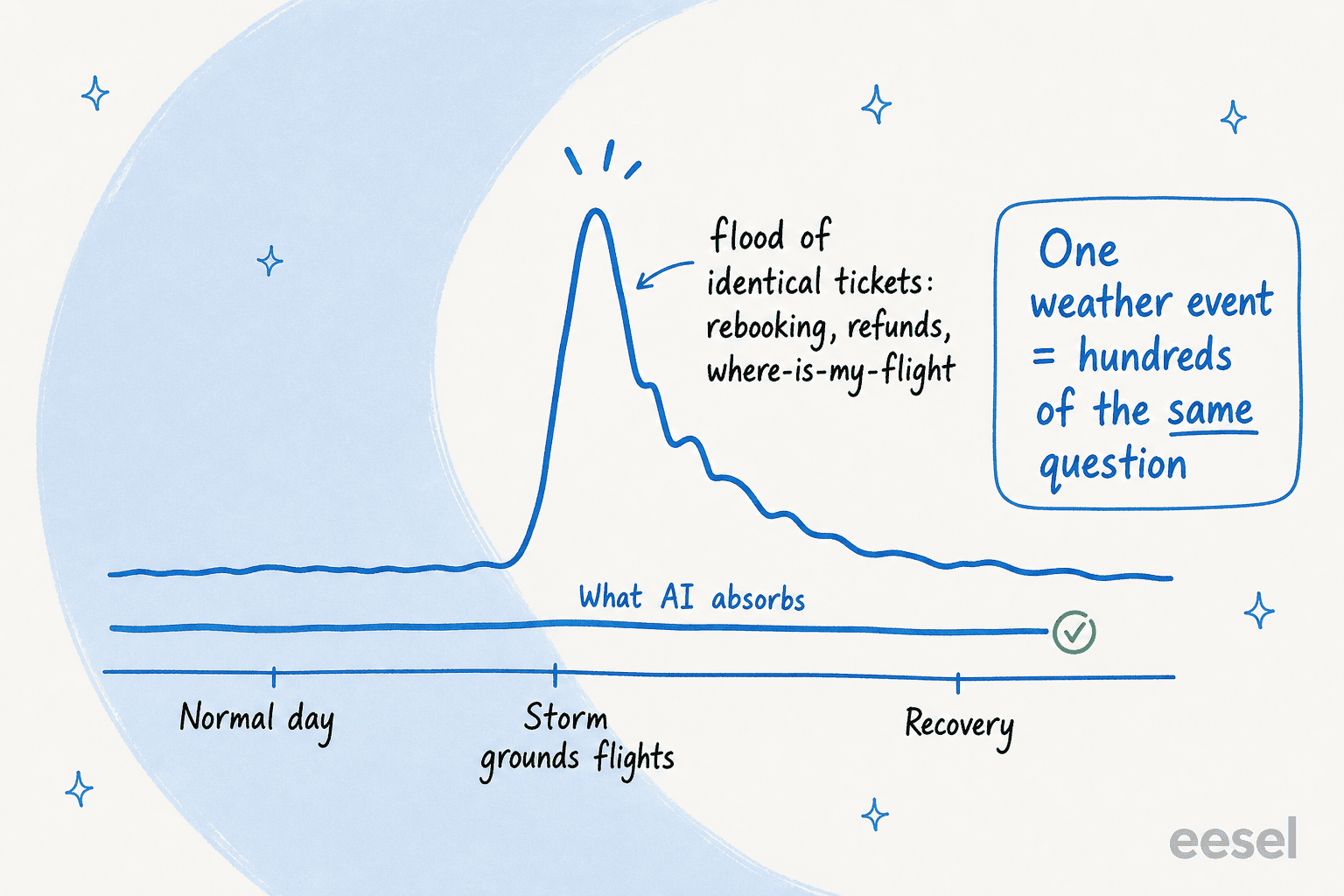
First, the volume is spiky in a way nothing else is. Most queues grow gradually. A travel queue can 10x in an afternoon because the weather changed. A snowstorm, an air-traffic strike, a volcano, an IT outage at the airline, and suddenly every inbox is full of the same three questions: "is my flight cancelled," "can I rebook," "where's my refund." That's not a staffing problem you can hire your way out of, because the spike is gone by the time the new hire is trained.
Second, it's multilingual by default. A traveler from anywhere can buy from you, so the inbox arrives in a dozen languages, at every hour, across every time zone. A retail brand can usually scope itself to one or two markets. Travel can't, and "we only do English business hours" is a guarantee of a backlog the moment your customers are mid-trip in another country.
Third, the stakes split hard. A huge slice of travel tickets are boringly repetitive and fully documented ("what's the baggage allowance," "how do I check in," "can I change the name on a booking"). The rest are time-critical and high-consequence: a missed connection at midnight, a medical issue abroad, a refund on a five-figure group booking. Getting the first kind wrong is annoying. Getting the second kind wrong loses a customer for life and shows up on Trustpilot the same day. This is why AI customer service for travel has to be precise about which tickets it touches, not just fast.
What "AI customer service" actually means here
The phrase covers everything from a canned-reply macro to a fully autonomous agent, so let me be specific about the three jobs that matter for travel.
- Deflection and resolution. The agent answers the customer directly for the questions it's confident about, end to end, so the ticket never reaches a human. This is where the ticket deflection numbers come from, and in travel it's the documented policy questions that make up the bulk of the spike.
- Copilot drafts. For everything else, the agent writes a suggested reply your human agent reviews and sends. It's the safest place to start, and most travel teams we work with begin here during their first peak season.
- Triage and routing. Before anyone touches a ticket, the AI tags it, sets priority, and routes it. In travel that means a "flight cancelled, departing in 3 hours" ticket jumps the queue ahead of a "do you have a senior discount" one. If you've never looked at support ticket triage, it's the easiest win to start with.
The thing that ties all three together is the knowledge source. A travel agent is only as good as what it learned from, and the best ones work like an AI knowledge base chatbot that learns from your solved tickets, not just your help-center articles. That distinction matters more than any feature checkbox, because a help center tells the AI what you wrote down, while past tickets tell it how your team actually handles a missed connection on a Friday night.
What to automate, and what to leave alone
This is the whole game for travel, so it's worth being blunt about where the line sits. After running agents against a lot of travel-shaped queues, the split is consistent: automate the documented and repetitive, keep humans on the time-critical and the irreversible.
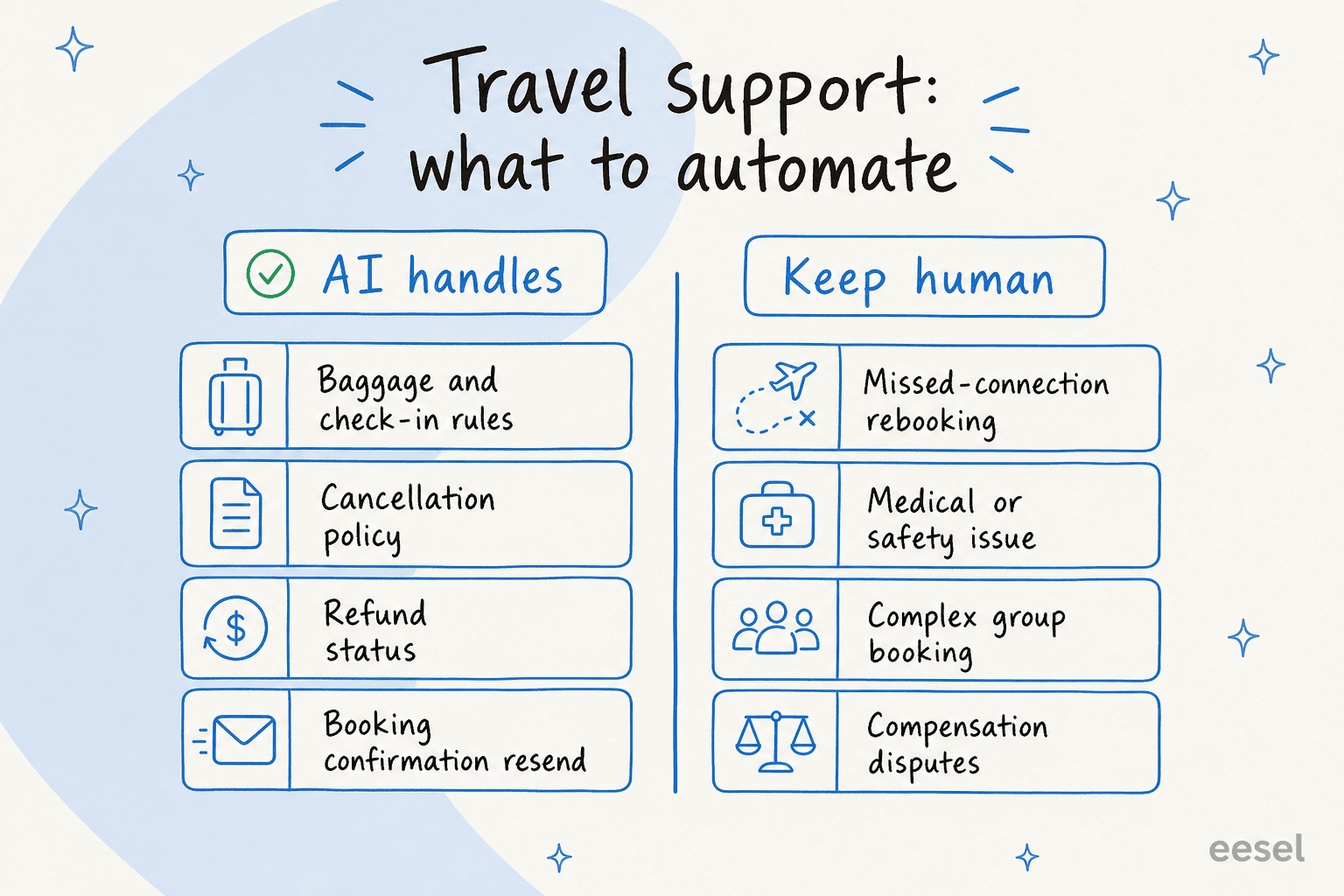
The left column is where AI prints money. Baggage and check-in rules, cancellation and change policies, refund status lookups, "resend my booking confirmation," loyalty-point questions, "what documents do I need." These answers already live in your docs or in a ticket you closed last week, they don't change based on context, and they make up the lion's share of a disruption spike. Let the agent own them.
The right column is where I'd hold the line. Rebooking a missed connection, a medical or safety issue abroad, a complex multi-passenger group change, and any compensation dispute all share a trait: they're high-consequence, often irreversible, and frequently not fully documented. An AI that confidently "resolves" a rebooking it got slightly wrong has stranded someone. That's not a deflection win, it's a churn event with a refund attached.
A support lead at a transport-booking company we spoke with framed the target perfectly: he wanted the AI to take roughly 60% of his Zendesk tickets off the team's plate, but only if it reliably knew when to escalate to a human. That's the right instinct. The goal isn't a high resolution rate, it's a high resolution rate on the right tickets.
How the agent decides what to answer
Here's the part the marketing pages skip, and the part I care about most as someone who builds the thing.
A decent travel support agent doesn't just generate text. It runs a loop: read the incoming ticket, search everything it knows (past tickets, help docs, connected tools, your booking system), and then make a routing decision based on how confident it is. High confidence and the topic is in-scope, it answers. Low confidence, it backs off, drafts a reply for a human, or escalates cleanly. This is confidence-based routing, and it's the single feature I'd refuse to ship without.

I keep coming back to something a CX lead at a seasonal e-commerce brand told us. She said the AI will never answer 100% of questions, and she didn't want it to. What she needed was an agent that only handled the tickets it was confident about and left the rest alone, because she couldn't go back and audit thousands of answers to catch the bad ones. In travel that's doubly true: the 5% it might get wrong are disproportionately the rebookings and refunds, the exact tickets you can least afford to fumble.
The way you de-risk this before launch is simulation: run the agent against your last few thousand real tickets and read what it would have said, by topic, before a single customer sees it. You find the gaps, fill them, and re-run. We built simulation into eesel precisely because "trust us, it's accurate" is not an acceptable answer when a wrong reply strands a traveler. You go live only on the categories where the simulation shows it's solid, and everything else stays a human-reviewed draft until it earns autonomy.
Multilingual and around the clock, the part travel can't skip
For most verticals multilingual support is a nice-to-have. For travel it's the job. Your customers are, by definition, often somewhere that isn't home, in a timezone that isn't yours, typing in a language your night shift may not speak. An agent that only works in English during business hours isn't really a travel support agent.
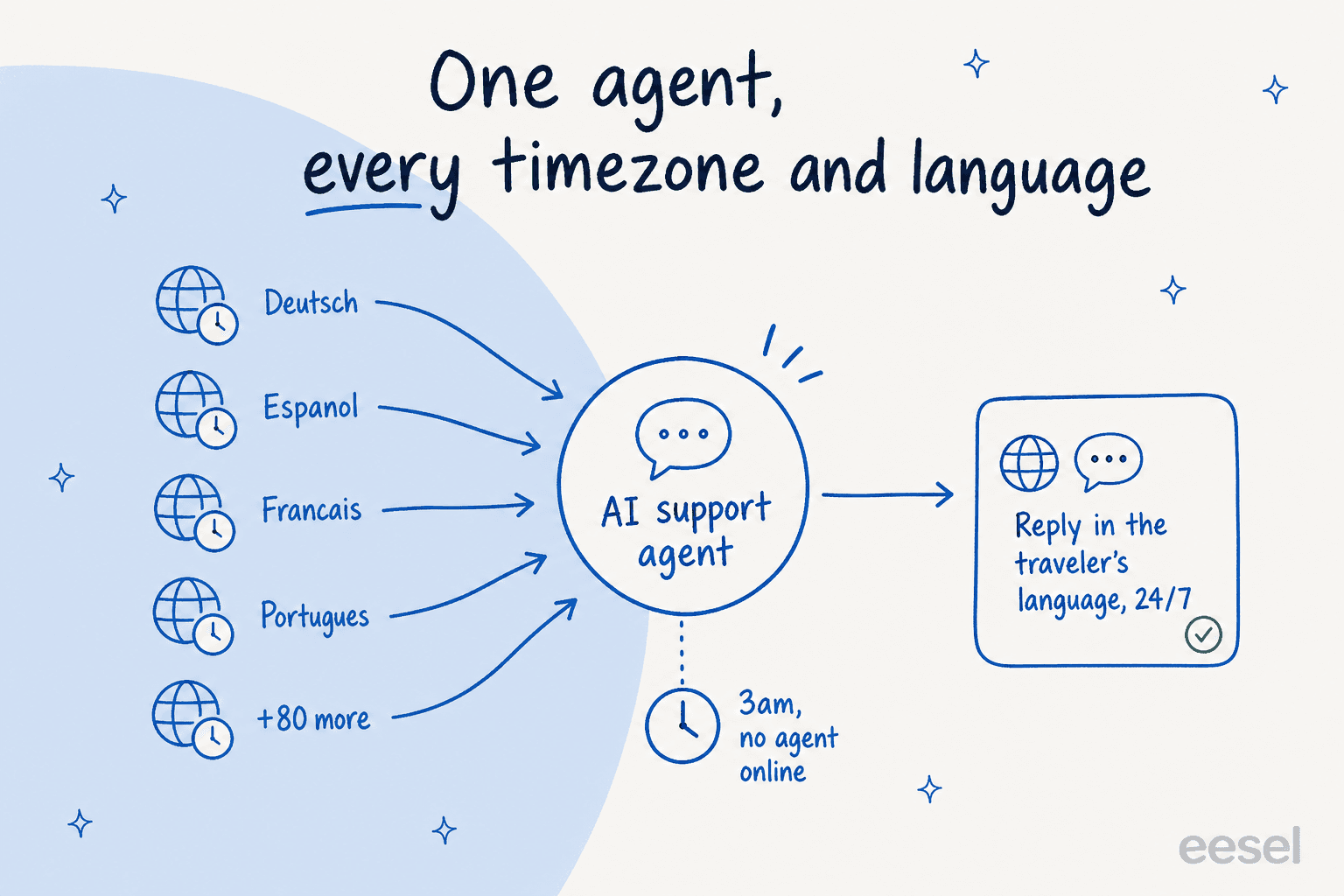
This is genuinely one of the things AI does best, and it's underrated. eesel handles 80+ languages out of the box and, more importantly, learns from your multilingual ticket history, so it answers the way your team actually answers in each language rather than running everything through a clumsy machine-translation layer. In one trial with a German jewelry e-commerce brand, the agent handled German, English, French, Dutch, Spanish, Polish, Croatian, and Turkish tickets without anyone prompting it per language. smava, one of our larger deployments, runs a fully automated Zendesk agent processing over 100,000 German-language tickets a month. The point isn't the language count, it's that a question at 3am in a language no agent on shift speaks still gets a correct answer immediately.
That 24/7 coverage is the other half. A traveler stuck at a gate doesn't care that your support team logged off at 6pm. The documented questions get answered instantly at any hour, and the genuinely complex ones get queued, triaged, and waiting with a drafted reply for the first human who logs on.
What it actually delivers (the numbers)
I'm wary of resolution-rate claims, because they're easy to inflate. So here are figures from real customers, with their context attached.
Gridwise, a gig-economy driver-analytics app running on Zendesk, is the one I quote most because the result landed fast:
"In the first month, eesel is resolving 73% of our tier 1 requests... Our team implemented and achieved results quickly during our 7-day trial. Responses are simple to fix and adjust."
Kim Simpson, Gridwise
A few others worth knowing: Global Payments reported up to 80% time savings finding answers across their documentation, and InDebted runs eesel as the first responder on Jira tickets. Different industries, same pattern that travel teams should copy: automate the documented majority, keep humans on the rest, and let your first-contact resolution climb only as fast as the simulation proves it's safe.

If you want the broader benchmark math rather than single-customer anecdotes, our analysis of how much AI saves walks through the cost-per-ticket model in detail.
What to look for before you buy
If you only check five things, check these. They're the ones that separate an AI helpdesk that survives a real travel peak from one that gets switched off in week three.
| What to check | Why it matters for travel | Red flag |
|---|---|---|
| Confidence-based routing | It must skip rebookings and refunds it isn't sure about, not guess | "It answers everything" |
| Trains on past tickets | Docs alone miss how your team handles a disruption | Help-center-only ingestion |
| Multilingual out of the box | Travelers arrive in every language at every hour | English-only, or bolt-on translation |
| Simulation before launch | See what it'd say on real tickets before a peak | "Just turn it on" |
| Fits your existing helpdesk | You shouldn't migrate platforms before high season | Forced platform migration |
That last row matters more than people expect. Your helpdesk is where your team already lives, so the AI should layer on top of it, not replace it. eesel connects to 100+ integrations including Zendesk, Freshdesk, Gorgias, HubSpot, and Salesforce Service Cloud, so you keep your stack and bolt the agent on. (We integrate with the helpdesks above, so weigh our take on them with that in mind, and if you're just testing the water, the free options are a fine place to start.)
On security, travel buyers usually have a real procurement gate: GDPR and EU data residency are common, and PCI matters the moment payment data is in the ticket. Ask early, because it's a frequent late-stage deal-killer.
Build it yourself, or buy?
Plenty of travel tech teams have the chops to wire up an LLM API themselves, and the debate usually starts in a Slack thread with "we could just build this." You can. The question is whether you want to own it forever.
Building a prototype is a weekend. Building the parts that make it safe for real travelers, confidence routing, helpdesk sync, simulation, multilingual knowledge ingestion, and then maintaining all of it as your fare rules and policies change, is a standing engineering commitment. One of our customers, GENERAL BYTES, a crypto-hardware company with a 300-plus article knowledge base, summed up why they chose buy:
"We could try to write our own LLM application but we didn't want to invest our time into that. We wanted something that we would not have to maintain."
Karel, GENERAL BYTES
I'd put it this way: build it if AI support is your product. Buy it if your product is getting people from A to B and support is a cost center you want to run lean through every peak. For most travel teams the second is true, and the build-versus-buy cost maths out in favor of buy once you price in an engineer's time and the maintenance that never ends.
What it costs
Pricing is where travel teams get burned, because the billing unit is doing a lot of quiet work. Per-seat pricing punishes you for staffing up before high season. Per-resolution pricing can produce a scary bill the month a storm triples your volume. eesel runs on flat, usage-based pricing, which tends to map cleanly to how travel volume actually behaves.
| Plan | Price | What you get |
|---|---|---|
| Free trial | $50 in free usage, no card | Try it on your real tickets |
| Usage-based (PAYG) | From $0.40 per ticket/conversation | No per-seat fee, no platform fee, no minimum |
| Annual commit | 25% off (commit ≥$300/mo for the year) | Same features, lower rate |
| Enterprise | $1,000/mo platform fee + usage | SSO, HIPAA/BAA, higher KB limits, dedicated SE |
The thing I'd flag for travel specifically: a "light" task like a dashboard lookup is free, a regular ticket or chat is $0.40, and your bill scales with support work, not with how many seasonal agents you hire. So a quiet month costs less and a storm month costs more, instead of paying year-round for peak headcount. The full breakdown lives on the pricing page, and our cost savings guide shows worked examples at different volumes.
Try eesel for travel support
eesel is an AI helpdesk agent built for exactly this kind of queue: it learns from your past tickets and docs, answers in 80+ languages around the clock, runs in simulation against your real history before it goes live, and uses confidence-based routing so it only answers what it's sure about and cleanly hands the rebookings and disputes to a human. It sits on top of the helpdesk you already use and bills by usage rather than per seat, so it doesn't punish you for staffing through peak. If you want to see what it'd say on your own tickets, the 7-day trial runs against your real history.

Frequently Asked Questions
What is AI customer service for travel?
How much does AI customer service for travel cost?
Can AI handle multilingual travel support?
How does AI cope with a disruption spike, like a storm grounding flights?
How do I stop the AI from giving travelers wrong answers?


Article by
Alicia Kirana Utomo
Kira is a writer at eesel AI with a Computer Science background and over a year of hands-on experience evaluating AI-powered customer service tools. She focuses on breaking down how helpdesk platforms and AI agents actually work so that support teams can make better buying decisions.