What AI self-service means for ecommerce
Strip away the buzzwords and AI self-service is just this: a shopper gets a correct, instant answer without opening a ticket, and your team never sees it. The "AI" part matters because the old self-service, a static FAQ page and a search box, barely worked. People didn't read the FAQ. They opened a chat and asked anyway.
What's different now is that an AI agent can read your whole knowledge base, your past tickets, and (this is the ecommerce-specific part) the customer's actual order, then write a real answer in their language. It's the gap between "here's our returns policy page" and "your order #4821 shipped Tuesday, here's the tracking, and yes, you're inside the 30-day return window."
That distinction, policy answers versus order-aware answers, is the whole game for a store. A bot that can only recite policy deflects almost nothing, because almost every ecommerce question is about this order, not the general rule.

The questions to automate first
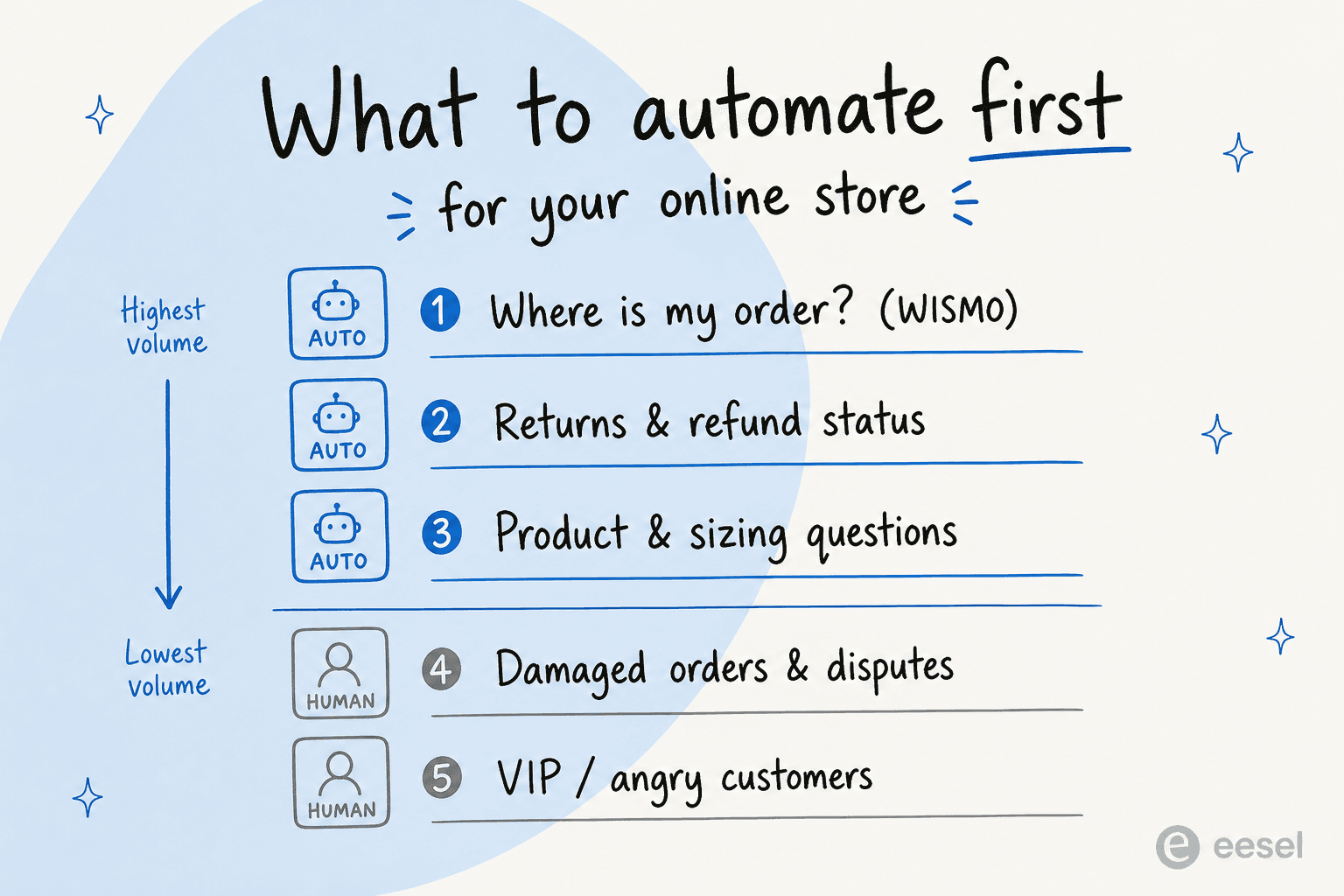
Not every ticket is a good automation candidate, and the fastest way to get burned is to point AI at all of them at once. After watching plenty of store rollouts, the volume sorts cleanly into "automate this now" and "keep a human on it."
The repetitive, factual top of the funnel is where the easy wins live:
- Where is my order (WISMO). The single highest-volume question in ecommerce, and the most automatable, because it's a lookup. One multi-brand operator I saw was fielding 500+ tickets a day that were mostly refunds, unsubscribes, and order tracking.
- Returns and refund status. "Can I return this?" and "where's my refund?" are policy-plus-lookup, exactly the shape AI handles well with the right refund macros.
- Product and sizing questions. Pre-purchase questions that a good agent answers from your product docs, often turning support into a sale.
What you keep on a human: damaged or wrong items where the customer is already upset, payment disputes, and your high-value VIPs. Those need judgment and a bit of grace, not a confident bot.
A DTC supplements brand I came across summed up the goal perfectly: they didn't want AI on everything, they wanted it to auto-resolve at least half of their WISMO, subscription, and product-question volume so the team could focus on the rest. That's the right ambition, dominate the repetitive half, don't fake the hard half.
How AI self-service works behind the chat bubble
The mechanics matter, because the difference between a helpful agent and a liability is what happens in the half-second after a shopper hits send.
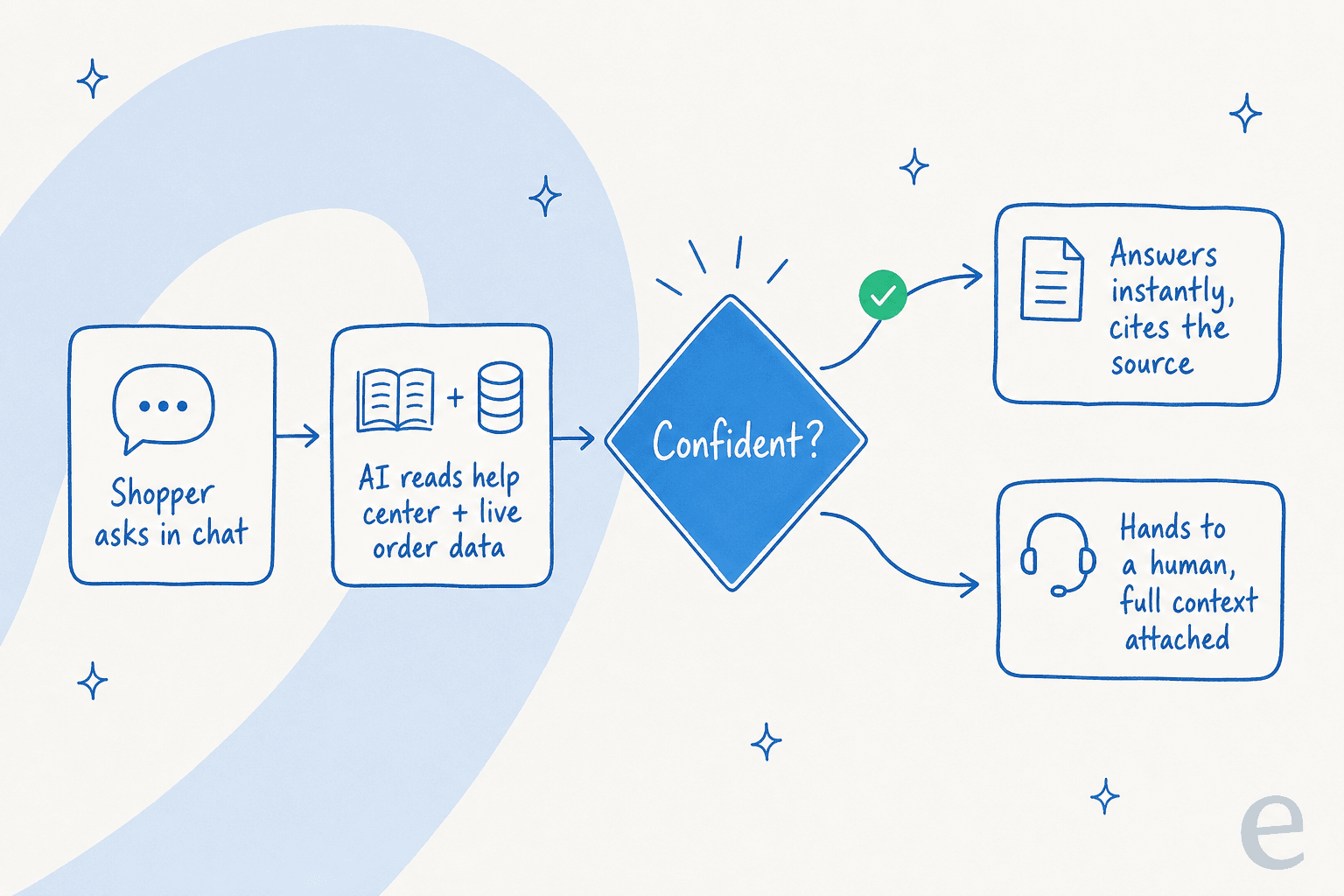
A well-built ecommerce AI chatbot runs a loop: it reads the question, pulls from your connected knowledge (help center, past tickets, product docs) and live order data, decides whether it's confident enough to answer, and either responds with sources or hands off cleanly to a human. The handoff is the part people skip, and it's the most important part.
Here's a real version of that loop working: on one SEO tool's site, a shopper asked the chat two how-to questions, got both answered from the docs, then typed "can I talk to a human?", and the agent handed off to a ticket the instant they asked. Two deflections, one clean escalation, zero friction. That's what you're aiming for, not a bot that traps people in a loop until they rage-quit.
The other piece is order-aware actions. The reason a rule-based chatbot from 2019 failed and an AI agent doesn't is that the agent can actually do the lookup against Shopify or your helpdesk, not just match a keyword to a canned reply.
What good actually looks like: the numbers
Here's where I can be specific, because we run this on real store traffic. When we put eesel against a German online jewelry retailer's roughly 1,000 tickets a month on Zendesk and Shopify, the real-traffic trial came back at 93% triage accuracy and 100% spam detection, with zero false positives on the 22% of the inbox that was junk.
The category breakdown is the part I'd screenshot if I were a store owner. On useful draft answers, the agent hit 93.8% on returns and refunds, 100% on refund status, and 100% on product inquiries. Those are exactly the three buckets I told you to automate first, and they're exactly where the AI was strongest, that's not a coincidence, it's because those questions are factual and well-documented.
Zoom out and the numbers hold across stores. In a first month, we've watched eesel resolve 73% of tier-1 requests for one customer, with results showing inside a 7-day trial. And it's not an eesel-only story, Gorgias reported brand confidence in AI-generated responses jumping from 57% to 85% in a few months, with AI answers scoring 4.77/5 on language quality versus 4.4 for humans.

The honest caveat: those numbers track triage and draft quality, not "send everything on autopilot." In that same jewelry trial, agents rewrote most drafts for length and tone before sending. That's fine, it's the copilot-first pattern almost every store wants, draft for the humans, then graduate to full auto on the questions the AI has earned.
Where it goes wrong, and how to avoid it
Plenty of store owners have tried this and bounced off. It's worth being straight about why, because the failures are predictable.
The loudest complaint is the bot that confidently answers wrong. Here's a Shopify operator on Reddit who'd just installed one:
"I installed an AI customer service bot thinking it would reduce support workload, but it's honestly disappointing. It often misunderstands..."
r/ShopifyeCommerce, "Added an AI Chatbot to My Store... It's Mostly Causing problems"
That's almost always one of two root causes. Either the bot has no confidence threshold, so it answers everything including things it doesn't know, or it has no hard fallback, so when the knowledge base comes up empty it invents an answer from its training data instead of saying "let me get a human." A CX lead I think about a lot put the fix bluntly:
"The AI will never be able to answer 100% of the questions... I need an AI who is only handling the tickets that it's confident to handle and all the other ones, leave them alone."
A DTC supplements CX lead, on why confidence routing is non-negotiable (eesel customer interview)
The second failure is thin documentation. The AI is only as good as what you feed it, and a store with three outdated help articles and a pile of macros will get a mediocre bot no matter how good the underlying model is. The good news is this is fixable, and tools that flag knowledge gaps turn "our docs are bad" into a concrete to-do list instead of a vague excuse.
The pricing trap: per resolution vs per ticket
This one costs stores real money and almost nobody flags it before they sign.
Two billing models dominate AI support. Per-resolution charges you each time the AI closes a ticket. Per-ticket (or usage-based) charges a flat amount for each conversation handled, resolved or not. They sound similar. They are not, and the difference bites hardest exactly when you can least afford it: peak season.
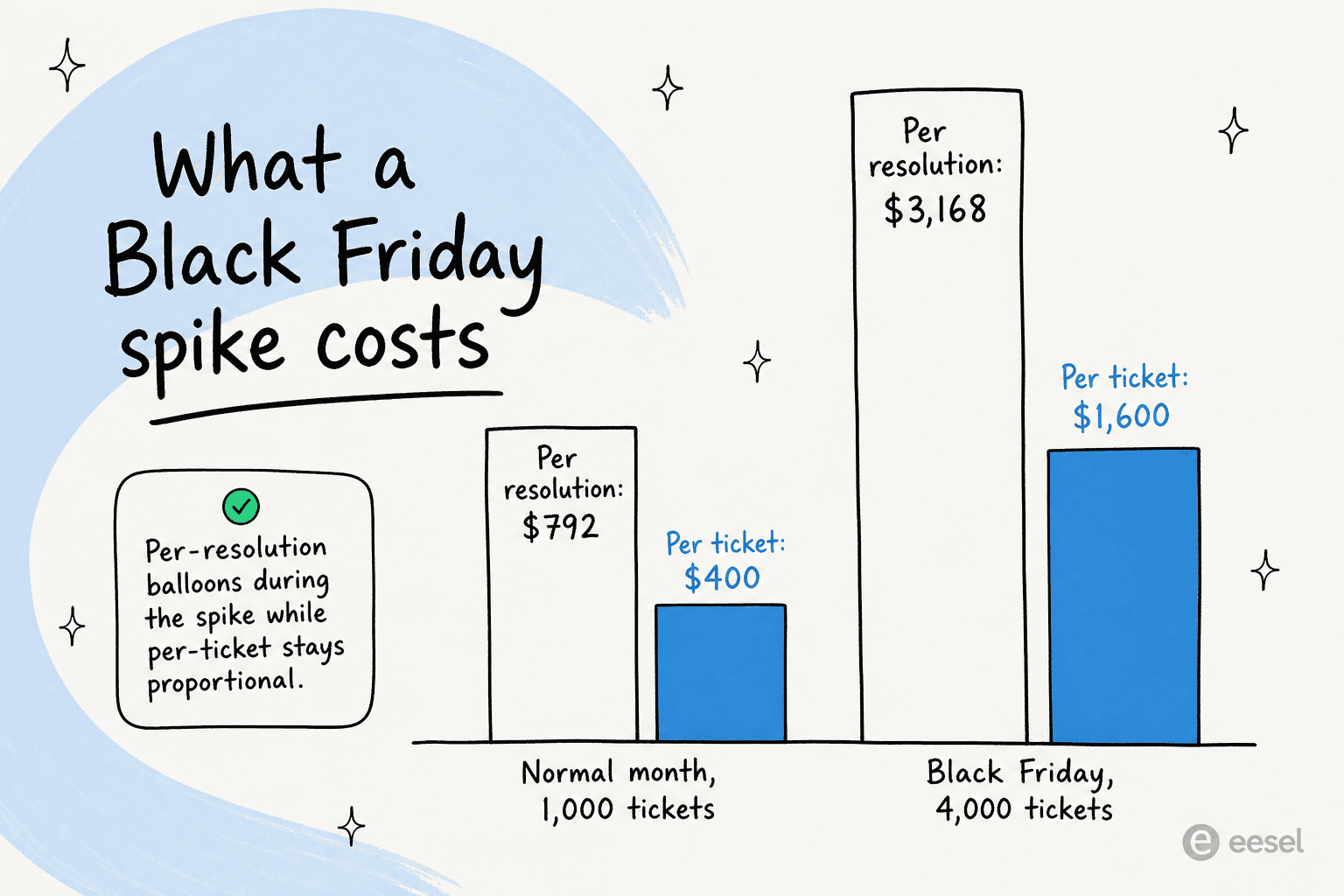
Per-resolution pricing has a nasty property, it charges you more the better the AI performs, and it scales straight up with volume spikes you don't control. We ran the math for a store doing about 1,000 tickets a month: at roughly $0.99 per resolution and an 80% resolution rate, that's about $792 a month. Then Black Friday hits, volume quadruples to 4,000 tickets, and the same model bills $3,168 for the month. A flat per-ticket model at $0.40 lands at $400 and $1,600 for the same two months, scaling with volume but never penalizing you for resolving more.
One more thing to ask any vendor quoting a resolution rate: does it count auto-closed spam? In that jewelry store's inbox, 22% was junk. If a tool "resolves" spam and bills you for it, your resolution rate looks great and your invoice looks worse. eesel's per-ticket pricing sidesteps the whole problem, you pay $0.40 for a conversation handled, with no per-seat fees and no charge for the tickets your humans take.
How to set it up the right way
You don't flip AI self-service on and walk away. The rollout that doesn't blow up looks like this:
- Connect your real knowledge and order data. Point the AI at your help center, your past tickets (the single most-requested feature I hear, because your solved tickets are your best training data), and your store, so it can actually look up order #4821.
- Simulate against history before going live. This is the step that separates a safe rollout from a scary one. Run the agent over thousands of your past tickets and see exactly what it would have said, by category, before a single customer is involved. You find the gaps in a dashboard, not in an angry review.
- Start in copilot mode. Let the AI draft replies for your agents to approve. You build trust, the agents catch the misses, and the AI learns from every edit.
- Turn on full auto where it's earned. Graduate the categories the AI nails (order status, refund status) to autopilot, keep humans on the rest, and expand as confidence grows. This gradual handoff is how stores get to high deflection without a single embarrassing public mistake.

The throughline of all four steps is control. The reason store owners get nervous about AI self-service is the fear of a bot saying something dumb to a paying customer. Every step above exists to make that impossible before it can happen, which is also why a Shopify merchant reviewing one of these tools could write:
"This is very useful for Shopify merchants because many support requests are repetitive, and automating these responses can save a lot of time for store owners and support teams."
grace, Shopify App Store review (March 2026)
Try eesel for ecommerce self-service
If you run an online store, eesel is built for exactly this. It connects to Shopify and your helpdesk (Gorgias, Zendesk, Freshdesk, Shopify Inbox), learns from your help center and past tickets on day one, and answers WISMO, returns, and product questions in your customer's language with real order lookups, not canned policy quotes.
The part I'd push hardest on: you can simulate it on your own historical tickets before it ever talks to a customer, so you see your real deflection rate by category up front. It's confidence-based, so it only answers what it's sure about, and it's flat $0.40 per ticket with no per-seat fees, so Black Friday doesn't wreck your bill. It's free to try on your own data.
Frequently asked questions
What is AI self-service for ecommerce?
How much of my support volume can AI self-service deflect?
Is it safe to let AI handle refunds and order questions?
How do I add AI self-service to my Shopify store?
How much does AI self-service for ecommerce cost?



Article by
Riellvriany Indriawan
Riell is a designer and writer at eesel AI with about two years of experience researching CX platforms, AI chatbots, and helpdesk software. She combines her design background with a sharp eye for how these tools actually look and feel in practice — making her comparisons unusually visual and user-focused.