

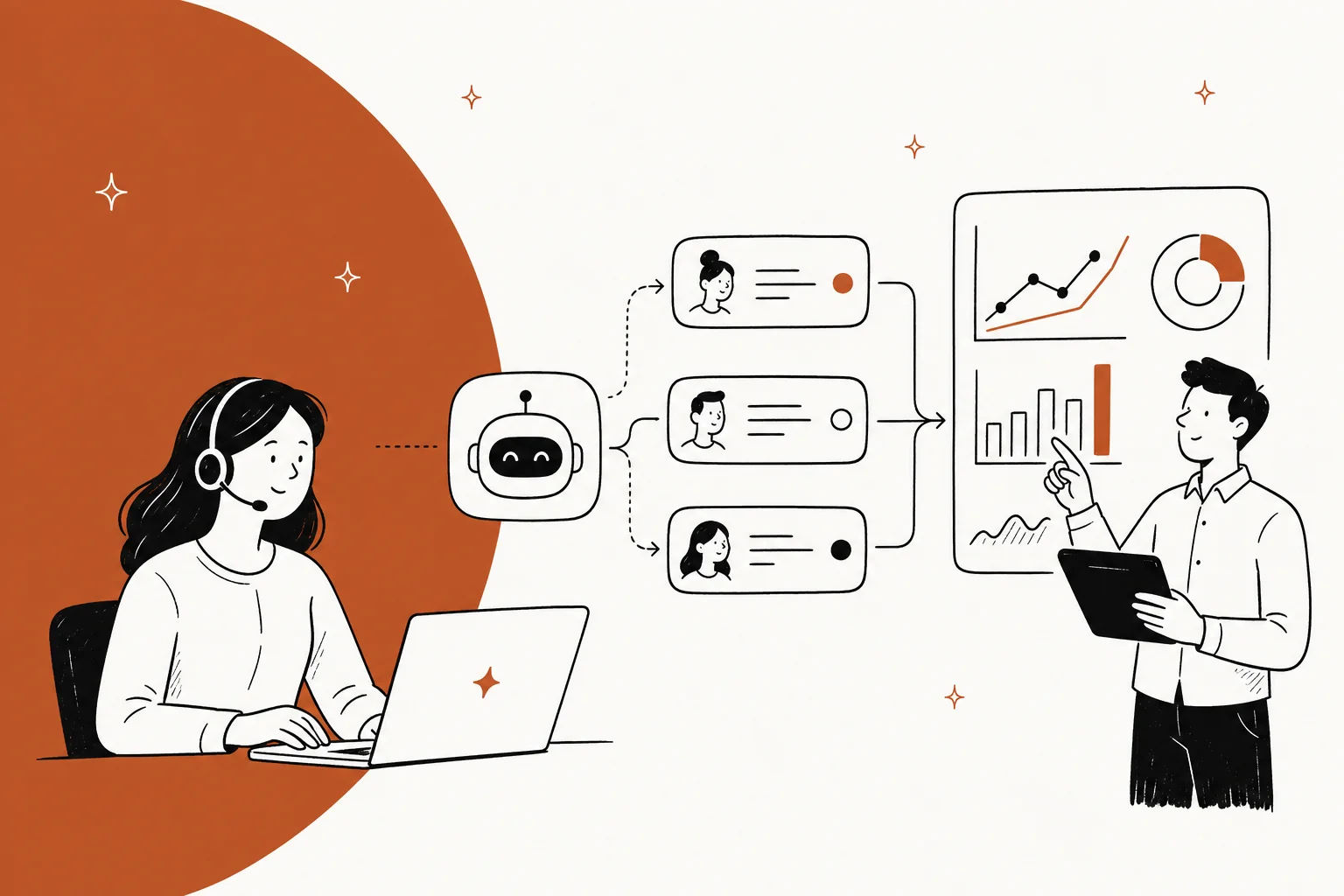
AI driven customer service means one simple thing: the AI is the one making the call, not just suggesting it. Picks the queue. Writes the first reply. Decides when to escalate. Tags the ticket, too. That is a different setup than an AI that only drafts and wait, and it fails in a different way as well.
Here is the part that almost nobody puts in the budget. On a real trial we ran against a German jewellery retailer's live Zendesk traffic, the agent hit 93% triage accuracy and 88% directionally correct drafts, but only 12% of those drafts went out unedited. Accuracy, fine. Last mile, that was the actual cost. Meanwhile the metric everyone is buying on, resolution rate, it counts a customer who gave up as a win at several vendors, and the unit sitting on your invoice is not even the same unit vendor to vendor.
So here is the order: draft mode first, against real tickets. Confidence threshold gets set before any target does. And the pricing, that should be per ticket handled, not per "resolution" that someone else defined for you. That last part is why eesel uses 1 credit per ticket on a fixed monthly plan with no seat fee, and no argument later about what actually counted.
What "AI driven" actually means
I work eesel's support queue. The phrase gets used for two completely different setup, and it is exactly the gap between them where most rollouts go wrong.
First one is AI-assisted. The AI writes a draft, suggests a tag, it summarises the thread too, then a human decides at the end. This is the helpdesk copilot pattern, low-risk because a person stays as the last gate, always.
The second one is AI-driven. Here the AI is the gate itself. Four decisions move across at once: which queue the ticket lands in, what the first reply says, whether it escalates, how it gets tagged. Nobody is signing off anywhere in between.
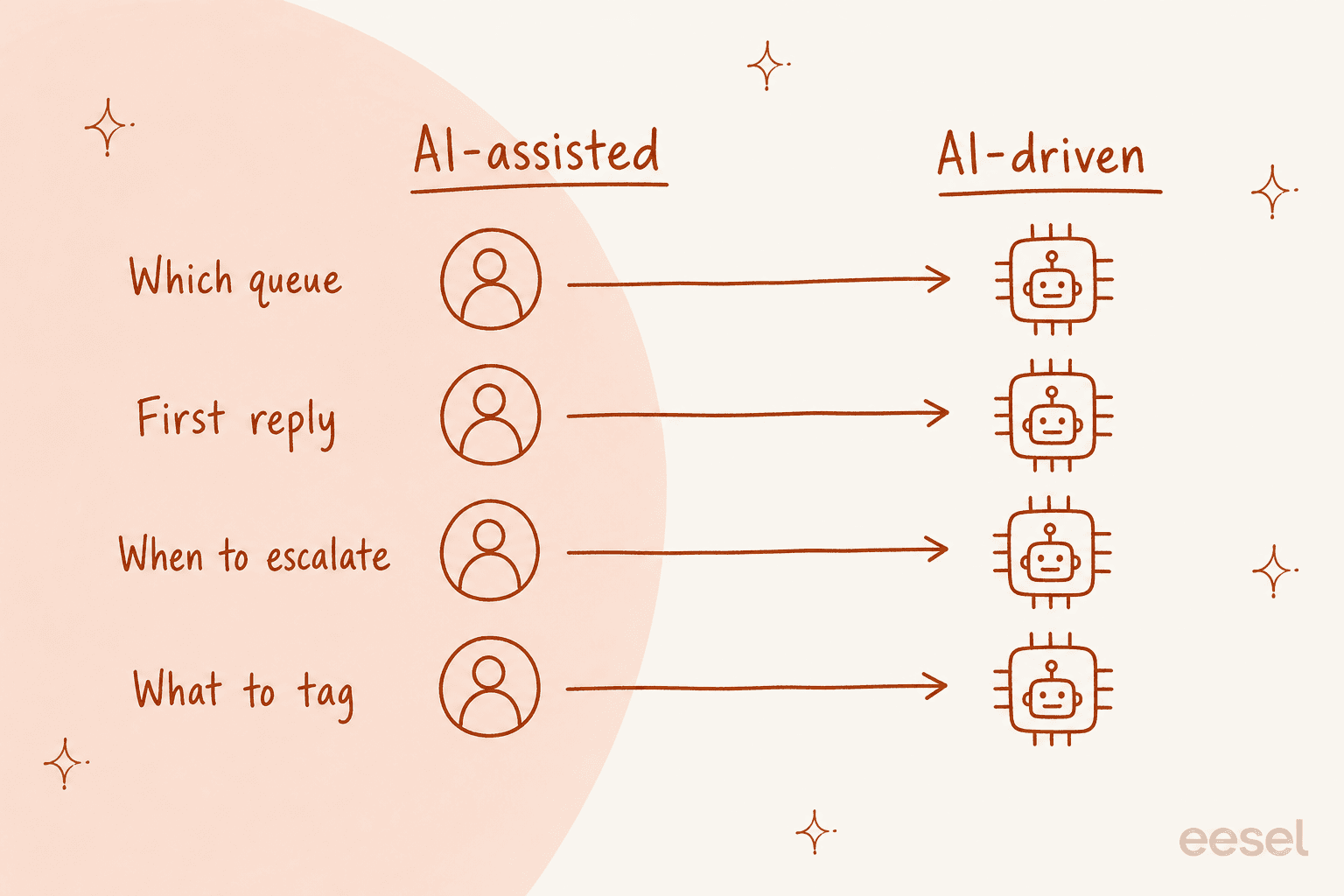
This distinction matters more than which model sits underneath, in terms of what actually happens day to day. Two teams can both say they are running AI powered customer service, and still be doing the opposite thing entirely. It is the same split as between an AI agent and a traditional chatbot, just one layer down: decision-making against script-following.
Reason people reach for the driven version, it is obvious enough honestly. Tier-1 volume is repetitive. On top of that, clearing a backlog by hand is miserable work, which is exactly the pitch behind helpdesk automation: the boring half runs itself. But handing over four decisions at once, on day one, to a system you have not even watched yet, that is how you end up in the threads below.
The number that changed how I read AI accuracy claims
We ran a cross-validated trial on a German online jewellery retailer, doing roughly 1,000 tickets a month across Zendesk and Shopify: 284 chats, plus a 100-ticket cross-validation against real traffic. Headline numbers, they were good. 93% triage accuracy. 100% spam detection with zero false positives, and that's on an inbox that turned out to be 22% spam. 88% of the drafts came out directionally correct.
Then comes the number that actually mattered: 12% of drafts were sent as-is, and factual error rate sat at 7%.
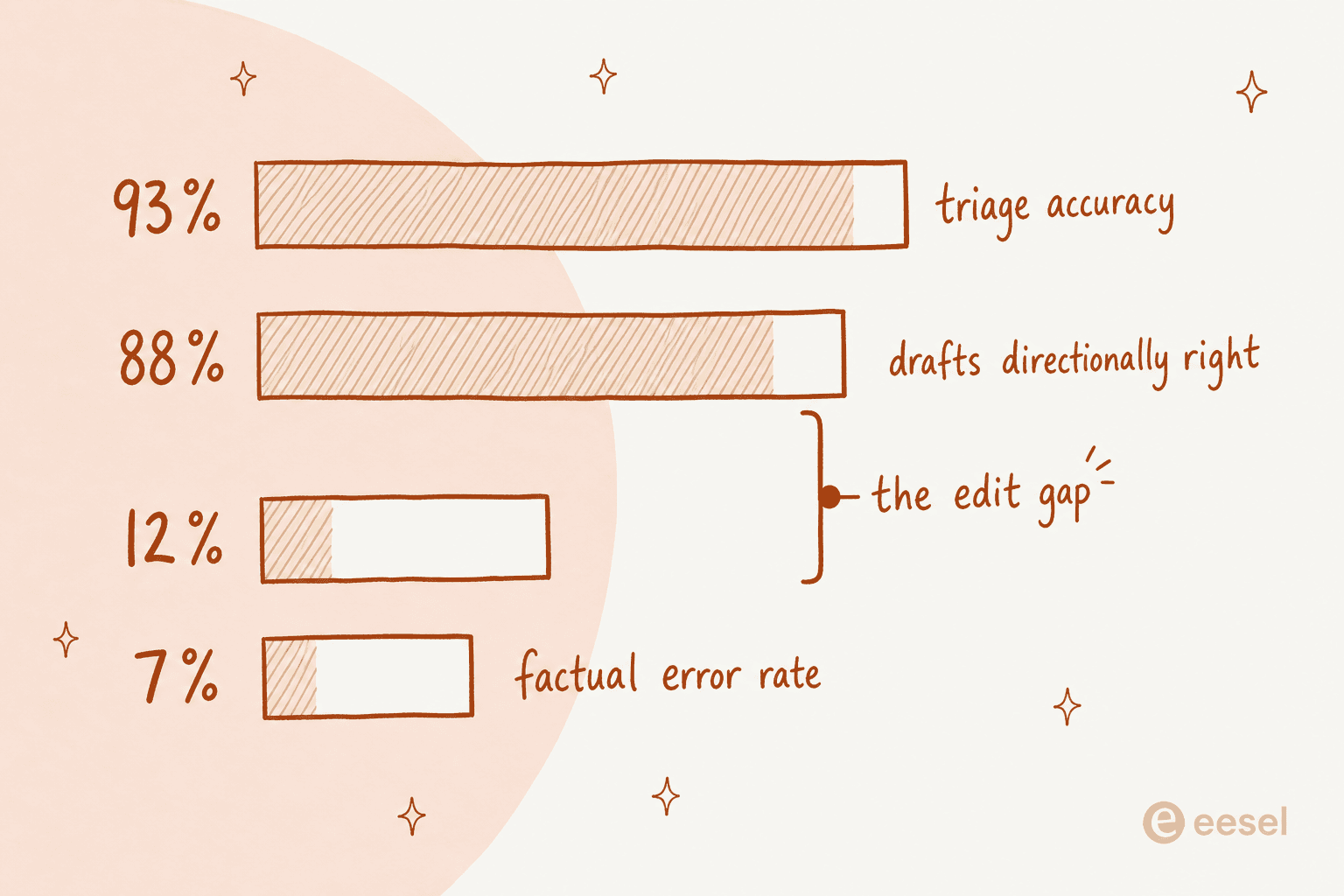
Sit with that gap between 88 and 12 for a second, it is worth to flag. The AI understood the ticket. It picked the right approach too, then drafted something the support agent agreed with, in principle. And still, that same agent rewrote it seven times out of eight anyway. Tone, a policy detail, a link, or the specific phrasing this brand uses for returns.
That gap stays invisible in every vendor accuracy stat I've ever read, because "accurate" and "sendable" is not really the same bar. It also explain a pattern that shows up constantly in support communities: teams turn the thing on, get burned, then quietly demote it back down:
"Auto-replies sounded great in theory, but once real tickets came in, it started giving confident but wrong answers. CSAT dipped quick. What worked better for us was using it as an agent assist, draft replies, summaries, tagging, not full auto mode."

Notice what they did there. They did not rip it out entirely. They moved it back one square, from driving to assisting, which is where it probably should have started in a first place. Same thread's original poster, they described the triage version of this:
"the ai kept misclassifying things like warranty claims as general inquiries... customers complained the responses felt too robotic and sometimes gave wrong info on returns. we rolled it back partially and now our agents are using it as an assist."
And a Freshdesk user, same thread, landed on the outcome that should worry any support manager, because it is basically the opposite of the thing you actually bought:
"We tested an ai integration in freshdesk and had almost the exact same experience. it worked for very simple tickets but anything slightly complex got misclassified. agents ended up spending more time fixing errors than before, so we had to rethink our approach."
Handle time went up. Not because the AI was bad at classifying tickets as such, but because nobody had measured the correction work, before flipping the switch.
Nobody is billing you for the same thing
Here is the part I did not expect to turn out the messiest of all, and honestly it is the thing I would check first, before anything else.
Every vendor in this category runs a usage meter. Almost none of them is metering the same event though. I pulled published pricing for nine of them, and the units, they just do not compare at all.
| Vendor | Billable unit | Published rate | What fires the meter |
|---|---|---|---|
| Zendesk | Automated resolution | Not published | Only when resolved with no escalation |
| Freshdesk | Freddy session | $0.49 ($49 per 100) | The bot's attempt, resolved or not |
| Gorgias | Automated interaction | $0.85 to $1.00 by plan | Each automated interaction |
| Salesforce | Conversation, or action | $2.00, or $0.10 | Flat per conversation, or per tool call |
| Ada | Resolution or conversation | Not published | Vendor's definition, quote only |
| Decagon | Conversation or resolution | Not published | Customer picks the model |
| Forethought | Unnamed "outcome" | Not published | Unit never stated on the page |
| Tidio | Lyro conversation | $0.70 to $0.78 | One reply from Lyro, prepaid |
| eesel | Ticket or chat session (1 credit) | From $299/mo for 500 credits | One ticket, any number of replies |
Three things jump right out of that table.
A "session" bills the attempt. A "resolution" bills the outcome. Same bot behaviour, different invoice. Freshdesk is quite explicit, a session is an interaction and not a guaranteed resolution, so you are paying for the try either way. Zendesk on the other hand defines its unit as billing only for requests "successfully resolved by the AI agent, without any escalation to a human agent". Sounds strictly better for the buyer, that is, until you notice Zendesk publishes no rate for it anywhere on the pricing page. So the cheaper-sounding unit ends up being exactly the one you cannot price.
Vendors use "resolution" and "interaction" interchangeably, and only one of them is on the bill. The Gorgias pricing page headline promises you "pay only when it resolves a conversation", which reads nice. But the meter printed in the plan comparison table, at $0.85 to $1.00, that is the automated interaction, not the resolution. So if you're comparing that $0.85 to $1.00 against someone else's per-resolution rate, you are really comparing two different events entirely.
Two or three meters can fire on one ticket. Gorgias can overrun on both tickets and automated interactions, same month. Tidio runs three meters at once, and a chat that Lyro handles alone burns one Lyro conversation, then it burns a billable conversation too, the moment a human steps in and replies.
  <div class="adcs-panel adcs-p1">
    <div class="adcs-row"><div class="adcs-name">eesel<span class="adcs-unit">500 credits, 1 per ticket</span></div><div class="adcs-num">$299</div></div>
    <div class="adcs-row"><div class="adcs-name">Freshdesk<span class="adcs-unit">500 sessions, all inside the included allowance</span></div><div class="adcs-num">$0</div></div>
    <div class="adcs-row"><div class="adcs-name">Tidio Lyro<span class="adcs-unit">500 prepaid Lyro conversations</span></div><div class="adcs-num">$350</div></div>
    <div class="adcs-row"><div class="adcs-name">Gorgias Advanced<span class="adcs-unit">500 inside the 530 bundled interactions</span></div><div class="adcs-num">$477</div></div>
    <div class="adcs-row"><div class="adcs-name">Salesforce Agentforce<span class="adcs-unit">500 conversations at $2.00</span></div><div class="adcs-num">$1,000</div></div>
    <div class="adcs-row"><div class="adcs-name">Zendesk<span class="adcs-unit">automated resolutions, no rate published</span></div><div class="adcs-na">Not published</div></div>
  </div>

  <div class="adcs-panel adcs-p2">
    <div class="adcs-row"><div class="adcs-name">eesel<span class="adcs-unit">2,000 tickets, inside the 2,500-credit plan</span></div><div class="adcs-num">$999</div></div>
    <div class="adcs-row"><div class="adcs-name">Freshdesk<span class="adcs-unit">1,500 sessions over the allowance, at $49 per 100</span></div><div class="adcs-num">$735</div></div>
    <div class="adcs-row"><div class="adcs-name">Gorgias Advanced<span class="adcs-unit">$477 bundle plus 1,470 at $0.85</span></div><div class="adcs-num">$1,727</div></div>
    <div class="adcs-row"><div class="adcs-name">Salesforce Agentforce<span class="adcs-unit">2,000 conversations at $2.00</span></div><div class="adcs-num">$4,000</div></div>
    <div class="adcs-row"><div class="adcs-name">Tidio Lyro<span class="adcs-unit">ladder stops at 1,000, above that is contact sales</span></div><div class="adcs-na">Not published</div></div>
    <div class="adcs-row"><div class="adcs-name">Zendesk<span class="adcs-unit">automated resolutions, no rate published</span></div><div class="adcs-na">Not published</div></div>
  </div>

  <div class="adcs-panel adcs-p3">
    <div class="adcs-row adcs-best"><div class="adcs-name">eesel<span class="adcs-unit">5,000 tickets, inside the 5,000-credit plan</span></div><div class="adcs-num">$1,899</div></div>
    <div class="adcs-row"><div class="adcs-name">Freshdesk<span class="adcs-unit">4,500 sessions over the allowance, at $49 per 100</span></div><div class="adcs-num">$2,205</div></div>
    <div class="adcs-row"><div class="adcs-name">Gorgias Advanced<span class="adcs-unit">$477 bundle plus 4,470 at $0.85</span></div><div class="adcs-num">$4,277</div></div>
    <div class="adcs-row"><div class="adcs-name">Salesforce Agentforce<span class="adcs-unit">5,000 conversations at $2.00</span></div><div class="adcs-num">$10,000</div></div>
    <div class="adcs-row"><div class="adcs-name">Tidio Lyro<span class="adcs-unit">ladder stops at 1,000, above that is contact sales</span></div><div class="adcs-na">Not published</div></div>
    <div class="adcs-row"><div class="adcs-name">Zendesk<span class="adcs-unit">automated resolutions, no rate published</span></div><div class="adcs-na">Not published</div></div>
  </div>

</div>
<div class="adcs-foot">Rates from each vendor's own pricing page, checked 27 July 2026. Freshdesk includes the first 500 Freddy sessions once per account on Growth, Pro and Enterprise. Gorgias figures use the Advanced plan's bundled AI component and its $0.85 per-interaction rate. Salesforce also sells a Flex Credits meter at $0.10 per action, which its own maths puts at $0.30 to $0.60 for the same exchange. Seat licences are excluded throughout.</div>
At 5,000 conversations the spread is roughly five times, cheapest published rate against the most expensive one. That is not a rounding difference, and not really a quality difference either, it is a difference in unit definition, plain and simple.
"Resolved" is a judgement call, and the vendor is the one getting paid
This is the bit that turned into a public argument, and honestly I think it is the single most important thing to get before you set any target on a dashboard.
Ada draws this line clearly, right on its own site: containment counts conversations that did not escalate, "including frustrated customers who gave up", while an automated resolution is supposed to pass relevance, accuracy and safety too. Two numbers, very different meaning, and it's the softer one that usually gets quoted around.
Decagon goes even further, and I respect them a lot for actually publishing this. Their own glossary admits that defining a resolution creates "gray areas and billing disputes", that billing becomes less predictable month to month, and that there's a vendor incentive to over-classify a conversation as resolved. Which is really the vendor telling you, straight up, that the meter has a thumb on it.
Support teams worked this one out themselves, on their own. When Zendesk moved over to automated-resolution pricing, the r/Zendesk thread got straight to the point:
"the subjective part in the resolutions. who knows if the bot is just leaving the customer hanging and marking it as a resolution... the bot just didn't help the customer in anyway. they got agitated and abandoned the chat and it was considered a resolution"
And here's the structural version of that same complaint, which is honestly the sharpest thing I read while researching all this:
"What is defined as a resolution isn't really fair. If it's an abandoned deflection, it shouldn't count. Mechanisms to understand that aren't well-tuned. This creates an incentive misalignment where, theoretically, creating abandonment would make sense as it would maximize 'resolutions' as currently defined."
I don't think any vendor is deliberately engineering abandonment, to be fair. But the incentive shape, it is real, and once you see it you cannot unsee it: you stop reading AI resolution rate as a quality metric anymore. It is a billing metric that just happens to look like one, and the same caution goes for every deflection number you get quoted too.
What I would track instead, which is also what we look at internally:
- Reopen rate on AI-handled tickets. A resolution that comes back within 48 hours, that was not a resolution. Hardest number of all to fake, this one.
- CSAT split by handler. Whole-queue CSAT, it hides an AI problem behind good human work. So split it out.
- Customer effort on escalated tickets. How many turns did someone burn with the bot, before finally reaching a person.
- Edit rate on drafts. Our 12% number, this one. If drafts keep getting rewritten, the AI is costing agent time rather than saving it. Fold it into your support QA review, not leave it to anecdote.
None of that is exotic really, most helpdesks could report it today if they wanted. It's just less flattering than deflection is, which is exactly why it never leads the slide.

Where AI driven support earns its place
I've been hard on this category for four section now, so let me be fair for a bit, the wins here are real, and they are specific too.
Spam and triage. That jewellery retailer's inbox was 22% spam, and the AI caught 100% of it, zero false positives. That's not a marginal gain, that's a whole fifth of the queue no human should ever had to see. Triage accuracy at 93% also beats what most tired humans manage by 5pm on a Friday, if we're honest.
Repetitive tier-1 volume. Gridwise, a gig-economy driver analytics app running on Zendesk, reported eesel resolving 73% of tier-1 requests within the first month, after already seeing results inside a 7-day trial. InDebted's internal IT helpdesk on Jira Service Management sits at 15% deflection with a 55% target, and that is really the more typical shape an honest rollout takes: real, incremental, not some press release.
Category-specific drafting. In that same trial, draft usefulness by category came out at 100% for product inquiries and refund status, 96.4% for warranty claims, 93.8% for returns and refunds. The AI was excellent on the narrow, well-documented questions, and only mediocre on everything else. Which is a scoping instruction, not really a verdict.
And the counterweight quote, from a team where this actually worked:
"Ada is able to take on the small stuff. So much of support is made up of monotonous, easy-to-answer inquiries... Ada handles the majority of those inquiries, so our team is able to handle the big stuff... it has cut our teams response time into a third of what it was pre-Ada."

Every single one of those wins has the same shape: narrow scope, high volume, well-documented answer. None of it is "point it at the whole queue and see what happens", not even close.
The control setting that decides whether this works
If you take just one operational thing away from this post, take this one. The deciding feature is not the model at all. It's whether you can tell the AI what it is not allowed to decide.
Clearest statement of this I've ever heard came from a CX lead at a DTC supplements brand, running Gorgias and Shopify, at about 7,000 tickets and 30,000 orders a month:
"The AI will never be able to answer 100% of the questions, but if it tries and just answers 'sorry I don't know this,' I cannot go and check all my 7,000 tickets to see if the AI actually made a good answer, then the point is a little bit gone. I need an AI who is only handling the tickets that it's confident to handle and all the other ones, leave them alone."
That right there was the deal-breaker on the call. Not accuracy, not price, not integrations, none of that. Just whether the AI could be told to stay in its lane or not. We did not have confidence-based routing sharp enough at that time, and we lost that deal, which is exactly the sort of thing that ends up changing how a product gets built.
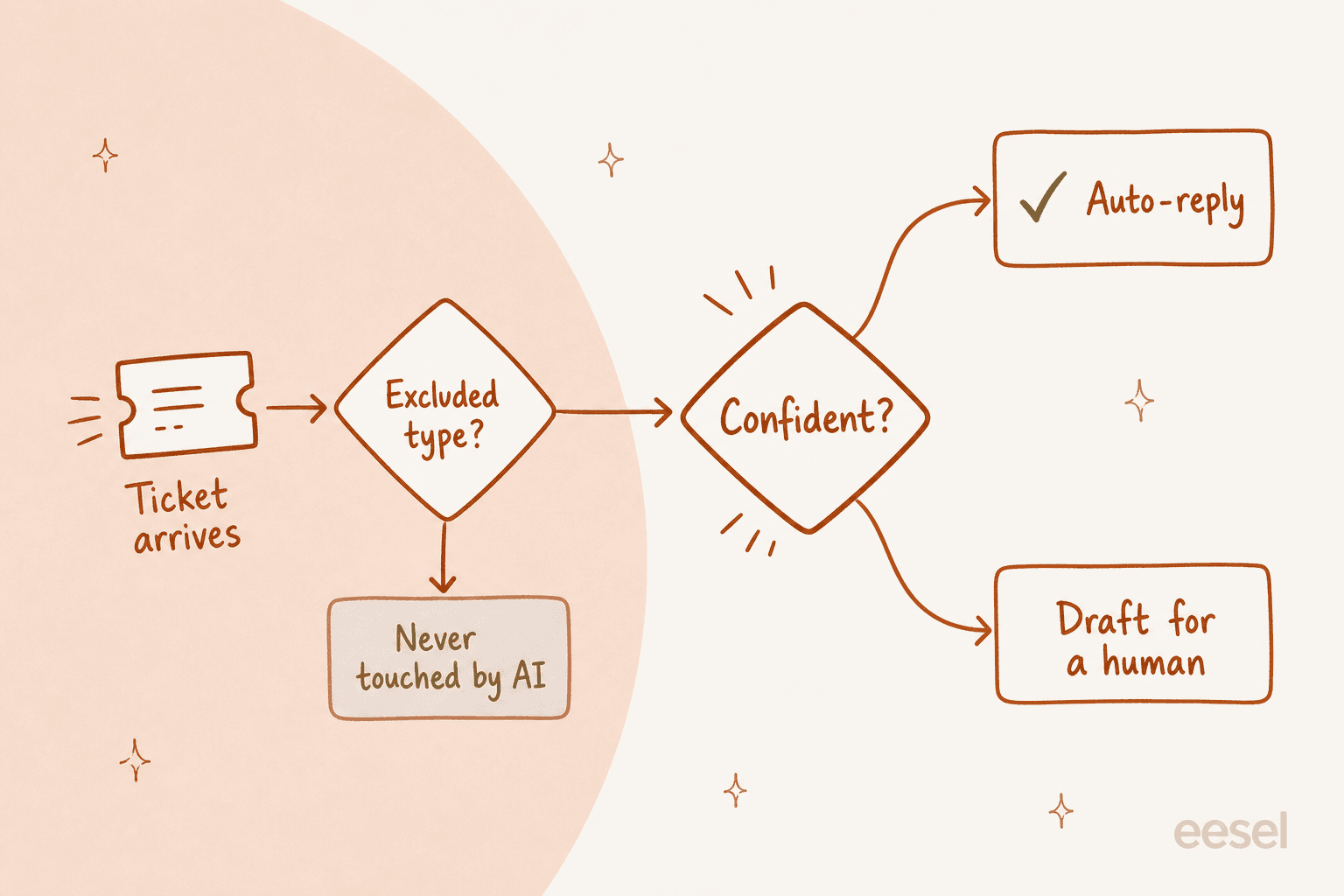
The gates that are worth demanding, in this order:
- Ticket-type exclusion. Billing disputes, legal, security, anything with refund over a threshold. One of our own admins, they put it plainly in a chat: "There are certain tickets I don't want to go through AI." That really should be a setting, not some feature request.
- A confidence threshold you can move. Below it, AI drafts instead of sending. Check whether the tool exposes an intent confidence threshold at all, before you buy, because plenty of them do not.
- Explicit invocation. Another evaluator asked for exactly this: "I want response only when I mention @eesel not during creation and every customer ticket message." Firing on every single ticket is a choice, and it should be your choice to make.
- A clean handoff. With full context carried over, so customer does not have to repeat themselves. Getting the handoff point right matters more than pushing the deflection number up.
- A feedback loop that actually trains. Rejecting a draft with a reason, that should change the next draft. That is what coaching an AI agent means, in practice.

The screenshot above, that is the version of this I use the most. Instead of digging through some settings panel, you just tell the agent the rule in a plain English and it rewrites its own instructions. In this case: when tagged in Zendesk, always draft a customer-facing reply, rather than leaving an internal note.
A rollout order that keeps the numbers honest
This is the sequence I'd run myself, and it's deliberately slower than what most onboarding docs give you.
- Simulate against historical tickets first. Before even one customer sees anything, run the agent over tickets you've already closed, and compare its answer against what your team actually sent. We built this step in because we've watched confident bots give wrong answers in production, and once was already enough for us.
- Draft mode for two weeks minimum. Track edit rate, not accuracy. If your agents keep rewriting most drafts, that's a knowledge problem you have, not a model problem, and no amount of auto-reply is going to fix it.
- Fix the knowledge before you widen the scope. A G2 reviewer on Agentforce put this failure mode well: "If your Content Version files (Knowledge Articles) haven't been updated since 2021, the AI agent will confidently give customers outdated information." Training on a current knowledge base, that's most of the actual work.
- Auto-reply on exactly one category. Pick the one with highest draft usefulness. Order status is usually the answer here. Watch reopens for a fortnight after.
- Widen one category at a time. Order tracking, then returns, then warranty. Ticket routing can widen faster than auto-reply does, because a bad route only costs minutes while a bad reply costs trust.
- Set your spend cap on day one. The same Agentforce review described what happens otherwise: if an agent "gets stuck in a loop or handles an unexpected surge in holiday traffic, your 'digital wallet' of credits can drain faster than anticipated". Caps are boring, but they do save weekends.

Step 2 is the one people skip most, and it's the one that actually pays off. Everything in this post that surprised me, it came out of reading what the AI would have said, right next to what we actually said.
Try eesel for AI driven customer service
We've been putting AI agents on live support queues for years by now, across deployments like Smava's fully automated German Zendesk agent at 100,000+ tickets a month, and Ecosa's 10,000+ across Zendesk, Slack and their website (case study). Most of what's in this post, it's scar tissue from those very rollouts.
eesel is built around two things I would insist on myself, if I was the one buying. First, the agent runs in draft mode until you're happy with it, so nothing reaches a customer before you've read what it would have said. Second, the unit is a ticket, not a resolution: 1 credit per ticket or chat session handled, however many replies it takes, on fixed monthly plans from $299 for 500 credits, with no seat fees and no platform fee. Nobody gets to reclassify an abandoned chat into some billable win, because there's simply nothing there to reclassify.
It plugs into Zendesk, Freshdesk, Gorgias, Front, Jira Service Management and Slack, and it reads the knowledge you already have sitting in Confluence, Notion, Google Docs and your past tickets too. Most teams get their first agent live in about 30 minutes. You get $50 of usage for free, no card needed, which at $0.40 a ticket works out to 125 real tickets to judge it on.

If you'd rather see it against your own queue than some demo one, start free and point it at last month's tickets. The edit rate alone will tell you more in one afternoon than any vendor benchmark ever will.