Botpress vs eesel AI for Help Scout: setup, control, and pricing compared

Rama Adi

Katelin Teen
Last edited September 24, 2026
Why I wrote this comparison
A B2B SaaS team on Help Scout recently asked Claude which AI reply tools work with Help Scout. The answer listed DocsBot, AGO, Twig and Botpress. It also noted, fairly, that Botpress's Help Scout page reads like generic marketing copy, and that a real setup would be custom work.
Then the team asked the questions every Help Scout buyer asks:
- How is it configured?
- Can we control the tone?
- Can we stop it replying to certain email addresses or topics?
- What analytics do we get on answered conversations?
- What does it cost?
- Is it a native fit for Help Scout, and how long is setup?
- Can it draft instead of sending?
I build eesel's integrations, so I know what our Help Scout app does under the marketing copy. I also read Botpress's docs, pricing and code repos to see what theirs does. This post answers each question for both tools, with sources. Where eesel has a limit, I say so.
The short version, side by side
| Question | Botpress | eesel AI |
|---|---|---|
| How it connects to Help Scout | Hub listing (v2.0.0) with no public docs. The realistic path is a custom build on webhooks and the Help Scout API | Native OAuth app. Connect, click Authorize in Help Scout, done |
| How it's configured | Build a bot in Studio or the TypeScript ADK. Wire the email loop yourself | Write an automation in plain language, or ask the dashboard chat to write it |
| What it learns from | Website crawl, uploaded files, tables. No Help Scout Docs connector or past-conversation import documented | Past Help Scout conversations, your Help Scout Docs site, and any other connected source |
| Tone control | Autonomous Node instructions plus a Policy Agent | Plain-language instructions, and you can correct a draft in chat and save it as a rule |
| Skip certain topics | Policy Agent, prompts and workflow branches you build | Write it in the automation, for example "skip anything about refunds" |
| Skip certain senders | No setting. Add your own condition in the workflow | No hard blocklist. Tag the sender with a Help Scout Workflow, then tell eesel to skip that tag |
| Draft vs auto-send | Whichever Help Scout API call you build | Two separate actions. Drafts run on their own; sends ask for approval by default |
| Analytics | Bot analytics in Studio. Team-level metrics on Team plan ($750/mo) | Reports page (tasks, trigger events, approvals, review times) plus a per-conversation Activity log |
| Pricing | Plus $150/mo (annual) for 250 conversations; Team $750/mo for 1,500 | From $299/mo for 500 credits (1 credit per conversation). No platform or seat fee |
| Setup time | My estimate: days to weeks of builder time for Help Scout email | Median about 29 minutes from connecting to the first live task (n=11) |
| Live chat | Strong: webchat, WhatsApp and other channels are core | Help Scout email and Beacon's email mode. Beacon live chat is not supported |
| Free start | Free plan with a small conversation allowance | 100 free credits, no card |
The rest of this post unpacks each row.
What Botpress is, and where Help Scout fits
Botpress is a platform for building AI agents. You design them in a visual Studio or in code, then deploy them to webchat, WhatsApp, Slack, email and other channels. It is flexible and well liked. It holds 4.5/5 from 512 reviews on G2, and the top praise tags are ease of use, features and integrations.
Help Scout is a small part of that picture. Here is what I found when I looked for the Help Scout piece:
- There is a Hub listing. Botpress's own docs repo registers a help-scout integration at version 2.0.0, "Maintained by Botpress Team."
- The listing doesn't say what it does. The Help Scout page talks about "ticket categorization, response suggestions, and follow-up reminders" in general terms. It names no actions or events. The Zendesk listing, by contrast, lists concrete actions like creating tickets and routing to human agents.
- There is no doc page. The docs index has guides for Zendesk, Gmail and others, but none for Help Scout.
- The source isn't public. Botpress's open-source repo has Zendesk, Freshdesk and Gmail integrations. It has no Help Scout folder.
So you can't tell what the Help Scout integration does until you log in to Studio and install it. It may cover some of what you need. I can't confirm that from the outside, and neither can you before you commit.
Botpress's own positioning also points elsewhere. Its Desk FAQ says it "connects to Zendesk or Intercom with no migration required." Help Scout isn't named. And Botpress's blog post on Help Scout alternatives ranks Botpress Desk first, as a replacement for Help Scout.
That is a fair strategy for Botpress. It just means that if you want to keep Help Scout, you are off the paved road.
What eesel AI is, and how it fits Help Scout
eesel is an AI teammate you hire for a job. For support, that is an AI helpdesk teammate that works inside the tool your team already uses. The Help Scout integration is first-party. Replies and notes land inside the Help Scout conversation, not in a separate inbox.

It reads two Help Scout sources: your past conversations and your public Docs site. Every other source you connect, like Notion or your website, is also available to it. Then it acts on new conversations the way you tell it to. It can draft a reply, send one, add a note, or update tags, status and assignment. The full list is in the Help Scout docs page.
How each one is configured
Botpress: you build the loop
For a Help Scout email team, the setup has three parts:
- Build the agent. You create a bot in Studio. An Autonomous Node holds the main instructions and picks the model.
- Give it knowledge. You add a website crawl, documents or tables to the Knowledge Base. There is no documented Help Scout Docs connector, so you would crawl your Docs site as a website. There is no documented import of past Help Scout conversations.
- Wire Help Scout. Either install the Hub integration and build on whatever it exposes, or use Botpress's generic Webhook integration. With the webhook route, a Help Scout webhook calls your bot. The bot writes an answer, then calls the Help Scout API to post a note, a draft or a reply.
That third step is where the work lives. You handle credentials, threading, loop prevention and errors. None of it is hard for a developer. All of it is yours to build and maintain.
Reviewers on G2 say the same thing in their own words:
"The initial setup was not easy, but also not impossible."

Learning curve is the top complaint tag on Botpress's G2 page, with 59 mentions. Steep learning curve adds 30 more, and poor documentation has 28.
eesel: connect, then describe the job
eesel's setup is two steps. First, connect. You click Connect on the Help Scout tile, then Authorize in Help Scout. Past conversations start syncing on their own. The Docs site syncs once you paste in its URL.
Second, create an automation. An automation is one Help Scout trigger plus instructions in plain language. There are two triggers: "a customer opens a new conversation" and "a customer sends a message." You can write the automation yourself, or ask the dashboard chat for it, for example "draft a reply to every new conversation, don't send it."

Connecting alone does nothing. Nothing runs until an automation exists. I like that default, because you never wake up to an AI that started answering customers on its own.
Can you control the tone?
Both tools, yes. The difference is who does the work.
On Botpress, tone lives in the Autonomous Node's instructions, which Botpress says can make the agent "align with your brand." On top of that, a Policy Agent can gate responses against "off-brand words," competitor mentions and sensitive topics. It is detailed control. It is also prompt engineering. One G2 reviewer noted it "sometimes requires additional prompt engineering and testing to ensure predictable behavior."
On eesel, tone is plain-language instructions. The docs give examples like "Keep replies to 2-3 short paragraphs," "Match the customer's language" and "Never use 'I apologize for any inconvenience'." Your core instructions apply under every automation. Automation instructions add to them and don't replace them.
The part support leads tend to like: you can correct a draft in chat. Say "shorter, and don't offer a discount," and it rewrites the draft. It then offers to save that correction as a standing rule. eesel also learns your voice from your past Help Scout conversations. There is no tone slider or dropdown. It is all written instructions.
Can you stop it replying to certain senders or topics?
This was the sharpest question in the prospect's list, so here is the precise answer.
Topics
Botpress: you build it. The Policy Agent can cover "sensitive topics, or off-limits information." You can also branch the workflow on a topic check. It works, and it's yours to set up and test.
eesel: you write it into the automation, for example "skip anything about refunds" or "don't touch billing disputes." Two layers apply the rule. First, a fast AI check runs before the agent wakes up. If it decides to skip, no task is created and no credit is used. Then the agent reads the same rule and applies it again.
Specific email addresses or domains
Neither tool has a ready-made sender blocklist for Help Scout.
Botpress: because you write the workflow, you can add a condition like "if the sender is on this list, stop." That is custom logic in a code card or expression, not a setting.
eesel: there is no hard blocklist setting for Help Scout. Two methods work today, and it's worth knowing both.
- Write it in the automation. For example, "skip messages sent from a @yourcompany.com address." The agent sees the sender and follows this. One Help Scout team on eesel has exactly this rule. On three internal emails, the agent took no action and logged that it was skipping per the rule. The catch: the fast pre-check can't see the sender address, so those conversations still reach the agent. Each one used a credit.
- Tag first, then skip the tag (the method I recommend). In Help Scout, create a Workflow with the condition "Customer Email ends with @yourcompany.com" and the action "Add Tag," for example
no-ai. Then tell eesel "skip anything tagged no-ai." eesel re-reads live tags from Help Scout before it decides, and the pre-check does see tags. So these usually get skipped before a task exists, and those skips use no credits.
To be plain about it: both methods are AI decisions, not a hard rule like a firewall. The tag method is the most dependable one today. If you need a guarantee that one address never gets an AI reply, don't let the AI send at all: use drafts only. That is the next section.
Draft or auto-send?
Botpress: there's no toggle for Help Scout. With a custom build, you pick which Help Scout API call your bot makes: a note, a draft, or a sent reply. You also own the testing and the loop prevention.
eesel: draft and send are two separate actions, each with its own permission. Every action has three settings: run on its own, ask for approval every time, or stay off.
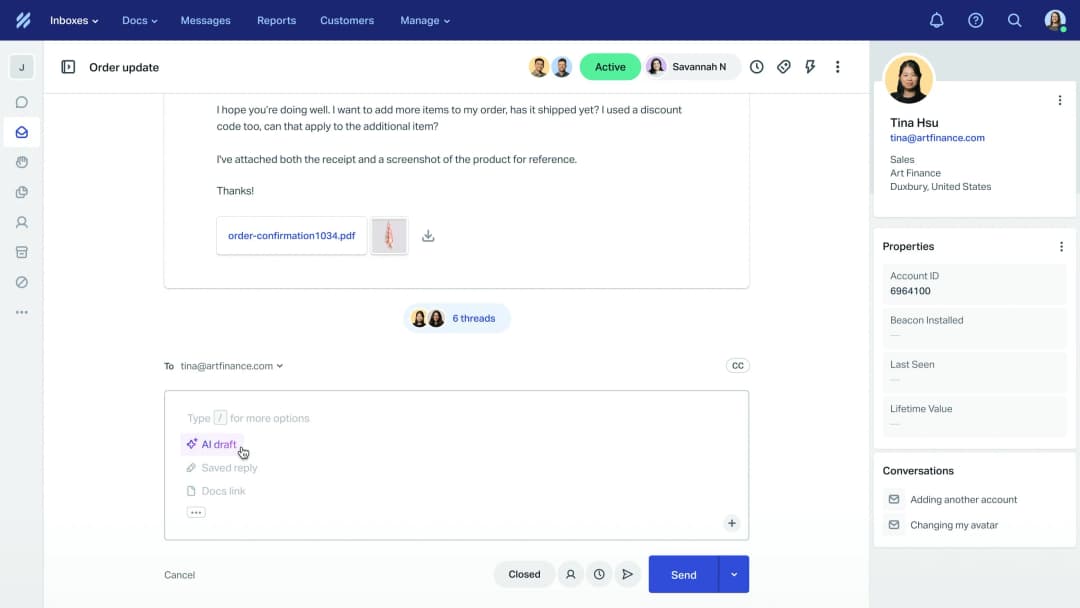
- Create draft reply saves the reply unsent in Help Scout's reply box. It runs on its own by default, since nothing reaches the customer. A teammate reviews it, edits it and sends it from Help Scout.
- Send reply always sends, and a sent reply can't be recalled. So it asks for approval by default. You approve from the dashboard, a Slack thread or the CLI.

You can also mix them by case. Leave Send on auto, and write "ask before replying to anything about refunds." The details are in the actions and approvals docs.
What teams actually do: over the last 30 days, Help Scout teams on eesel used the draft action about 15 times as often as the send action. Most start with drafts, and I'd start there too. Our Help Scout auto-reply guide walks through when to move to sending.
One honest quirk. Help Scout shows drafts and replies under the user who authorized the connection, labelled "You." There is no "eesel AI" label on them, because Help Scout doesn't offer one.
Analytics on answered conversations
Botpress: Studio has bot analytics, and there's an admin API for pulling analytics out. "Team analytics," broken down by team and agent, is on the Team plan only, at $750/month billed annually. These numbers describe Botpress conversations. Nothing appears inside Help Scout's own reports.
eesel: the Reports page shows total tasks, trigger events by type, approvals and rejections per action, approval efficiency, review times and the approval trend over time. The Activity page shows each conversation eesel touched, with:
- a link to the Help Scout conversation
- the trigger that fired
- the sources it searched
- each action it took, and who approved it
- its reasoning
You can also ask the agent for a written report, such as "analyze ticket trends," on demand or on a schedule.
What eesel doesn't have for Help Scout email today: a resolution-rate number or a CSAT score. If those are must-haves, keep using Help Scout's own reports for them. For more on what to track, see our guide to AI customer service metrics.
Pricing
The two tools bill on different units, so let me lay out both.
Botpress
Botpress repriced on 14 May 2026. AI usage is now bundled, and billing is per conversation. Workspaces created before that date keep the old pricing.
| Plan | Annual billing | Monthly billing | Conversations included | Extra conversations |
|---|---|---|---|---|
| Free | $0 | $0 | 25 (pricing page) or 100 (May blog) | None, hard cap |
| Plus | $150/mo | $189/mo | 250/mo | $65 per 100 |
| Team | $750/mo | $939/mo | 1,500/mo | $50 per 100 |
| Built For You | $1,650/mo | n/a | Custom | Custom |
| Enterprise | Custom | Custom | Custom | Custom |
Source: Botpress pricing and the May update post. The two pages disagree on the free allowance, so check before you plan around it.
A few rules worth knowing:
- The unit. A conversation is "any exchange with at least two messages from the end user in the billing month." Many Help Scout emails are a single customer message. By that definition, a one-message email may not count. I'd confirm how email threads are counted with Botpress before budgeting either way.
- Packs auto-recharge. At 95% of your quota, a pack of 100 is added. The pricing FAQ says this can't be turned off.
- Test chats count. Emulator conversations are billed too.
- Build cost is separate. None of this covers the builder time to wire up Help Scout. If you don't have that, "Built For You" is $1,650/month and Botpress builds and runs the agent.
Our Botpress pricing post has the longer history.
eesel
eesel is one fixed monthly price on the Teammate plan. One Help Scout conversation the agent works on uses one credit, however long it runs. There's no platform fee and no seat fee. You start with 100 free credits and no card. If you run out, the agent pauses until credits reset, or you can turn on overage at $0.80 per extra credit with a monthly cap you set. Unused credits don't roll over, and paying a year upfront gets you two months free.
| Help Scout conversations handled per month | eesel plan |
|---|---|
| Up to 100 | Free (100 credits) |
| 500 | $299/mo |
| 1,000 | $499/mo |
| 2,500 | $999/mo |
| 5,000 | $1,899/mo |
| More than 5,000 | Talk to us |
Two things to know so the bill never surprises you:
- A conversation that reaches the agent uses a credit. If the agent reads it and decides to skip, that's still one credit. Only a skip at the pre-check is free. This is why the tag method above matters.
- Size the plan to conversations, not replies. One credit covers one conversation however long it runs, so pick the batch that matches your monthly conversation count, and move up or down any time.
For a 500-conversation month, that's the $299 plan on eesel. On Botpress Plus it's $150/month annually, plus overage packs ($65 per 100) past 250 conversations, depending on how email threads are counted, plus the build. For more on budgeting, see AI customer service cost.
Native Help Scout fit and setup time
This is the question that decided it for the prospect. They didn't want hours or days of setup.
Botpress: Botpress says "most teams are live within days," with an offer to do the implementation for you. That line is on the Desk page, which is about Zendesk and Intercom. For Help Scout email, my estimate is a few days to a few weeks of builder or developer time. That covers the bot, the knowledge base, the webhook and API wiring, draft vs send logic, and testing edge cases like reply loops. It's doable. It's a project.
eesel: I measured it. Across the 11 Help Scout workspaces where I could time it, the median from connecting Help Scout to the first live task was about 29 minutes. Seven of the 11 were live within 35 minutes. The slow tail (up to about 61 hours) includes teams that connected and then waited for their first real customer email, so treat it as an upper bound on effort. It also doesn't tell you how many of those teams got help from us along the way.

If you'd rather set it up from a terminal or a coding agent, the same steps work as eesel login, eesel integrations connect help_scout and eesel automations.
Where eesel falls short on Help Scout
A fair comparison has to cover this side too.
- No Beacon live chat. eesel handles Help Scout conversations, including Beacon's email mode. It doesn't answer Beacon live chats, which run on a separate Help Scout API. If live chat is your main channel, Botpress's webchat is the stronger fit there.
- Sender rules are AI decisions. As covered above, there's no hard blocklist. Use drafts if you need a guarantee.
- Replies show as "You" in Help Scout, not as eesel.
- No resolution-rate or CSAT number for Help Scout email yet.
- Docs sync needs your URL. Past conversations sync automatically (closed ones from the last 30 days by default). Your Docs site only syncs once you enter its address.
A note on Twig AI and Sera
Twig AI still turns up in "AI for Help Scout" answers, so it's worth a quick check.
Twig no longer lists Help Scout as an integration. Its integrations page lists 18 connectors. The helpdesks are Zendesk, Intercom and Freshdesk. The Help Scout integration URL returns a 404. The "native Help Scout integration" line you may see comes from older directory listings.
The company has also shifted focus. Its homepage now leads with Sera, "your AI front desk," aimed at dental, medspa, auto and home-services businesses. The pricing page is titled "Sera AI Receptionist Pricing," with plans at $99, $499 and $1,499 a month. The older B2B support agent is still on the compare page, from $5 per ticket, demo only. Twig has 4.9/5 from 10 reviews on G2.
If Twig was on your shortlist for Help Scout, our Twig AI alternatives list has options that do connect. So does our roundup of the best AI for Help Scout.
Which should you pick?
Pick Botpress if:
- you want one bot-building platform across webchat, WhatsApp, Slack and more, and Help Scout is one channel among many
- you have developers who can build and maintain the Help Scout wiring
- you want deep control over flows, models and code, and the build time is worth it to you
- live chat on your site matters more than email replies in Help Scout
Botpress is a strong builder, and its G2 reviews back that up. For a team with developers and a multichannel plan, it's a fair choice. Our Botpress alternatives post covers similar builders.
Pick eesel if:
- your support runs through Help Scout email and you want to keep it that way
- you want AI drafts in the reply box this week, not after a build project
- you want tone, topics and draft vs send controlled in plain language, not code
- you want one fixed monthly price sized to your conversations, with no platform or seat fee
For most Help Scout teams asking the prospect's questions, that's eesel. The prospect's own list asked for native fit, no long setup and draft control. Those are the things eesel was built to do inside Help Scout. For more ways to add AI to your mailbox, see AI for Help Scout and adding AI to Help Scout.
Try eesel in your Help Scout mailbox
If you want AI replies in Help Scout without building a bot, eesel for Help Scout is the short path. Connect it, and it learns from your past conversations and Docs. Tell it "draft a reply to every new conversation," and the drafts start showing up in your reply box for your team to check and send.

You start with 100 free credits and no card, and paid plans start at $299/month for 500 credits. That's enough to run drafts on 100 real conversations in your mailbox and judge them yourself. Try eesel.
Frequently Asked Questions
Does Botpress integrate with Help Scout?
Botpress lists a Help Scout integration in its Hub, but there is no public documentation of what it does, and its source is not in Botpress's open-source integrations folder. For a Help Scout email team, the realistic path is a custom build on webhooks and the Help Scout API. See our Botpress review for the wider picture.
Botpress vs eesel AI for Help Scout: which is faster to set up?
eesel connects to Help Scout over OAuth from its Integrations page. Across 11 Help Scout workspaces I could measure, the median time from connecting to the first live task was about 29 minutes. A Botpress setup for Help Scout email means building the bot and wiring the email loop yourself, which I estimate at days of builder time, not minutes.
Can an AI in Help Scout skip emails from certain addresses?
Neither tool has a ready-made sender blocklist for Help Scout. On eesel, the dependable method is a Help Scout Workflow that tags mail from that address (for example no-ai), plus an automation instruction to skip that tag. It is an AI decision, not a hard rule. On Botpress you write the filter into your own workflow. More on tagging in Help Scout.
How much does an AI for Help Scout cost with Botpress or eesel?
Botpress plans start at $150/month billed annually (Plus, 250 conversations) or $750/month (Team, 1,500 conversations), per its pricing page. eesel's Teammate plan starts at $299/month for 500 credits, where 1 credit covers one conversation however long, with no platform or seat fee and 100 free credits to start, no card. The full maths is in our Botpress pricing breakdown.
Can the AI draft replies in Help Scout instead of sending them?
On eesel, yes. Create draft reply is its own action and saves the reply unsent in Help Scout's reply box, while Send reply asks for approval by default. On Botpress, draft vs send is whichever Help Scout API call you choose to build. Our Help Scout auto-reply guide covers the trade-offs.
Does Twig AI still work with Help Scout?
Twig's current integrations page lists Zendesk, Intercom and Freshdesk as its helpdesks, and its Help Scout page returns a 404. The company now leads with Sera, an AI front desk for appointment businesses. See our Twig AI alternatives for other options.


Article by
Rama Adi
Rama is a software engineer at eesel AI with two years of experience writing about B2B SaaS, AI tools, and customer support technology. Based in Bali, Indonesia, he brings a developer's perspective to product comparisons — cutting through marketing copy to what the integrations and APIs actually do.