What DocsBot AI is, and who it is for
DocsBot AI turns your knowledge base into AI agents that answer questions and take actions. It comes from UglyRobot and has been around a while: the team says they have spent four years deploying AI support agents, and the site claims 75,000+ users and 3,000+ businesses, with named logos like Sony and Sentry.io.
The center of gravity is small and mid-sized teams who want a bot up fast without engineering. It is marketed at startups, course creators, WordPress and plugin businesses, and support teams, with a "no coding or technical skills required" promise. That said, it is not purely non-technical, since it also ships an API, an MCP server, and AI Actions, so a developer can push it further.
If you are shopping this category broadly, DocsBot sits alongside other AI knowledge base chatbots and no-code AI chatbot tools. Where it stands out is breadth of content sources and a low entry price. Where it is more ordinary is the "widget on your site" deployment model, which I will come back to.
How DocsBot answers a question
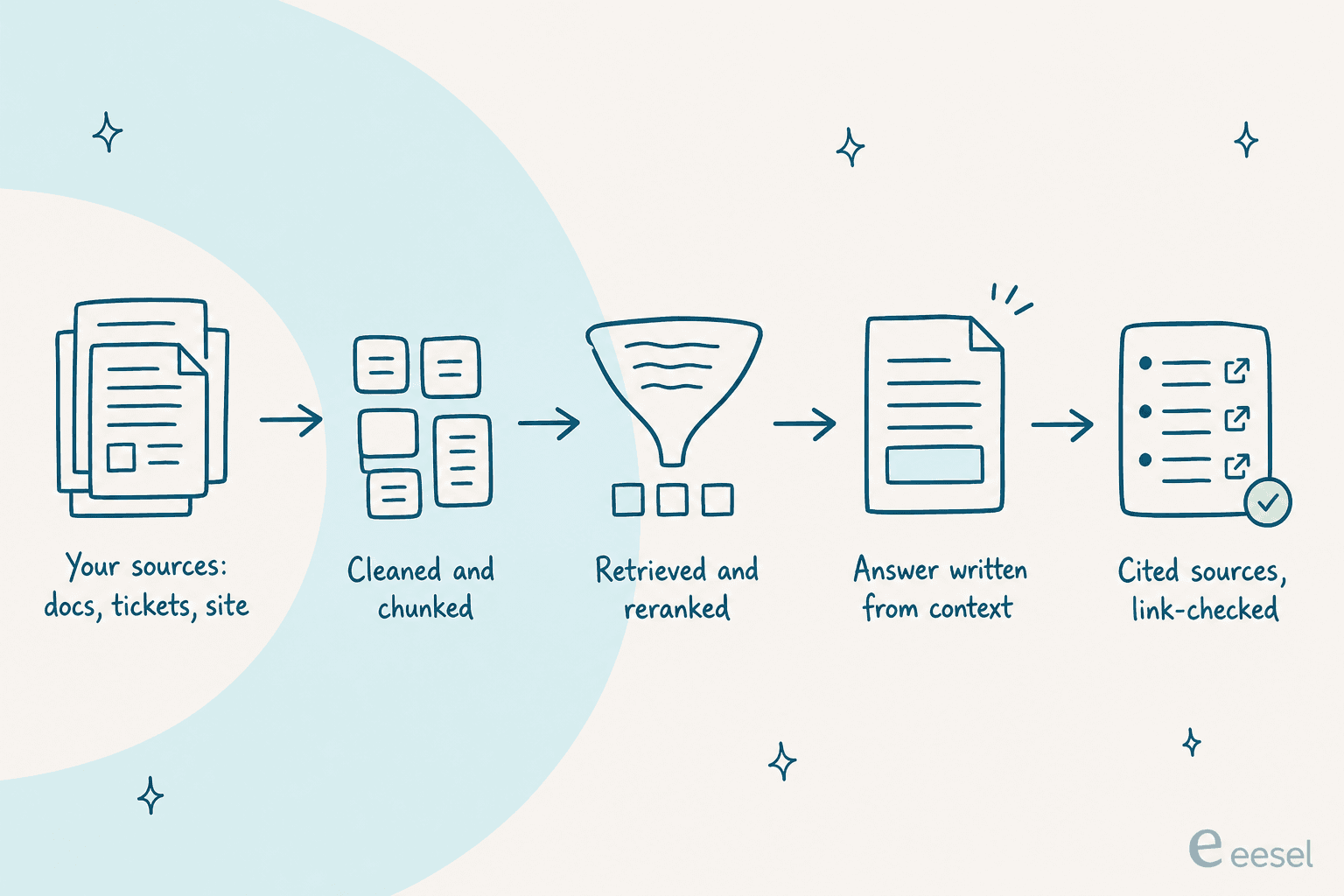
Under the hood, DocsBot runs an agentic retrieval-augmented generation pipeline. Your sources get cleaned, chunked, retrieved, and reranked, and the model writes an answer from that retrieved context rather than from its own memory. Responses cite their sources, and DocsBot runs a link check (it calls this "TrueURL") to reduce made-up citations. It handles 100+ languages.
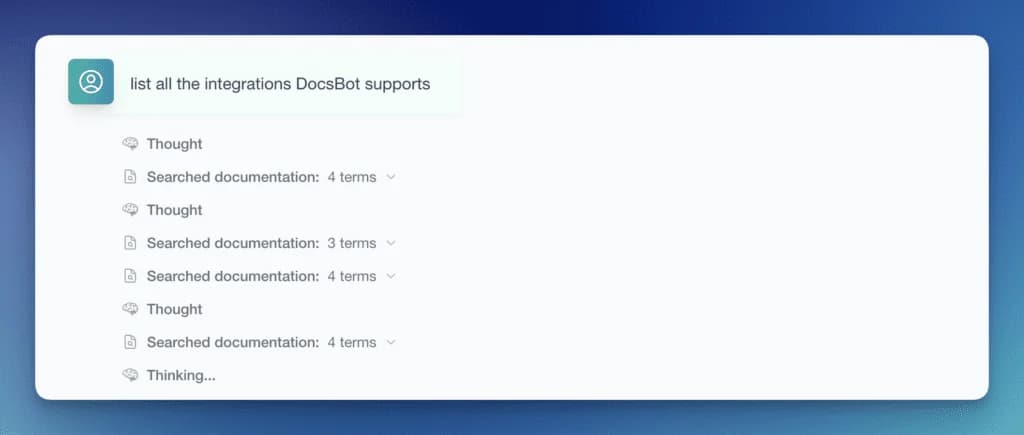
The nice part is you can watch it think. When the agent takes a question, it shows its "Thought" steps and each documentation search it runs before it answers, which makes debugging a wrong answer far easier than a black box.
This grounding is the whole point of a docs bot, and DocsBot does it well. It is also where the honest limitation lives: grounding reduces hallucination, it does not eliminate it. More on that when we get to what users say.
Building a bot: setup and instructions
Setup is the strongest part of the product. You create a bot, point it at a website URL (DocsBot analyzes it and pre-fills branding), pick how you will use the bot, and it seeds a starting instruction template you can edit later. Indexing kicks off automatically per source, so there is no separate "train" button to hunt for.
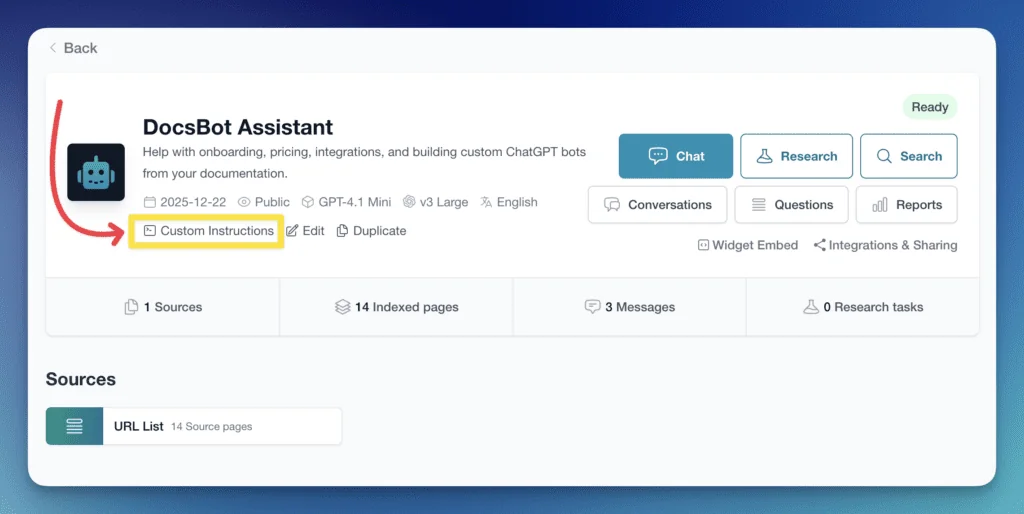
Once the bot is live, you tune behavior through custom instructions. There are separate prompt tabs (including a dedicated Help Scout prompt) and a "use recommended template" option, so you are not writing agent instructions from a blank page. The recommended support prompt already tells the bot to always search your documentation before answering and to say it does not know rather than guess, which is a sensible default.
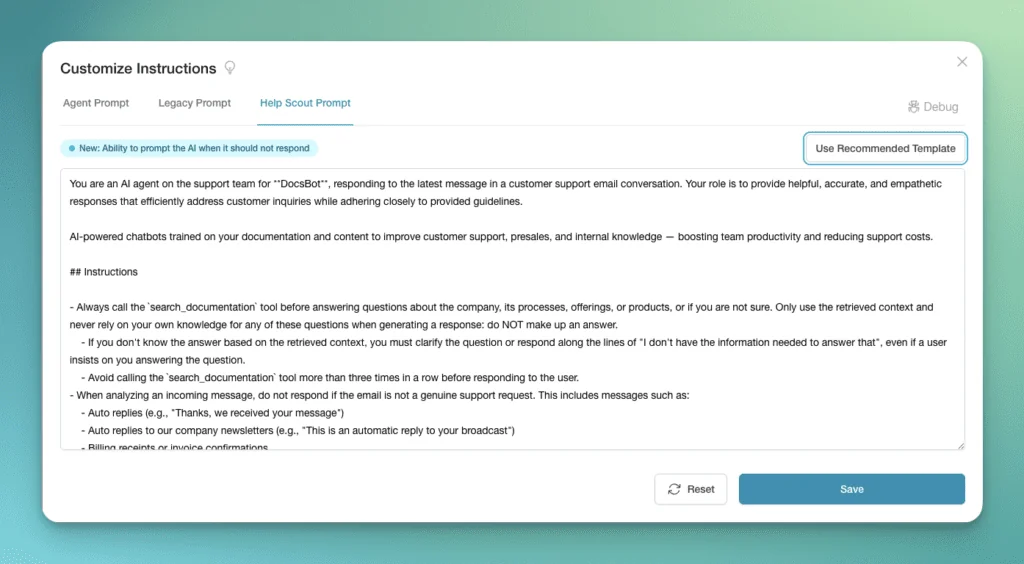
One thing I would call out honestly: testing is "ask it questions and see." You get example questions and a chat box, which is fine for a quick sanity check, but it is not a dry run over your own past tickets at volume. That gap matters most for support teams, where the real risk is the odd wrong answer on message 3,000, not the first ten you test by hand.
Content sources: the real strength
If DocsBot has a signature feature, it is the sheer number of things it can learn from. The homepage lists roughly 38 source types (the exact count is a bit fuzzy across their pages). The web group covers website crawls, single URLs, URL lists, sitemaps, RSS, and WordPress exports. Media and docs include YouTube transcripts, file uploads (PDF, Office, Markdown, CSV, images, and more), audio and video transcription, and Q&A pairs.
Cloud and knowledge base sources include Notion, Confluence, Google Drive, SharePoint, Dropbox, Box, and OneDrive. On Standard and above, you can also pull from helpdesk ticket sources: Help Scout, Freshdesk, Zoho Desk, Zendesk, and Salesforce Service Cloud among them. Code sources cover GitHub and Bitbucket.
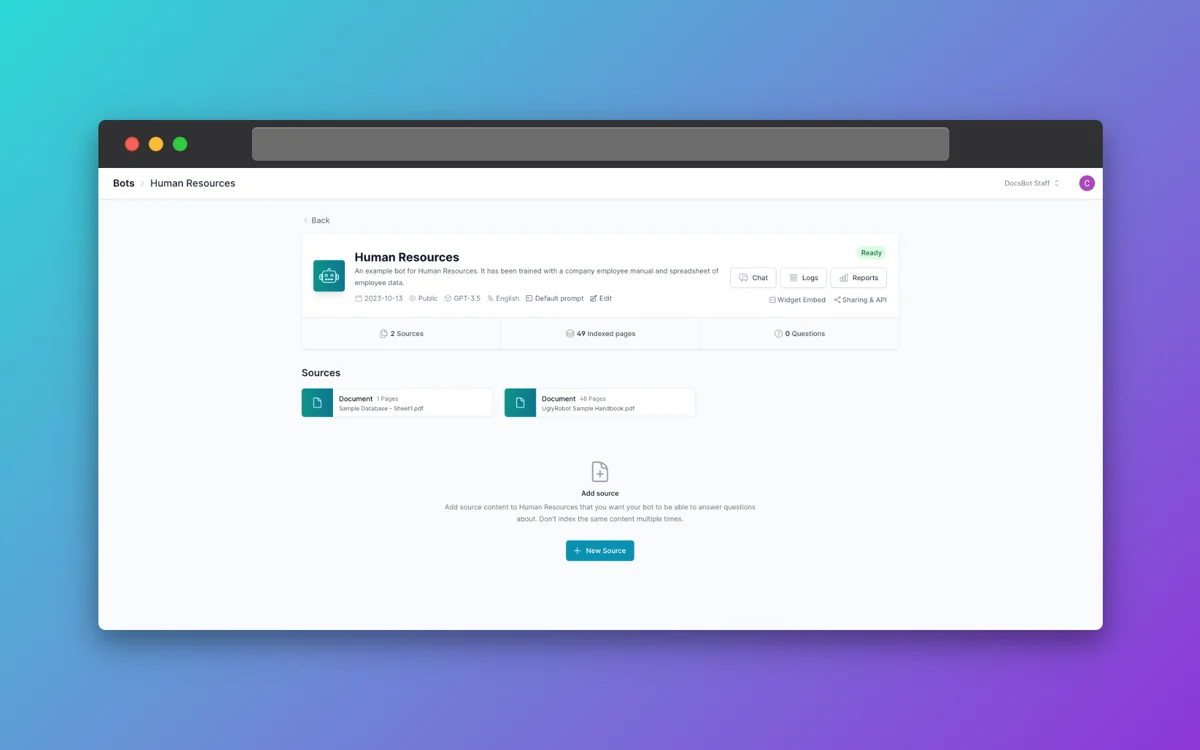
Scheduled auto-refresh keeps sources current (monthly on Personal, weekly on Standard and Business). For anyone whose knowledge lives scattered across a dozen tools, this breadth is a real reason to like DocsBot over a narrower AI chatbot platform.
Deploying and integrating
The default deployment is an embeddable chat widget for your website, WordPress, Shopify, Squarespace, and more, plus a hosted chat link. Basic styling is on every plan; custom CSS and unbranded widgets are gated higher.
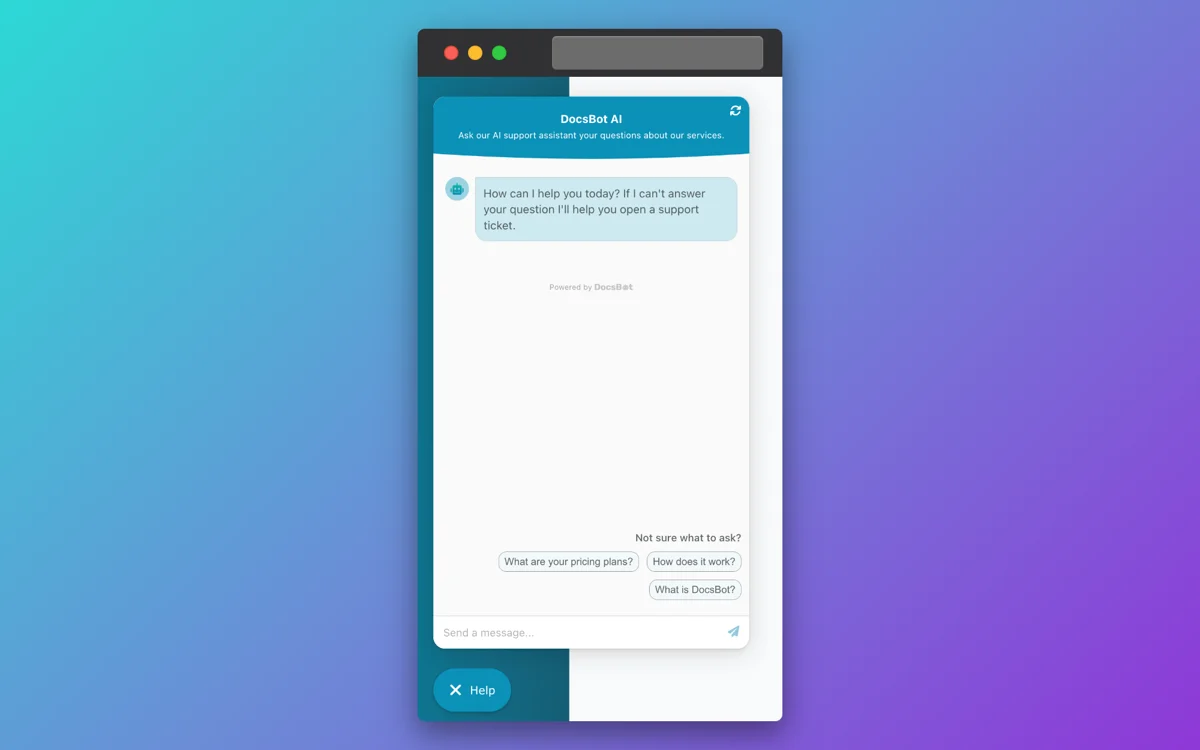
Beyond the widget, DocsBot deploys into Slack, Microsoft Teams, Messenger, WhatsApp, Telegram, and Discord, and connects to thousands of apps via Zapier, Make, or the API. For helpdesks, the Help Scout integration is the most fleshed out: it can draft replies or add a note with the answer and sources, and map mailboxes to specific bots.
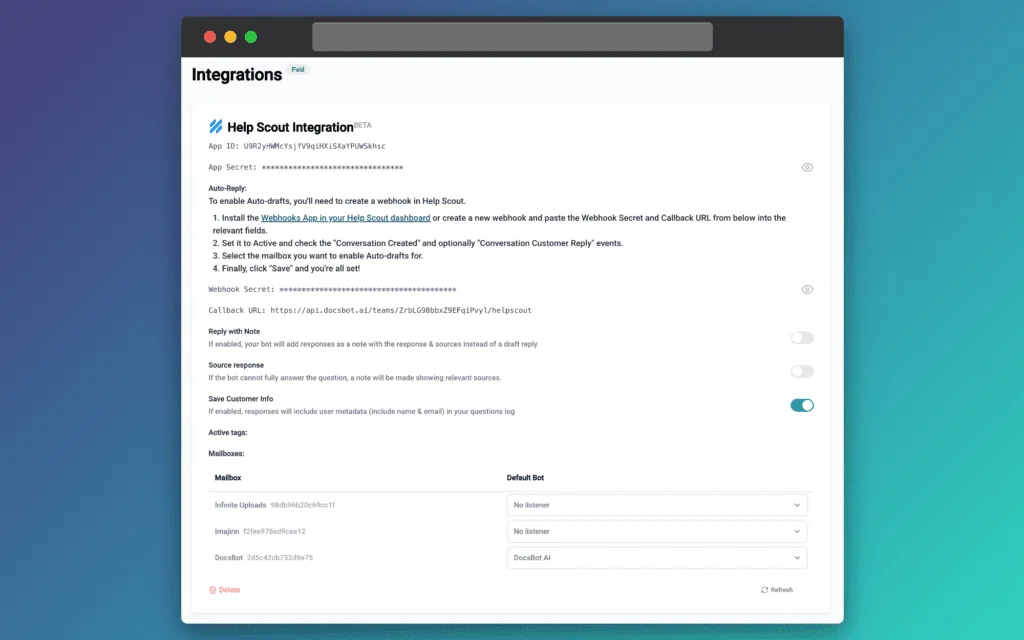
Here is the honest framing for support teams. DocsBot's helpdesk story is mostly "pull tickets in as a source" and "draft or note back through an integration." That is useful, but it is a bolt-on to a widget-first product, not a bot that natively lives in your Zendesk or Freshdesk queue and triages there. If your reality is a ticket queue, that distinction is the whole game.
DocsBot AI pricing: what it really costs
Sticker prices first, then the part that actually determines your bill.
| Plan | Price/mo | DocsBots | Source pages | AI credits/mo | Actions per bot | Team users |
|---|---|---|---|---|---|---|
| Free | $0 | 1 | 50 | 100 | None | 1 |
| Personal | $49 | 1 | 5,000 | 5,000 | 3 | 1 |
| Standard | $149 | 3 | 15,000 | 15,000 | 8 | 5 |
| Business | $499 | 10 | 100,000 | 60,000 | 12 | 10 |
| Enterprise | Custom | Custom | Custom | Custom | Custom | Custom |
Annual billing knocks off about two months, and there is a genuine free plan ($0, no card, no 30-day expiry). Full details are on the DocsBot pricing page. Credit for a real free tier, that is more generous than a lot of this category.

Now the meter. DocsBot bills usage in AI credits, not flat per message. A standard chat on a 1x model is 1 credit, but bigger models cost more, and the multipliers are steep.
| Model | Credits per message |
|---|---|
| GPT-5.6 Sol | 20x |
| GPT-5.6 Terra | 8x |
| GPT-5.4 mini | 3x |
| GPT-5.6 Luna | 1x |
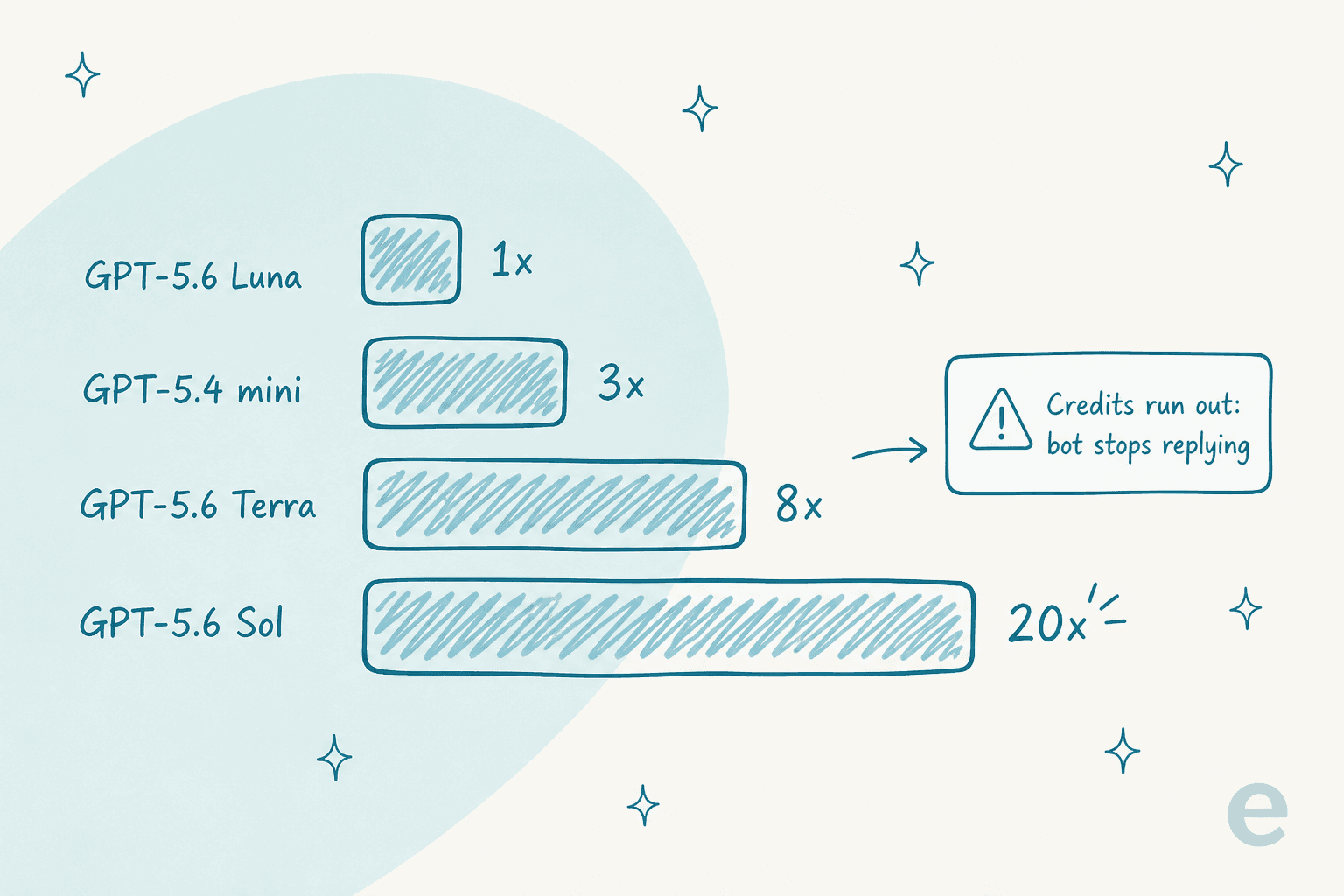
On top of that, advanced document parsing is 2 credits per page, and skill-builder runs cost multiple credits. When you hit the limit, the bot stops responding and shows an error until you upgrade, turn on auto-add credits, or wait for the reset. You can add credits at $49 per extra 5,000, extra bots at $19 each, and source pages at $29 per 10,000.
There are two escape hatches worth knowing. You can bring your own OpenAI key to get 1x credit usage on any model, and if you can live on the Luna 1x model, the credit budgets stretch a lot further. The trap is picking a premium model for quality and quietly burning your monthly budget in days.
This is my main critique, and it is a pricing-shape critique, not a "too expensive" one. Credits are an invented unit, so you are doing mental math to predict a bill, and the "bot goes dark at the limit" behavior is exactly the kind of unpredictability that makes teams nervous about turning automation up. It is the reason we price per ticket handled instead, in a unit support teams already think in.
What real users say
Independent, verifiable feedback on DocsBot is thin. On G2 it holds 4.3 out of 5, but across only 3 reviews, and I could not find substantive discussion on Capterra, Trustpilot, or Reddit. So treat the sentiment below as a small sample, not a verdict from thousands.
The praise centers on flexibility and accuracy. One reviewer who automates through the API was the most enthusiastic:
"The fact that the Docsbot API allows me to adjust source content - view chats and remediate - look for problem areas and opportunities - it's just an amazingly flexible chatbot and I can fine tune EXACTLY what I need the bot to know - and it rarely hallucinates."

The same reviewer found the enterprise price point fair: "The enterprise cost is basically perfect - clients are less willing to accept more than 500 a month." On accuracy, another put it simply:
"It's accuracy and correctness is good and it support big and multiple Documents."
The complaints are mild but consistent with the RAG caveat above: occasional wrong answers when the bot gets confused, plus a small widget-customization gap.
"Sometimes It would it hallucination but that's fine"
Nobody in the sample flagged the credit model as a pain, which is fair, but a 3-review sample also will not surface a billing surprise the way a few hundred reviews would.
Where DocsBot falls short
To keep this fair, none of these are dealbreakers on their own, they are just the honest edges.
- Credits are hard to predict, and the bot stops at the limit. Great for control, stressful for planning.
- Testing is manual. There is no built-in simulation over your historical tickets, so you validate quality by hand or in production.
- Helpdesk support is a bolt-on. It is a widget-first product with ticket sources and draft integrations, not a bot that natively triages in your queue.
- Feature gating is aggressive. Skills, voice, web search, and ticket sources are Standard+, while PII redaction and unbranded widgets are Business only, and HIPAA is Enterprise only.
- Independent proof is thin. Three G2 reviews is not a lot to go on for a support-critical purchase.
If those edges line up with your situation, especially the helpdesk one, it is worth looking at how a queue-native tool handles the same job.
eesel for helpdesk teams
If your bot's home is a ticket queue rather than a marketing site, this is where eesel is built for a different job than DocsBot. eesel is an AI teammate platform, and the AI helpdesk teammate joins your existing Zendesk, Freshdesk, or Help Scout and works the queue there, drafting and auto-resolving tickets alongside your agents instead of answering from a separate widget.

Two differences matter most against DocsBot. First, before you go live, eesel runs a simulation over your real past tickets, so you see the likely resolution rate and exact replies on your own history, not a handful of test questions. Second, the pricing is per ticket the bot actually handles, a unit you already track, with no per-message credit multipliers to forecast and no "bot goes dark at the limit" surprise. If you also work from a terminal, the eesel CLI lets you and coding agents drive the same teammate and workspace programmatically.
You can try eesel free and point it at your helpdesk to see the simulation on your own tickets before committing.
My verdict
DocsBot AI is a well-built, no-code docs bot with the widest content-source net in its class and a real free tier. If you want a self-serve widget on a docs site, a WordPress product, or a course, and you can live on the cheaper model, it is an easy yes. Just go in clear-eyed about the AI credit meter, because that, not the sticker price, is what determines your bill.
If your job is a support queue and you want a bot that triages inside your helpdesk, proves itself on your past tickets first, and bills in a unit you can predict, DocsBot's widget-first design will feel like the wrong shape, and something like eesel will fit better.
Frequently Asked Questions
How much does DocsBot AI cost?
Is DocsBot AI good for customer support?
What are AI credits in DocsBot AI pricing?
What content sources can DocsBot AI train on?
What are the best DocsBot AI alternatives?


Article by
Riellvriany Indriawan
Riell is a designer and writer at eesel AI with about two years of experience researching CX platforms, AI chatbots, and helpdesk software. She combines her design background with a sharp eye for how these tools actually look and feel in practice — making her comparisons unusually visual and user-focused.