

What is Wix Smart Chat?
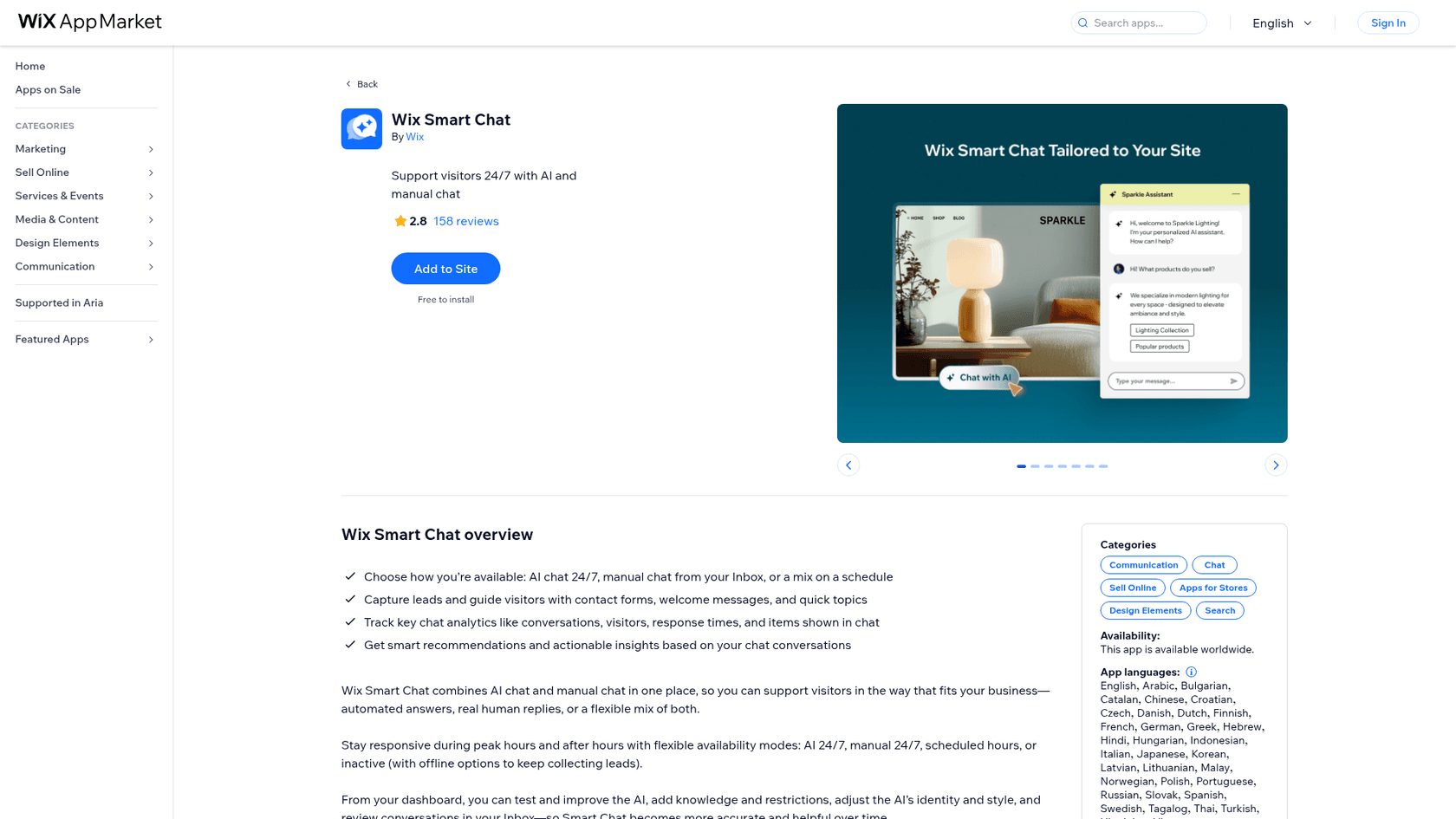
Wix Smart Chat is a free app built by Wix, listed in the Communication > Chat category of the App Market under the pitch "Support visitors 24/7 with AI and manual chat." It used to be called Wix AI Site Chat. Wix's overview article says the AI Site Chat dashboard turned into Smart Chat in place, training rules and all, and the newer piece is the manual chat that used to live in a separate app.
The bigger news is what it's replacing. Wix's migration article says Wix Chat can no longer be installed from the App Market and will stop getting updates and support. If you run a Wix site with chat, Smart Chat is where Wix is steering you, whether or not you want AI.
| Wix Smart Chat at a glance | |
|---|---|
| What it is | AI chat plus manual live chat in one Wix widget |
| Developer | Wix (in the Made by Wix collection) |
| Rating | 2.8 from 158 reviews on the Wix listing |
| Install price | Free |
| AI billing unit | Wix AI credits, shared across Wix AI tools |
| Manual chat | Free, answered from the Wix Inbox |
| Availability | Worldwide, chat interface in English only |
| HIPAA | Manual Chat yes, AI Chat no |
| Replaces | Wix AI Site Chat and Wix Chat |
How Wix Smart Chat works
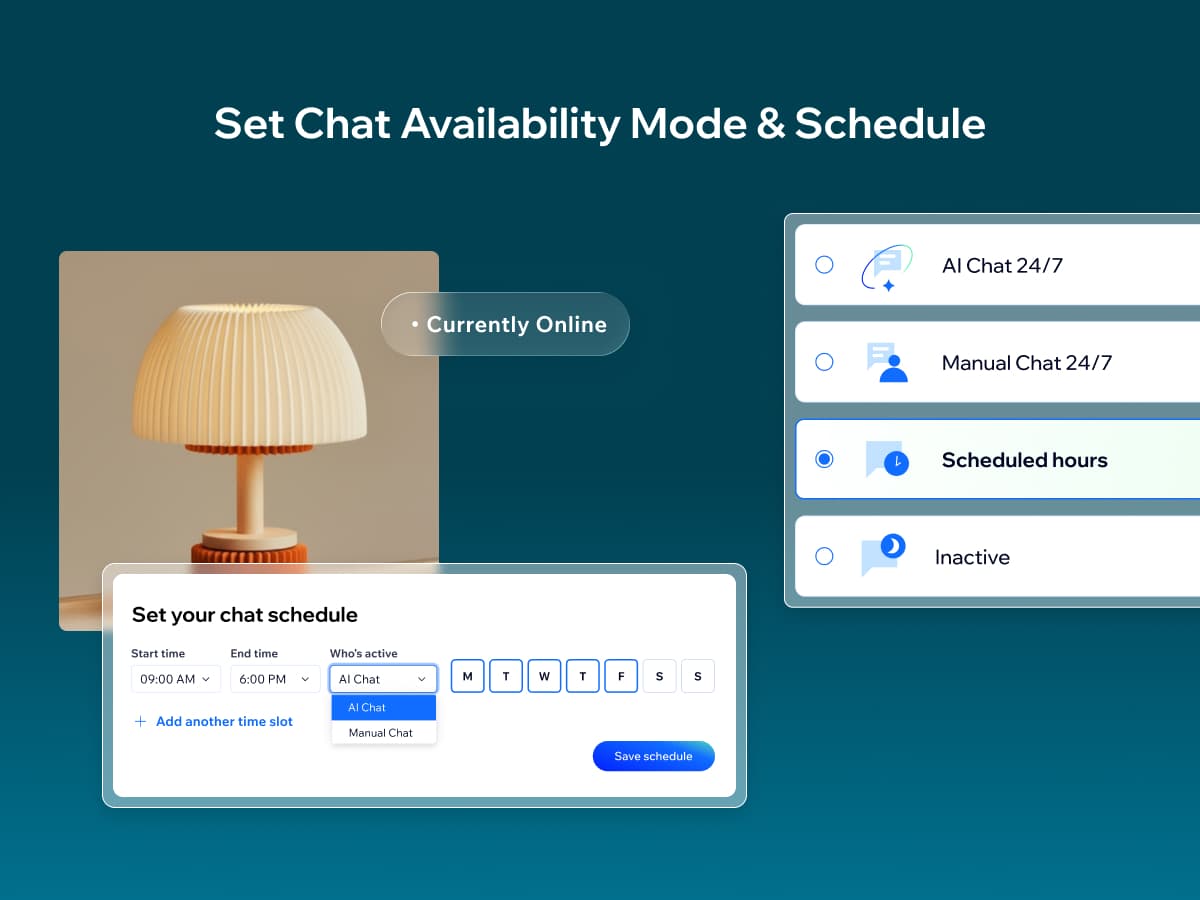
Everything starts with the availability mode, which decides who answers. There are four: AI Chat 24/7 (the default), Manual chat 24/7, Scheduled hours, and Inactive. The scheduled mode is the useful one. Per Wix's settings article, you set time slots by day and choose whether the AI or a person covers each one, so you can answer yourself from 9 to 6 and let the AI take the night.
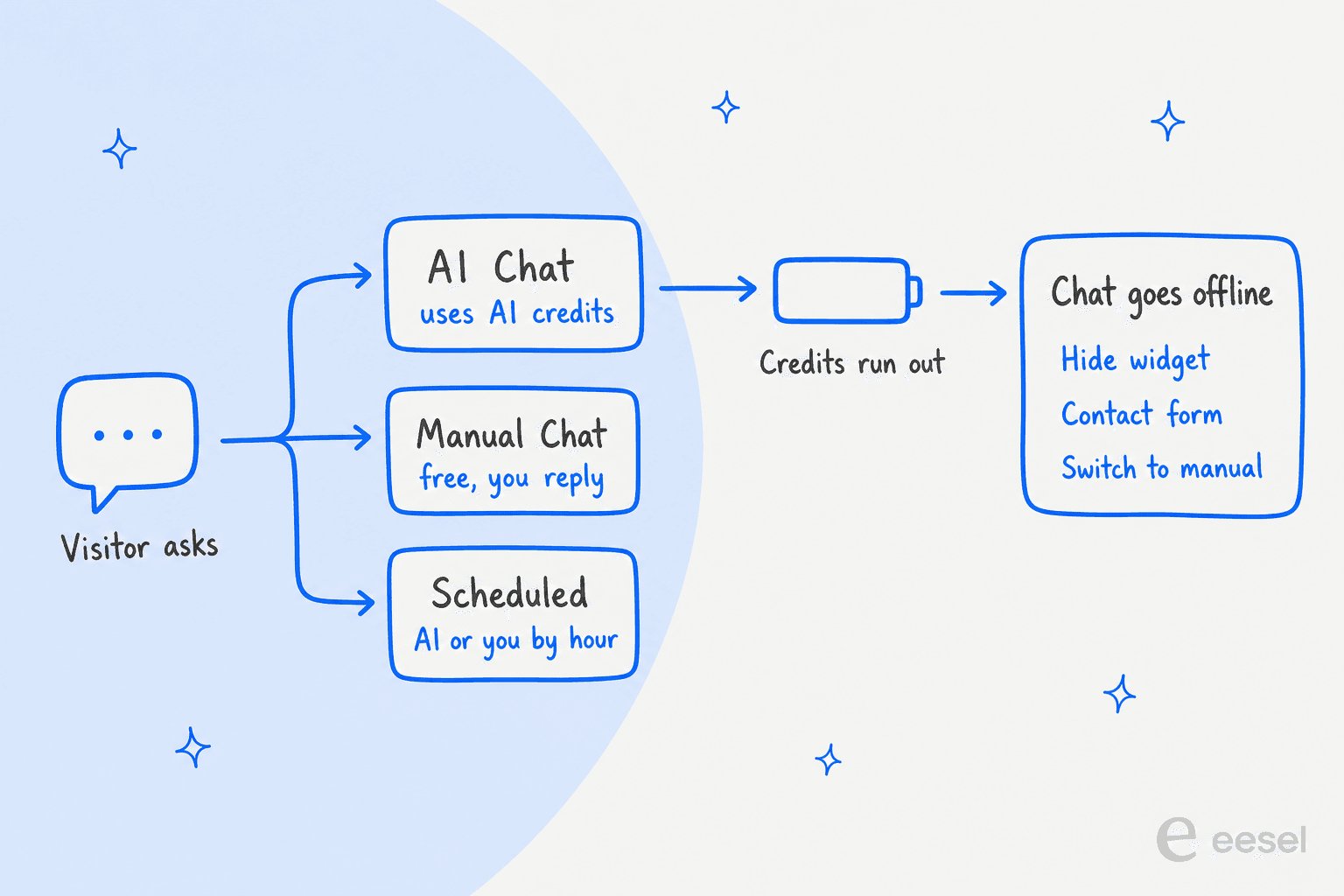
The other half of the setup is what happens when the chat goes offline. Wix takes it offline outside your scheduled hours, in Inactive mode, and when your AI credits run out. You pick the fallback: hide the widget, show a contact form, let visitors leave a message, or show a custom offline note. Wix's own tip for running out of credits is to switch to Manual chat 24/7 and answer by hand.
AI chat that reads your public site
The AI learns from what's published on your site. Wix's data coverage article lists the content it indexes: site pages, store products, blog posts, services, events, online programs and your training rules. On a store, it can suggest products and send links to pages, which is the main thing the listing's gallery shows off.
The limits matter more than the list. The AI can't index hidden pages, password-protected pages, member-only pages, or dynamic pages generated from collections. It may also skip pages built by some apps, Wix names Wix Restaurants, and third-party apps that don't expose their content. There's a Data coverage page in the dashboard that shows what got indexed, which I like, because it turns "why didn't it know that?" into something you can check.
Wix also states plainly that the AI "may generate and present inaccurate or misleading information" to visitors and that Wix assumes no liability for it. Every AI vendor has a line like this somewhere. Wix puts it on the overview page, and the reviews below suggest it isn't a formality.
Training rules and testing in the dashboard
You shape the AI with two kinds of training rules. If you've never trained a chatbot before, the idea is the same everywhere. Knowledge rules add facts that aren't on your site, typed in or uploaded as a PDF or DOCX (text only, images are ignored). Restriction rules block topics, and for each one you choose whether the AI says it can't answer or forwards the visitor to your inbox. The trial version caps you at 10 training rules.
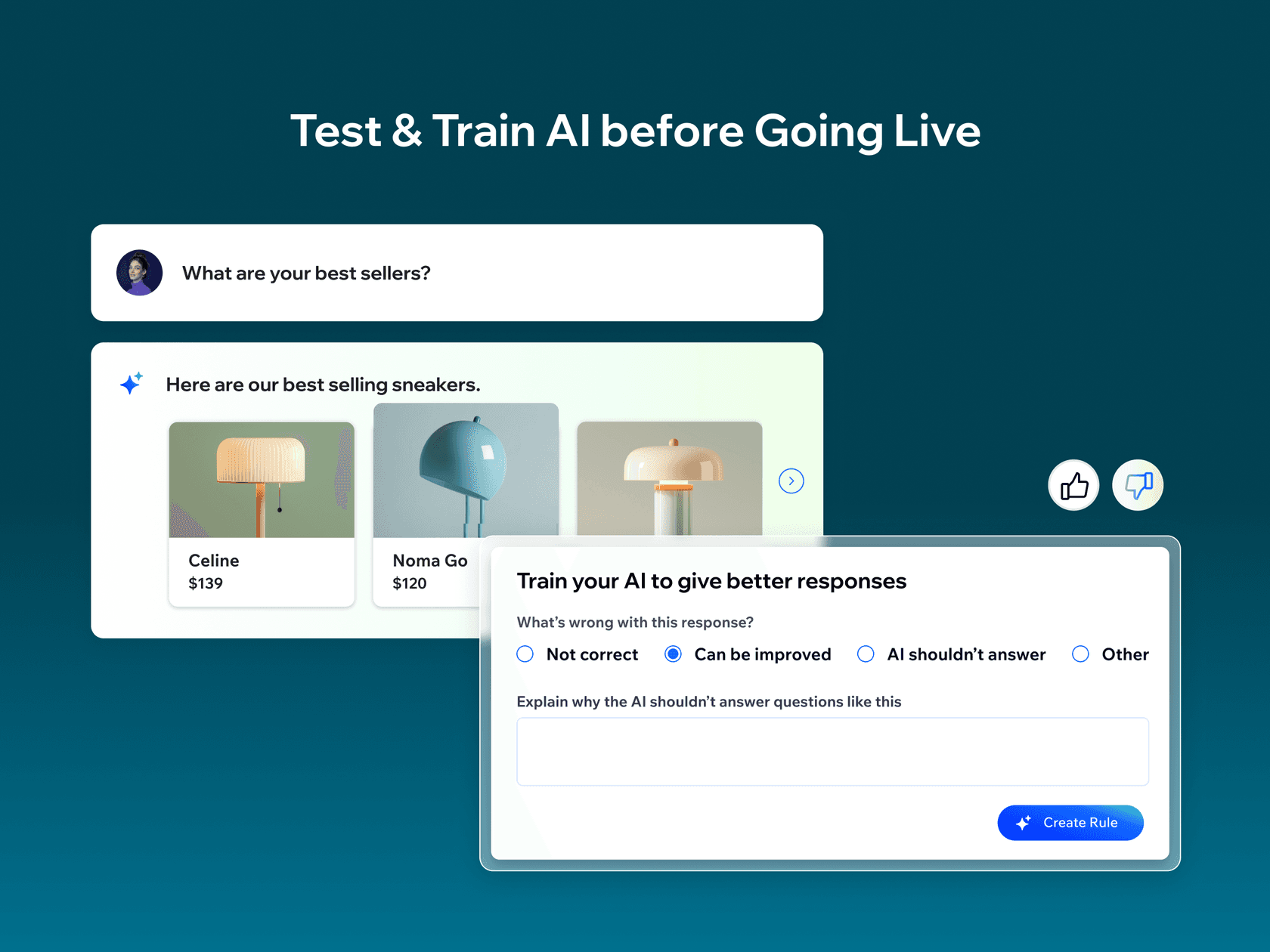
Testing happens in a private chat in your dashboard, and it doesn't use AI credits. You ask questions, mark answers good or bad, and a bad mark turns into a draft rule for you to approve. That loop is sensible. The catch is that it only tests the questions you think to ask, which is the gap I see in most chatbot setups, and one of the common chatbot problems I'd plan around. My guide to testing an AI agent explains why your real past conversations make a better test set than invented ones.
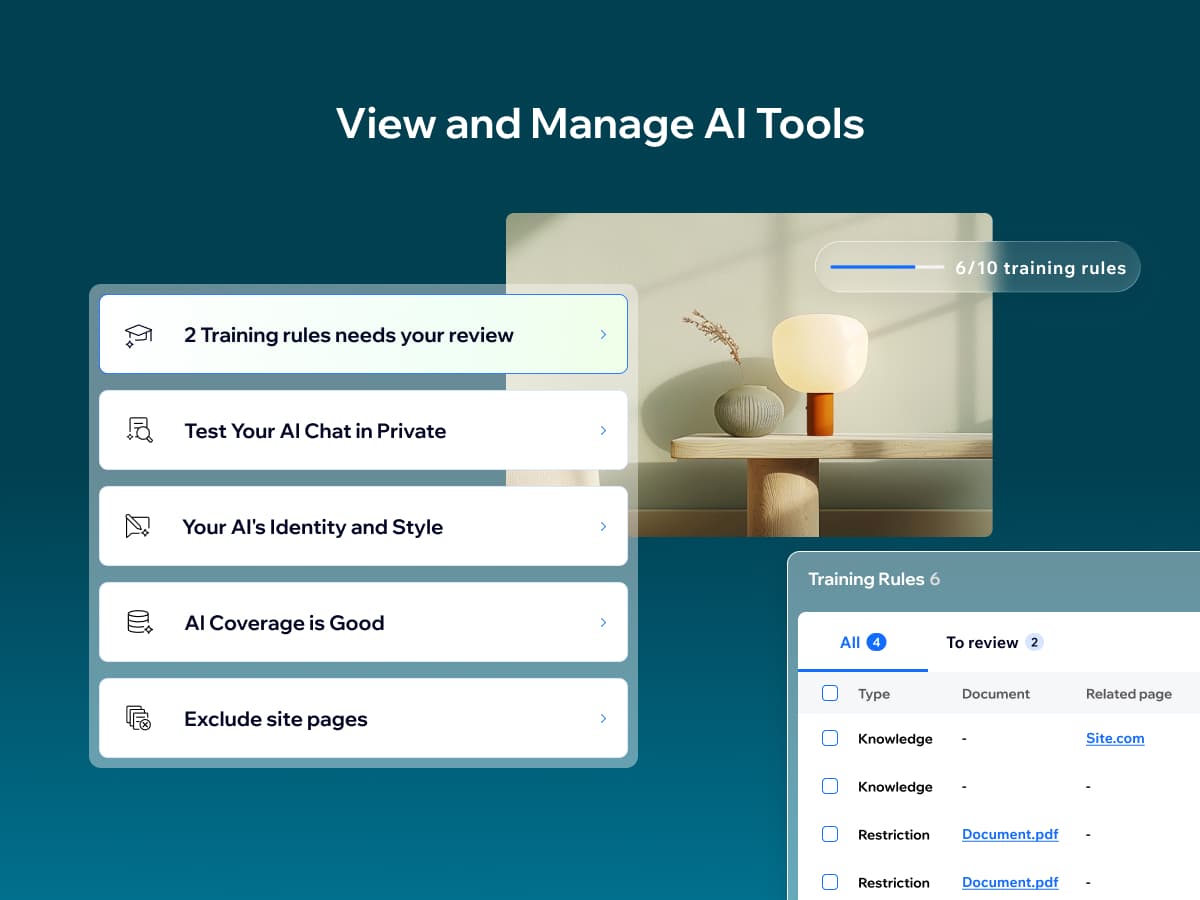
You can also exclude pages the AI shouldn't learn from, like an old promotion, and set the AI's identity and tone, which my piece on brand voice for AI agents goes into. That's handy for outdated pages. It does not help with the most common complaint in the reviews, which is the AI saying things that aren't on any page at all.
Manual chat in the Wix Inbox
The manual side lives in the Wix Inbox, the same place your forms and emails land. You can reply in real time, hand a conversation to a teammate, see which replies came from AI and which from a person, and send payment requests or coupons. You can show a contact form before or during the chat, and email is its one required field. Wix's request page says you can't add extra fields yet.
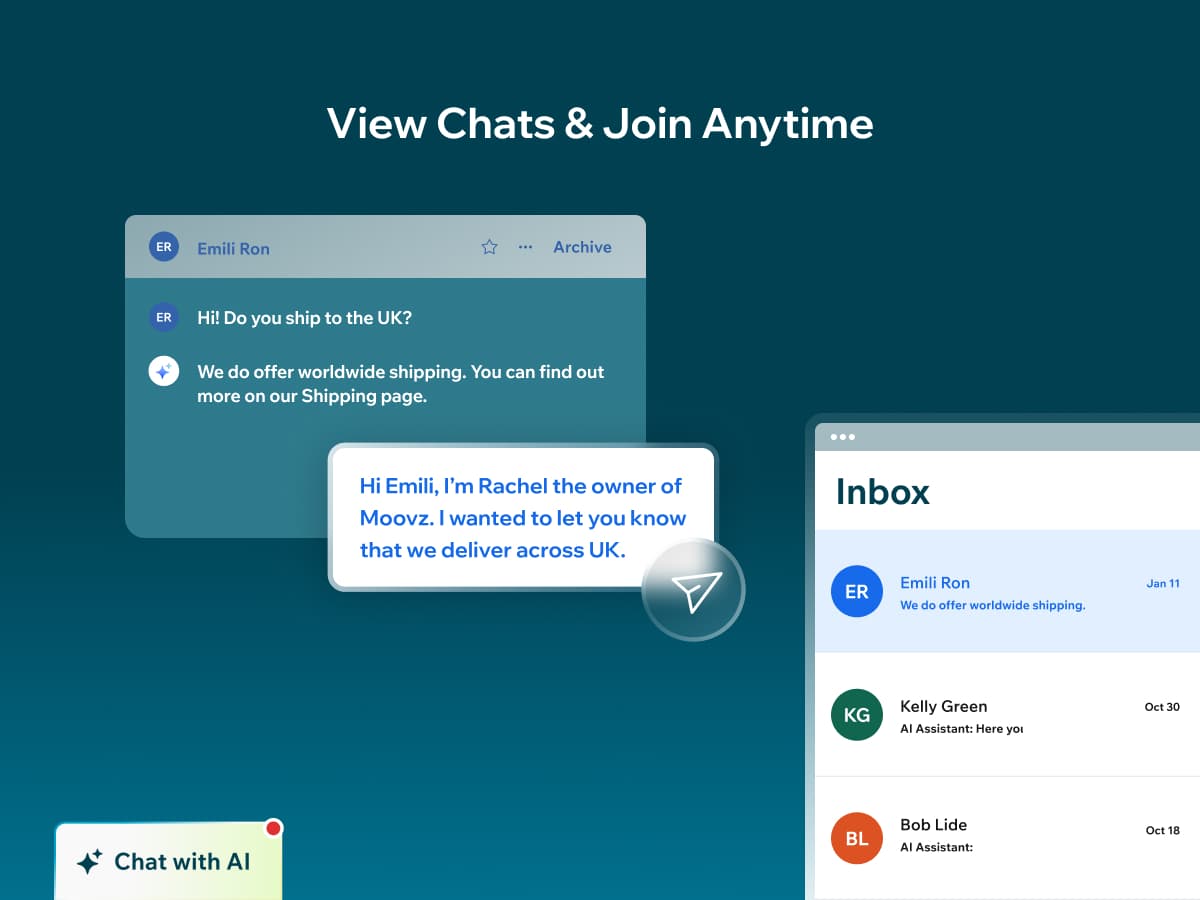
Two details trip people up. First, the "a visitor is on your site now" notifications that Wix Chat users loved only work when your mode includes Manual Chat. Wix's live visitors article says they don't fire in AI Chat 24/7. Second, the AI can now reply on WhatsApp Business messages that come into the Inbox, using the same credits as site chats. WhatsApp is the only connected channel today. If WhatsApp is your main channel, my roundup of the best WhatsApp chatbots goes further.
Wix Smart Chat pricing and AI credits
This is the part of Wix Smart Chat that changed most in 2026. It used to have its own subscription with a monthly conversation quota. Wix's AI credits article says that from June 10, monthly Smart Chat subscriptions stopped renewing and moved onto the AI credits included in your Wix site plan. Yearly subscribers were told the details would come by email.
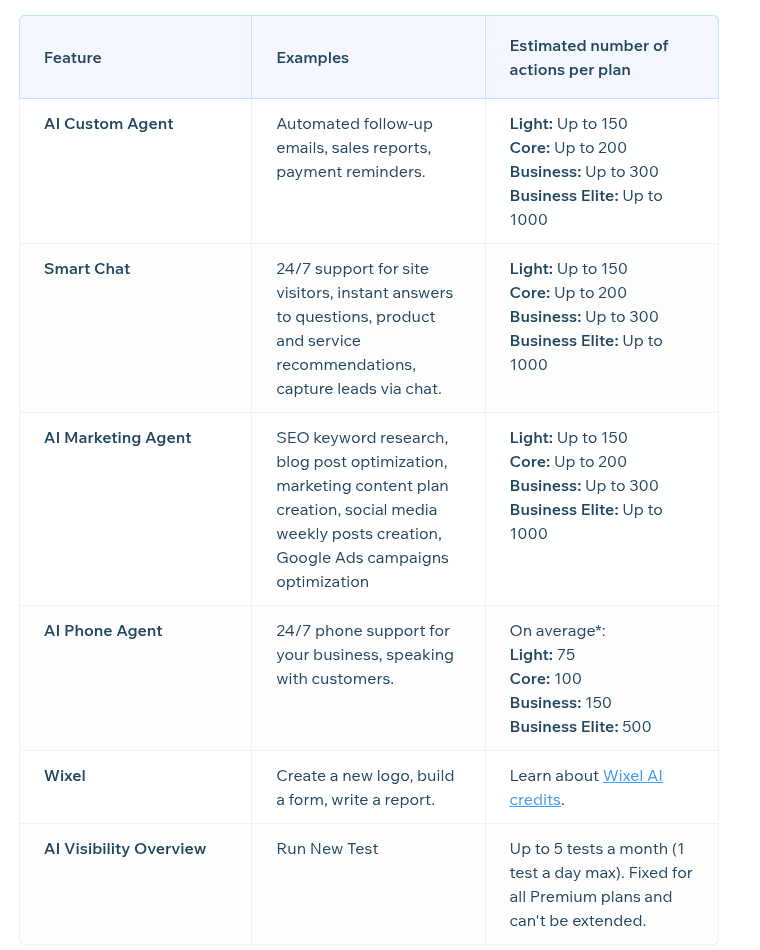
So the real price of Smart Chat's AI is the Wix plan you're on. Here's what Wix publishes, from its plans page (yearly billing, USD reference prices, your local price and tax can differ) and its About AI Credits table:
| Wix plan | Price (billed yearly) | Smart Chat AI actions a month (Wix estimate) | Plan price per AI action, if chat used them all |
|---|---|---|---|
| Free | $0 | Shares up to 120 credits a month (30 a day max); no chat estimate published | n/a |
| Light | $17/month | Up to 150 | about 11¢ |
| Core | $29/month | Up to 200 | about 15¢ |
| Business | $39/month | Up to 300 | about 13¢ |
| Business Elite | $159/month | Up to 1,000 | about 16¢ |
| Manual chat only | Any plan | Free, no credits used | Free |
| New install trial | Free | 50 conversations in total | Free |
On paper that's cheap. If you're already paying for Core to run your store, the AI chat costs nothing extra up to the allowance. Before you count on those numbers, read the fine print, because four things in it change the math:
- The allowance is shared. The same credits pay for the AI Custom Agent, the AI Marketing Agent, the AI Phone Agent and Wixel. Every blog post the marketing agent optimizes is a chat your visitors don't get.
- The numbers are estimates. Wix says the number of actions "is not guaranteed" and that the cost of each one depends on its length and complexity. Under the old plans, a conversation was one unit until 10 minutes of silence. Under credits, a long chat can cost more than a short one.
- There are no top-ups. Wix's FAQ says you can't buy extra AI credits on a Premium plan. When you run out, the chat goes offline until your credits reset on your plan's monthly date, or you upgrade.
- Unused credits expire. They reset every month and don't roll over.
One more wrinkle: Wix Studio sites get no AI credits at all, because Wix says Studio sites currently access AI features at no additional cost. If you build client sites on Studio, the credit math above doesn't apply to you.
Plug in your own numbers below to see which plan covers your chat volume once other AI tools take their share.
How does that compare with a dedicated tool? eesel's pricing page lists 500 credits for $299 a month, where a ticket or a chat is 1 credit however long it runs. Per chat, Wix is far cheaper, and I'd say so to anyone who asked. The question is what a wrong answer costs you, which is what the reviews are about. For a wider view of what chatbots cost, see my chatbot cost breakdown.
What 228 reviews say about Wix Smart Chat
The listing shows 158 reviews averaging 2.8. Its review feed returned 228, from July 2024 to October 19, 2026, so some reviews apparently don't count toward the displayed total. I read all 228. Wix replied to 191 of them, which is more attention than most app developers give their reviews.
The trend is the story. Sorting by year, the share of one-star reviews went from 8% in 2024 to 38% in 2025 to 73% of the 89 reviews posted in 2026. The average fell from 3.8 to 2.6 to 1.7.
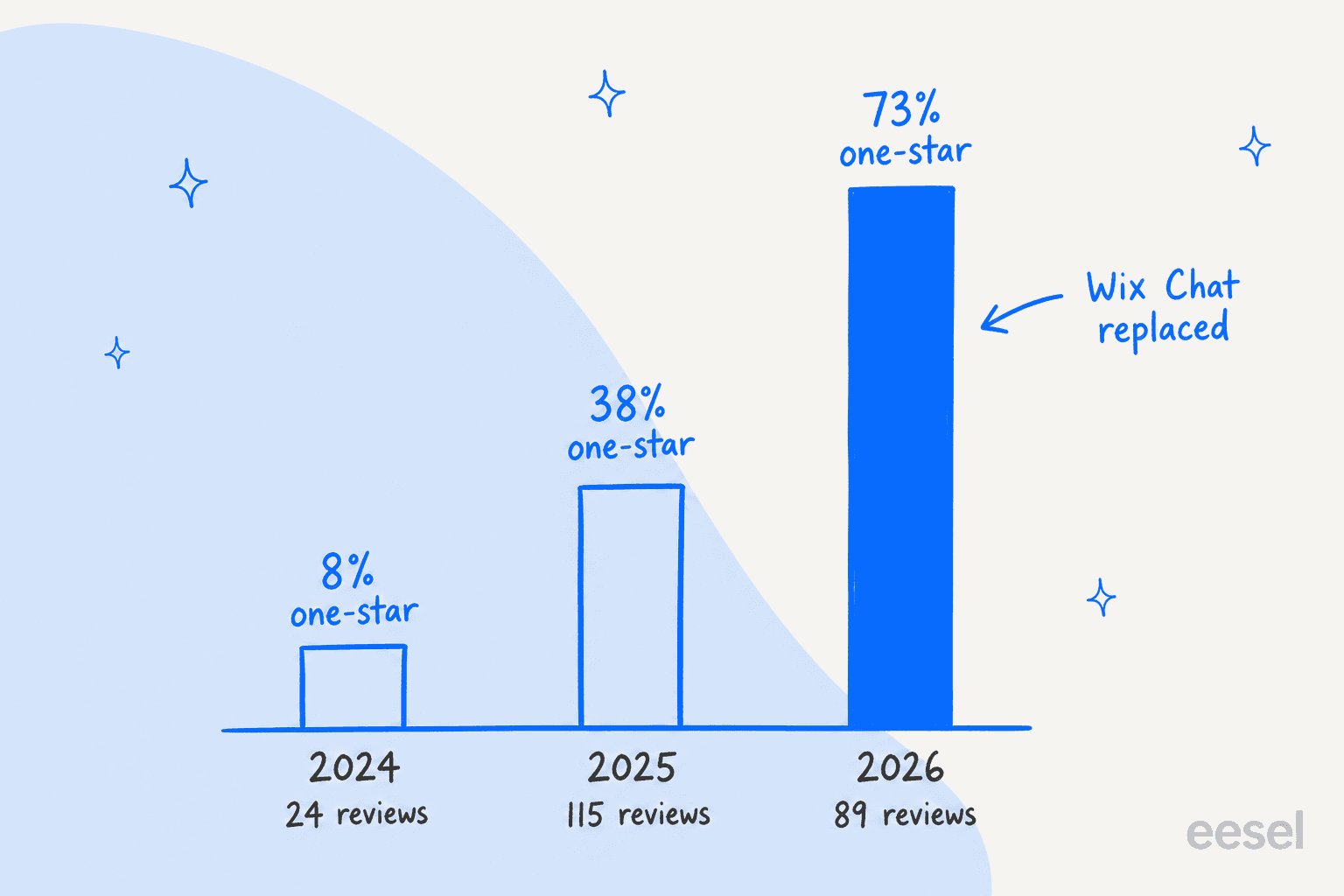
The 2026 spike lines up with Wix moving people off Wix Chat. Of the 87 reviews since March 2026, about a third mention the old Wix Chat by name or ask for it back. That's an important nuance: a good share of the anger is about a forced migration, not about the AI. The AI has its own problems, though, and they show up in the 2025 reviews too.
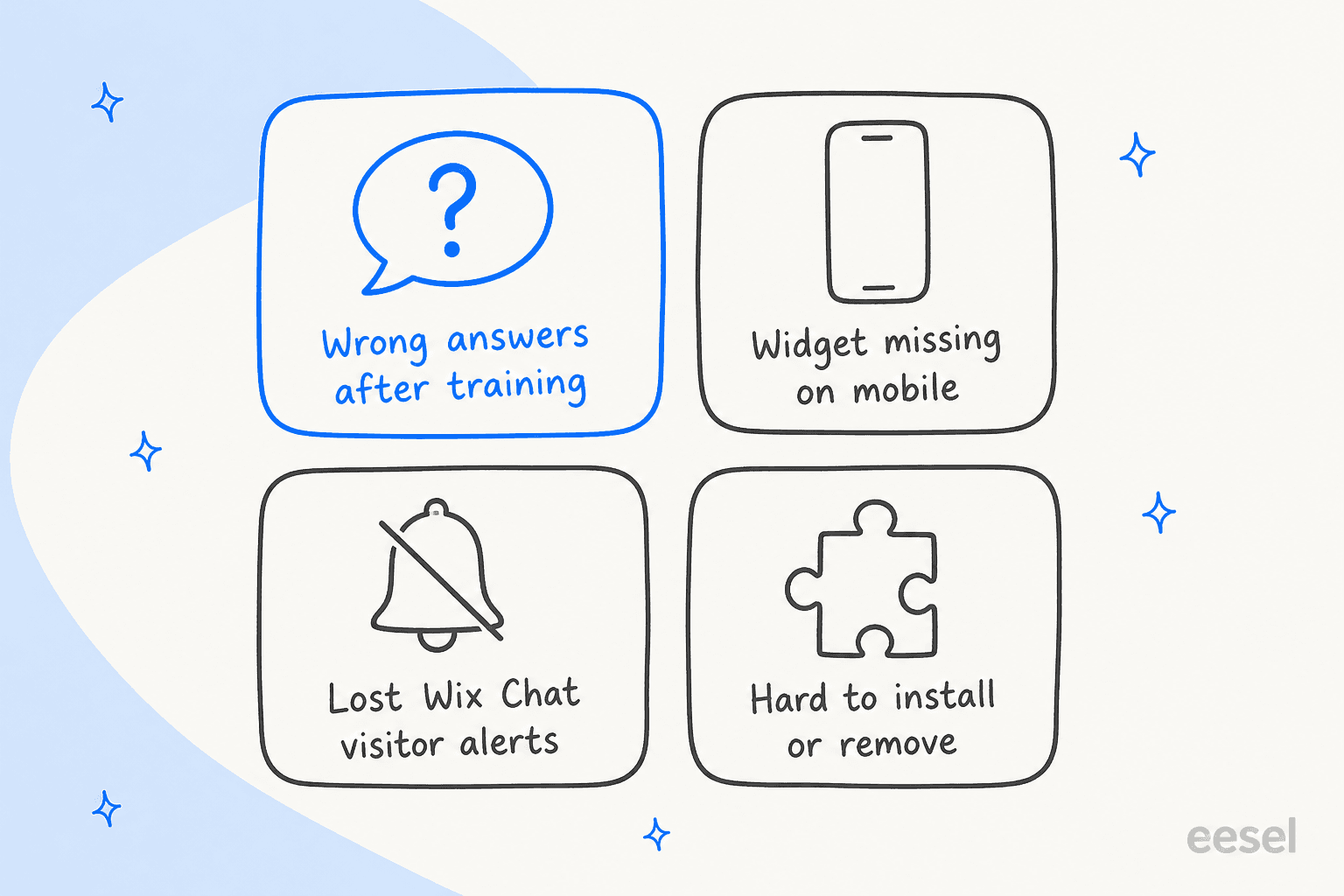
Answers that stay wrong after training
This is the complaint I take most seriously, because it's the one that costs sales. Reviewers describe the AI offering services they don't sell, quoting old prices after a price change, and ignoring restriction rules. The most detailed one came from a restaurant owner in June 2026, the kind of business I wrote about in my guide to AI chatbots for hospitality:
"Initially, the results looked promising, but over time the AI began providing incorrect information, including wrong addresses, incorrect business hours, and even phone numbers that were not associated with the business."
trohas, Wix App Market, June 2026
Another store owner summed up a price update in one line:
"Prices were updated for our products. Customers were given the old prices!"
isystevenson1, Wix App Market, March 2026
From an engineering view, these look like two different failures. Old prices point at stale indexing: the AI is still answering from a copy of the page it read earlier. Made-up phone numbers point at the model filling a gap instead of saying it doesn't know, the same thing that happened to the car-model bot I mentioned up top. Training rules help with the second only if you guess the question in advance. My write-up on AI hallucinations covers the usual fixes.
It's not universal. Several reviewers say it works once you put in the effort:
"I had a hard time using in the beginning but you really need to invest the time and effort to train it. Once it is properly trained it will do what you want it too."
vdacosta247, Wix App Market, January 2025
Mobile is where the widget struggles
The second cluster is mobile. Reviewers describe the chat not showing on mobile, an "AI Chat" label they can't hide, and the widget covering buttons. One web designer, writing about a client's site in September 2026:
"Always shows an AI on mobile - even when set to manual. No icon on desktop for when in manual mode."
wearetidy, Wix App Market, September 2026
Wix's own deleting article confirms one limit: you can't hide the widget on mobile only, because removing it from the mobile view removes it everywhere. You can choose desktop only or mobile only in the widget settings, but most visitors on a small business site are on phones, so test there first.
Features people lost from Wix Chat
Wix lists what Smart Chat doesn't do yet that Wix Chat did: Members Chat between site members, rule-based automations through Wix Automations, and a translated chat interface. The interface is English only for now. The AI can still reply in a visitor's language, which my multilingual live chat guide covers if that's your situation.
The loudest lost feature in reviews is the live visitor alert, and Wix has partly answered it: new visitor notifications now exist, but only in modes that include Manual Chat. Health businesses hit a sharper problem. A reviewer whose practice needs HIPAA wrote in August 2026 that after the forced move, "we were no longer able to respond to potential clients because the app isn't HIPAA Compliant." Wix's overview now says Manual Chat is HIPAA compliant and is the default on HIPAA sites, while AI Chat is not. If you're in healthcare, keep the AI off and read my notes on HIPAA compliant AI.
What people like
The positive reviews are shorter, but they're consistent: setup is easy, it lives inside the Wix dashboard you already use, and on content-heavy sites it can answer well. One reviewer with a large site:
"I have a considerably large site with around 3100 pages of content. It works and responds fairly well."
sasanshekarestan, Wix App Market, March 2025
That fits how it works. The AI answers from your pages, so a site with lots of clear, current text gives it more to go on, and a thin site gives it room to guess.
Wix Smart Chat pros and cons
| Pros | Cons |
|---|---|
| Free to install, manual chat free forever | AI answers can stay wrong after training, per many 2025 and 2026 reviews |
| Lives in the Wix Inbox and dashboard you already use | AI credits are shared with every other Wix AI tool |
| Scheduled hours mix AI and human cover | No credit top-ups on Premium plans, chat goes offline instead |
| Testing in the dashboard costs no credits | Can't index member-only, password or dynamic pages |
| Data coverage page shows what the AI learned | Chat interface is English only |
| Manual Chat is HIPAA compliant | No Members Chat or rule-based automations yet |
| AI replies on WhatsApp Business through the Inbox | Mobile display problems are the second biggest complaint |
Who should use Wix Smart Chat?
I'd install it if you're a small Wix business that mostly wants to reply to visitors yourself, the kind of team I had in mind for my guide to AI for small businesses. The manual chat is free, it lands in the Inbox you already check, and Wix is retiring the alternative anyway. Turning on the scheduled AI for nights is a reasonable experiment on a simple site with clear pages for prices, hours and policies, as long as you test it every time those pages change.
I'd be careful if your site has a lot of prices that change, services that need careful wording (health, legal, finance), or key content behind a member login. Those are exactly the places where the reviews report wrong answers, and where Wix's own coverage limits bite. Same if you're already near your plan's AI credits through the marketing agent or Wixel.
I'd skip it if a wrong answer is expensive for you, or if you need the chat to create a ticket in a helpdesk, look up an order, or hand a visitor to a person with the context attached. The human handoff is where a chatbot earns its keep, and Smart Chat's version is a contact form or a forwarded message in your Inbox. My guide to chat escalation shows what a fuller version looks like.
Wix Smart Chat alternatives worth a look
If Smart Chat isn't the fit, these are the routes I'd look at, each covered in more depth elsewhere on the blog:
- Free live chat you answer yourself: tawk.to or Chatway, both of which install on Wix. See my tawk.to alternatives and Chatway review.
- An AI chatbot with more controls: Tidio is the common pick for small stores. My Tidio review covers what you get.
- An older Wix chat app with an AI add-on: Formilla runs on Wix with a paid AI bot. See my Formilla review.
- A call button instead of chat: my Live Chat Alternative review and its alternatives list cover the Wix phone apps.
For the wider field, my AI live chat roundup and guide to AI chatbots for websites compare more tools side by side.
Try eesel when the answers have to be right
If you like the idea of Smart Chat but the reviews worry you, eesel is the AI helpdesk teammate I'd point you to. Its chat bubble answers visitors from your own site, your help center and anything else you connect, links the page it used, and when a visitor needs a person it creates a ticket or sends an email with a summary attached. On Wix it goes in through Custom Code, which Wix says needs a published site and a connected domain.
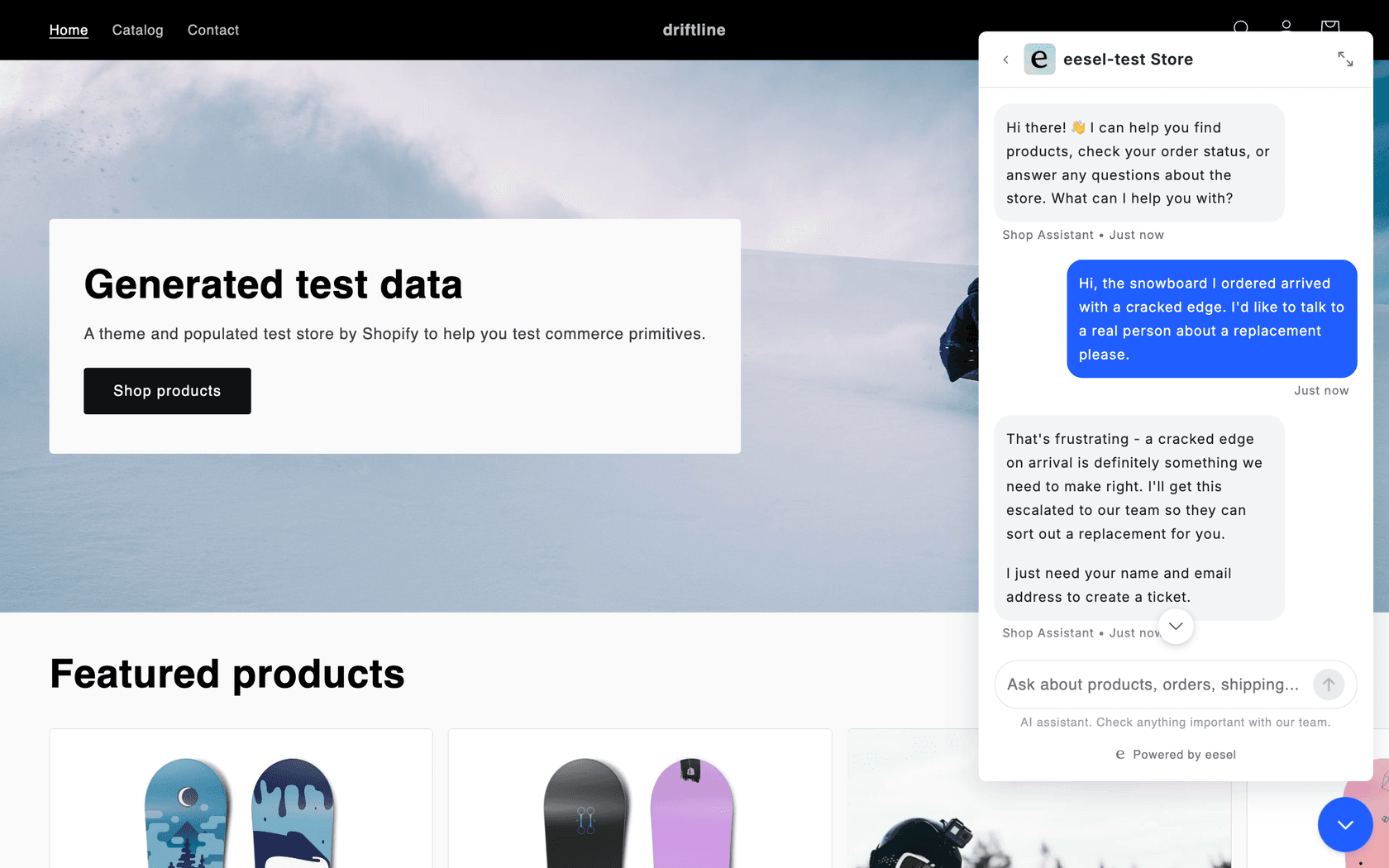
The difference I care about as an engineer is the test loop. eesel can replay your past tickets and score its answers against what your team actually sent, so you find the wrong-price problem before a customer does. And it's built to hand off what it isn't sure about. Original Bootcamp answers general questions about camps and prices from about 1,700 pages of its own website and sends anything about a booking or an account straight to a person. Question Beauty runs chat, email and Messenger questions through eesel in the language each customer wrote in, with 960 replies sent in a month.
It isn't the cheap option. Plans start at $299 a month for 500 credits on the pricing page, and Wix's own chat is cheaper per conversation. If you'd rather see it on your own questions first, the free plan gives you 100 credits with no card. Try eesel and point it at your Wix site.
Frequently Asked Questions
What is Wix Smart Chat?
Wix Smart Chat is Wix's own chat app for Wix sites. It combines an AI chat that answers from your site content with a manual chat you answer from the Wix Inbox, and it replaced both Wix AI Site Chat and the older Wix Chat. If you are new to the idea, my guide to AI live chat covers the basics.
Is Wix Smart Chat free?
The app is free to install and the manual chat is free to use. The AI chat runs on Wix AI credits: a new install gets a trial of 50 conversations, then the AI draws on the credits in your Wix plan. If cost is the main question, see my breakdown of chatbot cost.
How much does Wix Smart Chat cost per month?
There is no separate Wix Smart Chat price anymore. Wix estimates the AI chat gets up to 150 actions a month on Light ($17/month yearly), 200 on Core ($29), 300 on Business ($39) and 1,000 on Business Elite ($159), shared with Wix's other AI tools. My Wix pricing breakdown covers the plans themselves.
Why is the Wix Smart Chat rating so low?
The listing shows 2.8 stars from 158 reviews. The low ratings cluster around answers that stay wrong after training, a widget that misbehaves on mobile, and features people lost when Wix Chat was retired. My guide to preventing AI hallucinations explains why the first one happens.
Can I use Wix Smart Chat without the AI?
Yes. Set the availability mode to Manual chat 24/7 and you reply to every visitor yourself from the Wix Inbox, at no cost. Manual Chat is also the mode Wix calls HIPAA compliant. My piece on AI chatbot vs live chat helps you decide which side you need.
What happens when Wix Smart Chat runs out of AI credits?
The chat switches to offline mode. You choose whether the widget hides, shows a contact form, lets visitors leave a message, or you switch to Manual chat and answer yourself. Wix doesn't sell credit top-ups on Premium plans, so the fix is a bigger plan. For handoff patterns, see human handoff in chat.
Is Wix Smart Chat better than Wix Chat?
It adds AI answers, scheduling, training rules and analytics, and it is the only chat Wix still develops. It does not yet have Members Chat, rule-based automations through Wix Automations, or a translated chat interface. If those matter, compare a few live chat tools before you switch.
What is a good Wix Smart Chat alternative?
For free live chat, tawk.to or Chatway. For an AI chatbot that you control more closely, Tidio, or an AI teammate like eesel, whose chat bubble installs on Wix through Custom Code and hands off to a person. My AI live chat roundup compares more.