What DocsBot actually is (so the price makes sense)
Before the numbers, a quick grounding, because the pricing only makes sense once you know what you are paying for. DocsBot AI, built by Aaron Edwards under UglyRobot, LLC, turns your existing content (docs, websites, files, support tickets, and more) into custom AI agents that answer questions and take actions. Under the hood it runs an agentic retrieval pipeline over your indexed content and lets you pick from several AI models. It is a broad, widget-first product used by everyone from small teams to Sony, which says it handled over 30,000 inquiries in a month at roughly an 80% resolution rate.
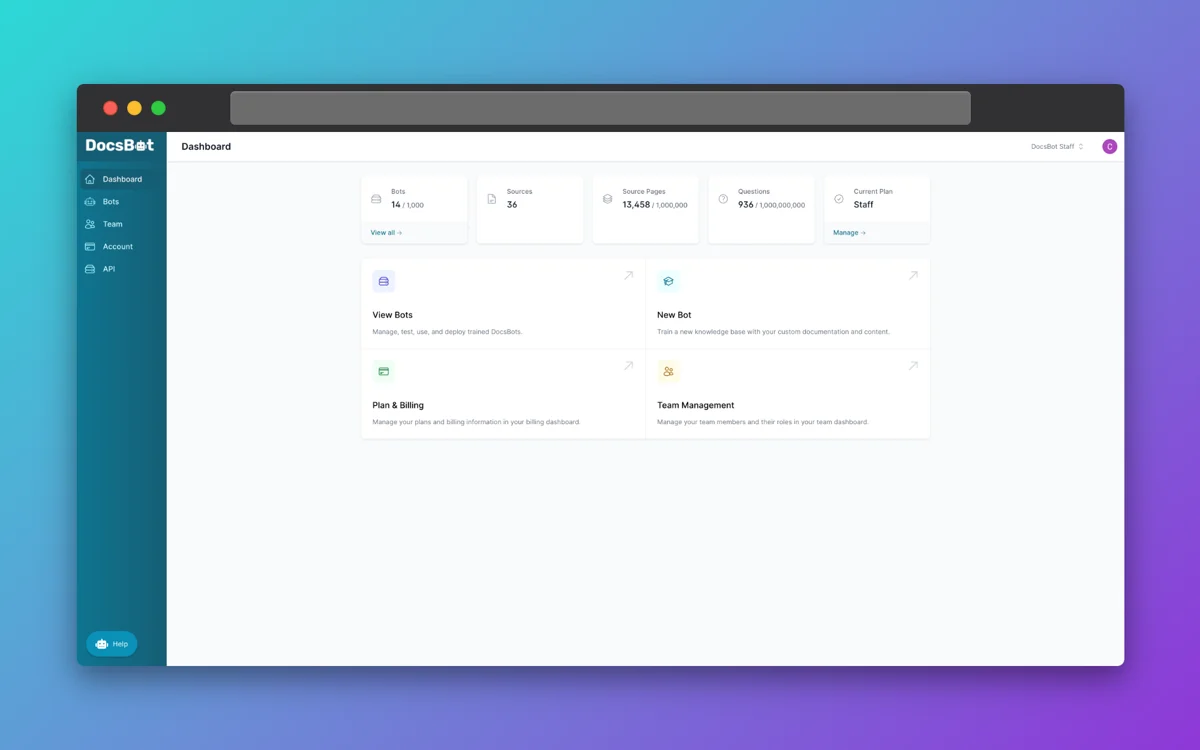
Notice the dashboard already frames everything in limits: bots, sources, source pages, and questions, each counting against a plan ceiling. That is the mental model for the whole pricing structure. You are not buying a flat seat; you are buying a set of caps, and the one that bites first is credits.
DocsBot AI pricing: every plan at a glance
Here is the live pricing, monthly and in USD. Annual billing is billed as roughly 10x the monthly rate, so you get about two months free, and there is a 14-day money-back guarantee.
| Plan | Price/mo | DocsBots | Source pages | AI credits/mo | Actions per bot | Team users |
|---|---|---|---|---|---|---|
| Free | $0 | 1 | 50 | 100 | 0 | 1 |
| Personal | $49 | 1 | 5k | 5k | 3 | 1 |
| Standard | $149 | 3 | 15k | 15k | 8 | 5 |
| Business | $499 | 10 | 100k | 60k | 12 | 10 |
| Enterprise | custom | custom | custom | custom | custom | custom |
A few things worth calling out before we go tier by tier. The Free plan genuinely costs nothing, needs no card, and your bots do not expire, which is more generous than a lot of "free" tiers that quietly delete your work after 30 days. The jump from Personal to Standard triples your bots and credits for triple the price, so it scales linearly rather than punishing you. And the leap from Standard to Business is the steep one: $149 to $499 is more than 3x for capabilities most small teams will not touch.
Free ($0/month)
One bot, 50 source pages, 100 AI credits a month, one user, and basic source types only. No actions, no card, no expiry. This is a real trial tier: enough to index a small FAQ and see how the answers read on your own content. It is not enough to run a live customer-facing widget, because 100 credits is a day or two of real traffic. Treat Free as "prove it works," not "ship it."
Personal ($49/month)
Built for power users and small businesses. You get 1 bot, 5k source pages, 5k credits a month, 3 actions per bot, and one user, plus the integrations that make the widget useful: remote MCP connections, lead-collection forms, Calendly-style scheduling, Zapier automations, Slack, and messaging channels like WhatsApp and Telegram. If you are one person putting a smart bot on a single site or docs portal, this is the honest entry point.
Standard ($149/month, most popular)
This is the tier DocsBot markets hardest and, in my view, the one most support-minded teams actually need. Everything in Personal, plus 3 bots, 15k source pages, 15k credits, 8 actions per bot, and 5 users. More importantly, this is where the support features arrive: Skills, escalation ticket creation, web search, native CRM lead delivery, the Help Scout integration, the MCP server, conversation and question analytics, and realtime voice agents. If you want DocsBot to do more than answer read-only questions, $149 is the real starting price, not $49.
Business ($499/month)
Everything in Standard, plus 10 bots, 100k source pages, 60k credits, 12 actions per bot, and 10 users. The headline unlocks here are the governance and scale features: web-search domain allowlists, conversation topic and sentiment reports, a data explorer, client-side PII redaction, unbranded chat widgets, rate limiting, and per-bot roles for reselling or running multiple workspaces. Two of those, unbranded widgets and PII redaction, are the ones I see teams get caught by, because they sound like table stakes and sit a full $350/month above Standard.
Enterprise (custom quote)
Everything in Business with the limits opened up, plus the things large buyers ask for: Azure OpenAI and self-hosting options, SSO, IP logging, SOC 2 Type II, a signed DPA, HIPAA availability, data residency, and priority SLAs. Pricing is by quote through human@docsbot.ai. If you need HIPAA or SSO, note that both live only up here, so budget accordingly.
The part that decides your bill: AI credits
Here is the single most important thing about DocsBot pricing, and the thing a bare tier table hides. You are not billed per conversation or per resolution. You are billed in AI credits, and the sticker price only buys you a monthly pool of them.
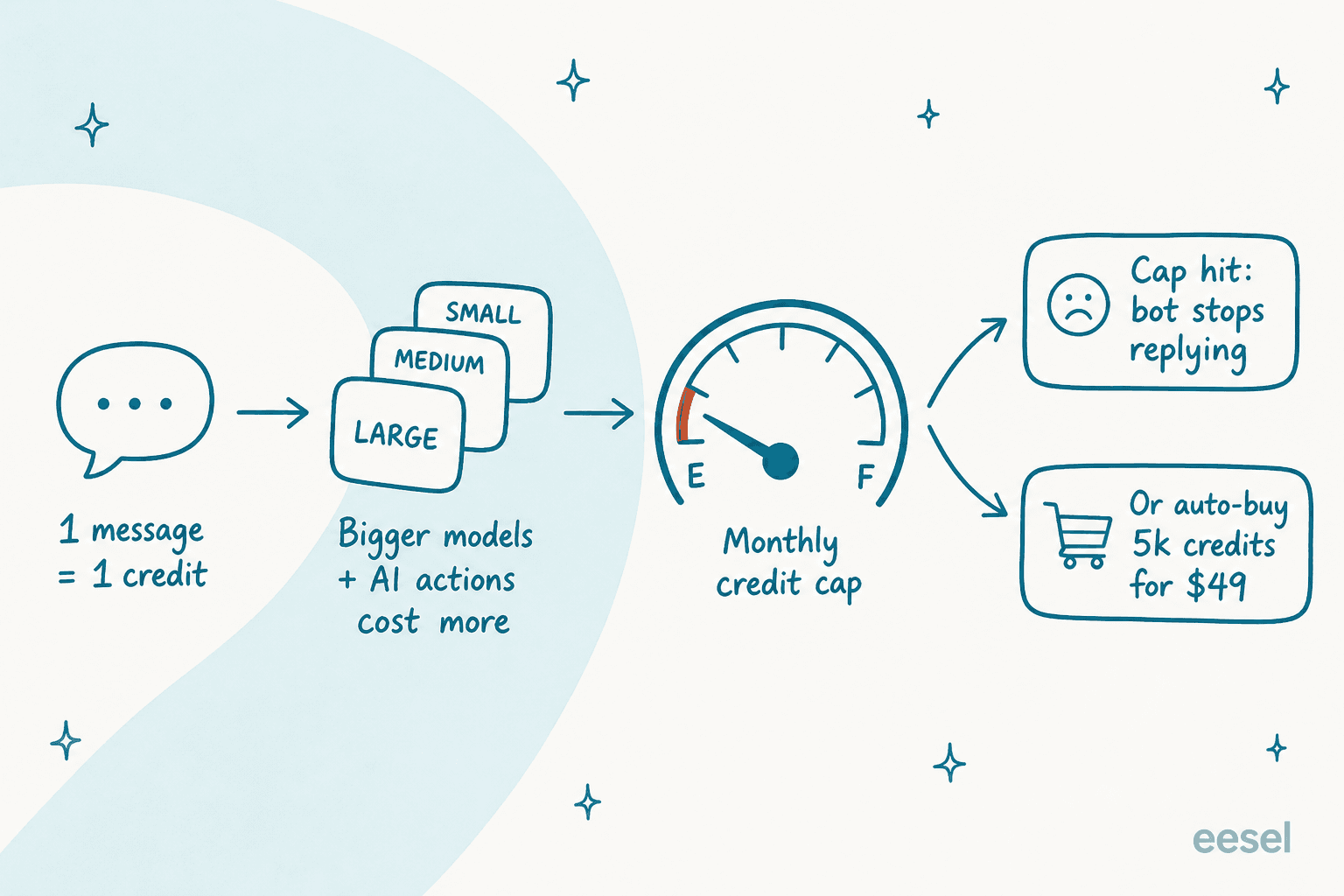
DocsBot's own AI Credits FAQ puts it plainly: credit usage "starts at 1x per message and may use more for larger models and AI actions." So a simple answer on a small model is one credit, but flip to a bigger model or let the bot take an action and a single exchange can cost several. Credits are consumed by chat, skills, and API usage alike.
The number that matters is what happens at the cap. When your monthly credits run out, the bot stops answering, unless you have the credit add-on switched on, in which case it auto-buys another block and your bill climbs. This is the classic surprise with metered AI, and it is the one I have watched trip up teams over and over: the month a campaign or an outage spikes your ticket volume is exactly the month the bot either goes quiet or quietly bills you more. Neither is what you want during a rush. If you have ever been burned by AI chatbot problems mid-incident, this is the failure mode to plan around.
What actually unlocks at each tier
The prices are only half the decision. The other half is that DocsBot gates real capabilities behind higher plans, so the "right" tier is usually set by one feature you need rather than by volume.
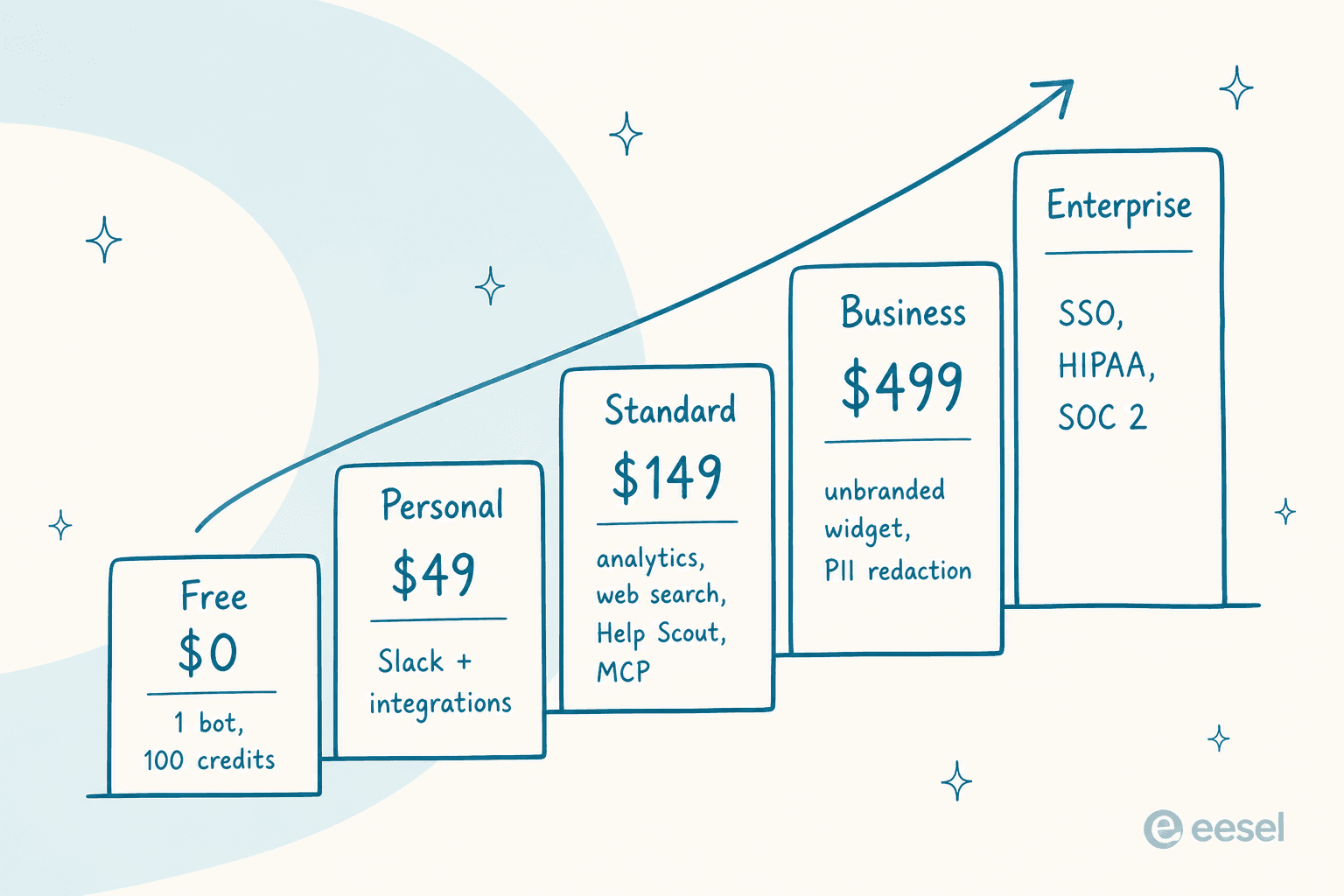
The pattern is worth memorising before you pick a plan:
- Standard ($149) unlocks the support layer. Skills, question and conversation analytics, web search, escalation tickets, the Help Scout integration, and the MCP server all start here. If any of those are on your list, Personal is not enough.
- Business ($499) unlocks governance. Data explorer, sentiment analysis, AI question reports, unbranded widgets, PII redaction, and per-bot reseller roles are all Business-and-up.
- Enterprise unlocks compliance. SSO, HIPAA, SOC 2 Type II, self-hosting, and Azure OpenAI are Enterprise-only.
So the honest way to price DocsBot is backwards: find the single feature you cannot live without, see which tier it lives on, and that is your floor. For most support teams that floor is Standard, because escalation and analytics matter. For a regulated buyer it is Enterprise, because HIPAA has no lower home.
Add-ons, and the gap between sticker price and real bill
The tiers are not the end of the story. DocsBot sells add-ons that stack on top of your plan and renew with it, and they are how a $149 plan becomes a $250 one.
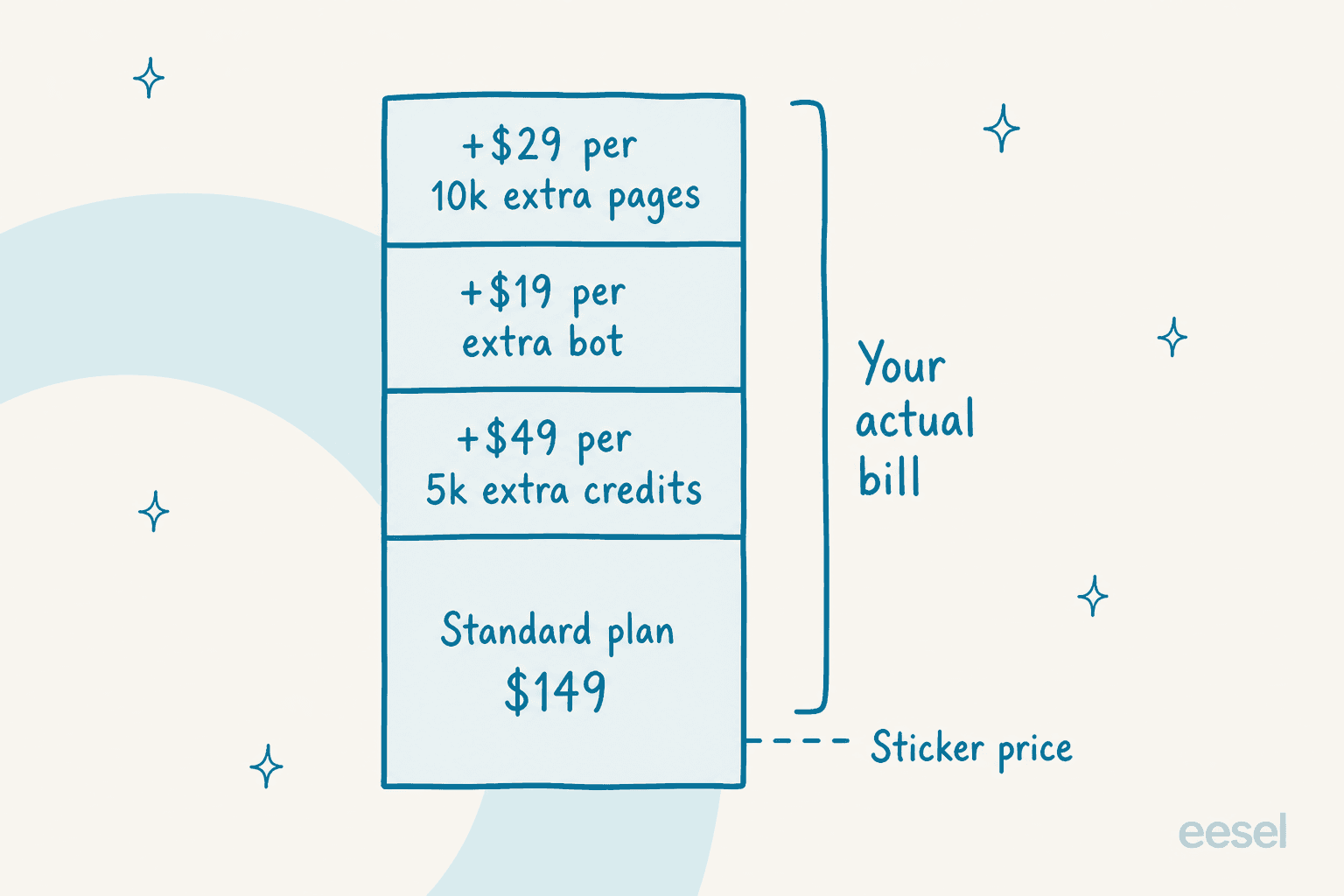
From the Add-Ons FAQ, the four you can buy are:
- AI credit limit: $49/month per 5k extra credits (it auto-raises when you run out, if you let it).
- Extra bots: $19/month per additional bot.
- Source pages: $29/month per 10k extra pages.
- Extra team users: $19/month per user, and this one is available on Business and Enterprise only.
The credit add-on is the one to watch. Because it can top up automatically, it is the least visible line on your invoice and the one most likely to drift. That last point about team users also catches people: if you are on Standard with its 5-user cap and you need a sixth seat, you cannot just buy one, you have to move up to Business first.
Try the numbers yourself
Rather than guess, plug in your own shape. This calculator takes a DocsBot base plan and the add-ons above and shows the monthly total.
A worked example makes the drift concrete. A support team on Standard ($149) that runs a busier-than-expected month and needs 10k extra credits ($98) plus an extra bot for a second brand ($19) is already at $266/month, not $149. Scale that to a Business plan with a couple of credit blocks and you are comfortably into four figures. None of it is hidden, exactly, but you have to go looking for it, which is why so many DocsBot pricing questions online are really "why is my bill higher than the plan I picked?"
What real users say about the value
DocsBot's user reviews are thin in number but consistent in tone. On G2 it sits at 4.3/5 across just three reviews, and there is little verifiable chatter on Reddit, Capterra, or Trustpilot, so weight this lightly. The reviews that do exist praise the automation flexibility and the price at the top end:
"Over the past year, it's become an amazing tool... I especially appreciate the work they've done with the API, I'm able to automate remediation and easily push new content into the pipeline sources. I LOVE IT. The enterprise cost is basically perfect... it's just an amazingly flexible chatbot and I can fine tune EXACTLY what I need the bot to know, and it rarely hallucinates."

The recurring caveat is accuracy under pressure, which is the honest trade-off with any retrieval bot:
"It's accuracy and correctness is good and it support big and multiple Documents." ... "There is nothing to dislike but sometimes it get confused due to which it generate wrong answers."
That "sometimes it gets confused" note is the reason I would never flip any support bot fully autonomous without testing it against real cases first. It is also where DocsBot's pricing model and its behaviour intersect: you are paying per message whether the answer was right or not.
Where DocsBot pricing fits, and where it does not
Being fair about it: DocsBot is a strong, well-priced no-code bot builder, and for a lot of jobs it is exactly right. If you want a smart widget on a docs site or marketing page, an internal knowledge bot for your team, or a self-serve deflection layer you can stand up in an afternoon, the Personal and Standard tiers are good value, and the free plan is a real trial rather than a teaser. Its breadth of source types and its API get consistent praise for a reason.
Where it gets harder to forecast is a live support queue. Two things drive that. First, the credit meter: ticket volume is spiky, and a per-message pool means your cost and your uptime both wobble with the busiest weeks. Second, the gating: the features a support team wants (escalation, analytics, unbranded widgets, PII redaction) are spread across Standard and Business, so the plan you need is usually a tier or two above the one the price led you to. That is not a knock on DocsBot, it is just a different shape than a team deflecting tickets often wants. If you are cross-shopping, our guides to the AI chatbot for customer service and Chatbase alternatives cover the same category from that angle, and the Chatbase pricing breakdown is worth a look since it uses a similar credit model.
Try eesel AI
If your real job is deflecting a support queue rather than embedding a docs widget, the thing that makes DocsBot pricing hard to plan, a metered credit that can run out mid-month, is exactly what eesel AI is built to avoid. eesel is an AI teammate platform, and the AI helpdesk teammate bills one credit per ticket or chat handled, with every feature and unlimited seats on a single plan, so you are not stitching escalation, analytics, and unbranded widgets across three tiers the way DocsBot pricing forces.
It also plugs straight into the helpdesk you already run, Zendesk, Freshdesk, Help Scout, and more, and it can simulate a rollout against your own past tickets before it ever replies to a customer, so you see the accuracy before you trust it live. For the developers in the room, the eesel CLI runs the same teammate from your terminal, scripts, or a coding agent like Claude Code, and every workspace doubles as an MCP server. You can try it for free on your own content and see the per-ticket math for yourself.
Frequently Asked Questions
How much does DocsBot AI cost per month?
DocsBot AI pricing runs from a free plan ($0) through Personal at $49/month, Standard at $149/month, and Business at $499/month, with a custom-quoted Enterprise tier. Annual billing gives you roughly two months free. Every paid plan is billed in monthly AI credits on top of the flat fee. If you are weighing options, our roundup of the best AI chatbot builders puts these numbers in context.
Is DocsBot's free plan actually usable?
It is fine for a test, less so for production. The free DocsBot plan gives you 1 bot, 50 source pages, and 100 AI credits a month with no card required and no 30-day expiry. That is enough to index a small help center and try the answers, but 100 credits burns quickly on a live widget. For real deflection you will want at least Personal or Standard. See our take on no-code chatbot tools for alternatives with free tiers.
What is an AI credit in DocsBot pricing?
An AI credit is DocsBot's billable unit. Credit usage starts at 1x per message and climbs for larger models and AI Actions, per the AI Credits FAQ. When you hit your monthly cap the bot stops answering unless you have an add-on set to top up automatically. It is the single biggest thing to model before you commit.
What add-ons should I budget for with DocsBot?
The common DocsBot add-ons are extra AI credits ($49 per 5k), extra bots ($19 each), extra source pages ($29 per 10k), and extra team users ($19 each, on Business and Enterprise only), all per the Add-Ons FAQ. On a busy widget the credit add-on is the one that quietly grows your bill.
Is there a cheaper alternative to DocsBot for customer support?
If your goal is deflecting tickets rather than embedding a docs widget, a per-ticket model can be easier to forecast than a credit meter. eesel AI bills one credit per ticket or chat handled and unlocks every feature on one plan, which sidesteps the tier-gating you get with DocsBot pricing. Our guide to the best customer service AI compares the trade-offs.


Article by
Kurnia Kharisma Agung Samiadjie
Kurnia is a software engineer and writer at eesel AI with two years of SEO experience, writing about AI tools, helpdesk software, and customer support. He pairs a developer's understanding of how these products are built with search-driven research into what actually ranks and resonates with the people searching for them.