


Gemini 3.6 Flash pricing at a glance
Here's the full standard-tier table, straight from Google's pricing page. The consumption mode you pick changes the rate more than anything else.
| Consumption mode | Input (per 1M) | Output (incl. thinking) | Context caching |
|---|---|---|---|
| Standard | $1.50 | $7.50 | $0.15 |
| Batch (50% off) | $0.75 | $3.75 | $0.075 |
| Flex | $0.75 | $3.75 | $0.075 |
| Priority | $2.70 | $13.50 | $0.27 |
| Free tier | Free | Free | Free |
The quick read: Standard is the default, Batch and Flex are the same 50%-off rate for work that doesn't need to be real-time, and Priority costs 1.8x for guaranteed low latency. Context caching at $0.15 per 1M is the lever most teams underuse, it lets you avoid re-paying input on the same system prompt or knowledge chunk on every call. It's the newest workhorse in the Gemini family, and it slots in where you'd previously have reached for 3.5 Flash.
Work out what it'll actually cost you
The headline rates only mean something once you multiply them by your real traffic. Plug in your monthly volume and average token counts to see the standard-tier and batch-tier monthly cost, plus the cost per request.
The lesson most teams learn here: at any real volume, output tokens dominate the bill, which is exactly why the $9.00 → $7.50 output cut is the headline change and why a model that finishes in fewer tokens is worth more than one that's a few cents cheaper per million.
What changed from Gemini 3.5 Flash
The generation-over-generation move is a pure cost win on the side that hurts. Here's how the two line up on standard tier, next to the budget option.
| Model | Input (per 1M) | Output (per 1M) | Positioning |
|---|---|---|---|
| Gemini 3.6 Flash | $1.50 | $7.50 | Most intelligent Flash, built for speed |
| Gemini 3.5 Flash | $1.50 | $9.00 | Prior flagship Flash |
| Gemini 3.5 Flash-Lite | $0.30 | $2.50 | Cheapest GA model, high-volume work |
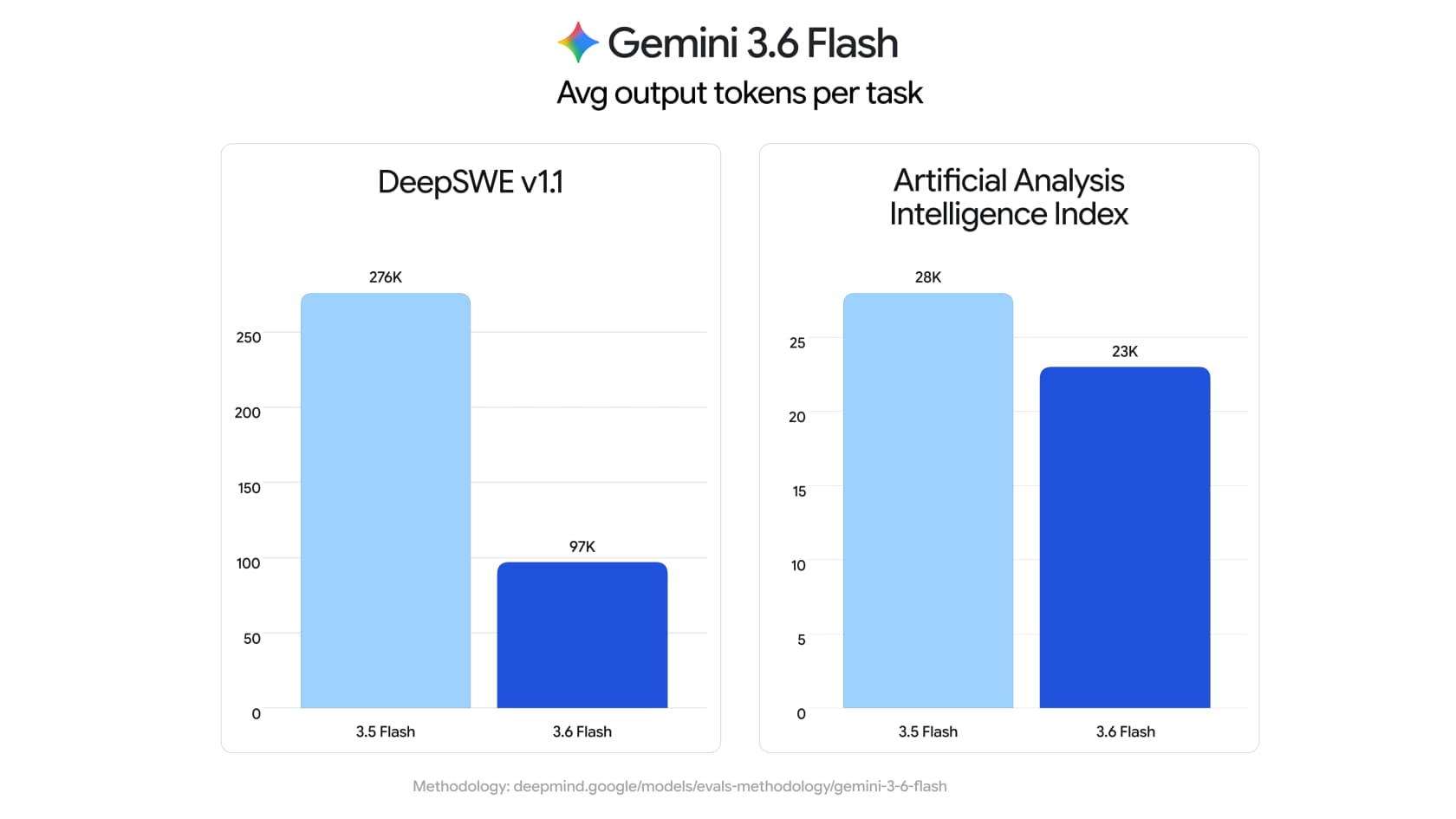
There are really two savings stacked on top of each other. The first is the ~17% lower output rate. The second is token efficiency: on the Artificial Analysis Index, 3.6 Flash uses 17% fewer output tokens to do the same work, and on agentic benchmarks like DeepSWE the gap reached 65% (average output fell from 276K to 97K tokens per task). Fewer tokens at a lower rate compounds, so the effective saving on a real workload is bigger than the sticker cut suggests. Batch tier tells the same story: 3.6 Flash batch is $0.75/$3.75 versus 3.5 Flash's $0.75/$4.50.
Across vendors, that $7.50 output rate undercuts Claude Sonnet 5 (roughly $15 output at list) by a wide margin while landing in a similar quality band for most agentic work. If the flagship tier is what you're really after, Google's own Gemini alternatives are worth a look while 3.5 Pro stays delayed.
The hidden costs the pricing table doesn't show
This is where a real invoice diverges from the headline $1.50/$7.50. Four line items catch teams out.
- Thinking tokens are billed as output. 3.6 Flash supports thinking, and those reasoning tokens count toward the $7.50 output rate. The token-efficiency gains help here, but a heavy-reasoning prompt still bills more than the visible answer length implies.
- Search grounding is metered separately. You get 5,000 grounded prompts free a month across the Gemini 3 family, then it's $14 per 1,000 search queries, and one customer request can fire several billable queries.
- The free tier trains on your data. On the free tier, Google uses your content to improve its products. On any paid tier it doesn't. For anything touching customer data, that alone rules the free tier out.
- Priority mode is a 1.8x surcharge. If you need guaranteed low latency, Priority runs $2.70/$13.50, nearly double standard. Most teams don't need it, but it's easy to switch on and forget.
Gemini 3.6 Flash vs 3.5 Flash-Lite: when the cheaper model wins
The most effective way to cut a Gemini bill often isn't 3.6 Flash at all, it's routing the simple work to Gemini 3.5 Flash-Lite. At $0.30/$2.50, Flash-Lite is roughly 5x cheaper on input and 3x cheaper on output, and it runs at about 350 output tokens/second.
The rule of thumb is about reasoning depth, not brand loyalty. Reach for 3.6 Flash when the work needs real multi-step reasoning: coding, agents that touch several systems, complex support tickets. Reach for Flash-Lite when each item is simple and the volume is high, like first-pass ticket triage or live-chat deflection of routine questions. Many production stacks run both, routing by difficulty, which is the cheapest setup of all. Whether you build a real agent or a scripted bot is a separate call from the model one.
Account tiers, spend caps, and rate limits
Your Gemini pricing is also shaped by which usage tier your billing account sits in, from the rate limits page.
| Usage tier | How you qualify | Billing cap |
|---|---|---|
| Free | Active project or free trial | N/A |
| Tier 1 | Linked active billing account | $250 |
| Tier 2 | Paid $100 + 3 days | $2,000 |
| Tier 3 | Paid $1,000 + 30 days | $20,000+ |
Two practical notes. First, spend-based rate limits run on a rolling 10-minute window (Tier 1 caps at $10, Tier 2 and 3 at $200), and exceeding one returns a 429 RESOURCE_EXHAUSTED error, so a traffic spike can throttle you before you hit your monthly budget. Second, if you're running at real scale, Google's Enterprise tier adds provisioned throughput and volume discounts that aren't on the public table. For how this sits against the consumer Gemini plans, our Gemini pricing guide and Gemini Workspace pricing cover the rest.
What it really costs to run a support agent
Here's the part every model-pricing post skips, and the reason I'd tell you not to read too much into the token rate if your goal is customer support.
A cheaper, faster model is good news. But the $1.50/$7.50 is the cost of the raw engine, not the car. I've spent the last three-plus years putting AI on live support queues, and the failure I've watched over and over isn't the model being too expensive, it's a confident-sounding bot giving a wrong answer because nobody built and paid for the layers around the model. Those layers are the real cost.

Retrieval over your help center, so it answers from your docs instead of guessing. Hallucination guardrails, so it hands off cleanly instead of inventing a refund policy. Integration, so it can act inside your ticketing system. And testing, so you know how it behaves before it touches a customer. Build that yourself on the raw API and you're not paying $7.50 per 1M tokens, you're paying an engineering team to rebuild retrieval, simulation, and every helpdesk integration from scratch, then maintain it as models change every few weeks. That's the case for purpose-built helpdesk AI over a DIY stack, and it's why AI chatbot problems almost always trace back to the plumbing, not the model tier.
Try eesel
This is exactly the layer eesel is built to be. You plug it into your existing helpdesk, it learns from your past tickets and knowledge base out of the box, and it runs on top of frontier models like Gemini so you get the efficiency without wiring the API or doing token math yourself.

The two things that matter most for pricing are the ones the token rate can't give you. First, eesel lets you simulate the agent against your historical tickets before it answers a live customer, so you see the resolution rate and the exact replies it would have sent, no guessing at what the spend buys. Second, it's priced on the work it does, per resolution rather than per token, so a busy month doesn't turn into a surprise API bill. If you're costing out models to build support automation, start from the outcome you want and let the platform handle the plumbing. It's free to try.