

Meta Muse is Meta's new personal AI agent that actually does tasks for you. It shops, books travel, fills forms, sends email, and negotiates on your behalf, and it launched in the US on September 8, 2026 on iOS, Android, muse.ai, and inside WhatsApp. It runs on Meta's Muse Spark 1.3 model.
The interesting part is the architecture, not the errands. Every user gets a dedicated cloud computer (the Muse Secure VM) with its own browser, and a separate agent called Sentinel has to approve anything that leaves that machine, from sending an email to making a purchase. Muse never sees your real passwords or card numbers, and it pays with single-use virtual cards. Meta is backing the security claim with a bug bounty that pays up to $300,000.
Pricing is freemium with paid tiers, but Meta has not published the exact numbers yet. The loudest reaction online is not about whether it works, it is about whether people want Meta specifically holding their email, payments, and smart-home keys.
One clarification up front, because the naming is confusing: this Muse is a consumer agent for your personal to-do list. It is a different thing from a business AI teammate. If you are here because you want AI to handle a job like customer support, that is a separate product shape, and I will get to where the line sits at the end.
What is Meta Muse?
I build AI agents for a living, so I read a launch like this by asking one question: what is the agent actually allowed to do, and what stops it when it is wrong? Muse is one of the first big consumer answers to that question.
Meta describes Muse as "a personal AI agent" that "doesn't just answer questions, it actually does the work." You talk to it like you would message a friend, in the Muse app or directly in WhatsApp, and it plans a task, works across the apps you connect, and follows through. It keeps working after you close the app and comes back when something changes or when it needs your sign-off. It also remembers details you mentioned once and makes suggestions unprompted.
Meta frames this as a first step toward "personal superintelligence," which is a big phrase for a fairly grounded idea: an agent that takes routine work off your plate. Under the hood it runs on Muse Spark 1.3, which Meta calls its most capable model to date. One hands-on tester on Hacker News put the model's feel in plainer terms:
"Muse Spark 1.3... is somewhere between Sonnet and Flable (Opus tier in my experience) in intelligence, but is very fast at 200+ tok/s."

Here is the product itself on Meta's page, so you can see how it presents.
This is a different category from an AI assistant that only chats, and it is a step past a rule-based chatbot. If you want the wider map of what the word covers, my guide to AI agents breaks down the categories. The whole pitch here is action, which is exactly why the guardrails matter so much.
What Muse can actually do
The examples Meta leads with are deliberately mundane, which is the point. Muse is aimed at "billions of people," with no learning curve, so the demos are chores rather than code.
| Task | What Muse does |
|---|---|
| Shopping | Researches, adds to cart, and checks out with a virtual card, with your approval |
| Recipe to groceries | Turns a saved Instagram recipe reel into a grocery list |
| Planning | Suggests a dinner party menu and remembers friends' dietary restrictions before it sends invites |
| Travel | Books trips end to end by driving a real browser |
| Reads and, if you allow it, sends on your behalf | |
| Admin | Fills out forms, negotiates a bill, or sells a car |
The through-line is that Muse acts on the open web through a real browser, the same way you would. That is useful, and it is also the thing skeptics keep circling back to. As one commenter noted, the current wave of general assistants keeps stopping short of exactly this:
"Whenever I try to do something with ChatGPT or Gemini, it just refuses to do things citing limitations in its web browsing capabilities. An everyday LLM that can actually fill forms and do stuff for you on the Internet... is what normal people actually need."
That gap is why Muse leans so hard on the browser, and why it competes less with a chat window and more with the agentic browsing efforts from Google and the ChatGPT agent push from OpenAI. Payment is where it goes furthest: Muse checks out with Link built by Stripe and is, per Meta, the first AI agent covered by Link's purchase protections. This is the same agentic commerce shift that is reshaping how ecommerce brands think about checkout, only pointed at your personal wallet instead of an ecommerce store's checkout.
How Muse works under the hood
This is the part worth slowing down on, because it is where Muse is actually different from a chatbot with a browser bolted on.
Every user gets their own dedicated computer in the cloud, an isolated Linux VM with its own browser, storage, and memory. Meta calls it the Muse Secure VM (its internal codename is "Hatch"). That VM is the system of record for everything you put into Muse, and data only leaves it for model inference and telemetry. Inside, Meta splits the box into two separate worlds: the part where you and the agent do work, and the part Meta built to keep you safe.
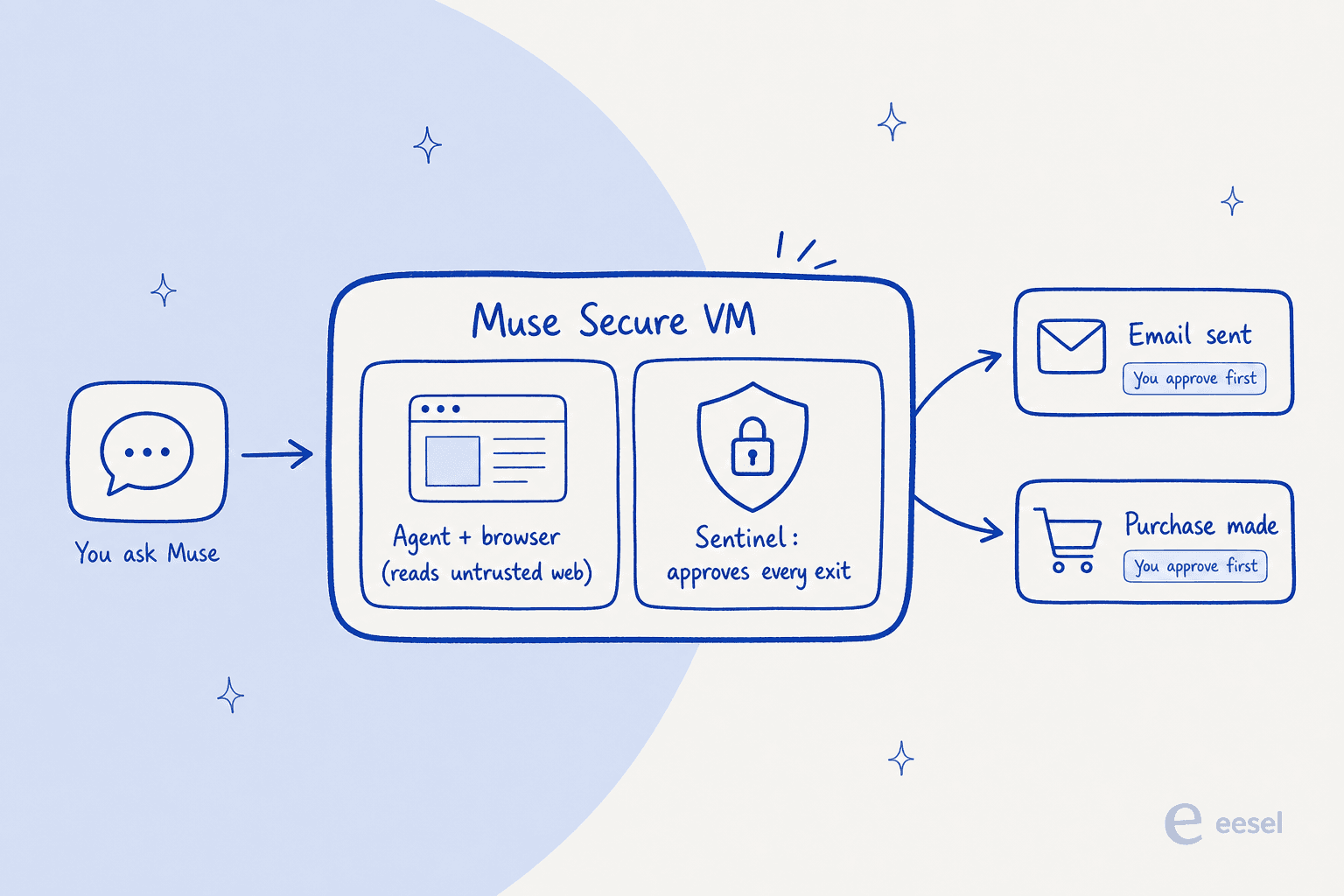
The agent, its workspace, and every tool it runs live in a sandboxed runtime cell (a systemd-nspawn container where root inside the cell maps to an unprivileged host user, with filtered system calls and stripped kernel capabilities). The security-sensitive services sit outside that cell, so an attacker who compromises the agent cannot switch them off. Credentials for anything you connect are stored in that separate compartment, and the agent only ever handles surrogate tokens. In plain terms: Muse can use your logins without ever seeing them, including passwords you type into the browser yourself.
The self-described Meta skeptics who actually opened it up were, grudgingly, impressed by how visible all this is:
"I'm not a fan of Meta in any way, but... it's running in its own VM, and it's an impressively transparent system: you have access to its System Files right in the GUI... You can look at the AGENTS.md and other harness files it uses... It seems a lot more obvious to me how Muse works than say Claude or ChatGPT."
The security model: why Muse runs in its own computer
If you hand an agent your private data, point it at the untrusted open web, and give it the ability to send things out, you have assembled what security researcher Simon Willison named the lethal trifecta: the exact combination a prompt-injection attack needs to steal your data. Muse has all three by design, so the whole architecture is built to break the third leg.
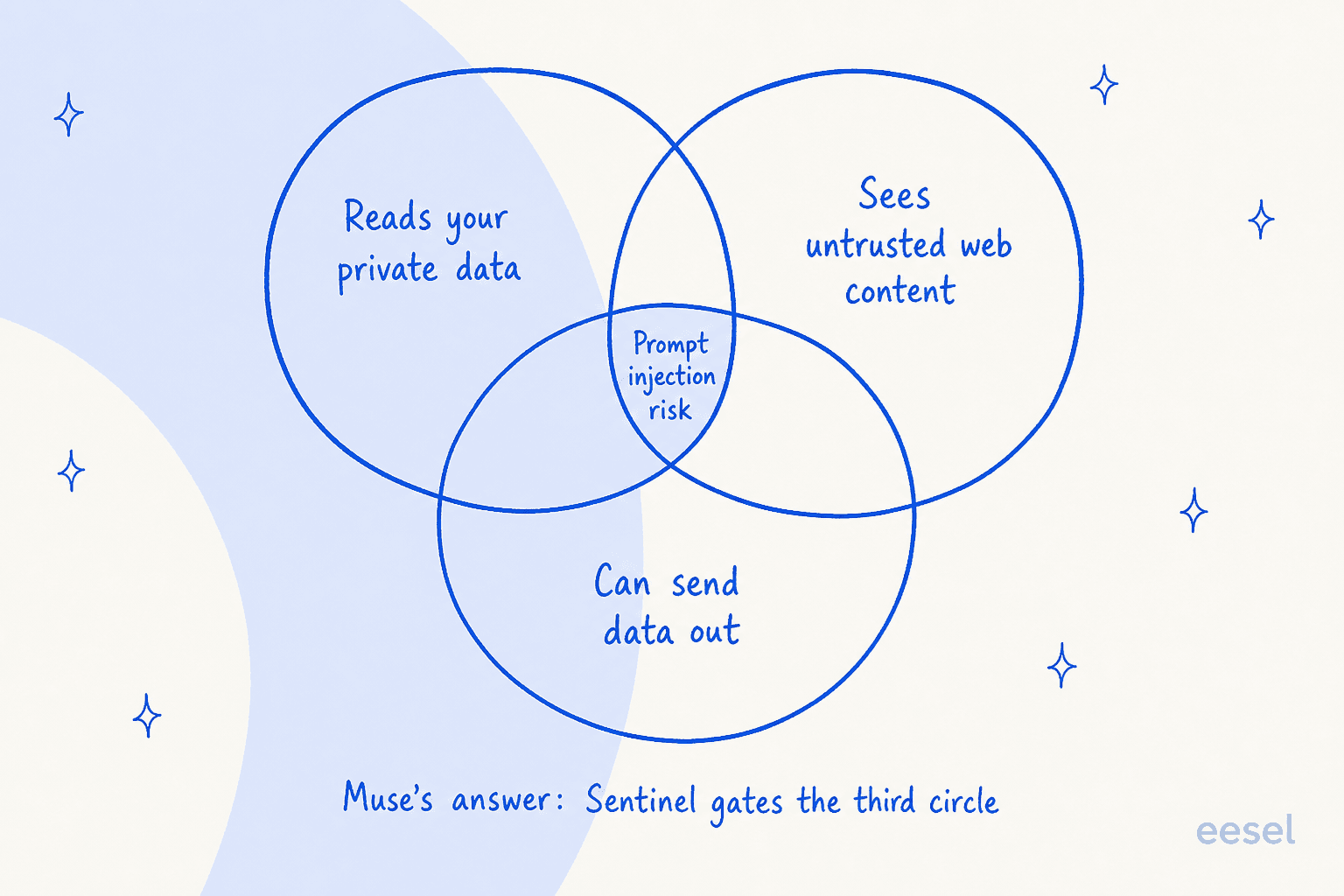
That job belongs to Sentinel, a separate agent on the same machine, kept apart from Muse at the system level. Sentinel is the sole permission authority for two things: connector actions to third-party services, and every network request that tries to leave the VM. Muse can only propose; Sentinel decides allow, deny, or ask you. It evaluates each request at both the network and application layer, blocks server-side request forgery tricks, and uses kernel-level "tainted egress" tracking (built on eBPF) so a request that has touched your private data loses any auto-allow and falls back to asking you.
When Sentinel decides to ask, execution stops and the approval prompt is shown in the app UI, not inside the chat with Muse, and your answer routes straight back to Sentinel. That detail is quietly important: it means a prompt-injected agent cannot forge your consent by talking its way through the conversation. Meta's CTO framed the layered approach directly:
"One threat we're particularly focused on is prompt injection, and we handle it in layers. The model is trained to recognize and resist it. The harness marks anything coming from an untrusted source. Deterministic code checks the result. And an ensemble of classifiers runs where the agent can't reach them."
Purchases get their own belt and braces: a single-use card number tied to that merchant, a specific amount, and a short validity window, plus a human approval every single time. Even if an attacker stole the card details through injection, they would be useless. Meta is putting money behind the claim with a bug bounty paying up to $300,000, including up to $130,000 for a working prompt injection that affects a single user. That number is a fair signal of how hard this problem is, and it is not one Meta pretends is solved. As one long-time practitioner put it, an unattended agent on the open web is a rough neighborhood:
"This is the worst kind of hazmat for LLMs, in one of the most adversarially challenging roles (unattended personal agent). If you ask the agent to recommend a soda and buy it for you, and it goes to Reddit, it is going to be exposed to prompt hijacking attempts."
What people are saying
The technical design earned real respect. The company attached to it did not. Across the Hacker News launch thread (362 points, 379 comments), the dominant reaction was some version of "I want this, just not from Meta."
"I absolutely want a general purpose assistant. I absolutely don't trust Facebook with the necessary data."
"Meta in particular has a history of intentionally using customer data and behavior to the detriment of those customers... It's handing your drug dealer the keys to your house."
Meta clearly anticipated this, which is why the privacy claims are so specific: Muse does not share your conversations or VM data with Meta's ad systems, you can opt out of model training, and a Muse Confidential VM that encrypts the whole machine with a key only you hold is planned for later in the year. Whether that reassures anyone who has watched Meta's track record is the open question, and at least one commenter was already watching the fine print:
"How long until 'conversations are not shared with Meta's ad systems' quietly disappears from the site?"
The other worry was reliability, the plain fear of handing irreversible actions to a model that can be confidently wrong. But it was not all skepticism. The people who actually used it found moments where it delivered:
"SAS messed up on one booking... I asked [Muse] to handle it for me. To my surprise, it dug through all of the SAS emails and actually found the emails confirming that the food fees were reimbursed... if not some tool like Muse, I wouldn't even find time to handle this."
That, to me, is the honest read on Muse today: a capable agent with a serious security design, launched by the one company a lot of its target users least want to trust.
Pricing and availability
Muse is live in the US only, on iOS, Android, and muse.ai, with AI glasses "coming soon." You can also use it directly inside WhatsApp. Meta says it is "free for most of what people need, with subscription plans for people who want to do more," so the model is freemium with paid tiers on top.
Meta did not publish exact tier prices at launch. You will find specific numbers floating around in coverage, but I would not repeat them as fact until they show up on Meta's own page, and I will keep the dedicated pricing breakdown for a separate post once the numbers are confirmed. For now, the safe summary is: free to start, pay to do more, US only.
Where Muse fits, and where it does not
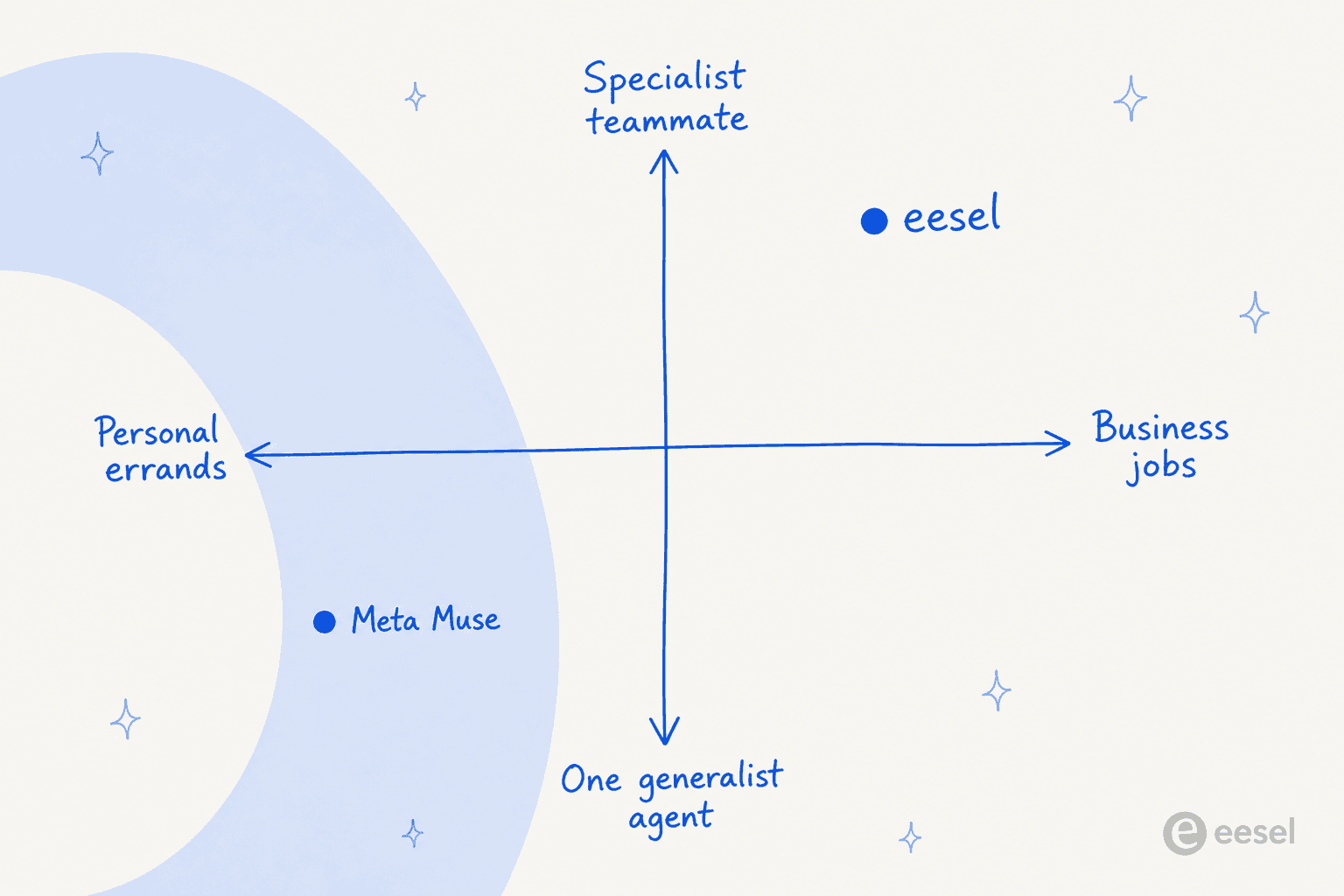
Muse is a consumer product. It is built for one person's errands, and it is a generalist by design: shopping today, travel tomorrow, a permission slip the day after. That is the right shape for a to-do list. It is the wrong shape for a business job.
This is worth saying clearly because the word "agent" now covers two very different products. A personal errand-runner and a business teammate share a name and almost nothing else.
Here is the thing my team has learned the hard way, running autonomous agents on live support queues for years: with a business job, the model is rarely the bottleneck. In one trial where we studied why agents rewrote AI-drafted replies, only about 5% of the edits were the AI being factually wrong. The rest was tone, length, and trust. That is the same lesson Muse's entire architecture is built around: getting the action right is less about raw intelligence and more about guardrails, approvals, and knowing exactly what the agent is allowed to touch. Meta built Sentinel for the consumer version of that problem. For a support queue, the equivalent guardrails are different, and that is a job for a purpose-built customer service agent, not a personal assistant. It is also why the AI customer service companies worth taking seriously look nothing like a consumer errand app.
Try eesel for the job Muse was not built for
If you landed here comparing agents for your business, this is the honest handoff. Muse runs one person's errands. eesel is an AI teammate platform, where you hire a ready-to-work teammate for a specific job. The current roster is an AI helpdesk teammate and an AI blog writer, each arriving with the skills, integrations, and company context for its role.

The difference that matters for a business: the AI helpdesk teammate plugs into the helpdesk you already run instead of asking you to rebuild anything, trains on your past tickets and help center, and, crucially, can be simulated against thousands of your historical tickets before it ever replies to a real customer. That is the guardrail a support team actually needs, the business-side answer to the same "how do I trust an agent with real actions" question Muse tackles for consumers. If a coding agent or your own scripts need to drive it, there is also a public eesel CLI and API so the same teammate can be run from a terminal as well as a dashboard. You can start free, no credit card, and see it run on your own data in minutes.
Frequently Asked Questions
What is Meta Muse?
Meta Muse is a personal AI agent that carries out real tasks for you, like shopping, booking travel, filling forms, and sending email. It runs on Meta's Muse Spark model inside a dedicated cloud computer Meta calls the Secure VM, and it launched in the US on September 8, 2026.
Is Meta Muse free?
Meta says Muse is free for most of what people need, with paid subscription plans for heavier use. Meta did not publish exact tier prices at launch, so treat any specific dollar figure you see as unconfirmed until it appears on Meta's own page.
What can Meta Muse do?
Muse can open a browser, fill out forms, negotiate, and check out on your behalf. Concrete examples Meta gives include turning a saved Instagram recipe reel into a grocery list, booking travel, lowering a bill, and selling a car. It behaves more like an agent than a chatbot because it takes real actions rather than only answering.
Is Meta Muse safe to use?
Muse runs in an isolated per-user VM, never sees your raw passwords, and routes every outbound action through a separate Sentinel layer that asks you to approve sensitive steps. It also pays with one-time virtual cards. That is a strong design, but an unattended agent browsing the open web still carries prompt-injection risk, which is why the human approval step matters.
Is Meta Muse good for customer support or business use?
Not really. Muse is a consumer agent for personal errands, not a business teammate. If you want AI for a defined business job like support, a purpose-built AI agent for customer service such as eesel plugs into your existing helpdesk and can be simulated on past tickets before it goes live.