Why look past Chatbase at all?
Let's give Chatbase its due first. It is genuinely easy to start with, it trains on your docs and website without code, and on G2 reviewers consistently praise how fast it is to get a bot live, with one G2 summary calling it "incredibly easy to use… without coding skills." It claims to be trusted by 10,000+ businesses, and for a startup that wants an FAQ bot on the marketing site this afternoon, it's a reasonable first stop.
The cracks show up once the bot has to do real support work. The pricing runs on message credits, from free up to $400 a month on Pro, and credits get consumed whether the bot resolved anything or not. The deployment model is a separate widget, so if your team lives in a helpdesk, the AI is one more place to manage. And the bot is happiest with static knowledge: one Reddit user looking for a Chatbase alternative wanted to "integrate a google sheet… that I can periodically change without having to re-train the AI," which is exactly the kind of dynamic, order-status-style query that trips simple trained bots up.
There's even an honest split among users on what Chatbase is for. One r/SaaS thread argued it "nails FAQs but doesn't really sell," while a separate thread insisted Chatbase is "amazing for sales." When the user base can't agree on the core job, that's usually a sign the tool is general-purpose rather than purpose-built, and it's worth knowing what a more focused AI chatbot platform can do.
What all of these tools actually do
Before the list, it helps to see the shared skeleton. Every "train on your data" support tool, Chatbase included, runs the same five-step loop under the hood. The differences between them are about how far each step goes, not whether the step exists.
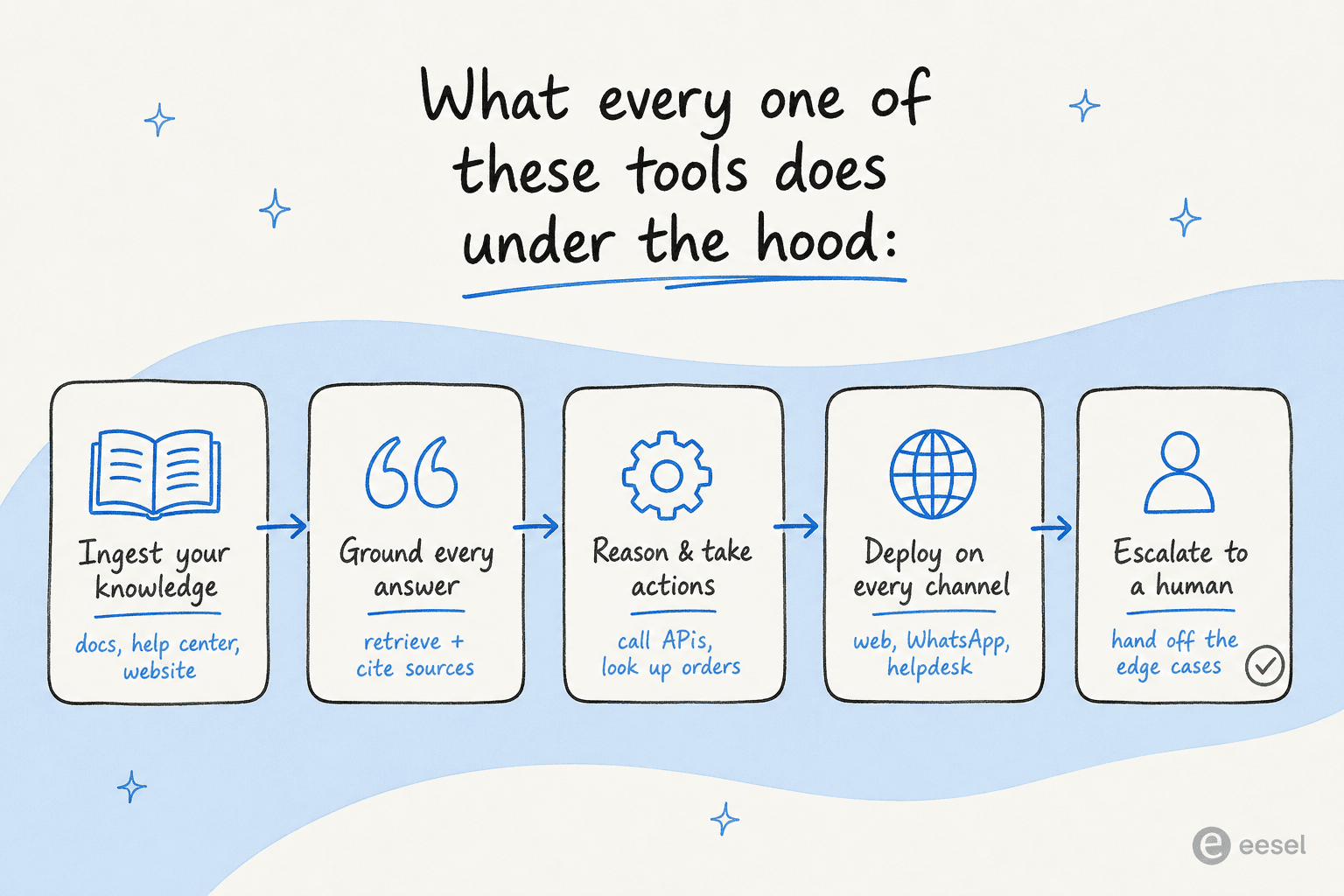
So when you compare two of these tools, the questions that matter are: how much knowledge can it actually hold and keep in sync, can it take real actions (look up an order, refund, escalate) rather than just answer, where does it deploy, and how clean is the human handoff. Hold those four in mind as you read.
How we picked, and what to look for
We weighted a few things heavily: the real billing model (not just the headline price), how the bot deploys (standalone widget vs inside your helpdesk), the quality of human escalation, and whether the tool can take actions instead of only answering. We pulled pricing from each vendor's own page, ratings from G2, Trustpilot, and Capterra, and sentiment from Reddit and review sites. Where a tool was something you could actually sign up for and poke at, we did.
A quick map of the field helps before the detail. Two axes separate these tools more than anything else: how quick they are to ship versus how deeply you can customise them, and whether they're built for an SMB or an enterprise.
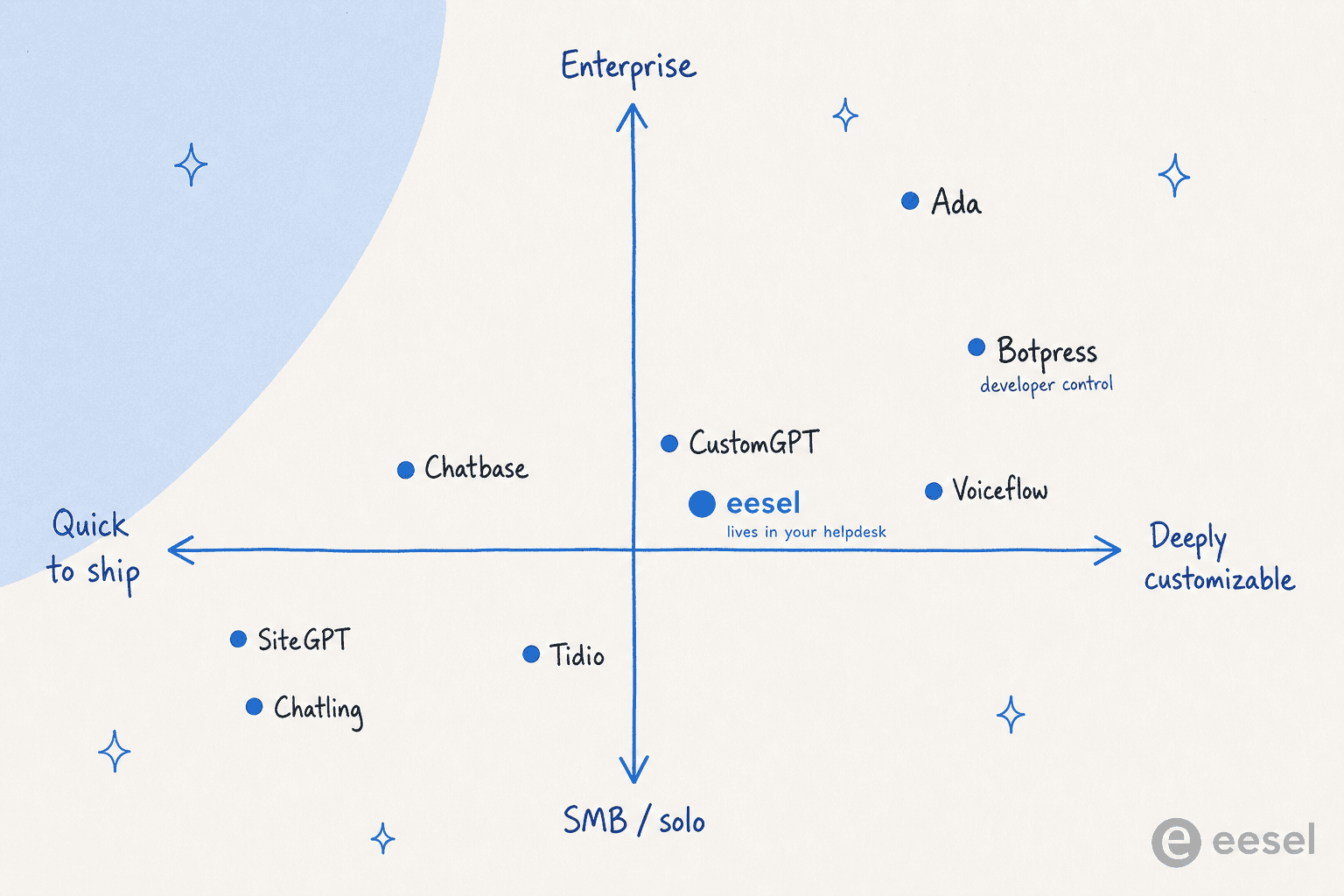
Here's how the eight stack up at a glance.
| Tool | Best for | Starting price | Billing unit | Free tier | Human handoff | Notable security | Rating |
|---|---|---|---|---|---|---|---|
| eesel AI | Helpdesk-native automation | $0.40 / AI action | Per action | Trial + $50 credit | Native, in-helpdesk | SOC 2, GDPR | New, fast-growing |
| Botpress | Developers who want control | $0 / $150 mo | Per conversation | 100 convos/mo | Botpress Desk | SOC 2, GDPR, pen-tested | 4.5/5 (G2) |
| Voiceflow | Complex flow + voice design | ~$60 /editor/mo | Per editor seat | 100 credits | Operator step | SOC 2, ISO 27001 | 4.6/5 (G2) |
| Tidio | SMB & ecommerce live chat | $24.17 mo | Per conversation | 50 Lyro convos | Built-in live chat | GDPR | 4.7/5 (G2) |
| CustomGPT.ai | Cited, no-hallucination answers | $99 mo | Per agent tier | 7-day trial | Via escalation | SOC 2, GDPR | ~4.0/5 (G2) |
| SiteGPT | Fast website-trained bot | $39 mo | Per message | 7-day trial | One-button handoff | SOC 2, GDPR, HIPAA | ~11 reviews |
| Chatling | Tight-budget SMBs | $0 / $40 mo | Per AI credit | 100 credits | Limited | GDPR | 4.7/5 (G2) |
| Ada | Large enterprises | Contact sales | Per conversation | None | Coaching + handoff | SOC 2, HIPAA, AIUC-1 | Enterprise |
Now the detail.
1. eesel AI
Best for: support teams who want AI working inside the helpdesk they already use, not in a separate widget.
Most tools on this list give you a chat widget to paste on your site. eesel AI takes the opposite stance: instead of being one more place to manage, it deploys as an AI agent inside Zendesk, Freshdesk, Slack, email, Shopify, and 100+ other tools, where it reads tickets, drafts and sends replies, and escalates the edge cases. The framing is less "build a chatbot" and more "onboard a teammate," and you brief it in plain language rather than wrestling with prompt engineering.
That difference matters most when the knowledge isn't static. eesel learns from your existing ticket history and help articles on day one, and it can take real actions, including pulling live Shopify order data into a reply, which is the exact dynamic-data gap Chatbase users complain about. It's proven at volume too: Smava runs a fully automated Zendesk agent handling 100,000+ tickets a month in German, and Ecosa connects Zendesk, Slack, and its website for over 10,000 tickets a month.
Pros:
- Lives inside your existing helpdesk, so there's no new interface for agents to adopt.
- Takes actions (order lookups, refunds, escalation), not just answers, so it works for AI chatbots that handle orders.
- Onboards from your ticket history and docs in minutes, no manual training set required.
- Usage-based pricing with no per-seat fee and a spend cap you control.
Cons:
- It's the AI layer, not a full standalone helpdesk, so you keep using your existing support tool (which is the point, but worth saying).
- Newer than the enterprise incumbents, so it doesn't carry a decade of G2 reviews yet.
Pricing:
| Plan | Cost | Notes |
|---|---|---|
| Free trial | $50 credit + 2 blog generations | No card required |
| Regular task (ticket / chat) | $0.40 each | Pay per AI action |
| Heavy task (blog post) | $4.00 each | For content work |
| Annual commit (≥$300/mo) | 25% discount | - |
| Enterprise | $1,000/mo platform fee + usage | SSO, custom controls |
Full detail on the eesel AI pricing page. No seat fees and no monthly minimum on self-serve, and agents pause at the spend cap you set, so a busy month can't surprise you with a bill.
Our take: if your support already runs through a helpdesk, eesel is the most natural Chatbase replacement on this list, because it removes the "manage a separate bot" tax entirely. If you specifically want a standalone marketing-site widget and nothing else, a lighter tool further down may be enough.
2. Botpress
Best for: developers and technical teams who want to build exactly the agent they imagine, with no ceiling on customisation.
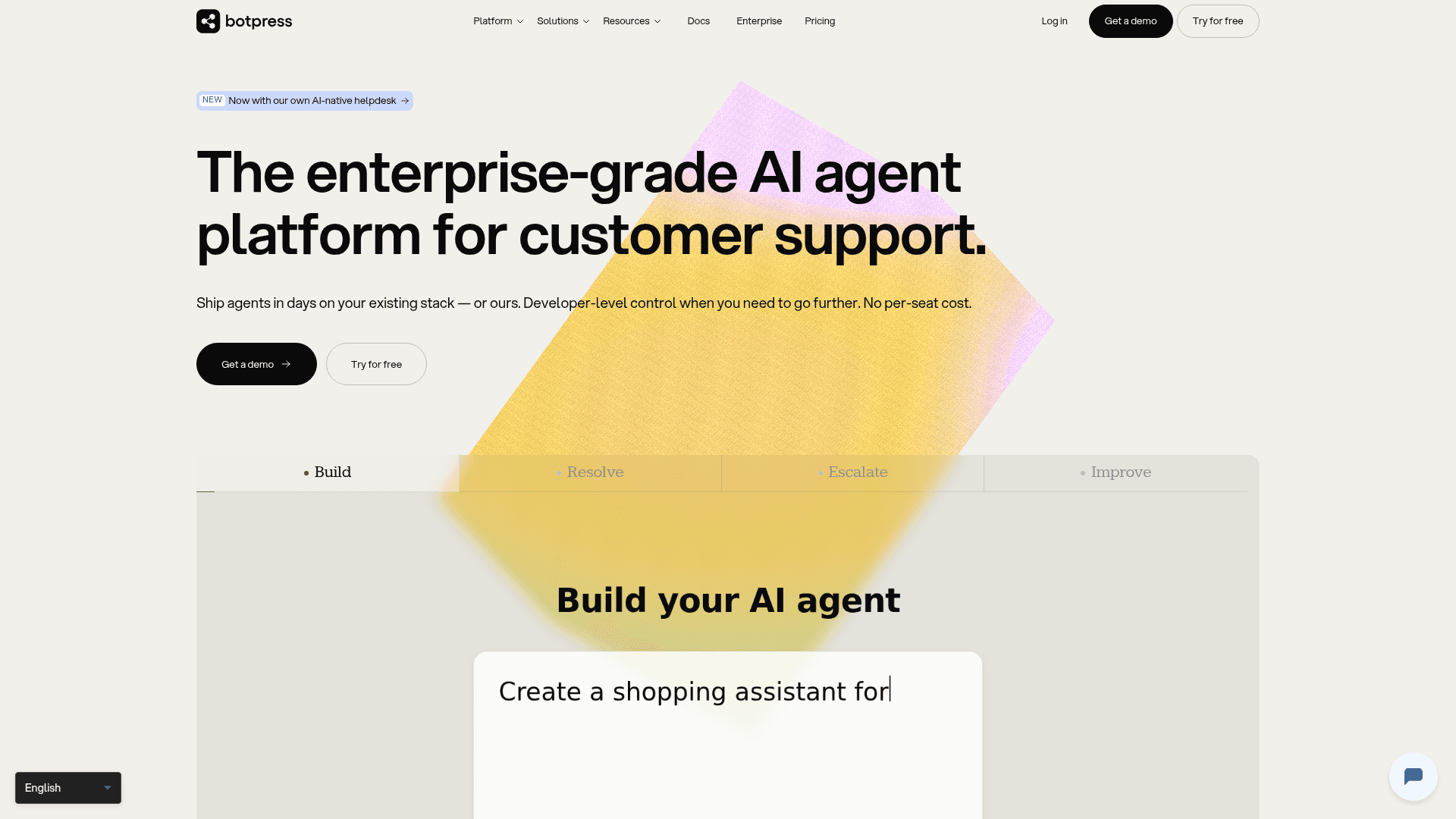
Botpress is the power tool of the group. Built over a decade out of an open-source framework, it now spans a visual Studio, a TypeScript developer kit (ADK), and the newer Botpress Desk helpdesk, all sitting on its Autonomous Engine for the LLM reasoning. It holds a solid 4.5 out of 5 across roughly 490 G2 reviews, and one practitioner on r/Chatbots called it "perhaps the most developer-friendly platform… supporting a visual flow builder, sending images and audio, and integrating webhooks."
The flip side is the learning curve. A third-party benchmark found that Chatbase takes 30 to 60 minutes from signup to live bot, while Botpress needs "2 to 8 hours for a basic deployment and weeks to master," and a Botpress vs Chatbase comparison warned that "teams often underestimate the engineering effort required to customize." Cost comes up too, both for DIY builds and agency work.
"Botpress is a fantastic choice. It has a great visual flow editor that makes building conversations intuitive, but it's built for developers."
Pros:
- Effectively unlimited customisation; switch between visual builder and code.
- Priced per conversation with LLM usage bundled in, so no separate token math.
- Strong security posture: SOC 2, GDPR, and KPMG pen-testing.
Cons:
- The steepest learning curve here; not for non-technical owners.
- Studio can feel laggy, and the knowledge base query model confuses newcomers.
Pricing:
| Plan | Price (annual) | Conversations/mo | Seats |
|---|---|---|---|
| Free | $0 | 100 | 3 |
| Plus | $150/mo | 250 | 3 |
| Team | $750/mo | 1,500 | Unlimited |
| Enterprise | Custom | Custom | Custom |
Our take: pick Botpress if you have developer time and want a no-compromise build. If you want the same flexibility without the build effort, this is exactly where a managed no-code AI chatbot tool earns its keep.
3. Voiceflow
Best for: teams designing complex, multi-step conversations, especially across chat and voice.
Voiceflow is the design studio of the bunch. Its visual canvas blends goal-based "Playbooks" with deterministic "Workflows," and its biggest strength, repeated across reviews, is that designers and engineers can collaborate on one canvas through a real dev-to-production pipeline (environments, A/B traffic splits, version history). It holds 4.6 out of 5 across 109 G2 reviews and won a 2026 G2 Best Software Award. The customer proof is real: Trilogy automated about 60% of support across 90 products in 12 weeks, and Turo built a multilingual chatbot in two months at 82% user satisfaction.
Two things to watch. First, the public pricing page hides its numbers behind demo and signup gates, which is its own kind of friction. Second, cost has historically been a sore point: one r/Chatbots thread complained about token burn, and even after Voiceflow moved to a credits model, the per-editor pricing scales quickly for bigger teams.
Pros:
- Best-in-class visual builder for genuinely complex, branching conversation logic.
- Strong on voice and phone, not just web chat.
- LLM-agnostic, with GPT, Claude, and Gemini all selectable.
Cons:
- Per-editor pricing (from ~$60/editor/mo, plus ~$50 for extra seats) adds up for teams.
- Opaque public pricing; you're nudged toward a demo.
Pricing:
| Plan | Price | Credits | Notes |
|---|---|---|---|
| Free | $0 | 100 | 2 agents, 1 editor |
| Pro | from $60/editor/mo | 10,000 | All models, ~20 agents |
| Business | from $150/editor/mo | 30,000 | Environments, roles |
| Enterprise | Custom | Custom | SSO, advanced security |
Figures via Voiceflow's own credits announcement and G2.
Our take: if conversation design is the project (especially voice/IVR), Voiceflow is the most capable canvas here. For straightforward support deflection, it's more machine than most teams need, and the seat-based pricing works against you.
4. MessageMind
Best for: teams that want one AI answering across chat, WhatsApp, social, email, SMS and phone calls, not just a website widget.
MessageMind is a Chatbase alternative in the sense that it answers customer questions, but it's aiming at something wider: a single AI agent that runs the whole front desk. The same agent picks up web chat, WhatsApp, Instagram and Messenger, email, SMS and inbound phone calls from one platform, hands off to a human when it should, and connects to the tools behind the conversation so it can take an action rather than only reply. If what you actually want is a bot on your marketing site, this is more than you need. If you're losing conversations because they arrive on six different channels, that's the problem it's built for.
It's strongest in hospitality and short-term rentals, where MessageMind's AI co-host qualifies inquiries, books stays, sends door codes and pre-arrival details, and chases reviews. That side is genuinely integrated rather than a landing page: it syncs with property management systems including Hostaway, Guesty, Lodgify, Hospitable, Zeevou, Cloudbeds and Mews.
Pros:
- One agent across web chat, WhatsApp, social, email, SMS and voice, which very few tools on this list attempt.
- Human handoff and action-taking integrations, not just answers.
- Deep vertical work in hotels and short-term rentals, with named PMS integrations.
Cons:
- A flat monthly subscription rather than usage pricing, so a quiet month costs the same as a busy one.
- Broader than a website FAQ bot, which means more to set up if that's all you wanted.
Pricing:
| Plan | Billed annually | Billed monthly |
|---|---|---|
| Entry | $59/mo | $69/mo |
Our take: if your customers reach you on WhatsApp and the phone as often as they reach you on your website, a single-channel chatbot will keep leaking conversations. MessageMind is the omnichannel answer on this list, and the hospitality build-out is the most convincing part of it.
5. Tidio
Best for: small and mid-market ecommerce stores that want an AI agent and live chat in one box.
Tidio is the friendliest all-rounder for a growing store. It bundles its Lyro AI agent (powered by Anthropic's Claude, not GPT), live chat, ticketing, and proactive Flows into one platform, and it's trusted by 300,000+ businesses with a 4.7 on G2 and 4.8 on the Shopify App Store. Tidio claims a 67% average resolution rate for Lyro and backs it with a money-back guarantee if you fall below 50%, which is a confident, checkable promise of the kind we like to see.
The thing to model carefully is pricing. Tidio charges on billable conversations, and the layers stack (live-chat conversations, Lyro conversations, and Flows visitors are separate meters), so usage can be hard to forecast. The jump from Growth to the $749/mo Plus plan is also a big step. For the deflection-focused buyer, it's worth reading up on how ticket reduction with AI actually works before committing.
Pros:
- AI plus live chat plus ticketing in one tool, strong for ecommerce customer service.
- Excellent Shopify integration with native order actions on Growth+.
- Lyro is praised for staying grounded in your data rather than hallucinating.
Cons:
- Layered conversation pricing is hard to predict at scale.
- The Growth-to-Plus price jump is steep for a small team.
Pricing:
| Plan | Price (annual) | Billable convos | Key unlock |
|---|---|---|---|
| Free | $0 | 50 | 50 Lyro convos (lifetime) |
| Starter | $24.17/mo | 100 | Live visitors, hours |
| Growth | from $49.17/mo | 250–2,000 | Shopify actions, analytics |
| Plus | from $749/mo | Custom | Departments, Lyro Connect, CSM |
| Premium | ~$2,999/mo | Custom | Guaranteed 50% resolution, SSO |
Our take: for an SMB store that wants one tool to do AI and human chat, Tidio is a great pick. Larger teams, or anyone who already lives in a separate helpdesk, will find the conversation-based meter and the standalone-widget model limiting.
6. CustomGPT.ai
Best for: content-heavy or regulated teams that need answers grounded in sources, with a visible audit trail.
CustomGPT.ai has one very sharp angle: trustworthy answers. Its whole pitch is an AI that "knows when to say 'I don't know,'" with every response linking back to its source. The company says it was third-party verified #1 for anti-hallucination technology, and it supports 1,400+ file types and 90+ languages, with named users including MIT, Adobe, and the United Nations. On Reddit, the recurring verdict is that its citation and source audit trail beats Chatbase and ChatGPT custom GPTs for compliance-sensitive support, where a generic bot that "makes stuff up" with no source visibility is a non-starter.
The catch is the entry plan. CustomGPT's cheapest paid tier is $99/mo and forces 10 agents with no single-agent option, which buyers on a budget find frustrating. It's also a slightly longer setup than the lightest tools, though most reviewers feel the audit trail is worth it.
Pros:
- The strongest anti-hallucination and source-citation story on this list.
- RAG API on every plan, a differentiator for builders.
- SOC 2 Type II, GDPR, and it doesn't train on your data.
Cons:
- $99/mo entry with a 10-agent minimum prices out solo users.
- Thinner public review base (~4.0/5 on G2) than the bigger names.
Pricing:
| Plan | Monthly | Annual | Agents | Queries/mo |
|---|---|---|---|---|
| Standard | $99 | $89 | 10 | 1,000 |
| Premium | $499 | $449 | 25 | 5,000 |
| Enterprise | Custom (from ~$1,000) | Custom | As needed | As needed |
Our take: if you're in finance, healthcare, education, or anywhere a wrong answer carries real cost, CustomGPT's grounded-and-cited approach is the safest bet here. For a simple storefront FAQ, the $99 floor is hard to justify.
7. SiteGPT
Best for: small teams that want a website-trained support bot live today, without much fuss.
SiteGPT is the founder-built, no-nonsense option: point it at your URL, sitemap, or files, and it trains a personalised bot ("ChatGPT specifically for your product") in your brand voice across 95+ languages. It does the support fundamentals well, with one-button escalation to a human, lead capture, and native Crisp, Intercom, and Zendesk connections, and it punches above its weight on compliance for a small tool: SOC 2 Type II, GDPR, and HIPAA on Enterprise.
It's worth being clear-eyed about two things. The public review base is small (around 11 G2 reviews), so there's less independent signal than for the bigger names. And the message caps plus paid branding removal draw grumbles: one Chatbase-alternative thread noted SiteGPT "caps your messages (40k/mo on the $259 plan) and $39/mo extra just to remove their branding."
Pros:
- Genuinely fast to train and deploy on a website.
- Clean human handoff and lead capture built in.
- Strong compliance options (HIPAA on Enterprise) for a tool this size.
Cons:
- Message caps, plus $39/mo to remove branding.
- Thin public review volume to lean on.
Pricing:
| Plan | Monthly | Chatbots | Messages/mo | Pages |
|---|---|---|---|---|
| Starter | $39 | 1 | 4,000 | 1,000 |
| Growth | $79 | 2 | 10,000 | 10,000 |
| Scale | $259 | 3 | 40,000 | 50,000 |
| Enterprise | Custom | up to 10,000 | Custom | up to 500,000 |
Our take: for a solo founder or small team that needs a competent website bot without a project plan, SiteGPT is a fair, affordable pick. Just watch the message ceiling as traffic grows, and budget for the branding add-on.
8. Chatling
Best for: solo founders and SMBs on a tight budget who want a no-code bot live in minutes.
Chatling wins on speed and price. It's a no-code builder "built for resolution, not deflection," trains on your website and docs, deploys to web, WhatsApp, Instagram, and Messenger, and exposes 28 different LLMs. Reviewers love how fast it is: it holds a 4.7 on G2 (71 reviews) with a 9.5/10 ease-of-use score, and one CEO reported it took "no more than 5 minutes to add the Chatbot to our website." SnapDownloader credits it with resolving 45% of support questions on 1,500 emails a month.
Two honest weaknesses. First, the AI-credit pricing is the top complaint by far: credits vary up to ~28x by model, so a plan can drain fast on premium models, and one user noted they "often exceed my credits limit, which interrupts service until the next month." Second, human handoff is its weakest dimension, with a G2 "Route to Human" score of just 6.7/10, which matters a lot if a real agent needs to step in cleanly.
Pros:
- Cheapest serious option here, with a usable free plan.
- Very fast, non-technical setup (5–20 minutes to live).
- 28 models and broad multilingual support out of the box.
Cons:
- Confusing, variable AI-credit pricing is easy to blow through.
- Weak live chat and human handoff; built for SMBs, not enterprise governance.
Pricing:
| Plan | Monthly | Annual/mo | AI credits/mo | Agents |
|---|---|---|---|---|
| Free | $0 | $0 | 100 | 2 |
| Standard | $40 | $32 | 3,000 | 3 |
| Plus | $140 | $112 | 15,000 | 5 |
Our take: if budget is the deciding factor and you mainly need an FAQ bot, Chatling is a strong, cheap choice. The moment reliable human handoff or predictable costs matter, you'll feel the ceiling.
9. Ada
Best for: large enterprises with very high conversation volume and a procurement process to match.

Ada plays a different game from everyone else here. It's a Toronto-based, unicorn-funded enterprise platform (it raised a $130M Series C in 2021 at a $1.2B valuation) that brands its own category, Agentic Customer Experience. Its platform pairs a multi-LLM Reasoning Engine with Playbooks (multi-step SOPs the agent reasons through) and Coaching (you review past chats and the agent applies the notes). The enterprise proof is heavy: Monday.com cut average handle time 42%, and IPSY reported a 943% ROI in four months. On compliance it leads with SOC 2, HIPAA, GDPR, and the AI-specific AIUC-1 certification plus zero data retention.
The gate is explicit. Ada's own pricing page states it's a great fit for companies with at least 300,000 annual customer service conversations, there's no public pricing, no free trial, and no self-serve signup. If you're an SMB or low-volume mid-market team, this isn't for you, and Ada says so itself.
Pros:
- Built for genuine enterprise scale and complexity.
- Multi-LLM Reasoning Engine, strong voice, and the rare AIUC-1 AI compliance cert.
- Coaching and Playbooks give real governance over agent behaviour.
Cons:
- Enterprise-only by design: 300,000+ conversations/year floor, sales-led, no public pricing.
- It's the AI layer on top of your helpdesk, not a full suite, and it's a heavy commitment.
Pricing:
| Plan | Price | Notes |
|---|---|---|
| All tiers | Contact sales | No public pricing |
| Qualification | 300,000+ conversations/yr | Stated minimum |
| Model | Volume / annual contract | Services-led deployment |
Our take: if you're a large consumer brand doing millions of conversations and you want a dedicated AI platform with services wrapped around it, Ada is a serious contender. For everyone smaller, the enterprise gate alone rules it out, and a self-serve tool will get you live far faster.
How the pricing really compares
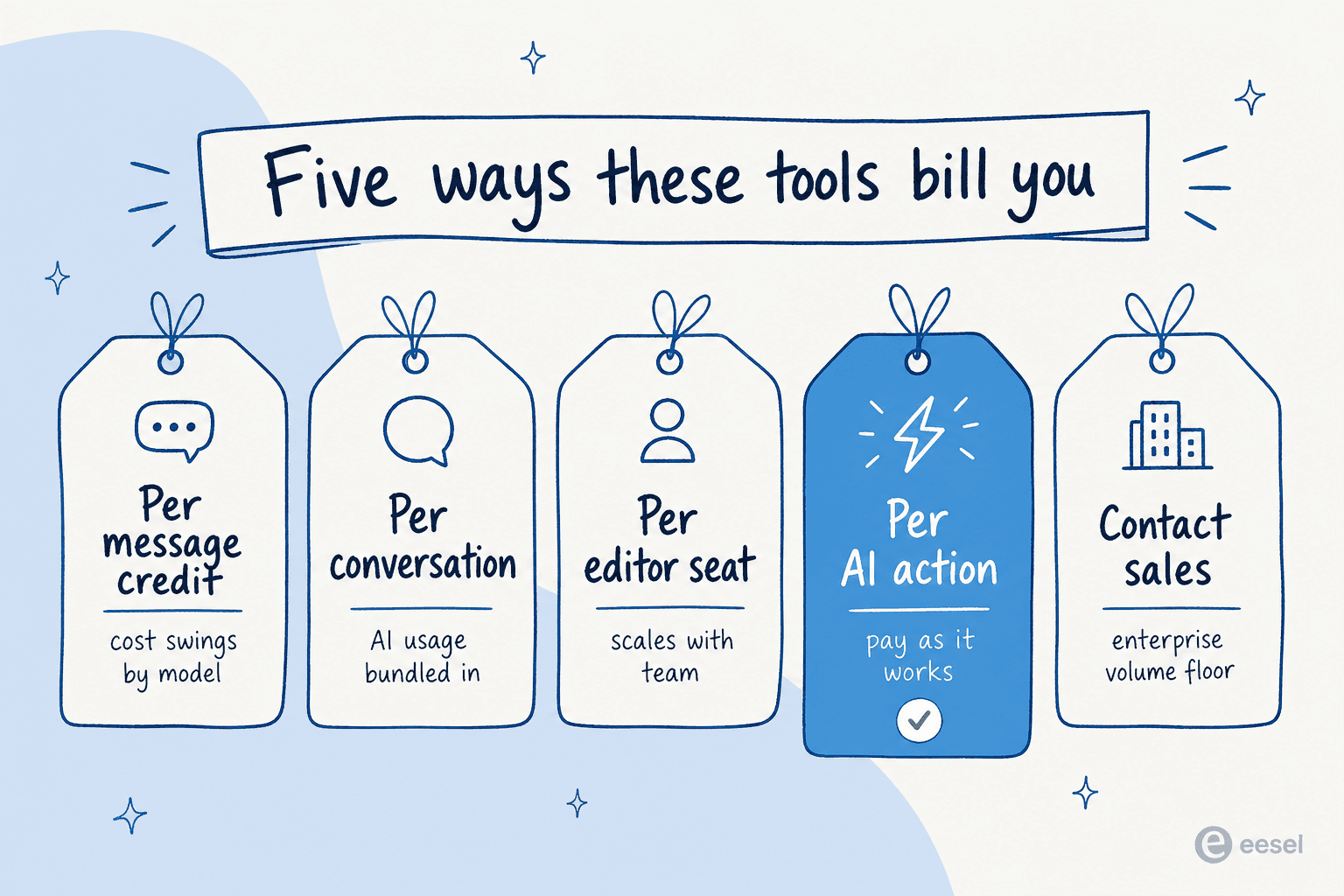
Here's the trap with this whole category: the sticker price tells you almost nothing, because no two tools bill on the same unit. What you're actually buying differs from tool to tool, and that's where the real cost hides.
A few practical implications:
- Per message credit (Chatbase, Chatling): you pay whether or not the bot resolved anything, and on Chatling the cost swings up to ~28x depending on which model answers. Easy to start, hard to forecast.
- Per conversation (Botpress, Tidio, Ada): cleaner, but a single "conversation" can mean very different things, and Tidio stacks multiple meters at once.
- Per editor seat (Voiceflow): fine for a couple of designers, expensive once a team needs many editors.
- Per AI action (eesel AI): you pay when work actually happens, and you set a hard spend cap, which is the most predictable model for high-volume support.
The honest takeaway: pick the billing unit that matches how you'll actually use the bot. A low monthly price on a credit plan can quietly cost more than a usage plan once real traffic hits, which is the same lesson buyers learn comparing AI agent cost against human agents.
Try eesel
If the reason you're leaving Chatbase is that it's one more disconnected widget to manage, eesel AI is built for exactly that problem. It deploys as an autonomous AI teammate inside the helpdesk, Slack, and email tools your team already uses, learns from your past tickets and docs in minutes, and takes real actions like looking up an order or escalating, rather than just answering questions.

The one differentiator worth repeating: there's no per-seat fee and you set a spend cap, so eesel's usage-based pricing stays predictable even when ticket volume spikes. You can Try eesel free with a starter credit and no card, and see it working in your own helpdesk before you commit.
Frequently Asked Questions
What is the best Chatbase alternative in 2026?
Is there a free Chatbase alternative?
How much does Chatbase cost compared to its alternatives?
What is a good Chatbase alternative for a Shopify or ecommerce store?
Can I use a Chatbase alternative with Zendesk or Freshdesk?


Article by
Riellvriany Indriawan
Riell is a designer and writer at eesel AI with about two years of experience researching CX platforms, AI chatbots, and helpdesk software. She combines her design background with a sharp eye for how these tools actually look and feel in practice — making her comparisons unusually visual and user-focused.