Which one fits you?
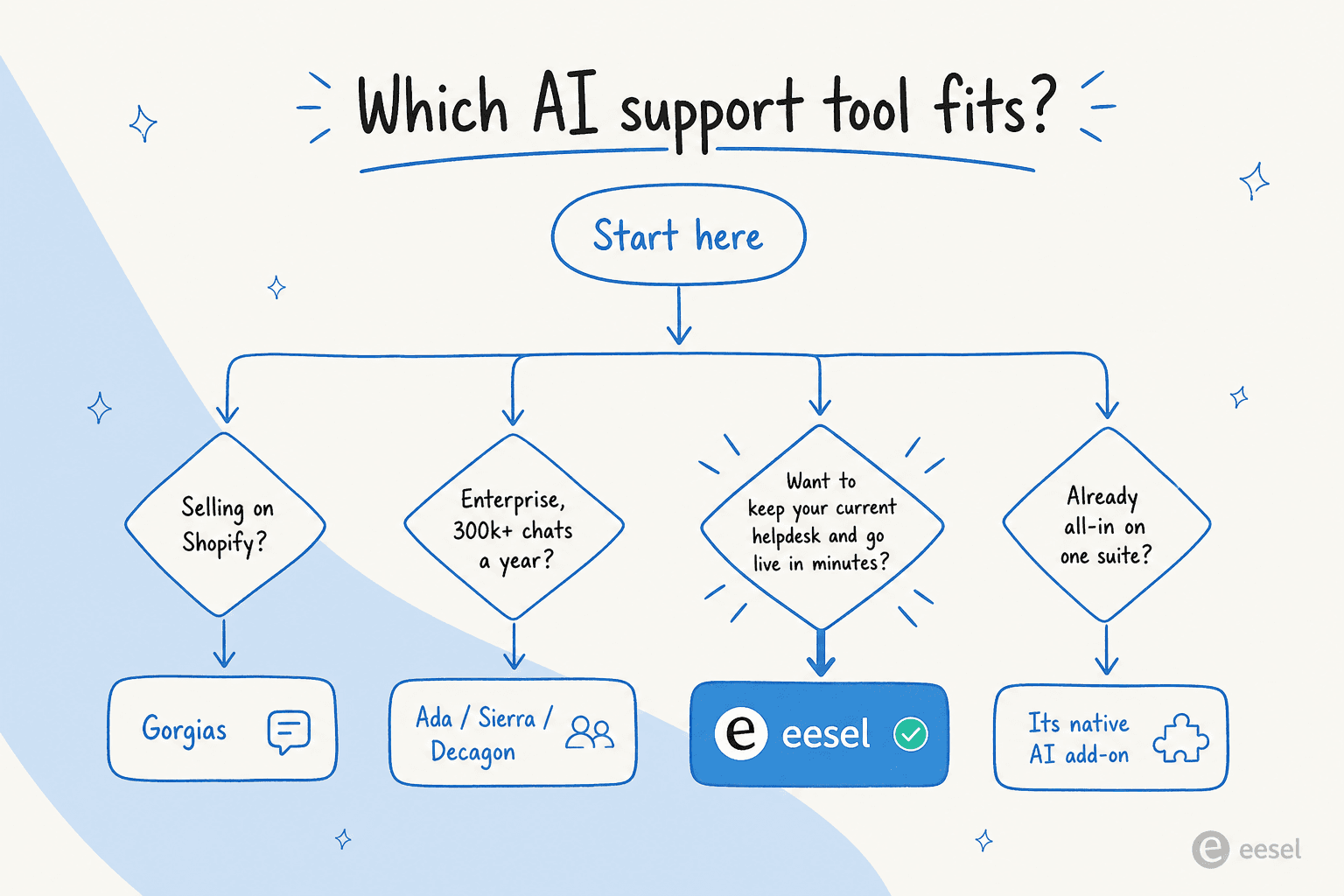
- Want to add AI without replacing your helpdesk, and go live in minutes? eesel AI layers onto Zendesk, Freshdesk, Slack, and 1,000+ other tools, and costs one fixed monthly price from $299 for 500 tickets, with no seat fees.
- Already deep in a suite? Zendesk, Salesforce Service Cloud, Freshdesk and HubSpot Service Hub bundle decent AI, but per-resolution or per-session billing adds up fast.
- Running a Shopify store? Gorgias pulls order data into every ticket better than anyone. Tidio is the budget option for small stores.
- Small team that wants a simple inbox? Help Scout is the easiest helpdesk on this list, with AI Answers at $0.75 per resolution.
- Enterprise with very high conversation volume? Ada, Sierra, Decagon, Forethought and Kustomer are the sales-led platforms built for that scale.
The 2026 comparison table
Here is the whole field at a glance. This is the part to screenshot. Prices were checked on each vendor's own pricing page on October 2, 2026.
| Tool | Best fit | AI strength | Pricing | Free trial |
|---|---|---|---|---|
| eesel AI | Keeping your helpdesk, going live fast | AI agent and copilot trained on past tickets and docs, tested on past tickets before launch | From $299/mo for 500 tickets (1 credit per ticket or chat), no seat fees | Free plan, 100 credits, no card |
| Zendesk AI | Large support teams already on Zendesk | AI agents, Copilot, intelligent triage | $19/agent/mo + $1.50 to $2.00 per automated resolution | 14 days |
| Salesforce Service Cloud (Agentforce) | Enterprises that run on Salesforce CRM | Agentforce agents that use full CRM data | From $25/user/mo (Starter Suite); Agentforce $2 per conversation or Flex Credits | Yes (length not stated) |
| Freshdesk (Freddy AI) | Small and mid-sized teams on Freshworks | Freddy AI Agent, Copilot, Insights | $19/agent/mo (annual) + $49 per 100 AI sessions after 500 | 14 days |
| Gorgias | Shopify and ecommerce brands | AI Agent that reads and edits live orders | From $10/mo (50 tickets) + $0.85 to $1.00 per automated interaction | 7 days |
| HubSpot Service Hub (Breeze) | Teams whose sales and marketing run on HubSpot | Customer Agent with CRM context | $90/seat/mo (Professional, annual) + $0.50 per resolved conversation | 14 days of Customer Agent |
| Ada | Large consumer brands | AI agent across chat, email and voice, with playbooks | Custom pricing (contact sales) | No |
| Sierra | Enterprises that want outcome-based pricing | AI agents built from SOPs, with voice | Custom, outcome-based (contact sales) | No |
| Decagon | AI-first, high-volume CX teams | Natural-language agent logic (AOPs) across channels | Custom, per conversation or per resolution (contact sales) | No |
| Forethought | Enterprises keeping their helpdesk | Multi-agent resolve, triage and QA | Custom, platform fee + outcomes (contact sales) | No (Proof of Value) |
| Kustomer | High-volume online retail teams | AI agent that takes actions on one customer timeline | Custom plans + $0.60 per engaged AI conversation | No |
| Help Scout | Small teams that want a simple shared inbox | AI Answers chat, AI drafts and summaries | $25/user/mo (Standard, annual) + $0.75 per AI resolution | Free plan; 3-month AI Answers trial |
| Tidio (Lyro) | Small ecommerce teams on a budget | Lyro AI agent for common questions | Free plan; Starter $29/mo; Lyro from $39/mo for 50 conversations | 7 days |
The big thing most roundups skip: how a tool bills (per seat plus per resolution, per AI conversation, a fixed monthly plan, or a custom enterprise contract) matters more to your final bill than any feature checklist. We break all of it down below. If you need the category and implementation path before comparing vendors, read our AI customer support guide.
How we picked (and how to read this list)
We spent time inside each product's docs, pricing pages, and UI rather than re-reading everyone else's roundups. Where a tool was something you can actually sign up for and try, we did, and the screenshots in this post are from those sessions. For the enterprise platforms that are sales-led only, we leaned on their published case studies, security pages, and what real users say on Reddit and G2.
A few things we weighed for each tool:
- Architecture. Is the AI a feature bolted onto a helpdesk, or a standalone AI platform that sits on top of whatever helpdesk you already run? This single split explains most of the price and setup differences.
- Pricing model and total cost. Per seat, per resolution, per conversation, per outcome, or a fixed monthly plan. We modelled real ticket volumes, not the sticker price.
- Time to value. Days, weeks, or a quarter-long implementation.
- Channel coverage and compliance. Chat, email, voice, and the certifications regulated teams need.
- Who it is genuinely for, and just as importantly, who should skip it.
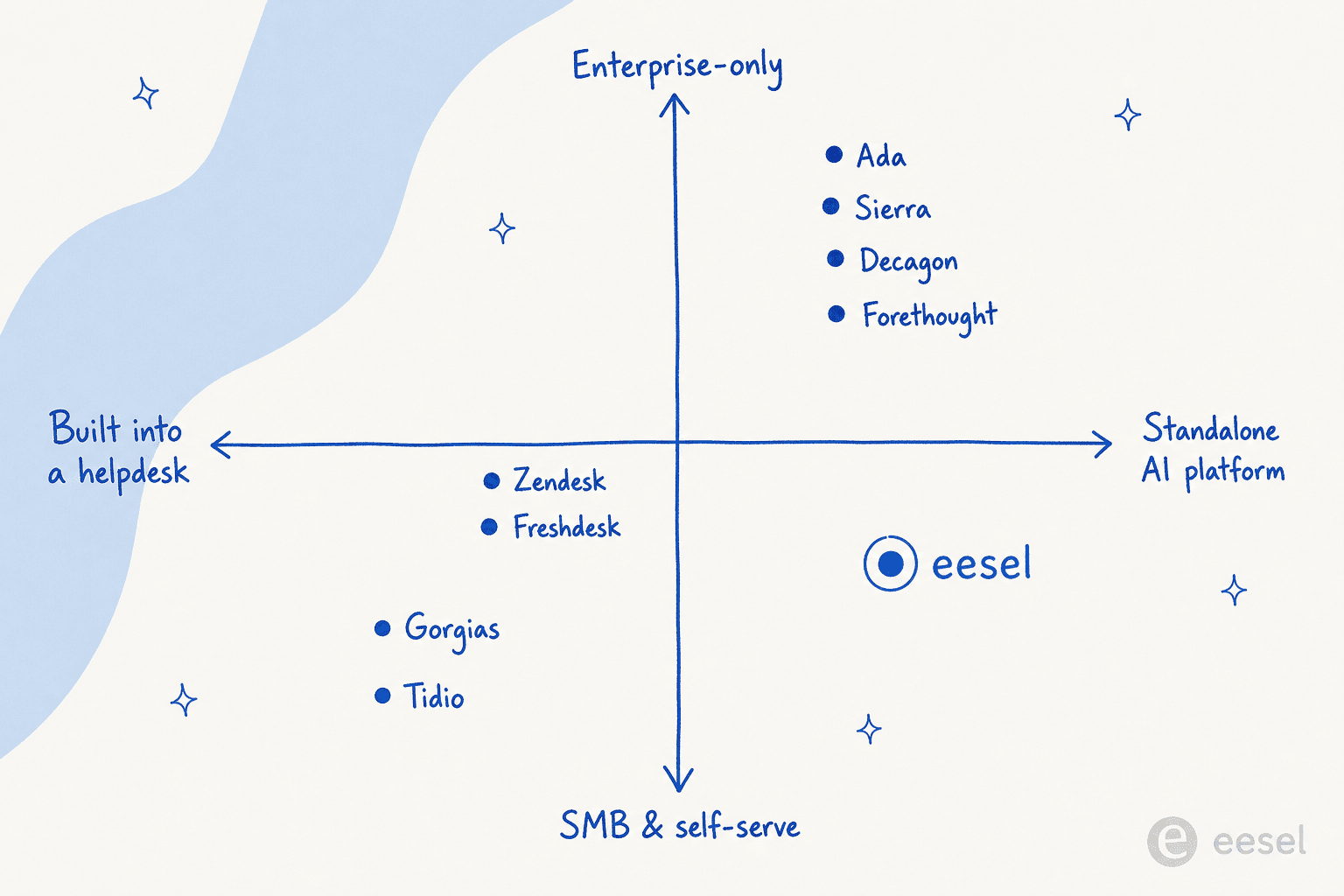
The clearest way to see where the field lands is this map. The horizontal axis is whether the AI is built into a helpdesk or a standalone platform; the vertical axis is who it serves, from self-serve SMB up to enterprise-only. It shows nine of the tools. The four we added in this update (Salesforce Service Cloud, HubSpot Service Hub, Kustomer and Help Scout) all sit on the "built into a helpdesk" side.
Now the detail on each, starting with our pick.
1. eesel AI: best for adding AI to the helpdesk you already use
Best for: teams that want AI agents answering tickets without leaving the helpdesk they already use.

Most AI support tools ask you to either adopt a whole new platform or buy an add-on locked to one vendor's suite. eesel AI takes a different route: it is an AI teammate that lives inside the tools you already run. Connect it to Zendesk, Freshdesk, Slack, Shopify, email, and 1,000+ others, and it reads tickets, drafts and sends replies, takes actions, and escalates the edge cases, all without you migrating anything.
The thing that makes it click in practice is onboarding. Instead of weeks of flow-building, eesel learns from your years of past tickets and help articles on day one, and you brief it in everyday language the way you would a new hire ("handle the support queue this afternoon, and loop me in on anything over $500 in refunds"). One customer, Smava, runs a fully automated Zendesk agent handling 100,000+ tickets a month in German.
Key features
- Runs natively inside your existing helpdesk and chat tools, so there is no new agent interface to learn.
- Learns from historical tickets, help center, and docs automatically.
- Both an autonomous AI agent and a copilot that drafts replies for human agents.
- A simulation mode that estimates resolution rate on your real past tickets before you go live.
Pricing
eesel charges one fixed monthly price, sized by how many tickets you want it to work. There is no per-seat fee and no platform fee, and every integration and channel is included.
- Free: 100 credits to try everything, no card needed.
- Teammate: 500 credits for $299/mo, 1,000 for $499, 1,500 for $699, 2,500 for $999, 3,500 for $1,349, or 5,000 for $1,899. Above that, eesel prices your volume with you.
- What a credit is: 1 ticket or 1 chat is 1 credit, however long it runs. You pay for every ticket the agent works on, whether or not it ends in a resolution. A team doing 1,000 tickets a month pays $499.
- Running out: agents pause until your credits reset, unless you turn on overage at $0.80 per extra credit with a monthly cap you set.
- Annual: pay a year upfront and get two months free.
- Enterprise: custom pricing for SSO and MFA, custom data residency, and HIPAA with a signed BAA.
Pros and cons
- Pros: no migration, fast setup, one predictable monthly price, no seat fees, and partial rollouts (route only 200 of 1,000 tickets if you want to start small).
- Cons: it is not a standalone helpdesk, so if you do not already have a ticketing system you will need one to sit it on top of. Teams with strict compliance needs (SSO, HIPAA, a BAA) will need the custom-priced Enterprise plan.
Our take: eesel is the one we would reach for first if you already have a helpdesk and want AI live this week instead of next quarter. The fixed monthly price and the no-seat-fee model make it the safest pick for teams that have been burned by per-resolution bills. Skip it only if you have no helpdesk at all, or if you are an enterprise that specifically wants a single AI platform to replace your stack.
2. Zendesk AI: best for large support teams already on Zendesk
Best for: teams already standardised on Zendesk.
Zendesk has repositioned itself as "the Resolution Platform," wrapping ticketing with AI Agents (the autonomous, customer-facing tier, derived from its Ultimate.ai acquisition), Copilot for human agents, intelligent triage, and AutoQA. It is a 2025 Gartner Magic Quadrant Leader, and it scores 4.3/5 across 6,837 G2 reviews. If you already live in Zendesk, the AI is one configuration away.
Key features
- AI Agents for autonomous resolution across messaging and email, with a dialogue flow builder and authorized actions on the Advanced tier.
- Copilot that drafts replies and executes approved actions for human agents.
- Intelligent triage to classify every ticket by intent, sentiment, and language.
Pricing
Zendesk's pricing page lists seats plus a separate AI bill:
- Support Team: $19/agent/month billed annually ($25 monthly).
- Suite Team: $55/agent/month billed annually ($69 monthly).
- Suite Professional: $115/agent/month billed annually ($149 monthly).
- Suite Enterprise + Copilot: talk to sales, no public price.
- Copilot add-on: $50/agent/month, paid yearly.
- AI agents: billed per "automated resolution." Each plan includes a small allowance (5 per agent per month). Beyond that, each resolution costs $1.50 committed or $2.00 pay as you go, with no monthly cap.
- Trial: 14 days on Suite Professional, Copilot included.
That uncapped model is the most common complaint we found, including in an r/Zendesk discussion on the new AR pricing model. AI costs can easily run 2 to 3 times the base subscription.
Pros and cons
- Pros: mature, deeply integrated if you already use Zendesk, strong omnichannel and reporting, 1,800+ marketplace apps.
- Cons: uncapped per-resolution pricing, AI quality gated by knowledge-base hygiene, and admin setup that reviewers describe as a near full-time job.
Our take: the right pick if you are already committed to Zendesk and have a clean knowledge base. If the per-resolution math worries you, look at free and cheaper Zendesk AI alternatives (including layering eesel on top of your existing Zendesk) before you sign.
3. Salesforce Service Cloud (Agentforce): best for enterprises that run on Salesforce CRM
Best for: large companies that already use Salesforce for sales and marketing.
Salesforce Service Cloud is the heavyweight helpdesk for large companies. Its AI, Agentforce, puts AI agents on top of the Salesforce CRM, so they can see a customer's history with sales, marketing and service before they answer. It is built for complex, high-volume operations, and it is priced that way.
Key features
- Agentforce service agents that answer customers and take actions using full CRM data.
- AI for human agents, such as case summaries and reply suggestions inside the console.
- Deep workflow automation and customization through the wider Salesforce platform.
Pricing
Salesforce prices Service Cloud editions per user, and Agentforce by usage:
- Starter Suite: $25/user/month, billed monthly or annually.
- Pro Suite: $100/user/month, billed annually.
- Core: $195/user/month, billed annually.
- Advanced: $395/user/month, billed annually.
- Max: $550/user/month, billed annually. Includes the full Agentforce for Service suite.
- Agentforce usage: $2 per conversation, or Flex Credits at $500 per 100,000 credits (an Agentforce action uses 20 credits, about $0.10).
- Agentforce add-on for Service: $125/user/month for unlimited employee use.
- Trial: "Try for free" is offered on the editions; Salesforce does not say how long it lasts.
For a deeper breakdown, see our Agentforce pricing guide.
Pros and cons
- Pros: scales to very large global teams, connects service data with the full customer history, and has deep workflow options.
- Cons: a serious investment of money and time to set up, the AI only works inside Salesforce, and it is far more than small or mid-sized teams need.
Our take: the natural pick if your company already runs on Salesforce CRM and has admins to configure it. If you only need AI answering tickets, a lighter layer on top of your current helpdesk will be live much sooner.
4. Freshdesk (Freddy AI): best for small and mid-sized teams on Freshworks
Best for: teams already on Freshworks who want bundled AI.
Freshdesk, from Freshworks, pairs a clean, affordable helpdesk with Freddy AI, a three-part suite: an autonomous AI Agent, a Copilot for human agents, and AI Insights for leaders. Freshworks says Freddy resolves up to 80% of queries, and the platform is trusted by 74,000+ businesses including Bridgestone and Klarna. It tends to be friendlier to less technical teams than Zendesk.
Key features
- Freddy AI Agent with 50+ prebuilt agentic workflows and a no-code studio.
- Freddy Copilot for reply suggestions, summaries, and live translation in-workspace.
- Freddy Insights for proactive alerts, root-cause analysis, and SLA-breach detection.
Pricing
From Freshdesk's pricing page:
- Growth: $19/agent/month billed annually ($23 monthly).
- Pro: $55/agent/month billed annually ($66 monthly).
- Enterprise: $89/agent/month billed annually ($107 monthly).
- Freddy AI Agent: the first 500 sessions are included on all paid plans, then $49 per 100 sessions. A "session" is one end-user interaction within a 72-hour window.
- Freddy AI Copilot: $29/agent/month billed annually ($35 monthly), on Pro and Enterprise only.
- Trial: 14 days of the Enterprise plan.
Pros and cons
- Pros: lower entry price than Zendesk, genuinely approachable UI, strong omnichannel under one roof.
- Cons: session-based AI pricing gets expensive at volume, and Copilot is only available on the pricier tiers.
Our take: a solid, affordable choice if you are a Freshworks shop or want a gentler learning curve than Zendesk. If the session pricing pinches, Freddy alternatives (eesel included) can run the AI layer at a fixed monthly price while keeping Freshdesk as your ticketing system.
5. Gorgias: best for Shopify and ecommerce brands
Best for: Shopify and ecommerce brands.
Gorgias is the ecommerce specialist. It is Shopify's only Premier CX Partner, powers 40% of the top Shopify brands, and pulls order history, refunds, and cancellations directly into every ticket and chat. It scores a strong 4.6/5 across 560+ G2 reviews. Its AI Agent handles order tracking, returns, and subscription edits on its own, and it doubles as a sales channel.
Key features
- Deepest Shopify integration on the market: order data, refunds, and cancellations inside the ticket.
- AI Agent across email and chat for both pre-purchase shopping and post-purchase support.
- Proactive chat campaigns triggered by cart state or page behaviour.
Pricing
Gorgias bills by ticket volume, not seats. Prices below are monthly billing; annual billing is cheaper on Basic and up.
- Starter: $10/month for 50 tickets (monthly billing only).
- Basic: $60/month for 300 tickets ($50/month billed annually).
- Pro: $360/month for 2,000 tickets ($300/month billed annually).
- Advanced: $900/month for 5,000 tickets ($750/month billed annually).
- Enterprise: custom, for more than 5,000 tickets.
- AI Agent: billed per automated interaction, from $1.00 on Starter down to $0.90 on Basic and Pro and $0.85 on Advanced. See our Gorgias AI pricing breakdown.
- Trial: 7 days, no payment details needed.
The community's rule of thumb for choosing it is sharp:
"I've been around ecommerce for 10+ years and this is honestly how I'd choose: 40%+ tickets need Shopify actions → I'd lean Gorgias. Mostly conversational support → Zendesk is fine."
u/cavalry18, r/CRM discussion on Zendesk vs Gorgias for Shopify

Pros and cons
- Pros: unmatched Shopify context, revenue attribution, AI that takes real ecommerce actions.
- Cons: pricing that scales with ticket volume plus a separate AI fee, and overkill if your support is mostly simple conversational questions.
Our take: if you are a Shopify store where a big chunk of tickets are WISMO, refunds, and cancellations, Gorgias earns its premium. If most of your tickets are simple FAQs, you are paying for power you will not use.
6. HubSpot Service Hub (Breeze): best for teams whose sales and marketing run on HubSpot
Best for: companies that already keep their customer data in HubSpot CRM.

HubSpot Service Hub is the helpdesk side of HubSpot's customer platform. Its AI, the Breeze Customer Agent, answers customers across chat, email, forms, and calling, and hands the conversation to your team when it needs a human. Because contacts, deals and past conversations all sit in the same CRM, the agent starts with context most tools do not have.
Key features
- Customer Agent that answers across chat, email, forms and calling, using your knowledge base and CRM records.
- Help desk, knowledge base, customer portal and AI agent in one platform.
- Usage is charged only when the agent resolves a conversation.
Pricing
HubSpot's Service Hub pricing mixes per-seat plans with HubSpot Credits, which pay for AI usage:
- Free: $0 for up to 2 users.
- Starter: listed at $20/seat/month, shown discounted to $7/seat/month on annual billing when we checked.
- Professional: $90/seat/month billed annually ($100 monthly), plus a one-time $1,500 onboarding fee. Includes 3,000 credits a month.
- Enterprise: $150/seat/month billed annually, plus a one-time $3,500 onboarding fee. Includes 5,000 credits a month.
- Customer Agent: 50 credits per resolved conversation, which is $0.50 at $0.01 per credit.
- Trial: 14 days of free Customer Agent access once you buy at least one Professional or Enterprise seat.
Pros and cons
- Pros: the AI uses your full CRM data, everything lives in one platform, and you only pay for resolved conversations.
- Cons: onboarding fees make the entry cost steep for small teams, it only works inside HubSpot's own help desk, and a busier month means a bigger credit bill.
Our take: a strong pick if HubSpot is already your source of truth for customers. If your support runs on Zendesk or Freshdesk, moving it all to HubSpot just for the AI is a big project.
7. Ada: best for large consumer brands with high conversation volume
Best for: large consumer brands with very high conversation volume.
Ada is the Toronto-based, enterprise AI platform that brands its category "Agentic Customer Experience." It is a standalone AI layer that sits on top of helpdesks like Zendesk and Salesforce, built around a multi-LLM "Reasoning Engine" with strong safeguards. Ada has raised around $190M, most recently a $130M Series C in 2021 at a $1.2B valuation. Customers include Monday.com (a 42% reduction in handle time) and IPSY.
Key features
- Multi-LLM orchestration via the Reasoning Engine, omnichannel including voice.
- Playbooks for multi-step SOPs and Coaching to improve the agent from reviewed conversations.
- AIUC-1 AI-specific compliance plus zero data retention with LLM providers, a rare combination.
Pricing
- Plans: none published. Ada's pricing page now sends you to a demo booking form, so every deal is a custom quote.
- Trial: none mentioned.
Our Ada pricing guide covers what to expect from the sales process.
Pros and cons
- Pros: genuine enterprise scale, leading AI-specific compliance, strong autonomous voice.
- Cons: built for large companies rather than small teams, no public pricing, and you own the AI layer separately from your helpdesk.
Our take: a serious choice for big consumer brands resolving hundreds of thousands of conversations a year. Smaller teams should look at Ada alternatives with published pricing.
8. Sierra: best for enterprises that want outcome-based pricing
Best for: enterprises that want outcome-based pricing and a vendor with deep enterprise credibility.
Sierra is the AI-agent platform from Bret Taylor (former co-CEO of Salesforce, chair of the OpenAI board) and Clay Bavor (18 years at Google). That pedigree shows up in its logo wall of regulated-industry names like Rocket Mortgage, SoFi, and Vanguard. Sierra reportedly raised $350M at a roughly $10B valuation in late 2025.
Key features
- "Ghostwriter," an agent that builds agents from SOPs, transcripts, or written goals, shortening the usual multi-week implementation.
- Both a code-first Agent SDK and a no-code Agent Studio.
- ISO 42001 (AI management) certification on top of SOC 2, HIPAA, and GDPR, plus deployment through ChatGPT.
Pricing
- Model: outcome-based pricing. You pay for resolved outcomes rather than seats or messages, and Sierra says that in most cases an unresolved conversation is not charged.
- Plans: no public rate card and no self-serve signup. Contact sales for a quote.
- Trial: none.
More detail in our Sierra pricing guide.
Pros and cons
- Pros: outcome pricing shifts risk onto the vendor, exceptional enterprise credibility, strong compliance footprint.
- Cons: enterprise-only, no published prices, and outcomes have to be carefully defined per contract.
Our take: a standout for Fortune 500 and regulated teams that want a partner accountable to results. Read the Sierra reviews and a Sierra vs Zendesk comparison before committing, because outcome pricing only works in your favour when the outcomes are defined tightly.
9. Decagon: best for AI-first companies replacing an old bot
Best for: AI-first companies replacing brittle bot tooling.

Decagon, founded in 2023, has become a CX-AI unicorn (reportedly ~$1.5B after a $131M Series C in 2025) on the back of a brand-heavy roster: Chime, Duolingo, Hertz, ClassPass, Figma. Its technical wedge is Agent Operating Procedures (AOPs), natural-language instructions that compile into executable code, so CX operators can author agent logic while engineers keep the guardrails.
Key features
- AOPs: natural-language agent logic that compiles to code, instead of decision trees.
- One agent runtime across chat, voice, email, SMS, and custom API surfaces.
- Observability and QA tooling (Watchtower, Duet) that traces every model call.
Pricing
- Plans: no public prices. The only way in is a demo request.
- Model: two options. Per conversation, a fixed rate for each incoming conversation with volume discounts. Or per resolution, a higher fixed rate per resolved conversation with escalations free. Decagon says most customers choose per conversation.
- Trial: none.
Our Decagon pricing guide goes deeper. The clearest pitch is the customer who replaced a previous vendor:
"With the previous vendor, at least half my week was dedicated to maintaining their system. With Decagon, it's been a night-and-day difference."
Duolingo, Decagon case study
Pros and cons
- Pros: built around AI from day one, strong omnichannel parity (voice included), and authoring that non-engineers can maintain.
- Cons: no public pricing, aimed at mid-market and up, and a younger company than the incumbents.
Our take: a strong option if you are an AI-first brand frustrated by a legacy bot and willing to run a sales process. If you are comparing it head-to-head, our Decagon vs Zendesk AI breakdown is the place to start.
10. Forethought: best for enterprises that want AI on top of their current helpdesk
Best for: enterprises that want agentic AI but refuse to switch helpdesks.
Forethought, founded in 2017 by Deon Nicholas, markets a coordinated multi-agent system (Discover, Solve, Triage, Assist, and Agent QA) that sits on top of any helpdesk. It has raised around $92M and claims a 15x average ROI and up to 98% resolution. Upwork reported a 50% reduction in time to resolution with it.
Key features
- Solve handles customer conversations end to end, including a Browser Agent that operates legacy systems with no API.
- Triage classifies and routes tickets; Assist is the agent-side copilot.
- Agent QA scores 100% of interactions instead of a manual sample.
Pricing
- Plans: Team, Professional and Enterprise, all "Get a Quote" with no dollar amounts.
- Model: a blend of platform access fees and outcome-based pricing, with optional add-ons.
- Trial: no free trial, but Forethought runs a Proof of Value on your own data.
See our Forethought pricing guide for more.
Pros and cons
- Pros: works with any helpdesk, so you keep your existing stack; explicit action-taking; strong ticket triage.
- Cons: enterprise pricing with no transparency, and a heavier sales and onboarding cycle than the self-serve tools.
Our take: the enterprise pick when you are committed to Salesforce Service Cloud or a legacy Zendesk and do not want a vendor's AI lock-in. For smaller teams that like the "keep your helpdesk" idea, eesel delivers the same architecture with published pricing; see the best Forethought competitor for the comparison.
11. Kustomer: best for high-volume online retail teams
Best for: large online retail and consumer teams that want one timeline per customer.
Kustomer is a CRM-style help desk built around the customer rather than the ticket. Every conversation, order, and past interaction sits on one timeline, which its AI agents use to answer and take action. It is aimed at larger teams handling a lot of conversations across many channels.
Key features
- A customer-facing AI agent that works across email, chat, SMS, WhatsApp and Messenger, and can take actions using your customer data.
- An AI copilot that helps reps reply faster.
- One customer timeline that gives both the AI and your team full context.
Pricing
Kustomer does not publish plan prices. The pricing page sends you to sales, but its pricing details page lists the AI rates:
- Platform plans (Enterprise and Ultimate): custom quote from sales.
- AI Agents for Customers: $0.60 per engaged conversation, charged whether or not the issue gets resolved.
- AI Agents for Reps: $40/user/month.
- Add-ons: HIPAA is $25/user/month and voice starts at $0.02 per minute.
- Trial: none mentioned.
More in our Kustomer pricing guide.
Pros and cons
- Pros: one timeline per customer gives the AI rich context, wide channel coverage, and AI rates are published even though plan prices are not.
- Cons: no public plan prices, the AI only runs on the Kustomer platform, and it is more than a small team needs.
Our take: worth a look for high-volume retail brands ready to move their help desk. If you want to keep your current helpdesk, an AI layer on top is the faster route.
12. Help Scout: best for small teams that want a simple shared inbox
Best for: small teams that want email-style support with light AI.
Help Scout is a simple shared inbox and help desk that feels more like email than a ticketing system. Its AI tools are built in and easy to switch on: AI Answers responds to customers in chat using your Help Scout Docs and other sources you add, while AI Assist, AI Drafts and AI Summarize help your team write and catch up on conversations faster.
Key features
- AI Answers for customer-facing chat, grounded in your Docs site.
- AI drafts, summaries and writing help inside the inbox.
- One of the easiest help desks to learn on this list.
Pricing
Help Scout's pricing is per user, with customer-facing AI charged per resolution:
- Free: $0 for up to 5 users, 1 inbox and 1 Docs site, up to 100 contacts a month.
- Standard: $25/user/month billed annually ($30 monthly).
- Plus: $45/user/month billed annually ($54 monthly).
- Pro: $75/user/month billed annually ($90 monthly), minimum 10 users.
- AI Answers: $0.75 per resolution, billed monthly, with a 3-month free trial and prepaid discounts available.
Pros and cons
- Pros: very easy to set up and use, a free plan for up to 5 users, and AI that is simple to turn on.
- Cons: the AI only works inside Help Scout, and per-resolution pricing means your AI bill rises as the AI handles more.
Our take: a great fit for small teams that mostly support by email and want AI without a big project. Larger or more complex teams will outgrow it. See our Help Scout AI alternatives if you want more control.
13. Tidio (Lyro): best for small ecommerce teams on a budget
Best for: small ecommerce teams that want AI without complexity.
Tidio is the SMB-friendly option, combining live chat, a help desk, and Lyro, an AI agent powered by Anthropic's Claude. Tidio claims a 67% average resolution rate (which it bills as the market's highest), serves 300,000+ businesses, and scores 4.6/5 across 1,879 reviews. It is genuinely easy to set up with no engineering help.
Key features
- Lyro AI agent grounded only in your uploaded FAQ and scraped site content, praised for staying on-script.
- Live chat, unified ticketing, and a no-code Flows builder for proactive automations.
- Native Shopify actions (order tracking, cart recovery) on the Growth tier and up.
Pricing
From Tidio's pricing page, monthly billing first (annual billing gives two months free):
- Free: $0, with 50 billable conversations and 50 Lyro conversations (one-time).
- Starter: $29/month ($24.17 billed annually), 100 billable conversations.
- Growth: from $59/month ($49.17 billed annually), 250 to 2,000 billable conversations.
- Plus: starts at $300/month plus monthly usage.
- Premium: contact for pricing. Includes a "guaranteed 50% Lyro AI resolution rate" and pay-per-resolution billing.
- Lyro add-on: from $39/month ($32.50 billed annually) for 50 conversations, up to $700/month for 1,000. That works out to about $0.70 to $0.78 per Lyro conversation on monthly billing, or about $0.58 to $0.65 on annual.
- Trial: 7 days.
Pros and cons
- Pros: very low entry cost, fast setup, strong Shopify ratings, and a guaranteed Lyro resolution rate on Premium.
- Cons: the jump from Growth to Plus ($300/month plus usage) is steep, and the layered billing (conversations plus Lyro plus Flows visitors) gets hard to predict at scale.
Our take: a great starting point for small stores and lean teams. As you scale and the pricing tiers start to bite, weigh Lyro alternatives with simpler pricing.
What are AI customer support tools?
They're tools that use artificial intelligence to help your team answer customer questions faster and more accurately. We've come a long way from the clunky, first-generation chatbots that could only tell you the business hours.
Today's tools are much smarter. They can teach themselves using your existing knowledge base, technical docs, and even your history of past support tickets to give surprisingly human-like answers. They can also:
- Summarize long ticket threads so your agents get the gist in seconds.
- Automatically route incoming questions to the right person or department.
- Analyze customer emails to gauge sentiment, helping you prioritize frustrated customers before things escalate.
- Take real actions, like checking order status or issuing a refund, rather than just replying with text.
That last one is the 2026 dividing line. An AI agent resolves a conversation end to end; an AI copilot drafts replies for a human who stays in the loop. Most serious tools now do both, and you'll pay differently for each.
The point isn't to replace your human agents. It's to take the repetitive tasks off their plate so they can focus on the tricky problems where their expertise really matters.
Tips for choosing the right AI customer support tool
Picking a tool is just the first step. To actually get the most out of it, keep these in mind:
-
Start with what you already have: pick a tool that works with your existing knowledge base rather than one that asks you to rebuild it. A tool that reads your docs and tickets in minutes is a fundamentally different project from one that needs a content sprint first.
-
Model your volume before you sign: work out how many tickets you actually want automated, then price that against each vendor's meter. The gap between the sticker price and the modelled bill is routinely 2-3x, and it's the single most common budgeting mistake I see.
-
Don't try to automate everything at once: find the top 10-20% most common, repetitive questions and automate those first. This creates immediate value and lets your team get comfortable.
-
Think about your agents: ticket summarisation and smart reply suggestions cut daily workload even when full autonomy isn't on the table yet.
-
Run a small test first: try it with a few agents on one channel before a full rollout. Better still, simulate against your real ticket history. We've watched confident-sounding bots quietly give wrong answers, which is exactly why a dry run over past tickets should be non-negotiable.
The decision really comes down to two questions
Strip away the feature lists and almost every choice here hinges on two things: do you keep your current helpdesk, and how do you want to be billed. This flow gets you to a shortlist in about ten seconds.
The billing question is the one buyers underestimate. The same 5,000 monthly AI resolutions cost wildly different amounts depending on whether you are billed per seat plus per resolution, per resolved conversation, or on a custom enterprise contract. Per-resolution models like Zendesk's have no monthly ceiling, which is exactly how a quiet month and a viral-spike month produce very different invoices.
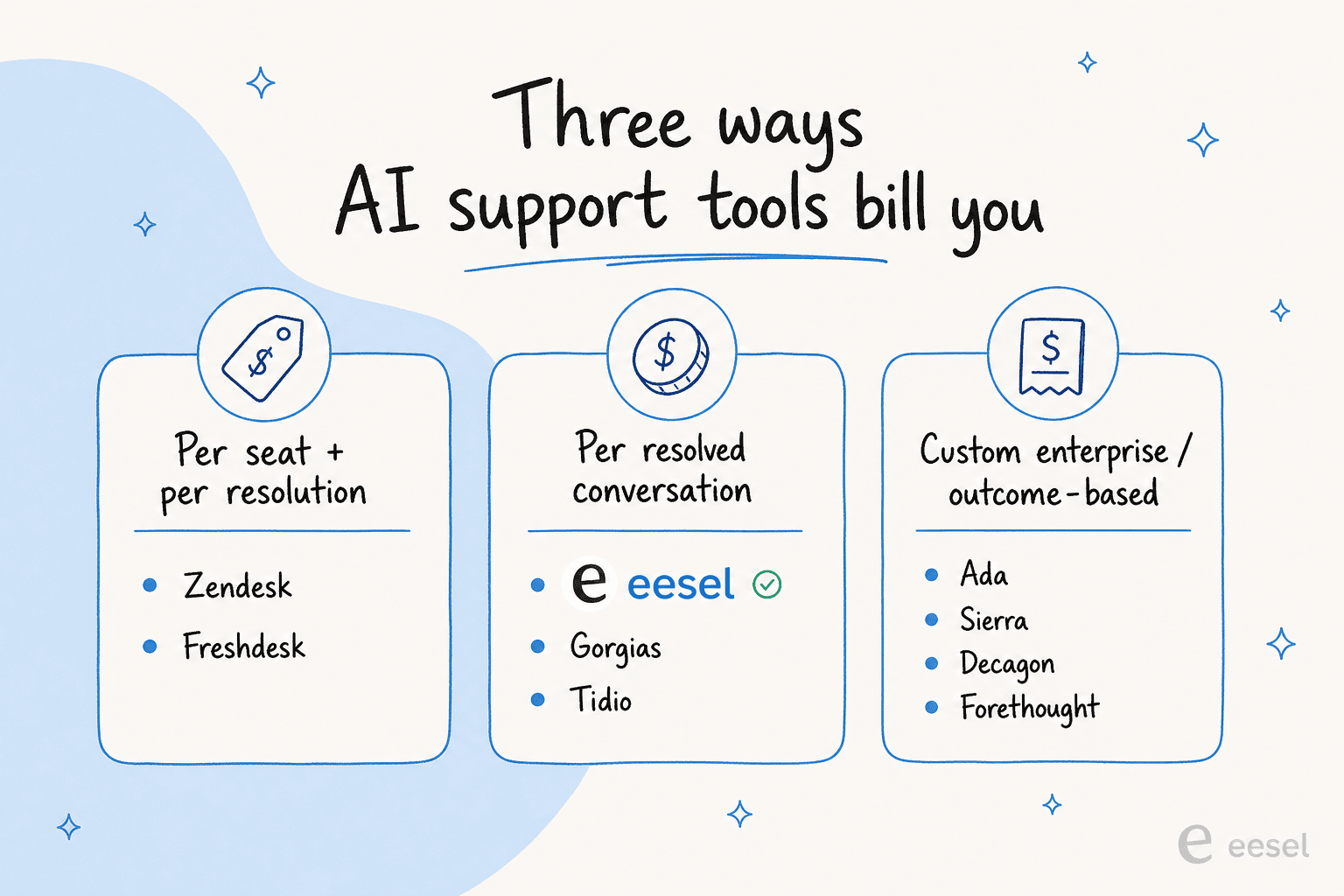
To make that concrete, here is roughly what the AI part alone costs for 1,000 AI-handled conversations a month, at each vendor's published rate. Seats and plan fees come on top for every tool except eesel.
- eesel AI: $499/month on the 1,000-credit Teammate plan. Every ticket the agent works counts, resolved or not, and there are no seat fees.
- HubSpot Service Hub: $500 in credits if all 1,000 resolve ($0.50 each), minus the credits included with your plan.
- Kustomer: $600 ($0.60 per engaged conversation, resolved or not).
- Tidio (Lyro): $700 on the 1,000-conversation Lyro tier, monthly billing.
- Help Scout: $750 if all 1,000 resolve ($0.75 each).
- Gorgias: $850 to $1,000 in AI Agent fees, depending on your plan.
- Zendesk AI: $1,500 committed or $2,000 pay as you go if all 1,000 are automated resolutions, minus the small included allowance.
- Salesforce Agentforce: $2,000 at $2 per conversation.
- Ada, Sierra, Decagon, Forethought: custom quotes only.
Whatever you pick, the other lever is your knowledge base. Every tool here resolves tickets on top of your help center and ticket history, so the cleaner that is, the higher your resolution rate climbs. The good news is that the better tools learn from your existing history rather than making you write it all up front. If you want to go deeper on the economics, our guide to how much AI can save in customer support and the wider best AI helpdesk software roundup are good next reads.
Try eesel AI
If the "keep your helpdesk, go live in minutes" pitch is the one that fits, that is exactly what eesel AI is built for. It plugs into Zendesk, Freshdesk, Slack, and 1,000+ other tools, learns from your past tickets on day one, and runs as an autonomous agent or a copilot. Pricing is one fixed monthly price from $299 for 500 tickets, with no seat fees and no platform fee. You can simulate it on your real ticket history before going live, and start free with 100 credits and no credit card.
Try eesel free, or book a quick demo to see it run on your own setup.
Frequently Asked Questions
What are the best AI customer support tools in 2026?
How much do AI customer support tools cost?
What is the difference between an AI agent and an AI copilot?
Do AI customer support tools work without a good knowledge base?
How do I avoid surprise bills with per-resolution AI pricing?


Article by
Riellvriany Indriawan
Riell is a designer and writer at eesel AI with about two years of experience researching CX platforms, AI chatbots, and helpdesk software. She combines her design background with a sharp eye for how these tools actually look and feel in practice — making her comparisons unusually visual and user-focused.