

How much does Wix Smart Chat cost?
Here's the short version, all from Wix's own pages:
| What you pay for | Price | Source |
|---|---|---|
| Installing the app | Free | Wix App Market listing |
| Manual chat (you answer from the Wix Inbox) | Free, uses no credits | Wix Help Center |
| AI chat trial on a new install | 50 conversations in total | Wix Help Center |
| AI chat after the trial | Wix AI credits from your site plan | Smart Chat AI credits |
| Extra AI credits on a Premium plan | Not sold, upgrade instead | About AI Credits |
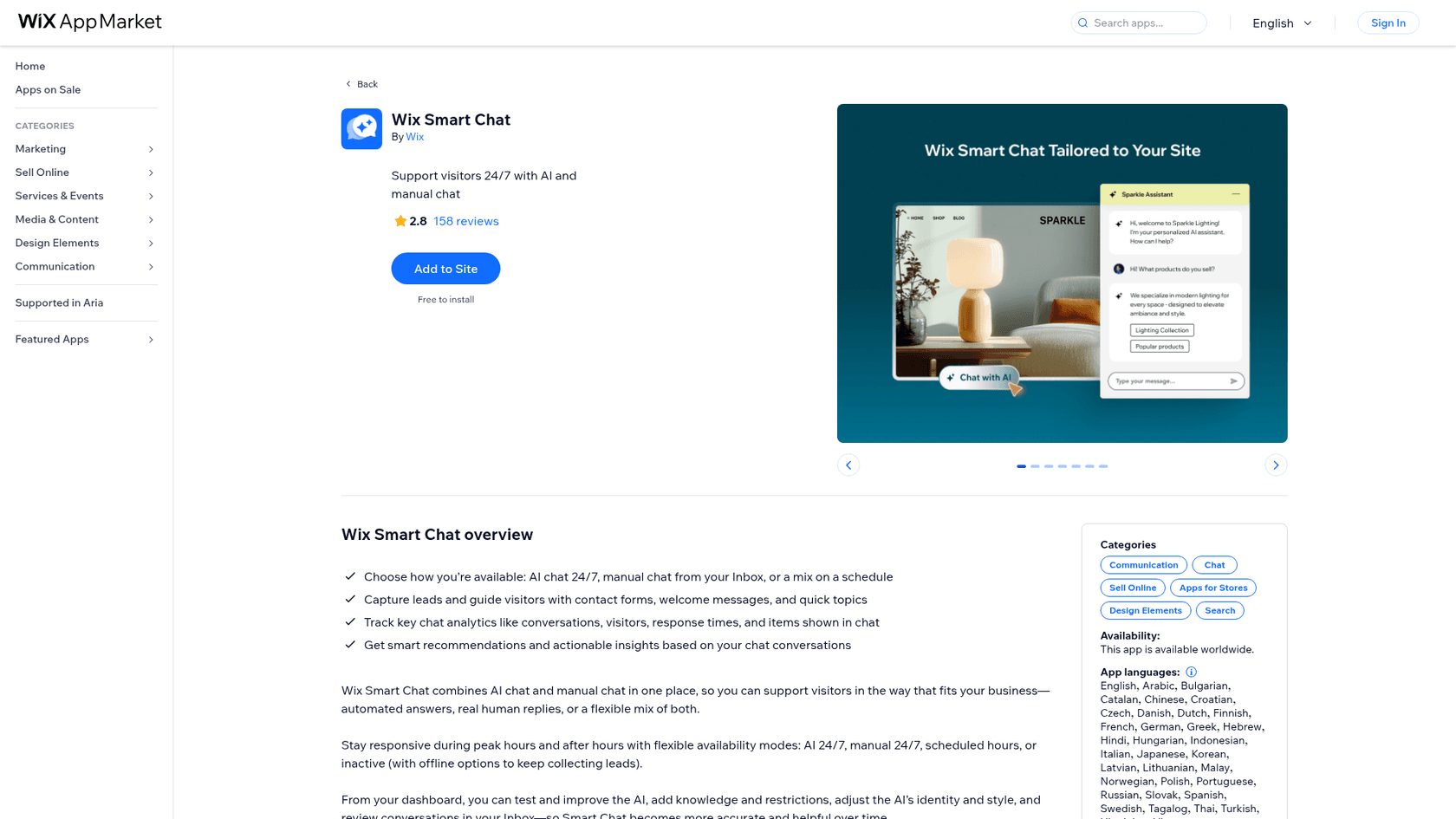
The "free" on the listing is accurate, and it's also the reason this keyword gets searched so much. Free covers the install and the manual chat. The AI that answers visitors at 2am, which is the reason most people install a chatbot for their website, runs on credits that come with your Wix plan. So the price of Smart Chat's AI is really the price of a Wix plan.
Wix Smart Chat pricing by Wix plan
Wix used to sell Smart Chat (back when it was called Wix AI Site Chat) as its own subscription with a monthly conversation quota. Wix's AI credits article says that from June 10, monthly Smart Chat subscriptions stopped renewing and moved onto the AI credits included in your Wix site plan. Yearly Smart Chat subscribers were told the details would come by email.
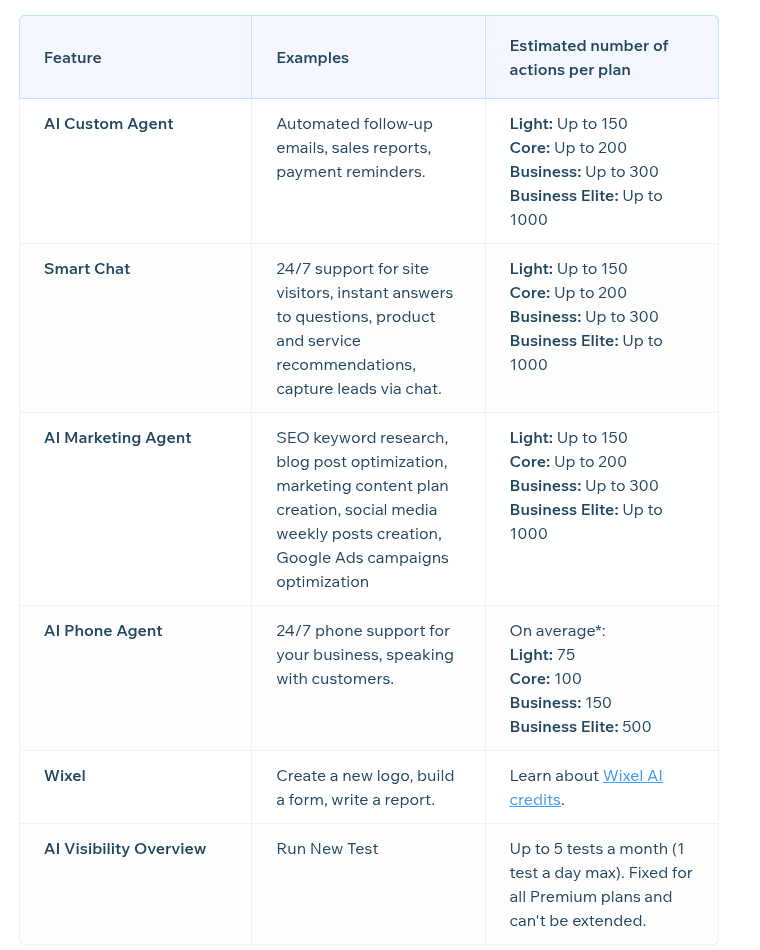
Here are the plans as Wix lists them on its pricing page, with the Smart Chat estimates from its About AI Credits table. Prices are Wix's USD reference prices for yearly plans paid upfront, before tax:
| Wix plan | Price a month (billed yearly) | Paid upfront per year | Smart Chat AI actions a month (Wix estimate) | Plan price per AI chat if chat used it all | Other tools drawing on the same pool |
|---|---|---|---|---|---|
| Free | $0 | $0 | No chat estimate; up to 120 credits a month, max 30 a day | n/a | All Wix AI tools |
| Light | $17 | $204 | Up to 150 | about 11¢ | AI Custom Agent, AI Marketing Agent, AI Phone Agent, Wixel |
| Core | $29 | $348 | Up to 200 | about 15¢ | Same |
| Business | $39 | $468 | Up to 300 | 13¢ | Same |
| Business Elite | $159 | $1,908 | Up to 1,000 | about 16¢ | Same |
| Wix Studio | Studio pricing | Studio pricing | No AI credits; AI features at no extra cost | n/a | n/a |
A few things in that table are worth reading slowly.
The same number appears for every tool. Smart Chat, the AI Custom Agent and the AI Marketing Agent each show "up to 150" on Light. That's not 150 of each. It reads as one pool of about 150 standard actions, which you can spend on any of them. The AI Phone Agent shows half as many (75 on Light), because a phone call burns more credits than a chat.
Monthly billing isn't priced on the page. The plans page says displayed prices are for yearly subscriptions and that "additional subscription periods are available." Wix doesn't print the month-to-month price there, so you'll only see it at checkout. If you're comparing Wix against a live chat tool billed monthly, compare against the price you actually see in your cart, in your currency, with tax.
Business is the best value per chat, by a little. At about 13¢ per AI chat if chat used the whole pool, Business beats Light, Core and Business Elite. That's a fun fact more than a buying reason, since almost nobody picks a website plan for its chat allowance.
The real cost: your Wix plan plus the credit ceiling
The way I'd frame Smart Chat pricing for anyone already on Wix is this: the AI is free until you hit the ceiling, and then it's a plan upgrade. There's no pay-per-chat overage, no top-up and no add-on. Each step up the plan ladder buys more chat room, and the steps aren't evenly sized.
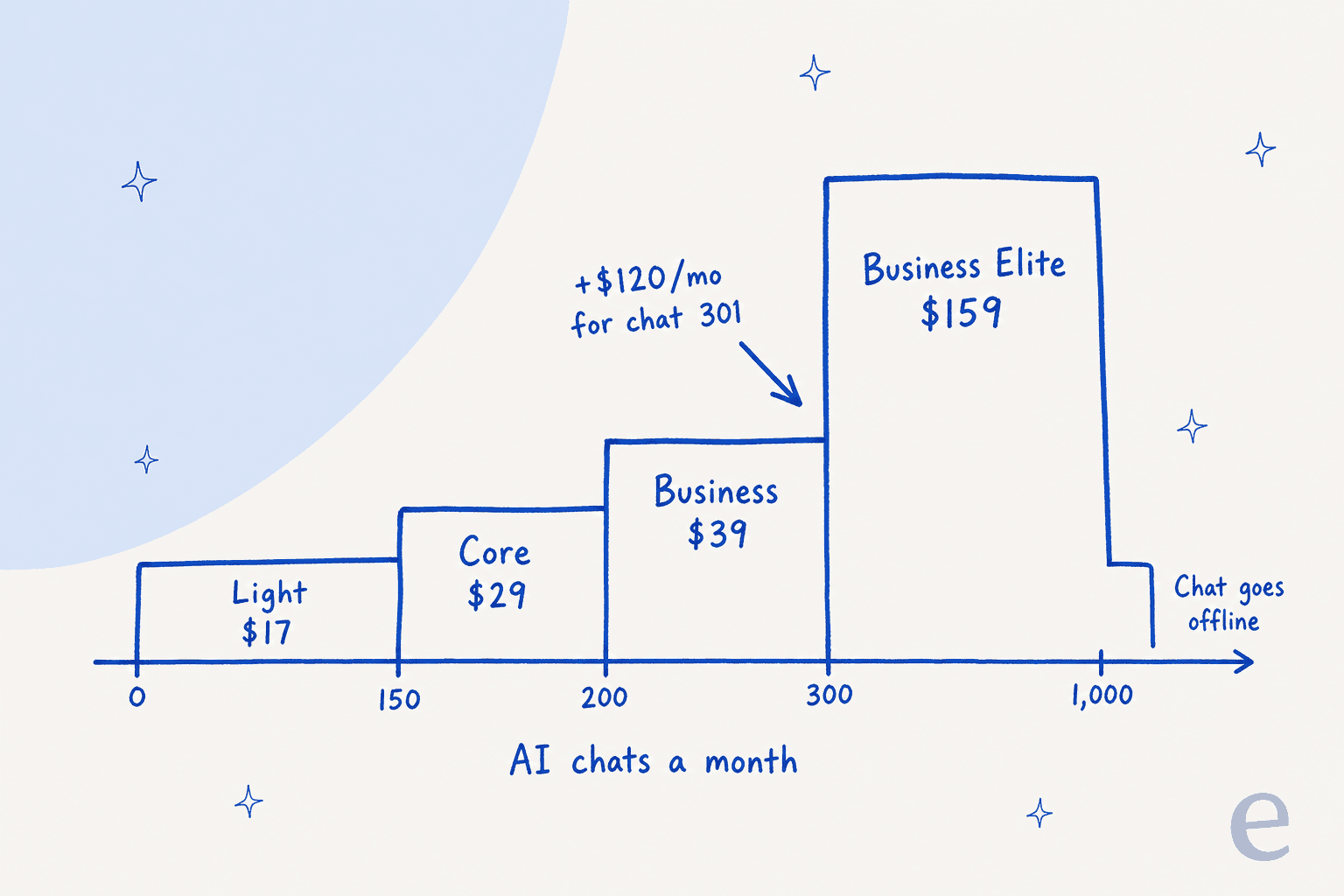
Going from Light to Core buys you 50 more chat actions for $12 a month. Core to Business buys 100 more for $10. Then Business to Business Elite buys 700 more, but it costs $120 a month more, or $1,440 a year. If your site sits at 320 AI chats a month, the twenty chats over Business's estimate cost you more than the plan you're already on.
And after Business Elite there's nowhere to go. Past roughly 1,000 actions, the chat switches to offline mode until your credits reset on your plan's monthly date. Wix's own tip is to switch to Manual chat 24/7 and answer by hand. For a busy store, that's the month's last week with no AI on the site.
This is the main thing I'd want a buyer to see before they search for chatbot cost comparisons. Per chat, Wix is cheap. The ceiling is the cost.
Use the calculator below with your own numbers. It fills the shared pool with your other Wix AI use first, then picks the cheapest plan that still fits your chats, and shows the same volume on eesel next to it.
Hidden costs in Wix Smart Chat pricing
None of these are hidden in the sense that Wix conceals them. They're all in the Help Center. They're hidden in the sense that the listing says "Free to install" and you have to read four articles to find them.
The credit pool is shared with every Wix AI tool
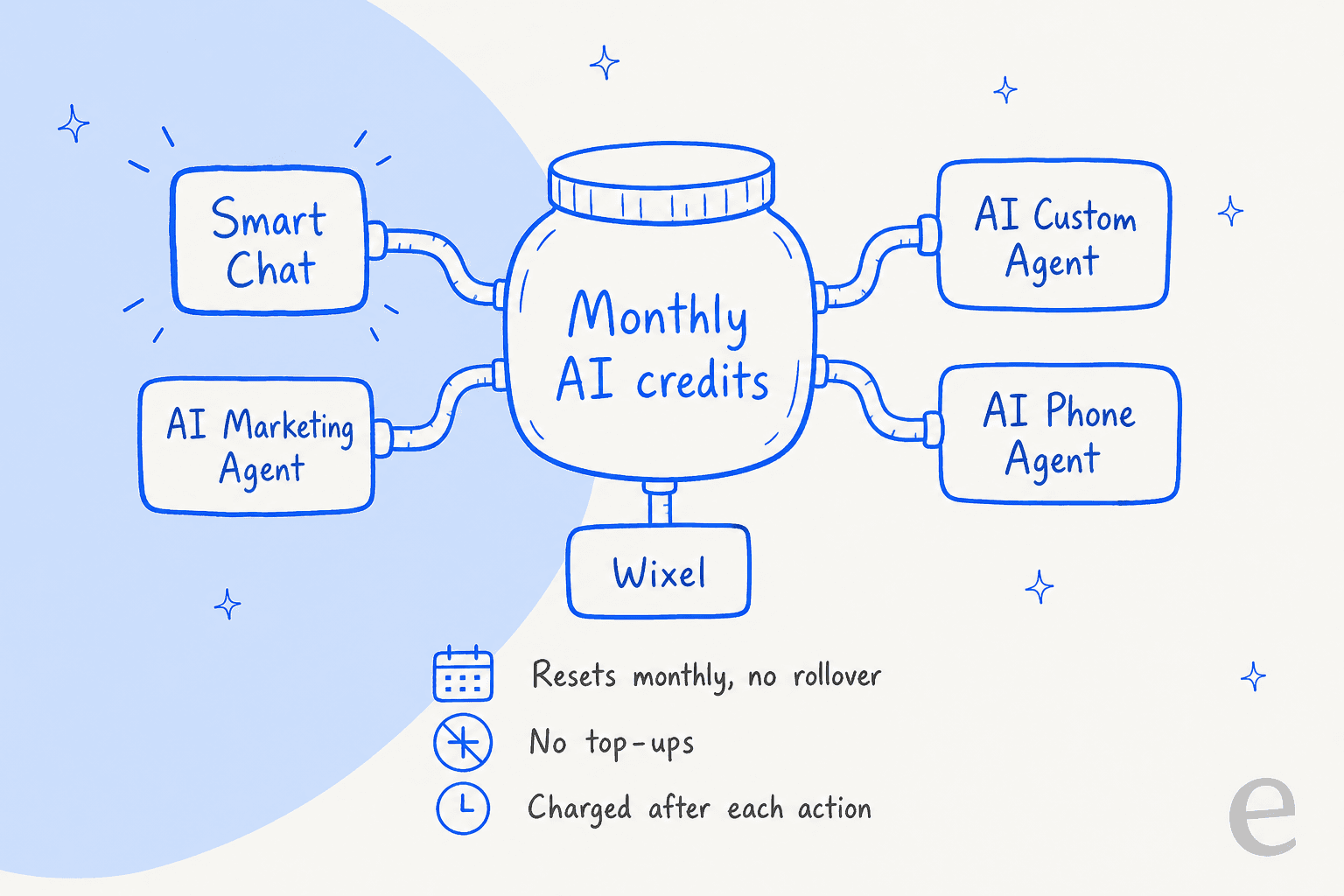
The same credits pay for Smart Chat, the AI Custom Agent, the AI Marketing Agent, the AI Phone Agent and Wixel. Wix also warns that some tools spend credits "without you taking action directly," and names three examples: an auto-email triggered by a customer, an AI chat with a site visitor, and marketing content the AI Marketing Agent generates on its own. If the marketing agent writes your weekly social posts, those come out of the same pool your visitors' chats do. So do Smart Chat's AI replies to WhatsApp Business messages in the Wix Inbox, which matters if WhatsApp is your busiest channel (my WhatsApp chatbot roundup covers dedicated options).
Two more details make the pool bigger in scope than people expect:
- It's per account, not per site. Wix says credits "apply to your entire Wix account, not just the site connected to your Premium plan." If you run two sites under one account, both chats draw from one balance.
- Collaborators spend your credits. Admin (Co-Owner) and Owner roles can use AI credits, and their actions come out of the site owner's balance.
Credits expire every month and can't be topped up
Unused credits don't roll over. They reset on the date you bought your plan, so a plan bought on the 10th resets on the 10th. A quiet month doesn't bank anything for a busy one, which hurts seasonal stores most. My guide to handling holiday support spikes covers why a fixed monthly ceiling is the wrong shape for retail.
On top-ups, Wix's FAQ is direct: "It is not currently possible to buy top-up credits for Wix Premium plans." The only top-ups Wix sells are for a Wixel Max subscription, which is a separate design product.
A chat doesn't have a fixed price
Under the old Smart Chat plans, the quota counted conversations. Under credits, Wix says the cost of each action "depends on the length and complexity" of the request, and the charge is worked out after the action finishes. A visitor who asks one question costs less than one who asks twelve. You can't know a chat's price in advance, which is why the "up to" in every estimate matters.
Small print on refunds and plan changes
- Cancel in the first 14 days under Wix's money-back guarantee and you lose any unused credits on that plan.
- Upgrade and your current balance is deleted and replaced with the new plan's higher balance.
- Downgrade and your balance is capped at the lower plan's allowance.
- Wix can change the rules. The About AI Credits page says Wix "reserves the right at any time to change the credit cost, the number of credits required for using AI features, and the AI tools that use credits."
That last point is the one I'd weigh most. Smart Chat has already changed billing models once this year. On an eesel sales call, a budget-conscious buyer told the team a previous vendor's price had "more than doubled" and asked whether paying yearly would lock in the rate. A credit system where the vendor sets the exchange rate is exactly what that buyer was worried about.
What doesn't cost anything
To be fair to Wix, a fair amount is free. Testing the AI in your dashboard doesn't use credits, Manual chat is free on every plan, and chatting with Aria, Wix's own AI agent, doesn't use credits either. If you mostly want to answer visitors yourself, Smart Chat costs nothing beyond the Wix plan you already have. My piece on AI chatbot vs live chat helps you decide whether you need the AI half at all.
What happens when your Wix AI credits run out?
The chat goes offline. Per Wix's settings article, you choose what visitors see instead: the widget hides, a contact form shows, visitors can still write a message, or a custom offline note appears. You can also switch to Manual chat 24/7 and keep answering yourself.
The contact form is the option I'd pick, because it at least catches the lead. But it's worth being clear about what it replaces. A visitor who asked a question at checkout and got a form instead of an answer often leaves, and a handoff that arrives as a form fill the next morning is slower than most shoppers will wait. If you want the AI to pass a visitor to a person with the context attached, my guide to chat escalation shows what that looks like.
Wix Smart Chat pricing vs other chat tools
Wix is cheap per chat, and I'd tell anyone that. Here's how the published entry prices compare with chat tools I've broken down elsewhere on the blog, each in its own pricing post:
| Tool | How AI chat is billed | Where I break it down |
|---|---|---|
| Wix Smart Chat | Shared Wix AI credits in your site plan, no top-ups | This post |
| Tidio | Lyro AI conversations on top of a plan | Tidio pricing |
| Chatway | Free live chat, AI billed per resolution | Chatway pricing |
| Formilla | Live chat plans plus a paid AI bot add-on | Formilla pricing |
| Crisp | Flat price per workspace, with seat caps per plan | Crisp pricing |
| Chatbase | Message credits by plan | Chatbase pricing |
| eesel | Fixed credit plans, 1 credit per chat however long | eesel pricing |
Most of these meter AI in some unit (conversations, resolutions, messages, credits), and the unit matters more than the headline price. My guide to cost per resolution walks through why. If Tidio is on your shortlist, my Tidio review covers the product side. For a wider list, see my AI live chat roundup.
Wix Smart Chat vs eesel pricing
eesel's pricing page is simpler to read and more expensive per chat. The free plan gives you 100 credits with no card. Paid plans start at 500 credits for $299 a month and go up in steps to 5,000 credits for $1,749. A ticket or a chat is 1 credit however many messages go back and forth, and if you run out you can turn on overage at $0.80 a credit with a monthly cap you set, instead of going dark.
| Wix Smart Chat | eesel | |
|---|---|---|
| Entry price for AI chat | Included in Wix plans from $17/month (yearly) | $299/month for 500 credits |
| Unit | Credits, cost varies with chat length | 1 credit per chat, fixed |
| Per chat at full use | about 11¢ to 16¢ | about 35¢ to 60¢ |
| When you run out | Chat goes offline, no top-ups | Pauses, or overage at $0.80 with your cap |
| Rollover | No | No |
| Shared with other tools | Wix Marketing, Custom and Phone agents, Wixel | Other eesel work (tickets, Slack, reports) |
| Learns from | Your public Wix pages and training rules | Your site, help center, docs and past tickets |
| Free test before launch | Dashboard test chat | Replay against past tickets |
On cost alone, Wix wins at every volume it can handle, and I'm not going to argue otherwise. Where the comparison changes is the review data: the listing sits at 2.8 stars from 158 reviews, and the most common serious complaint in Alicia's read of them was answers that stayed wrong after training. A 13¢ chat that quotes an old price isn't cheap, and it's one of the common chatbot problems I'd plan around on any tool. My write-up on AI hallucinations explains why that happens and how to catch it.
Is Wix Smart Chat worth the price?
Here's how I'd decide, by situation.
Worth it: you're already on a Wix Premium plan and get under about 150 AI chats a month. The AI costs you nothing extra, the manual chat lands in the Wix Inbox you already check, and Wix is retiring Wix Chat anyway. Turn the AI on for nights with Scheduled hours, keep your prices and hours pages current, and test in the dashboard, which is free. This is the small business case Smart Chat fits best.
Worth it with care: you're on Business with 200 to 300 chats. You're close to the ceiling. If the AI Marketing Agent or Wixel also eat into the pool, a busy month will take the chat offline before your reset date. Check your credit balance (click your profile at the top right of your Wix account) halfway through the month for the first few months.
Probably not: you get more than 300 AI chats a month. The $120 jump to Business Elite is the most expensive chat capacity Wix sells, and above 1,000 actions nothing covers you at all. At that volume, compare against a dedicated ecommerce chatbot priced per chat.
Not for the AI: health, legal or regulated businesses. Wix's overview says Manual Chat is HIPAA compliant and is the default on HIPAA sites, but the AI Chat is not. Use the free manual chat and read my notes on HIPAA compliant AI before you look elsewhere.
Not for the AI either: you need it to look up orders or create tickets. Smart Chat answers from your public pages and training rules. It doesn't open an order, check stock or file a ticket in a helpdesk. If that's the job, compare ecommerce live chat tools built for it.
If the answer is "I mostly want free live chat," you have options besides Wix too. My tawk.to alternatives list and the free AI chatbot roundup cover the no-cost route, and my Live Chat Alternative pricing post covers the Wix click-to-call apps.
How I'd keep Wix Smart Chat costs down
If you go with Smart Chat, a few habits stretch the pool:
- Use Scheduled hours. Answer by hand during the day, let the AI cover nights and weekends. Manual chats use no credits.
- Pick the offline behavior before you need it. Set the contact form now so running out doesn't hide the widget entirely.
- Watch the other AI tools. Pause AI Marketing Agent automations in your busiest chat month. Wix's own tip for saving credits is to "pause any automations you have set up."
- Fix the pages, not just the rules. The AI reads your public pages. A clear shipping, returns and pricing page answers more questions in fewer messages than ten training rules, and shorter chats cost fewer credits.
- Test in the dashboard. It's free, so test after every price or policy change, not just at launch. My guide to testing an AI agent covers what to test.
When eesel makes more sense than Wix Smart Chat
If your Wix site has outgrown the credit ceiling, or a wrong answer costs you real sales, eesel is the AI helpdesk teammate I'd point you to. To be clear about the setup: eesel doesn't have a Wix app. Its chat bubble goes on a Wix site through Custom Code, which Wix says needs a published site and a connected domain. It answers from your Wix pages plus your help center, docs and past tickets, links the page it used, and hands visitors to a person with a summary when it isn't sure.
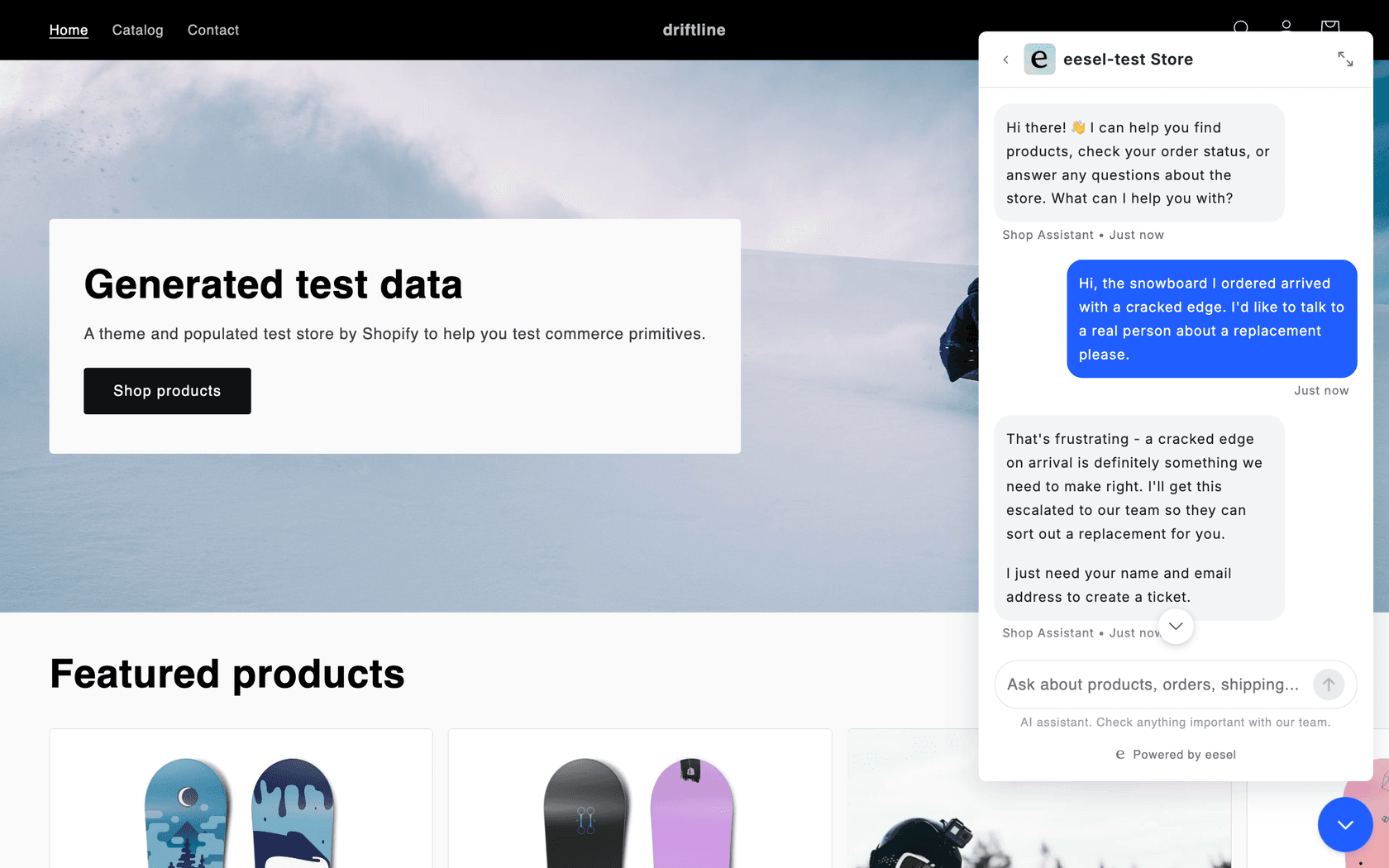
Two customers show the shape of it. SamCart runs a separate eesel agent on its website chat bubble with its own greeting, answering from about 280 help center articles and collecting a name and email before it answers, on a plan that covers 8,000 interactions a month. Nordbutiker, a Swedish e-bike and scooter retailer, runs a chat bubble on each of its brand stores across 4 countries, each trained on that store's own pages, and sends spare parts and warranty questions to a person.
The pricing difference is the trade. Wix charges about 11¢ to 16¢ a chat inside a ceiling. eesel charges more per chat but a chat is always 1 credit, you can see the price before the month starts, and you can replay past tickets to check the answers before a visitor sees them. Start on the free plan's 100 credits, point it at your Wix site, and compare its answers with Smart Chat's on the same questions. Try eesel.
Frequently Asked Questions
How much does Wix Smart Chat cost?
The app is free to install and the manual chat is free. The AI chat has no separate price since June 10, 2026: it uses the Wix AI credits in your site plan, which Wix estimates at up to 150 AI chat actions on Light ($17/month), 200 on Core ($29), 300 on Business ($39) and 1,000 on Business Elite ($159), billed yearly. My Wix pricing breakdown covers the plans themselves.
Is Wix Smart Chat free?
Partly. Installing it, the manual chat and testing the AI in your dashboard are free, and a new install gets a trial of 50 AI conversations. After that, Wix Smart Chat pricing comes down to your Wix plan's AI credits. If you only want free chat, see my roundup of free AI chatbots.
How many AI chats do I get on each Wix plan?
Wix's estimates are up to 150 Smart Chat actions a month on Light, 200 on Core, 300 on Business and 1,000 on Business Elite. Those numbers assume chat uses the whole pool. The AI Marketing Agent, AI Custom Agent, AI Phone Agent and Wixel draw on the same credits, so your real chat allowance is lower if you use them. My Wix Smart Chat review covers what the AI does with them.
Can I buy more Wix AI credits for Smart Chat?
Not on a Wix Premium plan. Wix's FAQ says you need to upgrade your plan to get more credits, and top-ups are only sold for a Wixel Max subscription. When the credits run out, the chat goes offline until your monthly reset. My guide to chatbot cost compares how other tools handle overage.
What happens when Wix Smart Chat runs out of credits?
The chat switches to offline mode. You choose whether the widget hides, shows a contact form, lets visitors leave a message, or shows a custom note, or you switch to Manual chat 24/7 and answer yourself. For what a better fallback looks like, see my guide to human handoff in chat.
Do Wix AI credits roll over?
No. Credits reset every month on the date you bought your plan, and unused credits expire. Credits also apply to your whole Wix account, so two sites under one account share one balance. If your traffic is seasonal, read my notes on holiday support spikes.
Does Wix Smart Chat pricing include Wix Studio sites?
Wix Studio sites don't get AI credits. Wix says Studio sites currently access AI features at no additional cost, so the credit ceiling in this Wix Smart Chat pricing breakdown applies to Wix Premium plans only. If you build for clients, my guide to website live chat compares other options.
Is Wix Smart Chat cheaper than eesel?
Yes, per chat. Wix works out to about 11¢ to 16¢ a chat if chat uses the whole pool, while eesel starts at $299 a month for 500 credits, about 60¢ a chat. eesel charges 1 credit per chat however long it runs, learns from past tickets, and offers capped overage instead of going offline. Its chat bubble installs on Wix through Custom Code.