


What Chatway is and how it bills
Chatway is a live chat widget with a shared inbox, an AI support agent, a help center and social channels like WhatsApp, Messenger and Instagram. It runs on almost any website, but most people meet it as a plugin. The WordPress plugin shows 30,000+ active installs and a 5-star average from 770 ratings, and the Shopify app, listed under the developer Premio, shows 4.9 stars from 287 reviews.
I've spent two years in SEO, and "Chatway pricing" is a search where the plan names are the least useful part of the answer. The person typing it usually has the free widget installed already and wants to know one thing: what happens when the shop gets busier. I work at eesel, where the team has spent the last few years putting AI on live support queues, and the busy month is always where chat pricing shows its real shape. One of the busier trials I've seen there pushed more than 300 real chats through a website widget in about 20 days. On Chatway, that is the whole Business allowance gone before the second week is out.
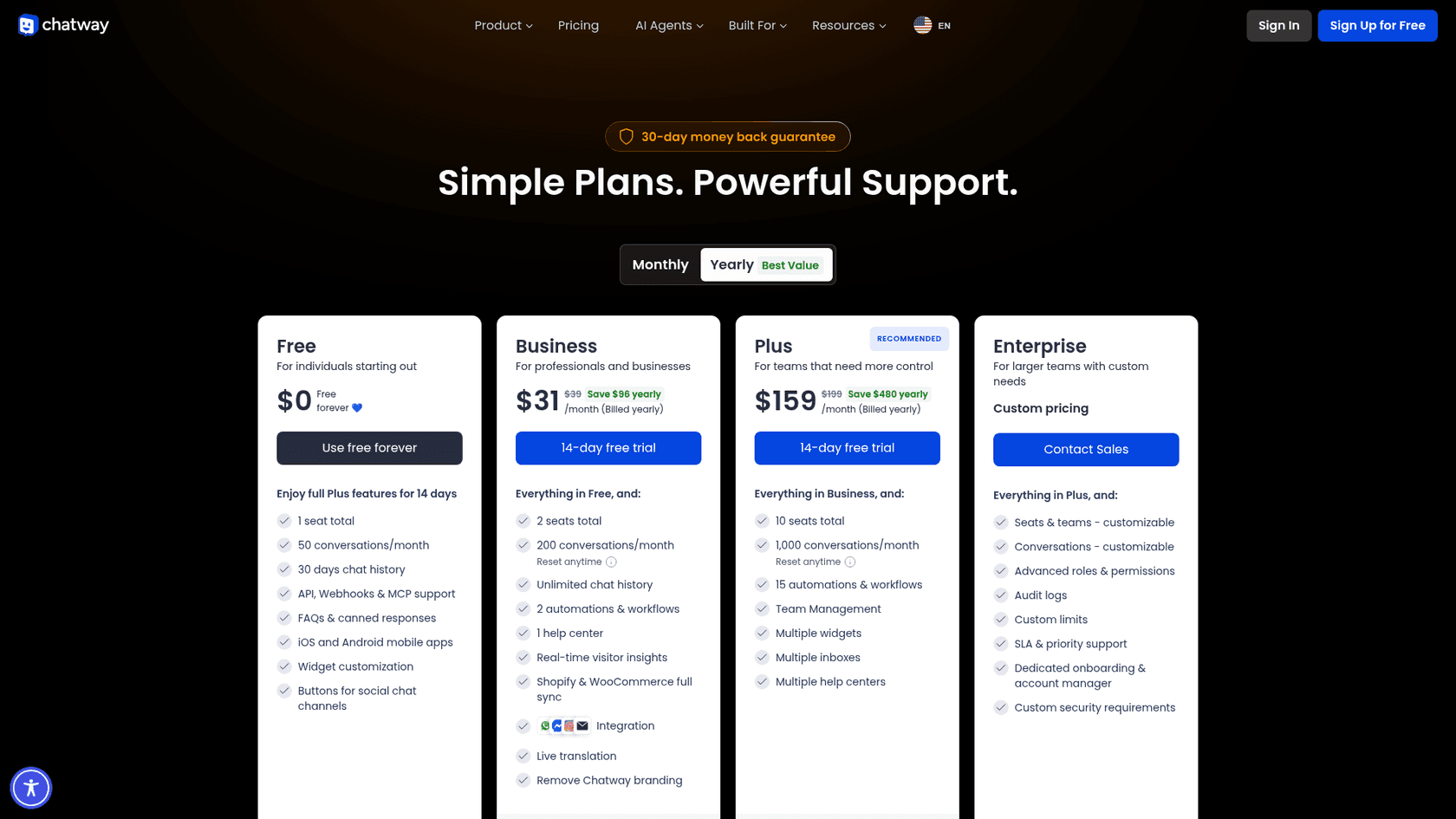
Chatway bills by the plan, not by the seat. Each plan includes a set number of seats and a monthly conversation allowance, and you can install the widget on unlimited websites under one account. Paid plans start with a 14-day free trial, and the pricing page offers a full refund within 30 days of purchase.
Chatway pricing plans compared
Here is every plan and its limits, from Chatway's pricing page as of October 21, 2026.
| Free | Business | Plus | Enterprise | |
|---|---|---|---|---|
| Price, billed monthly | $0 | $39/mo | $199/mo | Custom |
| Price, billed yearly | $0 | $31/mo ($372/yr) | $159/mo ($1,908/yr) | Custom |
| Seats included | 1 | 2 | 10 | Custom |
| Extra seats | Not available | $19/mo ($16 yearly) | $19/mo ($16 yearly) | Custom |
| Conversations per month | 50 | 200 | 1,000 | Custom |
| Reset allowance mid-cycle | No | Yes, pays plan again | Yes, pays plan again | Custom limits |
| Chat history | 30 days | Unlimited | Unlimited | Unlimited |
| Contacts viewable | Last 30 days | Unlimited | Unlimited | Unlimited |
| API, webhooks and MCP | Yes | Yes | Yes | Yes |
| Automations and workflows | None | 2 | 15 | Yes |
| Help centers | None | 1 | Multiple | Multiple |
| WhatsApp, Messenger, Instagram, email inbox | Buttons only | Yes | Yes | Yes |
| Shopify and WooCommerce full sync | No | Yes | Yes | Yes |
| Live translation | No | Yes | Yes | Yes |
| Remove Chatway branding | No | Yes | Yes | Yes |
| Teams, multiple widgets and inboxes | No | No | Yes | Yes |
| Audit logs, roles, SLA | No | No | No | Yes |
| AI Support Agent | $0.50 per resolved chat | $0.50 per resolved chat | $0.50 per resolved chat | $0.50 per resolved chat |
The Free plan also gets the full Plus feature set for its first 14 days, so the first two weeks on Free are not what the plan looks like afterwards.
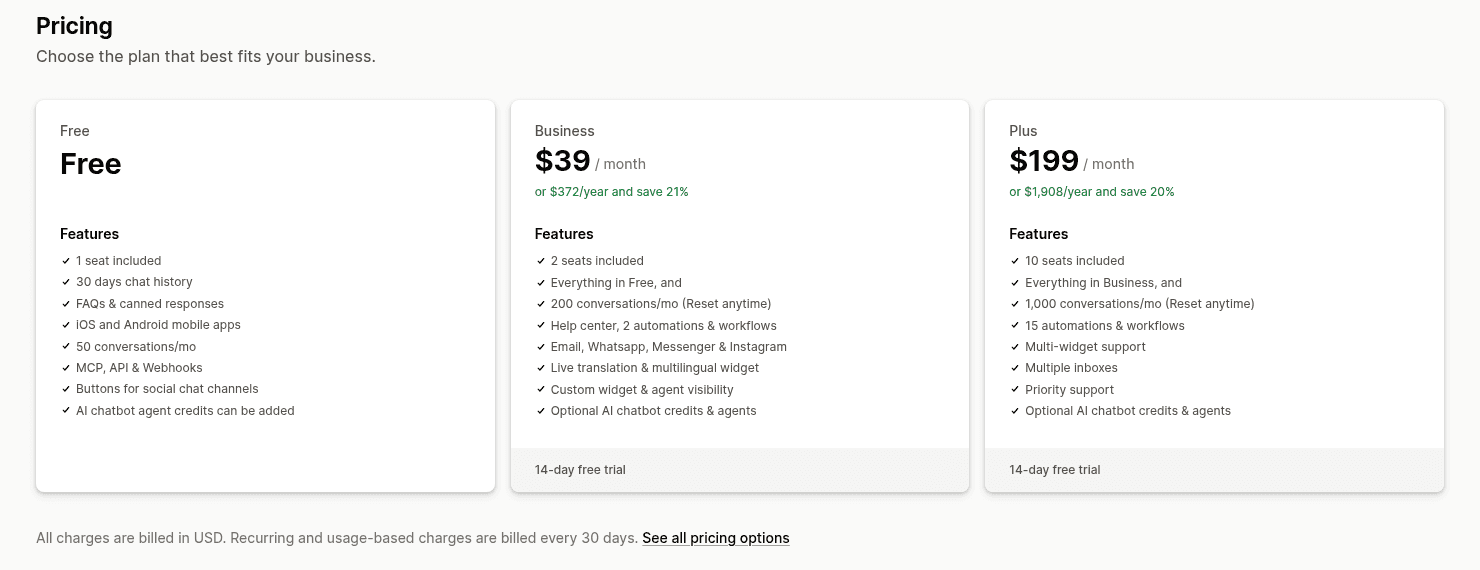
I checked the prices against the Shopify listing and they match: Business at $39 a month or $372 a year (21% off), and Plus at $199 a month or $1,908 a year (20% off). The listing adds that recurring and usage charges are billed in USD every 30 days through Shopify. What it doesn't show is the Enterprise plan or the AI price; it only says AI chatbot credits "can be added". The WordPress plugin page has no prices at all and links back to the pricing page.
What counts as a conversation in Chatway?
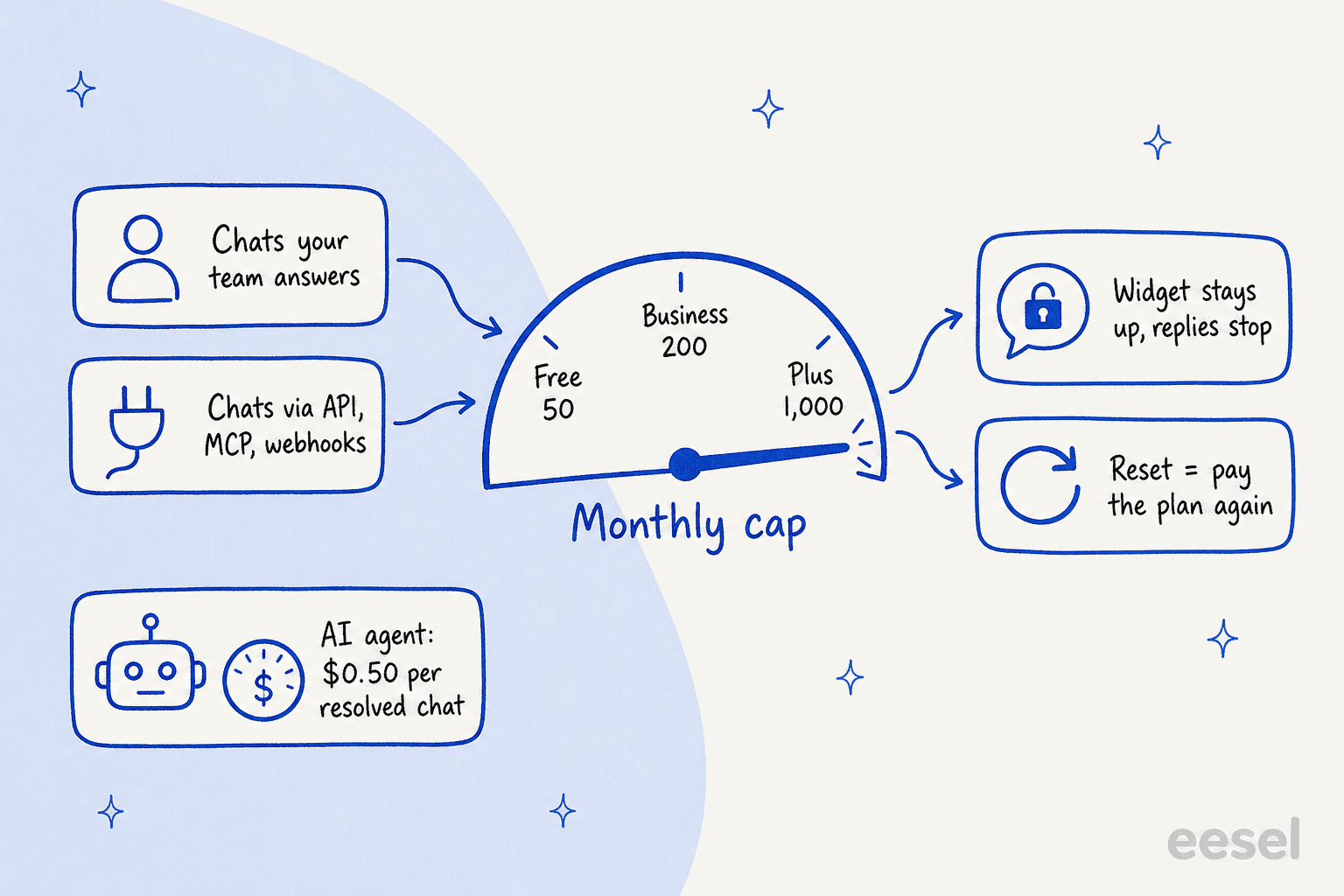
This is the part of Chatway pricing that most summaries skip, and it's the part that decides your plan. The pricing page says the monthly limits include conversations handled manually or through API, MCP, and webhooks. So the cap isn't an AI quota. It counts the chats your own team answers too.
That's a different model from most marketplace chat apps. Chatty, for example, meters AI conversations and keeps human chats unlimited on every plan. Tidio also counts billable conversations, so it's the closest like-for-like comparison.
What happens at the limit is spelled out plainly. The widget stays visible on your site, but you can't reply to new conversations, by hand or through the API, until the allowance renews. On Business and Plus you can reset the allowance any time instead of waiting. Each reset charges you for your current plan again, starts a new billing cycle and restores the full allowance.
Two things follow from this that are easy to miss.
- Junk chats use up the cap. When eesel ran a real-traffic trial on an ecommerce inbox, 22% of the incoming messages were spam. Website chat gets less spam than email, but a bot or a "do you do SEO?" pitch still opens a conversation. A contact form before the chat and some spam filtering protect the allowance.
- Connecting your own AI doesn't dodge the meter. Chatway's "bring your own AI" option lets you plug in an outside agent through MCP or webhooks on any plan, including Free. Those conversations are counted per conversation, not per message, but they still count toward the cap.
One question the pricing page doesn't answer outright: whether a chat the AI agent resolves on its own also uses one of your plan conversations. The cap wording lists manual, API, MCP and webhook chats, and the AI is billed on its own meter. I'd ask Chatway support before you size a plan around heavy AI use, and the calculator below lets you test it both ways.
The AI Support Agent add-on
Chatway's AI agent is sold separately from the plans, and it works on all of them, Free included. The pricing is $0.50 per resolved conversation, every account starts with 10 free AI conversations, and after that you buy AI credits as you go. The AI agent page says you are "only charged when the AI provides a useful answer," and that no credit is used when it can't respond properly.
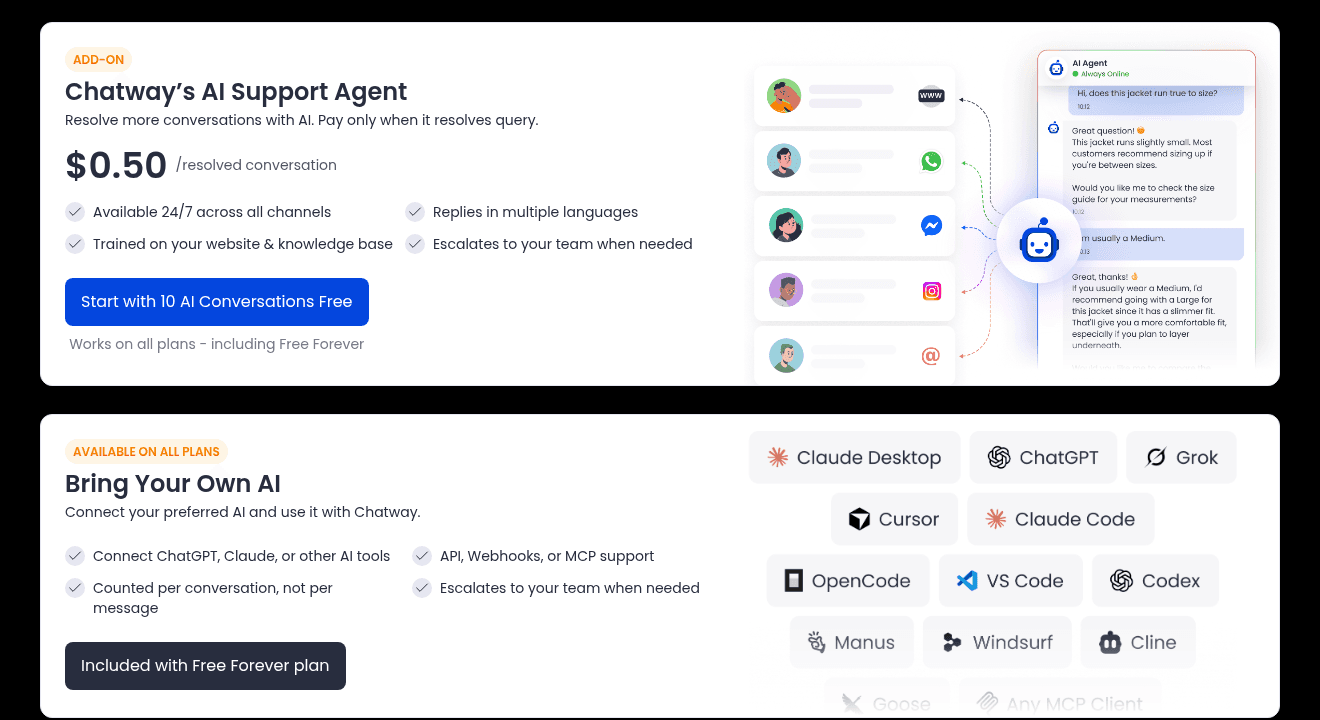
The agent trains on the data sources you give it, like website links and documents, answers in several languages, and hands a chat to your team when it should. On WordPress it can also read pages, posts, WooCommerce products, orders and carts, which the plugin's 1.5.2 changelog added in October 2026. On Shopify, store data comes through the Business plan's sync.
There's one small mismatch between Chatway's own pages. The pricing page and AI page say you pay per resolved conversation. The AI agent setup guide says "one credit will be used for every conversation handled by the AI agent." Those can mean the same thing if "handled" means "answered usefully," but if you plan on hundreds of AI chats a month, check your first invoice against your resolved count.
Is 50 cents a lot? It depends on what the chat would cost otherwise. Next to a person answering "where is my order?", it's cheap. Next to the per-chat cost of the plan itself, about 20 cents, it more than triples the price of every chat the AI closes. My post on deflection vs resolution explains why paying per resolution means your bill grows as the AI gets better.
Business vs Plus: the same price per chat
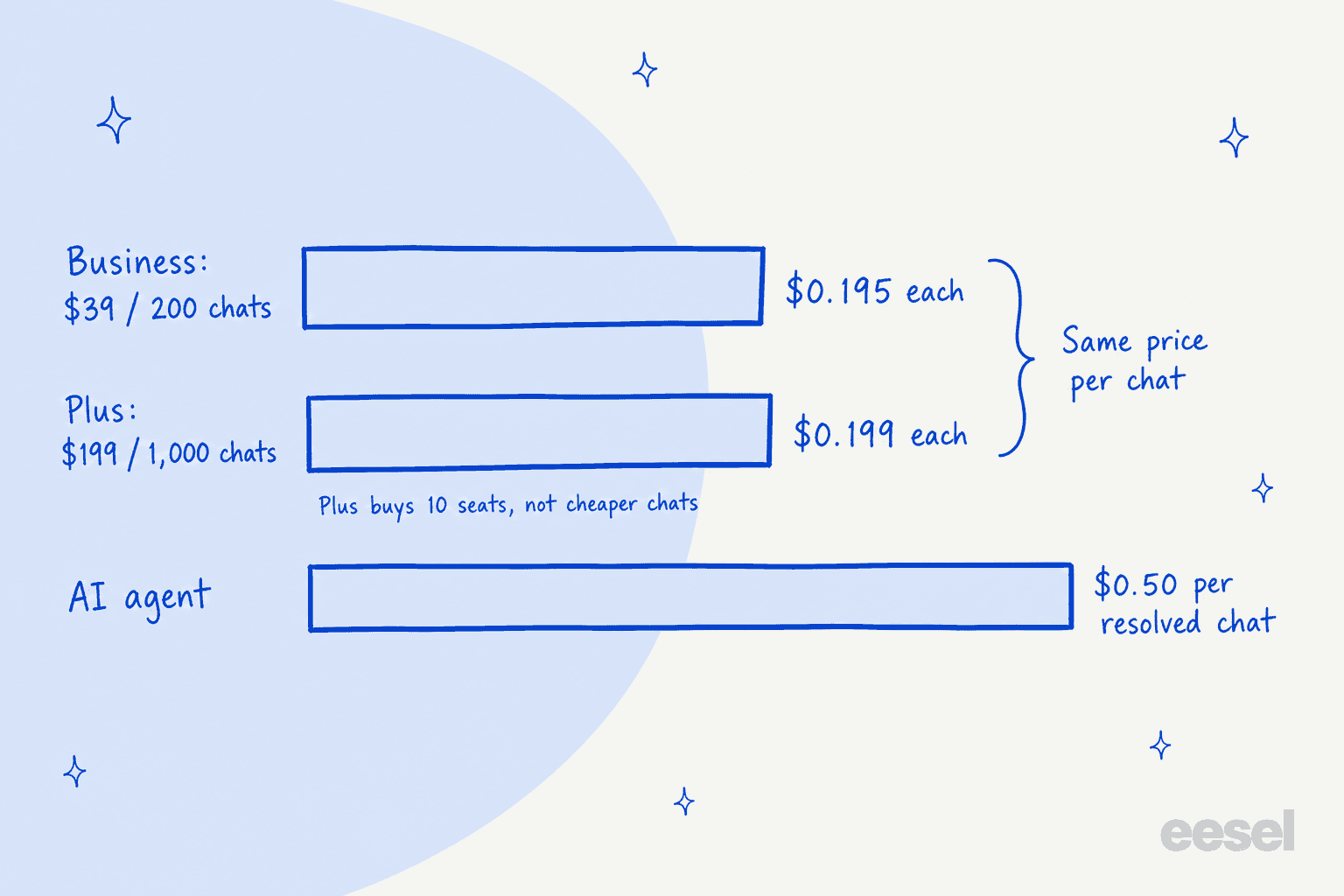
Here is the finding that surprised me most. Divide each plan's price by its allowance and you get almost the same number:
- Business: $39 for 200 conversations is $0.195 a conversation.
- Plus: $199 for 1,000 conversations is $0.199 a conversation.
Because a reset just buys the plan again, a Business account that resets four times in a month has paid $195 for 1,000 conversations, $4 less than Plus. So conversation volume alone never forces you onto Plus. What does is everything else Plus includes: 10 seats instead of 2, 15 automations instead of 2, teams, multiple widgets, multiple inboxes and multiple help centers.
Seats are where the plans cross. Business with 8 extra seats is $39 plus 8 × $19, or $191 a month, almost the price of Plus, before you count any resets. So my rule of thumb: more than about 8 people on the inbox, or more than one brand or website to keep apart, and Plus is the plan. Below that, Business plus the odd reset is cheaper.
Reviewers mostly land on the same point about price. One G2 reviewer put it this way:
"Clear, intuitive UX paired with flawless performance and impressive speed, all offered at a reasonable price."

The trade-off another G2 reviewer flagged is the Free plan's single seat and 30-day chat history, which match the plan table above, and which they called understandable for a free plan.
Work out your own Chatway bill
Here's a calculator for your own numbers. It prices Free, Business and Plus for your monthly conversations, seats and AI-resolved chats, adds resets where the allowance runs out, and picks the cheapest plan that fits. Prices come from Chatway's pricing page as of October 21, 2026.
Type in your monthly chats, team size and AI-resolved chats to see what each Chatway plan would bill, resets and AI included.
Play with the AI box and the checkbox together. With 600 chats, 4 people and 250 AI resolutions, the AI line costs more than the plan itself on Business. That's the number to watch as you scale.
What real sites pay: four worked examples
Here are four site profiles run through Chatway's published prices, billed monthly. The volumes are illustrative, so swap in your own using the calculator above. I've assumed AI-resolved chats also use plan conversations, the cautious reading, and that a reset only recharges the base plan.
| Solo WordPress site | Small WooCommerce shop | Growing Shopify store | Busy store | |
|---|---|---|---|---|
| Conversations / month | 35 | 180 | 600 | 2,500 |
| People on the inbox | 1 | 2 | 4 | 12 |
| Chats the AI resolves | 0 | 60 | 250 | 1,000 |
| Plan that fits | Free | Business | Business (or Plus) | Plus |
| Plan and resets | $0 | $39 | 3 x $39 = $117 | 3 x $199 = $597 |
| Extra seats | $0 | $0 | 2 x $19 = $38 | 2 x $19 = $38 |
| AI agent | $0 | 60 x $0.50 = $30 | 250 x $0.50 = $125 | 1,000 x $0.50 = $500 |
| Monthly bill | $0 | $69 | $280 | $1,135 |
| Per conversation | $0 | $0.38 | $0.47 | $0.45 |
The solo site is what Chatway's free plan is built for. Thirty-five chats, one person, a widget that matches your theme. A WordPress reviewer running a small word-of-mouth business said on the plugin's review page that the free version is what they use, and for a site this size that's the right call.
The small shop is where Chatway is cheapest per chat that a person never touches. $69 buys a shared inbox, WooCommerce order lookups in the chat, WhatsApp and Instagram in one place, and an AI that closes a third of the questions. My guide to AI for WooCommerce support covers what to automate first.
The growing store is the interesting one. Plus would cost $199 plus $125 for AI, so $324, against $280 on Business with three resets. Business wins by $44, but you're buying the plan three times a month and living with 2 automations and one inbox. I'd take Plus here for the structure alone, and treat the $44 as the price of not watching a meter.
The busy store pays $1,135 a month, and $500 of it is the AI line. At this volume I'd talk to Chatway about Enterprise, since custom conversation limits change the math more than any plan choice. Whether $1,135 is a good deal depends on what each chat saves or sells, which my chatbot ROI guide works through.
Hidden costs and gotchas
Chatway's pricing page says the Free plan has no hidden charges, and that's fair. These aren't hidden; they're just easy to miss on the plan cards.
- A full cap means unanswered chats, not a surprise bill. Hitting 200 on Business won't charge you anything by itself. It stops your team replying until renewal or a paid reset. On a busy Saturday that's worse than an overage fee.
- Resets restart your billing cycle. A reset charges the plan again and starts a new cycle, so your renewal date moves. Keep an eye on it if you budget by calendar month.
- Yearly billing and resets don't obviously mix. The pricing page describes resets in terms of "your current plan." If you're on a $372 or $1,908 yearly plan, ask Chatway how a mid-year reset is billed before you rely on one.
- Seats add up quickly. At $19 a month each, three extra seats on Business cost more than the plan itself.
- WhatsApp itself may cost extra. Chatway connects your WhatsApp Business number on paid plans, but Meta's own messaging fees are separate, which I cover in my notes on WhatsApp Business API pricing.
- Order data is a paid feature. The Shopify and WooCommerce full sync, and the AI's access to orders and carts on Shopify, start on Business. On Free the widget doesn't know who it's talking to.
- The first 14 days on Free aren't the Free plan. New accounts get full Plus features for two weeks, so expect features to switch off on day 15.
How Chatway pricing compares
Chatway sits in the same price band as the other marketplace chat apps, and the billing unit is the thing that differs most. Prices below are from each vendor's own pricing page, checked October 21, 2026.
| Tool | Free plan | Paid from | What the price is per | AI answers |
|---|---|---|---|---|
| Chatway | 1 seat, 50 conversations | Business $39/mo, 2 seats, 200 conversations | Plan, with a conversation cap for all chats | $0.50 per resolved chat |
| Tidio | 50 billable conversations | Starter from $24.17/mo, 100 conversations | Billable conversations | Lyro from $32.50/mo |
| tawk.to | Free live chat | Add-ons from $29/mo | Free, plus add-ons | AI Assist $29/mo |
| Crisp | Yes, one shared inbox | Mini $45/mo per workspace | Workspace | Hugo AI from Mini |
| LiveChat | 14-day trial | $19 per user/mo, billed yearly | Seat | 10 AI resolutions on Essential |
| Chatty (Shopify) | 50 AI conversations | Basic $19.99/mo | Plan, AI chats only | Included, $0.40 per extra |
| eesel | 100 credits to try | $299/mo for 500 credits | Credit (1 chat = 1) | The core job |
My read: Chatway is one of the most generous options if your chats are mostly human and your team is small, because 2 seats, 200 conversations, the inbox, WhatsApp and order data all come in at $39. It's less of a bargain if most of your volume will be AI, since the $0.50 per resolution sits on top of the plan. For the wider field, my roundup of live chat alternatives and the 3CX Live Chat pricing breakdown cover the other WordPress options, and the Shopify chatbot apps list covers Shopify.
When the cap is the wrong problem
Chatway's pricing is built for a team that answers chats. The conversation cap, the seats and the inbox all assume a person is on the other end. That fits a lot of small sites well. Where it fits less well is the site whose chats pile up at night and on weekends, when the cheapest seat in the world doesn't help because nobody is in it.
That's the gap eesel is built for. eesel is an AI teammate platform, and for a website the teammate you'd hire is the AI helpdesk teammate running as a chat bubble. It goes on a WordPress site or a Shopify store with one script tag, reads your pages, help docs, past tickets and catalog, and answers in the visitor's language at any hour.
With WooCommerce connected it can look up orders too. When a chat needs a person, it hands it over with the conversation attached, or turns it into a ticket in your helpdesk.
I've watched this work on sites shaped a lot like a Chatway customer's. IC Intracom sells networking accessories under two brands and runs a separate chat bubble on each Shopify store, answering product, stock and compatibility questions from 2,100 Shopify product records. Between August 8 and September 8, 2026, the two agents handled 34 website chats and ran 41 product lookups, early days for a small setup. BEAUTEK, a German B2B equipment supplier, answered 77 website chats live in the same month and turned 20 of them into Zendesk tickets for its sales team. And Nordbutiker runs one bot per brand and per country, each answering from its own store's pages.
I'll be straight about price, because it's the opposite of Chatway's. eesel's pricing is one fixed monthly plan where one chat or ticket is one credit however long it runs: free to try with 100 credits, then $299 a month for 500 credits, $499 for 1,000 and $999 for 2,500. That's about 60 cents a chat at the entry size, more than Chatway charges for a chat a person answers, and close to what Chatway charges for a chat its AI resolves once the plan's share is added. You also aren't charged more as the AI gets better, because a credit is the same whether the chat is resolved or handed off.
I've seen the hard way that price isn't the only thing that loses a chat widget deal. One buyer ran a 67-test evaluation of eesel, found the answers solid, and still walked because eesel's chat widget was slow and kept getting stuck. That's why I'd tell anyone comparing chat tools to test the widget on a real phone, on your real site, before you compare a single price.
If you work from a terminal, or your site is looked after by a developer who uses coding agents, the eesel CLI does the same setup without the dashboard. npx @eesel/cli init chat-bubble --site https://your-site.com creates a chat bubble that reads your site and prints the embed snippet, and eesel chat "do you ship to Canada?" lets you test an answer before a visitor sees it. Claude Code or Codex can run those commands too, which is the eesel version of the MCP access Chatway sells as "bring your own AI": instead of wiring your own agent into a chat inbox, the agent is the one doing the answering.
Here's how I'd split it:
| Your situation | Better fit |
|---|---|
| A few chats a day, mostly answered by you or a small team | Chatway Free or Business |
| You want one cheap app for chat, WhatsApp, Instagram and a help center | Chatway |
| More than 8 people on the inbox, or several brands to keep apart | Chatway Plus |
| Most chats arrive after hours and need an answer, not a seat | eesel |
| You want the bot to read your catalog and hand real cases to a helpdesk | eesel |
There's a middle path too. Plenty of sites keep a cheap human chat tool and add an AI teammate for the hours nobody is online, which my guide to AI for after-hours support walks through. If you're not sure a bot belongs on your site at all, my explainer on AI chatbots vs live chat covers when a person should still answer.
Is Chatway worth the price?
For a small WordPress or Shopify site, yes, and it's an easy yes. The free plan is real, Business at $39 bundles more than most chat apps at that price, and the ratings back it up: 5 stars from 770 ratings on WordPress and 4.9 from 287 reviews on Shopify. If you're a solo owner answering chats from your phone, it's one of the best-value widgets I've looked at.
Where I'd slow down is in two places. First, the cap counts every chat, so plan for your busiest month, not your average one, and keep spam out of the widget. Second, the AI is billed on top at $0.50 a resolution, so a site that expects AI to carry most of the volume should price the AI line first and the plan second. If that line is the bigger number, compare it with tools where the AI is the product, like the ones in my AI live chat guide.
Try eesel on your website
If your chats have outgrown the hours your team can cover, eesel is the teammate I'd test next. Add the chat bubble to your WordPress or Shopify site, connect your pages, help docs and catalog, and ask it the questions your chats open with before a visitor does. IC Intracom runs exactly this on two Shopify stores, one agent per brand, each answering from its own catalog and handing sales and support questions to the team.
The free plan comes with 100 credits, enough to run it on a real week of your site's chats next to Chatway and compare.