


What is Live Chat Alternative?
Live Chat Alternative is a "Verified by Wix" app in the Communication > Phone category of the Wix App Market. Its one-line pitch is "Let visitors call you for free from your site." The developer is listed simply as Live Chat Alternative, but the demo video on the listing is titled "Free Call from FreeCallinc.com", the support email is a freecallinc.com address, and the older developer replies sign off as "The free Call team". The same company sells the app on Weebly as Free Call.
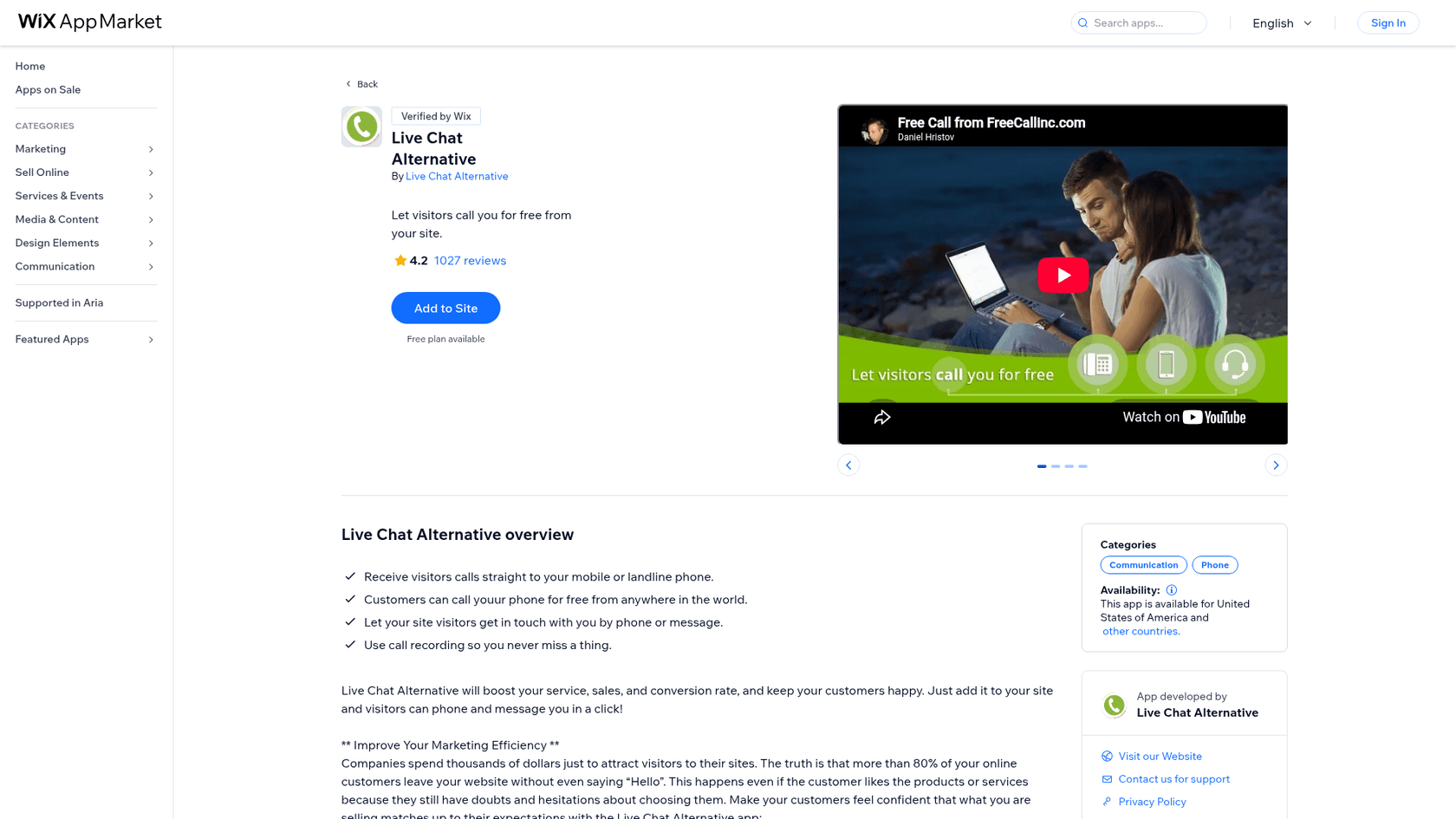
The name is the first thing to get straight. This is not AI live chat and not a text chat widget. The listing frames it as an alternative to live chat: "Instead of typing, you can actually talk with your website visitors." It's a click-to-call button with a contact form behind it.
| Live Chat Alternative at a glance | |
|---|---|
| What it is | A click-to-call button plus a message form for Wix sites |
| Vendor | Free Call, Inc. (freecallinc.com), app formerly called Free Call |
| Rating | 4.2 from 1,027 reviews on the Wix listing |
| Price | Free, then $4.99, $9.99 and $14.99 a month |
| Billing unit | Talk minutes: 60, 120 or 250 a month on paid plans |
| Text chat or AI | None |
| Not available in | Peru, Colombia, Mexico, Venezuela, Ecuador and Argentina, per the listing's country settings |
| Vendor websites (October 2026) | livechatalternative.com and freecallinc.com both failed to resolve |
What it does well
A call button that rings your real phone
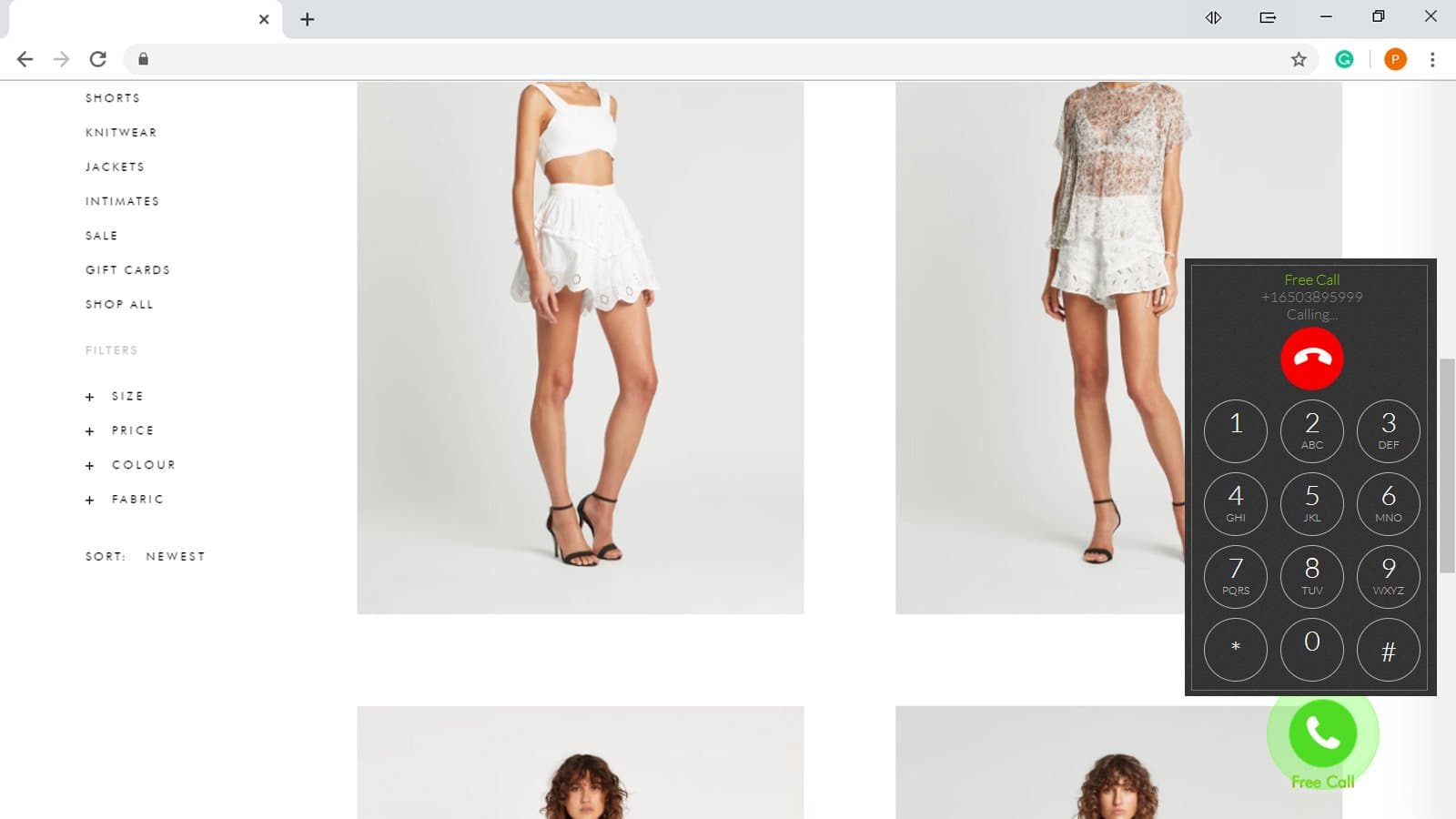
The core feature is simple and useful. A visitor clicks the green Free Call button, a small dial pad opens in the corner of the page, and the call rings your mobile or landline. The call runs from the browser at no cost to the visitor, and the listing says they can call "from anywhere in the world". For a business where one conversation can close a sale, like a contractor, a clinic or a custom furniture maker, that's a sensible thing to put on a page.
Business hours, with a message form as the fallback
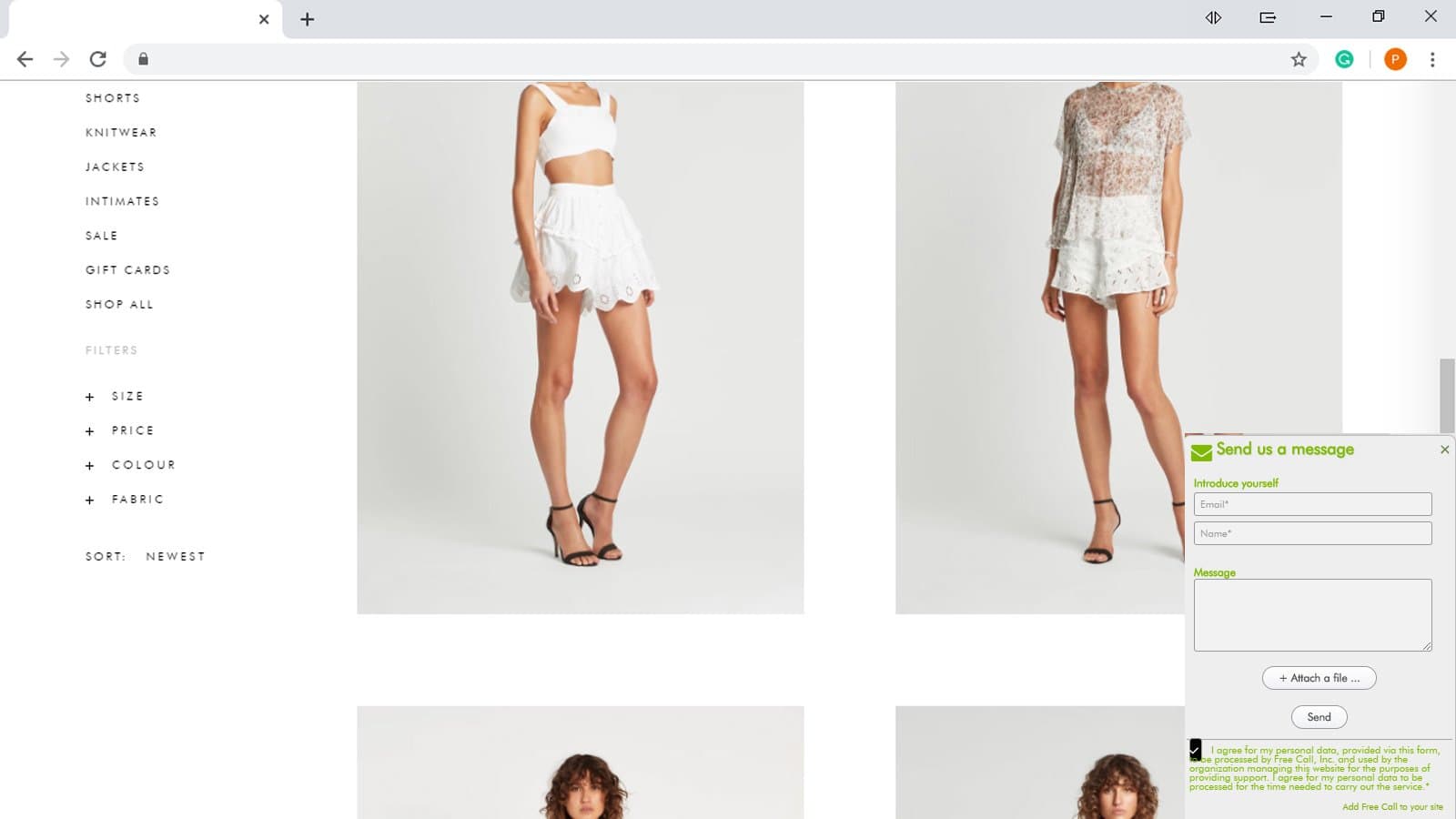
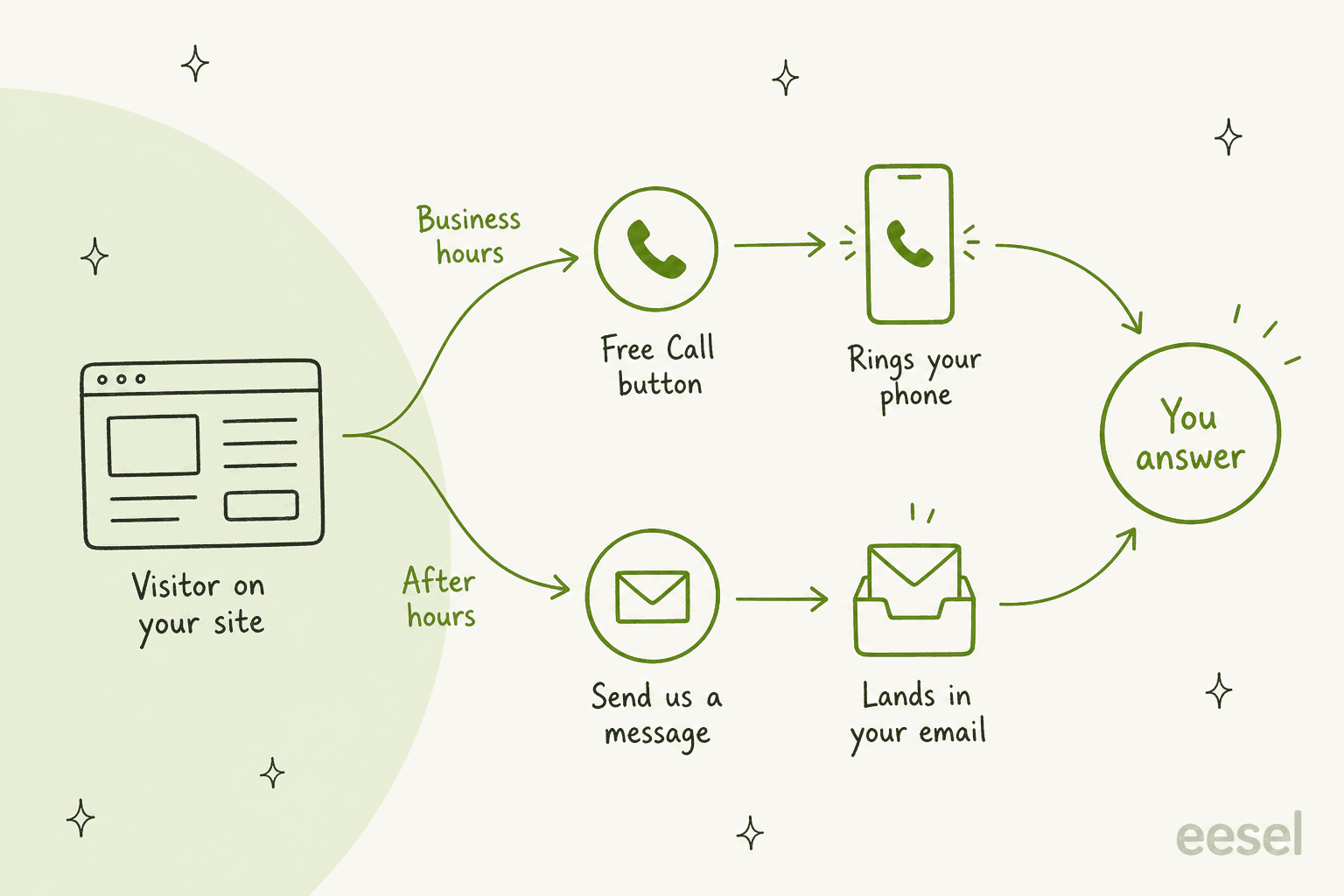
You set the hours you're reachable. Outside them, the call button hides and a "Send us a message" button takes its place, so visitors can still leave a name, email, message and a file. That's the app's answer to after-hours support: nobody answers at night, but nobody hits a dead end either.
It's worth being clear about what that flow means in practice. Every path ends with you. During the day the button rings your phone. At night the form lands in your inbox for the morning. Nothing in the app answers a question on its own, which is the gap an AI chatbot for your website is built to fill.
Call logging, recording and a shareable call link
The plan features list a call log that shows who called, when, and where from, call recording, and a "phone hyperlink" that turns your number into a clickable Free Call link you can put in an email signature or social profile. For a solo business owner, a log of missed and answered calls is the closest this gets to the live chat features a support team would expect.
Where it falls short
It isn't live chat, and the name sets the wrong expectation
If you're comparing contact tools, the app sits closer to a VoIP service than to live chat software. There's no typed conversation, no canned replies, no visitor list, no proactive chat and no chatbot. One person can handle several chats at once; one person can only take one call. That difference matters most on a busy afternoon, which is exactly when a call button goes unanswered. If speed of the first answer is what you're after, first response automation is the lever that moves it.
Less control over where the button shows
In April 2022, one reviewer wanted the call button only on a contact page and found the app placed it across the whole site:
"I couldn't go any further with the app because it forces you to have the app on every page on your site. I only want a call app on one page, my contact page."
Others reported the button not showing on a landing page (June 2025) or on the mobile version of a site (2022). I'd test both on your own theme during the first week.
The vendor looks hard to reach
This is the part that would stop me. When I checked in late October 2026, both the website on the listing (livechatalternative.com) and the original company site (freecallinc.com) failed to load, because neither domain points anywhere any more. Both are still registered, so this may be temporary, but it also means the privacy policy linked from the listing doesn't load. The demo site the listing links to loads a Wix fitness template with no call widget on it.
Trustpilot shows the same picture. The Free Call, Inc. page has six reviews, none in the last 12 months, and a notice that reviews are closed because the company's website has closed. The most recent one, from April 2023, is a 1-star from a paying customer:
"The service we paid for is not working and we have contacted the company in the last 9 weeks many times but they are not able or willing to fix the issue."

None of this proves the service is off. The listing is still live, still verified by Wix, and still shows its plans. But for a tool whose whole job is connecting a customer to you, I would email the support address on the listing and wait for a human reply before paying for a plan.
Live Chat Alternative pricing
Pricing is set on Wix and billed through your Wix account. Every number below comes from the pricing section of the Wix listing. There is no free trial, no yearly price and no Wix Premium requirement.
| Free | Freelancer | Small Office | Growing Business | |
|---|---|---|---|---|
| Price per month | $0 | $4.99 | $9.99 | $14.99 |
| Talk time | 3 minutes per call | 60 minutes a month | 120 minutes a month | 250 minutes a month |
| Free call button and message form | Yes | Yes | Yes | Yes |
| Business hours | Yes | Yes | Yes | Yes |
| Call logging | Yes | Yes | Yes | Yes |
| Call recording | Listed | Not listed | Not listed | Listed |
| Phone hyperlink | Yes | Yes | Yes | Yes |
Two things on the plan cards are confusing. Every plan has a feature called "Unlimited Talk Time", but its description says calls are free "for up to 3 minutes per call" and to upgrade for more, and the paid plans each name a monthly minute allowance. And call recording appears on Free and Growing Business but not on the two plans in between, which may just be a gap in the listing. I'd ask the vendor about both before choosing.
The minute math is easy. Freelancer and Small Office both work out to about 8.3 cents per included minute, and Growing Business drops to 6 cents. At 250 minutes a month, that's about 50 five-minute calls, or two or three a working day.
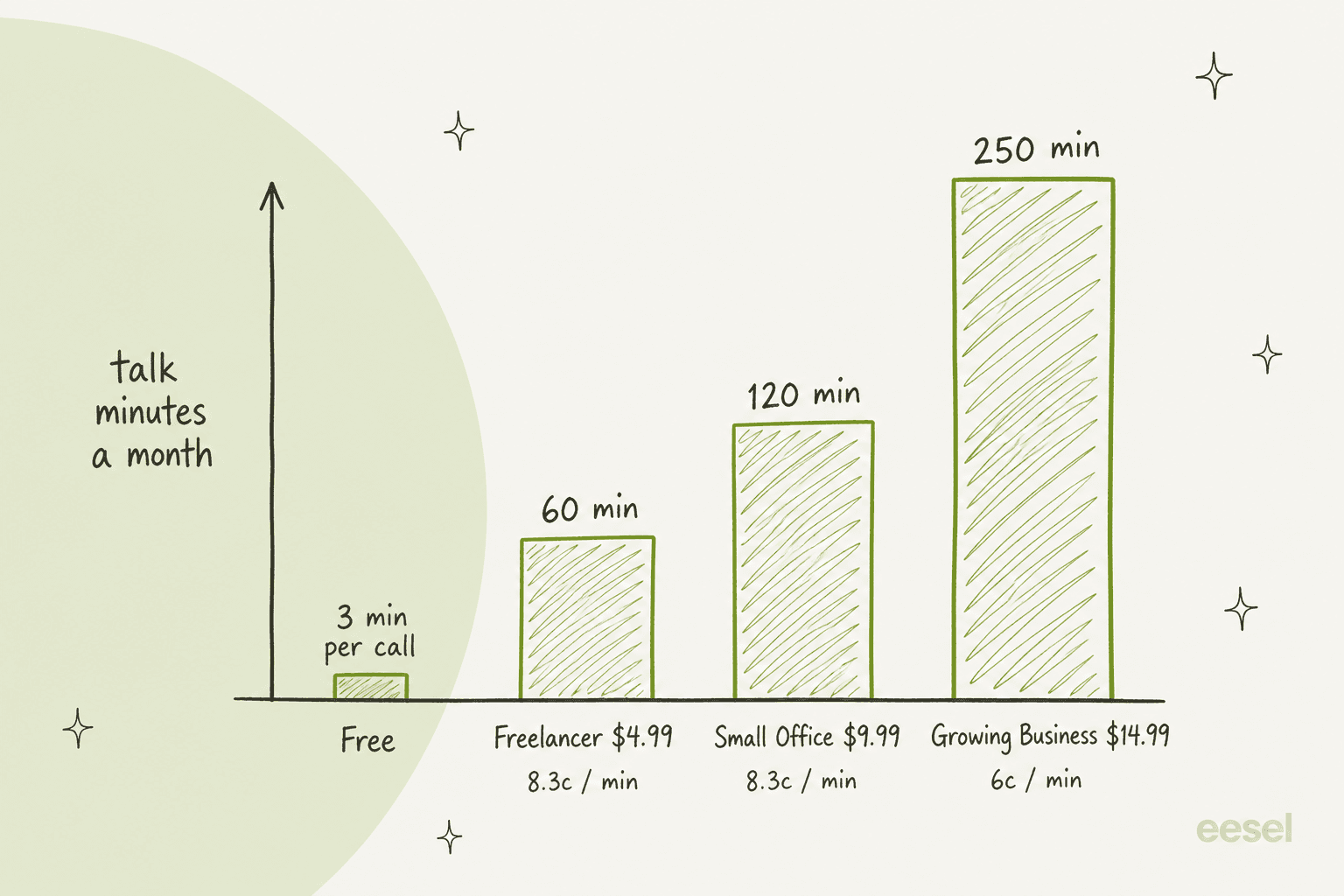
The free plan is where expectations break. Reviewers say a recorded voice tells the caller the call is limited to 3 minutes, which is an awkward thing for a customer to hear. A December 2023 review put it bluntly:
"app is advertised as free but to be usable for any business that wants to talk for more than 60 minutes a month you must pay. Misleading advertising"
Older developer replies also say some phone numbers in certain countries only work on paid plans, and several reviewers from Russia, Ukraine and the Philippines said their numbers didn't connect. Check your own number first.
The sticker price is low, but the comparison with chatbot pricing isn't like for like. A $14.99 call plan buys minutes on your own phone, so the real cost is your time on those calls, and every call you miss is a visitor who got no answer. If you want to put a number on that, my guide to chatbot ROI shows how I'd do it.
What 1,027 reviews say
The rating breakdown on the listing is 837 five-star, 60 four, 21 three, 24 two and 85 one-star reviews. The listing's review feed returned 1,046 reviews for me, and the dates tell a story the average hides.
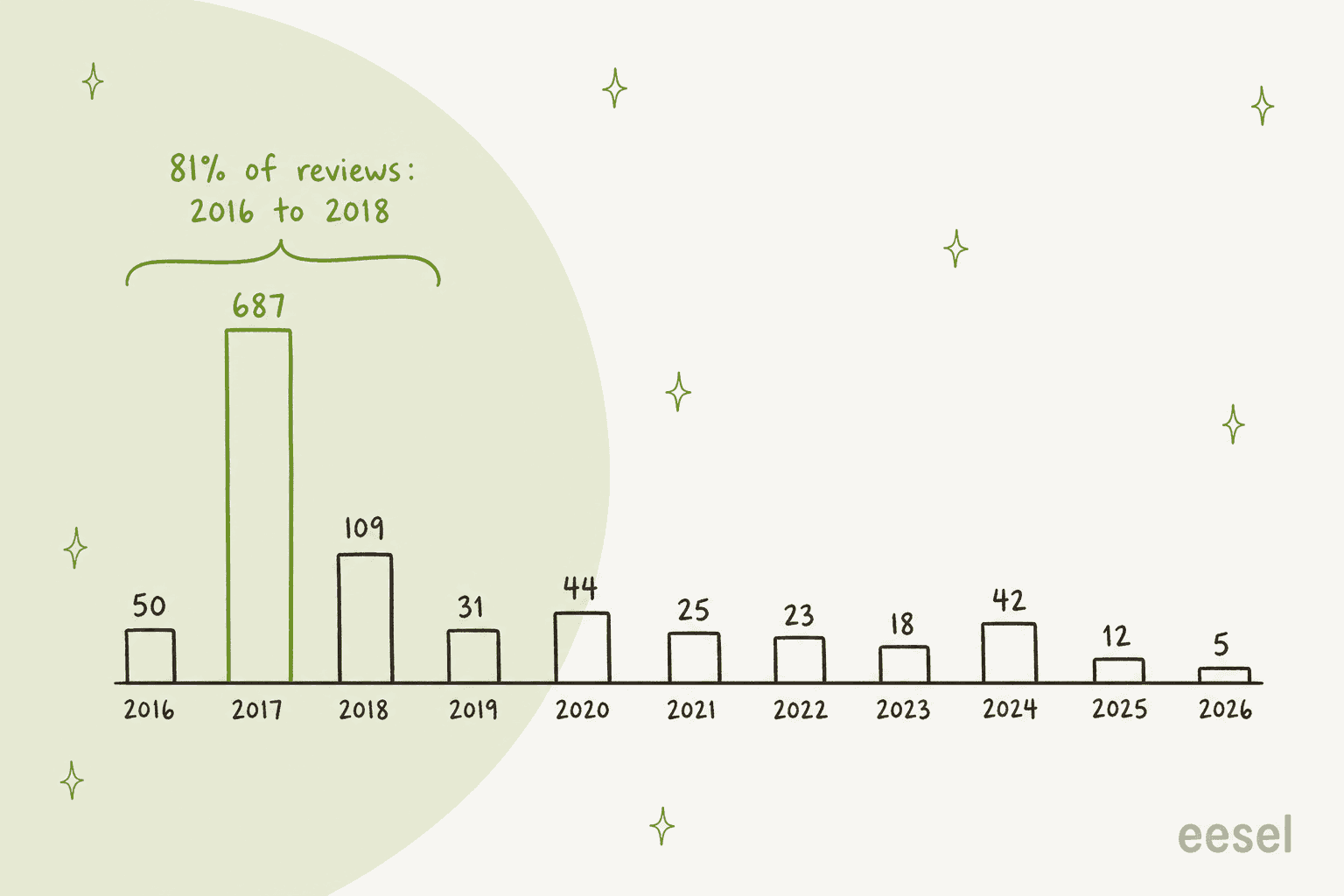
846 of the 1,046 reviews, about 81%, were posted between 2016 and 2018, and 687 of them in 2017 alone. Most five-star reviews are a few words long ("very nice", "simple and best"). That pattern isn't unusual for a free Wix app of that era, but it means the 4.2 average mostly describes the app as it was eight years ago.
The recent picture is thinner and harder. Since 2022 there have been about 100 reviews, still averaging around 4.2, but the detailed ones are mostly complaints. They cluster into four themes:
- The call doesn't connect. "not connecteing to the call" (July 2025), "Not working" (May 2024), "I don't recommend this it didn't work" (August 2024).
- The app won't come off the site. At least six reviews from January 2023 to December 2024 say they couldn't remove it, in English, German and Portuguese.
- Sign-up errors. A December 2023 reviewer couldn't create the account the app needs because sign-up kept failing with an error.
- The free plan limits, covered in the pricing section above.
The most recent removal complaint, from December 2024, is short and sums up the theme:
"cant use it, cant remove it"
In fairness, the developer used to reply to almost every negative review, usually within days, pointing people to support@freecallinc.com and explaining how to delete the app in the Wix Editor. 183 reviews have a developer reply. But the latest reply I found on a complaint is from November 2020, and the complaints since then have no answer on the listing.
There are happy users too, and their point is a real one. A store owner in late 2022 liked that it lets customers ring your own number "con un diseño muy profesional" (with a very professional design). If your visitors would rather talk than type, a call button can do what a chat box can't.
I found no G2 or Capterra listing for the app, and no Reddit discussion of it by name.
Live Chat Alternative pros and cons
Pros
- Cheap: paid plans from $4.99 to $14.99 a month, billed through Wix.
- Visitors can call your real phone from the browser, without their own phone plan.
- Business hours with a message form as the after-hours fallback.
- Call log, call recording and a shareable call link.
Cons
- No text chat, no chatbot and no AI, despite the name.
- The free plan cuts every call at 3 minutes and tells the caller so, reviewers say.
- Both vendor websites failed to load in October 2026, and the demo site showed no widget.
- No developer replies to reviews since 2020; recent reviews report calls not connecting and the app not uninstalling.
- Some countries' phone numbers don't work, and six Latin American countries are excluded.
- Every call needs a person free to pick up.
Who should use Live Chat Alternative?
Pick it if you run a small Wix site where a phone conversation is the sale, you can answer calls during set hours, and the vendor replies to you before you pay. In that case $4.99 to $14.99 a month is a fair price for a call button with a log. If you're still deciding whether AI belongs on a site your size, my take on AI for small business may help.
Skip it if you need text chat, you want questions answered while you're busy or asleep (see my guide to 24/7 support with AI), your number is in a country reviewers had trouble with, or you can't get a reply from the vendor. If you only want people on phones to call you, a plain phone link that opens the dialer does that for free.
My verdict: 2 out of 5. The idea is good and the price is low, but a contact button you can't be sure connects, from a vendor whose websites don't load, is hard to recommend in 2026.
Use the picker below to see which kind of contact tool fits what you actually need.
What should the button on your site do?
Pick the line that sounds most like you.
A phone link costs nothing on mobile. Live Chat Alternative adds browser calling, hours and a call log for $4.99 to $14.99 a month, once the vendor confirms it still connects. A VoIP service with click-to-call adds routing if several people take calls.
One person can run several chats at once, and an AI agent can answer the common questions from your own pages before you even look. This is the job a call button can't do.
A message form only collects questions for the morning. An AI agent answers them at 11pm from your site and policies, and leaves you the ones that need a person, with a summary.
When more than one person answers, you want every chat and call saved as a ticket you can assign. Pick a small-business helpdesk, then add AI on top of it.
Prices from the Live Chat Alternative listing on the Wix App Market, October 2026.
Live Chat Alternative alternatives worth a look
Depending on what's driving the search, these are the directions I'd look:
- Just calls: a phone link, or a VoIP service with click-to-call such as Dialpad (see my Dialpad review).
- Simple text chat: a chat widget like Tidio or tawk.to, covered in my Tidio review.
- A small team that needs tickets: one of the small business helpdesks with chat built in.
- AI that picks up the phone: an AI phone agent, if calls are most of your volume.
- Answers without someone on standby: an AI agent, below.
If you also sell through Wix Stores, my breakdown of Wix ecommerce pricing helps you budget the rest of the stack. For a wider shortlist of chat tools, see my roundup of AI live chat software, and for another marketplace chat app review, my Chatty review.
Try eesel when you can't always pick up
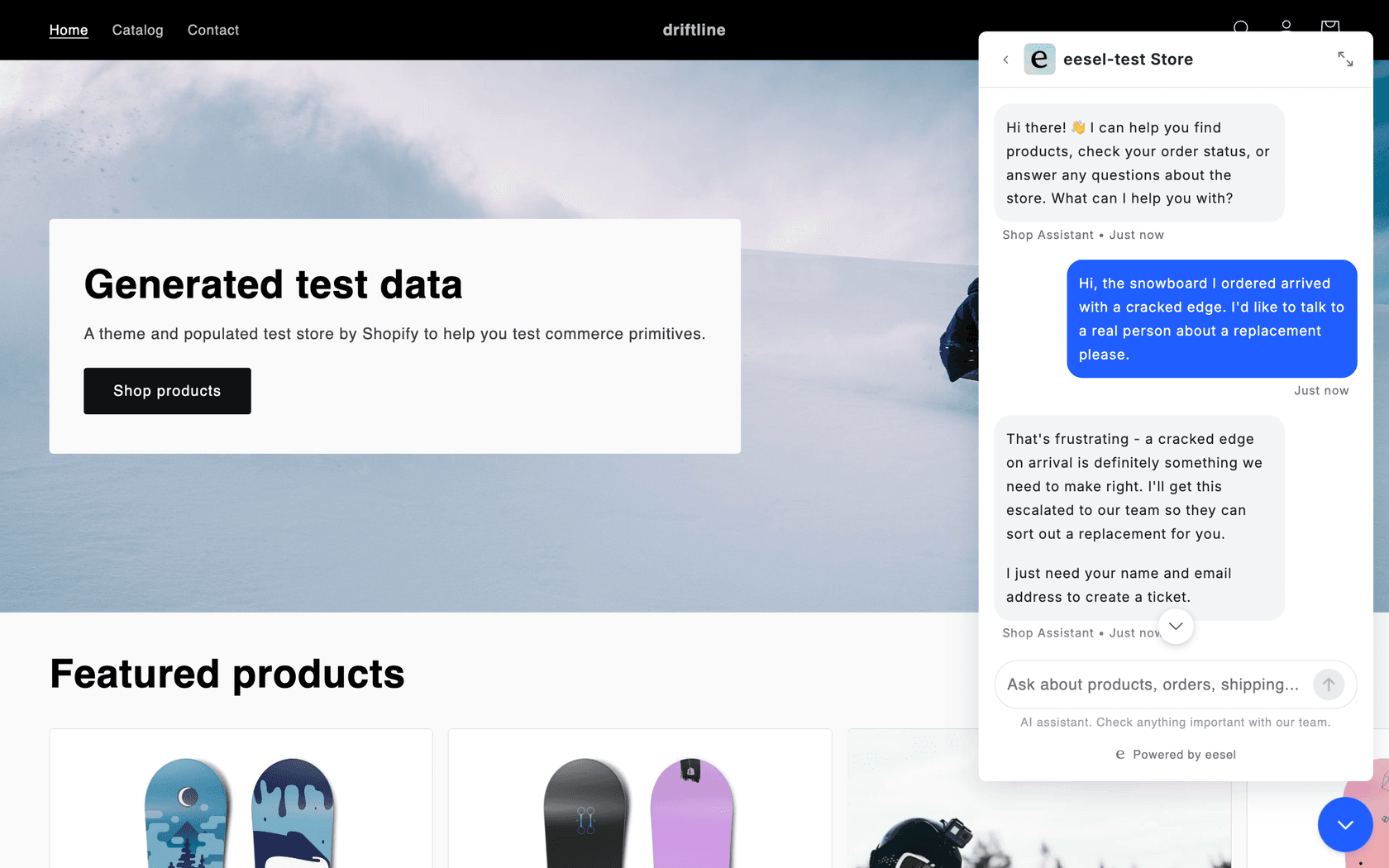
Live Chat Alternative is built around one idea: get the visitor to you. That works until you're on another call, with a customer, or asleep. eesel is an AI helpdesk teammate that takes the first answer off your plate. Its chat bubble sits in the corner of your site, learns from your own pages and help articles, answers visitors at any hour, and hands anything it can't handle to you with a note on what the visitor wanted.
The answering-from-your-own-site part is how Original Bootcamp, an outdoor group fitness business in Cologne, uses eesel. It's a small setup: one agent on its Freshdesk inbox that answers general questions about camps and prices from about 1,700 pages of the company's website plus past tickets, in short, informal German, and leaves anything touching a booking or an account to the team. For a store with more volume, Question Beauty has eesel on its chat, Messenger and email tickets, and in one month (8 August to 8 September 2026) eesel handled about 990 tickets and closed about 280 without a person.
A few practical notes for Wix sites. The eesel chat bubble is one script tag that works on any platform with a site-wide script setting. On Wix, that's Custom Code, which Wix's help center says needs a published site with a connected domain.
If you've wondered whether AI can answer calls, eesel also has a phone channel that answers them and transfers to your number when it can't help, but it isn't self-serve yet, so you set it up with the eesel team. Plans start at $299 a month for 500 credits on the eesel pricing page, where one chat is one credit, so it's a step up from a $14.99 call plan and makes sense once missed questions are costing you sales.
There's a 7-day free trial with 100 credits, so you can see it answer your own site's questions first. My walkthrough on building an AI live chat covers the setup step by step.
If you want your Wix visitors answered while you're busy with the ones on the phone, add the chat bubble to your site. Try eesel
Frequently Asked Questions
What is the Live Chat Alternative app on Wix?
Live Chat Alternative is a Wix App Market app, formerly called Free Call, made by Free Call, Inc. It adds a call button that rings your mobile or landline from the visitor's browser, plus a send-us-a-message form. Despite the name it has no text chat or chatbot. If you want real chat, start with my guide to adding live chat.
How much does Live Chat Alternative cost?
The Wix listing shows four monthly plans: Free ($0, calls capped at 3 minutes each), Freelancer ($4.99, 60 talk minutes), Small Office ($9.99, 120 minutes) and Growing Business ($14.99, 250 minutes). There is no free trial and no yearly discount. For how that compares with chat tools, see my breakdown of chatbot cost.
Is the Live Chat Alternative free plan really free?
The free plan costs nothing, but every call is limited to 3 minutes, and reviewers say a recorded voice tells the caller about the limit. One Wix reviewer called the free label misleading because real use needs a paid plan. A free live chat widget may suit a tight budget better.
Is Live Chat Alternative still supported?
I couldn't confirm it. In October 2026 both vendor websites, livechatalternative.com and freecallinc.com, did not resolve, the listing's demo site showed no widget, and Trustpilot says the company's website has closed. Email the support address on the listing before you pay. My live chat alternatives list has options with active vendors.
Can I remove Live Chat Alternative from my Wix site?
Several 1-star reviews from 2023 and 2024 say the app or its icon could not be removed. Older developer replies say you delete it in the Wix Editor and cancel any paid plan under your Wix billing settings. If you're switching to chat, my guide on setting up AI live chat walks through it.
What are the best Live Chat Alternative alternatives for Wix?
A plain phone link if you only need calls on mobile, a VoIP service with click-to-call if you need call routing, a chat widget like Tidio or tawk.to for text chat, and an AI agent like eesel if you want questions answered when nobody is free. See my AI live chat roundup for more.
Does eesel work as a Live Chat Alternative replacement?
For the chat side, yes: eesel's chat bubble is one script tag that answers visitors from your own pages and hands off to a person. On Wix that goes in Custom Code, which Wix says needs a connected domain. eesel also has a phone channel, set up with its team, and plans start at $299 a month.