What is Dante AI?
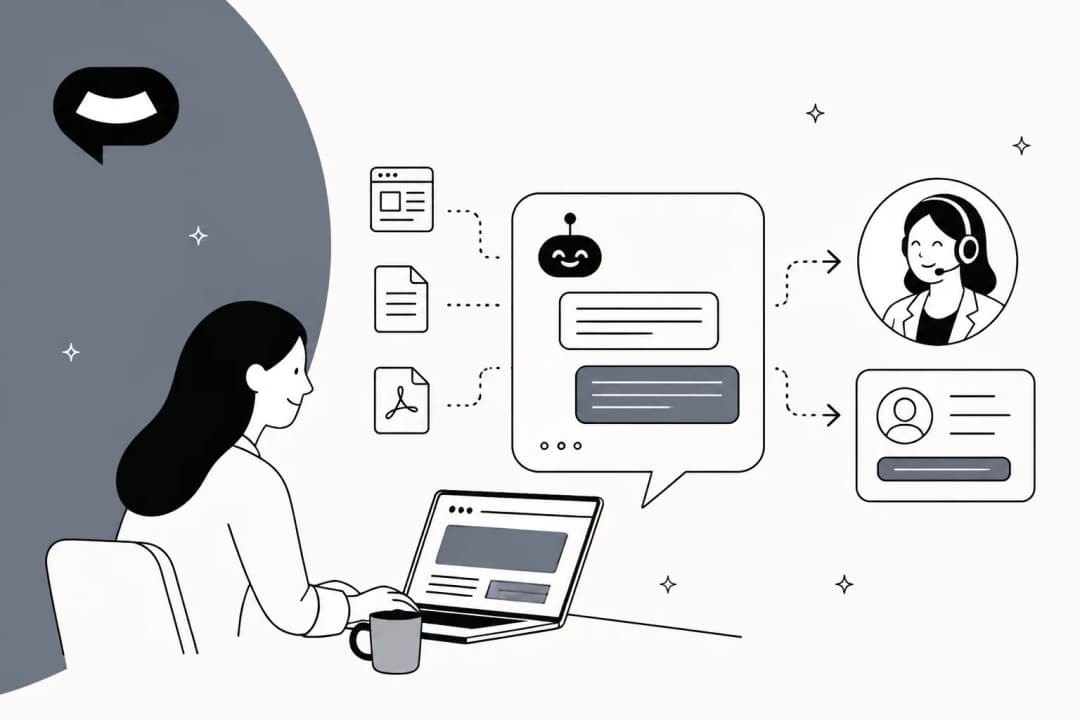
Dante AI is an AI customer support tool for small and mid-sized businesses. You give it your website address, it builds what it calls an "AI brain" from your pages, price lists, PDFs and anything you type in, and every channel answers from that one brain.
The company behind it is Dante AI Inc., a private company Crunchbase lists in San Francisco with 11 to 50 employees. It has been around since at least 2023, when a micro-SaaS report on Reddit noted it hit $7K MRR within a month of launch. The homepage lists Accenture, SAP, Comcast, Kaplan and GoTo under "Trusted by teams at".
The product you meet today is not the one most older reviews describe. In mid-2026 Dante moved to a new site and repositioned from a general AI chatbot builder into "All-in-one AI customer support". The old multi-chatbot, pick-your-model playground is now one AI brain feeding a website chat, a phone agent and a lead list. That shift from a chatbot to something closer to an agent is the same one I cover in AI agents vs AI chatbots.
How I reviewed Dante AI
I work eesel's support queue every day, and eesel has spent the last few years putting AI agents on live support queues for real customers. That work leaves scars. One B2B technical support team that came to eesel had a help center line that read "we support all models", so their bot cheerfully confirmed products they had never supported. Nothing was technically wrong with the AI. It was faithfully repeating a sentence that was too broad.
So when I review a tool like Dante, I care less about how fast the demo is and more about three questions: what does it do when the content is wrong or missing, where does a hard conversation go, and what will I actually pay at my real volume.
For this review I went through Dante's live homepage, pricing page and plan comparison, Dante's help center docs, the archived pricing pages from before the relaunch, and every review I could find on Trustpilot, G2, Capterra, Reddit and X. I did not run Dante on a live customer queue, so where I describe behaviour, it comes from Dante's own pages and from users who did.
What Dante AI does well
Dante gets several things right that matter to a small team with no developer. Here is what stood out.
Setup that really is quick
The setup is three steps on the homepage: give Dante your website, check what it knows by asking it questions privately, then switch on your channels. The free plan builds from your most important pages first, so the agent can answer while it reads the rest, and nothing goes live until you say so. It is the same build-from-your-site idea behind most knowledge base chatbots, done with fewer settings.
Reviewers back this up. One 5-star Trustpilot reviewer who has worked on chatbots and phone systems since 2009 said older software took months to build a basic support agent, then added:
"Dante gives a superior result in literally seconds, ingesting and learning from your existing content like your website and documentation."

One brain across chat and phone
This is the core idea, and it is a sensible one. You fill the brain once, and the website chat and the phone agent read from the same content. Dante's pricing FAQ is clear that you do not pay per channel: "One plan covers every channel that plan includes."
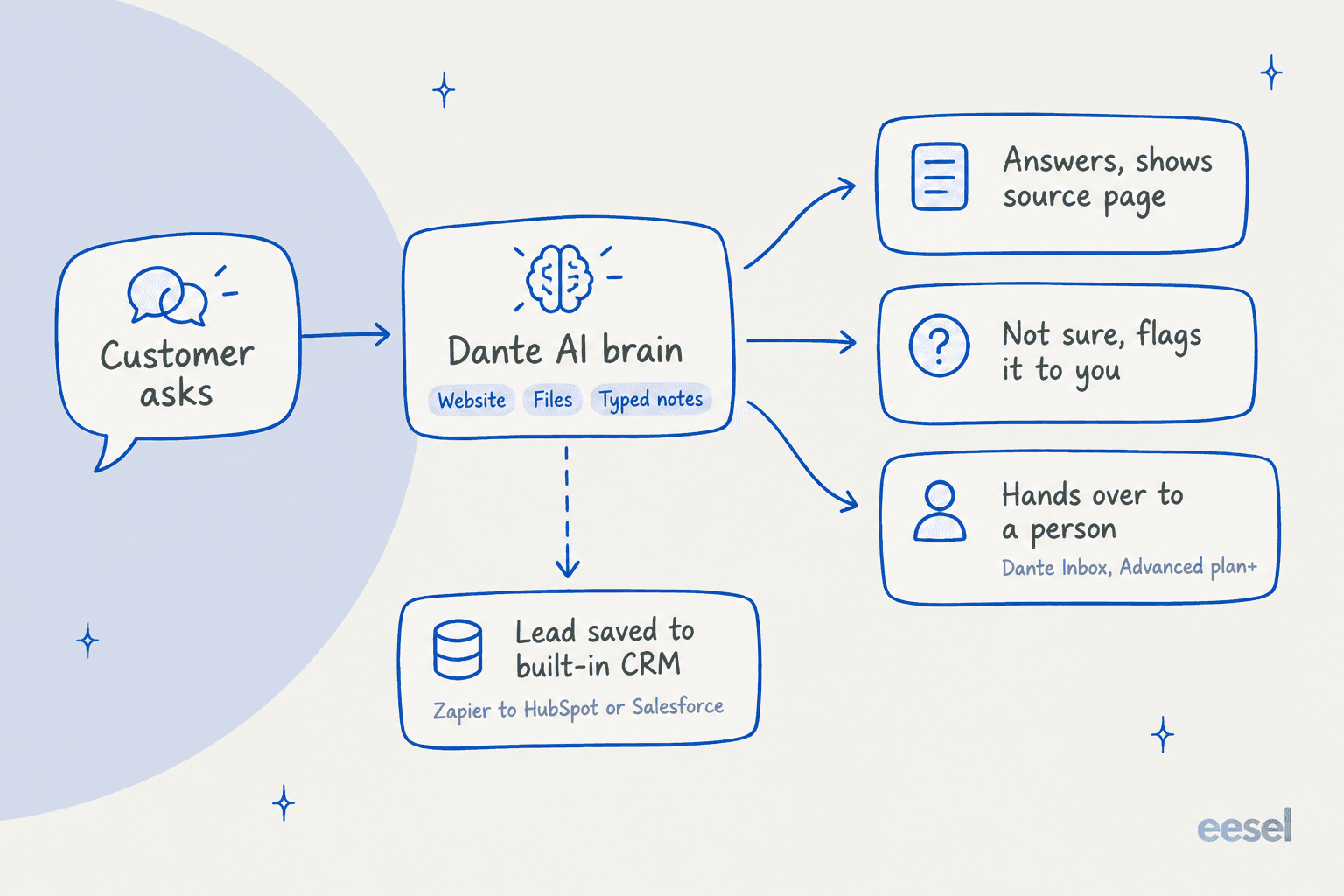
When it answers from your website, the chat shows the page it used. That small detail does real work: a customer can click through and check, and you can spot fast when the bot is quoting an old page. Most AI chatbot problems I see start with exactly that, an old page nobody noticed.
It says "not sure" instead of guessing
Dante's homepage makes a promise I like: "An AI that invents an answer is worse than none." When the brain does not know, the agent says it is not confident and passes the question to you. You correct the answer once and, per Dante, every channel uses the fix from then on. Both of those are on every plan, free included.
That is the right default. It does not fix the problem I described above, though. If your content says something too broad or out of date, the bot will repeat it with full confidence, because as far as it can tell, it does know. That is a content problem, not an AI problem, and AI hallucination prevention for support starts with auditing your source pages.
Lead capture with a built-in list
When someone asks about a quote, a booking or a job, Dante takes their name, number and what they wanted, and drops it into a built-in list you can track from new to won. You can export it as a CSV or push it to HubSpot or Salesforce through Zapier, and Dante does not charge per lead.
For a service business, a salon or a trades company, this is the feature that pays for the plan, and it puts Dante in the same conversation as the best chatbots for lead generation. It is also gated: lead capture starts on Advanced. If AI for lead generation is your main goal, budget for $120 a month, not $40.
Privacy defaults that hold on every plan
Dante makes a few promises on every plan, free included:
- Your data is stored in Western Europe (London, UK).
- Your knowledge, conversations and customer details never train anyone's model.
- You choose the exact websites that can load your agent, and rate limits stop anyone hammering it.
- Data deletion requests are built into the product.
For a European business, London hosting on the free plan is a real plus. One gap to note: the plan comparison says a "Custom Data Processing Agreement (DPA)" is "Enterprise only", but there is no Enterprise plan on the live pricing page. If you need a signed DPA, ask before you buy.
Every major model, switched in one click
Paid plans unlock every model Dante offers. The homepage FAQ names GPT-5, GPT-5.5, Claude Sonnet 4.6, Claude Opus 4.7 and Gemini 3.1 Pro, and switching takes "one click and no retraining." The free plan is limited to GPT-4o mini and GPT-5.4 nano. Model choice is great, and it is one reason Dante sits in most AI chatbot builder shortlists. As you will see in the pricing section, it is also where the cost moves fastest.
Channels: what's live and what's still coming
Dante's homepage shows four channels side by side: website chat, a voice agent on your phone line, email drafting and lead capture. Only some of these are live today, so it helps to separate them.
| Channel | Status | Plan |
|---|---|---|
| Website chat | Live | Free and up |
| Talk to your agent (realtime voice) | Live | Starter and up |
| Voice agent on a rented phone number | Live, 5 credits a minute | Advanced (1 number), Pro (3 numbers) |
| Native, through Meta's Cloud API | Starter and up | |
| Email reply drafts | "Email is next", per Dante's FAQ | Not shipped |
| WordPress | Direct connection | Not stated on the pricing page |
| Slack, Shopify, Teams, HubSpot, Salesforce, Discord | Through Zapier | Starter and up |
WhatsApp is a real native channel, not a Zapier workaround. You connect your WhatsApp Business account with Meta credentials, and handover works there too, inside WhatsApp's 24-hour reply window. If that is your main channel, compare it with other WhatsApp chatbots.
Two things are worth knowing before you plan around the phone. First, calls use 5 credits a minute and the number rental is extra, with no published rental price, so check what a month of calls costs before you put it on your main line. Second, human handover is a chat feature. A G2 reviewer who otherwise rated Dante 5 out of 5 named this as their one gap:
"So far, nothing major stands out. If anything, I'd love to see human handover added to the voice AI in the future."

If phone is your main channel, my guide to the best AI for phone support covers tools built voice-first, and my AI voice agent guide explains what to test on a call.
How human handover works
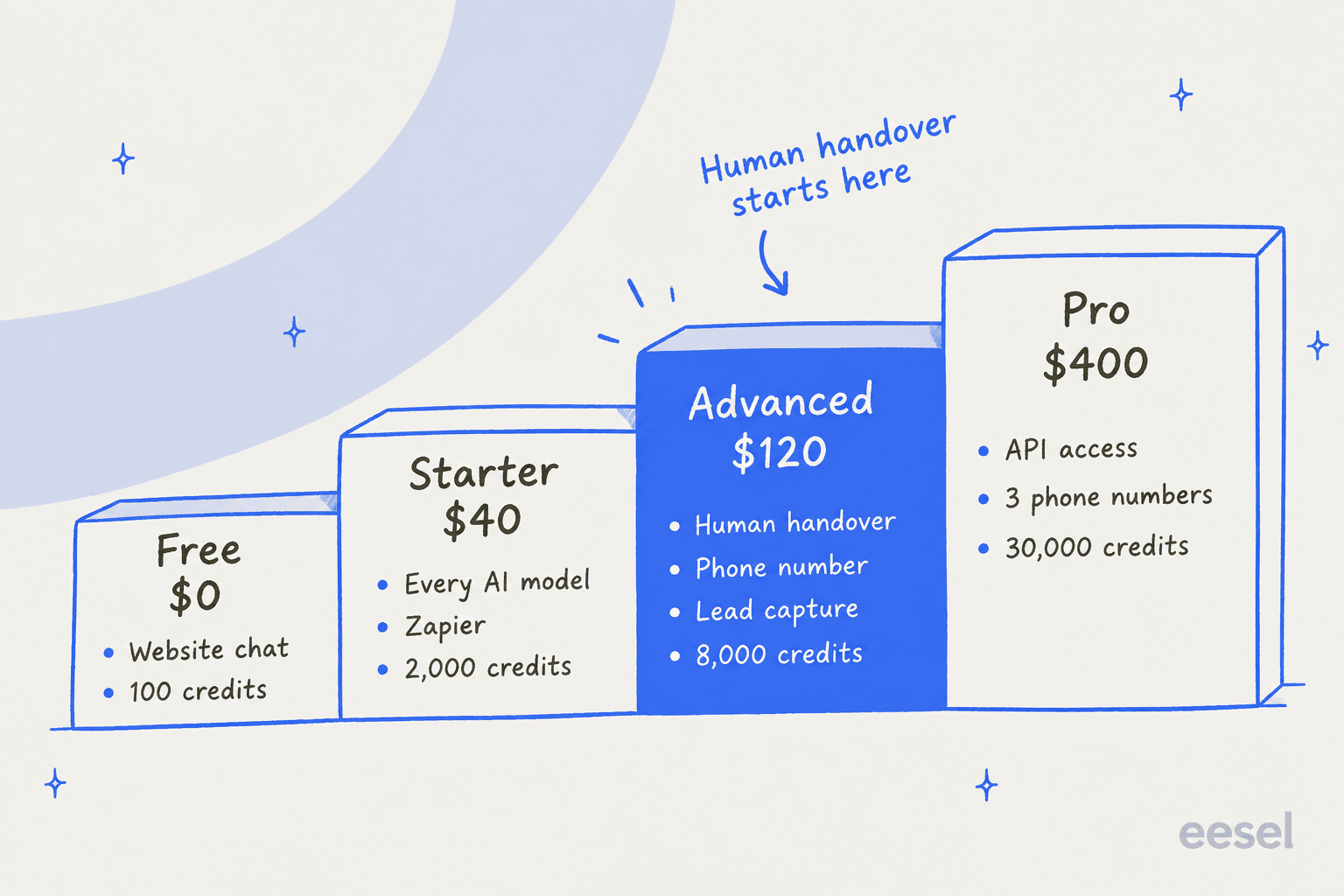
Handover starts on the Advanced plan. Your customer can ask for a person at any point, you decide which agents can take over and what Dante says, and the whole conversation travels with the handover so the customer never repeats themselves. Customers can also send screenshots and PDFs straight to the person handling the chat. That covers most of the human handoff best practices I'd look for.
The question I always ask is where the conversation lands. With Dante, it lands in Dante's own Inbox, with team seats and a queue per person. There is no native connection to a helpdesk like Zendesk or Freshdesk. Zapier can push leads into HubSpot or Salesforce, but a live chat escalation is worked inside Dante.
For a three-person business with no helpdesk, that is fine, maybe even simpler. It works a lot like a live chat tool with an AI in front. For a support team that already runs a queue, it means a second inbox to watch and conversations that never reach your reporting. If that sounds like you, read my notes on AI agent handoff best practices before you choose.
How you test it before going live
Dante gives you a private sandbox: you ask the agent anything, correct what it gets wrong, and go live when you are happy. Advanced adds knowledge gap reporting, which ranks every unanswered question by how many people asked it, and a weekly re-crawl of your site (daily on Pro). The gap report is the kind of view my chatbot analytics guide says to check weekly.
Two details from the sandbox docs are worth knowing. You can compare two models side by side on the same question, which is handy for picking a tier. And pressing Save changes in the sandbox pushes your edits to the live agent straight away, so treat it like production, not a scratchpad.
The gap report is the most useful thing here once you are live. What is missing is a way to test before launch at scale. Your sandbox questions are the ones you thought to ask. There is no option to replay hundreds of your past support conversations and see how the agent would have answered each one, so the first real test happens in front of real customers.
That matters more than it sounds. In my experience, the questions that break a bot are rarely the ones in your FAQ. They are the strangely worded ones, the two-questions-in-one ones, and the ones where the honest answer is "it depends on your account." You only find those in your own ticket history, and they are where a clear chatbot escalation path earns its keep.
What users say about Dante AI
Dante has a small but warm review footprint. Here is where it stands as of October 2026:
| Platform | Rating | Reviews |
|---|---|---|
| Trustpilot | 4.4 TrustScore | 41 |
| G2 | 4.8 out of 5 | 3 |
| Capterra | No rating | 0 |
Of the 40 Trustpilot reviews that loaded for me, 38 are 5-star. The single strongest theme is the team. Reviewers name support staff, and several mention the founder, James, getting on a call personally.
"I respect the hands-on approach by the Dante Team and founder James, who took his time to explain what I wasn't totally understanding and walk me through the app to be able to fully utilize it in the correct way."
Ease of use comes up next. A G2 reviewer at a mid-market IT services company said other tools "were never as user-friendly and intuitive as Dante."
There are a few caveats to read these with. About 9 reviews landed on a single day, February 10, 2026, and Trustpilot flags that Dante "hasn't replied to negative reviews." The one 1-star review from August 2026 says only "Worst company", with no detail. G2 itself notes there are not enough reviews to give buying insight.
The one detailed complaint is about pricing, and it is the same issue I hit:
"The package section shows relatively low prices, but the FAQ mentions higher rates for certain models, which makes it difficult to understand the actual cost."
Dante replied that it had made credits clearer on its pricing cards. That was October 2025. After the 2026 relaunch, the per-model rates moved off the pricing page and into the help docs, so the confusion has a fix, but you have to know where to look.
On Reddit the signal is thin and old. The most-discussed thread, from April 2024 in r/SaaS, questioned a one-time "unlimited" offer that Dante's own chatbot did not know about:
"Why does this come across as a scam?"

That offer is long gone, and a commenter in the same thread pushed back that an out-of-date bot is not a scam. I mention it because it is a neat example of the content problem: a chatbot is only as current as what it was last trained on.
Dante AI pricing in 2026
Dante bills in message credits. Per its pricing FAQ, "A credit is one answer from your AI agent." Light models cost one credit a message and heavier models cost more. Here is every plan on the live page.
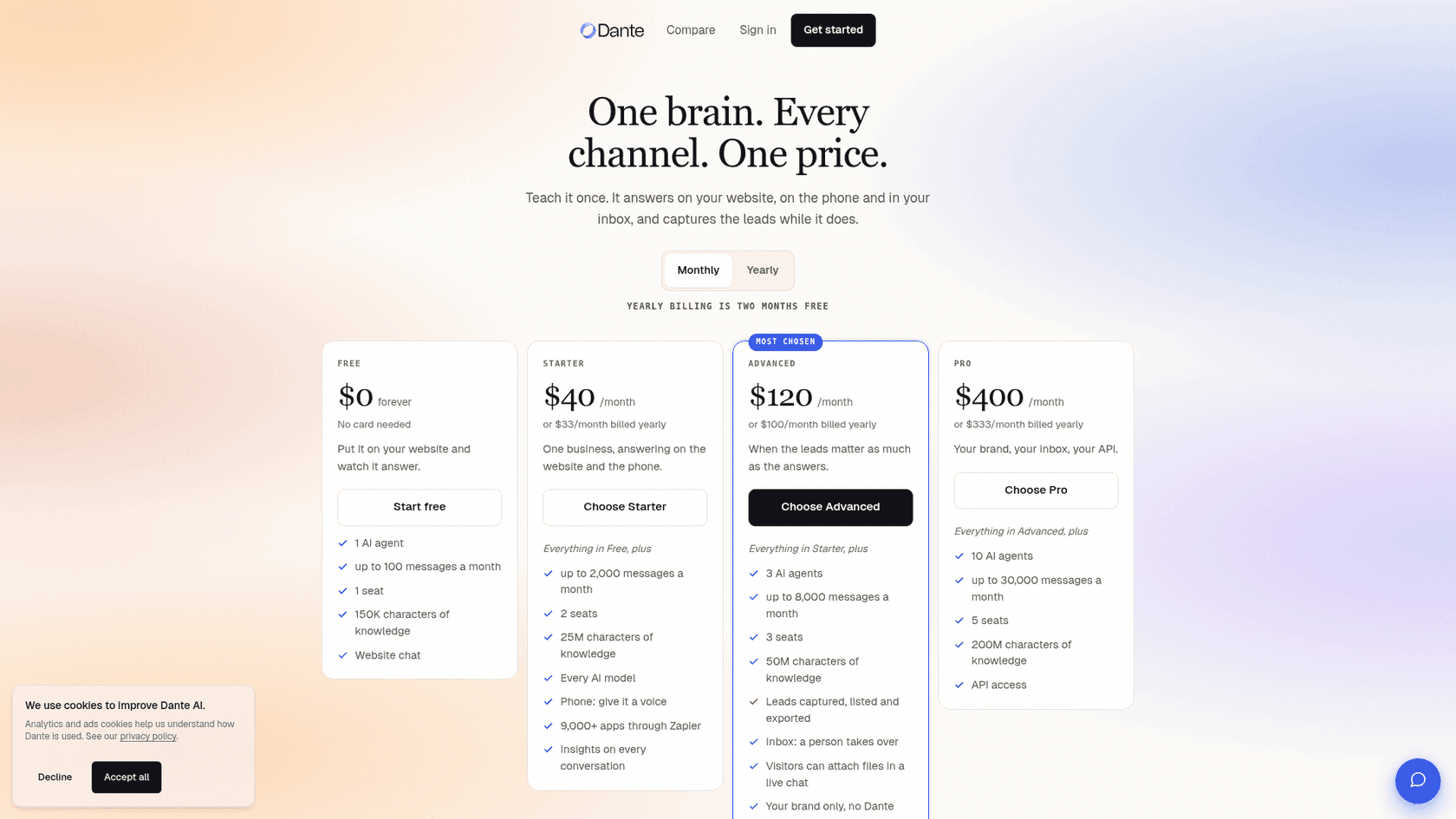
| Plan | Monthly | Yearly (per month) | Credits / month | AI agents | Seats | Knowledge | Key features added |
|---|---|---|---|---|---|---|---|
| Free | $0 | n/a | 100 | 1 | 1 | 150K characters | Website chat, GPT-4o mini and GPT-5.4 nano only, Dante branding |
| Starter | $40 | $33 | 2,000 | 1 | 2 | 25M characters | Every AI model, Zapier, realtime voice, basic insights, usage caps |
| Advanced | $120 | $100 | 8,000 | 3 | 3 | 50M characters | Human handover, 1 phone number, lead capture, knowledge gaps, weekly re-crawl, no Dante branding, custom CSS |
| Pro | $400 | $333 | 30,000 | 10 | 5 | 200M characters | API access, 3 phone numbers, daily re-crawl, onboarding call |
Add-ons, on any paid plan: extra credits at $20 per 1,000, and extra AI agents at $20 a month each. Removing Dante branding on Starter is an add-on with no published price. Credits reset monthly and do not roll over. There is no paid trial, but the free plan does not expire and needs no card.
What the relaunch changed
The archived pricing page from April 2026 tells a clear story. Prices held or rose, and included credits fell on every plan.
| April 2026 | Now | Change | |
|---|---|---|---|
| Starter | $40 for 3,000 credits | $40 for 2,000 credits | 33% fewer credits |
| Advanced | $100 for 12,500 credits | $120 for 8,000 credits | 20% higher price, 36% fewer credits |
| Pro | $400 for 50,000 credits | $400 for 30,000 credits | 40% fewer credits |
| AI agents (Starter / Advanced / Pro) | 2 / 10 / 50 | 1 / 3 / 10 | Fewer agents |
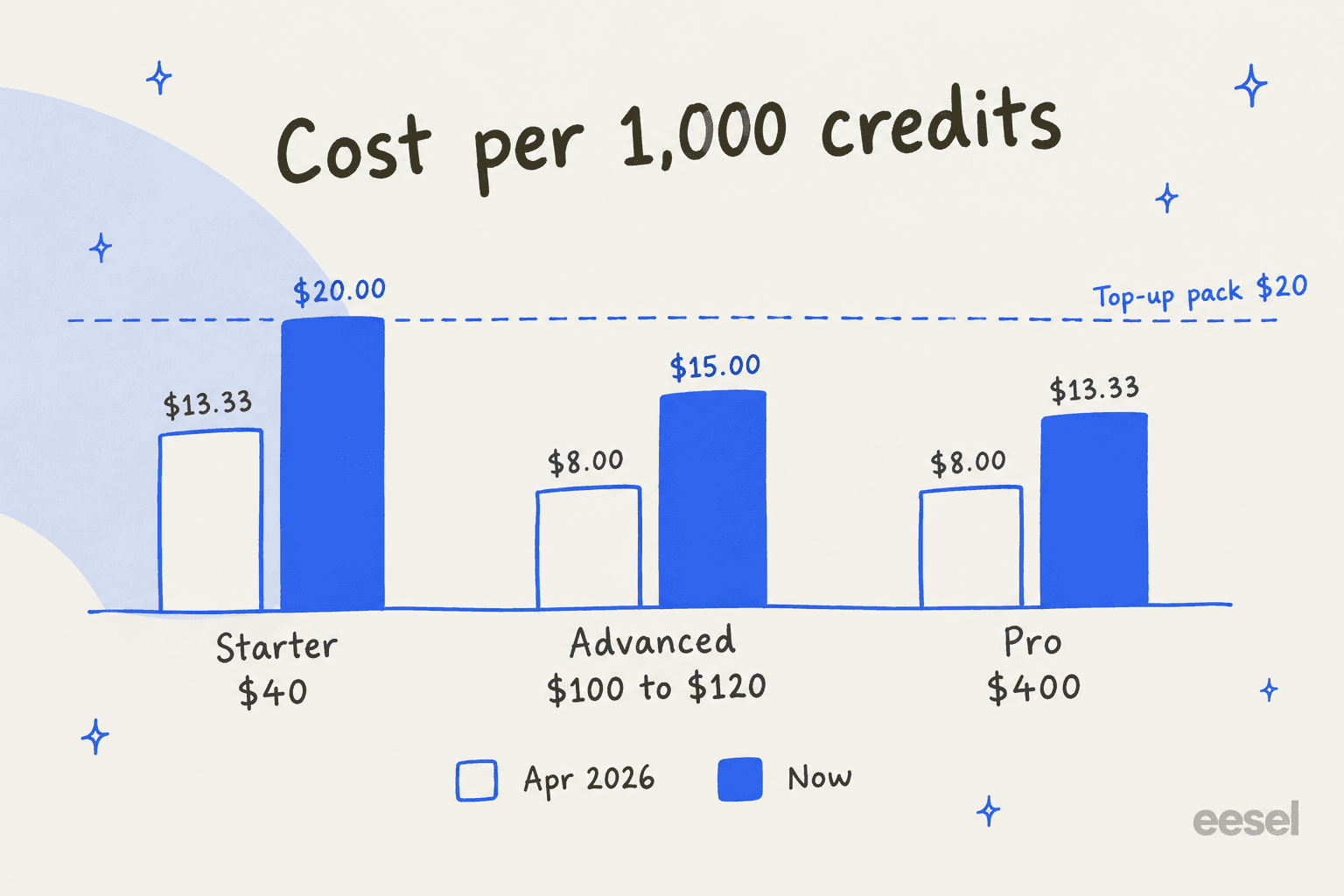
Put another way, the cost per 1,000 credits on Advanced went from $8 to $15. Starter now works out to exactly $20 per 1,000 credits, the same as a top-up pack, so Starter's included credits are no cheaper than buying them one pack at a time.
The model multiplier
This is the part I would want to know before I signed up. A credit is one answer only on the light models. Dante's AI models docs group the catalogue into three tiers:
| Model tier | Example models | Credits per answer |
|---|---|---|
| Fast and cost-efficient | GPT-4o Mini, GPT-5.4 Nano, GPT-5.6 Luna, Claude Haiku 4.5, Gemini 3 Flash | 1 to 5 |
| Versatile | GPT-5.6 Terra, GPT-5.4, Gemini 3.1 Pro, Claude Sonnet 4.6 | 10 to 15 |
| Most powerful | GPT-5.6 Sol, Claude Opus 4.7, GPT-5.5 | 25 |
That table lives in the help docs, not on the pricing page, which only says "heavier models cost more credits per reply." It matters a lot. On Claude Opus 4.7, the Advanced plan's 8,000 credits cover about 320 answers, not 8,000. A few other usage rules from the credits docs and voice docs are worth knowing:
- A phone call uses 5 credits a minute, and the monthly phone number rental is billed on top, with no published price.
- Each WhatsApp reply costs 1 credit, whichever model you pick.
- When your balance runs low, the widget drops to the cheapest 1-credit model rather than stopping.
My advice: start on a light model, move up only for the questions that need it, and set the monthly credit ceiling Dante offers on Starter and up.
What a real month costs
Assume a light model at one credit per answer and four answers per conversation, which is typical for a quick support chat.
| Monthly chats | Credits needed | Cheapest plan with handover | Monthly cost |
|---|---|---|---|
| 300 | 1,200 | Advanced | $120 |
| 2,000 | 8,000 | Advanced | $120 |
| 3,000 | 12,000 | Advanced + 4 top-ups | $200 |
| 7,500 | 30,000 | Pro | $400 |
At light-model rates, Dante is good value, and the numbers hold up against most chatbot ROI math. 2,000 chats a month with handover for $120 is a fair price. The math changes fast on a stronger model, though. Run the same 2,000 chats on Claude Sonnet 4.6 at 10 credits an answer and you need 80,000 credits, well past the Pro plan's 30,000. For context, see how Chatbase pricing and DocsBot pricing bill the same kind of usage.
Dante AI pros and cons
| Pros | Cons |
|---|---|
| Setup in minutes from your website, with nothing live until you approve | Credits cut 33 to 40% in the 2026 relaunch, Advanced price up to $120 |
| One brain for website chat and phone, no per-channel fee | Stronger models use 10 to 25 credits per answer, listed in the docs, not on the pricing page |
| Says "not sure" and shows its source page | Human handover, phone number and lead capture all start at $120 |
| Data stored in London, never used for training, on every plan | Handover lands in Dante's own Inbox, no native helpdesk connection |
| Built-in lead list with no per-lead fee | Email drafting announced but not shipped |
| Warm, hands-on support team per reviewers | Small review base: 41 on Trustpilot, 3 on G2, 0 on Capterra |
Who should use Dante AI?
Pick Dante if you run a small business with no helpdesk, most of your questions are answered somewhere on your website, and you want one AI on your site and your phone line for a fixed monthly price. A local service business that lives on quote requests is the sweet spot, as long as you budget for Advanced. If you run a WordPress site, the direct connection also puts it among the AI WordPress plugins worth a look.
Skip Dante if your team already works in a helpdesk like Zendesk or Freshdesk, if you need to test the bot against your real ticket history before launch, or if email support is your main channel today. Those are not what Dante is built around yet, and my AI helpdesk for small business roundup covers tools that are.
Test it first if you plan to use a heavier model or the phone line. Check the model's tier in the docs, set a credit ceiling, and watch the first week of usage closely.
If you are still comparing website chatbots, my Chatbase review and DocsBot review cover the two closest alternatives.
For a wider view, my SiteSpeak AI review and the best AI chatbots roundup line up the rest of the field.
eesel for teams that want the chatbot inside their helpdesk
Dante is built to be the place your support happens, a chatbot and inbox in one. eesel takes the opposite approach: it is an AI helpdesk teammate that joins the queue you already run, so a hard question gets escalated straight into Zendesk or Freshdesk with the full thread, not into a second inbox.

It still answers on your website through the eesel chat bubble, one script tag, no developer needed. The difference is what it learns from and how you test it. eesel trains on your past tickets as well as your help center, and before you go live you can run a simulation over hundreds of your past conversations, so you see how it would have answered your strangely worded questions, not just the ones you thought to type into a sandbox. You change its behaviour by telling it in plain English, as in the screenshot above.
I'll be straight about price. eesel's pricing starts at $299 a month for 500 credits, where one credit is a whole ticket or chat, not one answer. For a pure website chatbot on a small site, Dante is cheaper. eesel earns its price when your support already runs through a helpdesk and you can't afford a bot that learns on live customers. You can start free with 100 credits and no card. Try eesel on your own ticket history and see what it would have said.
Frequently Asked Questions
Is Dante AI worth it?
For a small business that wants one AI chatbot for its website plus a phone line, at a flat monthly price, yes. In this Dante AI review I found the Advanced plan at $120 a month is where it gets useful, because human handover and lead capture start there. Teams that already run a helpdesk queue are better served by an AI helpdesk agent that works inside it.
How much does Dante AI cost?
Dante AI has a free plan with 100 message credits a month, then Starter at $40, Advanced at $120 and Pro at $400 a month, or $33, $100 and $333 billed yearly. A credit is one answer on light models, while stronger models use 10 to 25 credits per answer. Extra credits cost $20 per 1,000. Compare that with Chatbase pricing and SiteSpeak AI pricing.
What changed in Dante AI's 2026 relaunch?
Dante moved to a new site in mid-2026 and repositioned as all-in-one AI customer support. Monthly credits dropped from 3,000, 12,500 and 50,000 to 2,000, 8,000 and 30,000 on Starter, Advanced and Pro, and Advanced went from $100 to $120. Per-model credit rates moved from the pricing page to the help docs. My chatbot cost guide covers how to compare credit plans.
Does Dante AI integrate with Zendesk or Freshdesk?
Not natively. Dante connects directly to WordPress and reaches other tools, including HubSpot, Salesforce and Slack, through Zapier. Human handover happens in Dante's own Inbox. If your team works in a helpdesk, look at AI for Zendesk or AI for Freshdesk options that hand off inside the queue.
Can Dante AI answer phone calls?
Yes. Dante runs a voice agent on a phone number you rent through it, with 1 number on Advanced and 3 on Pro. Calls use 5 credits a minute, and the number rental is billed on top. Starter includes realtime voice but no rented number. See my guide on whether AI can answer support calls.
Does Dante AI make up answers?
Dante says its agent replies that it is not sure instead of inventing an answer, and you can correct an answer once so every channel uses the fix. That is a good default, but it only covers questions your content does not answer. A wrong page still gives a wrong answer, which is why I test on real questions first. More on preventing AI hallucinations.
What are the best Dante AI alternatives?
For a website chatbot, the closest alternatives are Chatbase, DocsBot and SiteSpeak AI. For a support team that needs the bot inside Zendesk or Freshdesk and tested on past tickets, eesel is the closer fit. My AI chatbot builder roundup compares more options.


Article by
Riellvriany Indriawan
Riell is a designer and writer at eesel AI with about two years of experience researching CX platforms, AI chatbots, and helpdesk software. She combines her design background with a sharp eye for how these tools actually look and feel in practice — making her comparisons unusually visual and user-focused.