How I reviewed this
A quick note on method, because it sets the basis for everything below. Gemini 3.8 Live Avatar is an enterprise feature with custom avatar creation behind an allowlist, so this isn't a "I ran it in production for six months" review. What I did was read Google's own model card, the developer guide, and the pricing table line by line, cross-check the launch claims against the named customer deployments, and pressure-test the whole thing against a question I care about more than looks: does a face make the answer any better?
I've spent the last few years building AI agents that sit on live support queues, and the thing that keeps me up at night was never how the bot looked. It's whether it's right. So when Google shipped a photoreal talking head for enterprise agents, my first question wasn't "does it look good" (it does), it was "does it move the number that matters" (it doesn't). Here's the full breakdown.
What you're actually getting
Google first previewed this at Google Cloud Next 2026 and shipped it to general availability the week after the base Gemini 3.8 Live and 3.8 Live Extended Thinking models launched. Worth getting the naming straight up front, because it's easy to trip on: Gemini 3.8 Live is the real-time conversation model, and Live Avatar is the animated talking-head video layer that sits on top of it. It's a feature, not a separate model, and per the DeepMind model card it's built on Gemini 3 Pro.
Strip away the marketing and the feature does five concrete things:
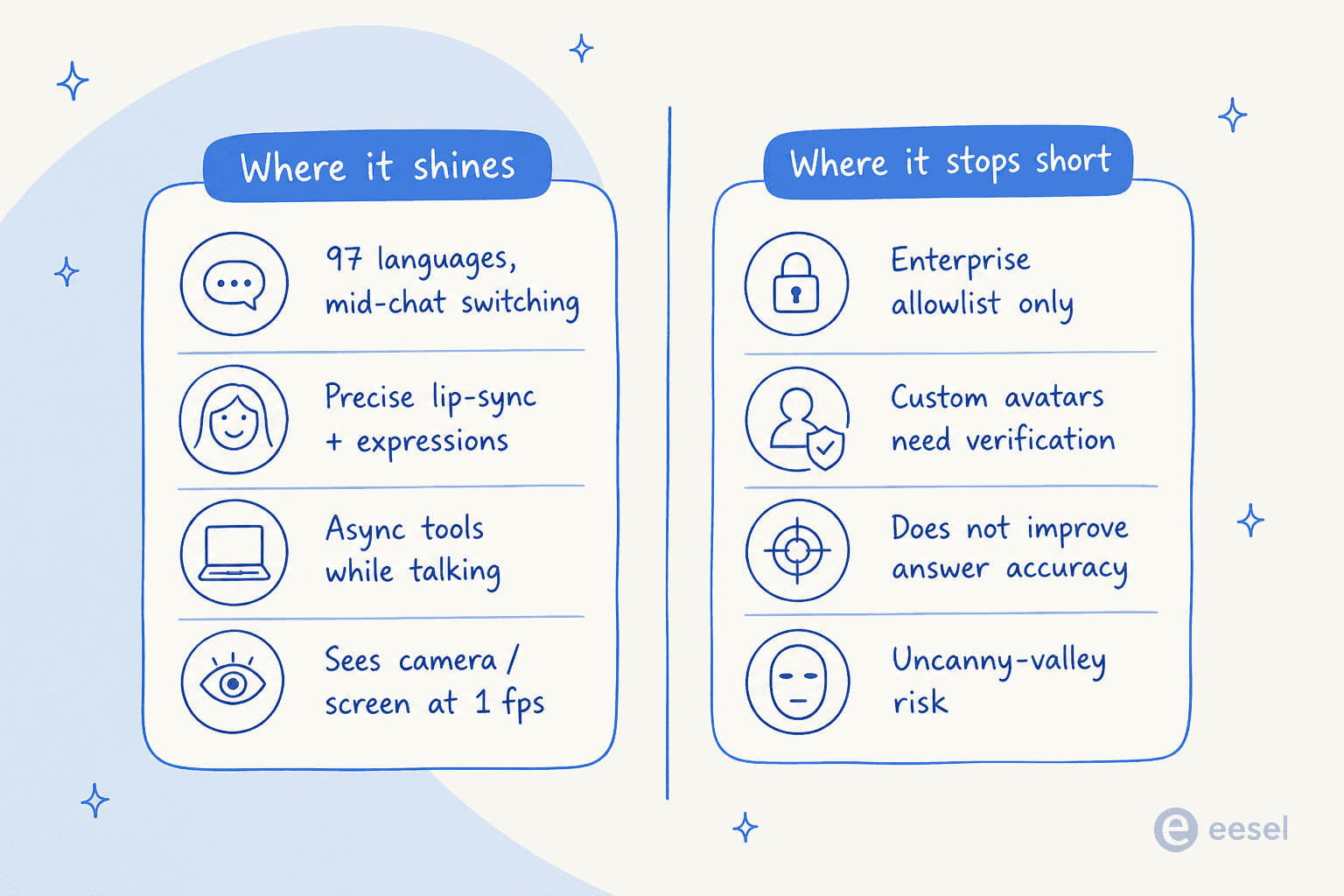
- A real-time face. Precise lip-syncing, natural facial expressions, and fluid turn-taking, rendered as 24 FPS synchronized video output. The baseline 2.5 Flash Live model had no video output at all, so this is a genuine step, not a tweak.
- It sees while it talks. The model processes audio and visual input at the same time, reading a camera feed or a screen share at one frame per second, so it can react to what you're pointing at mid-conversation.
- 97 languages with mid-chat switching. Native multilingual speech-to-speech that adapts lip-sync and expressions across languages, switching mid-conversation with no visual drift. This is the standout capability, and I'll come back to it.
- Background tool calls. Asynchronous function calling that fires tools and fetches data in the background while the dialogue keeps going, so the avatar isn't frozen mid-sentence waiting on an API.
- Preset or custom avatars. A library of curated preset avatars anyone on Gemini Enterprise can use, plus custom avatars generated from a single reference image and audio sample, preserving likeness and brand styling.
Two settings are on by default and worth knowing about: affective dialogue (it reads prosody, emotion, and pauses, then adjusts its tone) and proactive audio (it filters out ambient noise and off-topic chatter). Every audio and video output also carries an imperceptible SynthID watermark, and custom avatar creation is gated behind allowlisting plus verification, which is Google being sensibly cautious about deepfakes.
The multilingual piece is the real headline
If I had to point at one thing that makes this worth watching, it's the language range. Ninety-seven languages, detected automatically, with the lip movements and expressions re-syncing when the conversation switches language mid-sentence. For a global support org that today staffs separate voice teams per region, that's a structurally different offer.
And Gemini's underlying language quality is genuinely strong, which is the part that makes the avatar layer interesting rather than gimmicky. One developer on the Hacker News thread for the 3.8 Live launch put it better than any benchmark could:
"My first language is Afrikaans, which is a somewhat niche language and hard to find teachers/conversation buddies outside South Africa... I've been using Gemini to live chat in Afrikaans... It is phenomenal at speaking the language - like, it really shocks my family members when they hear it."

That's the capability doing real work: not a demo language, a niche one, spoken well enough to surprise native speakers. Pair that quality with a face that lip-syncs correctly across the switch, and you can see why Equal AI is running it across 9 Indian languages at a reported 1M+ live calls per day.
What it actually costs
Here's where a review earns its keep, because "per token" pricing hides the real number. The avatar video is billed through the Gemini Enterprise pricing at $1.00 per 1M tokens, and the billing footnote is the important bit: avatar video output converts at 6,192 tokens per second of speech, and it's charged only while the avatar is actively speaking, not while it sits idle listening.
Do the math and that's about $0.0062 per second, or roughly $0.37 per minute of avatar talk time. On its own, the face is one of the cheaper lines on the bill.
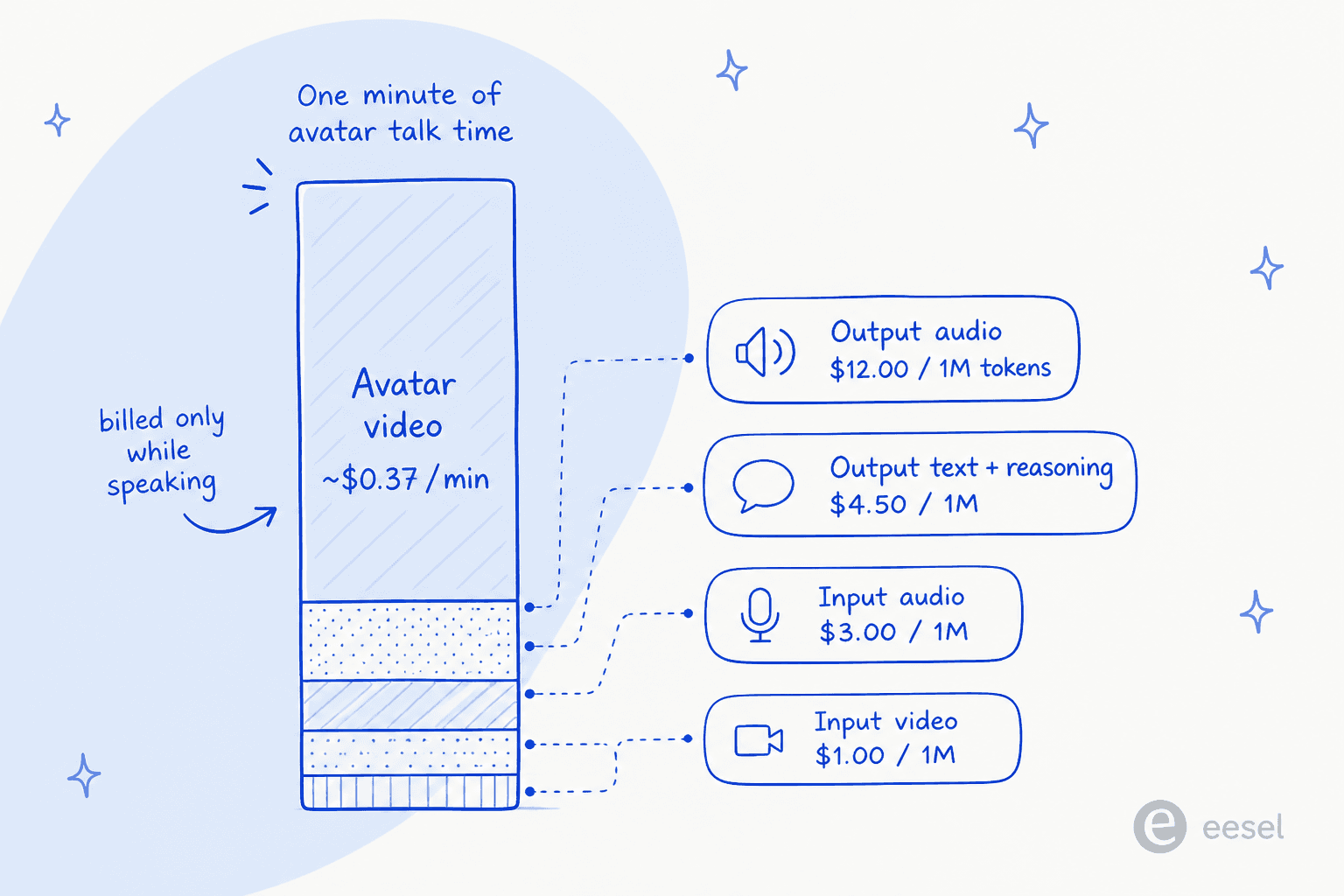
The catch is that the avatar never runs alone. It sits on top of the full Live API meter stack, and here's every rate for the non-global endpoints:
| Meter | Rate (per 1M tokens) | Notes |
|---|---|---|
| Input text | $0.75 | |
| Input video / image | $1.00 | 258 tokens per image |
| Input audio | $3.00 | 25 tokens per second |
| Output text (response + reasoning) | $4.50 | reasoning tokens billed here |
| Output audio | $12.00 | the expensive one |
| Output video (avatar) | $1.00 | 6,192 tokens/sec, billed only while speaking |
The line that dominates a spoken conversation is output audio at $12.00 per 1M, not the avatar video. So the honest framing is: turning on the avatar adds a modest, speech-time-only surcharge to a conversation that's already being billed for audio, reasoning, and inputs. There's also a structural tradeoff baked into the model card worth flagging: with Live Avatar enabled, the output token cap drops to 24K, down from 64K without it. And like any Live API session, past-turn tokens get re-processed and re-billed each new turn up to the context limit, so long conversations compound. If you're modelling this against a queue of thousands of daily interactions, build the estimate on audio and reasoning first, then add the avatar on top, not the other way round.
The catch: a face doesn't fix the answer
This is the whole review in one section. Everything above is real and impressive. None of it touches the thing that actually determines whether an AI support agent is worth deploying: is the answer correct?
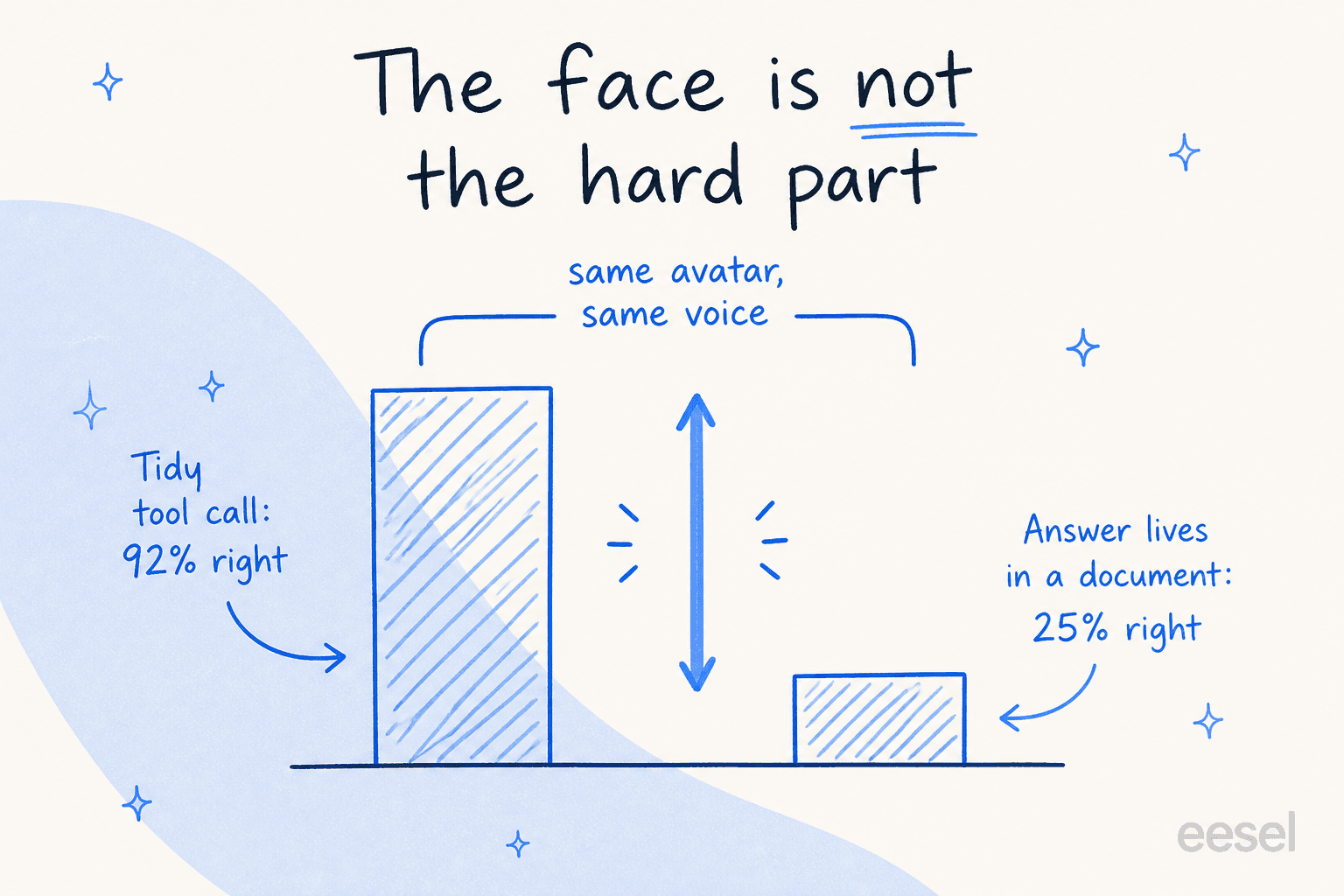
The pattern I keep seeing across agent evaluations is a cliff. On tasks that resolve to a clean, structured tool call, top models are excellent. On tasks where the answer lives in a knowledge base article, an edge-case policy, or a half-documented exception, accuracy collapses. It's the same model, the same voice, the same face on both sides of that gap, and the score on the hard side is the one that decides whether customers get a right answer or a confident wrong one.
A lifelike avatar makes the wrong answer land harder, not softer. A blunt chatbot that says "I'm not sure, let me get a human" is annoying but honest. A warm, smiling, perfectly lip-synced face delivering an incorrect refund policy in flawless Portuguese is a worse outcome, because it's more persuasive. The presentation layer and the correctness layer are separate problems, and Google shipped an outstanding presentation layer.
That's not a knock on Gemini. It's a knock on treating a face as the finish line. The uncanny-valley risk is real too: a face that's 95% convincing can read as more unsettling than an obviously-synthetic one, and for some support moments (a frustrated customer, a billing dispute) a photoreal avatar is the wrong register entirely. Whether it helps or hurts depends on the interaction, and that's a design call, not a default.
Who this is actually for
After all that, here's who I'd tell to jump in and who I'd tell to wait.
Reach for it if you're building a voice-first or kiosk experience where the face is the product: an in-store assistant, a guided onboarding walkthrough, a conversational shopping helper. Cox Automotive and Autotrader are using it for exactly that, a shopping assistant with live screen-highlighting, and Marianne Johnson, their EVP and Chief Product Officer, is on record backing the approach. If you also need broad multilingual coverage and you can get on the enterprise allowlist for custom avatars, the fit is strong.
Wait, or look elsewhere, if your actual goal is resolving more support tickets correctly across email, chat, and your helpdesk. The avatar doesn't move that number, and you'd be paying a video meter and a token-cap tradeoff for a capability your core problem doesn't need. Text and voice channels resolve the vast majority of support volume, and none of them require a rendered face. This is also worth remembering if you're weighing it against a conversational AI platform built for support rather than a model you assemble yourself.
The deeper point: Gemini 3.8 Live Avatar is infrastructure. It's a building block you construct an agent from using Google's ADK and the Live API, with all the integration, grounding, testing, and guardrail work still on you. That's the right tool if you're a team building a custom product. It's the wrong tool if you want a support agent that's already a finished worker.
Try eesel for the answer, not the face
Here's the honest positioning, because it matters for a review: eesel doesn't build avatars, and it isn't a voice product. It's an AI helpdesk teammate that works your text support channels, and it's built around the exact problem the avatar leaves untouched: getting the answer right.
Where Gemini 3.8 Live Avatar is infrastructure you assemble, eesel is the teammate you hire. It plugs into your existing helpdesk (Zendesk, Freshdesk, and others), learns from your real past tickets and knowledge sources, and, crucially, lets you simulate it on thousands of your historical tickets before it ever replies to a live customer, so you see its accuracy and resolution rate on your own data first. It also reports exactly what it did, which tickets it handled, and where a human stepped in, so the correctness layer is measurable, not a leap of faith.

If a talking face is what your product needs, Gemini's is the best I've reviewed. If a correct answer is what your support queue needs, that's a different tool, and you can try eesel on your own tickets free.
Frequently Asked Questions
What is Gemini 3.8 Live Avatar?
How much does Gemini 3.8 Live Avatar cost?
Can anyone create a custom Gemini Live Avatar?
Is Gemini 3.8 Live Avatar good for customer service?
How is Gemini Live Avatar different from an AI helpdesk agent?
What languages does Gemini 3.8 Live Avatar support?


Article by
Rama Adi Nugraha
Rama is a software engineer at eesel AI with two years of experience writing about B2B SaaS, AI tools, and customer support technology. Based in Bali, Indonesia, he brings a developer's perspective to product comparisons — cutting through marketing copy to what the integrations and APIs actually do.