

Genie 4 is Google DeepMind's new real-time world model, announced on 27 October 2026, and you can't use it yet. It generates an explorable world from a prompt, adds native sound and spoken dialogue, and lets you change the scene with text while it runs. It's a research preview for trusted testers only, with Project Genie on Google AI Ultra (from $99.99/month) and the Gemini API listed as "coming soon", no dates and no price.
The part most coverage skips: the real change is a second model in the loop. Gemini 3.8 Flash watches every frame Genie 4 renders, breaks your goal into steps and checks each one landed. Text steering itself isn't new, Genie 3 had it. And Google published fewer specs this time: no resolution, no frame rate, no parameter count, no benchmarks.
If you run a support team, Genie 4 won't touch your queue. But its "plan, act, check" loop is the right model for any AI that acts on your behalf, and it's how I'd judge an AI helpdesk agent: one that's been tested against your own past tickets before it answers a customer, which is what eesel does.
Why I dug into Genie 4
I build AI agents for a living at eesel, the kind that read a support ticket, look things up, and decide what to do next. Over the last few years of putting agents on live helpdesk queues, the lesson which stuck with me is that the model is rarely where the problem is. The problem is an agent that takes a step, never checks whether it worked, and confidently carries on. That is the reason every eesel rollout now gets simulated against a team's historical tickets before it goes to live.
So when DeepMind's announcement said, in effect, "we put Gemini in the loop to check every step", I paid more attention on that line than to the dragon footage. In this post I go through what Genie 4 is and what's actually new, then what the demos show (and where they slip), also how to get access and what Google hasn't told us yet. Everything here is coming from DeepMind's own pages and the public discussion, since nobody outside of the tester group has touched it yet.
What is Genie 4?
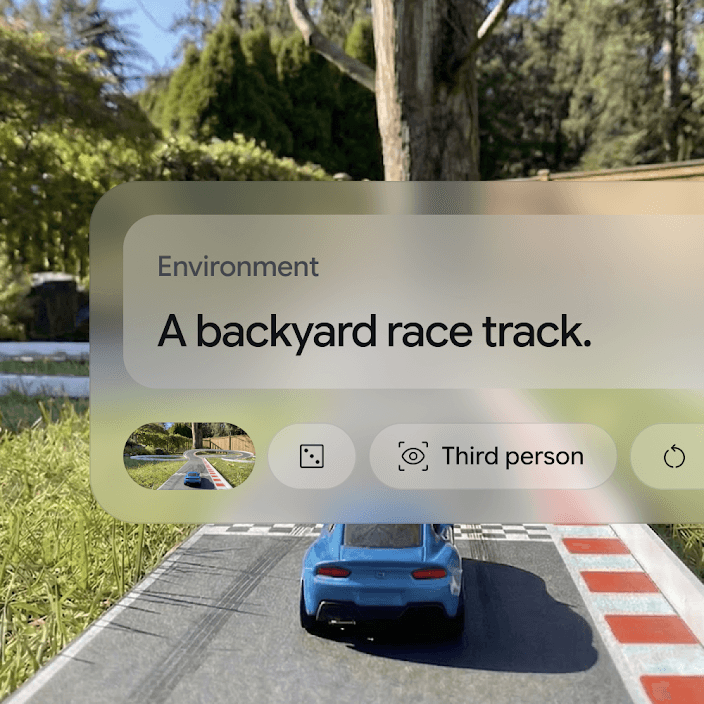
Genie 4 is a world model: an AI system that generates an interactive environment frame by frame, in real time, and reacts as you move through it. You describe a place (or give it a reference image), then you walk or fly through it, or drive, with keyboard controls while the model is inventing what's around the next corner.
DeepMind's announcement post, written by Raia Hadsell, Diego Rivas and Hang Qi, calls it "natively multimodal". Sound and music, and also dialogue, gets generated together with the world rather than added afterwards. The post also says the model is building on the Gemini family in two ways: Gemini Omni "anchors" the look and behaviour of the scene in the real world, and other Gemini models handle the reasoning that keeps a simulation coherent.

The pitch of Google for why this matters is quite broad: safe training worlds for robots and agents, plus creative uses in film, journalism, gaming and manufacturing, per the Google blog announcement. DeepMind frames world simulation as a step toward AGI. That's the long game, the short game is a preview you can join a waitlist for.
If you are new to the series, I already covered the consumer side of the previous model in my Project Genie deep dive.
What is actually new in Genie 4 compared with Genie 3?
Genie 4 adds three things Genie 3 didn't have: native audio, a Gemini planner in the loop, and Gemini Omni for realism. Real-time text steering is not one of them, despite of how some of the launch coverage reads.
Genie 3, announced in August 2025, already had what DeepMind called "promptable world events": typing a prompt to change the weather or add objects and characters mid-scene. What changed is the one who interprets that prompt. In Genie 4, "Gemini will contextually adapt your prompt to match the surrounding scene", and between your inputs Gemini "monitors and steers the scene to keep the world progressing cohesively."
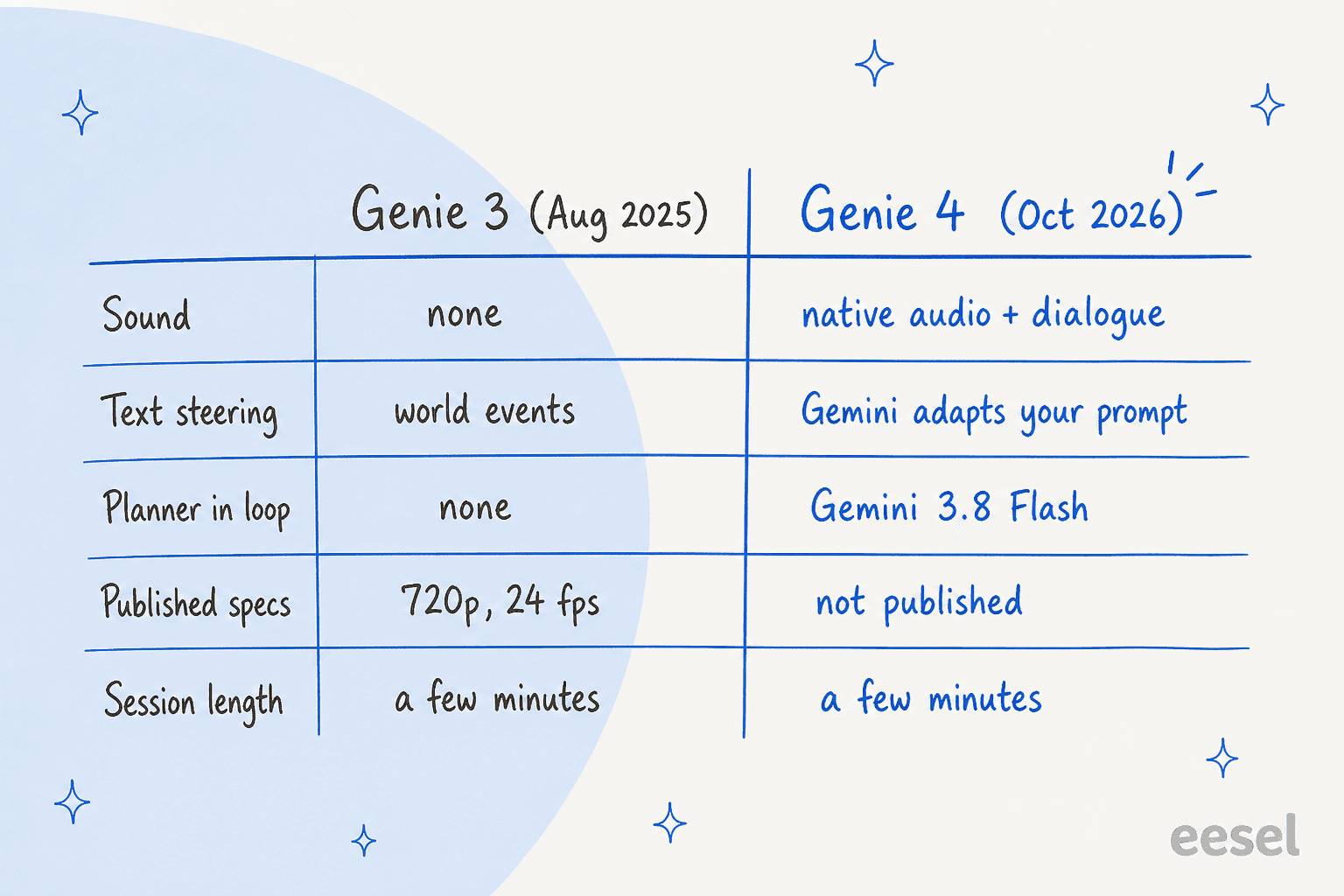
Here's the side-by-side, and I used only what DeepMind has published:
| Genie 3 (Aug 2025) | Genie 4 (Oct 2026) | |
|---|---|---|
| Native audio | No | Yes: ambient sound, music, interactive dialogue |
| Text steering mid-scene | Yes ("promptable world events") | Yes, with Gemini adapting your prompt to the scene |
| Planner in the loop | None | Gemini 3.8 Flash plans steps and checks frames |
| Realism layer | Not stated | Gemini Omni anchors real-world look and behaviour |
| Resolution / frame rate | 720p, 24 fps | Not published |
| Continuous interaction | A few minutes | A few minutes |
| Access at launch | Research preview, then Project Genie | Trusted testers, then Project Genie and Gemini API |
| Watermark | SynthID | SynthID on video and audio |
The quiet regression is in the spec sheet, not the model. Genie 3's launch post gave you 720p, 24 frames per second, and visual memory reaching "as far back as one minute ago." Genie 4's post gives you none of those numbers, and there is no comparison table either. It may well be better on all of them, I just can't check it.
On paper, the session length did not move. Both pages say the model supports "a few minutes" of continuous interaction. Some outlets reported a doubling, but that figure isn't on any DeepMind page that I could find, so I have left it out.
How does Genie 4 work with Gemini?
Genie 4 runs as two models working in a loop: Genie renders the world, and Gemini 3.8 Flash acts as a "guiding agent" that plans and checks. This is the most interesting paragraph in the whole announcement, so below is DeepMind's description put in plain terms.
As Genie 4 generates the world, Gemini keeps observing the scene and breaks a goal into a sequence of steps, then it reviews incoming frames to "track the progress and verify that each step succeeded." If the world drifts or you intervene, Gemini changes its plan on the spot. DeepMind says this is what unlocks "reliable causality, procedural behaviors, and multi-step reasoning."
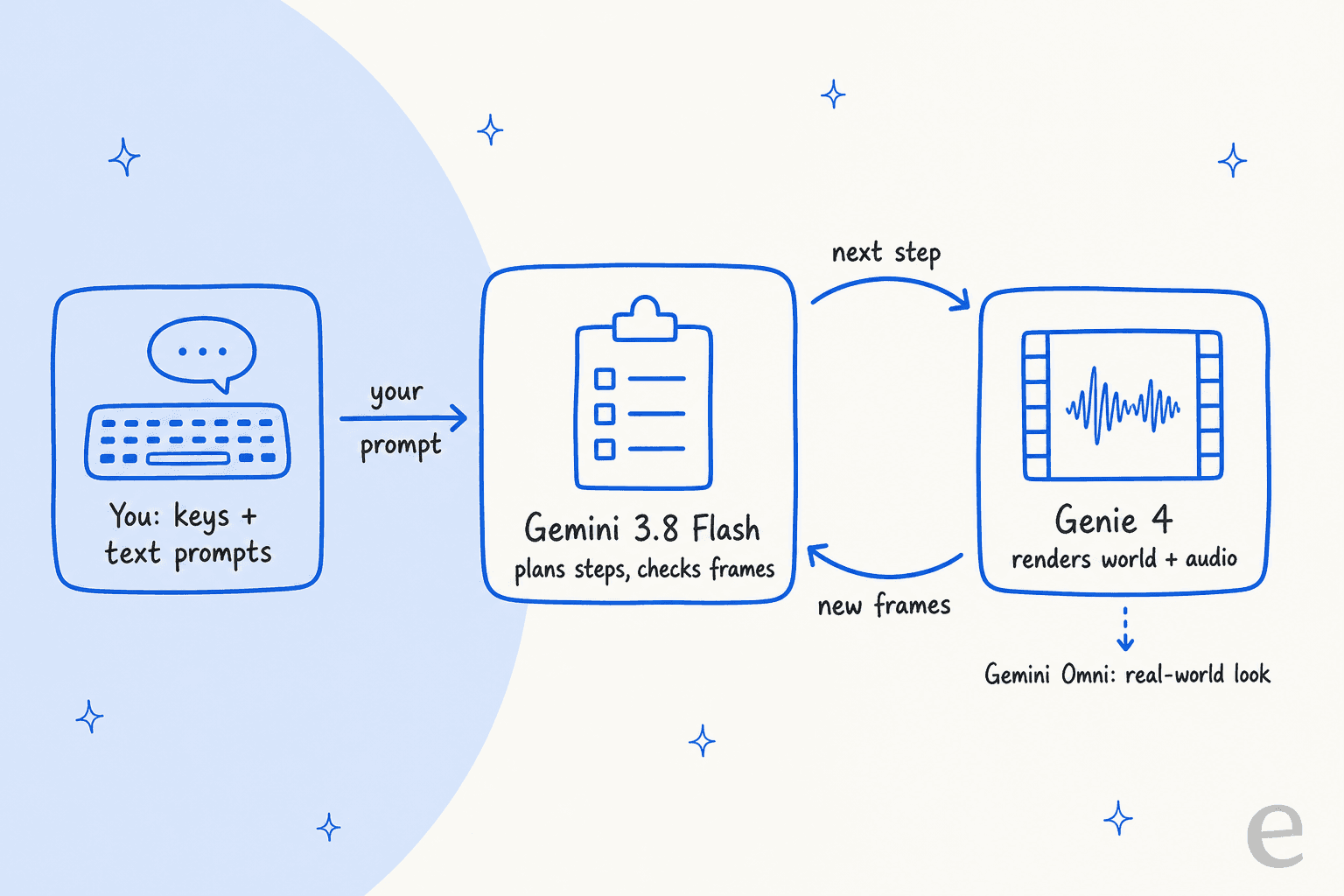
In other words, Genie on its own is a very good guesser of the next frame, and Gemini is what turns it into something that can follow a plan. The Gemini 3.8 Flash review covers the model playing the checker role here, and it's a fast, cheap model, which make sense for something that has to look at frames in real time.
DeepMind also showed a version of this with their bigger model. In a robotics demo, Gemini 4 Argon writes a detailed multi-step plan, and each step is fed to Genie 4 as a text caption while the simulation renders. The example is Apptronik's Apollo humanoid playing checkers.
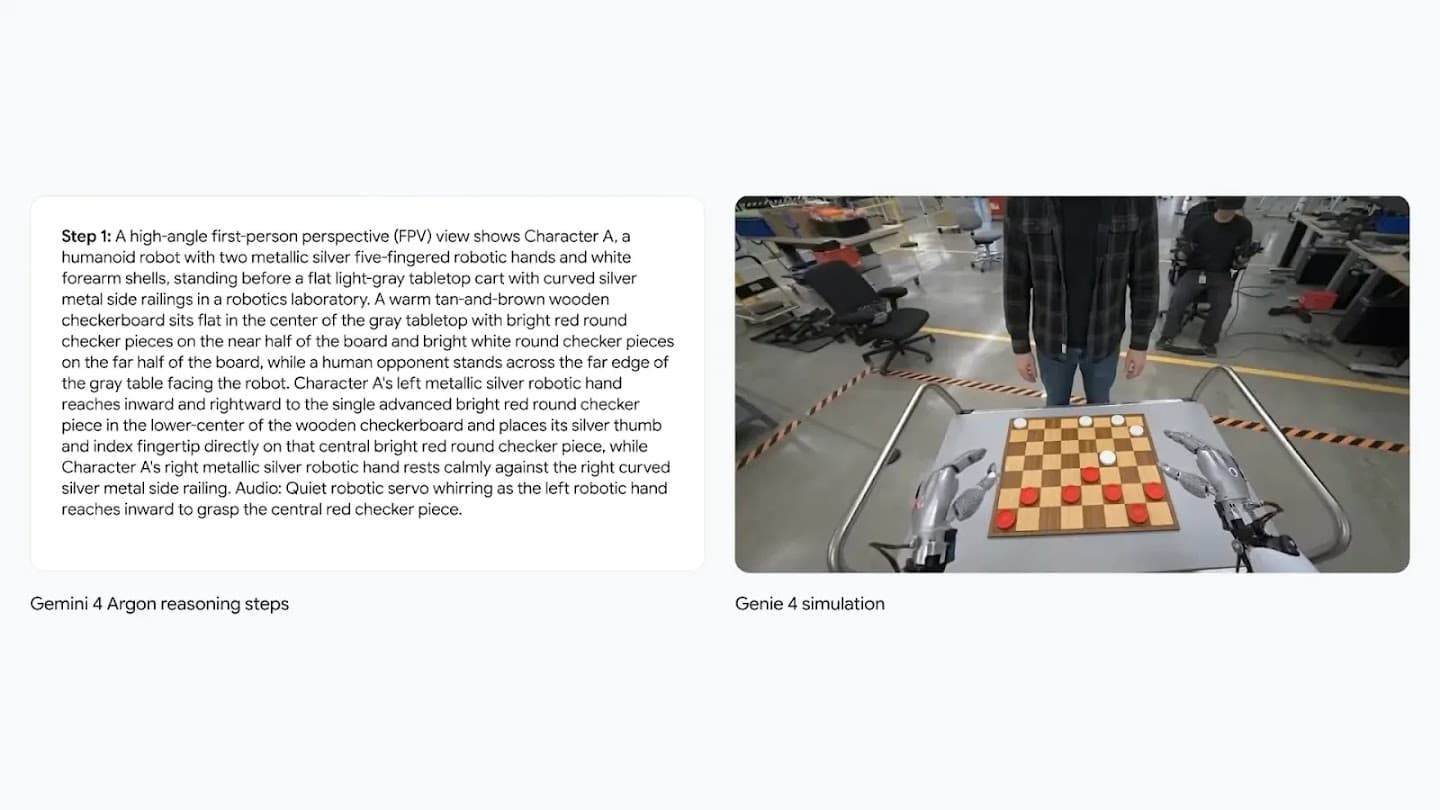
The robotics link is not a new thing for Google. It sits next to Gemini Robotics 2 and the Gemini 4 Argon for robotics work, and DeepMind's model page says Genie 4 worlds could be where agents like SIMA "learn new skills." DeepMind calls the direction "hybrid world models": language and code models handle structure and the story's timeline, and the pixel model handles what things look and sound like.
What do the Genie 4 demos actually show?
The demos show a big jump in realism, especially for people and sound, alongside the same consistency problems Genie 3 had. DeepMind is grouping them into four capabilities: real-time steering, physics and human action, sound, and complex events driven by Gemini.
DeepMind notes the clips are recordings of real-time sessions, with "standard keyboard controls for navigation and camera control, and text prompts to steer." A few of them that stood out for me:
- People. DeepMind calls human simulation "the most dramatic leap", and the crowded 1980s Japanese train platform and the backstage theatre walk does look far closer to footage than to a game engine.
- Sound. Genie 4 is DeepMind's "first real-time world model to generate audio natively." In the saxophone-on-a-lake clip, the instrument and the wind, also the water, are all coming from the model.
- Physics. Examples include aerodynamics and collisions, like a maple seed falling or a hot air balloon over Antarctica, and also a marble bust dropped onto a watermelon.
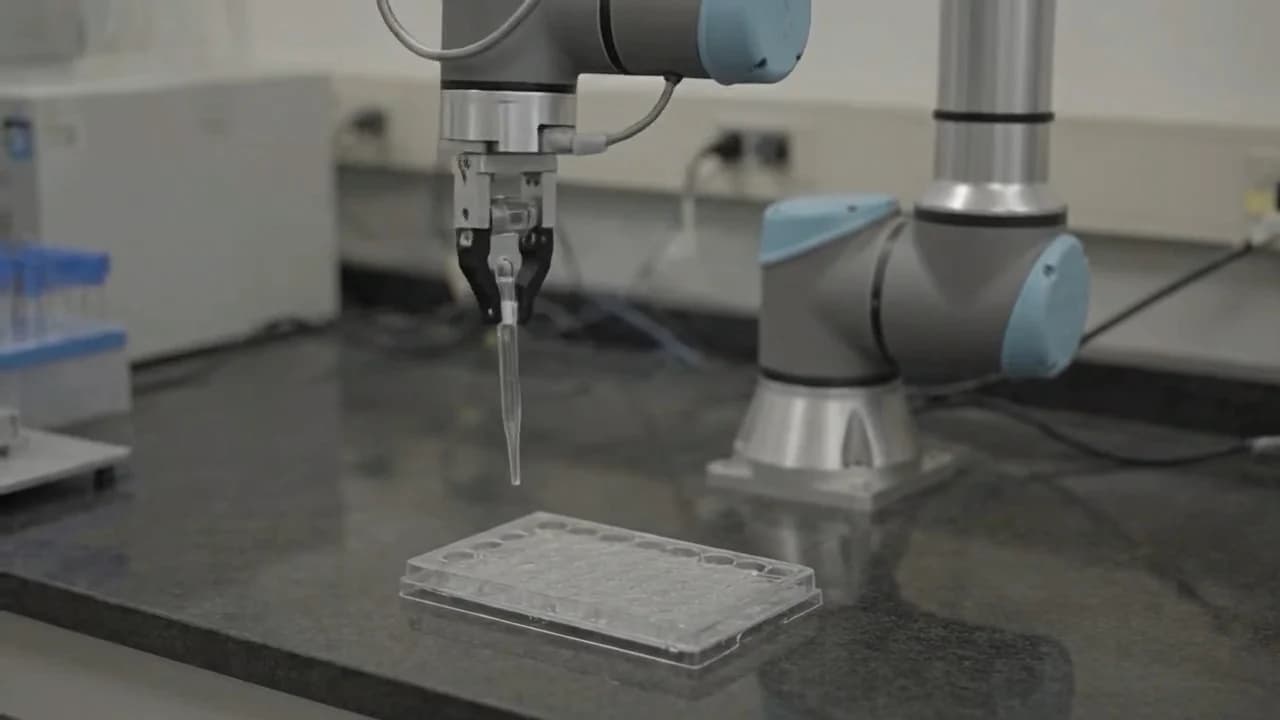
- Robot tasks. A Universal Robots UR5 arm holds a pipette and dispenses liquid into a lab plate.

The prompts are worth to read if you plan to use it. They are long and specific, and very camera-literate too: "photographed on 16mm film", "the camera is not attached to the man or the platform", "no HDR". DeepMind also published a prompt guide for Genie, which tells you the bar for good output is a director's brief, not a one-liner.
What are people saying about Genie 4?
The Hacker News thread reached 642 points and 390 comments on launch day, and the mood was impressed but sceptical. Most of sharp comments were about consistency, which is exactly the thing DeepMind lists as its top limitation.
One reader went through the dragon demo frame by frame:
"A big chunk of the right side of castle disappeared, including catapult, when camera turned back while flying on dragon. See 1:25 to 1:29. I was not expecting this to happen in a "world model"."


Another one put the pattern more general, and I think this is the most fair read of the demos:
"It's very good at maintaining consistency for things that stay in frame, but I don't know that this points to it developing a strong "world simulation" like they claim."
Other big theme was the openness. One commenter found it "very hard to get me excited about yet another proprietary model for which absolutely zero technical details are released (not even the number of parameters)", per this Hacker News comment. Not everyone agreed the robot-training story is hype, though, a reply to a sceptic pointed out that a world model is already being used to train self-driving cars:
"A proprietary version of this technology is already training Waymo's robot cars. Waymo blogged about their DeepMind-provided world model a year ago."
My read: the realism is real, but the "world" part is still mostly what's on screen. Things that leave the frame can come back different, which is fine for a film previz draft, but it matters a lot more when you want to train a robot on it.
What has Google not told us about Genie 4?
Google has published no parameter count, no benchmarks, no resolution or frame rate, no session limit beyond "a few minutes", no price and no API documentation. What it did publish is an unusually frank list of limitations, which is worth reading in full on the Genie model page.
Here is what DeepMind says Genie 4 still struggle with:
| Limitation | What DeepMind says |
|---|---|
| Coherent environments | Visual details and object permanence can drift, more so in long sessions, after several prompt edits, or when moving around |
| Other agents | Modelling interactions between users, multiple agents and shared environments is still a research problem |
| Real places | It can't simulate real-world locations with perfect accuracy |
| Text | Clear text usually only appears when it's in your world description |
| Duration | A few minutes of continuous interaction, not extended sessions |
| Audio | Real-time audio accuracy is still being improved |
On safety, Google says Genie 4 went through internal safety evaluations and has guardrails in line with its other models. It also says all video and audio it generates carries SynthID, Google's invisible watermark. That's the same approach like Genie 3, only now extended to sound.
How can you get Genie 4, and what will it cost?
Right now you can't, unless you're a trusted tester. Google says Genie 4 will come next to Google AI Ultra subscribers in Project Genie and to early access partners in the Gemini API and Google AI Studio. You can join the Genie 4 waitlist today.
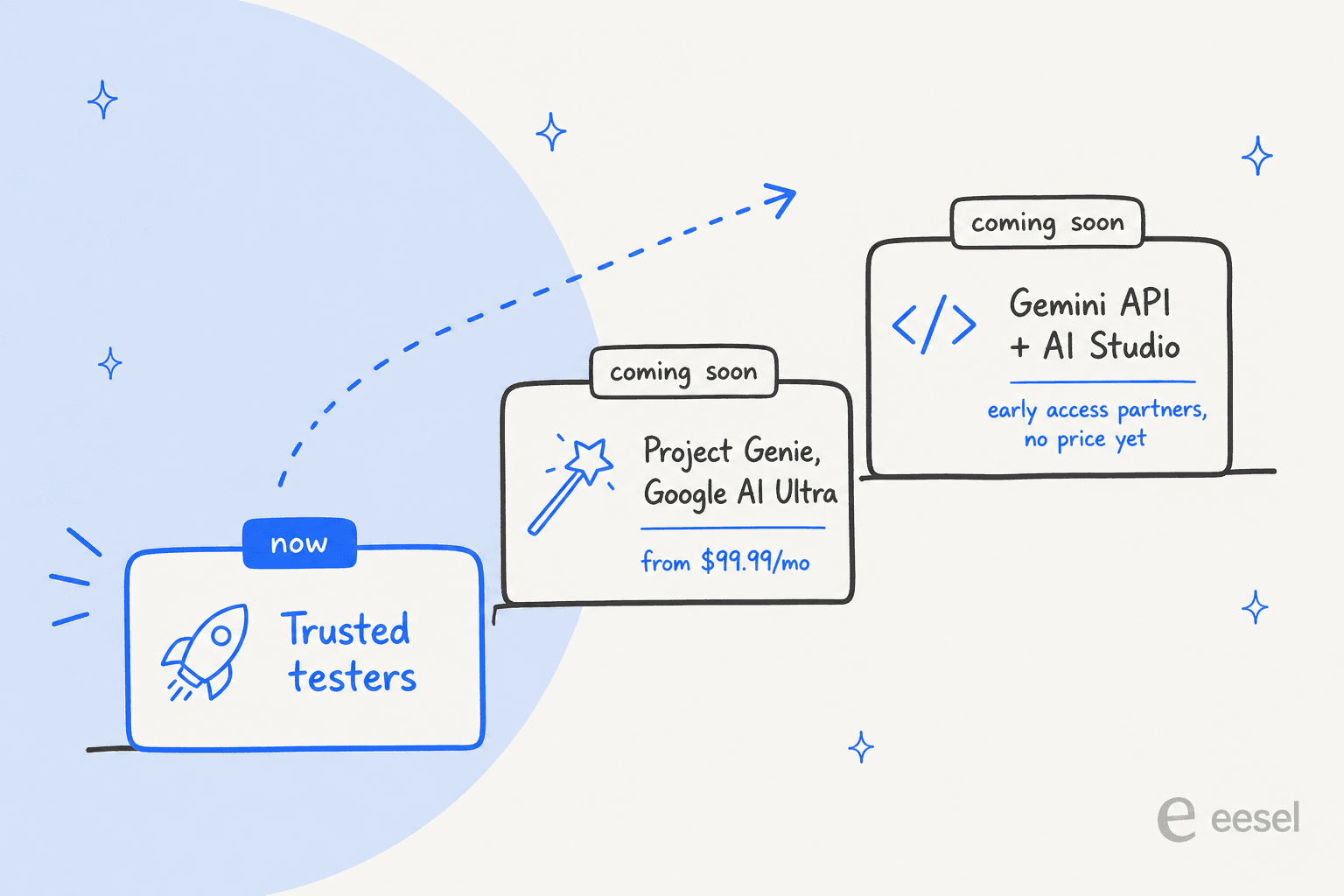
The consumer route is the most clear one. Project Genie is Google Labs' world-building app, and Google's plans page lists it as an Ultra-only feature in more than 140 countries. As of 28 October 2026, that page still describes Project Genie as running on Genie 3.
Here's what each route costs today, taken from Google's own pages:
| Route to Genie 4 | Status (28 Oct 2026) | Price |
|---|---|---|
| Trusted tester program | Live, invite only | Not published |
| Project Genie on Google AI Ultra | Coming soon | Ultra from $99.99/month (5x Pro usage) or $199.99/month (20x Pro usage), US |
| Gemini API and Google AI Studio | Coming soon, early access partners | No Genie 4 rate published |
So the realistic plan for most people is: join the waitlist, and if you already pay for Ultra, watch for Project Genie to switch models. For developers, there is nothing to build against yet. In the meantime, Google AI Studio and the Gemini API give you the rest of the Gemini family, including Gemini Omni Flash, the model behind Genie 4's realism layer.
Who is Genie 4 for?
Going from the trusted tester notes, the early uses are in creative and planning work, not in production. DeepMind lists four:
- Film previz. Directors stepping into a scene and running several "takes" live, changing camera, lighting, dialogue and action.
- Journalism and history. Turning a single archival photo into an explorable scene, or showing how a flash flood or wildfire unfolds.
- Game concepts. Going from an idea to an explorable prototype "before writing a single line of engine code."
- Simulation. Enterprise partners testing it for quick scenario generation, alongside DeepMind's own robotics work.
If you make video, compare it with tools you can use today, such as Sora 2, Runway and Kling AI. Those are making fixed clips, while Genie makes a world you move through, and that's a different job.
Does Genie 4 matter for customer support teams?
Not as a product. Genie 4 renders worlds, and nobody's going to answer a refund request with a simulated train platform. The architecture though is the most useful idea in the announcement for anyone who runs AI on a support queue.
Look at what Gemini does in the loop: break the goal into steps, act, check the result, then adjust. Genie on its own produces convincing frames that can quietly drift from the plan, and support AI fails in the same way. A model that writes a confident reply with nothing checking it against your policies or your order data is a guesser too. That's where AI hallucinations in support come from.
So the question I'd ask any vendor isn't "which model do you use?" It's "what checks the model, and can I see it work on my tickets first?" Here is a few concrete versions of that check:
- Test on history before going live. Run the agent against your past tickets and read what it would have sent. I wrote up how to test an AI agent.
- Ground every answer in a source. The agent should answer from your help center and past replies, and link what it used.
- Know when to step back. A clear handoff rule beats a clever model. See AI agent handoff best practices.
This is how SamCart set up eesel. They started by loading their help center and past Freshdesk tickets, then ran one agent on email tickets and a separate one on website chat. Both answer from about 280 help center articles, link only public articles, and the ticket agent stops replying the moment a teammate picks the ticket up. It's the same plan-act-check discipline, just applied on a queue instead of a dragon.
If you're comparing models for that job, my best support ticket model breakdown covers which ones hold up, and AI agents vs AI chatbots explains why the loop matters more than the model.
Should you care about Genie 4 yet?
Yes, if you work in film, games, simulation or robotics research: join the waitlist, because the realism and the native audio are a real step up on Genie 3, and the Gemini-in-the-loop design points at where world models are heading. No, if you were hoping to build on it this quarter: there's no API, no price and no spec sheet.
For everyone else, it's a good preview of a more broad idea. Google didn't make the world model reliable by making it bigger, it added a second model whose only job is to plan and check. That's the lesson I'd take back to whatever AI you're putting in front of customers. For the bigger picture on agents, my best AI agents roundup and AI agent examples are good next reads.
Try eesel for an AI that checks its work
Genie 4 needs Gemini to check every frame. Your support AI needs the same thing for every reply. eesel is an AI helpdesk teammate that joins your existing queue in Zendesk, Freshdesk or Gorgias and learns from your help center and past tickets. It also lets you run it against your own ticket history before it answers a single customer.
SamCart runs two of them, one per channel, from the same help center. If you'd like to see what it would have said on last month's tickets, try eesel free.