What is EmbeddingGemma 2?
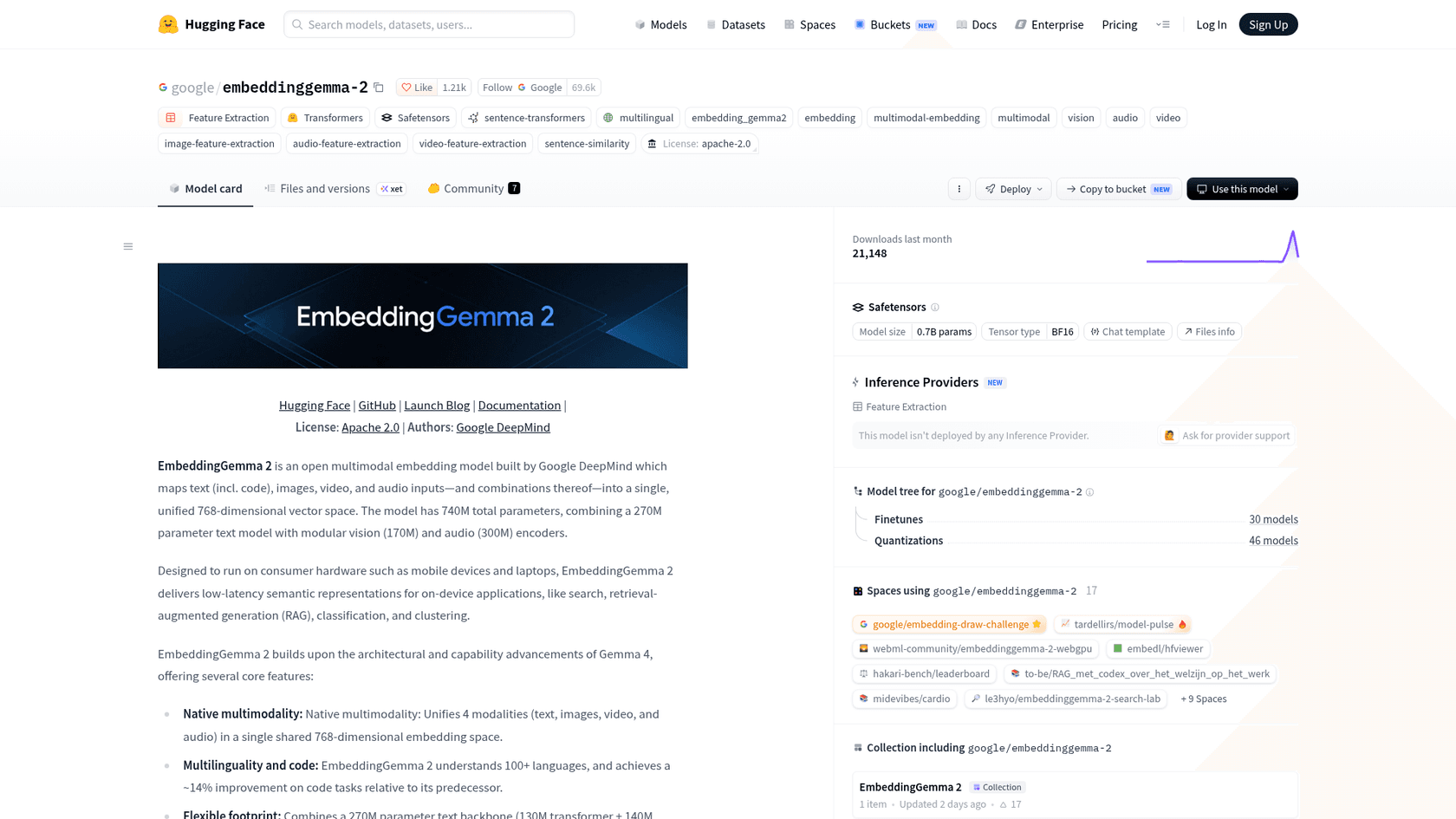
EmbeddingGemma 2 is an open embedding model from Google DeepMind, announced on October 6, 2026.
An embedding model does one job: it turns an input into a list of numbers (a vector) so that similar things end up close together. That is the engine under semantic search, clustering, and the retrieval half of RAG.
The first EmbeddingGemma, a 308M text-only model, came out in 2025 and passed 20 million downloads, per Google. Version 2 keeps the small, run-anywhere idea and turns it multimodal with four more input types. Per the model card, it maps text (including code), images, video and audio, or any mix of them, into a single 768-dimension space.
A quick note on where I'm coming from. I'm a software engineer at eesel and I build the AI agents that search a customer's help center before they answer a ticket. So when I read an embedding model launch, I'm less interested in the leaderboard and more in three questions: what does it find that the last one missed, what does it cost to run, and what breaks. I haven't put this model into production. My read comes from Google's model card and docs, the developer guide, and the first three days of hands-on reports on Hacker News.
EmbeddingGemma 2 at a glance
| Spec | EmbeddingGemma 2 | Source |
|---|---|---|
| Released | October 6, 2026 | Google blog |
| Parameters | 740M total: 270M text, 170M vision, 300M audio | Model card |
| Inputs | Text, code, images, video, audio, and interleaved mixes | Model card |
| Output | 768 dims, truncatable to 512, 256, 128 | Developer guide |
| Context window | 8,192 tokens (v1: 2,048) | Model card |
| Languages | 100+ | Gemma docs |
| RAM, quantized, Pixel 11 Pro | ~191MB text-only, ~567MB full | Google AI Edge |
| License | Apache 2.0 | Gemma docs |
| Price | Free weights; you pay for compute | n/a |
| Base | Gemma 4 decoder architecture | Gemma docs |
How does EmbeddingGemma 2 work?
Under the hood, it is one small text model with two optional add-ons bolted to the front. The core is a 270M parameter model (a 130M transformer plus a 140M embedder) adapted from the Gemma 4 decoder. A 170M vision encoder handles images, video frames and visual documents like PDFs and slides. A 300M audio encoder takes raw speech and sound. Everything flows through the same backbone and comes out as one 768-number vector.
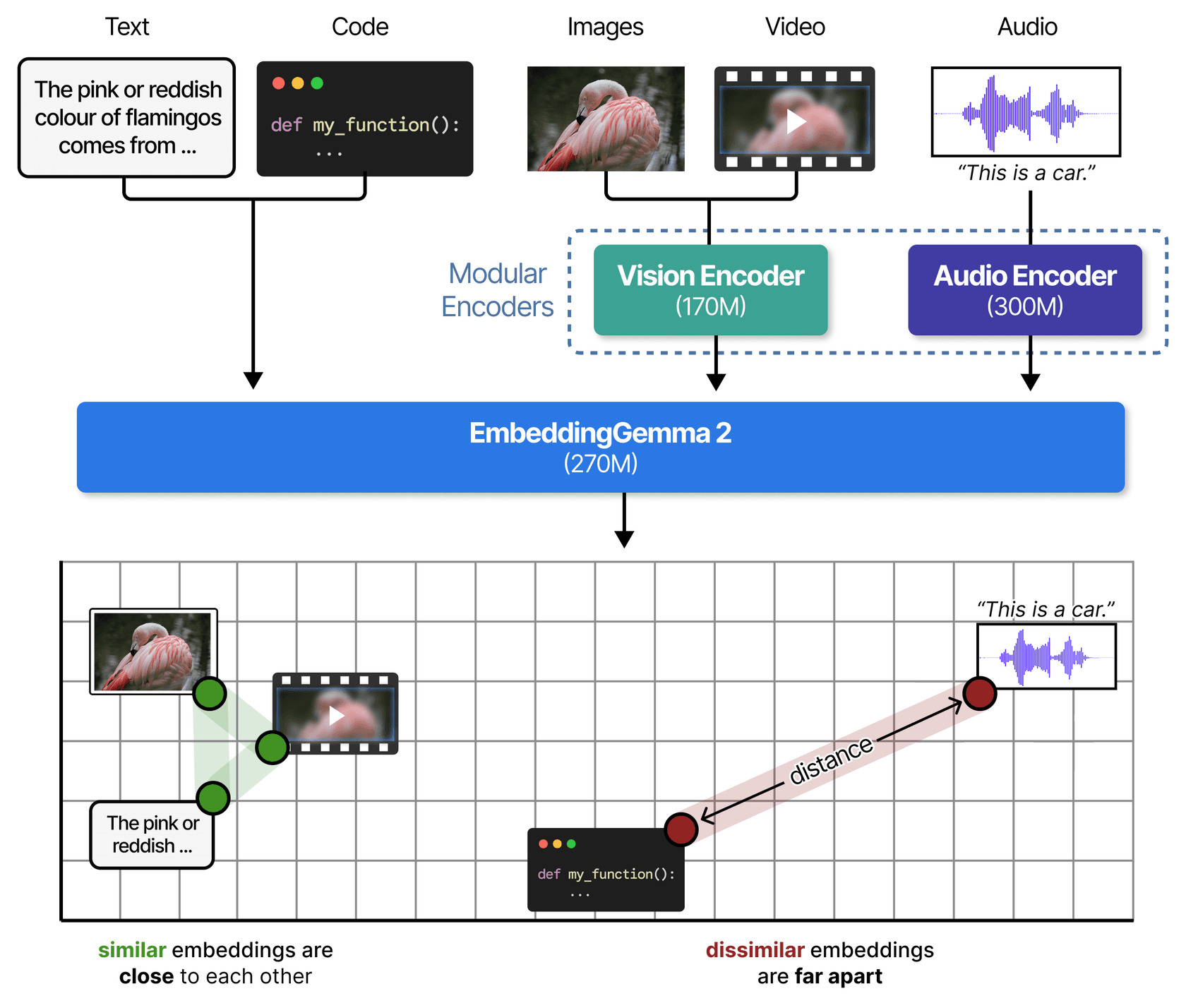
The clever part is that the add-ons are optional at load time. You set vision_config or audio_config to None and that encoder is never loaded, which saves both disk and memory. Per Google's developer guide, all four setups load from the same checkpoint and share one vector space. A query embedded with the 270M text-only setup can match documents embedded with the full model.
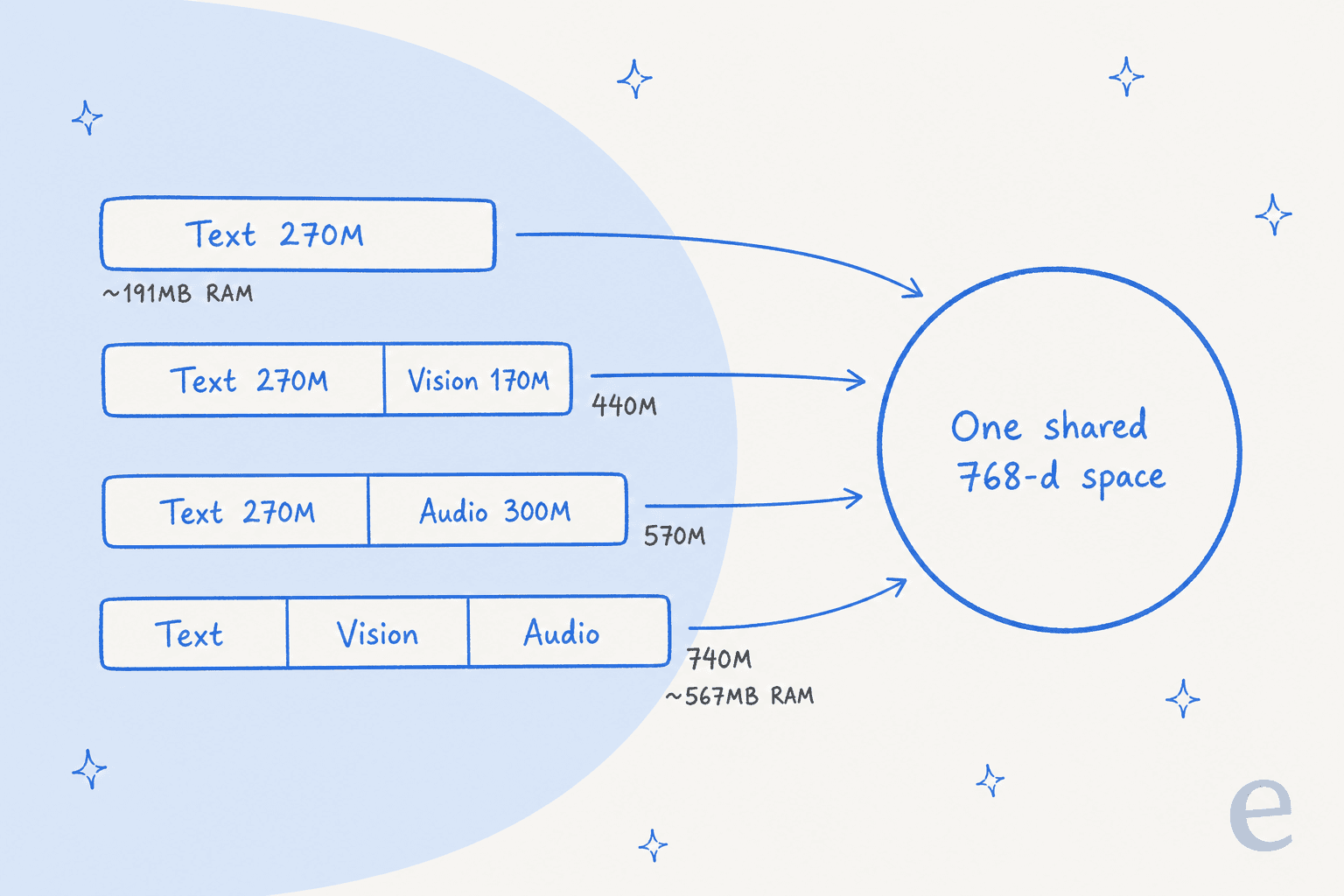
That has a practical upside I like a lot. You can start text-only and add images later without recomputing a single vector you already have, the guide says. If you have ever re-embedded a million documents because you changed models, you know how much that is worth.
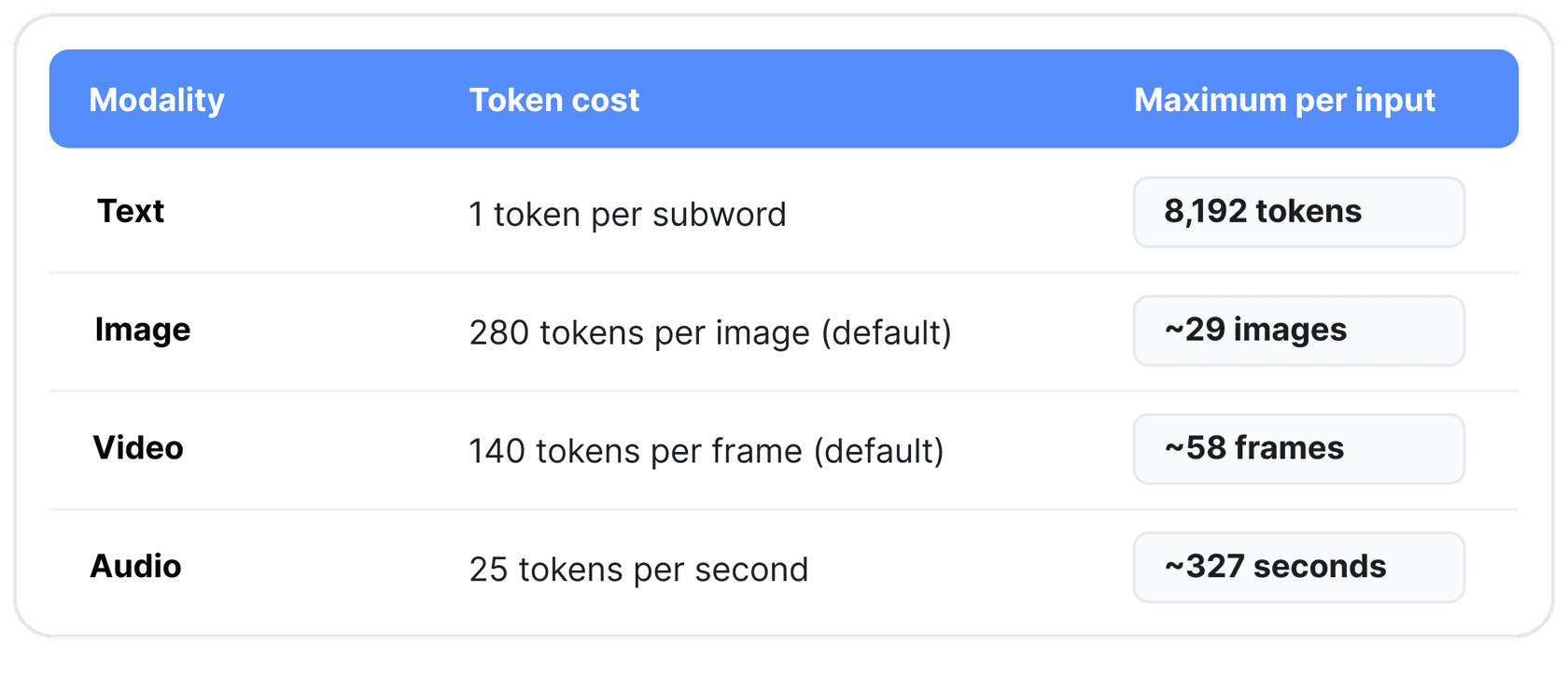
Inputs share the 8,192-token context window at fixed rates, counted in tokens. One image costs 280 tokens by default, a video frame costs 140, and a second of audio costs 25. So a single call can hold about 29 images, 58 video frames, or 327 seconds of audio, per the model card.
A few mechanics worth knowing before you write code:
- Video is sampled at 1 frame per second by default, and audio has to be 16 kHz mono.
- Image detail is a dial. The multimodal docs list five budgets per image: 70, 140, 280, 560 or 1,120 tokens. More tokens mean finer detail and slower runs.
- You can interleave. One input can mix text with
<|image|>,<|video|>and<|audio|>placeholders, like a product page with a photo and a demo clip, and it still comes out as a single vector. - Text gets a task prefix, media does not. Queries look like
task: search result | query: ...and documents liketitle: ... | text: .... Skipping the prefix still works but costs precision.
What changed from EmbeddingGemma 1?
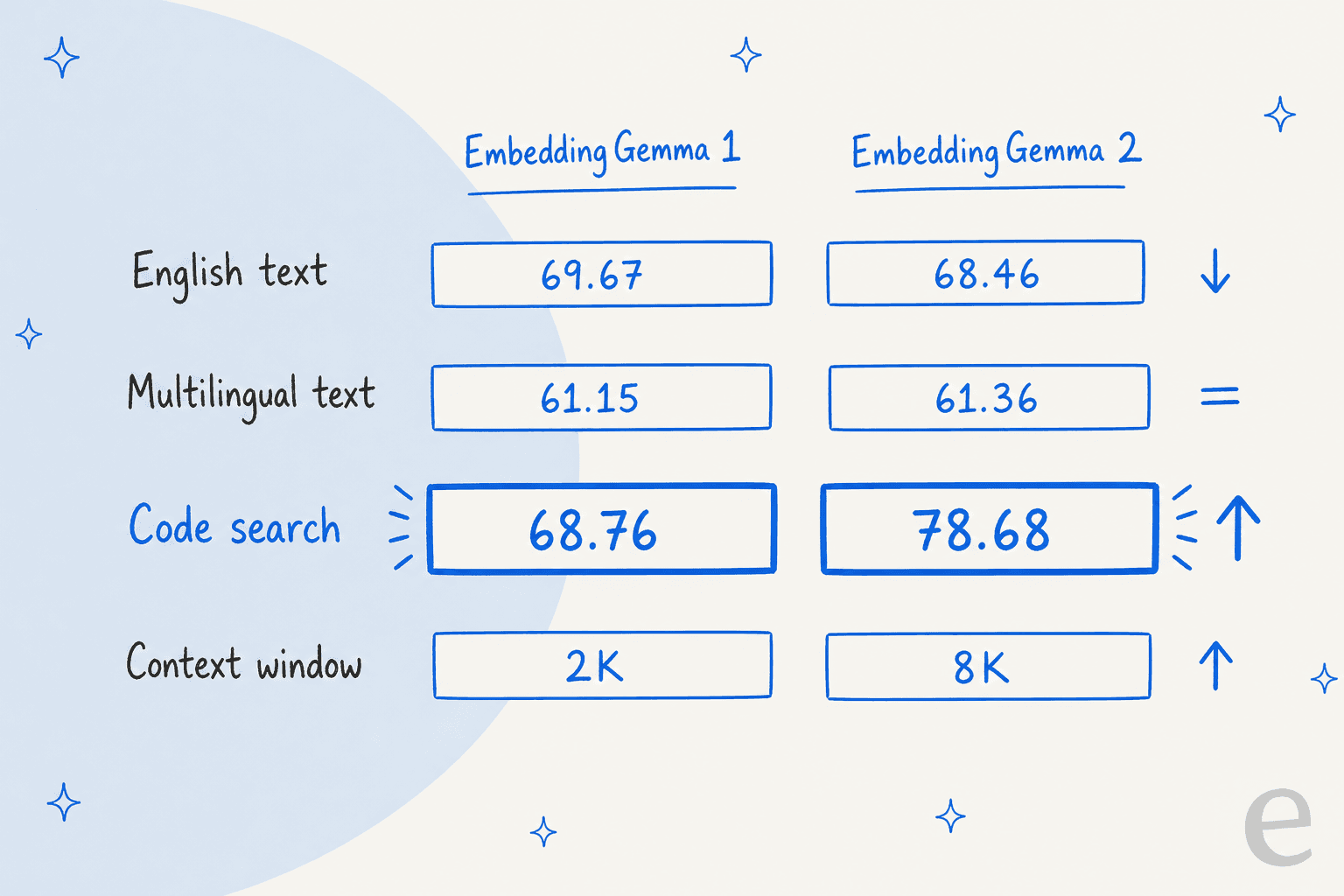
Here's where I'd slow down, because the launch framing and the numbers tell slightly different stories. Google's announcement says v2 matches v1's multilingual text performance and jumps on code. That's true. But the model card also carries MTEB English, and on that one v2 is a little behind.
| Benchmark (768 dims) | EmbeddingGemma 1 | EmbeddingGemma 2 | Change |
|---|---|---|---|
| MTEB English v2 | 69.67 | 68.46 | -1.21 |
| MTEB Multilingual v2 | 61.15 | 61.36 | +0.21 |
| MTEB Code v1 | 68.76 | 78.68 | +9.92 |
| Context window | 2,048 tokens | 8,192 tokens | 4x |
| Inputs | Text | Text, code, image, video, audio | +4 |
| License | Gemma terms, gated download | Apache 2.0 | Open |
The v1 numbers come from the EmbeddingGemma 300M card and the v2 numbers from the v2 card. Early hands-on testers landed in the same place:
"for text, benchmarks are identical to the first EmbeddingGemma. but you can use this new one and enable/disable what you don't need. can keep only text for ex."

So my read is simple. If you only search English text, v2 is a sideways move, and the upgrade is worth it only if the 4x longer context helps you (fewer, bigger chunks) or the Apache license unblocks a product. If you search code, or anything that is not text, it is a big step. For a help center that is mostly articles, my take on RAG vs fine-tuning matters more than this upgrade.
What the new benchmarks say
For the new input types there is no v1 to compare against, so the model card scores stand alone. Google calls it "best-in-class" among sub-1B multimodal embedders on MTEB Code and MAEB, the audio benchmark. That is a vendor claim with no head-to-head table on the card, so treat it as a starting point.
| Input | Benchmark | Score |
|---|---|---|
| Image | MIEB lite | 64.64 |
| Image | MMEB v2 Image (Hit@1) | 57.28 |
| Visual documents | MMEB v2 VisDoc (NDCG@5) | 67.84 |
| Video | MMEB v2 Video (Hit@1) | 50.67 |
| Audio | MSEB Retrieval (MRR@10) | 69.54 |
| Audio | MAEB | 49.39 |
Two things I'd flag from the HN thread. One commenter asked why it isn't compared to SigLIP 2, Google's own image-text model. Another got it running locally and found the zero-shot classification example from Google's own demo misfired:
"I got this running locally, and funnily enough the exact example they have for classifying "Cancel my flight and refund my credit card immediately." failed. It said the request does not involve a payment, charge, or refund, with a p(true) of 0.22 (where true means it is financial)."
That one stings a little for anyone eyeing it for ticket routing, since "refund or not" is exactly the kind of label a support team would want. One data point is not a verdict, but it is a good reason to test on your own tickets before wiring it to anything.
There's also a quieter gotcha in the multimodal docs: similarity scores are not calibrated across modalities. An unrelated painting scored 0.585 against a Golden Gate photo, higher than unrelated text prompts did. Compare rank within a search, not raw scores between images and text.
How fast and small is it, really?
This is where EmbeddingGemma 2 earns the "on-device" label. Google's AI Edge team published per-device numbers for embedding one image at a 70-token budget:
| Device | Chip | Latency per image | Images/sec |
|---|---|---|---|
| iPhone 18 Pro | CPU | 191 ms | 5.2 |
| iPhone 18 Pro | GPU | 69.8 ms | 14.3 |
| Pixel 11 Pro XL | NPU | 48.9 ms | 20.6 |
| MacBook M5 Pro | GPU | 37.3 ms | 26.9 |
| Dell XPS 16 | NPU | 49.8 ms | 20.1 |
| Raspberry Pi 5 | CPU | 1,761 ms | 0.6 |
Real-world numbers from a laptop look similar. One HN commenter shared throughput from an M3 Pro:
"Text: 78 embeddings/second on small texts - Image: 4 embeddings/second - Audio: 6 embeddings/second for 30 second chunks (which is how the encoder works) - Video: 0.2 embeddings/second per minute of video"
Note the gap. Video at 0.2 per minute of footage means an hour of video takes about five minutes to index on that laptop. Fine for a library of product demos. Too slow for live, high-volume video.
Storage is the other lever. The model uses Matryoshka training, so you can chop vectors from 768 numbers down to 512, 256 or 128 and keep most of the quality. Per the developer guide, a million 768-dim vectors take about 1.5GB in bfloat16, and about 250MB at 128 dims.
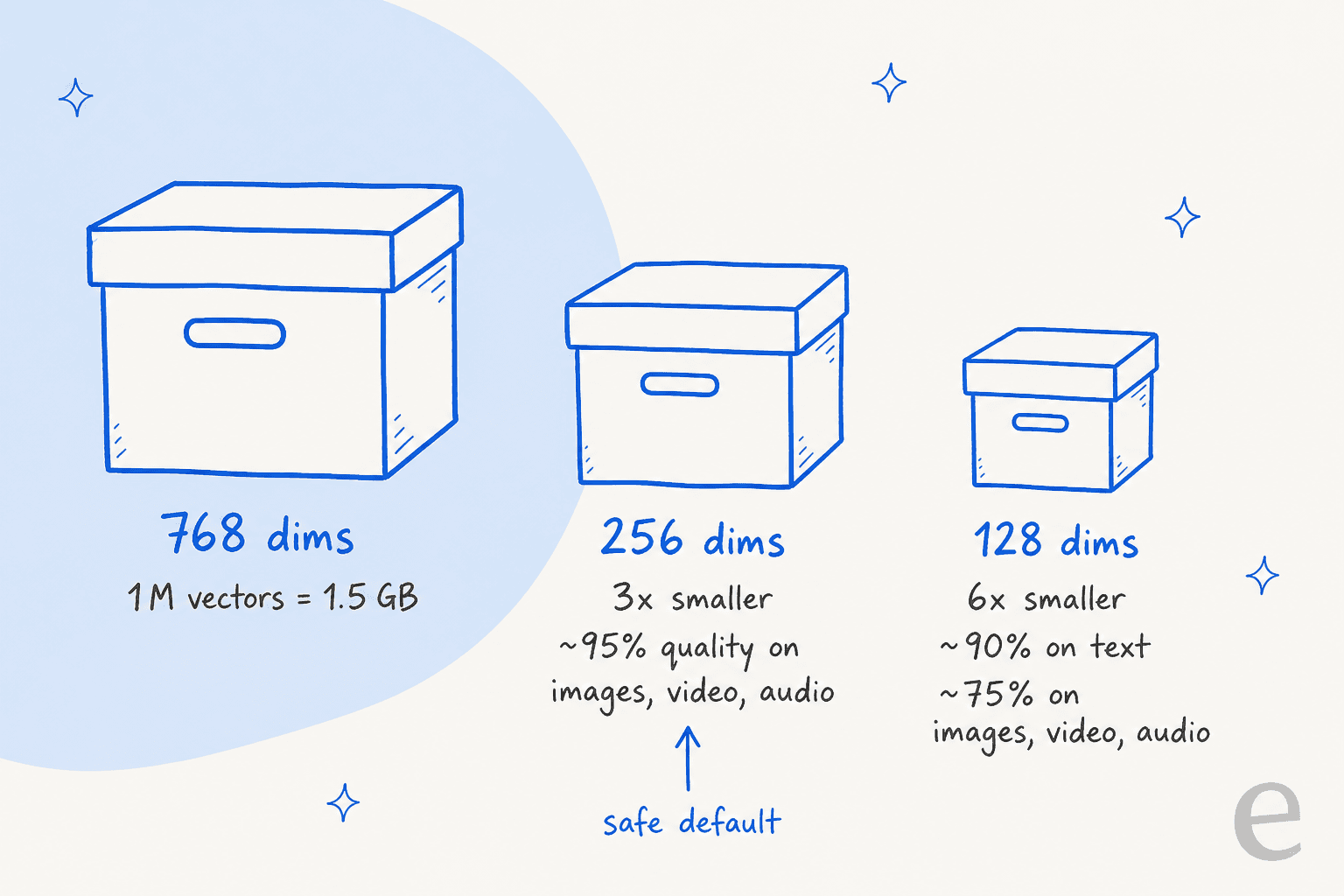
The catch is that media degrades faster than text when you squeeze. On the model card, MMEB v2 drops from 59.01 at 768 dims to 45.65 at 128. For a mixed index, I'd stop at 256 dims and only go to 128 for text-only shortlists you re-rank afterwards. Two rules from the card that will bite if you skip them: re-normalize vectors after you truncate, and never run it in float16. The activations overflow and you get NaNs or silently worse vectors with no error.
Which EmbeddingGemma 2 setup should you load?
Since you pay memory only for the encoders you load, the first decision is what your index actually contains. Pick the closest match:
What goes into your search index?
Tap an option to see the setup I'd start with.
vision_config=None, audio_config=None. Honest note: for English-only search, v1 scored slightly higher (69.67 vs 68.46). Switch if you need the 8K context or Apache 2.0, not for accuracy. 256 dims is a safe storage cut.CodeRetrieval prompt for queries and put the filename in the document title. Stay at 512 or 768 dims; code loses quality fastest when truncated.audio_config=None. Vision covers images, PDFs, slides and charts (MMEB v2 VisDoc 67.84). Raise the image budget to 560 or 1,120 tokens if your screenshots have small text. Keep 256 dims or more.vision_config=None. Resample audio to 16 kHz mono and chunk it; one call holds about 327 seconds. It matches speech content, not just "this is speech", but test on your own calls first.How do you run EmbeddingGemma 2?
Weights are on Hugging Face and Kaggle (new to the platform? start with my Hugging Face explainer), and day-one support is wide: sentence-transformers (v6.1.0 or later), Transformers, vLLM, SGLang, MLX, llama.cpp GGUF, Ollama, LM Studio, and Google's own LiteRT for phones. The shortest path, straight from the model card:
from sentence_transformers import SentenceTransformer

model = SentenceTransformer("google/embeddinggemma-2")

query_emb = model.encode("What causes the northern lights?", prompt_name="SearchQuery")
doc_emb = model.encode("The northern lights are caused by charged particles from the sun.", prompt_name="Document")
print(model.similarity(query_emb, doc_emb))
If you'd rather not touch Python, the Ollama build plugs into most local RAG stacks, and frameworks like LangChain and LlamaIndex will treat it like any other embedder.
For a worked support example, see my support RAG pipeline walkthrough or this Zendesk semantic search guide. You still need somewhere to store the vectors; Qdrant shipped a guide on launch day, and my post on RAG vs vector databases covers how to choose.
On phones, Google is bringing it to Android as a managed ML Kit service "in the coming weeks", with NPU acceleration. Until then, the AI Edge Gallery app is the easiest way to feel it. Its Instant Media Search demo searches your camera roll as you type, offline, and the Video Moments Finder jumps to timestamps for queries like "dog catching a frisbee" with no transcript.
Should you self-host it or use Gemini Embedding 2?
This is the second reframe I'd offer. EmbeddingGemma 2 is free to download, and people often assume that makes it the cheap option. For most teams, it isn't the cheaper one by much, because Google's hosted sibling is already very cheap.
Gemini Embedding 2 is Google's paid multimodal embedding API, and it is the only embedding model on the current Gemini API price list. (If you're weighing Google's API more broadly, see OpenAI API vs Gemini API.) My Gemini pricing post covers the rest; here are the embedding rates:
| Input | Standard (per 1M tokens) | Batch | Per unit (standard) |
|---|---|---|---|
| Text | $0.20 | $0.10 | n/a |
| Image | $0.45 | $0.225 | $0.00012 per image |
| Audio | $6.50 | $3.25 | $0.00016 per second |
| Video | $12.00 | $6.00 | $0.00079 per frame |
Now a worked example for a mid-size support team. Say 2,000 help articles at about 800 tokens each (1.6M tokens), 10,000 product screenshots, and 100 hours of recorded calls:
- Articles: 1.6M tokens x $0.20 = $0.32
- Screenshots: 10,000 x $0.00012 = $1.20
- Calls: 360,000 seconds x $0.00016 = $57.60
That is under $60 to embed the whole library once at standard rates, and half that in batch. A rented GPU at the $1 to $2 an hour one HN commenter quoted would run longer than that just to get going. So I'd frame the choice this way:
- Use Gemini Embedding 2 if your data can go to Google's API and you want zero setup. Just note that the free tier's data can be used to improve Google's products; the paid tier's is not.
- Use EmbeddingGemma 2 if the data cannot leave the device or your own servers (health, legal, internal support), if you need it offline, or if you embed queries on a phone and want no round trip. Those are real reasons. Cost alone usually isn't.
Simon Willison put the case for open embedders well:
"I really appreciate that EmbeddingGemma 2 is under the Apache 2.0 license. For embedding models in particular, I don't think it makes sense to use a closed, proprietary, hosted-only model."
His point is about lock-in more than price. Every vector in your index is tied to the model that made it. If a hosted model is retired, you re-embed everything. With open weights, the model you indexed with stays available as long as you keep a copy.
Why support teams should care about the multimodal part
Here's the angle I haven't seen in the launch coverage. Most writing about RAG for customer service assumes the knowledge is text. In practice, a lot of it isn't, and it comes up on eesel's sales calls constantly.
A DTC supplements brand doing about 7,000 tickets a month said their answers lived in ClickUp SOPs, untranscribed Loom videos, and old macros. A public-sector IT firm handling around 3,000 complex tickets a month runs on Freshdesk with image-heavy technical docs. Technical-product teams keep asking for AI that can read the diagrams inside their PDFs and the photos customers attach to tickets. Text-only embedders can't see any of that unless someone transcribes or captions it first, which is why so many support knowledge base tools still treat media as an attachment, not an answer.
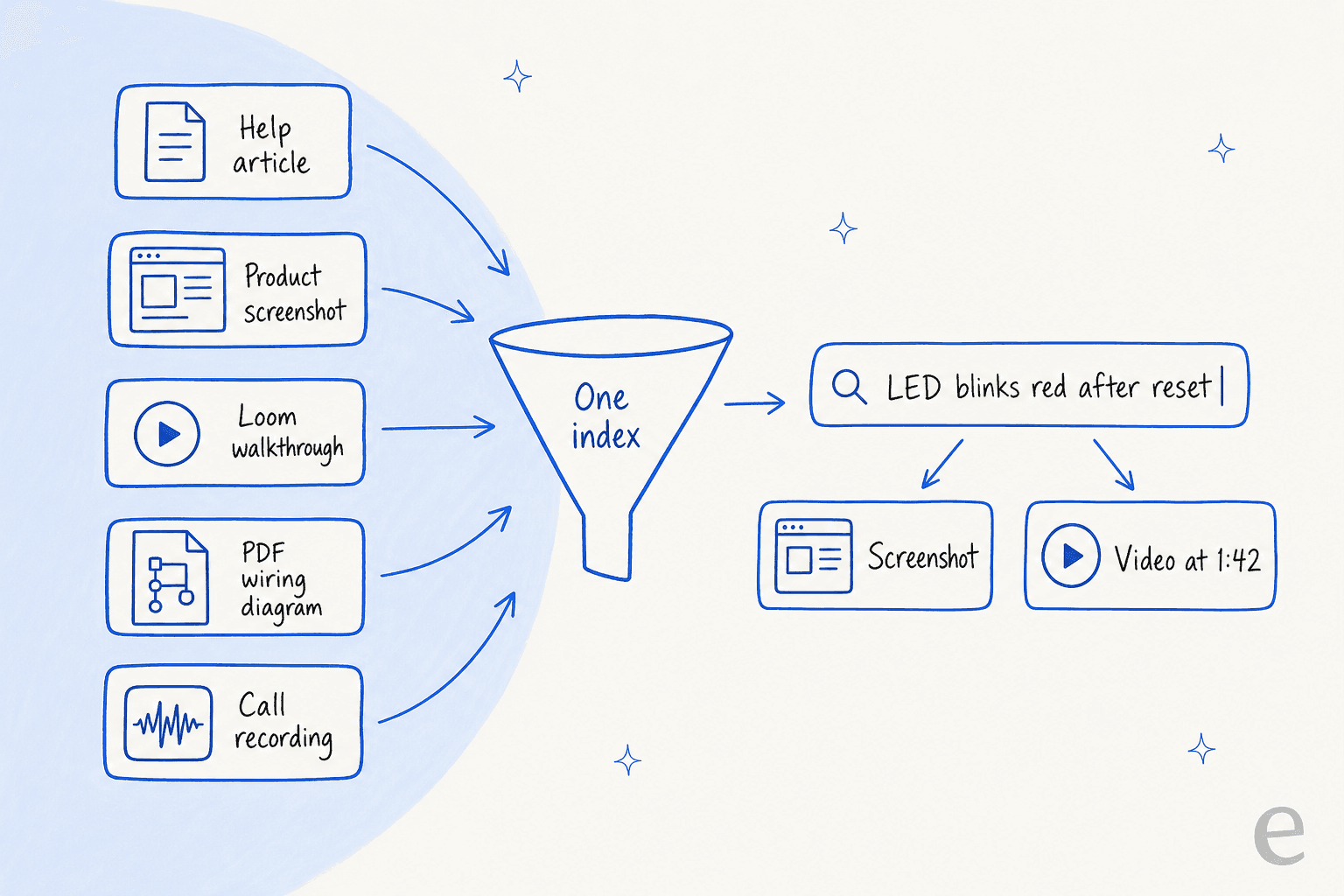
One shared space is the fix for that. Index the screenshot, the walkthrough and the article together, and a text query like "LED blinks red after reset" can pull back the right frame of the right video. One HN reader, a lawyer, described the same idea for case files:
"I could imagine using it to search a case file for "undamaged roof before Hurricane Katrina" and "damaged roof after Hurricane Katrina" and being able to locate both deposition testimony and pertinent photographs in the body of evidence."
But retrieval is only half of a support bot, and in my experience it is not the half that hurts. Earlier this year a few paying eesel customers, including a Danish solar-energy provider, saw their bot invent answers when the knowledge base search came back empty. It filled the gap from the model's training data, a textbook case of AI hallucination, and sent made-up subscription details to real customers.
A better embedder would not have fixed that. A hard "no match, hand it to a human" rule did, plus simulating the bot against past tickets before go-live. If you build on EmbeddingGemma 2, plan for that layer from day one; my guide on stopping AI hallucinations covers the patterns.
Who should use EmbeddingGemma 2?
| You are | My take |
|---|---|
| Building search over a codebase or coding-agent memory | Use it. +9.92 points on MTEB Code is the clearest win in the release. |
| Searching photos, screenshots, PDFs, audio or video | Use it, at 256 dims or more, and test on your own files. |
| Shipping on-device or offline search in an app | Use it. 191MB for text is small enough for a phone, and Android ML Kit support is coming. |
| Already on EmbeddingGemma 1 for English text only | Stay put unless you need 8K context or the Apache license. |
| Running support search in the cloud with no data limits | Gemini Embedding 2 is less work for about the same money. |
| Wanting a working support bot, not a pipeline | Skip the build. The model is one part of five. |
For comparisons with other options, my posts on Cohere Embed 5 and the OpenAI embeddings API cover the main hosted alternatives, and small language models goes deeper on the on-device trend this model belongs to.
For the wider field, my roundup of knowledge retrieval tools compares the finished products.
The verdict
EmbeddingGemma 2 is a good, honest release. The modular design is smart, the Apache license removes a real blocker, and code and multimodal search take a clear step forward in a package small enough for a phone. If your data is not just text, it is the first open model I'd try.
Just read past the headline. For English text it is level with the model it replaces, the "best-in-class" claims are Google's own, and for most cloud teams the hosted API costs about the same as running it yourself. Pick it for privacy, offline use, code, or media, and you'll be happy. Pick it expecting a big jump on plain-text search, and you won't see one.
Try eesel
If you came here because you are thinking about building a support bot on a fresh embedding model, here's the shortcut: the embedder finds passages, but someone still has to read them, write the reply, and know when to stay quiet. eesel's AI helpdesk teammate does that job inside Zendesk, Freshdesk or Gorgias. It learns from your help center, your docs in places like Confluence and Google Docs, and your past tickets, then runs a simulation over hundreds of your real tickets so you see its answers before a customer does. When search comes back empty, it hands the ticket to a person instead of guessing.
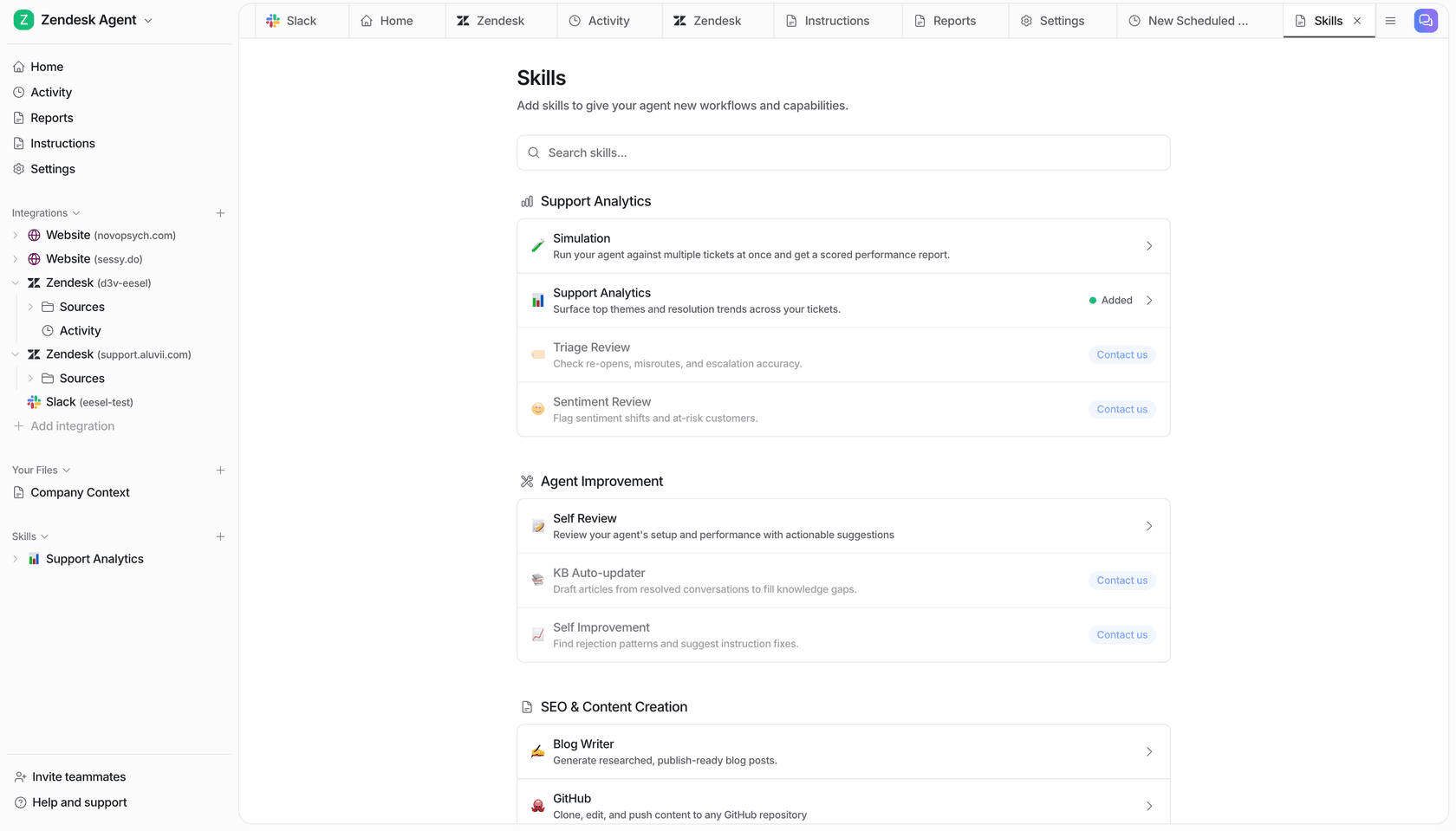
There's a free plan with 100 credits and no card, and paid plans are on the pricing page. Try eesel and replay last month's tickets before you build anything.
Frequently Asked Questions
Is EmbeddingGemma 2 free to use commercially?
Is EmbeddingGemma 2 better than EmbeddingGemma 1 for text search?
How much RAM does EmbeddingGemma 2 need?
Can I use EmbeddingGemma 2 for a support chatbot?
How does EmbeddingGemma 2 compare to Gemini Embedding 2?
Do I need to re-embed my data to switch to EmbeddingGemma 2?


Article by
Kira
Kira is a writer at eesel AI with a Computer Science background and over a year of hands-on experience evaluating AI-powered customer service tools. She focuses on breaking down how helpdesk platforms and AI agents actually work so that support teams can make better buying decisions.