


Gemini 4 Neon is Google's balanced frontier model, released on 18 November 2026 under the API ID gemini-4-neon. It costs $3 input and $15 output per million tokens, scores 61 on the Artificial Analysis index at xhigh thinking, and sits between the cheaper Gemini 4 Hydrogen and the pricier Gemini 4 Carbon, with Google claiming 32% less cost per task than Carbon at the default setting.
I would make it the default for hard coding and analysis work, and keep Hydrogen for high-volume loops. It is also slow at its top settings. eesel puts the right model behind each job in an AI helpdesk teammate, and the eesel CLI lets a coding agent test your setup on your own tickets.
What is Gemini 4 Neon?
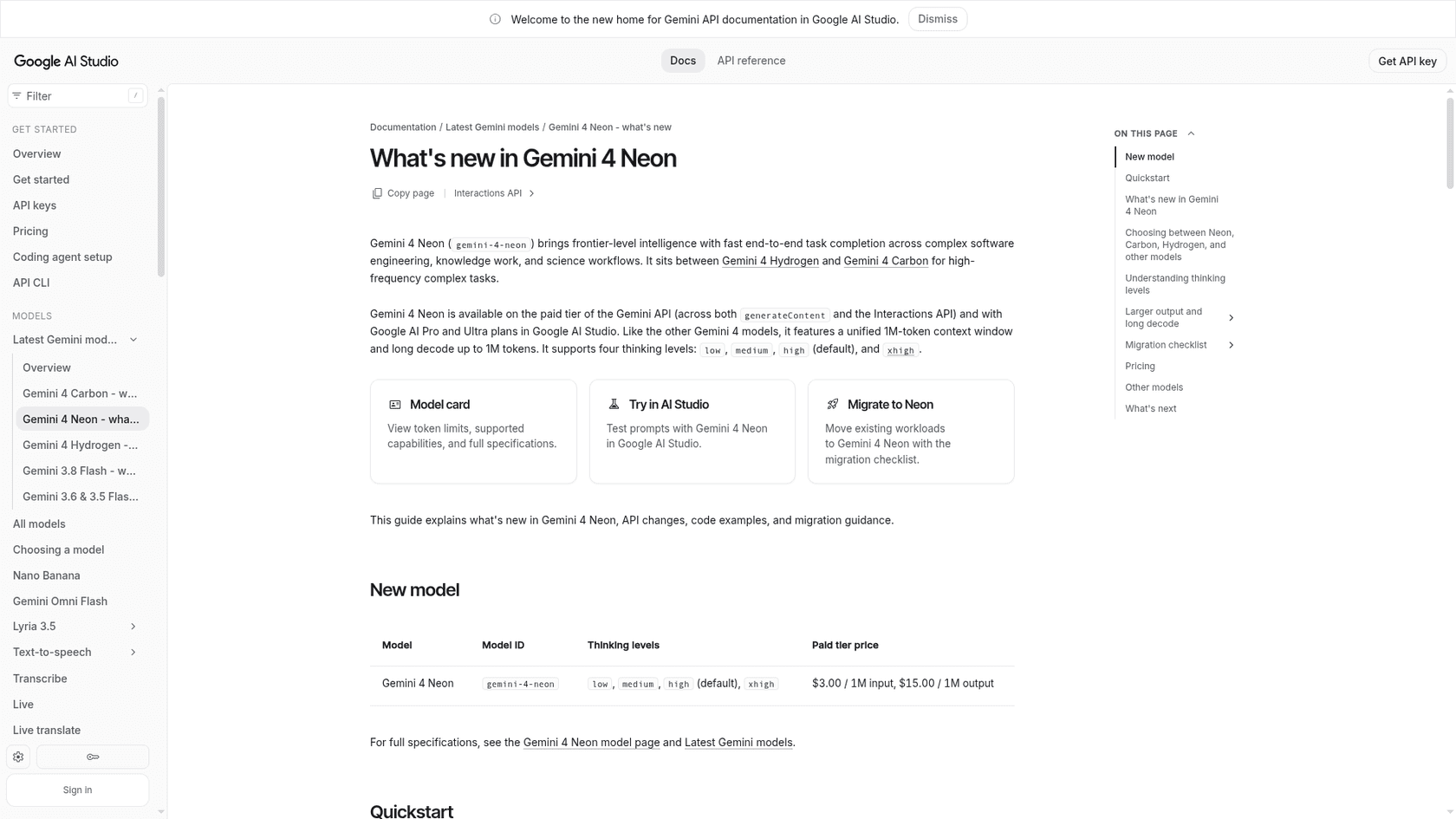
Neon is the fourth model in the Gemini 4 family, and the one Google describes as balancing "depth and efficiency." The model card says it is adapted from Carbon, so it shares Carbon's design: one 1,048,576-token window shared by input, thinking, and output, with long outputs of up to 1 million tokens.
The basics, taken from Google's own documentation:
- Model ID:
gemini-4-neon. - Released: 18 November 2026.
- Inputs and outputs: text, images, audio, video, and PDFs in; text out.
- Output length: 65,536 tokens per request by default, and up to 1,048,576 with long decode.
- Thinking levels:
low,medium,high(default), andxhigh. - Knowledge cutoff: March 2026.
Google's developer guide names Neon as the upgrade target for Gemini 3.1 Pro, and for general coding and enterprise reasoning work currently on Gemini 4 Argon. It also points complex coding or science work on Gemini 3.8 Flash at Neon.
Here is the Gemini API model page for it, which lists the ID, token limits, and what the model supports:
If you want the history, the Carbon review and Argon review cover how those two arrived.
Where does Neon sit in the Gemini 4 family?
Google ships four Gemini 4 models in about a month, and the names are not sized in any obvious order. Google's own chart is the clearest map:
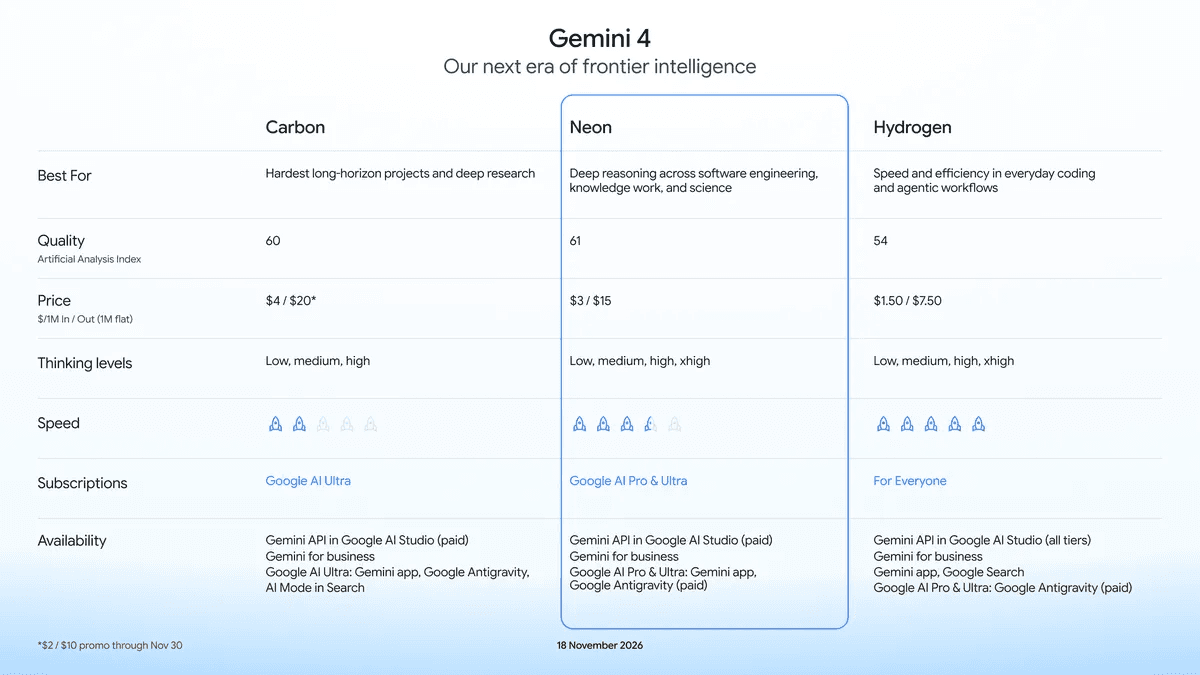
| Model | API ID | Role (per Google) | Price per 1M in/out |
|---|---|---|---|
| Gemini 4 Carbon | gemini-4-carbon | Hardest long-horizon projects | $2/$10 through 30 Nov, then $4/$20 |
| Gemini 4 Neon | gemini-4-neon | Deep reasoning across software, knowledge work, and science | $3/$15 |
| Gemini 4 Hydrogen | gemini-4-hydrogen | Fast everyday coding and agents | $1.50/$7.50 |
| Gemini 3.5 Flash-Lite | gemini-3.5-flash-lite | Classification and routing | See Google's pricing page |
Neon is the only one of the three with a pricing note worth reading twice. Until 30 November, Carbon's promo price of $2/$10 is below Neon's. From 1 December, Carbon is $4/$20 and Neon is 25% cheaper. So the price gap that makes Neon look like a bargain over Carbon only exists from December on.
The pairing idea from Hydrogen carries over. Google's guide says to plan and verify with Neon, then pass previous_interaction_id to Hydrogen subagents on the Interactions API for lower-latency worker execution. In Antigravity, Neon acts as the Orchestrator directing parallel Hydrogen subagents.
What does Neon do well?
Google's headline claim is that Neon ranks #3 overall on the Artificial Analysis index with a score of 61 at xhigh, behind larger and slower models. Artificial Analysis lists the same 61, and 60, 55, and 44 for high, medium, and low. Here is Google's own benchmark table against Claude Opus 5.5 and GPT-6.2 Sol. These are vendor-reported numbers, so read them as Google's best case:
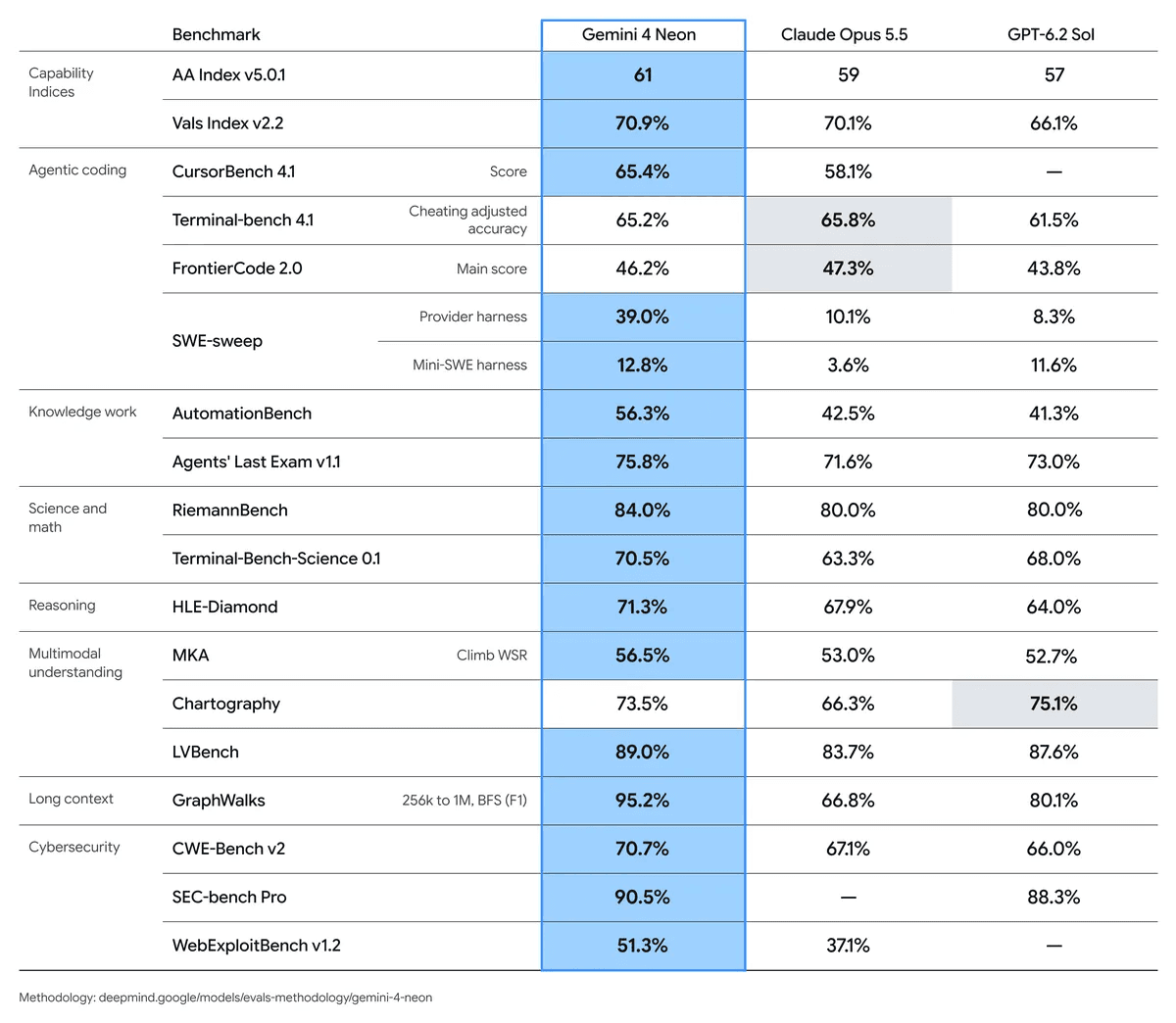
If you read the columns instead of the bold cells, the pattern is plain:
- Wins: knowledge-work agents (AutomationBench 56.3% against 42.5% and 41.3%), long context (GraphWalks 95.2% from 256k to 1M tokens, against 66.8% and 80.1%), science and math (RiemannBench 84.0%, Terminal-Bench-Science 70.5%), and repository fixes (SWE-sweep 39.0% in Antigravity's harness).
- Losses: Opus 5.5 is slightly ahead on Terminal-Bench 4.1 (65.8% against 65.2%) and FrontierCode 2.0 (47.3% against 46.2%), and Sol leads on Chartography (75.1% against 73.5%).
- Caveat on SWE-sweep: the 39.0% uses the Antigravity harness. On the neutral mini-SWE harness Neon scores 12.8%, which still leads Opus (3.6%) but sits just above Sol (11.6%).
Google also says Neon is #2 on the Vals Index (70.9%) and on Arena's new Agent Arena Index (1336), and ranks #1 on the Artificial Analysis Coding Agent Index (58.6). Those come from third-party leaderboards but Google picked which to show, so I treat them as claims to check, not verdicts.
Early customers named by Google point toward efficiency. Glean says Neon matched or exceeded Carbon on overall quality at three times the speed and 60% of the cost. The founder of Thoughtful Lab says it found subtle vulnerabilities other models missed "while using a fraction of the tokens." Those are partner-selected results, so I weight them lightly.
What do the four thinking levels cost?
The thinking level is the main dial. Higher levels reason longer, which costs tokens and time. Artificial Analysis ran all four on its v5.0.1 index:
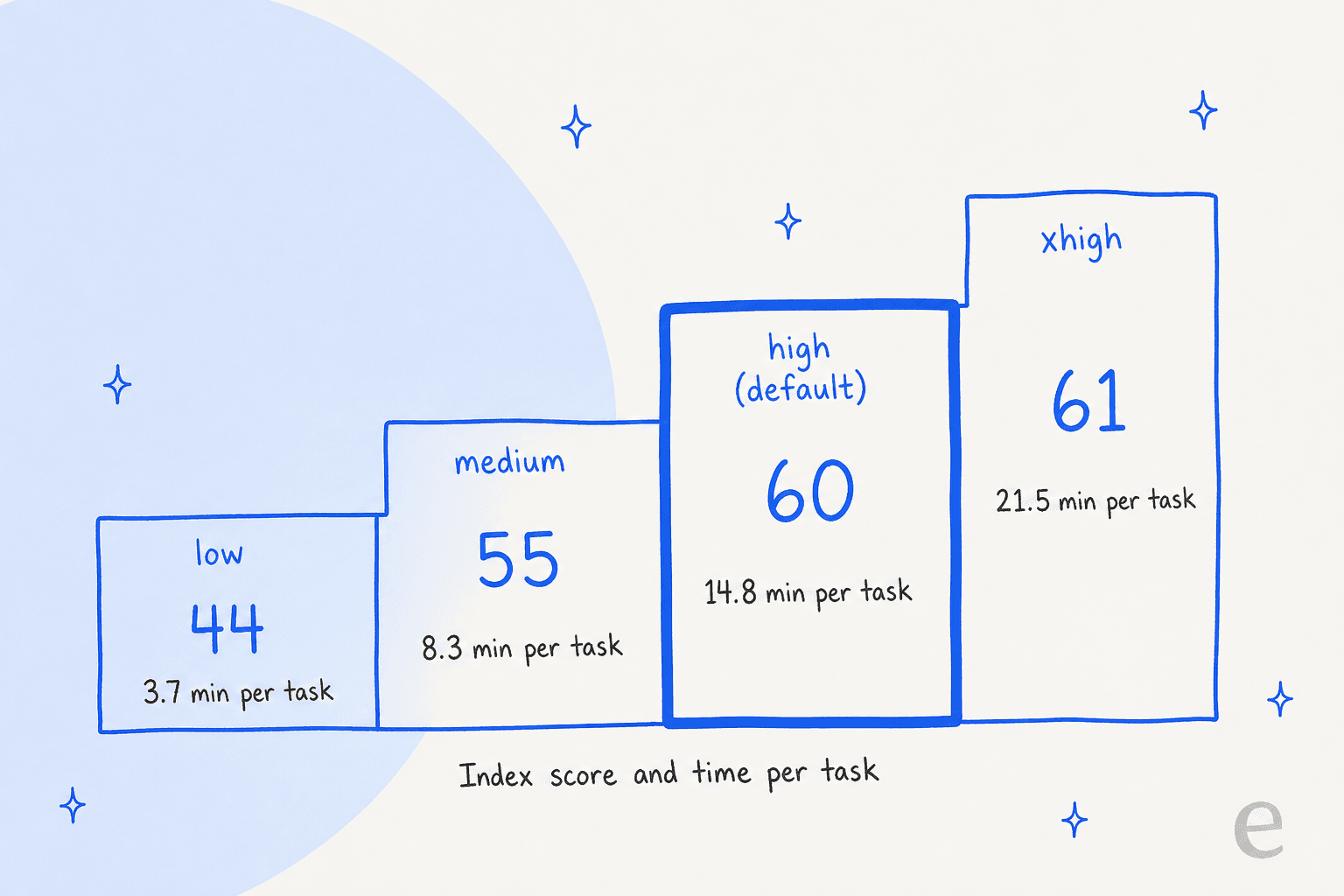
Three things stand out:
- Medium to high is the last big jump: 55 to 60 for about 6.5 more minutes a task. That is the step Google made the default.
- High to xhigh is one point for 45% more time: 14.8 to 21.5 minutes. Artificial Analysis says xhigh produced 283 million output tokens across the index against 123 million at high, and output tokens are the $15 ones.
- First-token wait grows too. Artificial Analysis measured 13.9 seconds to the first answer token at low, 40.6 at high, and 56.5 at xhigh.
That last number matters for chat. One Hacker News commenter called Neon's latency "by far the best for the level of quality," while Artificial Analysis rates its xhigh run among the slowest in its price tier. Both can be true: it is fast for its intelligence level and still slow for a person waiting on a screen. Google's guide agrees, suggesting MEDIUM for latency-sensitive tool turns.
Google's own chart shows cost against score:
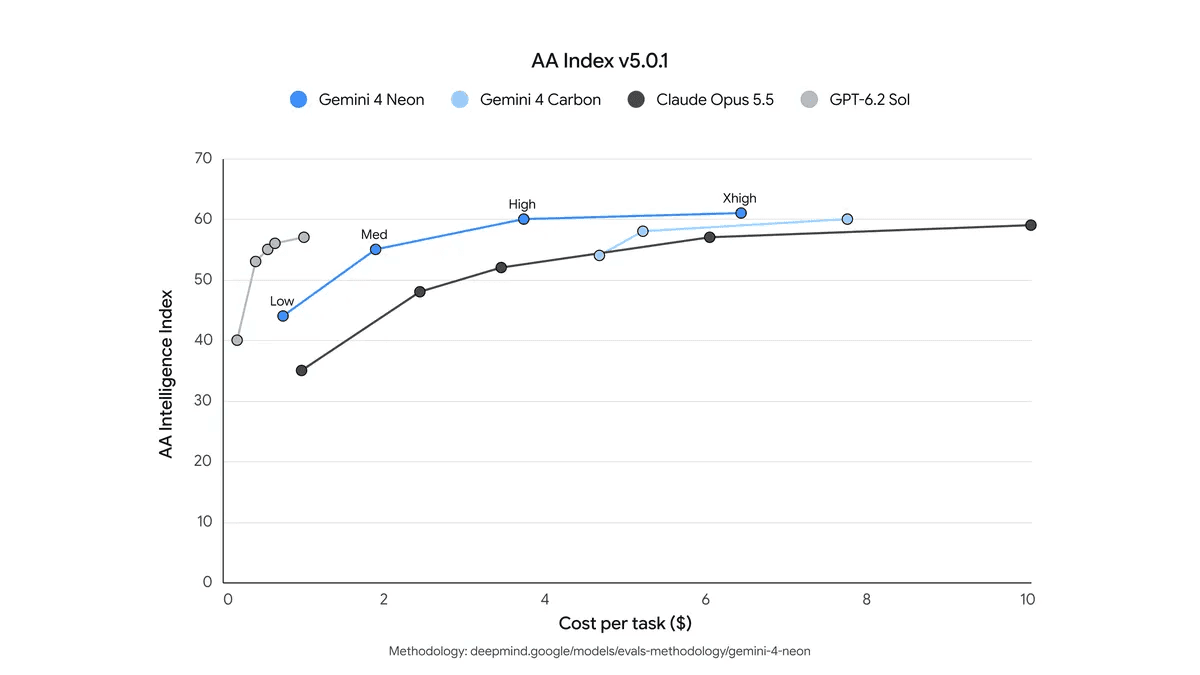
Reading the chart, Neon at high lands near $3.70 a task, Carbon's points sit between about $4.70 and $7.70, and Opus 5.5 reaches about $10 at its top setting. Sol's line sits far to the left, at roughly $1 or less per task for scores from 40 to 57. That is my reading of Google's picture, so treat the dollar figures as approximate. The shape is the point: Neon is cheaper per unit of score than Carbon and Opus, but not cheaper than Sol, a gap one Hacker News reader spotted at once:
"That looks to me like OpenAI equals or beats everything Google offers at half the price."

Plug in your own volume to see what a month costs at list price. Thinking tokens bill as output, so push the output slider up if you run higher levels:
How do I access and call Gemini 4 Neon?
Neon is not free anywhere, and access depends on where you work:
| Where | Who gets it |
|---|---|
| Gemini API and Google AI Studio | Paid tier only |
| Android Studio | Via the Gemini API |
| Gemini for business | Via the API or the model dropdown |
| Gemini app | Google AI Pro and Ultra subscribers |
| Google Antigravity | Paid Google AI Pro and Ultra subscribers, with its own orchestrator |
| Fairwind Program (Neon for cyber) | Eligible vetted defenders, rolling out over days |
Cloud buyers get a separate path: the Google Cloud guide lists gemini-4-neon on the global endpoint and in the us and eu multi-regions, and says it is available to verified enterprise customers in select regions. Carbon needs the pricier Google AI Ultra plan, so Neon on Pro is the cheaper way into the Gemini 4 top tier inside the app.
A minimal call with Google's Python SDK looks like this:
from google import genai

client = genai.Client()

interaction = client.interactions.create(
    model="gemini-4-neon",
    input="Find the race condition in this retry queue.",
    generation_config={"thinking_level": "high"},
)
print(interaction.output_text)
If you are migrating from Argon or Gemini 3.8 Flash, Google's checklist has changes that will break old code. The ones I would check first:
- Thinking default is
high(it wasmedium), andminimalorthinking_budgetreturns an HTTP 400 error. - Remove
temperature,top_p, andtop_k. The server ignores custom values. - No explicit caching. Remove
cached_content. Implicit caching runs automatically from 4,096 tokens, with a 95% discount on cache hits. - Parallel tool calls are strict. Only the first
functionCallpart in a parallel turn carriesthought_signature; duplicating it returns a 400. - Leave room for thinking. Reasoning tokens count toward
max_output_tokens, so an old low cap can cut answers short.
If your stack already talks to coding agents over the Model Context Protocol, my guide to the AI agent MCP server covers that side, and agentic coding CLIs covers the terminal tools that call models like this.
What does Gemini 4 Neon cost?
Google's pricing page lists one flat rate across the whole window:
| Item | Paid tier, per 1M tokens |
|---|---|
| Input | $3.00 |
| Output, including thinking tokens | $15.00 |
| Cached input (implicit caching only) | $0.15 |
| Grounding with Google Search | 5,000 free requests a month shared across Gemini 3 and newer models, then $14 per 1,000 |
Side by side with its siblings, the price ladder looks like this:
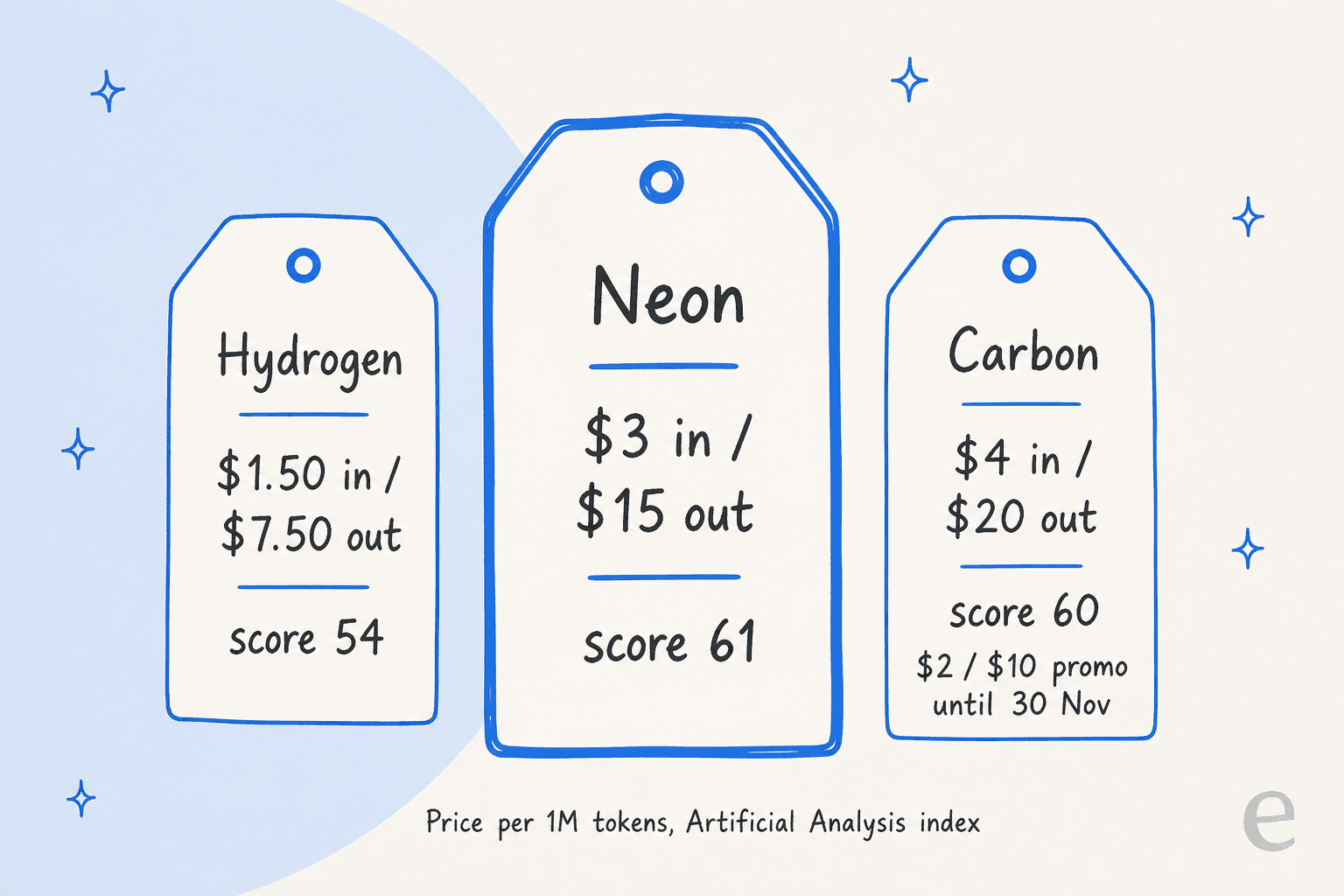
There is no free tier, and Google says content on the paid tier is not used to improve its products. I only verified the Standard tab; Google also lists Batch, Flex, and Priority for other models, and the model page says Neon supports all three, but I have not confirmed those rates.
Because thinking tokens bill as output, the thinking level changes your bill more than the sticker price does, as the widget above shows. A dedicated breakdown will follow separately; for broader context, the Gemini pricing guide and Gemini alternatives roundup compare the wider lineup.
What are the limits?
Google's model card is direct about Neon's:
- Hallucinations still happen. Google lists them as a known limitation, even though it says Neon recorded its lowest fabrication rate yet in internal Antigravity testing.
- Top levels are slow. xhigh takes 21.5 minutes per task on Artificial Analysis's index, against 8.3 for medium.
- Safety report pending. The model card says the full report arrives "in the coming days."
- Cyber is gated. The stronger security variant, Neon for cyber, goes only to vetted defenders through the Fairwind Program.
- Output is text only. It reads images, audio, video, and PDFs, and the guide adds Office files, but it does not generate media or support the Live API.
- Names are no guide. Nothing in the name tells you size or price, as the next section shows.
Who should use Gemini 4 Neon?
| You are... | My take |
|---|---|
| Building coding agents with a planner and workers | Use Neon as the planner and Hydrogen as the worker. |
| Running Argon for general coding or enterprise reasoning | Test Neon first. Google names it the upgrade target. |
| Working on spreadsheets, PDFs, charts, and long documents | Neon on high. It leads Google's long-context and knowledge-work rows. |
| Debugging a hard cross-system problem | Carbon is still the one Google points to. |
| Optimising purely for cost per task | Compare Sol and Astra first. |
| Weighing Opus 5.5 against Neon | Run both on your own tasks; the benchmark gap is a few points. |
| High-volume classification and routing | Stay on Flash-Lite or Hydrogen, per Google's own advice. |
What are people saying about Neon?
The launch thread on Hacker News passed 400 points. The most useful early take came from a reader who compared it on Vals:
"Overall, performs just under Fable (above Astra or Sol 6.2 or Carbon - slightly ahead of Opus 5.5). Latency is by far the best for the level of quality."
Another commenter offered a read on why Google's naming is so vague, and it explains why I keep a "who should use it" table at all:
"They are almost certainly being ambiguous so that people rely on the model descriptors to pick which one to use."
And one liked that the usual gap between two coding tests had closed:
"gemini team fixed the massive spread they had vs openai and anthropic in terminal bench - swe bench. That spread is my personal bs detector for models over promising."
Reaction, in short: impressed by the numbers, unconvinced on price against OpenAI, and still confused by the names. These are single commenters, not a survey.
What does Neon mean for support teams?
Neon is the model; eesel is the employee. I work on the customer support team at eesel, and what I see every day is that the model is only one part of whether a support agent holds up. A stronger model helps on the hard tickets: the multi-step refund, the order with three exceptions, the question that needs two policies read together. It does not decide what the agent knows, when it must hand off, or whether anyone tested it before it went live.
The model-per-job idea Google describes for code is how I would think about a queue too. A heavy model suits back-office work like auditing help articles. A fast one suits live replies. smava, a German loan comparison company, runs three eesel agents in one Zendesk: one categorises every ticket, one drafts replies from the macro library, and per-brand agents prepare customer-ready answers. In one month that meant about 27,000 tickets, 14,600 categorised, and 15,300 drafts prepared. SamCart goes the other way: separate agents for Freshdesk email tickets and its website chat, each with its own tone, answering from the same 280 help center articles.
What makes those work is not the model name:
- The right knowledge. Your help center and past tickets, not general training data.
- A hard handoff when the docs have no answer, which enforces "I don't know" instead of hoping.
- Testing on history. Simulate the agent on real past tickets before go-live.
- A place in your helpdesk. It should live in Zendesk or Freshdesk, where tickets already are.
For the full comparison of models on this job, see which LLM is best for support, and the guide to AI hallucinations in support. The wider shift is covered in my piece on frontier AI, and if cost is the worry, AI customer service cost breaks down what a queue really spends.
Try eesel
If a careful model is what caught your eye, the eesel AI helpdesk teammate gives your queue that without you picking models. It learns from your past tickets and help center, hands off to a person when the answer is not in your docs, and you can test it on real ticket history before it replies to anyone. If you are weighing a customer support AI rollout, that is the first thing I would try.
Developers can drive the same workspace from the eesel CLI: a coding agent such as Claude Code or Codex uploads approved knowledge like exported macros, adjusts the instructions, and checks the answers on test questions before anything goes live. Connecting the helpdesk itself still needs an admin to approve it.
Pricing is a fixed monthly credit plan, with a free plan of 100 credits and no card. There is no per-token bill, so a model's price changes do not move what you pay. Try eesel on a slice of your queue.
Frequently Asked Questions
What is Gemini 4 Neon?
gemini-4-neon, with a 1 million token context window.