


Google Antigravity's Orchestrator pairs two models in one chat: Gemini 4 Carbon writes the plan, Gemini 4 Hydrogen makes the edits, and control swings back to Carbon when something breaks. Google claims 24% less quota and 19% faster at near-Carbon success. On a flat plan that is a quota saving, not a dollar one, and you give up the thinking-level dial. It is Ultra only today. eesel applies the same planner-and-doer split to support queues: an AI helpdesk teammate that answers what it can and hands off on conditions you set.
I build AI agents at eesel, so the part of Orchestrator I care about is the mechanism: who decides, when control moves, and what that costs. If you want to drive an eesel teammate from a coding agent like the ones in Antigravity's CLI, the eesel CLI lets an agent upload approved help-center knowledge and run test questions before anything goes live. Connecting the helpdesk itself still needs someone with admin access.
What is Google Antigravity Orchestrator?
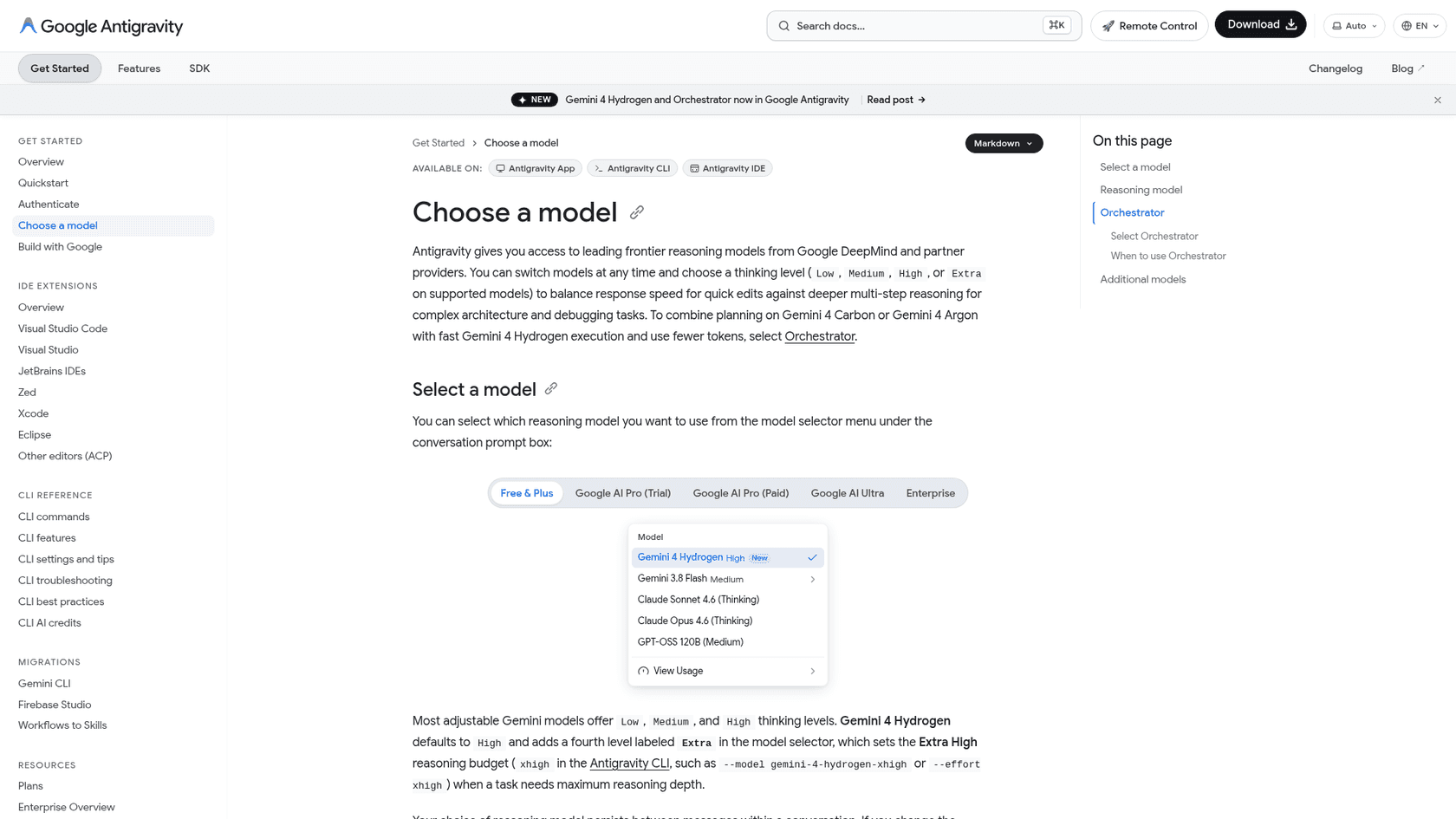
Orchestrator is a model selector option, not a separate product. Google launched it on 12 November 2026 next to Gemini 4 Hydrogen, and it shows up in the Antigravity App, the agy CLI, and the IDE extensions. Pick it, and one conversation is served by two models: Gemini 4 Carbon plans and reviews, Hydrogen implements.
The docs are explicit about what it is not: "Orchestrator isn't a router that classifies your prompt upfront and sends the whole request to a single model." Both models hand control back and forth within the same task, and the handoffs happen automatically inside a single response. It also keeps a single agent in the conversation. If you want parallel agents or agents that check each other, Google points you to subagents, Swarm (/swarm), Boost, and Teamwork instead.
How does the Carbon-plans, Hydrogen-builds handoff work?
Google's docs describe four mechanics. I'll walk through them the way I'd read a spec for an agent loop.
- Carbon plans first. Each message starts with a read-only planning phase. Carbon explores the codebase, resolves ambiguities, and writes a concrete plan that includes the conditions that should trigger re-planning. If your message is a question or review that needs no changes, Carbon answers directly. For small follow-ups with settled steps, it hands off a short plan right away.
- Hydrogen does the work. It applies file edits, writes code, runs builds and tests, and verifies against the plan.
- Control returns on friction. Carbon inspects the state, repairs the plan, and hands back.
- Carbon reviews progress. On longer tasks, and whenever you send a message while Hydrogen is working, Hydrogen reports to Carbon, which checks against the plan and then wraps up, continues, or updates the plan.
The detail I find most useful is that the re-plan conditions are written into the plan itself, so the executor isn't guessing when to stop.
Which four triggers send control back to Carbon?
The docs give examples of friction that returns control. Together with your own messages, they make four triggers:
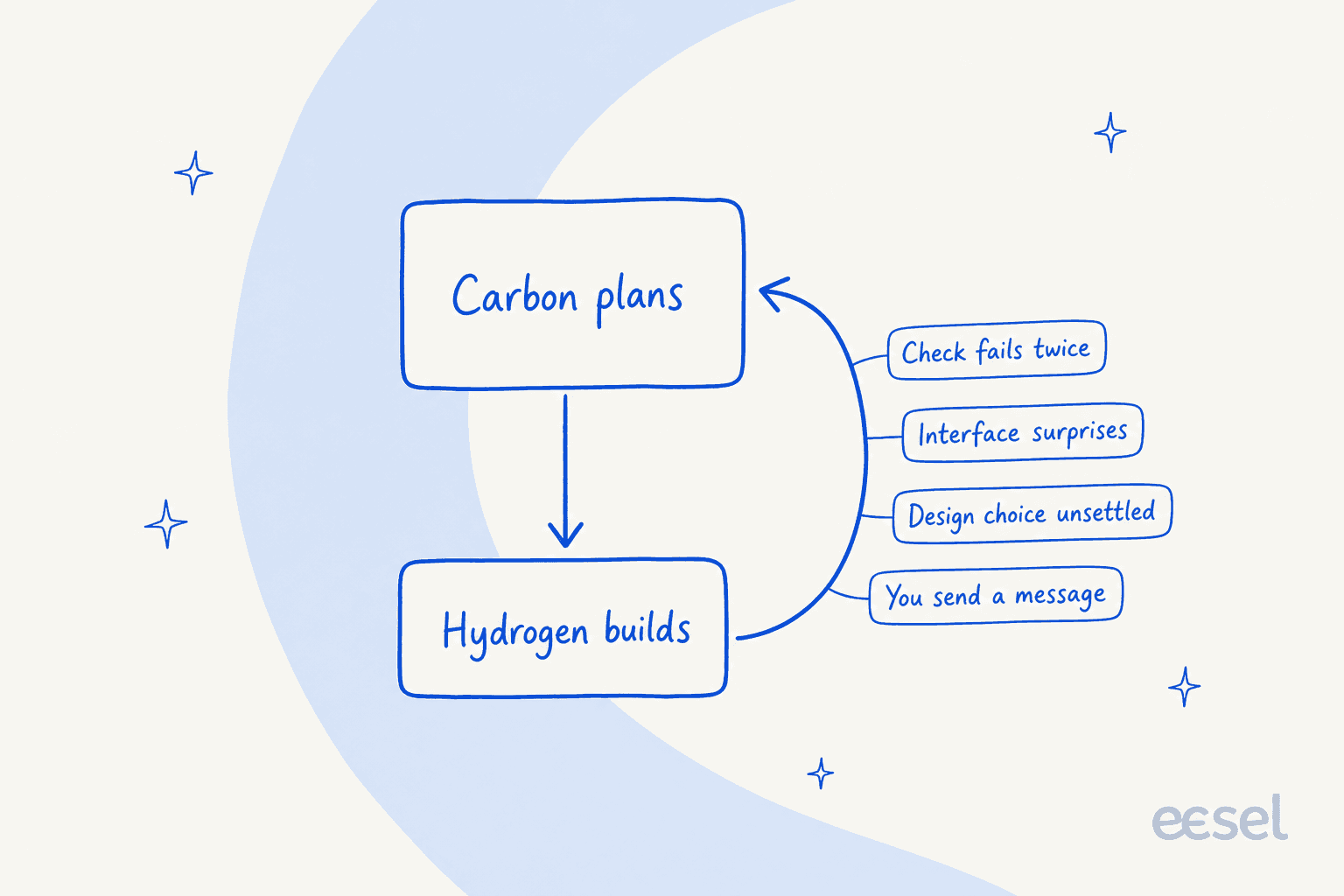
- A verification step fails twice. One failure is Hydrogen's to fix. Two means the plan may be wrong.
- An interface behaves differently than expected. The plan assumed an API or function shape that isn't true.
- A design choice the plan didn't settle. Carbon decides rather than letting the executor improvise.
- You send a message. Hydrogen reports progress and Carbon re-checks against the plan.
How is this different from a first-prompt router?
Google's launch post frames a static model router as one that guesses difficulty from the first prompt and routes the whole task to the cheapest good-enough model, which "start breaking down as agents become longer running". Orchestrator is described as dynamic and bidirectional.
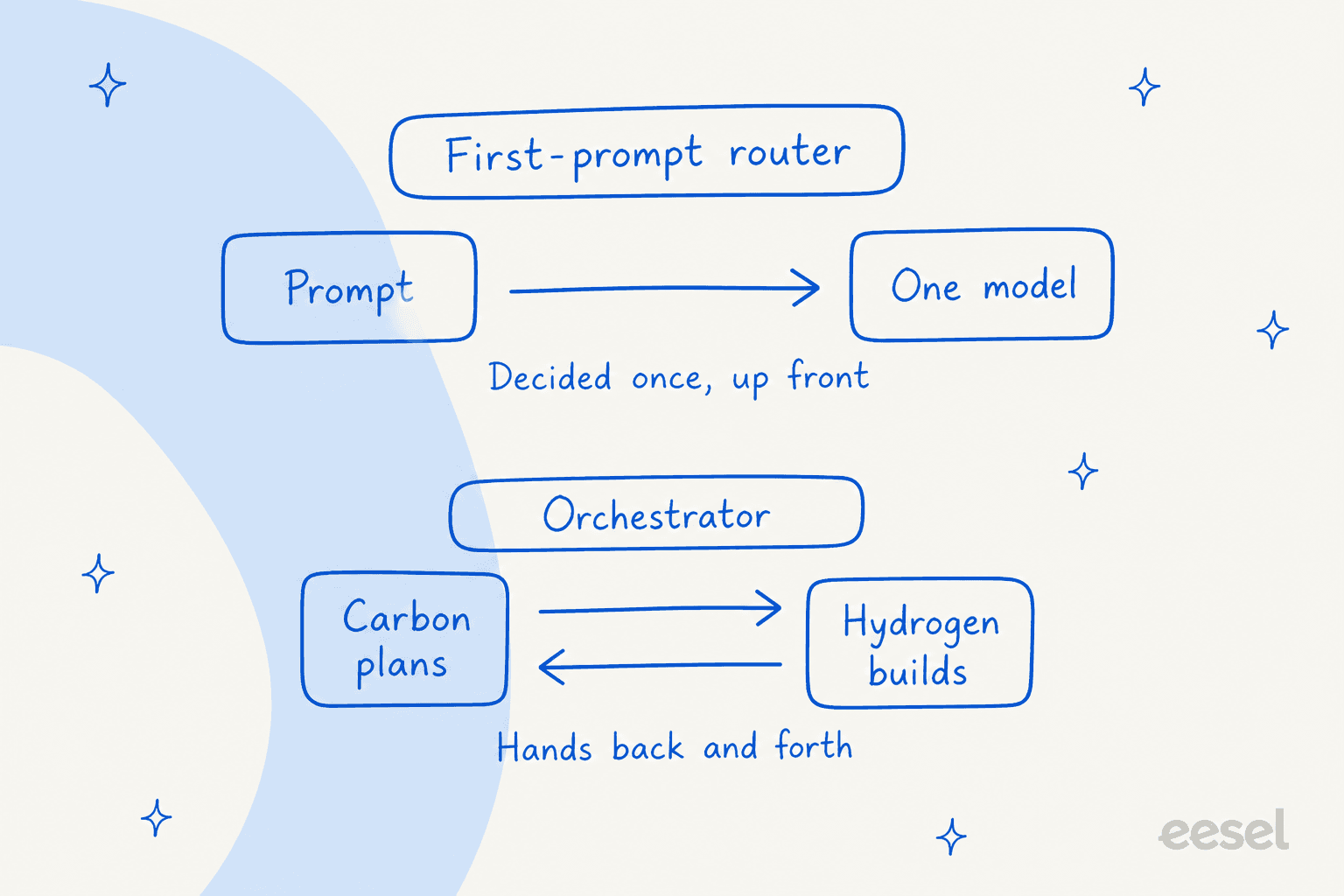
The practical difference is where the decision lives. A router decides once, at the moment it knows least. Orchestrator re-decides at each trigger, when it knows the most.
Who can use Orchestrator?
Only Google AI Ultra, according to the models table in Google's docs as of 13 November 2026.
| Model | Free & Google AI Plus | Google AI Pro | Google AI Ultra | Enterprise |
|---|---|---|---|---|
| Gemini 4 Carbon | No | No | Yes | Yes |
| Gemini 4 Argon | No | Yes (paid, or trial on eligible devices) | Yes | Yes |
| Gemini 4 Hydrogen | Yes | Yes | Yes | Yes |
| Orchestrator | No | No | Yes | No |
| Gemini 3.8 Flash | Yes | Yes | Yes | Yes |
Two places where Google's own pages disagree with each other, so you can check before you plan around them:
- Enterprise. The launch post says "Enterprises can access both in Gemini for business", but the models table and the Enterprise supported-models table both mark Orchestrator unavailable. I'd treat the tables as the current state.
- Hydrogen on Free. The launch post says Hydrogen rolls out to paid Pro and Ultra subscribers, while the models table marks it available on Free & Plus.
The launch post also says Orchestrator is "rolling out for Google AI Ultra subscribers, with additional models and plans supported in the future." Subscription prices, as listed on Google's subscriptions page in the US on 13 November: Google AI Pro is $19.99 a month, and Google AI Ultra is $99.99 (5x Pro limits) or $199.99 (20x).
The Hacker News launch thread shows the confusion this causes:
"I have Pro and I see the new hydrogen model. But not the Orchestrator."

"nope. Ultra only like any Carbon use, for now"
How do I turn Orchestrator on?
In the App, open the model selector under the prompt box and choose Orchestrator (it has a "New" badge). It stays selected for the conversation. In the agy CLI:
/model                                  # pick Orchestrator, persists across sessions
/model Orchestrator <prompt>            # one prompt only
agy --model Orchestrator                # at startup
agy -p "Add input validation to the signup form and run the tests." --model Orchestrator
agy models                              # list model identifiers
If you set /effort while Orchestrator is selected, the CLI reports "Effort isn't adjustable for Orchestrator." That is by design, and it leads to the main trade-off.
Should I pick Orchestrator, Carbon, or Hydrogen?
Google's own guidance is fairly clear. Orchestrator is the "recommended default" for feature work, bug fixes, refactoring, and multi-file debugging. Carbon directly is for when every step needs maximum depth. Hydrogen directly is for the small, well-defined jobs. Use the picker below to match your task.
My rule of thumb from building agent loops: if you can write the steps on a sticky note, use Hydrogen. If you can't write the steps yet, that is the case for a planner.
What do the 24% and 19% numbers tell you?
Google says Orchestrator reaches "near-Carbon task success rates while, on average, consuming 24% less quota and completing 19% faster." What that does and doesn't tell you:
- It is Google's own claim. I haven't seen an independent test.
- The benchmark version is unclear. The Antigravity launch post cites Terminal-Bench 4.1, while the blog.google Hydrogen post says Terminal-Bench 4.0.
- "Near-Carbon" has no number. Neither post publishes the absolute success rate for Orchestrator or Carbon.
- "On average" hides the spread. A task that never triggers a handoff will behave differently from one that bounces between models.
One commenter on the thread was surprised the saving wasn't bigger:
"I'm honestly surprised they only see 25% savings with co-trained models and special harness support."
He claims about 60% with his own bridge between two other models. That is his claim, not something I've verified.
Does Orchestrator save quota or dollars?
Quota. Google's plans docs say rate limits "correlate with the amount of work done by the agent", so complex tasks consume more. On a flat subscription, finishing the same work with 24% less quota means you hit the limit later. The bill stays the same.
Dollars only move in two places. Pro and Ultra users can spend purchased AI credits above the baseline at standard Gemini Enterprise consumption pricing, controlled by the AI Credit Overages setting (Never or Always). And if you build the same split yourself on the API, the model prices apply. Hydrogen costs $1.50/$7.50 per million tokens, and Carbon costs $2/$10 until 30 November, then $4/$20.
My own derivation, not a Google figure: from 1 December, Carbon output costs 2.67 times Hydrogen's on the API, so the more of a task that runs on Hydrogen, the wider the gap. I won't put a per-task dollar number on Orchestrator, because it has no API model id and none is published. There's no bring-your-own-key option in Antigravity either.
What do you give up with Orchestrator?
The thinking-level dial. Because the configuration is fixed, you can't tell the planner to think harder on a hard refactor or tell the builder to go cheap on a mechanical edit. Teams that already tune levels, as in Hydrogen's Low to Extra range, lose that lever. It's the same trade-off described in Claude Code model selection: convenience against control.
The Hacker News thread split along exactly this line:
"Excellent mode! I don't have to constantly switch between models and efforts."
"I'm nervous to delegate that authority to a model (since models tend to be... optimistic about their capabilities.)"
Both are reasonable. The second worry is the one the four triggers are meant to answer, because the handoff conditions are written down before Hydrogen starts. Whether they fire at the right moments is something only your own tasks can show.
What if I want parallel agents or my own split?
Orchestrator keeps one agent. Google's alternatives:
- Antigravity SDK. Wire Hydrogen and Carbon together yourself when you want programmatic control of which model handles each role. Google's SDK docs cover it, and the demo is an open-source issue triage system: Hydrogen agents triage, code, clarify, and iterate on PR comments, while a Carbon agent takes larger refactors, new features, and security checks.
- Swarm (
/swarm). Launched earlier the same week for multi-worktree parallel agent teams. For parallel workflows, Google says Carbon can coordinate while Hydrogen powers the worker and verifier agents.
If you already work this way elsewhere, Claude Code subagents and the multiple-agent systems guide cover the same pattern.
If you're comparing what competing tools charge, Cursor pricing and the best AI coding assistants roundup are the place to start.
What does Orchestrator have to do with support?
Orchestrator is infrastructure for writing code. eesel is the employee. The two meet at one design idea: separate the thinking from the doing, and write down when the doer must stop.
eesel is an AI teammate platform where you hire ready-to-work teammates for specific jobs, and the helpdesk teammate is the one that matches this idea. It answers what it can, and it hands the conversation to a person on conditions you set, much like Carbon's re-plan triggers. My colleagues' AI helpdesk agent guide and handoff best practices cover what those conditions look like.
The safety net comes first, though: eesel simulates every rollout against past tickets before it goes live, which is the support equivalent of checking a plan before the builder starts. See AI support simulation testing for how.
The same idea shows up in customer deployments, where each agent gets one clear job:
- SE Ranking runs three products on one support team, with an agent for each across three Zendesk connections. In one month it handled
4,650conversations (2,554Zendesk tickets and2,102live chats, 8 August to 8 September 2026), with about 2,100 live chats answered first by eesel, drawing on16,800pages of knowledge. - SamCart runs one agent per channel: first replies on Freshdesk tickets, and a live chat on its website. They answer from
280help center articles, with4agents in the workspace.
Neither is an Orchestrator-style loop, and I'd not claim they are. The parallel is narrower: specialised agents, each with a defined job and defined handoff, beat one generalist doing everything.
How does the eesel CLI fit in?
If you already use a coding agent, the eesel CLI operates the same eesel teammate and workspace you see in the dashboard. A person can use it from a terminal, scripts can automate it, and coding agents such as an agent in the agy CLI, Claude Code, or Codex can drive it. In practice that means an agent can upload approved knowledge such as exported help articles, macros, and policies, adjust the teammate's instructions, and ask test questions and check the answers before go-live. Connecting the helpdesk itself still needs an admin to approve it, and uploading knowledge isn't the same as the teammate being ready, so the tested answers matter more than the upload.
Want a planner-and-doer split on your support queue instead of your codebase? Try eesel: the helpdesk teammate joins your existing helpdesk, answers from your own knowledge, and hands off on the conditions you choose. Teams that want the API route can start from an API-first AI agent platform and the AI agent CLI guide.
What's the bottom line on Orchestrator?
Orchestrator is a plan-then-delegate pattern with written re-plan triggers, not a first-prompt router. That's the useful part. The claims to keep in perspective are the numbers: 24% less quota and 19% faster come from Google, on a benchmark whose version differs between Google's own posts. If you're on Ultra and do ordinary feature and bug work, try it as your default for a week and watch your quota. If you tune thinking levels, need parallel agents, or sit on Pro or Enterprise, pick Carbon or Hydrogen directly. For the wider cost picture, my Gemini pricing overview covers every model in the lineup.
Frequently Asked Questions
What is Google Antigravity Orchestrator?
agy CLI, and the IDE extensions.Is Antigravity Orchestrator available on Google AI Pro?
Can I set the thinking level for Orchestrator?
/effort command reports that effort isn't adjustable for Orchestrator. To pick a level, choose Carbon or Hydrogen directly. Hydrogen offers Low, Medium, High (the default), and Extra.How do I turn on Orchestrator in the Antigravity CLI?
/model and pick Orchestrator, which persists across sessions. For one prompt, use /model Orchestrator <prompt>. At startup, use agy --model Orchestrator, or agy -p "..." --model Orchestrator for headless runs. This sits alongside other agentic coding CLIs.