


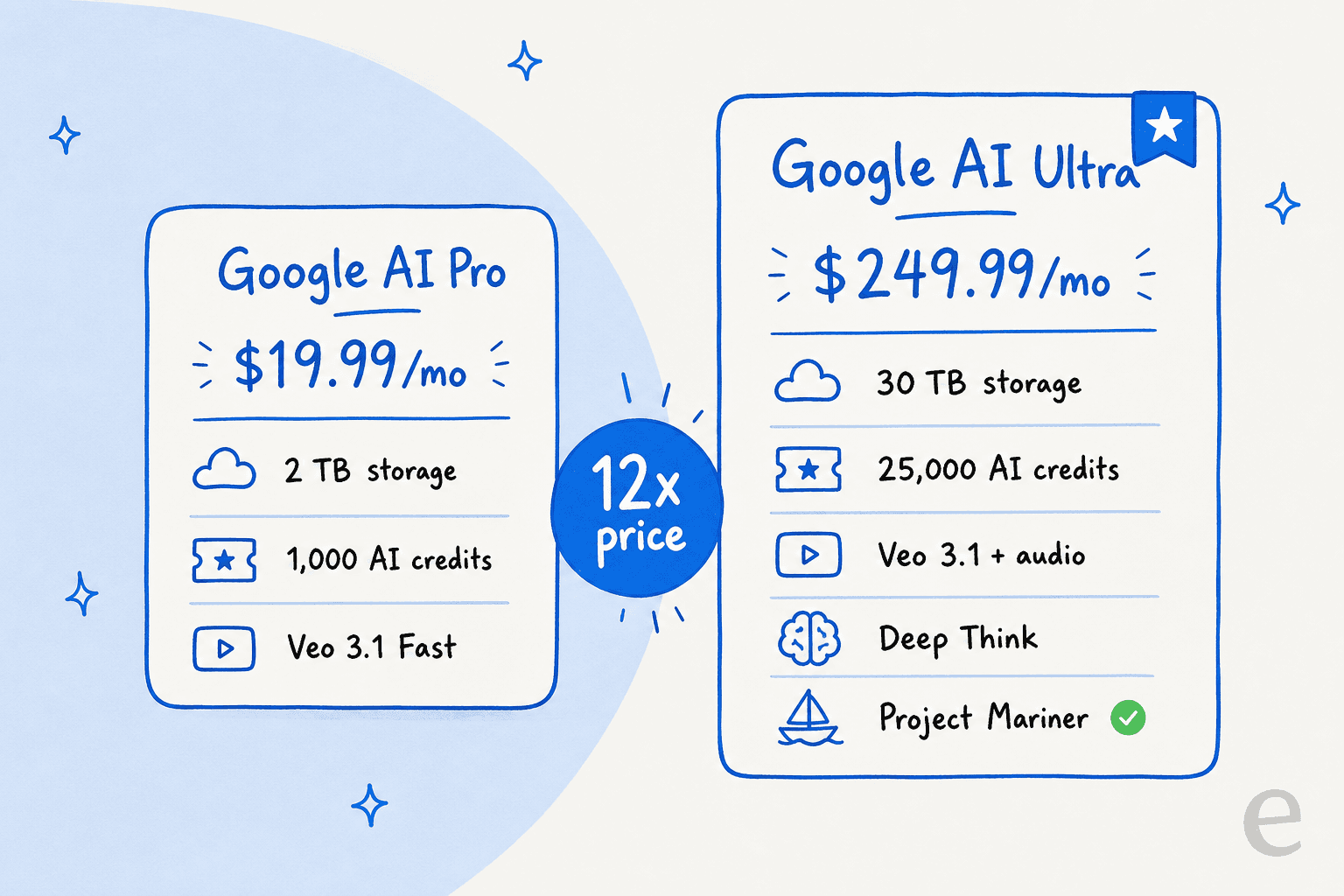
Google's AI subscription lineup got a major overhaul in 2025. What started as Google One AI Premium split into distinct tiers: Google AI Pro at $19.99 per month and the flagship Google AI Ultra at $249.99 per month. That's a 12x price jump between tiers, which raises an obvious question: what exactly are you getting for that extra $230?
Here's the short version. Google AI Ultra costs $249.99/month (with a $124.99 intro rate for the first three months) against $19.99 for Google AI Pro. What that 12x premium buys is the highest access limits across every Google AI product, the full Veo 3.1 video model with audio, Deep Think reasoning, Project Mariner automation, and 30 TB of storage with 25,000 monthly AI credits (vs 2 TB and 1,000 on Pro).
Most people don't need Ultra. It earns the price for professional video creators, developers running heavy AI coding workflows, and researchers processing huge document libraries. For everyday productivity, the $19.99 Pro plan covers it, and if you're just comparing models, my Google Gemini 3 pricing breakdown is the better starting point.
And if the thing you actually want to automate is customer service rather than a general-purpose AI bundle, a purpose-built tool fits the job better. eesel AI plugs into your existing help desk, learns from past tickets, and resolves frontline support on its own, on a fixed monthly price from $299 for 500 credits (1 credit per ticket or chat) instead of $250 a seat.
What is Google AI Ultra?
Google AI Ultra is the top tier of Google's consumer and business AI subscription plans. Launched in May 2025, it replaced the previous unified AI Premium offering with a three-tier structure: Plus, Pro, and Ultra.
Think of Ultra as Google's "VIP pass" to its entire AI portfolio. While Plus and Pro offer varying levels of access to Gemini, video generation, and Workspace features, Ultra removes virtually all limits and adds exclusive capabilities not available at lower tiers.
The plan targets several distinct user profiles:
- Content creators and filmmakers who need professional-grade video generation with Veo 3.1 and Flow's cinematic tools
- Developers and AI researchers who require maximum compute for coding agents, deep research, and model experimentation
- Business teams who want centralized AI management with enterprise security through the Workspace add-on
- Power users who will actually consume 25,000 AI credits monthly and need 30 TB of storage
At $249.99 per month (with a promotional rate of $124.99 for the first three months), Ultra is priced substantially higher than rivals like ChatGPT Plus ($20/month) or Perplexity Pro ($20/month). Google is clearly betting that access to its most advanced models and highest usage limits justifies the premium.
Google AI Ultra features breakdown
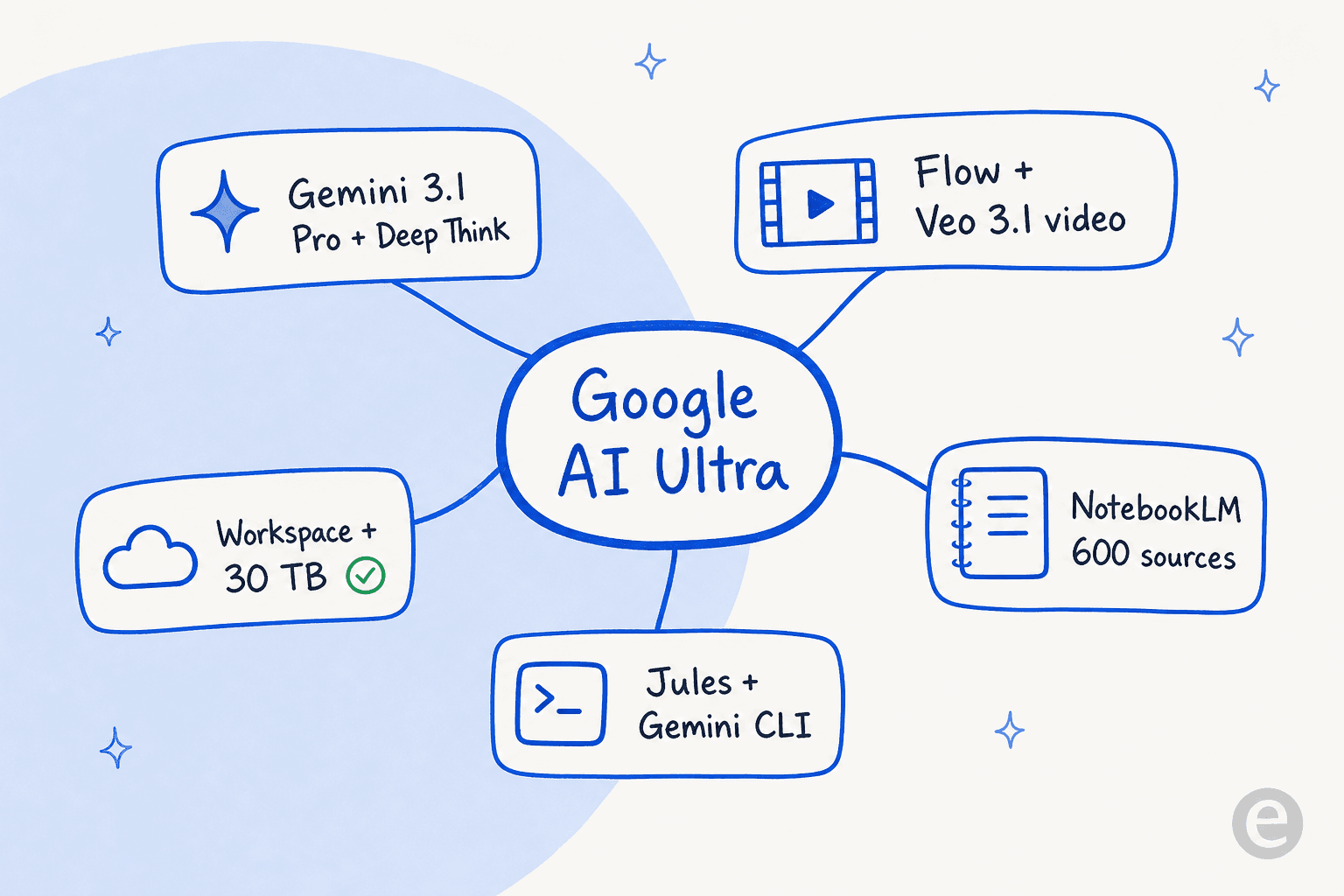
Ultra isn't a single product so much as a bundle that spans Google's whole AI ecosystem, from the Gemini app to video tooling, research assistants, and developer agents.
Gemini app with highest access
The Gemini app sits at the center of Google AI Ultra. Ultra subscribers get the highest rate limits on Gemini 3.1 Pro, Google's most capable AI model, plus exclusive access to features that don't exist at lower tiers.
Deep Think is an enhanced reasoning mode available only to Ultra users in the US. It's designed for complex mathematical problems, coding challenges, and multi-step logical analysis. If you're working through difficult research problems or debugging intricate code, this is the mode you'd use.
Gemini Agent (also US-only) enables the AI to work autonomously on tasks. Instead of back-and-forth prompting, you can delegate multi-step workflows like a true AI agent and it will execute them independently.
Ultra also expands practical limits that matter for heavy users:
- 1,500-page file uploads (compared to lower limits on Pro and Plus)
- 1 million token context window for processing massive documents
- Priority access to new features as Google rolls them out
- Deep Research that analyzes hundreds of sources in real-time
For developers specifically, Ultra allows uploading up to 30,000 lines of code for analysis, debugging, and optimization across entire repositories.
Video and image generation
This is where Ultra distinguishes itself most clearly from Pro. While Pro users get access to Veo 3.1 Fast (optimized for speed), Ultra users get the full Veo 3.1 model with audio generation. The videos include synchronized sound effects, dialogue, and background audio generated alongside the visuals, which is the kind of capability that puts it in the same conversation as Sora.
Flow is Google's AI filmmaking tool, custom-built for DeepMind's Veo, Imagen, and Gemini models. With Ultra, you get:
- 1080p video resolution
- Advanced camera controls
- "Ingredients to video" feature for referencing images to create consistent clips
- Highest monthly generation limits
- First access to experimental models
Whisk Animate transforms static images into 8-second videos using Veo 3. You can generate images from text prompts, then animate them with motion and camera movement.
The 25,000 monthly AI credits (compared to 1,000 on Pro and 200 on Plus) determine how much video and image generation you can do. Credits refresh monthly and don't roll over.
Research and productivity tools
NotebookLM functions as a research assistant grounded in sources you provide. Ultra unlocks the highest limits:
- 600 sources per notebook
- Maximum Audio Overviews, Flashcards, Infographics, and other outputs
- Customizable notebook styles and response lengths
- Priority access to new features
Project Mariner is one of Google's agentic AI prototypes, available to Ultra users in the US. It can automate up to 10 browser tasks simultaneously, from booking travel to researching products. You can delegate complex workflows and Mariner executes them in the background, reporting back when complete.
Project Genie (also US-only) is an interactive world model that generates environments in real-time from text or image prompts. It's positioned as a creative tool for exploring AI-generated spaces.
Developer tools
Ultra includes premium access to Google's developer-focused AI tools:
Jules is an asynchronous coding agent built on Gemini 3.1 Pro. It integrates with GitHub repositories and can handle multiple coding tasks simultaneously. Ultra subscribers get the highest task limits, highest concurrency, and priority model access, putting it squarely among the better AI coding tools.
Gemini CLI brings AI directly to your terminal. It's designed for flexible workflows spanning coding to content generation, much like Claude Code does for Anthropic's models. Ultra provides the highest daily request limits.
Gemini Code Assist offers IDE integration for VS Code and JetBrains, with AI-powered code completion, explanation, and debugging. Again, Ultra gets the highest limits.
Google Antigravity is an agentic development platform powered by Gemini 3.1 Pro. Ultra subscribers receive the highest rate limits and first access to new models.
The Google Developer Program Premium membership included with Ultra adds:
- $100 per month in Google Cloud credits
- 30 Firebase Studio workspaces
- Access to developer communities and forums
Google Workspace integration
Ultra includes Gemini integration across the entire Workspace suite:
- Gmail: Draft responses, query your inbox with natural language, summarize threads
- Docs: Write and proofread content, generate inline and cover images, create formatted documents
- Sheets: Smart fill, AI functions, generate tables from prompts
- Slides: Generate custom images, remove backgrounds, refine text
- Meet: Studio sound and lighting, custom backgrounds, automated note-taking
- Drive: PDF analysis, file insights, multi-document summarization
- Vids: Full AI-powered video creation with editing and collaboration
- Chrome: Auto browse capabilities for completing web tasks (US only)
The plan also includes 30 TB of storage across Google Photos, Drive, and Gmail, plus a YouTube Premium Individual subscription and Google Home Premium Advanced plan with 24/7 video history.
Google AI Pro vs Ultra: What's the difference?
The jump from Pro to Ultra is substantial. Here's the side-by-side comparison:
| Feature | Google AI Pro | Google AI Ultra |
|---|---|---|
| Monthly price | $19.99 | $249.99 |
| Storage | 2 TB | 30 TB |
| AI credits | 1,000/month | 25,000/month |
| Gemini model access | Higher limits | Highest limits |
| Deep Think | Not included | Included (US only) |
| Gemini Agent | Not included | Included (US only) |
| Veo video generation | Veo 3.1 Fast | Veo 3.1 (full) |
| Project Mariner | Not included | Early access (US only) |
| Project Genie | Not included | Included (US only) |
| YouTube Premium | Not included | Individual plan included |
| Google Home Premium | Standard plan | Advanced plan |
| Cloud credits | $10/month | $100/month |
Who should choose Pro?
Most users will be well-served by Pro. If you're using AI for everyday productivity, occasional content creation, and standard development work, the $19.99 tier provides plenty of capacity. The 2 TB storage and 1,000 AI credits cover typical usage patterns, and the Gemini pricing tiers below it are worth a look before you commit.
Who needs Ultra?
Ultra makes sense for specific profiles: professional video creators, intensive AI developers, and researchers processing massive document libraries, plus businesses that want centralized AI management with enterprise security. The 30 TB storage alone could justify the cost for users with large media libraries.
Google AI Ultra for Business
For organizations, Google offers AI Ultra Access as a Workspace add-on rather than a standalone subscription. This is distinct from the consumer Ultra plan, though the core capabilities overlap.
The add-on is available for:
- Business Starter, Standard, and Plus
- Enterprise Starter, Standard, and Plus
- Education Fundamentals, Standard, and Plus
Key business-specific features:
- Central license management: IT admins purchase and assign licenses through the Google Admin Console
- Enterprise security: Interactions remain private and adhere to Google Workspace's security and compliance standards
- Workspace Studio: Execute automations ranging from ad-hoc email labeling to always-on workflows like pre-meeting briefs
- Speech translation: Real-time speech translation in meetings while maintaining speaker tone
- Controlled access: Admins can manage which users get access to Flow, Project Mariner, and other advanced tools
Each user with an AI Ultra Access license receives 25,000 monthly AI credits for Flow and Whisk. Credits refresh on the first of each month and don't roll over.
Important distinction: The business add-on is managed separately from consumer subscriptions. Pricing isn't publicly listed and requires contacting Google sales, which suggests enterprise pricing varies by organization size and contract terms.
For businesses specifically looking to automate customer service rather than general AI capabilities, specialized solutions often make more sense. I work on eesel AI, an AI teammate that handles frontline support tickets end-to-end, integrating directly with help desks like Zendesk and Freshdesk. It's a different approach than Google's general-purpose AI, focused specifically on autonomous customer service resolution.

Is Google AI Ultra worth $249.99 per month?
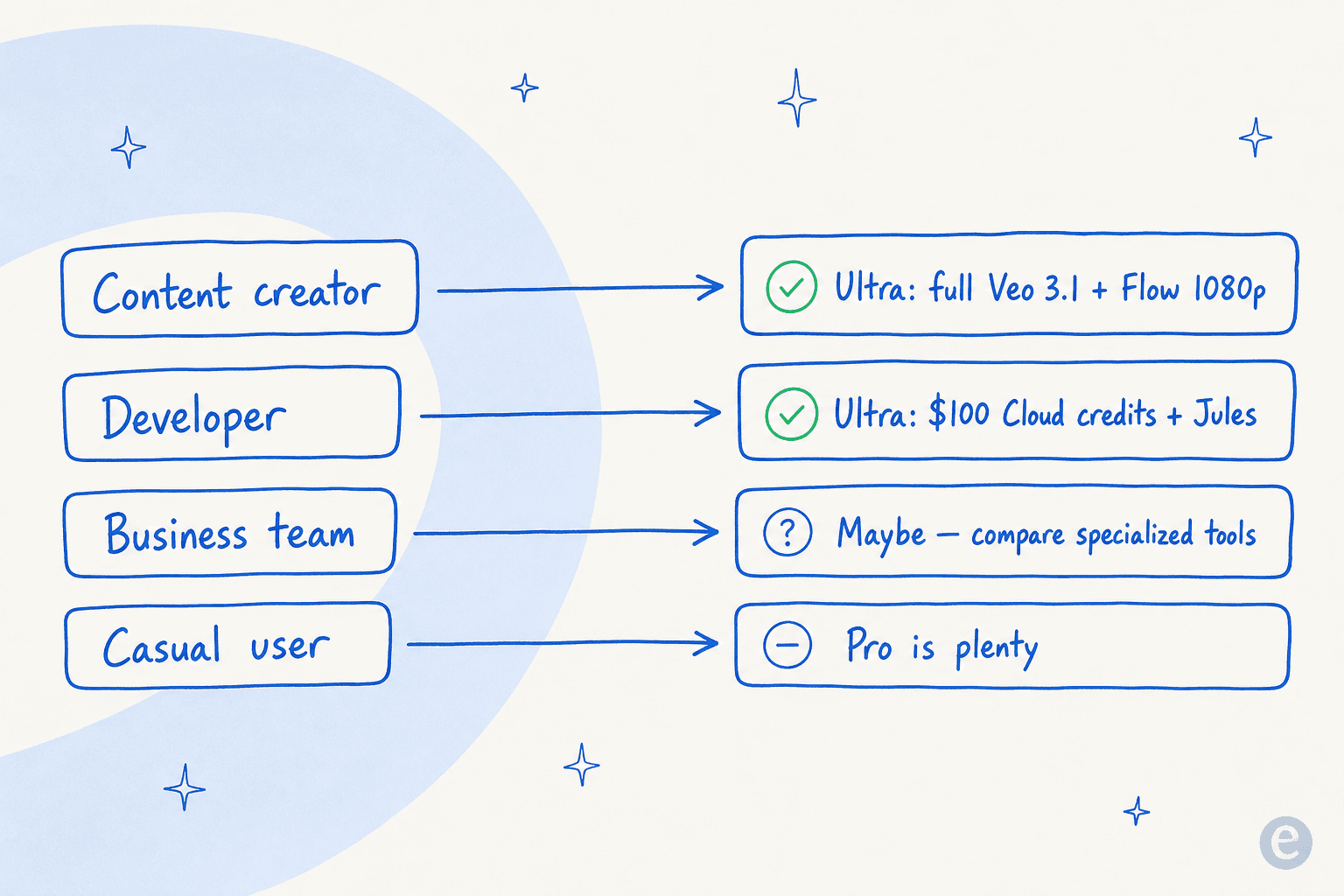
The value calculation depends entirely on your use case. Let's break it down by user type.
Content creators and filmmakers
If you're producing professional video content, Ultra's access to full Veo 3.1 with audio generation and Flow's 1080p cinematic tools could replace expensive production resources. The 25,000 AI credits support high-volume generation workflows. For independent filmmakers or social media production teams, this might actually reduce costs compared to traditional production methods.
Developers and AI researchers
The combination of Jules, Gemini CLI, Code Assist, and $100 in monthly Cloud credits creates substantial value for developers working with AI. If you're building AI-powered applications or conducting research requiring maximum compute access, the developer tools alone could justify the subscription.
Business teams
The math here is more complex. At $250 per user per month, a 10-person team would spend $30,000 annually on AI Ultra Access. For comparison, enterprise AI tools typically range from $50-200 per user monthly. The value depends on whether Google's specific capabilities (Flow, Project Mariner, Workspace Studio) align with your workflows better than the Gemini alternatives.
Casual users
Ultra is overkill for most individuals. The $19.99 Pro plan covers nearly all consumer use cases, and the free tier handles basic needs. Unless you're maxing out Pro's limits, Ultra is unnecessary.
The alternative consideration
For businesses evaluating AI investments, it's worth distinguishing between general-purpose AI (what Google offers) and specialized AI solutions. If your primary goal is automating customer service, a purpose-built tool like eesel AI often delivers better ROI than general AI subscriptions. The AI agent integrates with existing help desks, learns from past tickets, and autonomously resolves a large share of frontline support requests. The pricing is a fixed monthly plan sized to ticket volume (from $299/month for 500 credits) rather than seats, which typically works out more favorably for support teams than a per-seat $250 plan.

How to get started with Google AI Ultra
Signing up is straightforward if you're using the consumer plan:
- Visit one.google.com and select the Ultra plan
- The current promotion offers $124.99 per month for your first three months
- Complete payment and the features activate immediately on your Google account
- Download the Gemini mobile app or access features through the web interface
For Workspace administrators:
- Access the Google Admin Console
- Navigate to Billing > Get more services
- Search for "AI Ultra Access" add-on
- Purchase licenses for the users who need access
- Assign licenses to specific users or organizational units
New Workspace customers may need to make an early payment of $100 before purchasing AI Ultra Access. This restriction is removed after establishing payment history with Google.
Once subscribed, start with the features that differentiate Ultra from lower tiers: test Veo 3.1's audio generation, experiment with Project Mariner's task automation, or set up Jules for coding workflows. These are the capabilities that justify the premium over Pro.