
What Cohere Embed 5 actually is
Cohere is the enterprise AI company behind the Command models, Rerank, and the Parse 5 document parser. An embedding model is the quiet part of any search or RAG system, the piece that turns a chunk of text (or an image) into a list of numbers, and chunks that mean similar things then end up sitting close together. When a user asks something, that question also gets turned into numbers, then the system goes and fetches whichever chunks are nearest.
When the embedding model is weak, the right answer simply never gets fetched, and clever prompting is not going to fix that for you. It is the same layer that powers AI enterprise search.
Embed 5 takes over from Embed 4 as the flagship of Cohere, and it comes in two tiers: Pro, "optimized for maximum quality across multimodal, multilingual, financial, code, and parsed-document retrieval," and Fast, which "brings highly competitive performance to latency- and cost-sensitive workloads."
I build AI agents for a living at eesel, and retrieval is the layer where most of my debugging time goes, so these specs were the first ones I went looking for. Here they are side by side, pulled from Cohere's model docs and launch post:
| Embed 5 Pro | Embed 5 Fast | Embed 4 (previous) | |
|---|---|---|---|
| API model ID | embed-v5.0-pro | embed-v5.0-fast | embed-v4.0 |
| Text price (per 1M tokens) | $0.12 | $0.08 | $0.12 |
| Image price (per 1M tokens) | $0.40 | $0.40 | $0.47 |
| Context length | 128K tokens | 128K tokens | 128K tokens |
| Inputs | Text, images, fused text + image | Text, images, fused text + image | Text, images, mixed |
| Output dimensions | 256 to 2048 (default 2048) | 256 to 2048 (default 2048) | 256 to 1536 (default 1536) |
| Formats | float, int8, binary | float, int8, binary | float, int8, binary |
| Languages | 100+ | 100+ | Multilingual |
| Best for | Offline indexing, quality-critical search | Live queries, agent loops, high volume |
The Embed 4 rates come from Microsoft Foundry's Cohere pricing, since Cohere's own pricing page no longer lists Embed 4. If you are coming from OpenAI's 3-series, note that its API pricing still tops out at $0.13 for text-embedding-3-large. In the Cohere table there are two small details that people tend to miss. The default output went up from 1536 to 2048 dimensions, which is something that matters for storage (more on that below), and also image input got cheaper, from $0.47 to $0.40 per 1M tokens.
How Embed 5 works: index with Pro, query with Fast
This is the feature I would build around, and it is the one with the least hype attached. Most embedding families, including the OpenAI embeddings API, make you pick one model and live with it, because vectors from two different models are not comparable. Cohere trained Pro and Fast into a single shared space, so a query embedded with Fast can be matched directly against documents embedded with Pro.
The reason this matters is that indexing and querying want opposite things. Indexing happens once (or on every document update) and nobody sits there waiting on it, so here you want the best quality money can buy. Querying is a different story, it happens on every single user request and inside your latency budget, which means speed is what counts. Having one shared space lets you choose each side on its own.
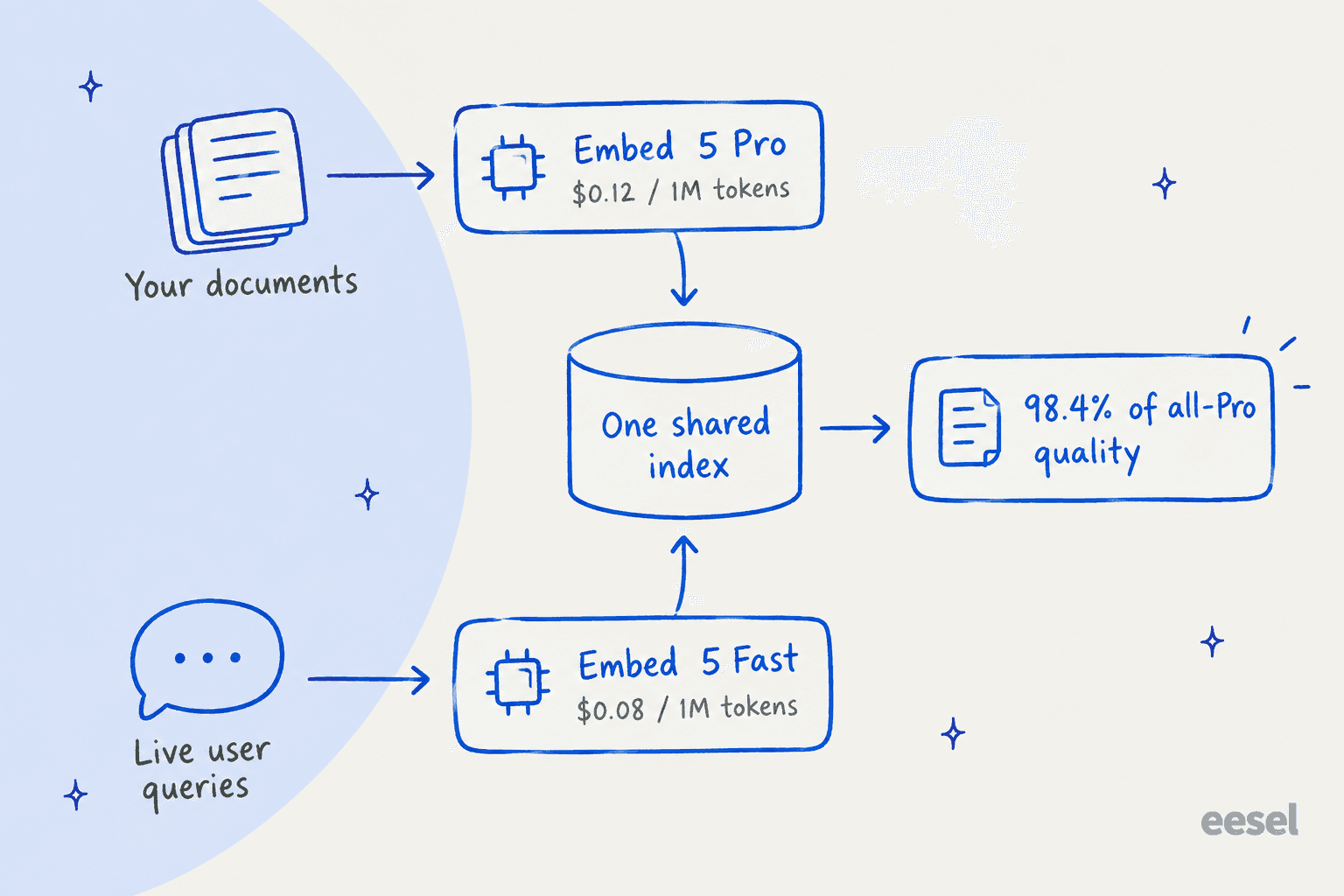
Cohere ran every pairing across 40 development datasets, then normalized the scores in a way that Pro documents plus Pro queries equals 100:
| Mean retrieval quality | Documents indexed with Fast | Documents indexed with Pro |
|---|---|---|
| Queries with Fast | 96.6 | 98.4 |
| Queries with Pro | 97.3 | 100 |
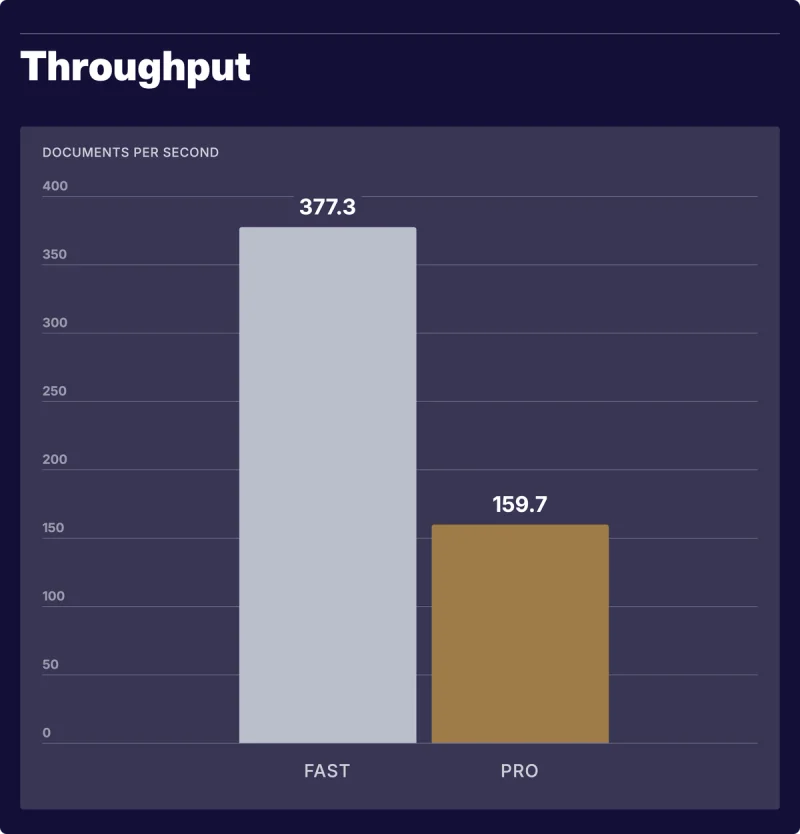
So Pro index plus Fast queries lands at 98.4, a 1.6% loss, while Fast does the query-time work at roughly 2.4x the throughput of Pro (377.3 versus 159.7 documents per second on Cohere's test). Cohere itself recommends exactly this pattern, and in the footnote there is the catch worth knowing about: both sides have to use the same output dimension. The pairing still holds when you add Matryoshka truncation and int8 quantization, so a compressed index works with it too.
A few API details from the Embed reference that shape how you call it:
input_typeis required. Usesearch_documentwhen indexing andsearch_queryat query time. There are alsoclassificationandclusteringmodes.- 96 inputs per call. Each input can mix text and image parts, with a 20MB total payload cap.
- Truncation defaults to
END. With a 128K context it is rare that you hit it, but if you prefer getting an error over silently losing the end of a long document, settruncatetoNONE. - Rate limits are per input, not per request: 2,000 text inputs a minute on both trial and production keys, and 5 versus 400 image inputs a minute, per the rate limits page. Trial keys are free but capped at 1,000 calls a month and not allowed for production use.
The benchmarks: strong, but read the fine print
The numbers Cohere published are good ones. Below is the headline ViDoRe V3 table, it covers enterprise documents across eight domains:
| Model | ViDoRe V3 average | Text price per 1M tokens |
|---|---|---|
| Cohere Embed 5 Pro | 85.8 | $0.12 |
| Cohere Embed 5 Fast | 84.5 | $0.08 |
| Voyage 4 Large | 83.7 | $0.12 |
| Gemini Embedding 2 | 83.2 | $0.20 |
| Cohere Embed 4 | 77.0 | $0.12 |
| OpenAI text-embedding-3-large | 75.5 | $0.13 |
| Jina Embeddings v5 Text Small | 74.5 | $0.05 |
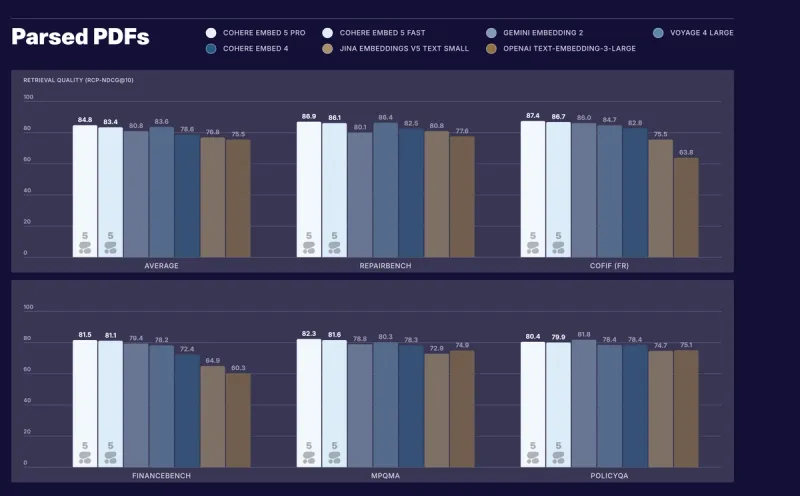
On the same test Pro gains 8.8 points over Embed 4, and the biggest jumps are on HR (+11.4) and on industrial documents (+10.3). It is also the leader of Cohere's parsed-PDF suite at 84.8. For financial retrieval it ranks first on FinanceBench (80.1) and FinQA (90.0), plus ViDoRe V3 Finance (85.0), with Fast coming second on each of them.
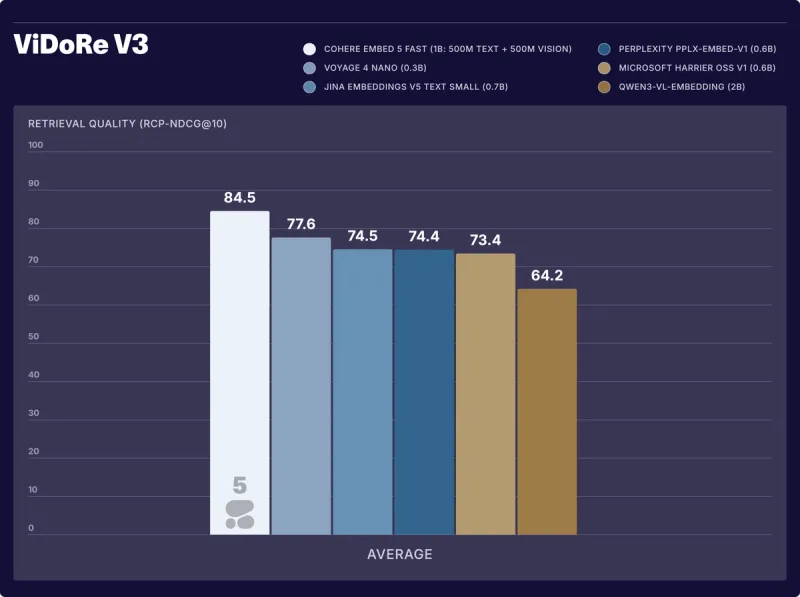
For me the most impressive result is actually Fast. Put against other compact models on ViDoRe V3 it scores 84.5, where Voyage 4 Nano gets 77.6 and Qwen3-VL-Embedding gets 64.2. The legend on Cohere's own chart (below) lists Fast at about 1B parameters, 500M text plus 500M vision, and the launch post says it beats Qwen3-VL-Embedding-2B by about 20 points despite being roughly half its size.
Now the fine print, because a fair read needs it.
It is a new metric, run by the vendor. Embed 5 is the first model family scored with RCP-nDCG@10, a method Cohere published the same day. Cohere's own footnote says it evaluates models by reordering a fixed candidate set, so "scores therefore reflect reranking quality rather than first-stage retrieval performance." It is a reasonable way to measure, and the code is public, but it is not the same number you would get by running a plain top-10 search over your whole index. Also some of the datasets are internal ones, like the "High Finance" set which Cohere annotated by itself.
Gemini Embedding 2 wins most non-European languages. Pro leads the European set (77 average across German, French, Spanish, Italian, and Russian). But in Cohere's own ten-language table, Gemini Embedding 2 beats Pro on 9 of the 10: Japanese, Korean, Arabic, Farsi, Hindi, Bengali, Telugu, Indonesian, and Thai. Pro only edges it on Chinese (82 versus 81). Telugu is the widest gap, at 91 versus 80.
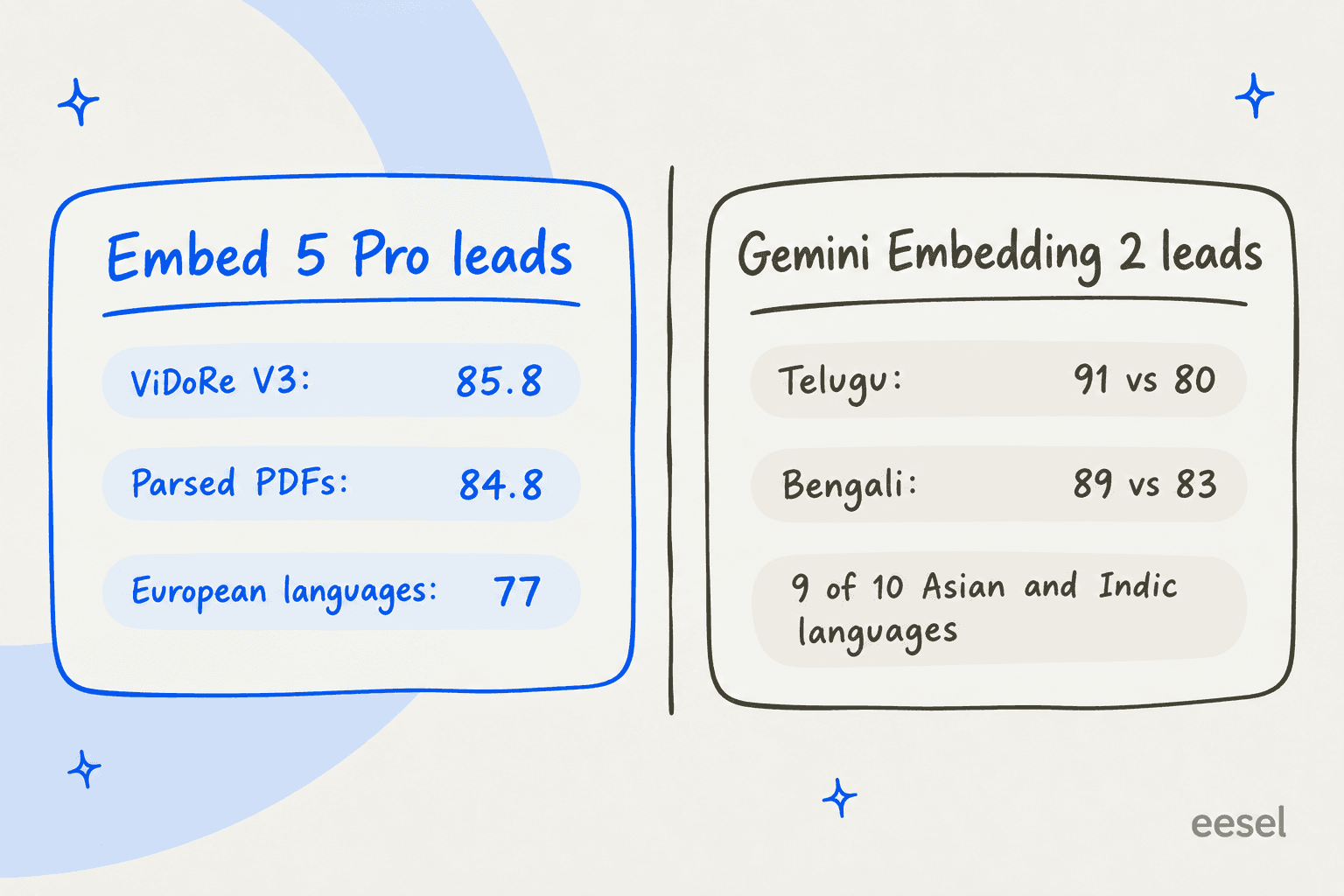
If your support queue or document base leans heavily on Hindi, Thai or Bengali, that table is the most useful thing in the whole launch, and credit to Cohere for printing it at all. For a team serving a multilingual knowledge base across Europe and English, Pro is the stronger pick on these numbers.
Community reaction is still early and thin, which is what you would expect one day after a launch. The most useful voice from a practitioner I found is an older one, and it is about Cohere's embeddings in general rather than Embed 5 itself:
"My experience with Cohere and interacting with their sales engineers has been boring, I say that is the most flattering way possible. Embeddings are a core service at this point like VMs and DBs. They just need to work and work well and thats what they're selling."

That matches the pitch here pretty well. Embed 5 is not trying to be exciting, what it tries to be is the boring and dependable layer that sits under your search.
Cohere Embed 5 pricing
Billing for Embed 5 is per input token, and there is no output charge. Here is everything Cohere publishes, from the pricing page and the launch post:
| Option | Embed 5 Pro | Embed 5 Fast | Billing unit |
|---|---|---|---|
| Cohere API, text | $0.12 per 1M tokens | $0.08 per 1M tokens | Input tokens |
| Cohere API, images | $0.40 per 1M tokens | $0.40 per 1M tokens | Image tokens |
| Trial key | Free, 1,000 calls a month | Free, 1,000 calls a month | Not for production use |
| Model Vault Small | $3.00/hour or $2,000/month | $3.00/hour or $2,000/month | Per dedicated instance |
| Model Vault Medium | $5.00/hour or $3,250/month | $5.00/hour or $3,250/month | Per dedicated instance |
| Amazon SageMaker | $2.39 to $8.48 per host-hour | $2.39 to $3.36 per host-hour | Software fee plus AWS instance cost |
| Microsoft Foundry | Not yet published (preview) | Not yet published (preview) |
The SageMaker rates come from the AWS Marketplace listings for Embed 5 Pro, with a matching listing for Fast. Cohere bills at the end of each month, or sooner once you hit $250 outstanding. For the rest of the catalog (Rerank, Parse, Command), see my full Cohere pricing guide. If you are also parsing PDFs, the Parse 5 pricing breakdown covers that meter.
Three billing notes I would want to know about before setting a budget:
- Image token counts are not documented. The price is per 1M image tokens, but Cohere publishes no tokens-per-image formula. The API response reports images as a count (
"images": 1), so run a small test batch and read the bill before you embed a million page images. - Model Vault only pays off at very high volume. A Small instance at $2,000 a month equals about 16.7 billion Pro tokens, or 25 billion Fast tokens, at API rates. Anywhere below that, the API comes out cheaper. If you pick Vault, the real reasons are isolation and guaranteed capacity, not the price.
- Not on Bedrock yet. Amazon Bedrock still lists Embed 4 at $0.12 per 1M tokens, with no Embed 5 SKU. OpenRouter carries no Cohere embedding models at all.
Why the token price is the least important number here
Let me run the math on a realistic support setup, since that is the world I spend my working days in. Say you have 2,000 help center articles (about 1,500 tokens each) and 200,000 past tickets (about 600 tokens each), roughly 123 million tokens in total. Embedding all of it once with Pro costs about $14.76. With Fast, about $9.84. Fifty thousand customer questions a month at 30 tokens each is 1.5 million tokens, about 12 cents on Fast. In other words, the embedding bill is basically a rounding error.
What does not round away is the storage, which scales with both dimensions and precision. Cohere's own example: a 2048-dimension float32 vector is 8 KB, a 1024-dimension int8 vector is 1 KB, and a 256-dimension binary vector is 32 bytes.
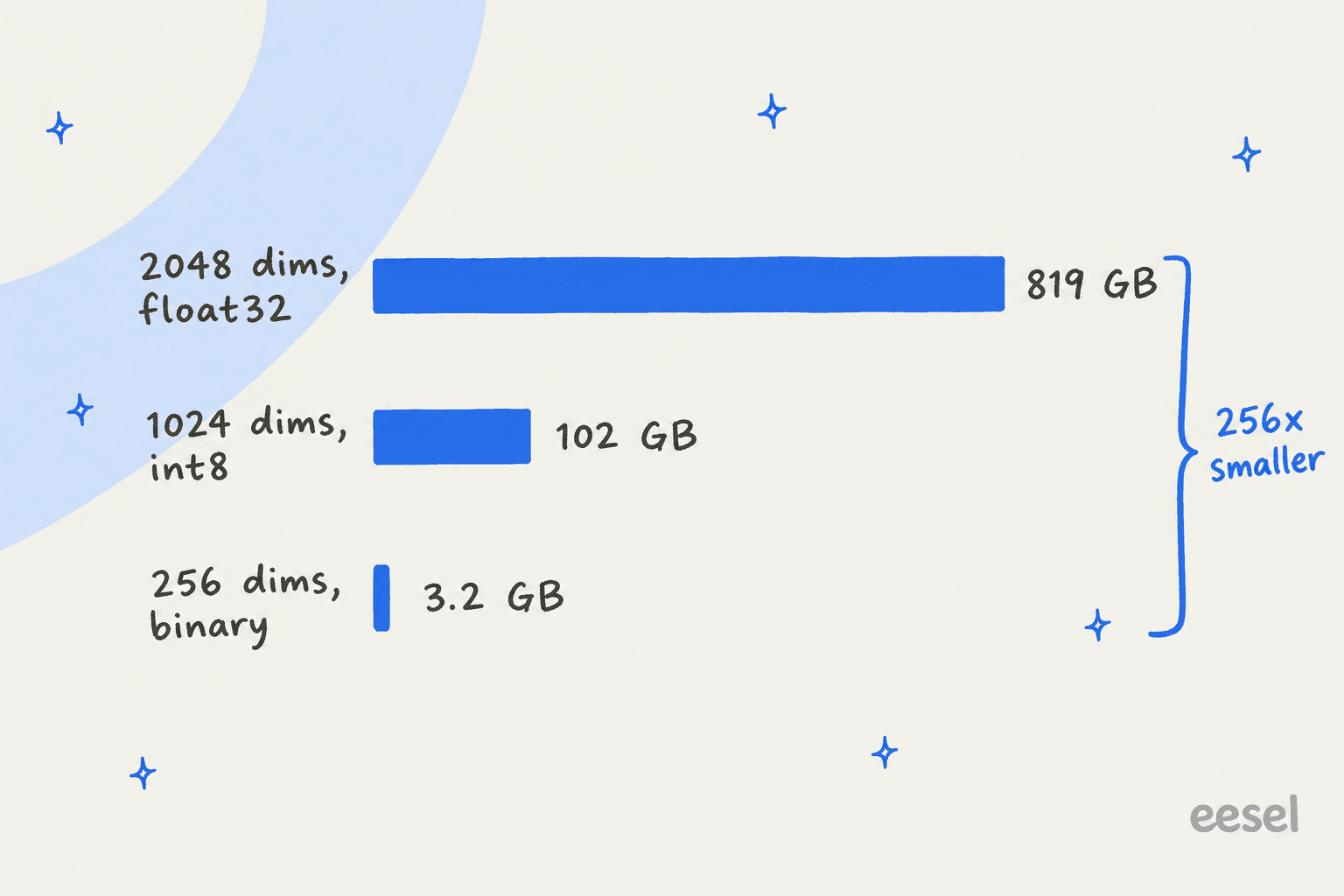
At 100 million chunks, the default float32 output is about 819 GB of raw vectors. On Pinecone's Standard plan (or a hosted vector store) at $0.33 per GB a month, that is roughly $270 a month before index overhead, every month. The same chunks at 1024-dim int8 are about 102 GB, roughly $34 a month. Embedding those 100 million chunks once (at about 500 tokens each) costs about $6,000 on Pro, a one-time charge. Pick your dimensions and precision before you index, because if you change them later it means re-embedding everything from scratch.
Cohere's recommendation lines up with this: "For most deployments, we recommend 1,024-dimensional int8 vectors as the ideal performance-efficiency point," and int8 "retains near-full-precision retrieval quality." Binary is the smallest of them, it loses some accuracy, and it does a good job as a fast first pass ahead of a reranker.
Upgrading from Embed 4: what to plan for
If you are running Embed 4 today, the upgrade is more than just swapping the model name. Things to plan for:
- Re-index everything. Cohere says Pro and Fast share a space with each other. It says nothing about Embed 4 vectors being comparable to Embed 5 vectors, so assume they are not and budget a full re-embed. With the prices above that is usually cheap in dollars, though it is expensive in terms of engineering time.
- Watch the default dimension. Embed 4 defaulted to 1536, Embed 5 defaults to 2048. If your vector database index is fixed at 1536, pass
output_dimension=1536(Embed 5 supports it) or rebuild the index. - Check your cloud. If you call Cohere through Bedrock or Oracle OCI, Embed 5 is not there yet. The launch channels are the Cohere API, Model Vault, Microsoft Foundry, and SageMaker.
- Batch jobs. Cohere says batch embedding is available for large-scale ingestion, but the docs table lists only the standard Embed endpoint for v5 models, so confirm Embed Jobs support for your model before you design a bulk pipeline around it.
Before blaming (or crediting) the model, check the rest of the pipeline first. This reply on an r/Rag thread about fine-tuning embeddings is the most practical advice on model swaps I have come across:
"more than I expected. but only after chunking was already clean. dirty chunks make every embedding model look bad."

That lines up with my own experience. If you want a worked example, the guide to semantic search over Zendesk Guide walks through the chunking side. A better embedding model helps most when chunking is already sound and you have hybrid search and a reranker in place.
Where Embed 5 fits, and where it doesn't
Embed 5 is a great pick if you are a platform team building your own search or RAG stack, especially over long, visually rich, or financial documents. The 128K context means fewer awkward chunk splits and the fused text-plus-image input takes care of slides and scanned pages. On top of that, the Pro/Fast split gives you a clean dial for speed versus quality. Pair it with Parse 5 to turn PDFs into Markdown and Rerank to sort the matches, and you have Cohere's whole retrieval stack. Cohere also announced that its managed search platform, Compass Cloud, is now in private beta.
"Cohere seems to be doing a lot on the search side this year with their parsing model, Compass Cloud announcement, and now Embed 5... exciting stuff"
It is the wrong level of the stack if your actual goal is an everyday tool, like an AI knowledge base for your team or an AI that answers customer questions from your help center and past tickets. An embedding model hands you vectors. You still need chunking, a vector database, a reranker, a generation model like GPT-6.1 Sol, guardrails, and a way to plug answers into your helpdesk.
If you want the deeper trade-offs, start with RAG versus plain LLMs. For help centers specifically, there is a separate guide on RAG versus fine-tuning.
The hardest lesson I took from running AI on live support queues has nothing to do with retrieval quality, it is about what happens when retrieval comes back empty. I have watched paying customers' bots answer real customers with confident, made-up claims because the knowledge base had nothing relevant and the model filled the gap from its training data. A better embedding model makes that rarer, but it does not make it impossible. The fix lives in the layer above: a hard fallback when nothing relevant is found, and testing on real tickets before launch.
Try eesel if you want the answers, not the pipeline
If you are reading about embedding models because of a support problem, eesel is the shortcut. eesel is an AI teammate platform, and its AI helpdesk teammate is the whole retrieval stack, already assembled: it connects to your help center, docs, and past tickets, and drafts or sends replies inside your helpdesk, Slack, or a shareable link. No vectors to size, no index to rebuild when a new model ships.
It plugs into the helpdesks most support teams already run. On Zendesk it answers from macros and solved tickets; on Freshdesk and Gorgias it works the same queue your agents do.

Before it touches a live customer, eesel simulates the rollout on your historical tickets, so you see the replies it would have sent and the resolution rate up front. That is how I would want any automated ticket resolution to earn its way onto a live queue.
And if you came here because you like working from a terminal, the eesel CLI lets you run the same teammate from the command line: connect an integration with eesel integrations connect, edit its standing instructions, approve or deny pending actions, and read every run with eesel activity. Every command returns JSON and supports --dry-run, so scripts and coding agents like Claude Code can drive it too. There is a full walkthrough on managing agents from a terminal, and a shorter take on the CLI for customer support.
Try eesel free on your own tickets.
Frequently Asked Questions
What is Cohere Embed 5?
embed-v5.0-pro) and Embed 5 Fast (embed-v5.0-fast), both with a 128K-token context window and 100+ languages.How much does Cohere Embed 5 cost?
$0.12 per 1M text tokens and Embed 5 Fast costs $0.08. Image input is $0.40 per 1M image tokens on both. Dedicated Model Vault instances start at $3.00 an hour ($2,000 a month). For the wider Cohere price list, see this Cohere pricing breakdown.What is the difference between Embed 5 Pro and Embed 5 Fast?
Is Cohere Embed 5 better than OpenAI embeddings?
Do I need to re-embed my data to move from Embed 4 to Embed 5?
output_dimension explicitly if your index schema is fixed.Is Cohere Embed 5 available on Amazon Bedrock?
Can I use Cohere Embed 5 for customer support search?


Article by
Kira
Kira is a writer at eesel AI with a Computer Science background and over a year of hands-on experience evaluating AI-powered customer service tools. She focuses on breaking down how helpdesk platforms and AI agents actually work so that support teams can make better buying decisions.