What is Cohere North 2?
North is Cohere's workplace AI platform: one place where employees search company knowledge, generate documents, and build agents that act across internal tools. Cohere calls version 2 "Cohere's biggest upgrade yet" in the North 2 launch post.
I build the agent side of eesel, so the part of any agent launch I read first is the plumbing: how the agent plans multi-step work, what it remembers, and who can stop it from burning money. North 2 is unusually honest about that last part. Cohere opens the announcement by saying enterprises have paid for agentic AI "in complexity, cost, and compromise", and most of the release is aimed at the cost and control half of that sentence.
The product page groups North into three modes: Discover (search grounded in your data), Create (summaries, tables, charts and apps) and Automate (shared agents and automations). Cohere sells it to large enterprises. The page shows 18 customer logos, including Oracle, Dell, RBC, LG CNS, Fujitsu, Bell, SAP and TD Bank, and the only way in is contact sales or an interactive demo.
If you are coming from Cohere's model side, North is a different purchase, and my Cohere alternatives roundup is the better read if you only need an API. The Command, Embed and Rerank models are API products you pay for per token. North is the employee-facing application layer that sits on top of them, or on top of someone else's models.
What's new in North 2?
Cohere lists five pillars for the release: a new agent harness, more intelligence (memory, libraries, skills, artifacts and app creation), model choice, sovereignty, and enterprise governance through North Admin. The easiest way to hold all of it in your head is as three layers.
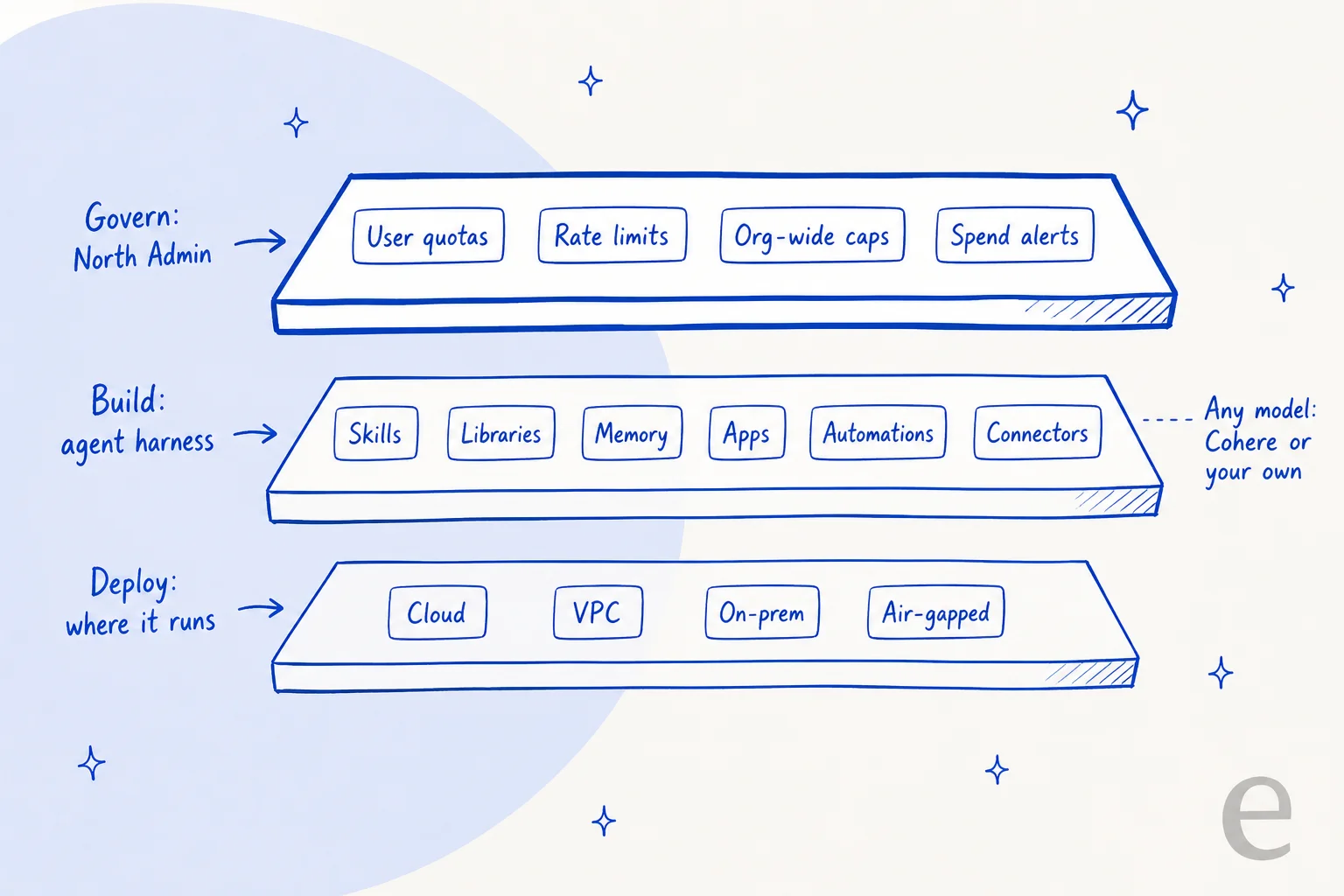
Here is every new piece Cohere names, in one table:
| Feature | What Cohere says it does | Layer |
|---|---|---|
| Agent harness | Redesigned orchestration for "more sophisticated, reliable, multi-step automations and agents" | Build |
| Memory | Agents "keep context across sessions, instead of starting cold every time" | Build |
| Skills | Reusable capabilities agents can call, so nobody rebuilds the same logic | Build |
| Libraries | Shared knowledge and assets the whole organization can draw from | Build |
| Applications | Decks, dashboards, documents and lightweight apps from natural language | Build |
| Automations | Templates, a drag-and-drop workflow builder, real-time monitoring | Build |
| Connectors | New: Slack, SharePoint, OneDrive, Outlook, Exchange, Jira, Linear, Notion, GitHub | Build |
| North Admin | Roles, model access, token spend tiers, rate limits, user quotas, org-wide caps | Govern |
| Autonomy policies | Agents only take authorized actions and ask a human for critical ones | Govern |
| Deployment | Self-hosted, VPC, hybrid, on-prem or air-gapped | Deploy |
The agent harness and automations
The harness is the part that plans and runs multi-step work. Cohere says you "build agents and automations with simple prompts" and keep "humans-in-the-loop where it matters". In North's agent builder, each agent gets a description, a set of tools, and a model picked from a dropdown.
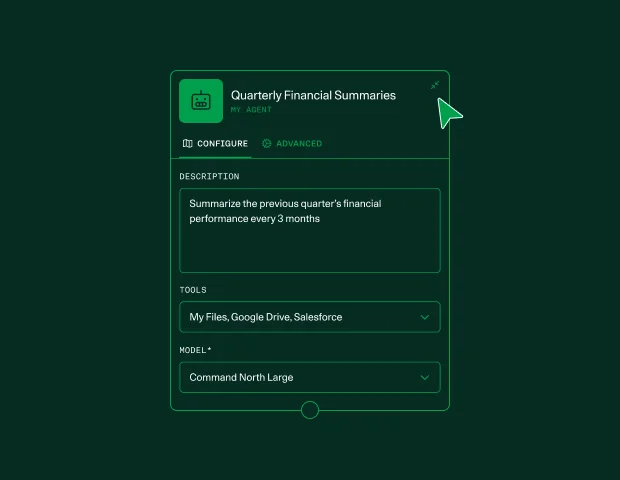
Automations are not new to North 2. North Automations shipped in July 2026 with scheduled runs, loops and branching, a plan mode to review the approach before building, versioning, and approval steps that loop in colleagues. Approval steps are the same idea as a human handoff in support. You can also choose the model at each step, which is the kind of detail that matters once a workflow runs a thousand times a month. North 2 folds that into the new harness and adds pre-built templates.
Integrations come in three ways, per Cohere: "first-party integrations, your MCP for any custom tool, or our SDK". If you have read about MCP for customer support, the MCP route is the escape hatch for any tool without a native connector.
Memory, skills, libraries and apps
Memory is the feature most coverage led with, and for daily users it is the one they will notice. Every chat-style assistant has a "starting cold" problem, the same one that makes internal answer search so frustrating, where you re-explain your role, your project and your preferences every session. North 2 agents now carry that context forward.
Skills and libraries are the organizational version of the same idea. A skill is a reusable capability any agent can call. A library is shared knowledge, closer to a company-wide AI knowledge base than to a personal chat history.
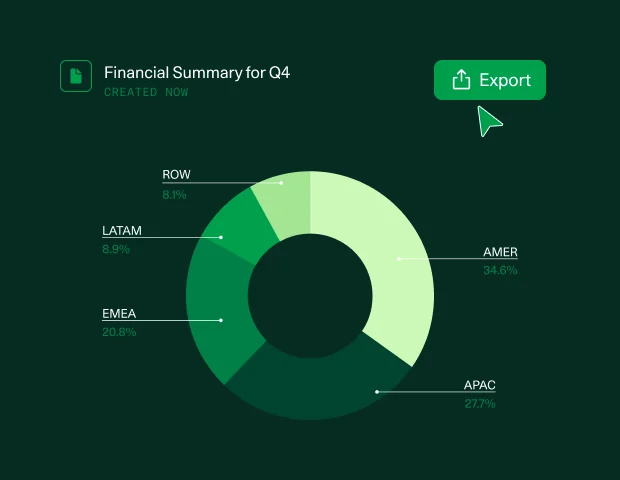
Applications let you prototype decks, dashboards, documents and small apps straight from chat. That puts North in the same lane as the artifact and canvas features in ChatGPT Enterprise and in Claude's paid plans, with the difference that the output stays inside your own deployment.
Connectors
The new connector list is Slack, SharePoint, OneDrive, Microsoft Outlook, Microsoft Exchange, Jira, Linear, Notion and GitHub. Cohere also says connectors to financial data providers are planned: PitchBook, Crunchbase, Daloopa, FiscalAI, S&P Global and FactSet.
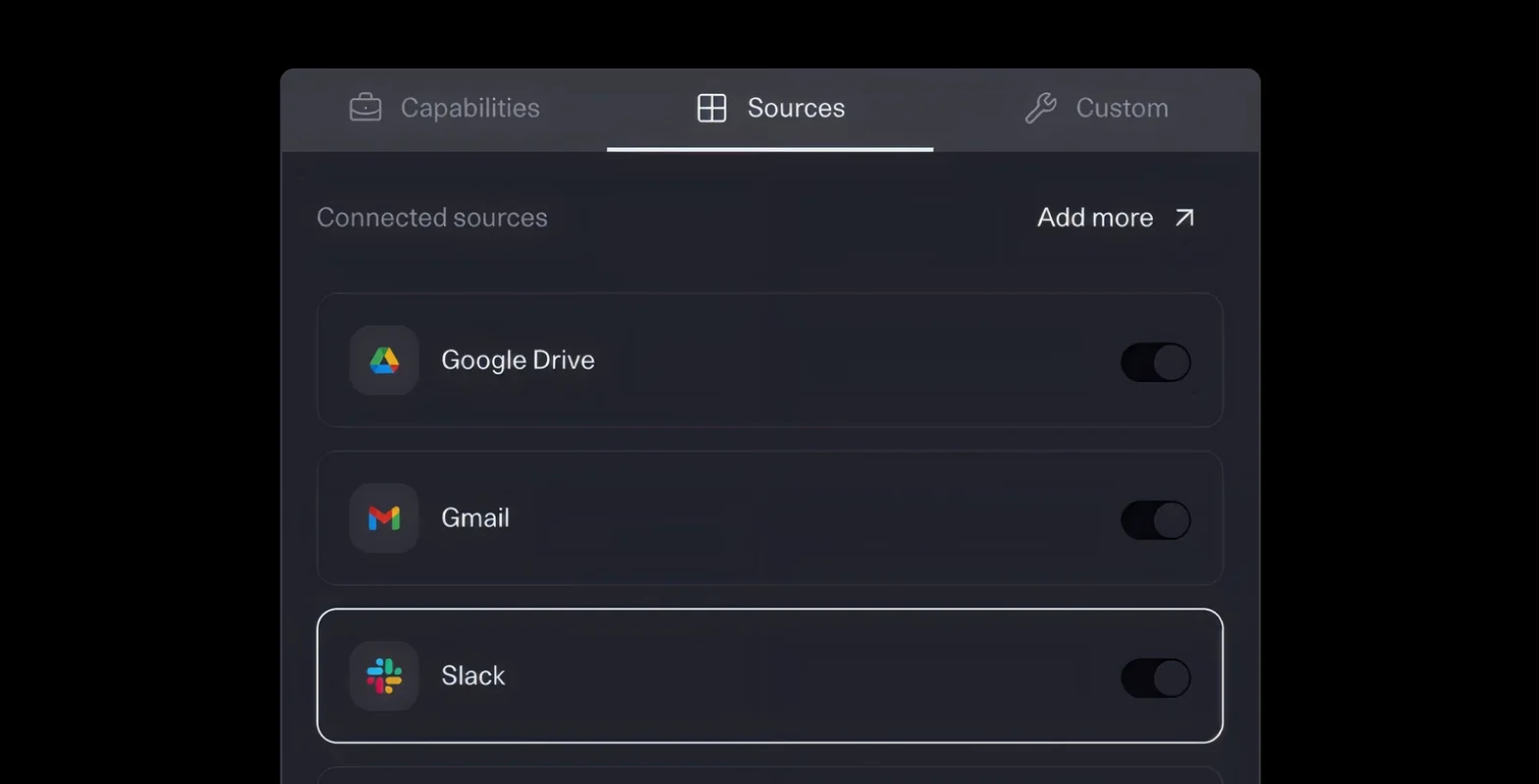
What is not on the list says a lot about who North is for. None of Cohere's public pages name a connector for Freshdesk, Zendesk, ServiceNow or Salesforce Service Cloud. The connectors are about employee knowledge and engineering work, plus finance data. Helpdesks would go through MCP or the SDK, and so would Jira Service Management as a service desk rather than plain Jira.
North Admin: the real headline
North Admin is the feature I'd put at the top of the release notes. Admins can set roles and permissions, decide which models get used where and by whom, and watch token spend in real time down to the user and agent level. Cohere describes "flow control" as defining "consumption tiers based on requests and token rates for users and groups".
Concretely, North 2 adds:
- Rate limits on requests and tokens.
- User quotas so one heavy user cannot eat the month's budget.
- Org-wide caps as a hard ceiling for the whole company.
- Alert thresholds that notify teams before a limit is hit.
- Model access rules, so the expensive model only goes to the teams that need it.
Why does this matter more than memory? Because the thing that kills internal AI rollouts is rarely the demo. It is the first invoice. A workforce of 5,000 people with access to frontier models and long-running agents can produce a token bill nobody forecast, and most finance teams respond by shutting access down. Cohere says plainly that "the one you could govern became too expensive to run at scale", and North Admin is its answer.
I have seen the same pattern from the support side. Every eesel rollout gets simulated against hundreds of past tickets before going live, and the eesel pricing page has an overage that is off by default for the same reason: nobody should find out what an AI agent costs from a surprise bill. The difference is scope. eesel caps one teammate's work. North Admin has to cap an entire company's.
Cohere also pairs this with a hardware claim: with NVIDIA Blackwell and Hopper, North "generates more insights, for fewer tokens" on Cohere models. NVIDIA's Kari Briski is quoted saying the chips help "North 2.0 deliver more tokens for less". There are no published numbers behind that, so I'd treat it as a direction, not a figure to budget against.
Where does North 2 run?
North 2 deploys "self-hosted, VPC, hybrid, or on-premises", and fully air-gapped. The detail that surprised me sits on Cohere's deployment options page: the multi-tenant SaaS option is "available for model deployments only". In other words, North has no sign-up-and-go cloud version.
| Option | What it means | North available? |
|---|---|---|
| Private | Your own data center or isolated VPC, including air-gapped | Yes |
| Public or hybrid cloud | Your cloud account (AWS, Azure, Google Cloud, OCI) | Yes |
| Model Vault | Dedicated, logically isolated, Cohere-managed inference | Yes, runs North's models |
| SaaS | Cohere's shared hosted API | No, models only |
With Model Vault, Cohere's Model Vault with North docs describe a split: you run the North application and control plane (agents, tools, orchestration and data) in your own environment, and point North at vault endpoints for inference that Cohere manages.
On security, the launch post lists SOC 2 Type 2, ISO 27001 and ISO 42001 certifications, plus guardrails, red-teaming and change logs. Cohere's security page adds that customers can opt out of model training at any time and that "we won't have access to your computing infrastructure or data" in private deployments. Neither page mentions HIPAA.
For a bank, a defense contractor or a government department, this is the whole point. Bell Cyber's CTO, Jawed Ahmad, is quoted in the launch saying North lets them bring agents into security operations "with the control, privacy, and sovereignty requirements our customers demand built in from the start". For a 40-person SaaS company, it means a platform team you may not have.
How much does Cohere North 2 cost?
Cohere does not publish a price. The Cohere pricing page says, for both North and Compass: "Get in touch for custom enterprise pricing." There is no free plan, no self-serve trial, and no per-seat figure. Buyers have been asking since the first North launch, with no public answer:
"Any idea what the pricing is like for this platform? Looks cool."

What you can price is the layer underneath. Since North runs in your environment or on Model Vault, the real cost is the North license plus inference and infrastructure:
| Cost line | Published price | Source |
|---|---|---|
| North / North 2 license | Custom, contact sales | Cohere pricing |
| Model Vault, Embed 5 Small instance | $3 per hour or $2,000 per month | Cohere pricing |
| Model Vault, largest listed instance (Rerank 4 Pro Large) | $10 per hour or $6,500 per month | Cohere pricing |
| Command A+ (open weights) | $0 via API or download, Apache 2.0 | Cohere pricing |
| Embed 5 Pro / Fast | $0.12 / $0.08 per 1M tokens | Cohere pricing |
| Rerank 4 Pro / Fast | $2.50 / $2.00 per 1,000 searches | Cohere pricing |
| Your own GPUs or cloud compute (private deployment) | Whatever you already pay | Your cloud bill |
Two things to watch. First, no generative model appears in the Model Vault price table, so the hourly figures above cover embedding and reranking instances, not the chat model your agents will lean on. Ask for the generative instance price in writing. Second, the free Command A+ is free to license, not free to run: Cohere's own docs say it needs one B200 or two H100 GPUs, and that hardware is yours to provision.
My Cohere pricing guide breaks down the model rates in more detail, and my Embed 5 breakdown covers the newest retrieval models North can use.
What North looks like in a real support team
The most concrete public North deployment is in customer support, which is why I spent the most time on it. In February 2026, Cohere published how CoreWeave used North to rework its support process in 90 days.
Before North, CoreWeave's support engineers pieced together context for each new ticket by hand, chased customers for missing details, then filed requests through a separate Freshdesk portal that sent them back to Slack for troubleshooting. Ivy DeWitt, Senior Manager of Customer Support Engineering, called it "clunky and slow". After North, the flow looks like this:
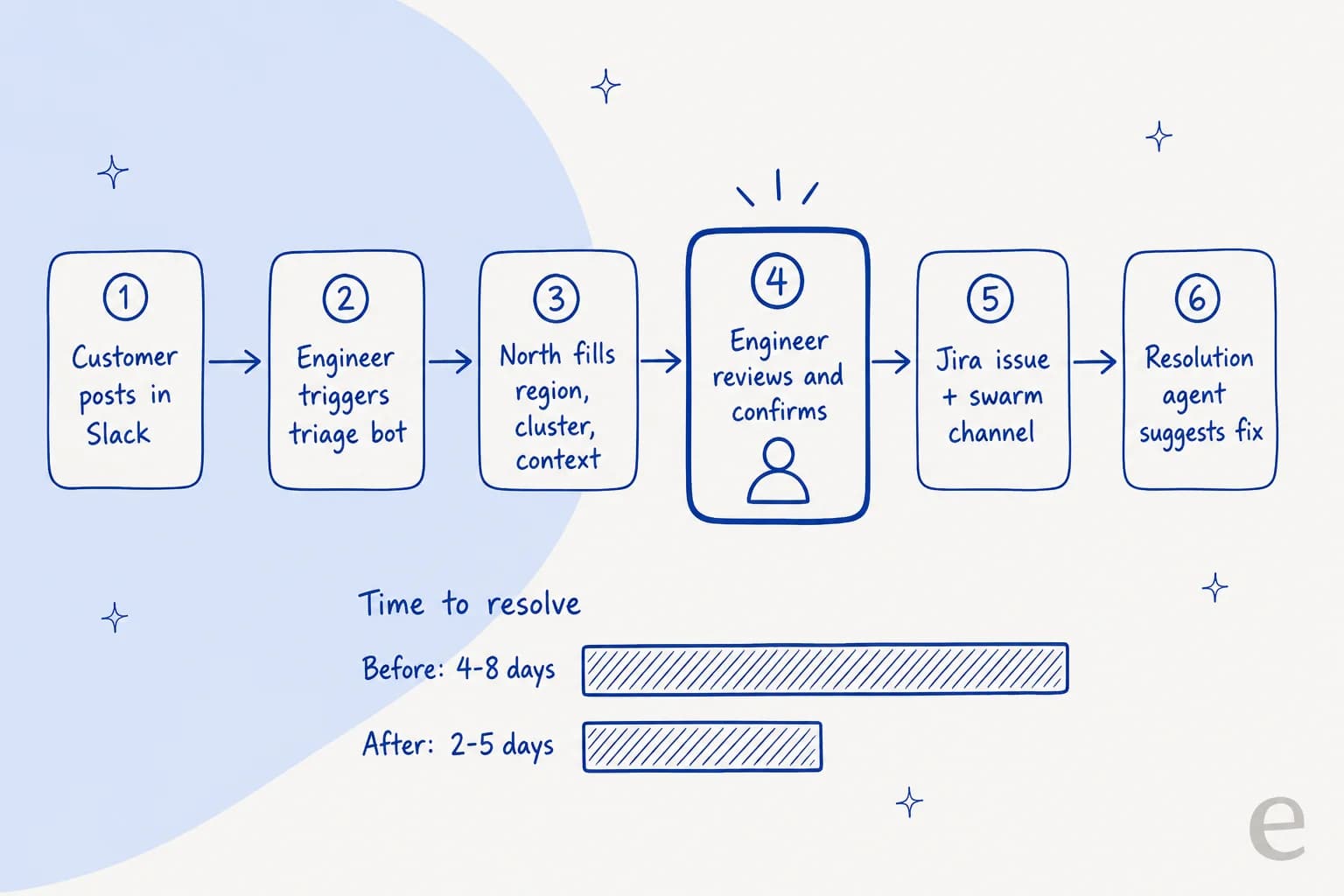
The results Cohere reports:
- Mean time to resolution fell from 4-8 days to 2-5 days, which Cohere credits to "improved internal procedures coupled with North automation".
- CSAT held at 4.9 to 5.0 for the vast majority of tickets after the first few months.
- Routing accuracy went up, though no number is published.
- Change management and training took a single business week.
It is a good result, and it is honest about how it got there. Look at step 4: a support engineer reviews and confirms every ticket before it moves, and step 5 is a classic escalation into engineering. North is a triage and research assistant for the team, not an agent that talks to customers. The project also started with a two-day on-site and ran with Cohere's solutions architects. Matthew Koscak, the Cohere solutions architect on the project, credits buy-in "from the right stakeholders from start to finish" as the key to success.
That is the right design for CoreWeave. Its customers are AI labs whose problems need a senior engineer anyway, and an hour of downtime is expensive. But it shows what North is: a platform you build a support workflow on, with help, over a quarter, closer to a no-code agent builder for the whole company than a finished support product. If you are looking at AI ticket triage for a more typical queue, that is a lot of project for the job. A Freshdesk triage agent gets you most of steps 2 to 6 without the build.
The same goes for teams that run support out of Slack, like CoreWeave does. A ready-made Slack support bot covers the triage-and-research half of that workflow on day one.
How does North 2 compare with other enterprise AI workspaces?
North 2 lands in a crowded category: Microsoft 365 Copilot, ChatGPT Enterprise, Gemini Enterprise and Claude Enterprise all sell an AI workspace with agents to the same buyers. Here is how they line up on the things North 2 is pitching:
| Cohere North 2 | ChatGPT Enterprise | Microsoft 365 Copilot | Gemini Enterprise | Claude Enterprise | |
|---|---|---|---|---|---|
| Public price | Custom, contact sales | Contact sales (OpenAI) | $30/user/mo, annual, plus an eligible M365 plan (Microsoft) | Business from $21/seat, Standard from $30/seat (Google Cloud) | $20/seat/mo annual plus usage at API rates (Claude) |
| On-prem or air-gapped | Yes | No | No | No | No |
| Bring outside models | Yes | No, OpenAI models | Partly, Foundry models in Copilot Studio | Bring your own agents (Standard/Plus) | No, Claude only |
| Admin spend controls | Quotas, rate limits, org caps, alerts | Analytics and agent controls | Copilot Credits packs and meter | Spending thresholds | User and org spend limits |
| Memory | Yes, cross-session | Not published for Enterprise | Yes, Copilot Memory | Yes, admin can disable | Yes |
| ISO 42001 | Yes | Not published | Not on pricing pages | Not in main list | Yes |
The pattern is clear. Everyone else wins on time-to-value: you can turn on Copilot or Claude for a team this afternoon, and Copilot's pricing is on a public page. North wins on where it runs and which models it runs. If "can this run inside our data center, on our choice of model" is a yes-or-no question for your security team, North 2 is one of very few products that answers yes.
For a wider look at the category, see my roundup of the best AI agents. If you mainly want a chat assistant, my enterprise AI chatbot guide is the shorter read.
What are people saying about North 2?
North 2 is two days old, so there are no long-term user reviews yet, and North has no G2 or Capterra presence to speak of. What exists is launch-week reaction on X, and it lines up with my read: people noticed the cost controls first.
Cohere's own launch post on X framed the release around "15+ new features" and the end of compromise:
"Enterprises have been compromising on agentic AI for years: platforms that aren't scalable, models that aren't sovereign, control without enterprise-grade security."
The sharpest independent take asked the question I'd ask in a sales call:
"best bit imo is token spend tracked per user and per agent, plus org caps
@cohere what happens when an agent hits its cap mid task?"
That is the right worry. A hard cap that stops a half-finished multi-step agent can leave a workflow in a broken state, and Cohere's public pages do not say what happens at the limit. If you are evaluating North 2, make that one of your first demo questions, along with whether the alert thresholds can pause a run before the cap hits.
Another reply zoomed out to the category:
"Enterprise agents are converging on the same primitives: memory, skills, shared libraries, autonomy policies, private deployment. Cohere North 2 bundles all of them."
I agree with the convergence point. Memory, skills and spend controls are table stakes now, as the comparison table above shows. What North 2 actually sells is the last item on that list: private deployment, on a model you choose.
Who should pick Cohere North 2?
After going through the launch, the docs and the one detailed customer story, my read is simple: North 2 is a platform for a company-wide AI program, not a tool for one team's problem.
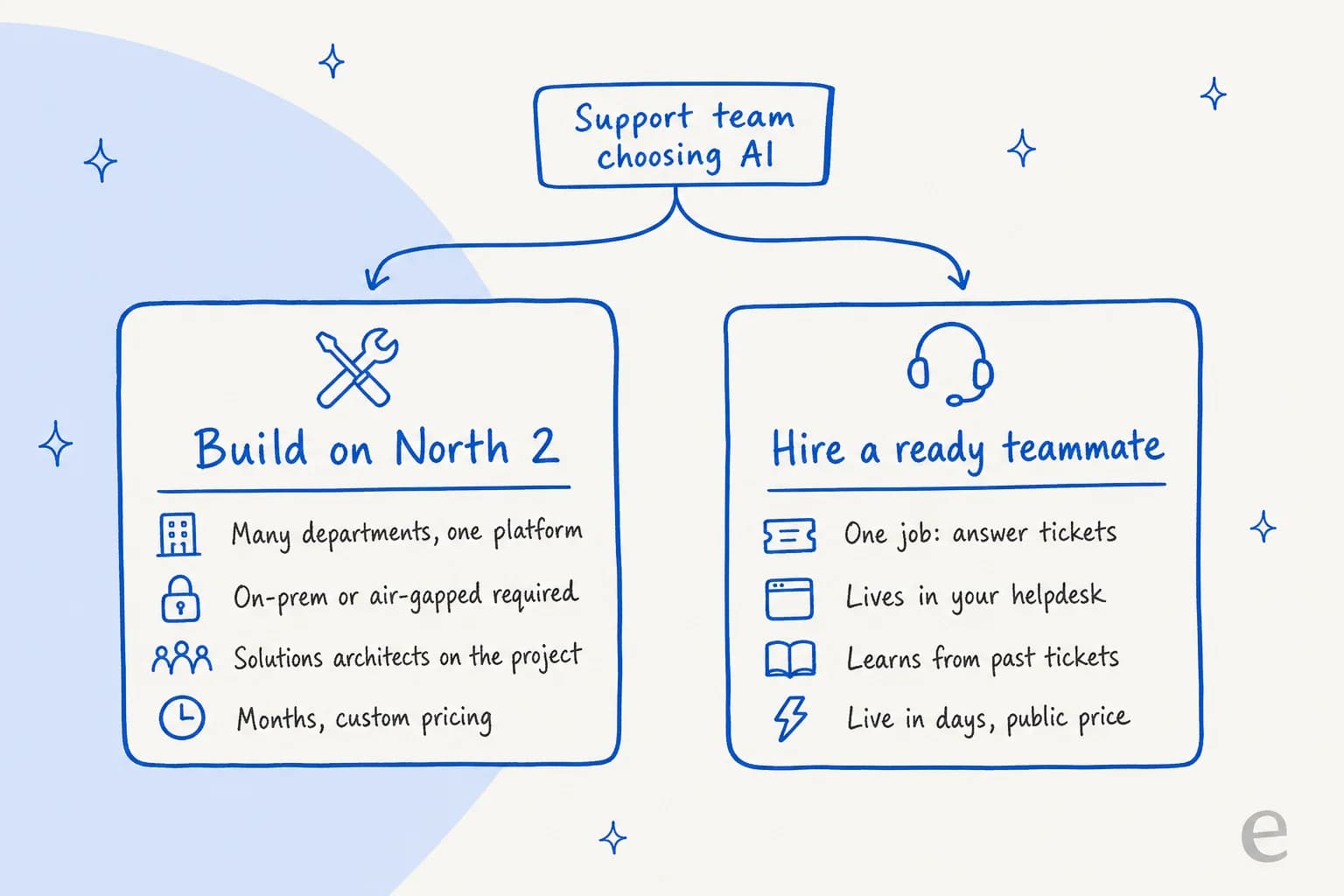
Pick North 2 if:
- Your security or regulatory team requires on-prem, VPC or air-gapped deployment, or data sovereignty in a specific country.
- You want agents across legal, finance, sales and operations on one platform, with one admin console capping spend for all of them.
- You want to mix Cohere's models with your own, and choose per workflow.
- You have a platform team, or budget for Cohere's solutions architects, to build the workflows.
Skip North 2 if:
- You need one specific job done, like answering tickets or drafting replies, and you want it live this month.
- Your stack already lives in Microsoft 365 or Google Workspace and the cloud is fine for your data. Copilot or Gemini Enterprise will be faster to roll out.
- You need a published price to get budget approved.
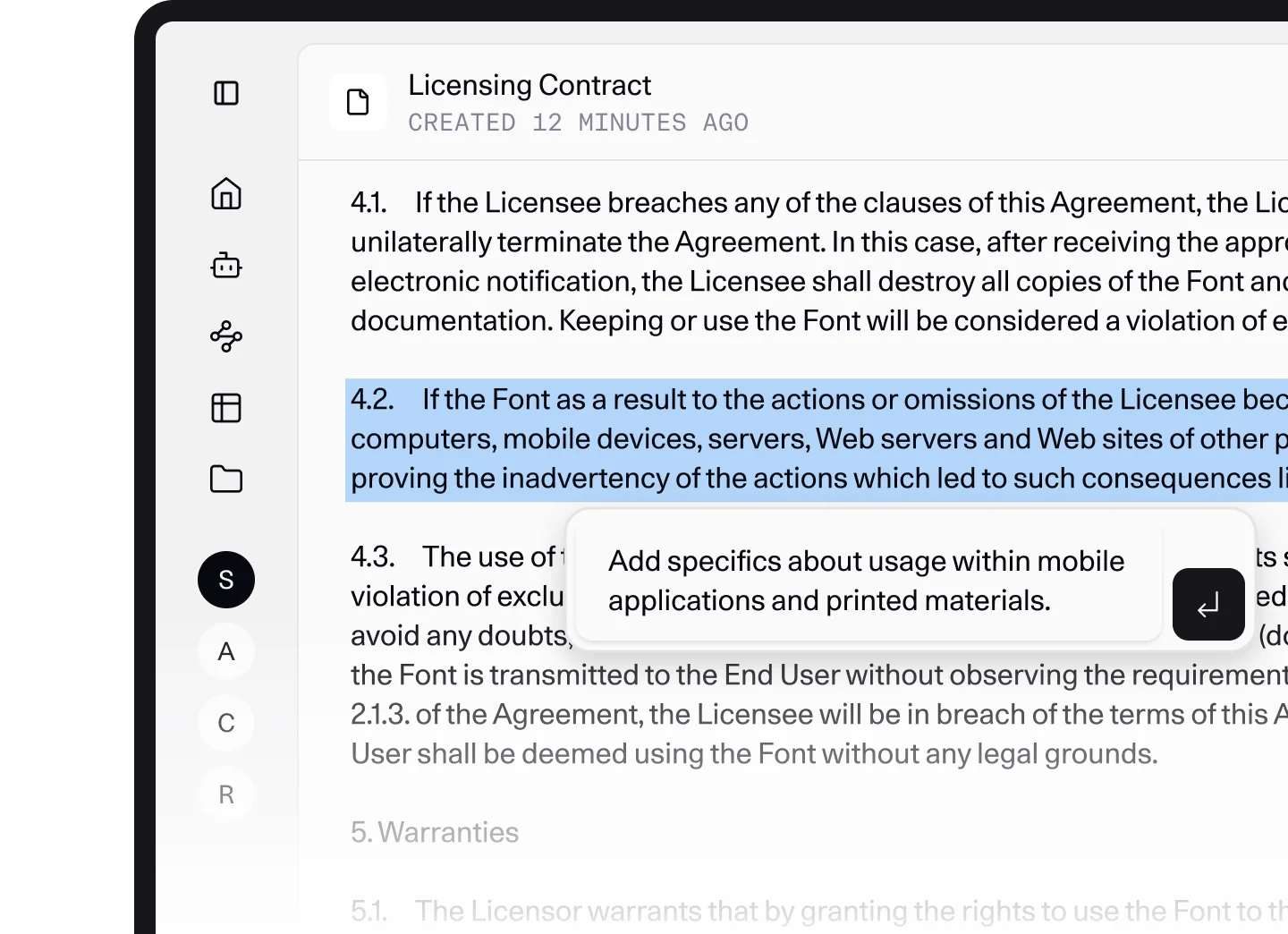
North's legal tab shows the sweet spot well: contract review and redlining inside a private workspace, where the documents should never leave the building.
eesel for support teams weighing North 2
If you read the CoreWeave story and thought "I want that, minus the quarter-long build", that is the gap eesel is made for. eesel is an AI teammate platform, and the AI helpdesk teammate is the one that does CoreWeave's steps 2 to 6 for a normal support queue: it joins Freshdesk, Zendesk, Slack or Jira Service Management, learns from your past tickets and help center, and triages, tags, drafts or answers within the rules you set.
The setup is the opposite of a platform project. You connect the helpdesk, and before anything reaches a customer, eesel simulates its answers against hundreds of your past tickets so you can see what it would have said. One eesel customer, Karel at GENERAL BYTES, put the build-versus-hire choice better than I can:
"We could try to write our own LLM application but we didn't want to invest our time into that. We wanted something that we would not have to maintain."
Pricing is public: a free plan with 100 credits, then 500 credits for $299 a month, where one ticket or chat is one credit, up to 5,000 credits for $1,749. Overage is off by default, so the spend cap North Admin gives a whole enterprise is built in for your support team from day one. If you prefer the terminal, the eesel CLI runs the same teammate from scripts or from coding agents like Claude Code, including approving or denying the actions it queues for a human.

North 2 is a serious platform for a company that wants to own its whole AI stack. For a support team that wants tickets handled well this month, try eesel on your own helpdesk first. It is free to start.
Frequently Asked Questions
What is Cohere North 2?
Cohere North 2 is the October 2026 version of Cohere's enterprise agent platform. It adds cross-session memory, skills, shared libraries, app creation in chat, a rebuilt agent harness, and North Admin controls for token spend, quotas and caps. It runs in your own cloud, on-prem, or air-gapped.
How much does Cohere North 2 cost?
Cohere does not publish a price for North 2. The pricing page says "Get in touch for custom enterprise pricing". Because North runs in your environment or on Model Vault, budget for infrastructure too. Model Vault instances are listed at $3 to $10 an hour. See my Cohere pricing guide for model rates.
Is Cohere North 2 available as SaaS?
No. Cohere's deployment page lists its SaaS option as "available for model deployments only". North runs in a private deployment, a public or hybrid cloud you control, or Cohere's dedicated Model Vault. That is a strength for regulated teams and extra setup for everyone else, unlike ChatGPT Enterprise.
What models does Cohere North 2 support?
North 2 is model agnostic. You can use Cohere's own models, such as the free open-weight Command A+, or bring your own external LLMs, and North Automations lets you pick a model per step. My Cohere review covers the Command family in more depth.
Can Cohere North 2 be used for customer support?
Yes, but as an internal tool. In Cohere's CoreWeave story, North triages and researches tickets inside Slack while an engineer confirms every ticket. It does not list helpdesk connectors like Freshdesk or Zendesk. If you want an agent that answers inside your helpdesk, an AI helpdesk teammate like eesel is the shorter path.
How does Cohere North 2 compare with Microsoft Copilot and ChatGPT Enterprise?
North 2 is the only one of the group that runs on-prem or air-gapped and lets you bring outside models. Microsoft 365 Copilot lists a public $30 per user price, and ChatGPT Enterprise and North are both sales-led. Copilot, Gemini Enterprise and Claude Enterprise all run in the vendor's cloud.
What are North Admin cost controls in Cohere North 2?
North Admin lets admins set roles, choose which models each group can use, and define consumption tiers by request and token rate for users and groups. It adds rate limits, user quotas, org-wide caps, and alert thresholds that fire before a limit hits. It is the same idea as a spend cap on eesel's pricing, applied to a whole workforce.
Does Cohere North 2 have memory?
Yes. Memory is the headline North 2 feature: agents keep context across sessions instead of starting cold each time. It sits next to skills (reusable capabilities) and libraries (shared knowledge), which work a lot like a shared AI knowledge base for the whole company.


Article by
Kira
Kira is a writer at eesel AI with a Computer Science background and over a year of hands-on experience evaluating AI-powered customer service tools. She focuses on breaking down how helpdesk platforms and AI agents actually work so that support teams can make better buying decisions.