


What Cohere Parse 5 actually is
Parse is Cohere's entry into enterprise document intelligence. The product one-liner is "turn your enterprise documents into AI-ready data," and mechanically that means it converts complex, multimodal files (tables, forms, diagrams, embedded images) into structured, machine-readable Markdown you can feed into indexing, retrieval, and agent workflows.
The specifics matter here, because "vision language model for documents" covers a lot of ground. Per the model docs, parse-v5.0 is a 2.3B-parameter model, roughly 4.6GB, with an 8,192-token context, built on Cohere's north-micro-vision-instruct architecture. That is a deliberately small model. Cohere is upfront that the frontier LLMs it gets compared against are "each general purpose and significantly larger than Parse." Small is the point: it is what makes the price and the throughput work.
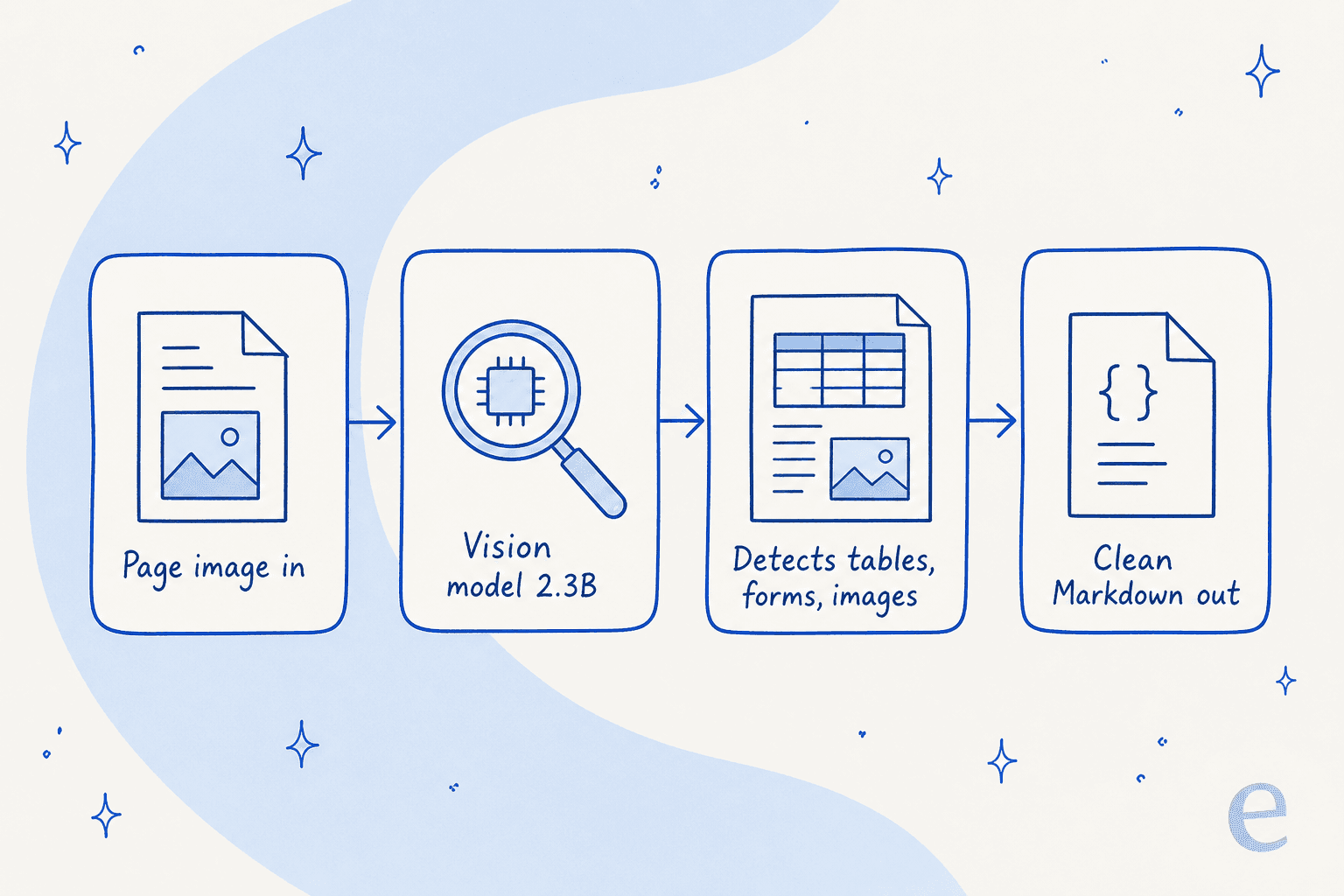
The flow is simple. You give it a page image, it detects the visual structure, and it returns clean Markdown with tables inlined as HTML and bounding boxes for the visual elements.
The benchmark: strong, just not the top
Cohere built its own benchmark, ParseBench, to measure "agent-suitable parsing performance" across three dimensions: table extraction, content faithfulness (omissions, hallucinations, broken reading order), and semantic formatting (styles that change meaning, like strike-throughs).
Parse lands at 79.2 on the three-dimension average, and the shape of that score is interesting. It is genuinely strong on tables (87.0) and content faithfulness (86.6), and weaker on semantic formatting (64.0). So it reads and structures your content reliably, but it is less careful about preserving nuances like italics or strike-throughs that occasionally change what the text means.
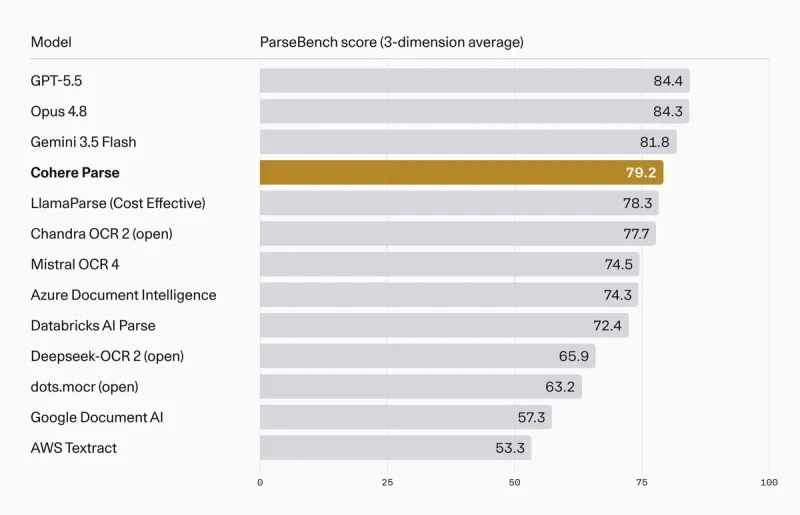
Read the chart honestly and two things are true at once. Parse is beaten by the three frontier models: GPT-5.5 (84.4), Opus 4.8 (84.3), and Gemini 3.5 Flash (81.8). And Parse beats every dedicated parser Cohere tested, including LlamaParse's cost-effective tier (78.3), Chandra OCR 2 (77.7), Mistral OCR 4 (74.5), and Databricks AI Parse (72.4). Against the old-guard cloud OCR services, it is not close: Cohere reports an over-20-point improvement on both AWS Textract (53.3) and Google Document AI (57.3).
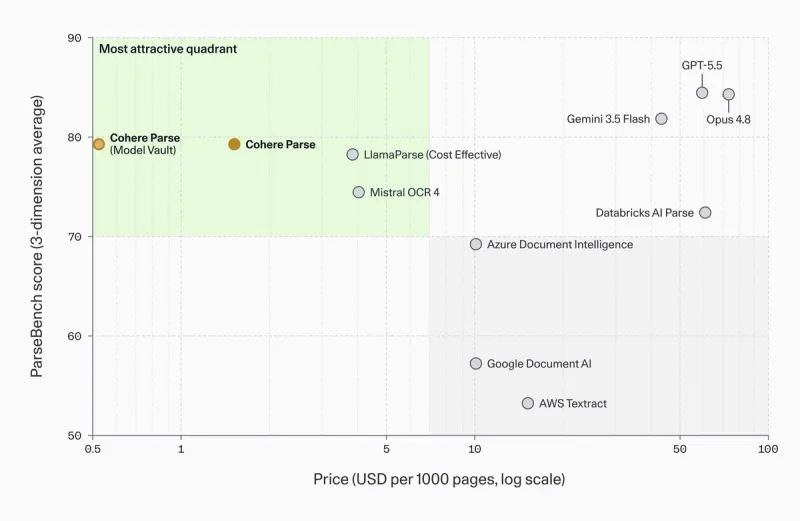
One caveat worth naming: this is the vendor's own benchmark, and the model it is selling wins the price-adjusted framing. That does not make the numbers wrong, but it is why the more useful chart is the next one, where accuracy is plotted against cost.
Throughput and price: where Parse actually wins
This is the whole argument for Parse, so it is worth slowing down on.
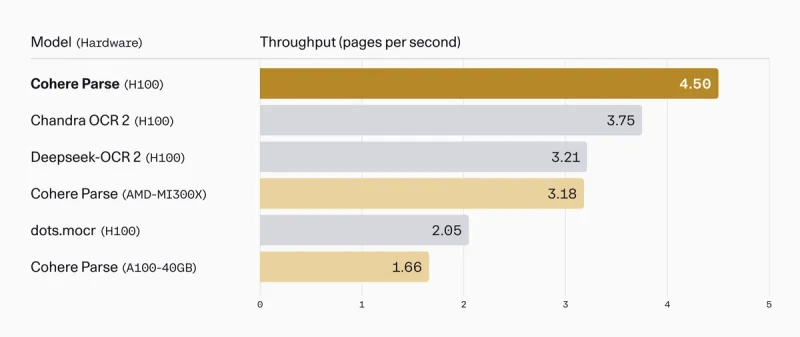
On price, the Cohere API charges $1.50 per 1,000 pages. On throughput, the model processes 4.5 pages per second, which Cohere reports as 36 pages per second (2,160 pages per minute) on an 8×H100 node, roughly 1.4x the throughput of RedNote's dots.mocr and 2.2x that of Chandra OCR 2 on the same hardware, all served on vLLM.
Put the accuracy and the price on the same axes and Parse's real position pops out. On the ParseBench pareto chart, it sits in the cheap, high-scoring quadrant, while the frontier LLMs deliver a few more points of accuracy at 30x to 50x the cost per page.
The savings get more concrete at volume. Cohere's worked example: an accounts-payable workflow processing about 13 million pages a month on Model Vault instead of the API saves roughly $12,000 a month, or $144,000 a year. Against a hyperscaler parser priced at $10 per 1,000 pages, that same single workflow would save about $1.47 million annually. Those are the kinds of numbers that get a parsing decision escalated to finance, and they are the reason Parse exists.
Cohere Parse 5 pricing in full
Parse is sold through several routes, and the cheapest one depends on how steadily you run it. Here is the full picture.
| Access route | What you get | Price |
|---|---|---|
| Cohere API | Managed endpoint, pay per page, no infra | $1.50 per 1,000 pages |
| Model Vault (50% GPU utilization) | Single-tenant hourly instance | ~23% below API |
| Model Vault (full utilization) | Single-tenant hourly instance | up to 61% below API |
| Microsoft Foundry | Model Cohere-parse-v5 in Azure | Azure instance pricing |
| Amazon SageMaker | Marketplace deployment | AWS instance pricing |
| Hugging Face Space | Free demo to try it | Free |
The read here: the API is the right choice for spiky or low-volume work, because you pay only for the pages you send. Model Vault wins once you have steady, high volume to keep the instances busy, which is exactly the accounts-payable-scale workload Parse is built for. If your volume is lumpy, do the math before committing to a dedicated instance, because idle GPU time erases the per-page savings fast.
For how this sits inside Cohere's wider catalog and plans, our Cohere AI pricing breakdown covers the Command, Embed, and Rerank rates alongside it.
What it extracts, and what it skips
A parser is defined as much by what it leaves out as what it captures, and Parse has some sharp edges you should know before you build on it.
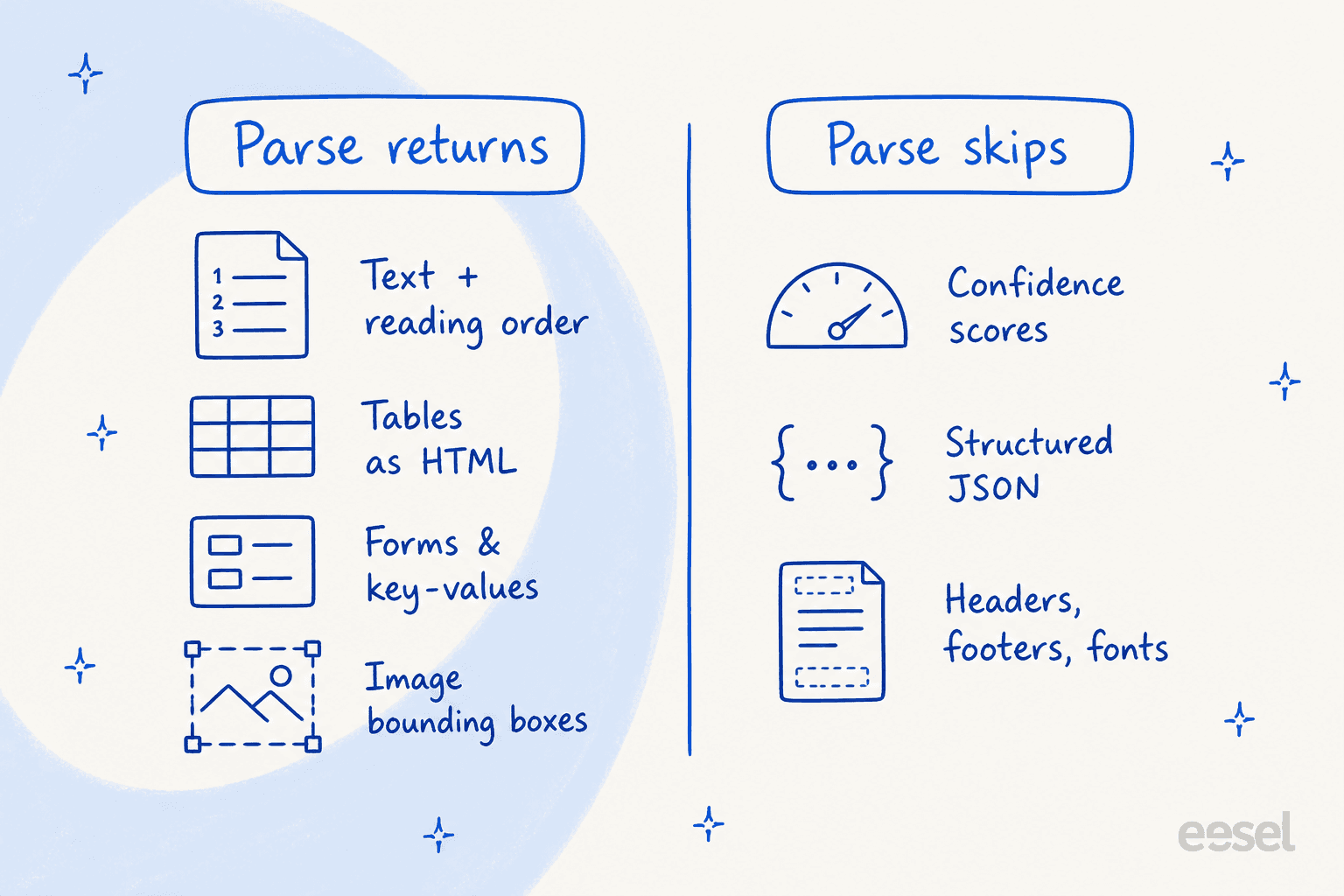
On the plus side, Parse returns text with correct reading order, tables as HTML, forms and key-value pairs, and image descriptions with bounding boxes. That is a solid feature set for feeding a knowledge base or an AI knowledge base chatbot.
The limits, straight from the docs, are where you need to pay attention:
- No confidence scores. You cannot ask Parse how sure it is about a given extraction, which makes automated quality gating harder. In an accounts-payable or claims flow, that is a real gap.
- Markdown only, no structured JSON. If your pipeline wants typed fields out of the box, you are post-processing the Markdown yourself.
- No header, footer, or font hierarchy detection. It reads the content but does not tag document furniture or heading levels.
- Bounding boxes for tables and images only. Per footnote 2 of the launch, Parse does not emit per-element boxes for text. Cohere frames this as an intentional reading-order choice, not a bug, and for most RAG use cases it does not matter, but if you need word-level coordinates, look elsewhere.
None of these are deal-breakers for the ingestion use case Parse targets. They are deal-breakers if you were hoping to drop Parse into a structured document-extraction product that needs typed fields and confidence gating. Match the tool to the job.
Calling the API (and the one gotcha)
The developer experience is clean. You install the SDK, create a client, and call co.parse on the Cohere v2 API.
The minimal call from the quickstart is about as simple as parsing gets:
import base64, cohere

co = cohere.ClientV2("COHERE_API_KEY")

with open("document.png", "rb") as f:
    b64 = base64.b64encode(f.read()).decode("utf-8")
data_uri = f"data:image/png;base64,{b64}"

response = co.parse(
    model="parse-v5.0",
    document={"type": "image_url", "image_url": data_uri},
)

for page in response.pages:
    print(page.markdown.content)
Here is the gotcha, and it is a big one for anyone planning a build today. The docs list PDF, PPT, and JPEG as supported types, but the API reference is explicit that the endpoint currently supports document.type = image_url only, meaning a data URI or a remote image URL. Direct PDF and file-URL inputs are not yet supported. So in practice you rasterize your PDF pages to images first, then send them one at a time. The image limits are generous (20MB file size, 50 megapixels), and you can switch output_format to blocks when you want the ordered array of text, table, and image regions with their bounding boxes instead of flat Markdown.
Language coverage is nine input languages stable today: Arabic, English, French, German, Japanese, Korean, Italian, Portuguese, and Spanish, with zero-shot support for others at lower accuracy.
Where Parse fits: it's step one, not the whole pipeline
This is the part most launch coverage glosses over. Parse turns documents into clean text. It does not embed them, retrieve them, or answer anything. It is the front door of a retrieval pipeline, not the pipeline.
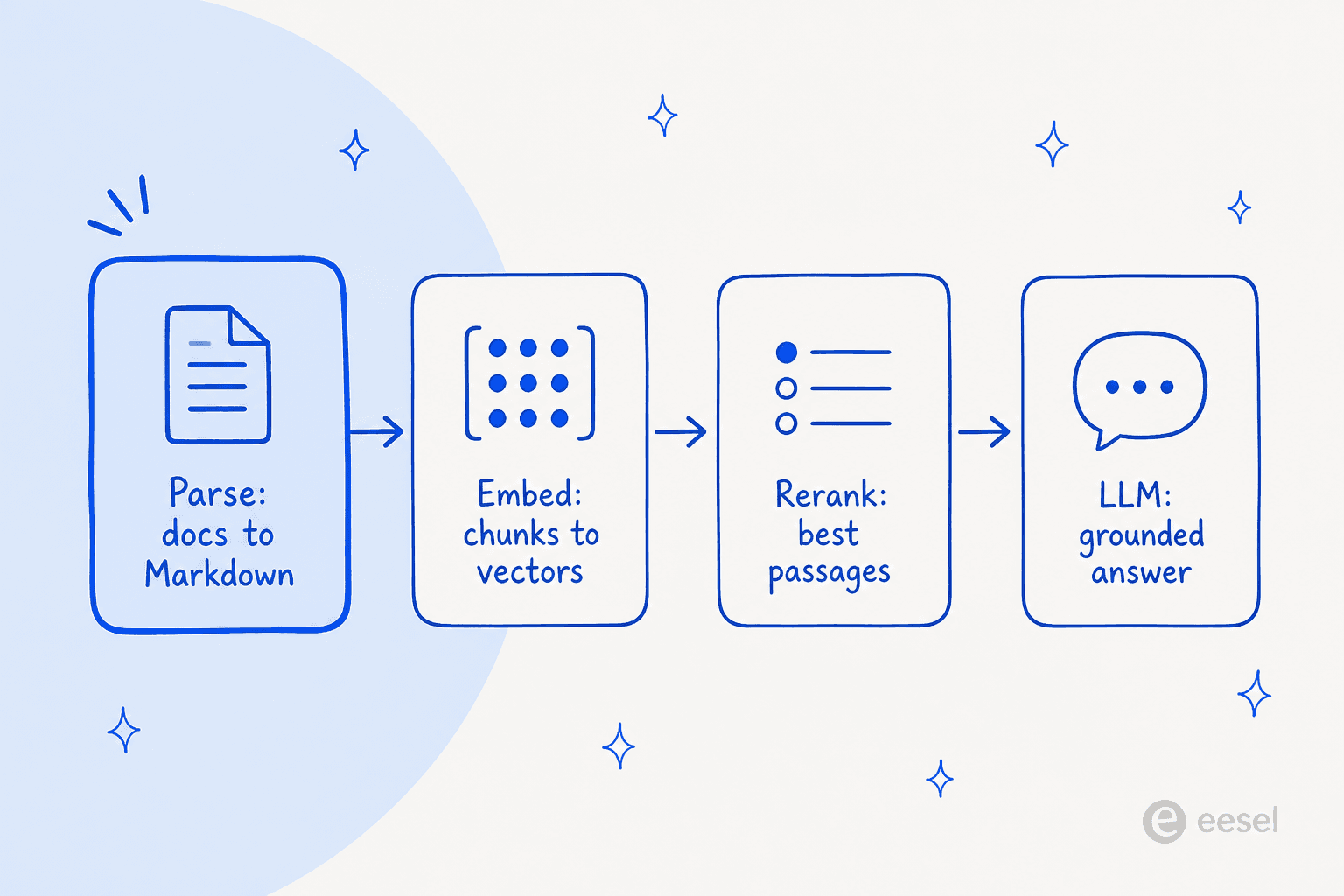
Cohere knows this, which is why Parse ships as a component of Compass, its document-intelligence and search stack, alongside Embed and Rerank. If you are already all-in on Cohere, that integrated path is genuinely convenient. If you are not, it is worth weighing Cohere alternatives before you standardize on one stack.
The one credible outside voice I could find on the launch made the same point about parsing being harder than it looks. Enterprise-tech journalist Sean Kerner put it well:
"Text, document parsing should be a solved problem at this point right? But it's not.. every few weeks there is another option that claims to make it better. This week it's @cohere Parse 5."
That skepticism is fair. Parse 5 is a good release, but it is one strong parser in a churning field, and it solves exactly one link in a chain that has four or five links. If your actual goal is answering questions from your documents, choosing a parser is the start of the project, not the finish.
Who should actually use Cohere Parse 5
After going through it, here is where I land.
Reach for Parse 5 if you are ingesting large volumes of enterprise documents (think hundreds of thousands to millions of pages) into a RAG or knowledge management system, you care about predictable per-page cost, and "close to frontier accuracy at a fraction of the price" is the trade you want. The Model Vault and on-prem story also makes it a strong pick for regulated industries that cannot send documents to a public API.
Skip it, for now, if you need direct PDF ingestion today, structured JSON output, per-field confidence scores, or the last few points of formatting accuracy that only a frontier model buys. And skip it if what you actually wanted was answers, not clean text, because a parser alone does not get you there.
eesel: when you want answers, not just parsed text
If you got to Parse 5 because you want an AI to actually answer questions from your company's documents (support tickets, help articles, internal wikis), it is worth naming what the parser does not do. Parse gives you clean Markdown. You still have to build the embedding, retrieval, ranking, and answering layers on top, and then keep them accurate as your content changes.
eesel is the ready-to-work version of that whole pipeline. Instead of infrastructure you assemble, it is an AI helpdesk teammate you hire: it connects to your help center, past tickets, and tools like Zendesk or Confluence, learns your company's context, and answers real customer and employee questions. It is one of the best AI helpdesk options precisely because the whole pipeline is handled for you. Parse 5 is a building block; eesel is the finished job.

The part I would flex, because it is the thing I wish every parsing-first pipeline had: eesel lets you simulate a rollout against your own historical tickets before it ever answers a live customer, so you see the real resolution rate and the exact answers on your actual content, not a demo. That is the difference between shipping a parser and shipping something you trust. You can try eesel free.
Frequently Asked Questions
What is Cohere Parse 5?
parse-v5.0) is a 2.3B-parameter vision model that converts document pages into clean, machine-readable Markdown for search, RAG, and AI agents. It went generally available on August 27, 2026 and is positioned on price-performance rather than top-of-table accuracy.