


Why look past Cohere Parse 5 at all?
Let me be fair to Parse first, because it is a genuinely good release. Cohere shipped it on August 27, 2026 as "a high-throughput vision parsing model with the strongest price-performance profile on the market," and the numbers back that framing. It processes 4.5 pages per second, returns clean Markdown that drops straight into a RAG pipeline, and costs a flat $1.50 per 1,000 pages. If you are ingesting hundreds of thousands of pages a month, that price-performance story is hard to argue with. I went deep on all of this in our full Cohere Parse 5 review.
So why does anyone shop around? Three real reasons come up again and again.
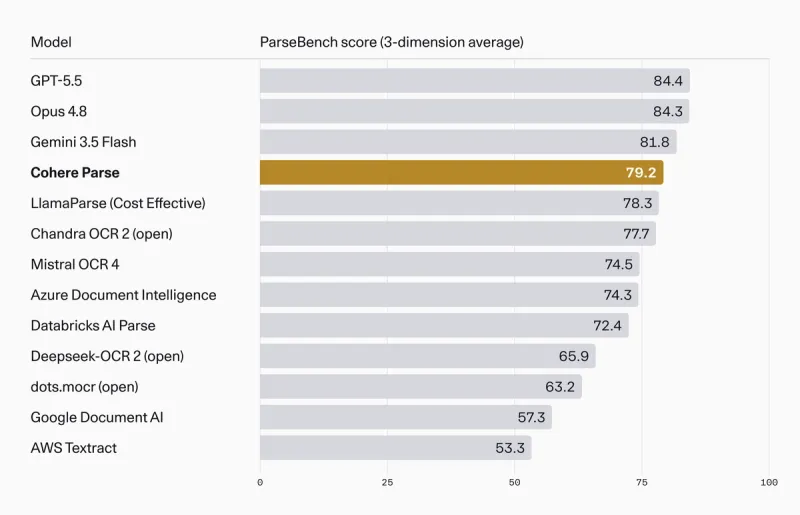
Accuracy. Parse is explicitly positioned on price-performance, not on being the most accurate parser you can buy. On ParseBench it scores 79.2, and it is "only bettered by the frontier LLMs" (GPT-5.5, Opus 4.8, Gemini 3.5 Flash). If your documents are messy, dense, or full of nested tables, those extra points matter, and you might happily pay more per page to get them.
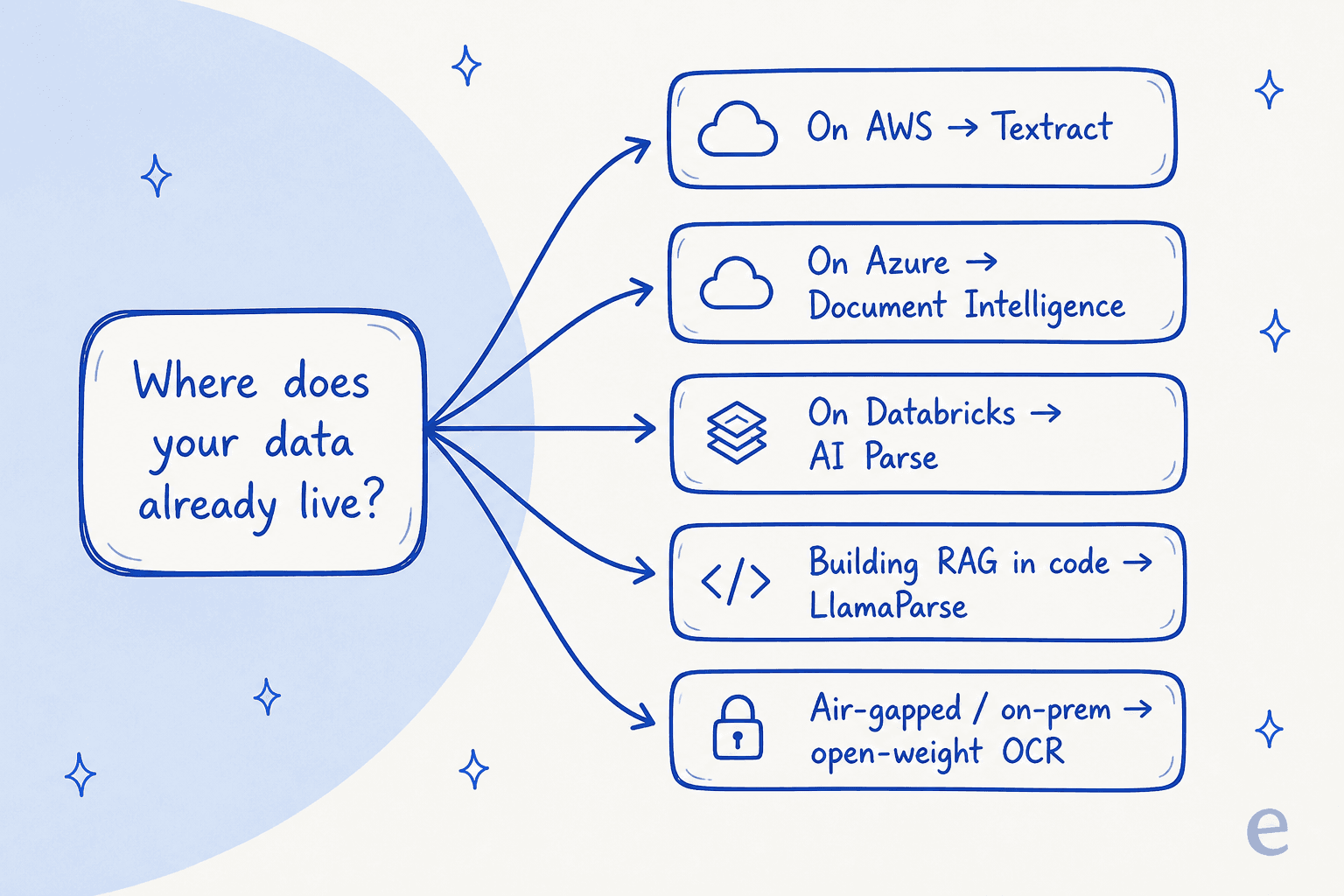
Stack fit. If your data already lives in AWS, Azure, or Databricks, adding Cohere means another vendor, another key, another bill, and another data-processing agreement. The native parser in your cloud is often "good enough" and saves all of that friction.
Input limits and data control. Parse's live endpoint currently accepts image inputs only, so PDFs need converting to images first, and it is a managed API. Teams in regulated industries frequently want direct PDF handling or a model they can run fully on their own hardware. Some alternatives do both.
None of these are knocks on Parse. They are just the seams where a different tool fits better. Here is how the market breaks down.
How I picked and compared these alternatives
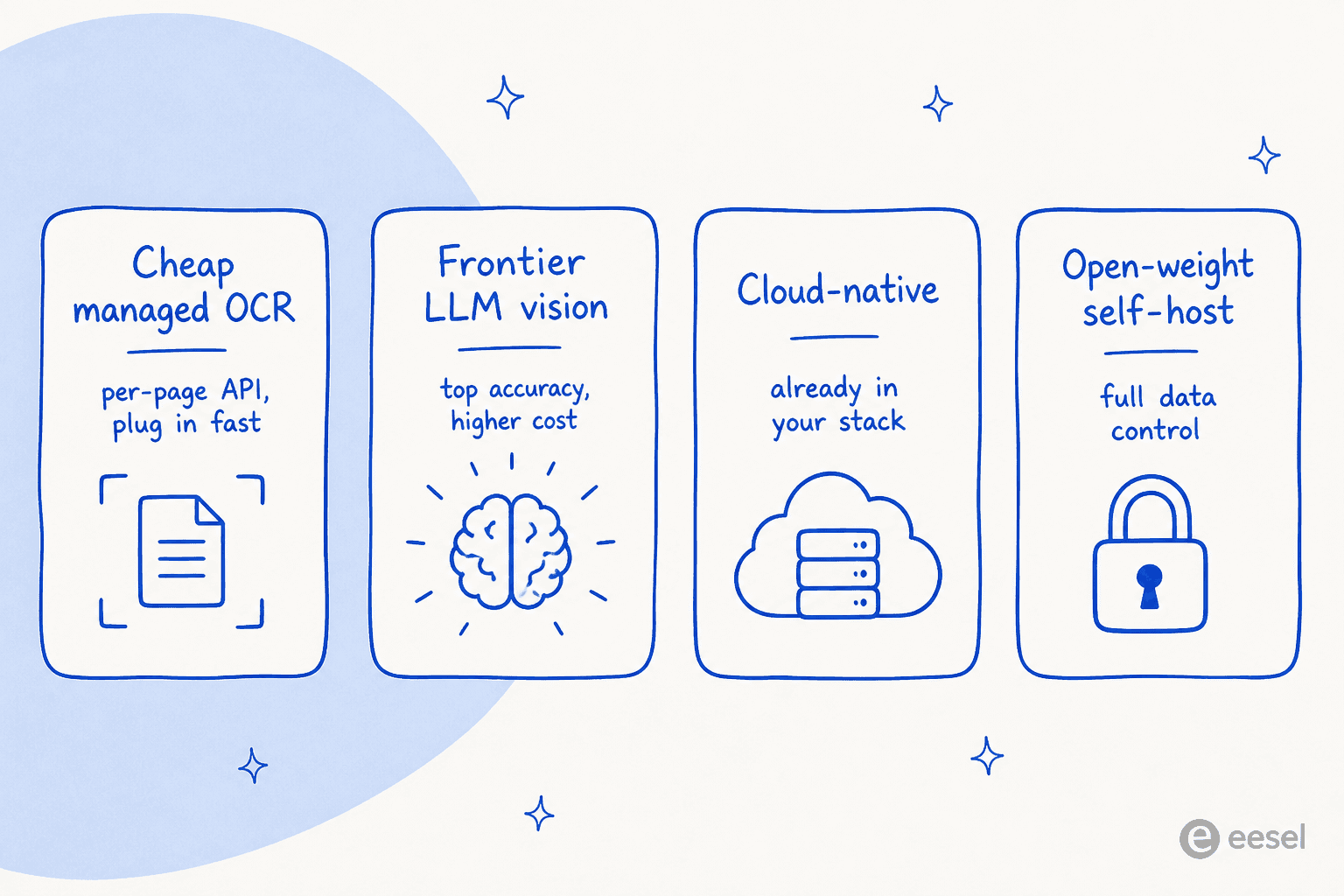
Every tool here does the same core job as Parse: it takes document pages and returns structured, machine-readable text or Markdown. I ranked them on four things a buyer actually cares about:
- Accuracy - where it lands on ParseBench, the benchmark Cohere itself used, so the comparison is apples to apples.
- Cost model - per-page, per-token, or your own compute, and what that works out to at volume.
- Deployment - managed API, inside a cloud you already use, or self-hosted.
- Input handling - images only, PDFs directly, or a wide spread of file types.
Here is the whole field at a glance. ParseBench scores come straight from Cohere's published table.
| Tool | ParseBench avg | Best for | Deployment | Input | Cost model |
|---|---|---|---|---|---|
| Cohere Parse 5 | 79.2 | Cheap, high-volume parsing | API, Model Vault, cloud marketplaces | Images | $1.50 / 1,000 pages |
| GPT-5.5 | 84.4 | Messiest docs, top accuracy | API | Images, PDFs (via LLM) | Per token |
| Opus 4.8 | 84.3 | Top accuracy, long context | API | Images, PDFs (via LLM) | Per token |
| Gemini 3.5 Flash | 81.8 | Cheap frontier-grade parsing | API | Images, PDFs (via LLM) | Per token |
| LlamaParse | 78.3 | Code-first RAG pipelines | API / cloud | PDFs, Office, images | Credits per page |
| Mistral OCR 4 | 74.5 | Per-page API with self-host | API, self-host | Images, PDFs | $4 / 1,000 pages |
| Databricks AI Parse | 72.4 | Teams on the lakehouse | Inside Databricks | PDFs, images | DBUs |
| Azure Document Intelligence | 69.3 | Structured forms, prebuilt models | Azure | PDFs, images | Per 1,000 pages |
| AWS Textract | 53.3 | AWS-native, regulated stacks | AWS | PDFs, images | Per 1,000 pages |
| Unstructured | Not on ParseBench | Open ingestion, many file types | API, open source | 25+ file types | Per page / open source |
A quick note on reading this table: a lower ParseBench score is not automatically "worse for you." Textract sits at the bottom on this general benchmark, but if you only need clean text off standard PDFs inside an AWS shop, it is still a perfectly sensible pick. Match the tool to the job, not to the leaderboard.
1. LlamaParse
Best for: teams building a RAG pipeline in code who already live in the LlamaIndex ecosystem.
LlamaParse is the parsing service from LlamaIndex, the popular open-source framework for building LLM apps over your own data. It is built for exactly the job Parse targets: turning complex PDFs, slide decks, and spreadsheets into clean, chunk-ready Markdown for retrieval. On ParseBench its Cost Effective offering scores 78.3, essentially neck and neck with Parse's 79.2.
Features. LlamaParse takes PDFs, Office files, and images directly (no image-conversion step), offers multiple parsing modes that trade cost against depth, and drops straight into a LlamaIndex retrieval pipeline. It handles tables, embedded images, and multi-column layouts, and it can follow natural-language parsing instructions per document.
Pros. If you are already writing Python and pulling in LlamaIndex, this is the lowest-friction option on the list. Direct PDF and Office support saves real engineering time, and the 10,000 free monthly credits make it easy to prototype before you spend anything.
Cons. It is a developer tool, not a point-and-click product. The credit model takes a minute to reason about, since different parsing modes burn different numbers of credits per page. And you are still assembling the retrieval and answering layers yourself.
Pricing. LlamaParse bills in credits: 1,000 credits costs $1.25, and basic parsing starts at 1 credit per page (the layout-aware Agentic modes cost more). The free plan includes 10,000 credits a month, and an Auto Mode routes each page to the cheapest tier that will do the job.
Verdict: the natural choice if you are building RAG in code and want parsing that snaps into the rest of your stack. If you are not already in the LlamaIndex world, the ecosystem lock-in is a reason to look elsewhere.
2. Mistral OCR
Best for: teams who want the simple, per-page API experience of Parse from a different vendor, with a self-host path.
Mistral OCR is the closest philosophical match to Cohere Parse: a dedicated, high-throughput OCR model sold as a clean per-page API. Mistral positions it as document understanding that returns structured Markdown with tables and images preserved, from a model you can also run yourself. On ParseBench, Mistral OCR 4 scores 74.5, a step below Parse but still ahead of most cloud-native options.
Features. It handles images and PDFs directly, extracts tables and embedded figures, supports a wide set of languages, and returns Markdown built for downstream indexing. Mistral also offers self-hosted deployment for teams that need documents to stay on their own infrastructure.
Pros. Fast and dead simple to integrate if you have ever called an OpenAI-style API. The self-host option is a genuine differentiator over Parse's managed-only endpoint, and the European data-residency story appeals to teams with EU compliance needs.
Cons. It trails Parse and the frontier models on ParseBench, particularly on semantic formatting, and the current model is no longer the price bargain the original was. For the densest financial or scientific documents, the accuracy gap can show up as the occasional broken table.
Pricing. The current Mistral OCR 4 runs $4 per 1,000 pages, dropping to $2 per 1,000 via the batch API; the no-code Document AI layer is $5 per 1,000. That is above Parse's $1.50 flat rate, so the swap costs you a little more per page now.
Verdict: if you liked the idea of Parse but want a second source, EU data residency, or a self-host path, Mistral OCR is the most direct swap. Just know you are trading a few accuracy points and paying a bit more per page for it.
3. GPT-5.5
Best for: the messiest, most valuable documents where accuracy matters more than the per-page bill.
You do not have to use a purpose-built parser at all. A frontier multimodal model like GPT-5.5 can read a page image and return structured text, and it tops the whole ParseBench table at 84.4, over five points clear of Parse. Cohere itself concedes that Parse "is only bettered by the frontier LLMs," and GPT-5.5 is one of them.
Features. As a general-purpose model, GPT-5.5 does not just transcribe; it reasons about a page. You can ask it to extract specific fields, follow complex formatting rules, or handle a layout it has never seen, all in one call. It reads images and, through the API, PDFs.
Pros. The best accuracy on the benchmark, and unmatched flexibility. If a document has a weird layout that a fixed-schema parser chokes on, an LLM will often just figure it out. It is also the same model you are probably already using elsewhere, so there is no new vendor.
Cons. Cost. You pay per token, and a dense page can be a lot of tokens, so at millions of pages this gets expensive fast compared to Parse's flat per-page rate. It is also slower per page, and general models can hallucinate content in a way a narrow OCR model is less prone to.
Pricing. Per-token, billed on input and output, so cost scales with page complexity rather than a fixed per-page number. OpenAI's current flagship, GPT-5.6 Sol, runs $4 per million input tokens and $20 per million output on its promotional rate, with cheaper siblings (Luna at $0.20 / $1.20) for lighter jobs. A dense page burns a lot of tokens, so at millions of pages this adds up fast.
Verdict: reach for GPT-5.5 when the documents are high-value and low-volume, or when layouts are too varied for a fixed parser. For high-volume, predictable pages, the per-token bill makes a dedicated parser like Parse the smarter buy.
4. Gemini 3.5 Flash
Best for: teams who want frontier-grade parsing accuracy without the full frontier-model price.
Gemini 3.5 Flash is Google's fast, cheap multimodal model, and it is the sweet spot between the two extremes on this list. It scores 81.8 on ParseBench, beating Parse and every cloud-native parser, while being far cheaper per token than a flagship model like GPT-5.5 or Opus 4.8.
Features. Like GPT-5.5, it is a general model that reads page images and PDFs and can extract structured data on instruction. Flash is tuned for speed and low cost, with a large context window that lets you feed it long documents in one go.
Pros. A rare combination: higher accuracy than Parse and the flexibility of an LLM, at a price that stays reasonable at scale. If you are already on Google Cloud or using Vertex AI, the integration is trivial.
Cons. Still per-token, so still less predictable than a flat per-page parser, and at truly massive volume Parse's $1.50 per 1,000 pages can still win on total cost. As with any LLM, you carry a small hallucination risk that a narrow OCR model does not.
Pricing. Per-token, at Flash's low rates. The current Gemini 3.7 Flash is $0.75 per million input tokens and $3.75 per million output on its promotional pricing, and there is a genuinely free (rate-limited) tier for prototyping. That is a fraction of a flagship model's token cost.
Verdict: my default recommendation for teams that want more accuracy than Parse but balk at flagship-model pricing. Flash is the value pick of the frontier-model group.
5. Databricks AI Parse
Best for: data teams whose documents already live in the Databricks lakehouse.
Databricks AI Parse (ai_parse_document) is document parsing built directly into the Databricks platform, callable as a SQL function over data you already have in the lakehouse. It scores 72.4 on ParseBench. The pitch is not top accuracy, it is zero data movement.
Features. You call parsing inline in a SQL or notebook workflow, and the extracted text lands right back in your Delta tables, ready for downstream knowledge management and analytics. No separate service, no data leaving the platform.
Pros. If your pipeline is already on Databricks, this is the path of least resistance: no new vendor, no egress, and governance handled by Unity Catalog. For unifying document parsing with the rest of your data engineering, nothing else is this seamless.
Cons. It only makes sense if you are a Databricks shop; standing up the platform just to parse documents would be absurd. And at 72.4 it trails Parse and the frontier models on general parsing quality.
Pricing. Billed in DBUs (Databricks Units) as part of your normal compute, rather than a public per-page rate. Check the Databricks pricing page and your workspace's rate.
Verdict: an easy yes for existing Databricks teams who value keeping data in place over squeezing out the last accuracy points. Irrelevant to everyone else.
6. Azure AI Document Intelligence
Best for: teams on Azure that need structured extraction from forms, invoices, and IDs with prebuilt models.
Azure AI Document Intelligence (formerly Form Recognizer) is Microsoft's mature document-processing service. It scores 69.3 on ParseBench, but that general score undersells its real strength: prebuilt models that pull structured fields out of specific document types, invoices, receipts, tax forms, and IDs, without you training anything.
Features. Beyond plain text OCR (the Read model), it ships prebuilt extractors for common business documents and a custom-model workflow to train your own on a handful of samples. It takes PDFs and images directly and returns structured JSON with field-level confidence scores, something Parse's live endpoint does not currently emit.
Pros. For structured forms, this is a level above generic parsing: it does not just read the invoice, it tells you the total, the vendor, and the due date as labelled fields with confidence. Deep Azure integration and enterprise compliance make it an easy sell in Microsoft shops.
Cons. It is more about form-field extraction than clean-Markdown-for-RAG, so for general document-to-text it lags the newer parsers. The confidence scores and prebuilt models add configuration overhead you do not need if you just want text.
Pricing. Per 1,000 pages, priced by model type: the Read OCR model is $1.50 per 1,000 pages (matching Parse), while prebuilt models are $10 and custom extraction $30 per 1,000. A free F0 tier covers 500 pages a month.
Verdict: the best pick when your real problem is structured extraction from known forms, not general parsing, and you are already on Azure. For clean Markdown to feed a RAG index, a newer parser fits better.
7. AWS Textract
Best for: AWS-native teams and regulated stacks that want document OCR inside their existing cloud.
AWS Textract is Amazon's long-standing OCR and document-analysis service. It sits at the bottom of the ParseBench general table at 53.3, and Cohere reports an "over 20-point improvement" over it, so nobody is choosing Textract for cutting-edge Markdown quality. People choose it because it is already in their AWS account.
Features. Textract detects text, tables, and form key-value pairs, plus specialized APIs for expenses and identity documents. It takes PDFs and images, integrates natively with S3, Lambda, and the rest of AWS, and inherits AWS's compliance certifications out of the box.
Pros. For an AWS shop, the integration and governance story is unbeatable: no new vendor, no data egress, IAM and audit logging you already trust. It is battle-tested at enterprise scale and its table and form extraction on clean, standard documents is reliable.
Cons. On the modern benchmark it is well behind the field, especially on semantic formatting (a 2.8 there). It is an older-generation OCR engine, not a vision-language model, so on messy or unusual layouts it struggles where newer tools cope.
Pricing. Per 1,000 pages, priced separately by API: plain Detect Text is $1.50 per 1,000 pages, while Analyze Document jumps to $15 for tables and $50 for forms, so pulling structured fields gets pricey fast. New accounts get a three-month free tier.
Verdict: the safe, boring, correct choice for AWS-native teams parsing standard documents who value staying in-cloud over benchmark scores. If parsing quality on hard layouts is your bottleneck, look higher up this list.
8. Unstructured
Best for: teams that need to ingest a wide spread of file types into one clean pipeline, with an open-source option.
Unstructured is less a single OCR model and more a full ingestion layer: it takes 25-plus file types (PDF, Word, PowerPoint, HTML, email, images) and normalizes them into clean, chunked JSON ready for embedding. It is not on ParseBench because it plays a slightly different role, the plumbing that gets everything into your vector store, not just PDFs.
Features. Connectors for dozens of sources, a huge range of input formats, layout-aware chunking, and a well-known open-source library alongside the managed API. It is a common default in DIY RAG stacks precisely because it handles the long tail of file types the single-purpose parsers ignore, which matters if your knowledge management is scattered across a dozen apps.
Pros. Breadth. If your knowledge lives across PDFs, Confluence exports, emails, and slide decks, Unstructured handles all of them in one pipeline. The open-source core means you can start free and self-host.
Cons. Its raw OCR quality on complex documents is not best-in-class, so many teams pair it with a stronger parser for the hard PDFs. And running the open-source version at scale is real engineering work, not a managed convenience.
Pricing. The open-source library is free to self-host; the managed Unstructured Platform is billed per page. Check their site for current API pricing.
Verdict: the best pick when your problem is variety of formats, not raw parsing accuracy on one type. Many teams use Unstructured for breadth and a model like Parse or Gemini for the tricky documents.
A note on open-weight parsers
If data control is your driver, the fastest-moving corner of this space is open-weight OCR models you host yourself: things like dots.ocr, Chandra OCR 2, and DeepSeek-OCR 2 all appear on ParseBench (Chandra OCR 2 scores a respectable 77.7). dots.ocr ships under an MIT license and runs locally via vLLM, so the trade is straightforward: no per-page fee ever, and full control over where documents are processed, in exchange for owning the GPUs and the ops. For an air-gapped or heavily regulated environment, that trade is often worth it. For everyone else, a managed API is less hassle.
The thing every tool on this list leaves you to build
Here is the part that is easy to miss when you are comparing parsers. Every option above, Parse included, only does one job: it turns documents into clean text. That text is not an answer. To actually use your documents, you still need to chunk and embed the text, store it, retrieve the right passage for a given question, and generate a grounded answer on top.
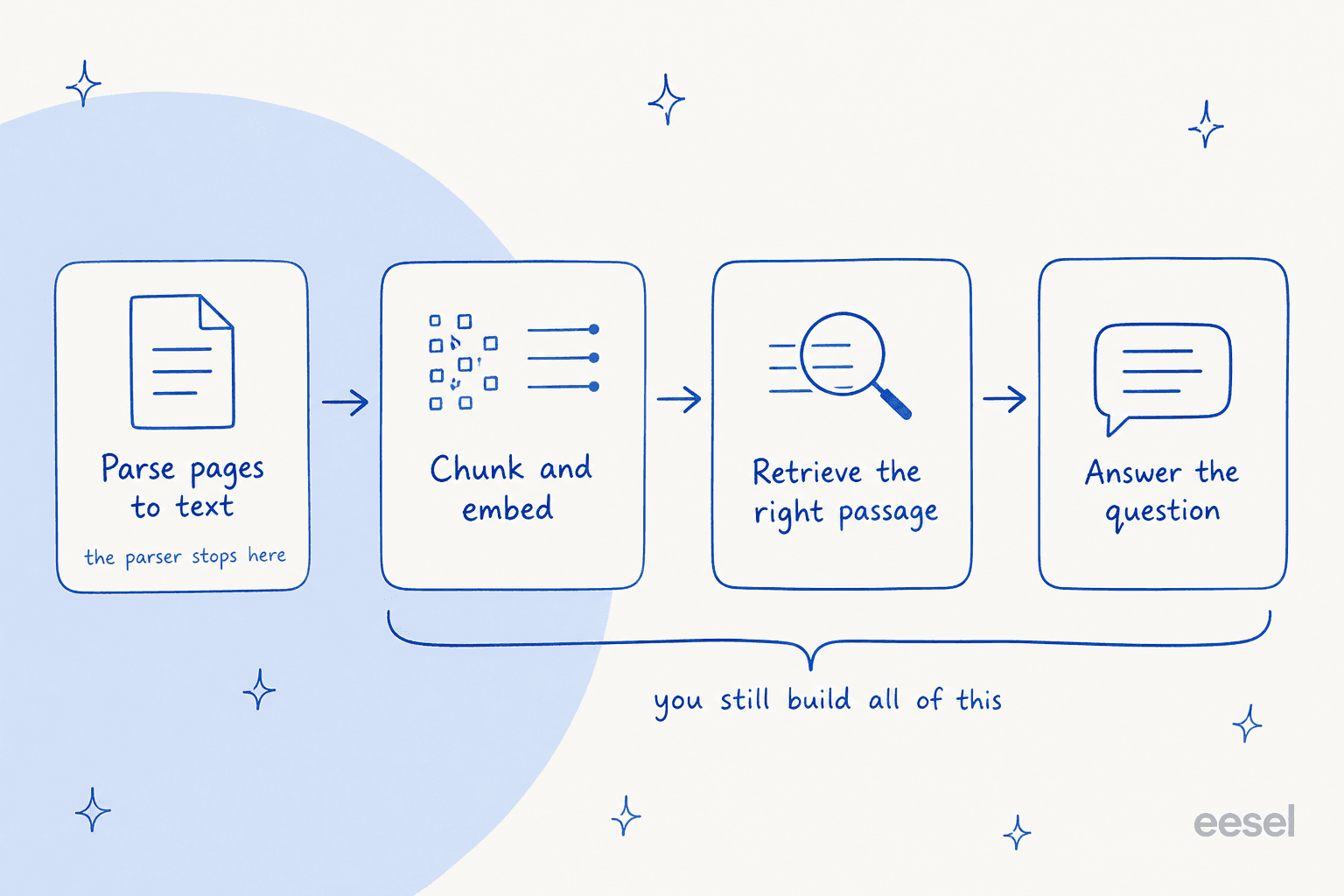
If you are a data team building a custom product, wiring those four stages together is exactly the work you signed up for, and picking the right parser from this list is a real decision. But a lot of the people googling "Cohere Parse alternatives" are not building a parser pipeline for its own sake. They want the outcome: answers to customer or employee questions, pulled from their own documents. For them, choosing an OCR model is a means to an end that is three steps further down the line.
Try eesel
That is the gap eesel fills. eesel is an AI teammate platform: instead of a toolkit you assemble, you hire a ready-to-work teammate for a specific job. The AI helpdesk agent is the relevant one here, and as an AI agent for customer service it ingests your help center, internal docs, and past tickets, does the parsing, embedding, and retrieval for you, and then actually answers questions, live in your helpdesk.

So the honest framing is this: if you are building a document pipeline and need a parser as one component, pick from the eight above. If your real goal is answering questions from your knowledge, you do not need to choose an OCR model at all, you need the layer that sits on top of it. eesel is free to try, connects in minutes, and you can point it at your existing docs and see it answer before you commit to anything. (There is also an AI blog writer teammate in the roster, for a very different job.)