


What is Cloudflare Clairic?
I work eesel's support queue every day, and the slow part of most tickets isn't writing the reply. It's the copying. The order number from paragraph two, the delivery date from the tracking email, the total from a blurry receipt photo. Cloudflare Clairic is a model built for exactly that copying, and it's the most practical thing to come out of the "System One" wave so far.
Clairic launched on Cloudflare's blog on October 19, 2026, written by Alex Reneau, Michelle Chen and Kevin Flansburg from the Workers AI team. It lives on Workers AI as @cf/cloudflare/clairic, it's marked as a preview, and Cloudflare says it intends to publish the weights later.
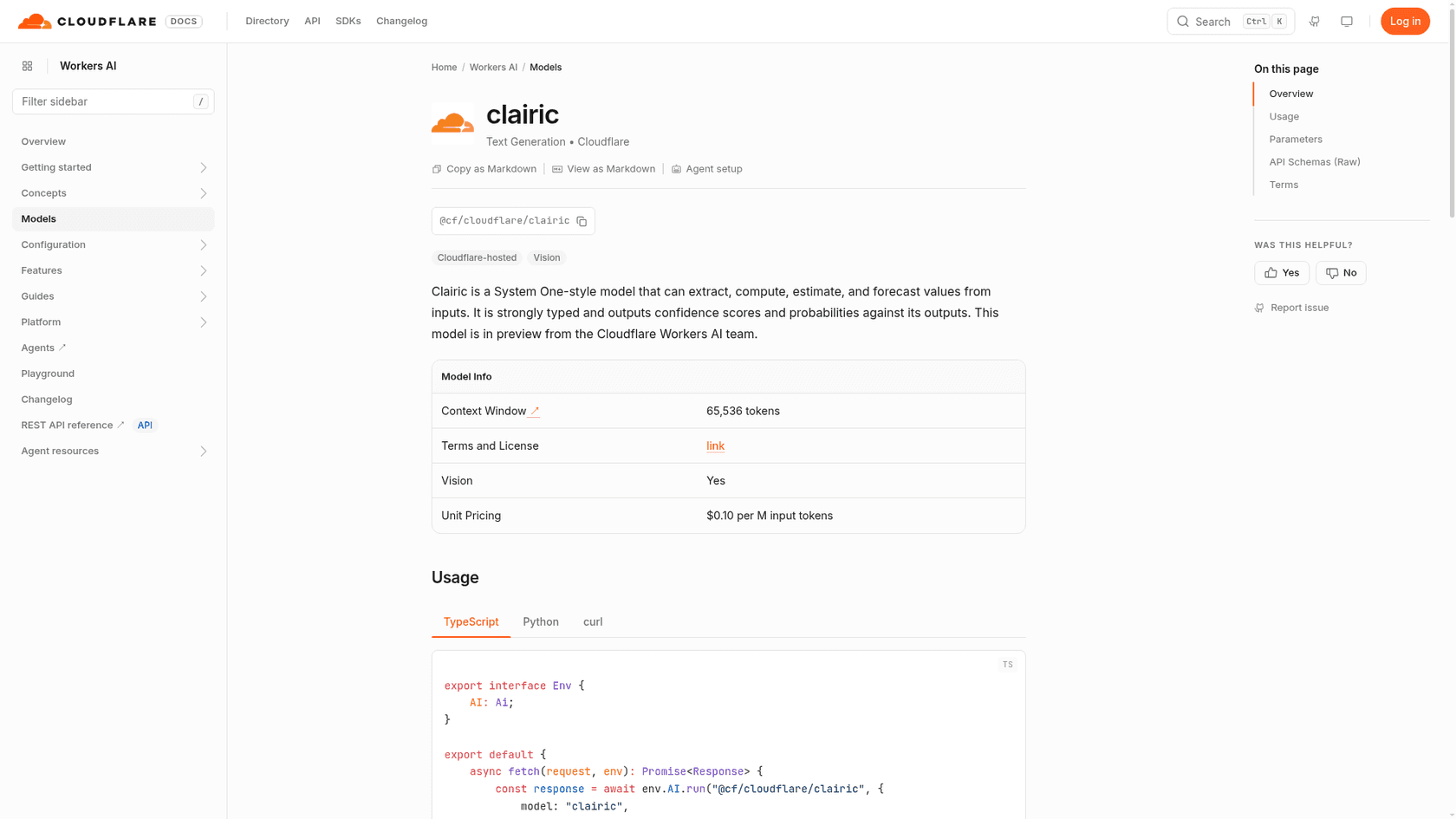
The model card is short. A 65,536 token context window, vision support (up to four images per request), and a single price line. The name, according to Cloudflare, is a mix of "clerical", "clairvoyance" and Cloudflare AI Regression model, which is a fair summary of what it does: boring data entry plus a bit of prediction. It caps a busy few weeks for Cloudflare's AI team, after the Kitesurf agent browser and a web search API.
Why did Cloudflare build an extraction model?
A month before Clairic, TypeSafe introduced Jev and the idea of System One models, borrowed from Daniel Kahneman's fast-and-slow thinking. Cloudflare followed on October 1 with Clef, its own decision model. Both answer questions where you can list the possible answers up front: is this urgent, which team owns it, refund or repair.
Cloudflare's point is that a lot of the structured-output calls going to frontier LLMs have answers you can't list in advance. What's the invoice total? When was this delivered? How many days late is it? A decision model can't help there, because there's no fixed option set to put probabilities on. Clairic is the first model in the second class, which Cloudflare calls System One extraction models.
Here's how Cloudflare lays out the three classes, condensed from its launch post:
| System One: extract | System One: decide | System Two | |
|---|---|---|---|
| Example models | Clairic | Jev, Clef | GPT, Claude, Gemini, DeepSeek |
| How it runs | One parallel pass | One parallel pass | One token at a time |
| Output | Typed values: spans, numbers, dates, lists, distributions | One of your listed options, with probabilities | Free-form text |
| What it answers | What's the amount? When did it happen? How much will it be? | Which category? Which action? | Why did it happen? How should we fix it? |
| Always a valid response? | Yes, a value of its type or null | Yes, one of your options | No, text must be parsed and checked |
The line I keep coming back to from Cloudflare's post is this one: extraction models turn raw input into typed values, decision models turn values into decisions, and LLMs turn decisions into words. That's a clean way to split a support workflow, and it's closer to how a good agent works a ticket than "send the whole thing to one big model and hope".
How does Cloudflare Clairic work?
A request has two parts. The state is the text you want read (plus up to four PNG, JPEG or WebP images, sent inline). The fields map is your schema: each field gets a name, a type and optional plain-language instructions. Clairic reads everything in one forward pass and answers every field at once, so asking for thirty fields costs about the same as asking for three.
There's no upper limit on fields. The model docs say fields that don't fit next to the state in one 8,192-token pass get split into parallel passes that each see the whole input, then merged.
| Field type | What you get back |
|---|---|
text | An exact span of the input, with its character offsets |
number | A number read or worked out, honoring integer and decimals |
date, time, datetime | Real calendar dates and valid times, in ISO form |
duration | A length of time in the unit you pick |
list | Every matching text, number or date, in input order |
estimate | A distribution inside your min and max, on your step grid, linear or log scale |
forecast | One estimate per future step of a series, up to 64 steps |
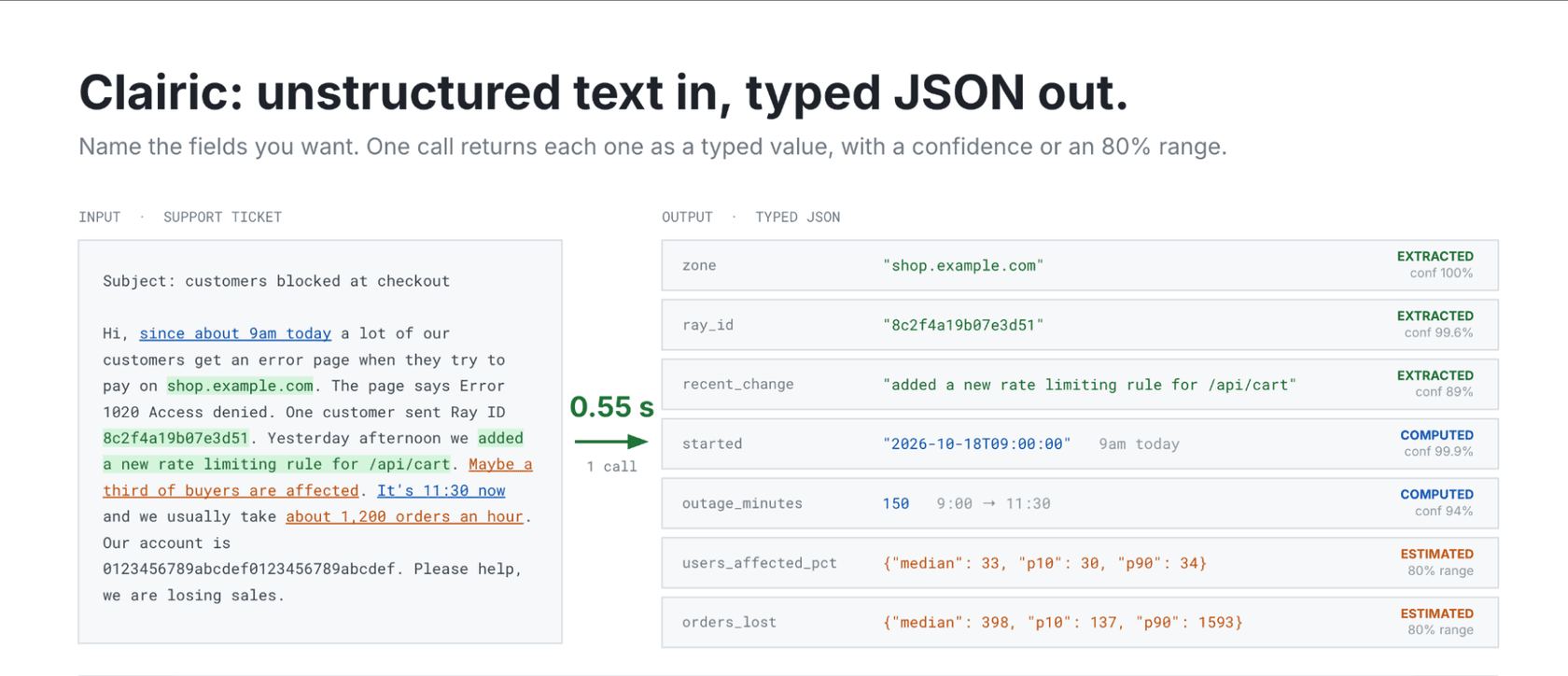
Every single-value answer comes with p_null (the probability the input doesn't contain it) and a confidence score. Estimates and forecasts come with a median and an 80% interval, p10 to p90, and you can ask for all 99 percentiles with options.include_quantiles. If a field depends on today's date, the changelog entry says to set reference_date or add a line like "Today: 2026-10-19" to the state.
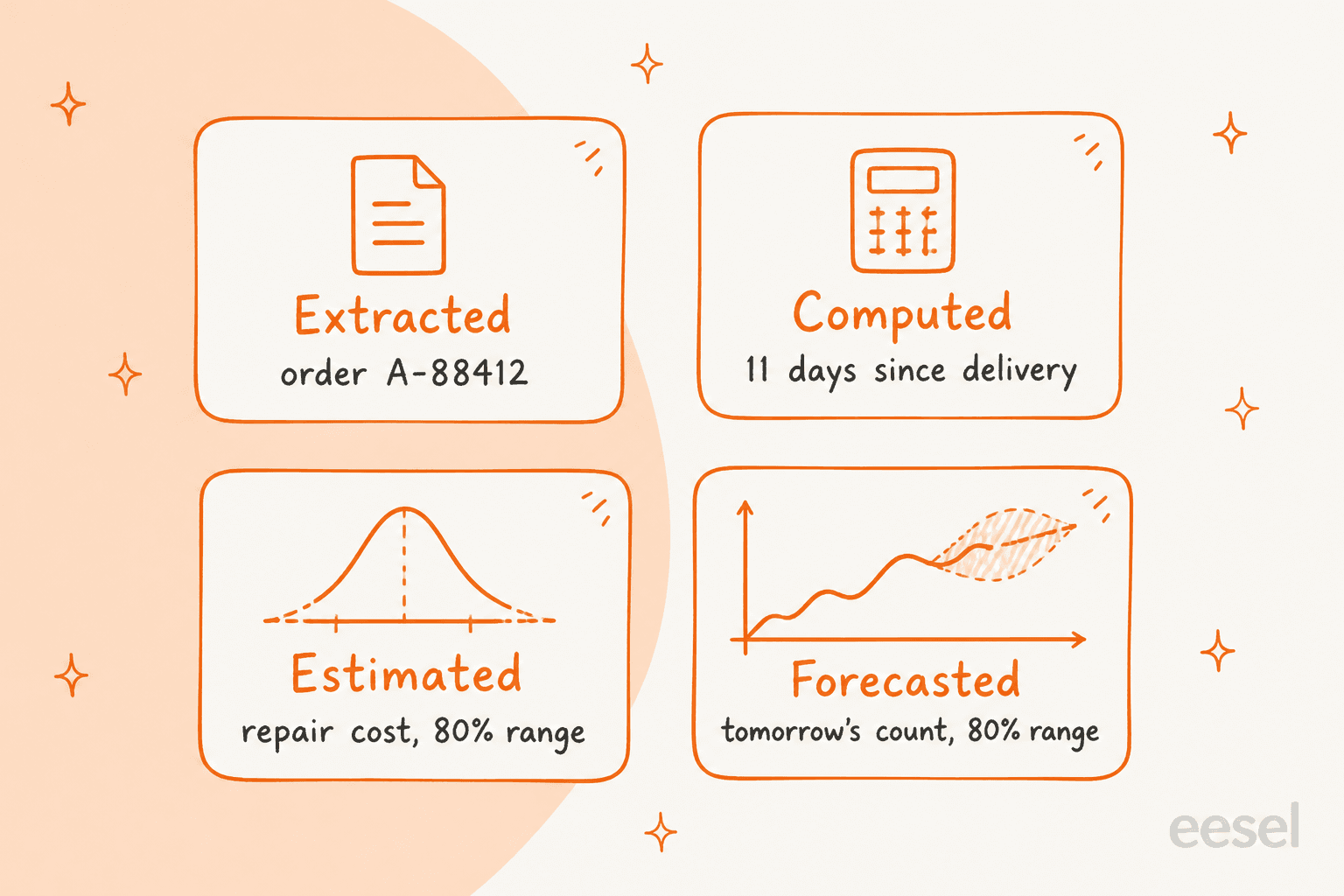
Extracted and computed values
Cloudflare's main example is a support email, which is why I paid attention. A customer writes that order A-88412 arrived on September 28 with a cracked screen and a dented corner, that they paid $649.00 plus $52.10 tax, and that it's now October 9. Clairic is asked for six fields, and the answers show the whole idea in one go:
order_idcomes back as"A-88412"with its span in the email and a confidence of 0.999957.amount_paidcomes back as701.1, a number that isn't written anywhere. Clairic added the price and the tax.days_since_deliverycomes back as11, worked out from two dates in the text.damagecomes back as a list,["cracked screen", "dented corner"], with both spans so you can highlight them.tracking_numbercomes back asnull, because the email doesn't have one. The model'sguesswas "$52.10", with a confidence of 0.416, andp_nullof 1.
That last one is the part support people should care about. An LLM asked for a tracking number will sometimes hand you a plausible-looking string. Clairic hands you null and tells you what it would have guessed, so your code can ask the customer instead of searching the carrier for a number that doesn't exist. It's the same instinct as hallucination prevention in a support bot, built into the output format.
Cloudflare also ran a photo of a real, slightly crooked receipt through it. Clairic read the order number, timestamp, quantity, unit price, subtotal, tax and tip, and returned null for the discount because none was printed. Confidence was lower on the harder reads (0.78 on the order number, 0.83 on the timestamp) and above 0.99 on the clean ones, which is the behavior you want.
Estimated values
Some values aren't in the input at all, but the input carries evidence for them. Cloudflare's example is a home price: five comparable sales and one subject property, with a sale_price field typed as an estimate between $50,000 and $5,000,000 on a log scale. Clairic returned a median of $415,000 and an 80% range of $370,000 to $470,000.
The width of that range is the useful part. Cloudflare's extraction models guide says a narrow interval signals the input supports the estimate and a wide one says it doesn't. In a support context that's the repair-cost estimate in the damaged-order example, and it's what lets the next step decide "repair" or "refund" without a person guessing.
Forecasted values
A forecast field takes a history as plain text and returns one estimate per future step, each with an 80% interval. Cloudflare tested it on the daily number of people screened at US airport checkpoints, asking each morning for the next day's count for 21 days in a row.
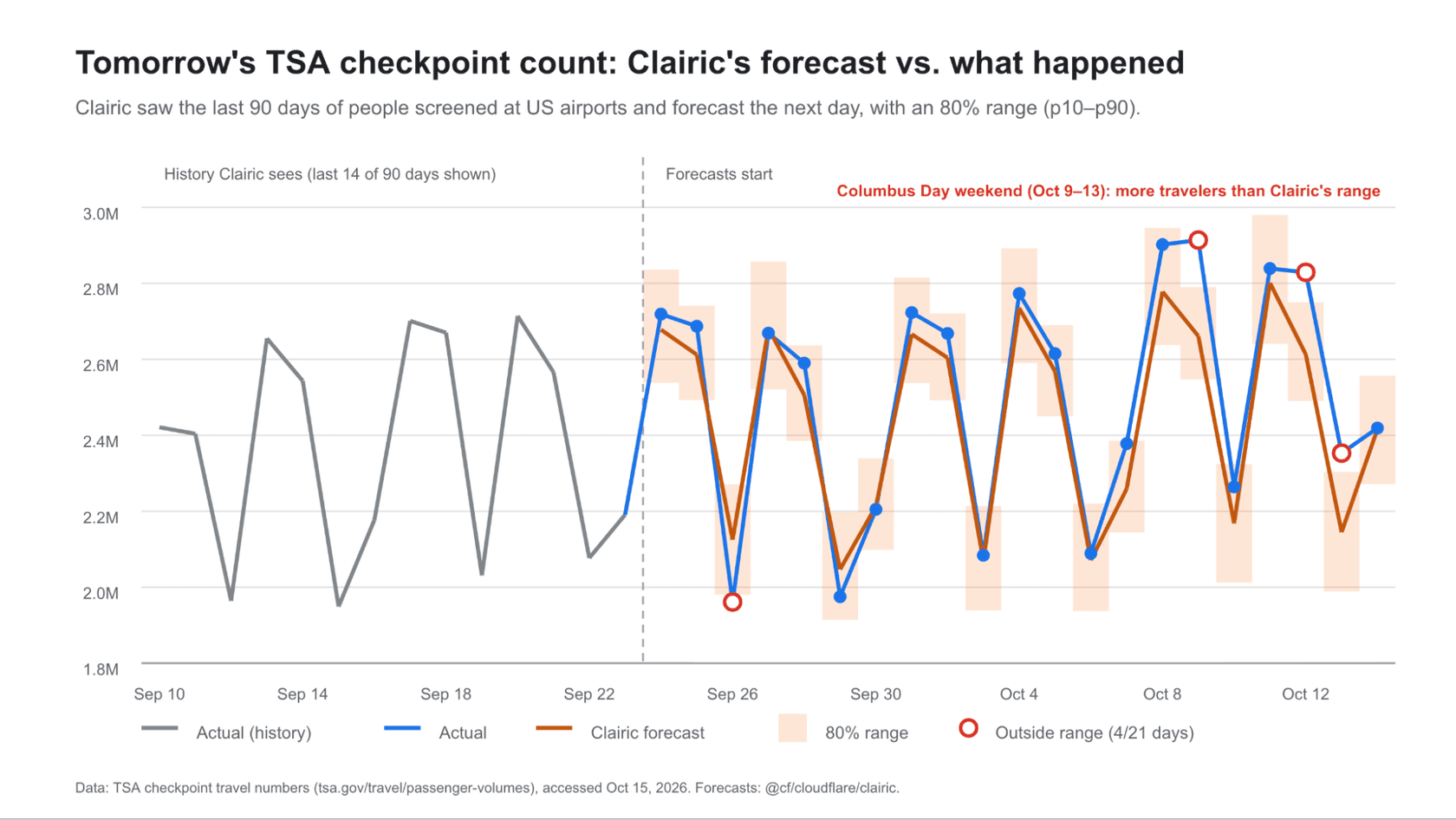
The forecasts were off by 3.3% on average, and 17 of 21 actual counts landed inside the 80% interval, which is roughly what an 80% interval should do. Three of the four misses fell on the Columbus Day weekend, because Clairic reads patterns in the series and doesn't know about holidays the series doesn't show. Cloudflare is upfront that this doesn't replace a dedicated time-series model, so I wouldn't plan a holiday roster on it. For that, a proper support workforce forecasting setup is still the tool.
Clairic vs Clef vs an LLM: what's the difference?
The cleanest way to see where Clairic fits is the pipeline Cloudflare built for the launch. The same damaged-order email goes through two setups. In one, Clairic extracts the facts, Clef decides between a refund and a free repair based on a written policy, and GLM-5.3 writes the reply. In the other, GLM-5.3 does all three steps.
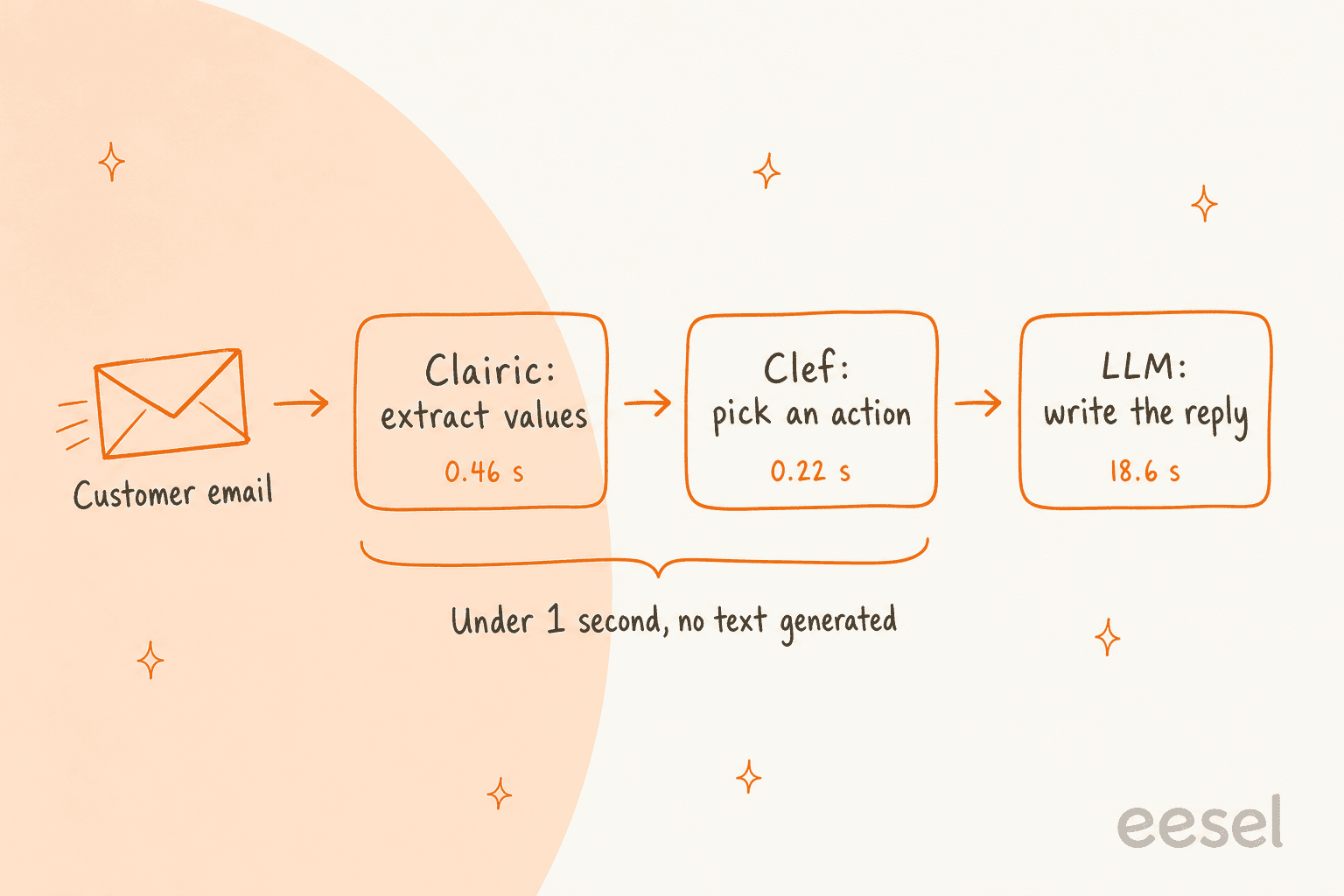
| Clairic, then Clef, then GLM-5.3 | GLM-5.3 for every step | |
|---|---|---|
| End-to-end latency | 19.3 s | 61.7 s |
| 1. Extract | Clairic: 0.46 s | GLM-5.3: 16.1 s |
| 2. Decide | Clef: 0.22 s | GLM-5.3: 21.9 s |
| 3. Reply | GLM-5.3: 18.6 s | GLM-5.3: 16.4 s |
| Cost per million claims | $6,032 | $11,740 |
That's 3.2 times faster and 49% cheaper, and nearly all of the remaining time and cost is the one step that writes text. Both pipelines got the facts and the decision right in every run, so this isn't a "the LLM failed" story. The difference Cloudflare points to is consistency: Clairic's repair estimate was identical on every run, while GLM-5.3's came back as $250, $250 and $220. Cloudflare also notes that when Gemma 4 and Qwen ran the all-LLM version, they couldn't produce the repair cost at all.
There's a security angle hiding in that design too. Clef decides from a five-line summary of typed values instead of the raw email, and the LLM never sees the email at all. A customer message that tries to talk the model into a refund has a much harder time getting through typed fields, which matters for anyone thinking about AI refund automation.
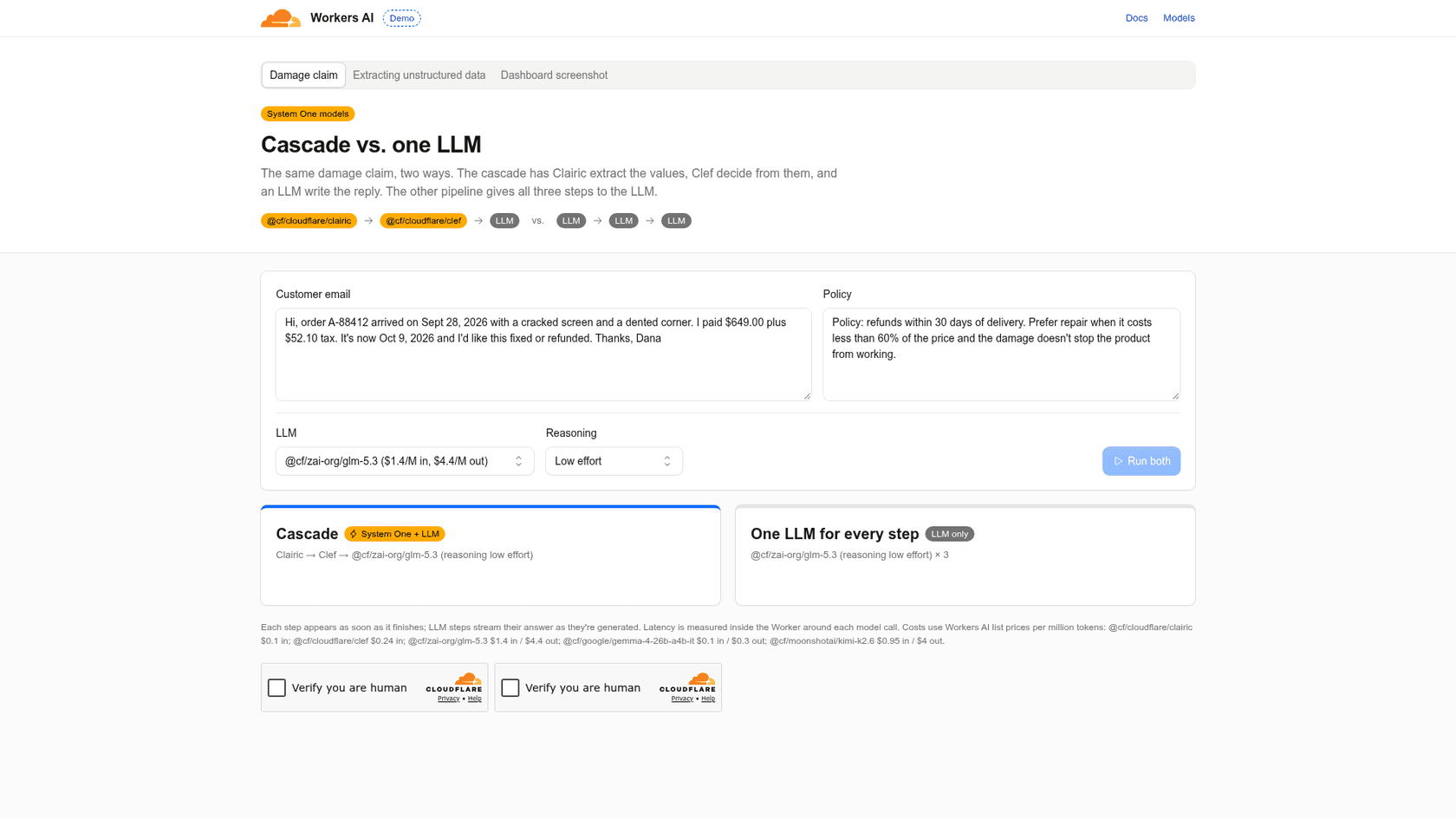
You can run the comparison yourself on Cloudflare's live pipeline demo, with your own email and policy text.
How much does Cloudflare Clairic cost?
Clairic is billed like every other Workers AI model, in neurons, and the Workers AI pricing page lists it next to its siblings. Because it generates no tokens, there's only an input price.
| Model | Price per M input tokens | Neurons per M input tokens | Output price |
|---|---|---|---|
Clairic (@cf/cloudflare/clairic) | $0.100 | 9,091 | None |
Clef (@cf/cloudflare/clef) | $0.240 | 21,818 | None |
Clef-omni (@cf/cloudflare/clef-omni) | $0.150 | 13,636 | None |
Clef-flash (@cf/cloudflare/clef-flash) | $0.038 | 3,455 | None |
Workers AI itself costs $0.011 per 1,000 neurons, and every account gets 10,000 free neurons a day, reset at 00:00 UTC. Going past the free allocation needs the Workers Paid plan.
To make that concrete, the invoice example on the model page used 655 input tokens (61 for the invoice text, 472 for the six-field schema, the rest overhead) across three passes. At $0.10 per million, that's about $0.000066 per call, or roughly $6.55 for 100,000 invoices. The free 10,000 neurons work out to about 1.1 million Clairic input tokens a day, so on that example around 1,680 calls a day cost nothing. Notice that the schema was bigger than the document. Long instructions on every field are where your token bill grows, so keep them short.
For comparison with the LLM you might use today, the Clef pricing guide has a calculator for the decision side, and the AI support cost breakdown covers what the whole stack runs per ticket.
What are Clairic's limits right now?
This is a preview, and Cloudflare is unusually direct about what doesn't work yet. From the launch post and the changelog:
- Arithmetic stops at two steps. Totals, differences, conversions and date math are reliable. Long chains of dependent steps and sums across many table rows aren't. Cloudflare's advice: have Clairic pull the inputs and let your code do the math.
- Estimates need evidence. Ask for a value the input gives no clues about and you'll get a wide interval.
- Calibration is measured, not guaranteed. Intervals are trained to be calibrated and are on most held-out sets, but they can run narrow on unfamiliar data.
- Forecasting is basic. Next-step forecasts follow recent patterns, longer horizons flatten toward the average, and holidays the series doesn't show will be missed.
- Well formed isn't correct. The types guarantee shape. Use
confidence,p_nulland the intervals to decide what to automate and what to send to review.
There are practical limits too. Images max out at four per request, 4 MiB each and 8 MiB total, and remote URLs aren't accepted, so you send the bytes inline. Clairic is listed under Text Generation, and the Workers AI limits page sets the default for that task type at 300 requests per minute.
The one gap people noticed on launch day is benchmarks. Cloudflare published worked examples and the pipeline comparison, but no standard extraction benchmark scores yet:
"It's interesting that they haven't published any benchmarks yet."

Others on the same thread were more interested in where it could go next:
"Seems like it might excel at NER and intent-slot tasks, too."
That's my read as well. Until Cloudflare publishes numbers, the honest way to judge Clairic is to run it on a few hundred of your own tickets and compare the fields against what your team actually entered.
Where does Clairic fit in a support queue?
On the support side, this is where I think the model earns its keep. A lot of what an agent does in the first minute of a ticket is extraction: find the order number, check the delivery date, work out whether it's inside the return window, note what's damaged. On a demo call earlier this year, a B2B telematics team on Zendesk told my colleagues on the sales side that the two things they wanted first were tagging from a fixed tag list and auto-filling ticket fields. Clairic is a clean way to build the second one yourself.
Here's how I'd split common support jobs across the three model classes. Pick a job to see which one fits:
Which model class handles this support job?
Extraction (Clairic), decision (Clef) or generation (an LLM)
Tap a job above.
text field. Returns the exact span with character offsets, or null with a p_null score if the customer didn't include one, so you can ask instead of guessing.duration field. A computed value from two dates. Add today's date to the state or set reference_date, or the math has nothing to anchor to.estimate field. Returns a median and an 80% range inside the bounds you set. A wide range is your signal that the input doesn't support a number yet.forecast field, with care. Fine for a rough next-step number. Cloudflare says it misses events the history doesn't show, like holidays, so don't staff a peak week on it.The part Clairic gives you that a JSON-mode or function calling LLM call doesn't is a built-in way to decide what to trust. Every answer carries a confidence and a probability of being missing, which maps neatly onto three lanes:
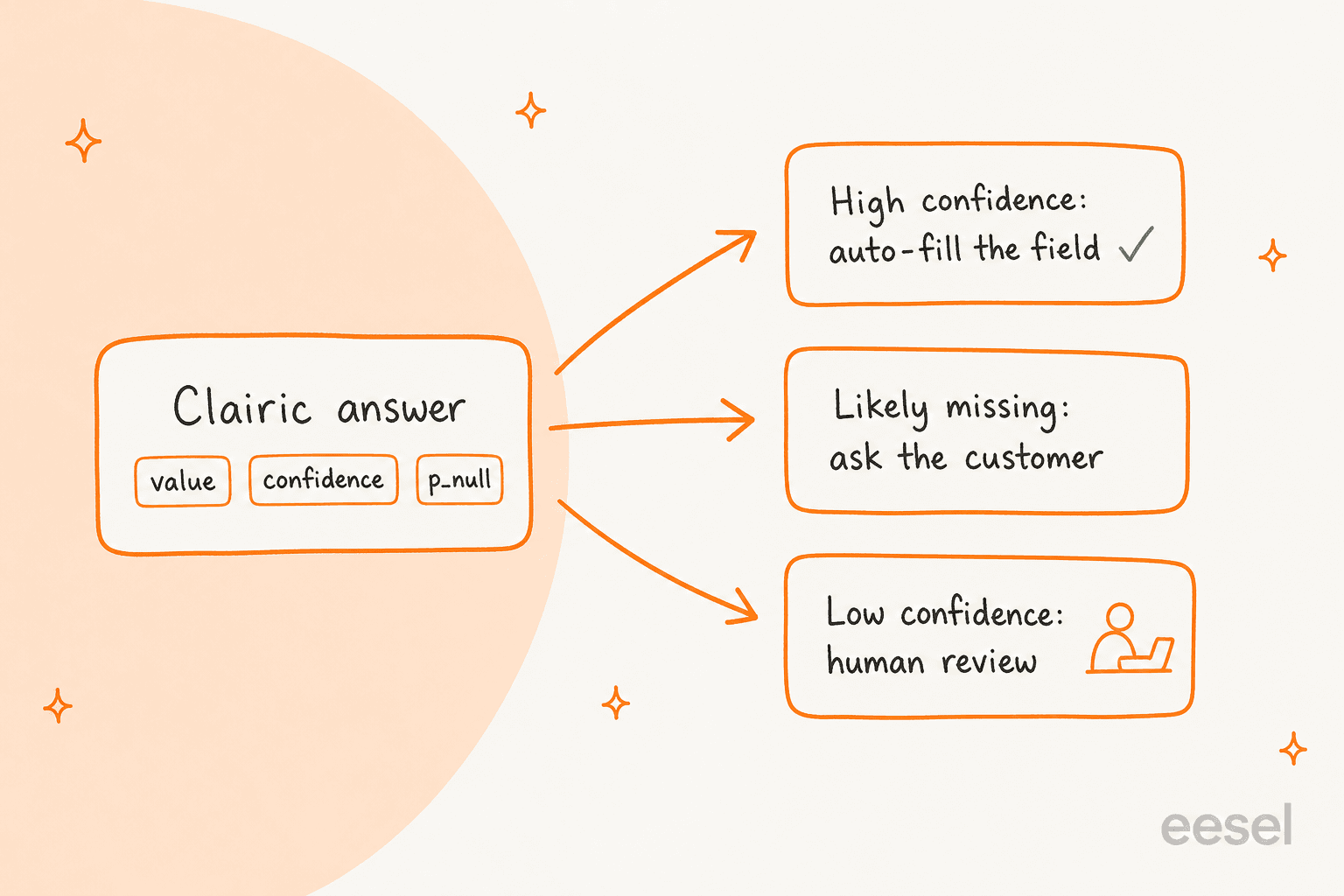
That's the same logic most helpdesks already use for ticket classification, and it fits behind tools you may already run. Zendesk's own entity extraction does a version of this inside the helpdesk, and the advanced AI version adds custom entities. Clairic is the build-it-yourself option: more control over the schema and the thresholds, and more code to own.
What Clairic doesn't do is the work. It won't open Shopify to check the order, apply your refund approval matrix, write back to the ticket, or know when a damaged item needs a person. Someone has to write the Worker that does all of that, handle escalation and keep it running when the helpdesk API changes. For a team with engineers who want a fast, cheap parser inside their own ticket triage pipeline, that's a fair trade. For a support team that wants the queue handled this week, it's a component, not an answer.
Who should use Cloudflare Clairic?
I'd reach for Clairic in three situations:
- You already run on Workers. Calling it is one
env.AI.run()line next to your existing code, and the free daily neurons cover a lot of low-volume extraction. - You're parsing the same shapes over and over. Invoices, receipts, order emails, shipping notices. Fixed fields, high volume, and a typed answer beats re-validating LLM JSON on every call.
- You need to know when the model isn't sure. The
confidenceandp_nullscores give you a routing signal for free, which is most of the work in a safe automation.
I'd wait if you need it on your own hardware (no weights yet), if you need audited accuracy numbers before a launch review (no benchmarks yet), or if the job is mostly multi-step math across big tables (Cloudflare itself says to do that in code). And if what you really want is fewer tickets in the queue rather than cleaner fields, a ready-made AI helpdesk agent gets you there without a build.
eesel for the ticket after the extraction
Clairic is infrastructure. eesel is the employee. eesel is an AI teammate platform, and the teammate that matters here is the AI helpdesk teammate. It joins your Zendesk, Freshdesk, Gorgias or Front queue, learns from your past tickets and help center, and does the reading Clairic does as part of working the ticket: finding the order, checking the dates, spotting what's damaged. Then it acts. It tags, drafts, answers or hands off, and anything you mark as ask-first waits for a person to approve.
Rúngne, a Norwegian climbing apparel brand on Gorgias and Shopify, runs three eesel agents: one acknowledges and tags every ticket, one looks up the order, tracking and stock in Shopify and leaves a draft, and one answers plain questions directly. Between August 8 and September 8, 2026 that came to about 2,100 tickets handled, 580 drafts left for the team and 150 order lookups. Damaged items, lost parcels and cancellations go straight to people, which is the same line I'd draw for any extraction-driven automation. Dokument 24 does the lighter version on Zendesk: every first message gets a product tag and a Danish draft as an internal note.

If Clairic appeals to you because it's programmable, look at the eesel CLI. It's the same teammate as the dashboard, driven from a terminal, and every command prints JSON, so a script or a coding agent like Claude Code, Cursor or Codex can run the whole setup. For an extraction-style workflow, that looks like:
npx @eesel/cli initstarts a workspace with no account needed (Node 18.17 or newer), andeesel loginkeeps it.eesel integrations connect <platform>connects Zendesk, Freshdesk or Gorgias, andeesel integrations <platform> actionslists every action the teammate can take there with its approval setting.eesel instructionsholds the standing rules in plain language, like "fill the order number field; if there isn't one, ask for it."eesel approvals listandeesel approvals approve <id>clear held actions from a script, and--dry-runprints the exact call a write would make before it happens.eesel activityshows what the teammate did, newest first, which is your audit trail.
The workspace is also an MCP server (eesel mcp token prints the claude mcp add line), and my colleague's AI agent CLI post goes deeper on running support from a terminal.
The pricing unit is different because it buys a different thing. eesel pricing starts with 100 free credits, then fixed monthly plans from $299 for 500 credits, where one credit covers a whole ticket or chat however many lookups and actions it takes. If you want to build the extraction layer yourself, Clairic is a fast, cheap and honest component. If you want order emails read, looked up and answered in your helpdesk this week, Try eesel on your own queue and read the drafts before you pay anything.
Frequently Asked Questions
What is Cloudflare Clairic?
Cloudflare Clairic is an extraction model that Cloudflare released as a preview on Workers AI on October 19, 2026, as @cf/cloudflare/clairic. You send it text (plus up to four images) and a list of typed fields, and it returns one typed value per field with a confidence score. It sits next to the decision models like Clef in what Cloudflare calls System One models.
How is Cloudflare Clairic different from Clef?
Clef picks from options you list and returns a probability for each, so it answers "which team?" or "refund or repair?". Clairic answers with values that can't be listed in advance, like an order number, a date, a total or an estimated repair cost. Cloudflare's own demo chains them: Clairic extracts, Cloudflare Clef decides, an LLM writes the reply.
How much does Cloudflare Clairic cost?
Clairic is $0.10 per million input tokens with no output token charge, because it doesn't generate tokens. It's billed in Workers AI neurons (9,091 per million input tokens) and every account gets 10,000 free neurons a day. For the full Workers AI picture, see the Clef pricing guide.
Is Cloudflare Clairic open source?
Not yet. At launch Clairic is a hosted preview on Workers AI only, and Cloudflare says it intends to release the model with open weights soon. If you need something you can host yourself today, small language models on Hugging Face are the usual route.
Can Cloudflare Clairic hallucinate?
It can be wrong, but it can't invent a malformed answer. Every value comes back in the type you asked for or as null, and text answers are spans of your input with character offsets. Cloudflare's docs are clear that well formed isn't the same as correct, so use the confidence and p_null scores the way you'd use confidence thresholds elsewhere.
Can I use Cloudflare Clairic for customer support tickets?
Yes, Cloudflare's own launch examples are a damaged-order email and a checkout-outage ticket. Clairic pulls the order ID, dates, amounts and damage list out of the message so your code or a model like Clef can act on them. It doesn't reply or touch your helpdesk, which is where an AI helpdesk agent like eesel comes in.
How do I call Cloudflare Clairic?
From a Worker, call env.AI.run("@cf/cloudflare/clairic", { model: "clairic", state, fields }). From anywhere else, POST the same body to /accounts/{account_id}/ai/run/@cf/cloudflare/clairic with an API token. If you're wiring it into a support stack, my colleague's AI helpdesk API post covers the plumbing around it.
Is Cloudflare Clairic good at forecasting?
For a quick next-step number, yes: in Cloudflare's 21-day TSA test its forecasts were off by 3.3% on average. Cloudflare calls forecasting basic, though, and says it doesn't replace a time-series model trained on your data. For staffing a support team, a proper workforce forecasting setup is still the better tool.