The meter Kitesurf optimises is not the meter you pay
Start with the sentence in Cloudflare's own documentation: "Kitesurf wins on the memory and CPU that drive your bill (by 3-7x)."
Now open the Browser Run pricing page, last updated in April 2026. There is exactly two meters on it:
| Meter | Workers Free | Workers Paid |
|---|---|---|
| Browser hours | 10 minutes per day | 10 hours/month, then $0.09 per hour |
| Concurrent browsers (Browser Sessions only) | 3 | 10, averaged monthly, then $2.00 per browser |
Neither of them is CPU. Neither of them is memory. Browser hours are wall-clock time, reported per request in the X-Browser-Ms-Used response header, and Quick Actions get charged on browser hours alone. Concurrent browsers is a headcount, not a resource measurement. Same distinction that makes LLM API pricing so hard to compare across vendors, really.
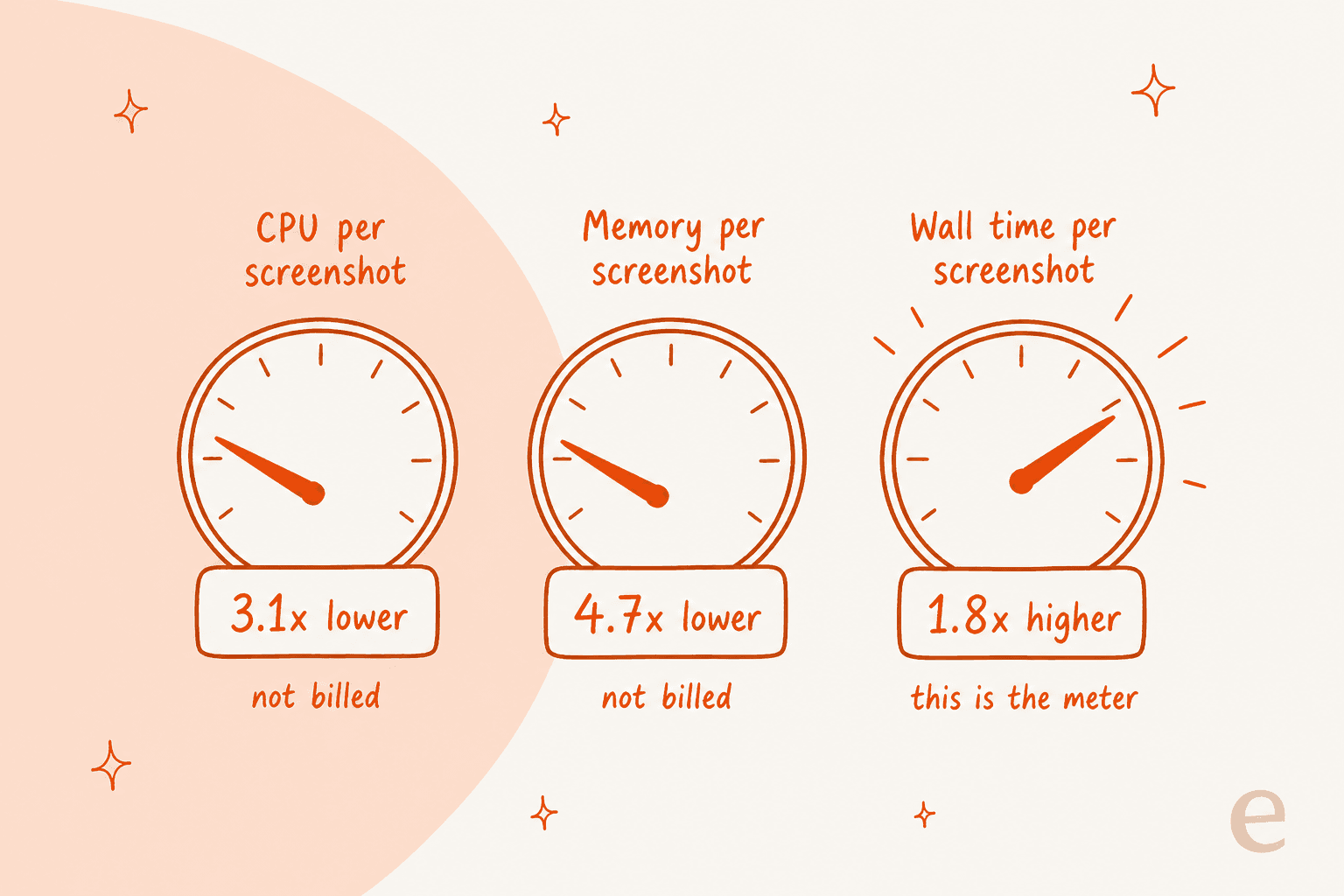
So under the published rate card, running the same job on Kitesurf rather than Chromium makes the billed meter tick roughly 1.7 to 1.8x faster. The CPU and memory savings are large and they are real, but where they land is Cloudflare's fleet, where a screenshot session drops from 271.0 MiB down to 57.8 MiB. A real platform win, and exactly the sort of thing that later lets a provider raise concurrency ceilings and cut prices. It is not a line item on your invoice yet. Anybody who has tried to model cost per resolution already knows how far apart a provider's unit cost and your unit price can sit.
Two caveats, and I would rather state them plainly than bury them. First: benchmark wall time and billed browser-ms are measured differently, so treat that multiplier as a direction and not as a decimal. Second: Kitesurf is free while in beta, which makes the honest answer to "what does it cost" nothing at all, today. The real question is what happens at general availability. That answer is unpublished.
Here is the arithmetic on the current rate card, so you can put your own volume in:
At a million screenshots a month the delta comes out about $12.78. At ten million, about $128. Small absolute numbers, because Browser Run is cheap to begin with, and that is part of the honest read here: nobody is choosing Kitesurf to save money on browser hours today. What they would choose it for is that Cloudflare's own capacity gets cheaper, which is how you eventually arrive on higher concurrency ceilings and a better rate card. That ceiling has moved twice already this year, from 30 to 120 back in April, then to 200 in the current limits page.
What Kitesurf actually is
Three components. The naming is unusually literal, for once.
The Engine is the only public-facing piece. It speaks the Chrome DevTools Protocol over WebSocket plus an HTTP REST surface, and it is also the only component holding session state. That CDP choice is the whole compatibility story, in terms of adoption: point Puppeteer, Playwright, chrome-remote-interface, or any agent that speaks MCP and CDP at it, and it works. You opt in by appending browser=kitesurf on the endpoint. That is the entire migration.
PageScript is where a page actually lives. Every page, and every out-of-process iframe too, gets its own long-lived isolate spun up through Dynamic Workers, holding a clean globalThis and a DOM document. The HTML and CSS parsing comes from Blitz and Stylo, which is Firefox's CSS parser. Both Rust.
PageRenderer turns the computed page into pixels. Stateless, holding only a disposable cache, and the Engine calls renderFrame() on it over Workers RPC. Because it holds nothing at all, a stuck render just gets killed and retried instead of debugged.
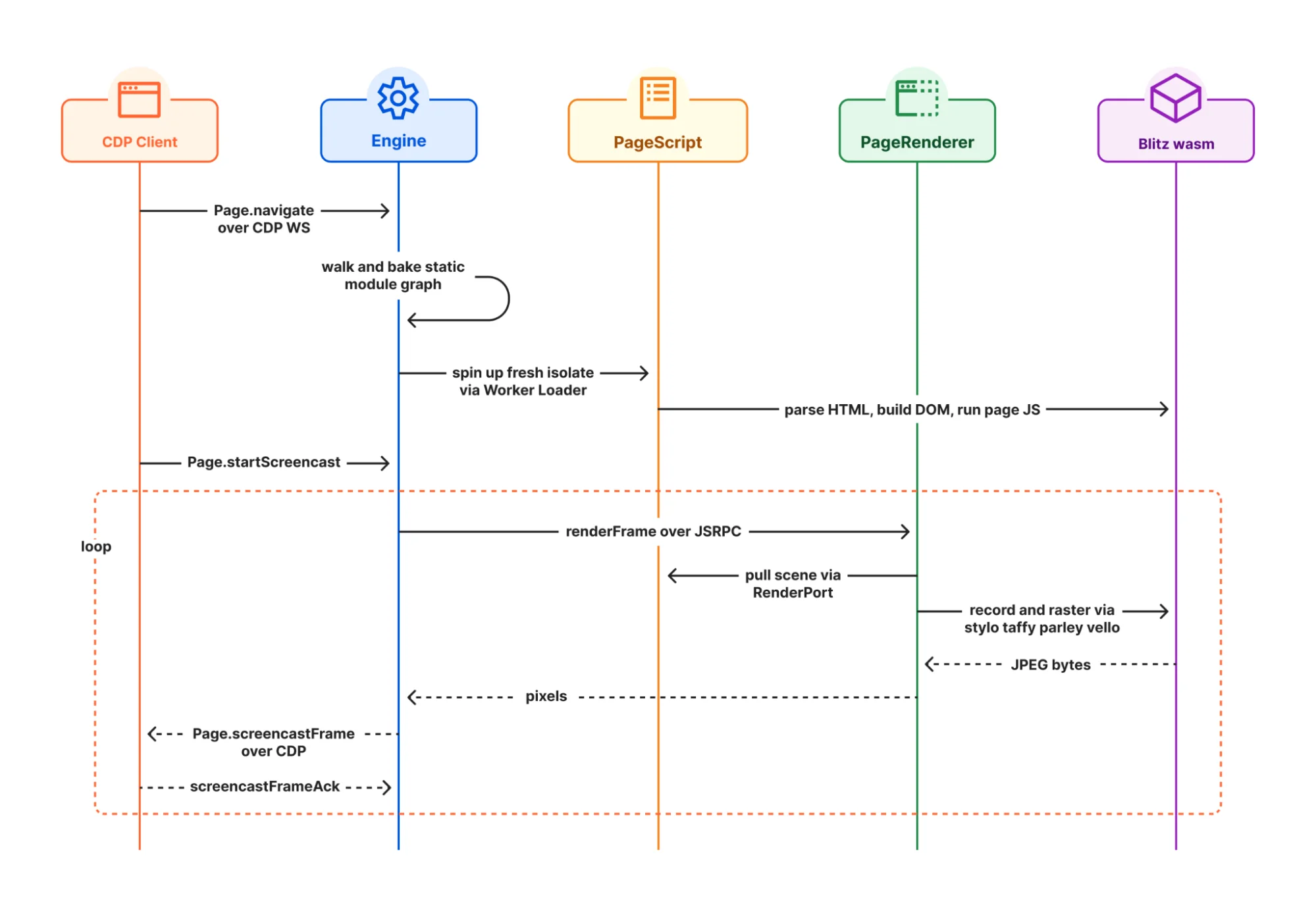
Two details in there is worth more than the architecture diagram itself.
First one: Workers still does not support eval natively, for security reasons. So Cloudflare's workaround is running Boa, an ECMAScript engine written in Rust, inside the isolate. As one commenter put it, that is a JS engine written in Rust, compiled to Wasm, running inside V8. Celso Martinho, who wrote the post, agreed on Hacker News and said they will migrate off Boa once native eval lands. It is rare to watch a vendor label their own layer as suboptimal in the launch post.
The second is about where the idea came from in the first place. Cloudflare credits obscura, an Apache-2.0 Rust headless engine, as the initial inspiration, and says the first attempt was porting it onto Workers with an AI agent, which "didn't work very well at first." Then its author turned up in the thread:
"I had no idea Cloudflare had tried porting Obscura until I read this post. Seeing something I built mentioned as the starting point for Kitesurf is an honor... For context, I'm 16."

As of today that repo sits at 22,186 stars.
The benchmark, read line by line
Cloudflare publishes medians of five Browser Run Quick Action runs across a 14-URL corpus, and the contents of it are readable: Hacker News, Wikipedia, MDN, three newspapers in The Guardian and El Mundo and RTP, plus five TodoMVC builds.
| Metric | Kitesurf | Chromium (warm pool) | Kitesurf, relative |
|---|---|---|---|
| CPU: screenshot | 380 ms | 1,173 ms | 3.1x less |
| CPU: HTML extraction | 229 ms | 877 ms | 3.8x less |
| Memory: screenshot | 57.8 MiB | 271.0 MiB | 4.7x less |
| Memory: HTML extraction | 39.4 MiB | 273.7 MiB | 7.0x less |
| Wall time: screenshot | 1,148 ms | 637 ms | 1.8x slower |
| Wall time: HTML extraction | 820 ms | 472 ms | 1.7x slower |
Three things worth to notice here.
The comparison runs against a warm pool, which Cloudflare names right in the column header instead of hiding it. A warm Chromium has a JIT that already saw the page; Kitesurf is a cold software renderer, every single time. Which makes it a fair fight for a bursty agent workload and an unfair one for a long session. Either way, the framing is honest.
Chromium's memory barely moves between the two tasks, 271.0 MiB against 273.7 MiB, while Kitesurf's drops from 57.8 to 39.4 MiB. That is the actual shape of the argument: Chromium pays for a whole browser whether or not you asked it to draw anything, and Kitesurf pays roughly in proportion to the work. It is the same reason token-metered AI pricing behaves differently from seat pricing, and why GPT-5.6 pricing rewards short prompts.
And that corpus is fourteen text-heavy, well-behaved pages. Reasonable stand-in for "extract this article", poor one for a checkout flow.
What it cannot do yet
Cloudflare lists four gaps, and I would rather quote than paraphrase them: play video, render WebGL, negotiate a bot-challenge handshake with real TLS fingerprints, or start a long-running authenticated session that requires persistent state. For any of those you use Browser Run's Chromium default.
That fourth one is the load-bearing limitation. An agent that does anything commercially interesting on the web spends most of its life logged in, and this is exactly the case Kitesurf defers today. Any shopping assistant worth building lives behind a login, and so does most of whatever an ecommerce chatbot gets asked to do. The best comment in the whole Hacker News thread came from somebody who had spent a day testing the premise directly, driving the open web with raw HTTP only:
"Rendering was almost never the blocker. Identity was."
Someone else drew the obvious conclusion:
"The missing primitive for agents is not a browser. It is a portable identity and a spendable balance."
Which, in fairness to Cloudflare, is a thing they are separately building. The same limitation is the reason an agentic commerce protocol exists at all, and why Shopify's version leans on structured endpoints instead of a browser. Browser Run itself now ships a WebMCP feature whose entire pitch is replacing screenshot-analyze-click loops with direct function calls, which tells you plenty about where Cloudflare thinks this ends up.
There is also a playground-only budget, worth to know if you test there: every page navigation gets 20 seconds of CPU time and 60 seconds of wall-clock time, then the page is stopped. Fine budget for reading an article. Tight one for anything resembling a real autonomous agent run.
Standards coverage, and the shape of that curve
The launch post claimed around 215,000+ Web Platform subtests passing. The Browser Run docs already say over 235,000, and they break it out per area: DOM 97%, HTML 96%, Selection 99%, SVG 97%, Encoding 99%, CORS 95%, XHR 95%, with URL trailing at 83%.
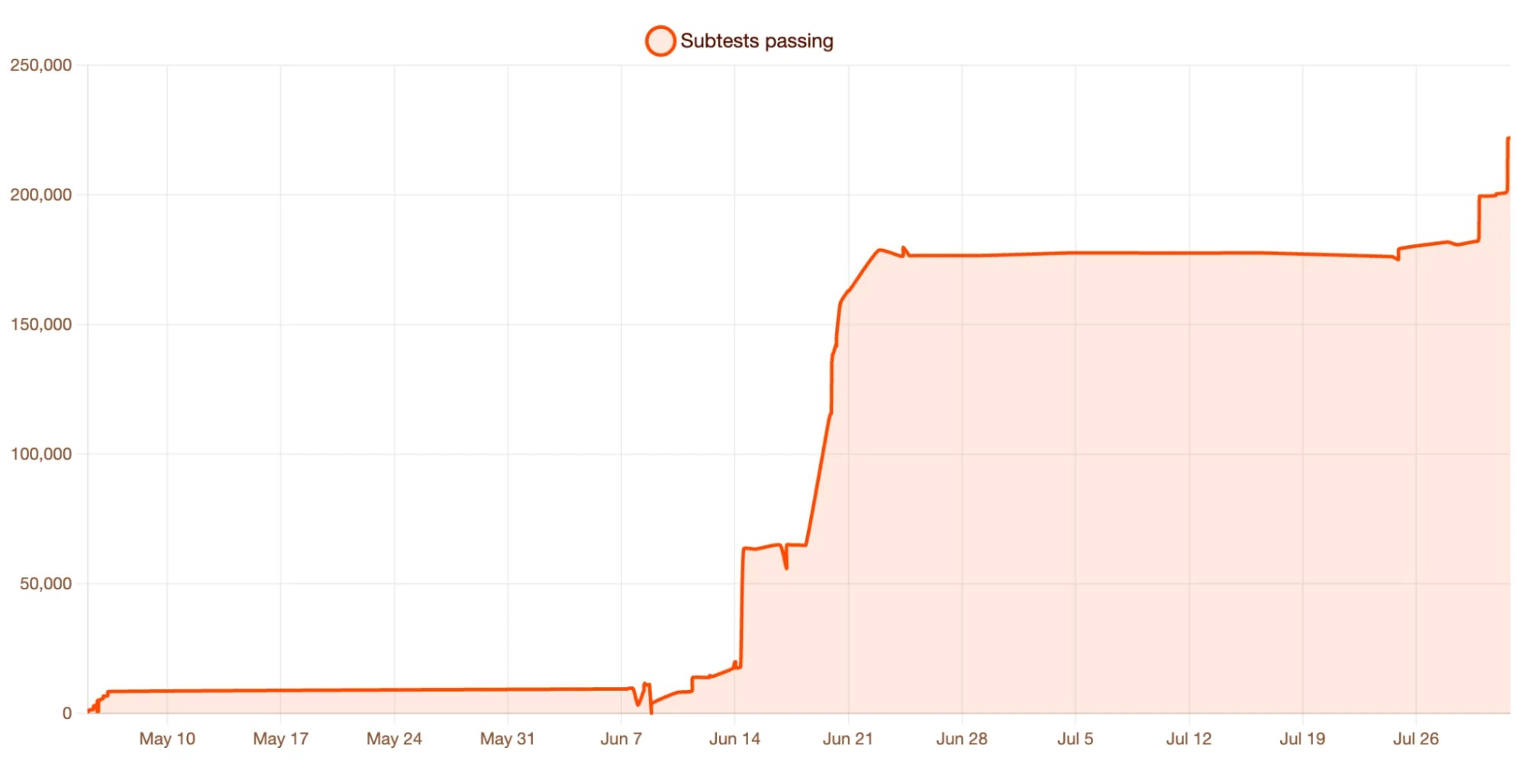
Read the curve, not the headline. It is not a smooth ramp at all, it is three step changes and a five-week plateau sitting around 176,000 through late June and into July, then a jump right at the end. This is what a team clearing whole spec areas in batches looks like, and it means extrapolating a weekly rate off it, in either direction, is the wrong read.
Conformance is also not the same thing as working, and Cloudflare says so itself, which is why they pair WPT with multistep Puppeteer integration tests plus visual regression runs against Chromium at every step. That instinct, that a passing test suite is not a passing user, is the same one behind adversarial testing for AI agents. It is also why I insist on a simulation over real historical tickets before any ticket classification goes live.
One small thing. The Browser Run changelog the post asks you to watch carries no Kitesurf entry yet, its most recent line being dated 28 July.
The security question the isolate does not answer
Cloudflare's security story is isolation, and it is a good story. Every page load gets treated as untrusted, every session starts fresh, and network access is funnelled through a single SandboxOutbound worker which enforces CORS, injects browser-shaped headers, keeps each page's cookies in its own jar, and 403s anything that fails policy. Nothing else touches the network, at all. As a posture that is stronger than most of what I read when auditing vendors on SOC 2 and GDPR questions, or on the data-privacy checklist every enterprise buyer sends over.
The sharpest pushback in the thread was that this guards the wrong direction:
"The V8 isolate guards the wrong half of this imo. It stops the agent's code from escaping the sandbox, but the risky part of a browser agent isn't code escaping, it's that it reads untrusted pages and then acts on them."
A reply took it further:
"Hidden instructions in product descriptions will become the new blackhat SEO: instead of keyword-stuffing for crawlers, stores get prompt-stuffed for agents."
This is fair, and it is not really a Kitesurf problem either. To Cloudflare's credit the launch post does name prompt injection and tool safety as top priorities in its threat-model section, it just never claims the isolate solves them. Nothing at the browser layer can. The isolate bounds what the agent can run, not what it can be talked into doing, so the fix has to live in whatever the agent is permitted to do afterwards: scoped tools, confidence thresholds, and a human on anything irreversible. Same architecture that stops a support bot confidently inventing a refund policy, which eesel's notes on preventing hallucinations and agent handoff practices go into.
Does it get past Cloudflare's own bot protection?
This was the top question in the thread, and the speculation around it got loud enough that it deserves a direct answer. Celso Martinho, who wrote the launch post, replied himself:
"Browser Run requests coming from Chromium or Kitesurf are always identified as bot traffic by Cloudflare."
Requests carry a documented user agent and they are signed with Web Bot Auth. Kitesurf also cannot negotiate a bot-challenge handshake with real TLS fingerprints, and that is listed as a limitation, not as a feature. If your plan depended on looking human, this is not the tool. For that job the market already has residential-proxy scrapers, which is the axis eesel's Firecrawl vs Bright Data comparison turns on.
The strategic discomfort in the thread was a separate point and it did not get answered:
"It's pretty bizarre to see them going from being the bot protection platform to differentiating on the kinds of bots they'll block, because now they're facilitating the exact kind of bot automation they made their name protecting against."
Both of these things can be true at once. Kitesurf identifies itself honestly, and Cloudflare now sells onto both sides of a fence it built.
The playground is the fastest way to find out
There is no compatibility matrix. Cloudflare's own answer on whether a site works is to go try it. The public playground takes any URL and hands you Inspect, Screenshot, PDF and HTML buttons, with preloaded examples that cover Wikipedia, Hacker News, MDN, a few newspapers, and Doom. Same try-it-yourself instinct behind the Chrome auto-browse demos.
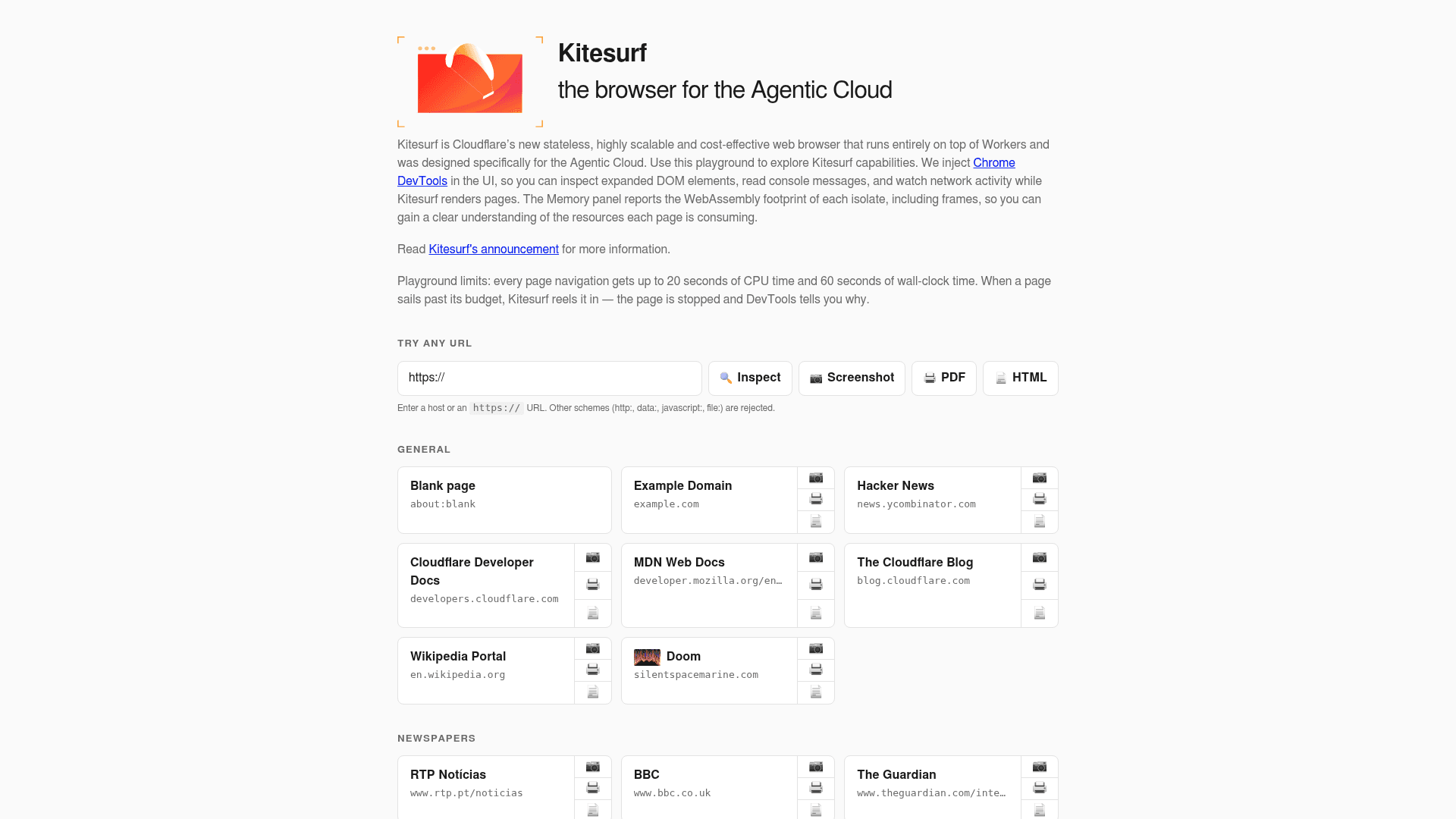
https:, which is a small tell about the threat model, as captured from kitesurf.cloudflare.app.The better feature is the injected Chrome DevTools. Cloudflare implemented enough of CDP that the Memory panel reports the WebAssembly footprint of each isolate individually, so you get to see where a page's cost actually goes.
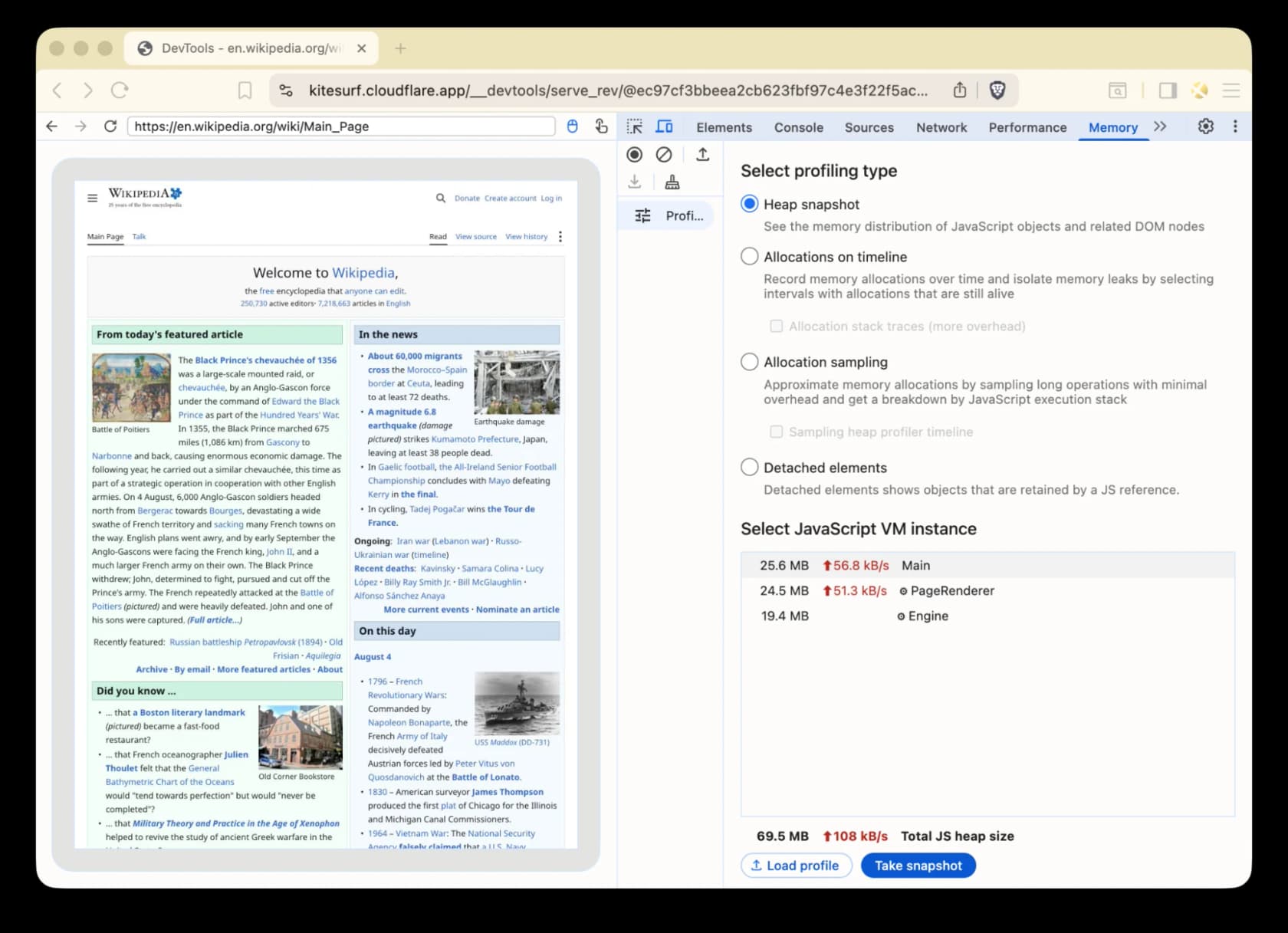
In that capture a live inspect session on Wikipedia's main page reports Main at 25.6 MB, PageRenderer at 24.5 MB, Engine at 19.4 MB, so 69.5 MB total JS heap. Worth to flag that this runs higher than the 57.8 MiB benchmark figure, and the reason is that a benchmark screenshot is one shot while this is three isolates held open with DevTools attached. Per-component attribution like that is unusually good instrumentation for a beta, and honestly it is the thing I would use it for first. If those screenshots then go to a model, the Gemini agentic vision work is the other half of the pipeline.
What this means if you are building a support agent
I ship integrations for a living, so my honest read is this: Kitesurf is a very good primitive and not a product. Cloudflare presents it that way too.
If you build agents that read the public web at volume, screenshotting pages, pulling article text, generating PDFs, pre-rendering for crawlers, then it is worth a browser=kitesurf on one endpoint this afternoon. That is the whole test. The pattern here is the same one that sits behind every scraping-as-a-service tool.
If you are weighing options there, the writeups on Firecrawl alternatives and Firecrawl vs Scrapy cover the buy end and the build-it-yourself end, respectively.
Pre-rendering is the quietly useful case. Browser Run already ships a tutorial for returning crawler-ready HTML out of a Worker, and if that is the reason you are reading this, then an SEO AI agent is what you are really building. Wiring the output into a model is a solved problem as well, either through function calling or through a Claude integration.
Now, if you are building an AI agent to work a support queue, a browser is close to the least interesting part of the whole stack. Here is what three-plus years on that problem says actually decides whether it works:
- Retrieval, not rendering. The agent has to answer out of your help centre, your macros, your past tickets. Nothing in a browser does that, which is what an AI knowledge base is for, and why training on your own content beats a better renderer every time. The retrieval side is the whole game here, which is roughly the argument in RAG vs LLM.
- Identity, exactly as the thread said. Checking one customer's order requires an authenticated view into your systems, and long-running authenticated sessions are the thing Kitesurf explicitly defers. An API integration handles this on day one, which is why support automation tools get built around the helpdesk and not around the browser.
- Knowing when to stop. The single largest objection eesel hears from buyers is never accuracy in the abstract, it is control. One CX lead at a DTC supplements brand put it exactly this way on a call: "I need an AI who is only handling the tickets that it's confident to handle and all the other ones, leave them alone." That is a routing problem, and the reason to bias toward tier-1 deflection with a clean escalation path instead of autonomy everywhere. It is also the practical difference between AI agents and chatbots.
- Proof before go-live. Cloudflare tested Kitesurf against 235,000 subtests before they shipped it. The equivalent for a support agent is replaying it across your own historical tickets, and that is the difference between a demo and a rollout.
That last point is also the honest version of build-vs-buy. Several technical customers have left eesel to build directly onto the Claude API, an AR construction-tech firm and a DTC beauty brand among them. An engineering lead at a Bitcoin-ATM hardware company who went the other direction said it best: "We could try to write our own LLM application but we didn't want to invest our time into that. We wanted something that we would not have to maintain." Kitesurf lowers the cost of one brick. The wall is still yours, and the bricks you actually need are a RAG pipeline, a model choice for support, plus somewhere to put the ticket automation.
If what you want is the wall instead, eesel plugs into Zendesk, Freshdesk, Gorgias, HubSpot or Front inside a few minutes, reads your existing help centre and your past tickets, then lets you dry-run the thing over real history before a single customer sees it. It runs as a copilot too, if you would rather keep a human on send. Try eesel, free, and see what an AI support agent actually has to get right.
The bottom line
Kitesurf is the most interesting thing anybody has shipped in browser automation this year, and the numbers behind it come published in enough detail that you can argue with them, which is rarer than it ought to be. A three-month-old engine at 235,000 subtests, passing on Wikipedia and on Hacker News and on Doom, running in isolates, is a real achievement. It is also a very different bet from the consumer AI browser category, where the product is the interface and not the runtime.
Just be precise on what it buys you today. It buys 3 to 7x lower resource use in exchange for 1.7 to 1.8x more wall clock, on a rate card that bills the wall clock. It buys a one-parameter migration, plus an honest list of four things it cannot do. What it does not buy is a way past a bot challenge, and it does not solve prompt injection either. Cloudflare says both of those out loud.
The savings are real. They just sit on Cloudflare's side of the ledger until a Kitesurf price exists to check them against. For a workload that reads the public web at scale, go try it this week. For an agent that has to actually resolve a customer's problem, the browser was never the hard part. The arithmetic that matters over there is human agent cost, not browser hours.
Sources
- Introducing Kitesurf - Cloudflare blog, Celso Martinho, 7 August 2026, the agent-first browser announcement
- Kitesurf - Cloudflare Browser Run documentation
- Browser Run pricing - Cloudflare documentation
- Browser Run limits - Cloudflare documentation
- Browser Run changelog - Cloudflare documentation
- Automatic request headers - Cloudflare documentation
- WebMCP - Cloudflare documentation
- Kitesurf playground and benchmark corpus - Cloudflare
- Kitesurf on Hacker News - launch discussion, 221 points, 63 comments
- Blitz and obscura - source repositories
Frequently Asked Questions
What is Cloudflare Kitesurf?
How much does Cloudflare Kitesurf cost?
Is Cloudflare Kitesurf faster than Chromium?
What can Cloudflare Kitesurf not do yet?
Does Cloudflare Kitesurf bypass Cloudflare's bot protection?
How many Web Platform Tests does Kitesurf pass?
Is Cloudflare Kitesurf open source?
Should I use Kitesurf for an AI customer service agent?


Article by
Rama Adi
Rama is a software engineer at eesel AI with two years of experience writing about B2B SaaS, AI tools, and customer support technology. Based in Bali, Indonesia, he brings a developer's perspective to product comparisons — cutting through marketing copy to what the integrations and APIs actually do.