What the Cloudflare Web Search API actually is
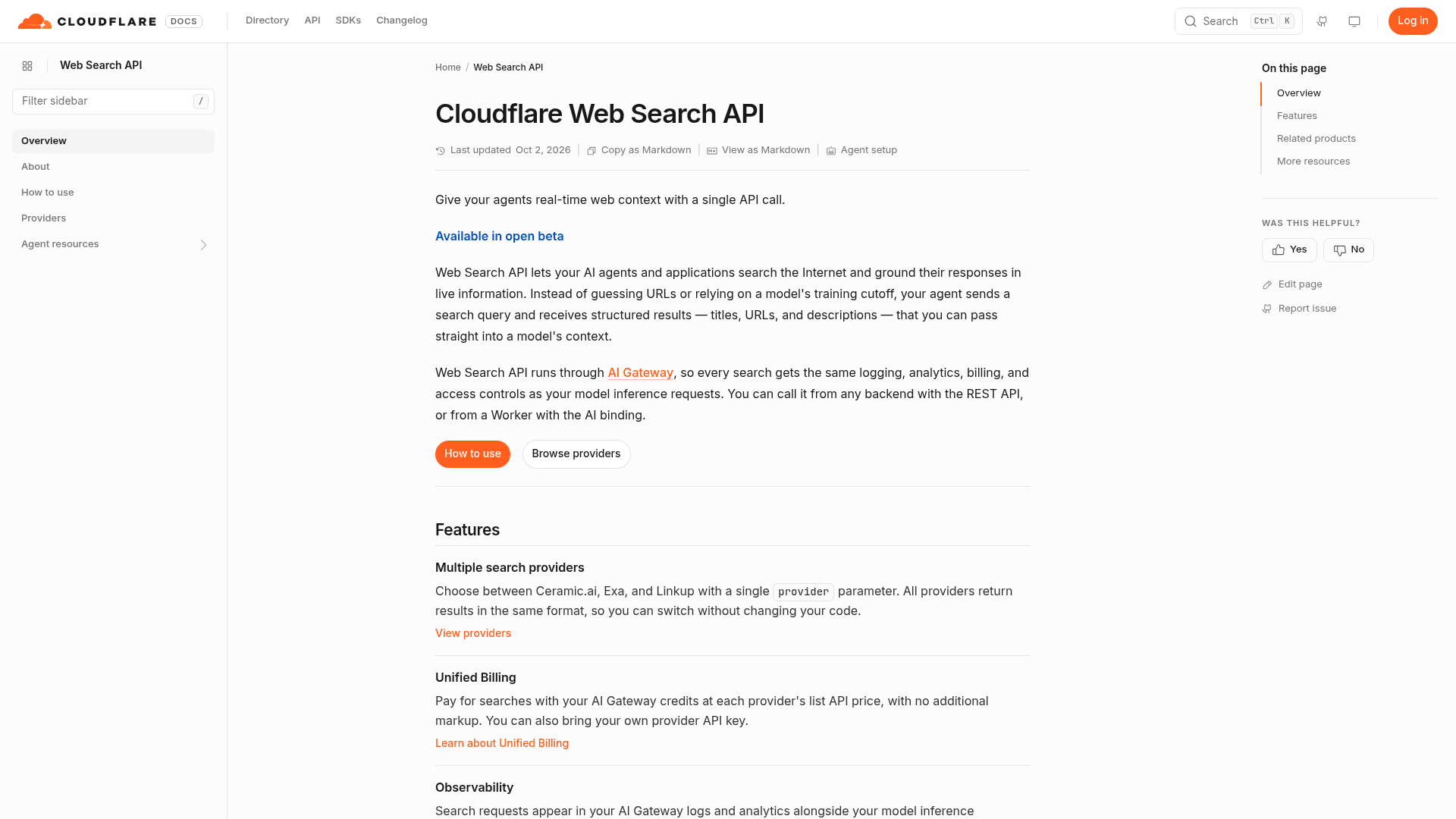
The pitch in the launch post by Michelle Chen, Sam Else, and Gabriel Massadas starts with a fun admission. When an agent needs a live page, it usually guesses the URL and curls it, which is why you see so many 404s in agent logs. Web search gives the agent a real starting point: send a query, get a list of results, feed them into the model.
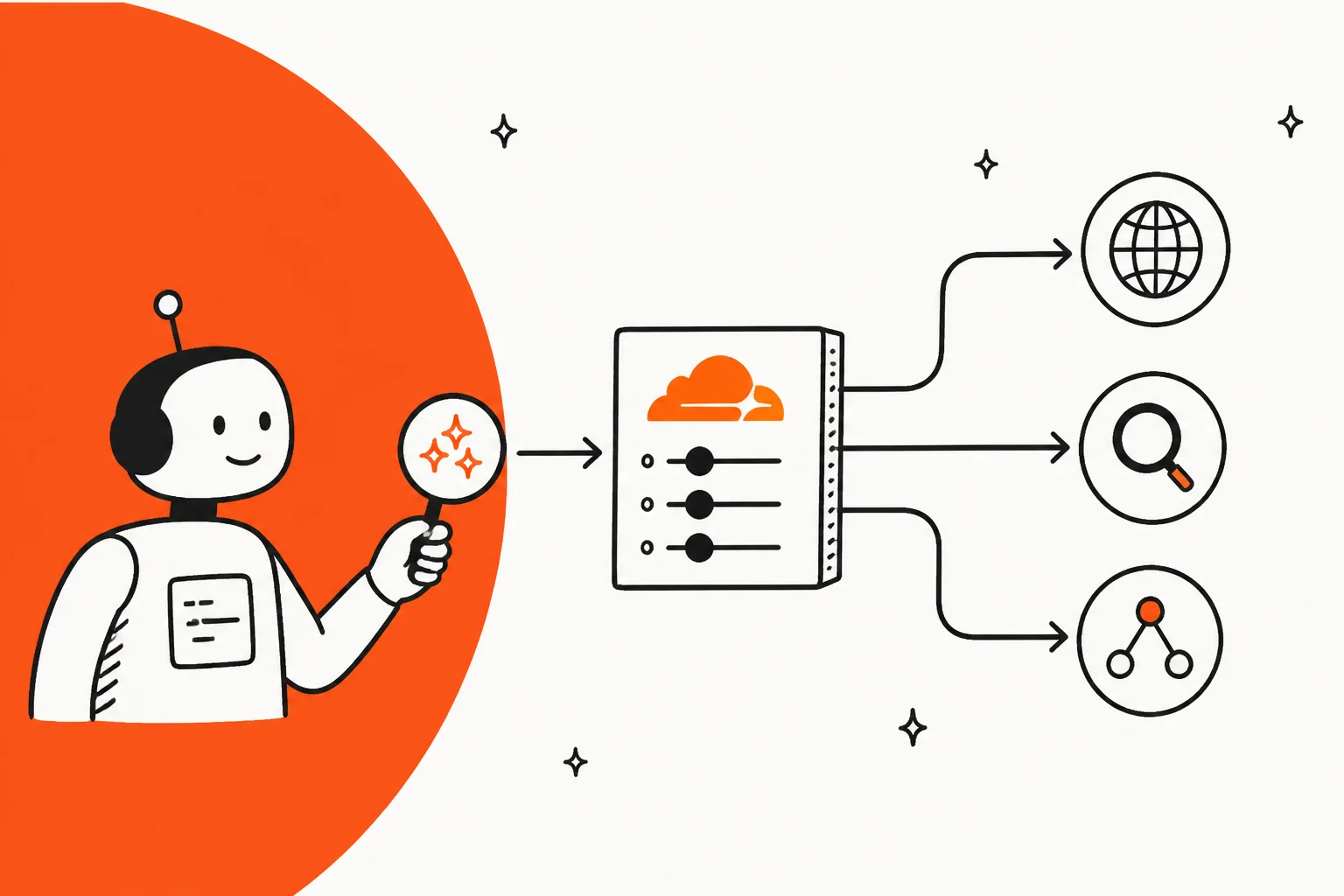
Under the hood it is a routing layer, not a search engine. Cloudflare's About page lists four steps for every request:
- Route the request through the AI Gateway you name.
- Forward the query to the provider you chose, or to Ceramic.ai if you did not choose.
- Normalize the response into one format: URL, title, and an optional description, image, favicon, and last-modified date.
- Log the request and bill it to your account.
That is the whole product today, and I mean that as a compliment. If you already run model calls through AI Gateway, search now shows up in the same logs, against the same budget, under the same access rules. Cloudflare also says server tools are coming, so web search will eventually be built into the control plane instead of a tool you wire up yourself.
The launch landed in Birthday Week, and it clearly struck a nerve. The Hacker News thread hit 590 points and 284 comments, which is more than the Kitesurf browser launch pulled. Cloudflare's own announcement on X got a reply that sums up why people care:
"search in the same gateway as the model calls is the nice part. wiring exa into my agent tonight"
How a request moves through it
Before getting into money, it helps to see the moving parts, because every interesting decision sits in one of them.
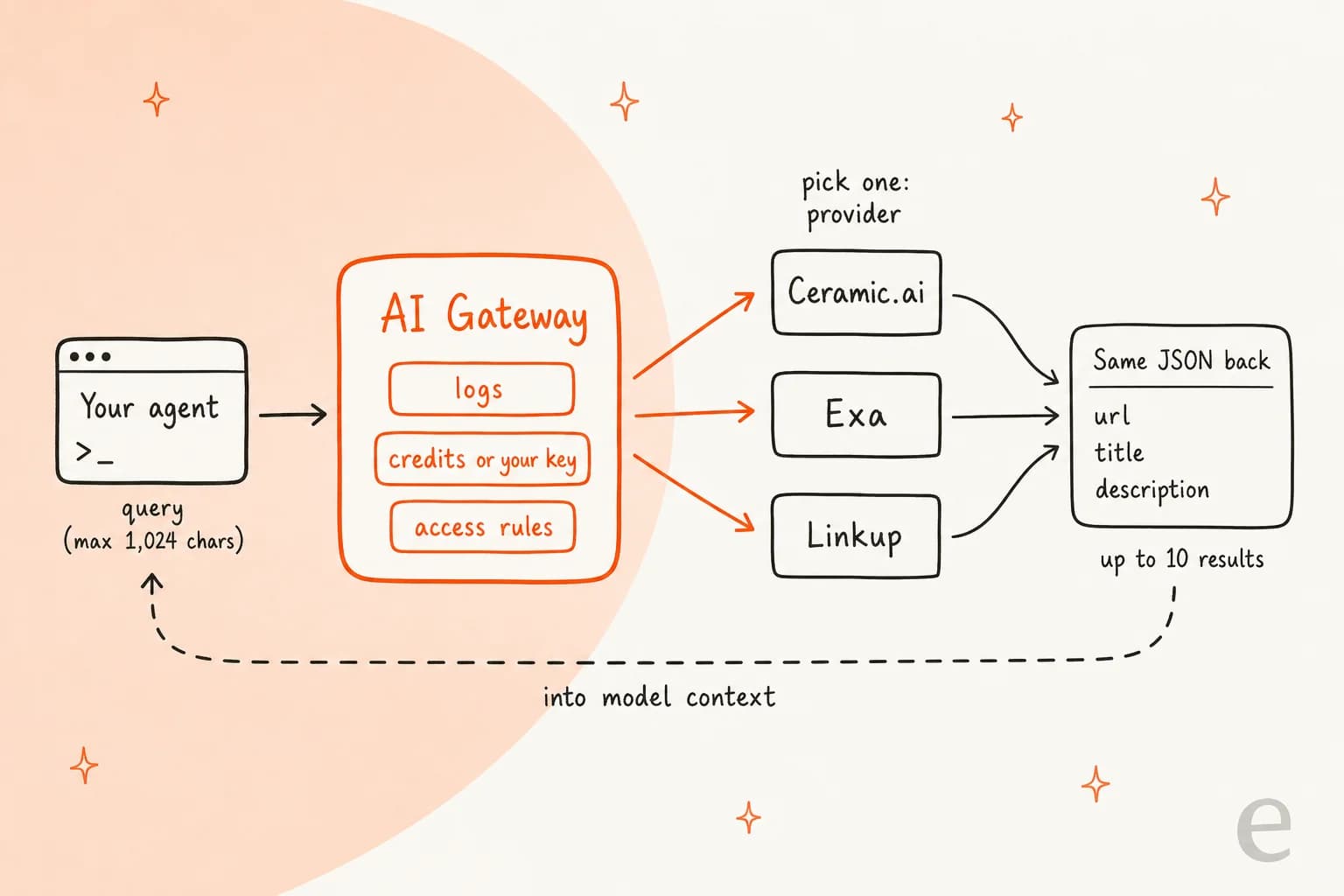
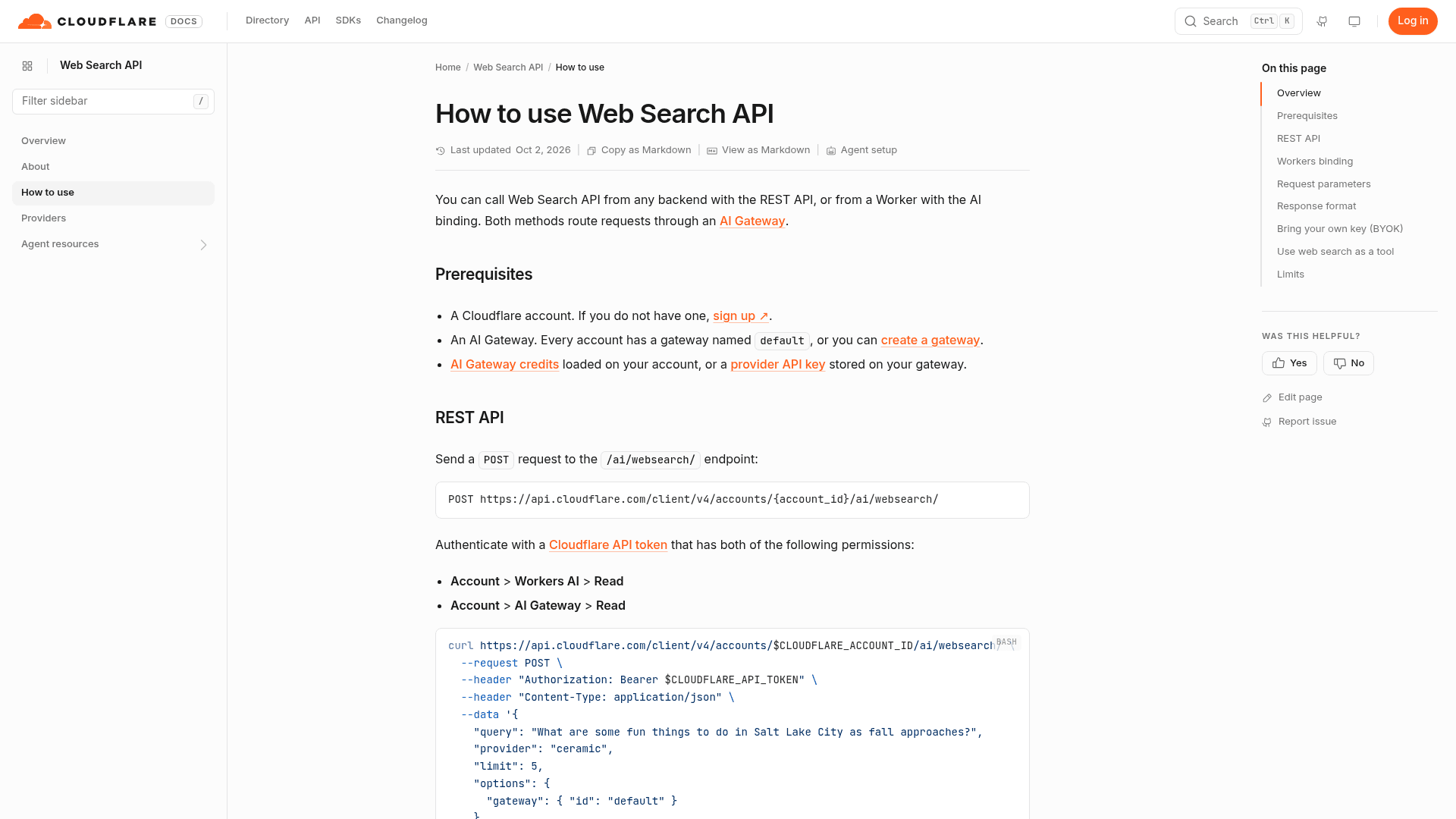
You can call it two ways, both documented on the how-to page:
- REST:
POST https://api.cloudflare.com/client/v4/accounts/{account_id}/ai/websearch/, authenticated with a Cloudflare API token that has both Workers AI Read and AI Gateway Read permissions. - Workers binding:
env.AI.websearch({ gatewayId, query, provider, limit }), which returns a standardResponseyou call.json()on.
The request has very few knobs, which tells you a lot about the design:
| Parameter | What it does | Limits |
|---|---|---|
query | The search text | 1 to 1,024 characters |
provider | Which engine runs it | ceramic (default), exa, linkup |
limit | How many results come back | 1 to 10, default 10 |
byokAlias | Use a provider key stored on your gateway | Fails with a 400 if not configured |
gateway.id | Which AI Gateway to route through | Every account has default |
There is no date filter, no domain allowlist, no country parameter, and no "fetch the full page" option. Each provider runs in a fixed mode: Exa uses its auto search type with highlights as the description, and Linkup uses fast depth with raw results, per the providers page. If you need Exa's or Linkup's deeper modes, you call them directly.
The response is deliberately thin: an items array and a metadata block with your query, a request ID, and latencyMs. That thinness is the point. It drops straight into a model's context window without you writing a parser per provider, and Cloudflare's docs include a full example of wiring it as a web_search tool for a model like Gemma 4 running on Workers AI.
Why the provider parameter is the real pricing decision
Here is the table that matters. Every number below is from Cloudflare's providers page, checked on October 8, 2026:
| Provider | provider value | Price per 1,000 requests | Zero Data Retention | What you get back |
|---|---|---|---|---|
| Ceramic.ai (default) | ceramic | $0.25 | Yes | Own index of 40B+ pages, descriptions up to 8,000 characters |
| Linkup | linkup | $5.00 | Yes | fast depth, raw sourced results, no generated answer |
| Exa | exa | $7.00 | No | auto search type, query-relevant highlights as the description |
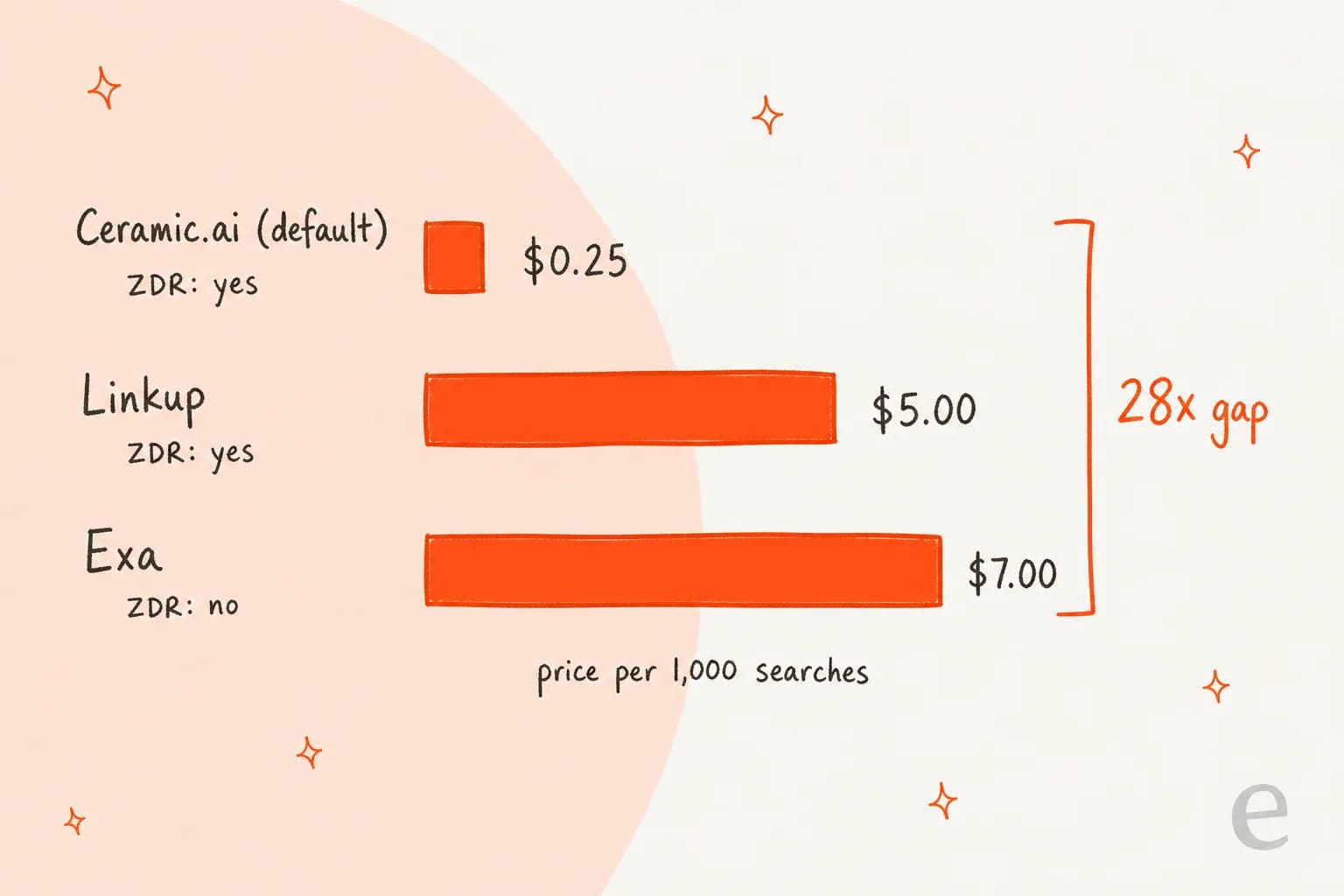
Exa costs 28 times what Ceramic costs for the same request shape, and switching between them is one string. That is great for experimentation and dangerous for budgets, because nothing in your code changes when a teammate flips ceramic to exa in a config file. One HN commenter who posted the price list asked the right question:
"Does anyone have insights on the quality differences? Web search API pricing for AI agent usecases has always felt so expensive for what it is, but I have no grounding on the economics of running a web index."

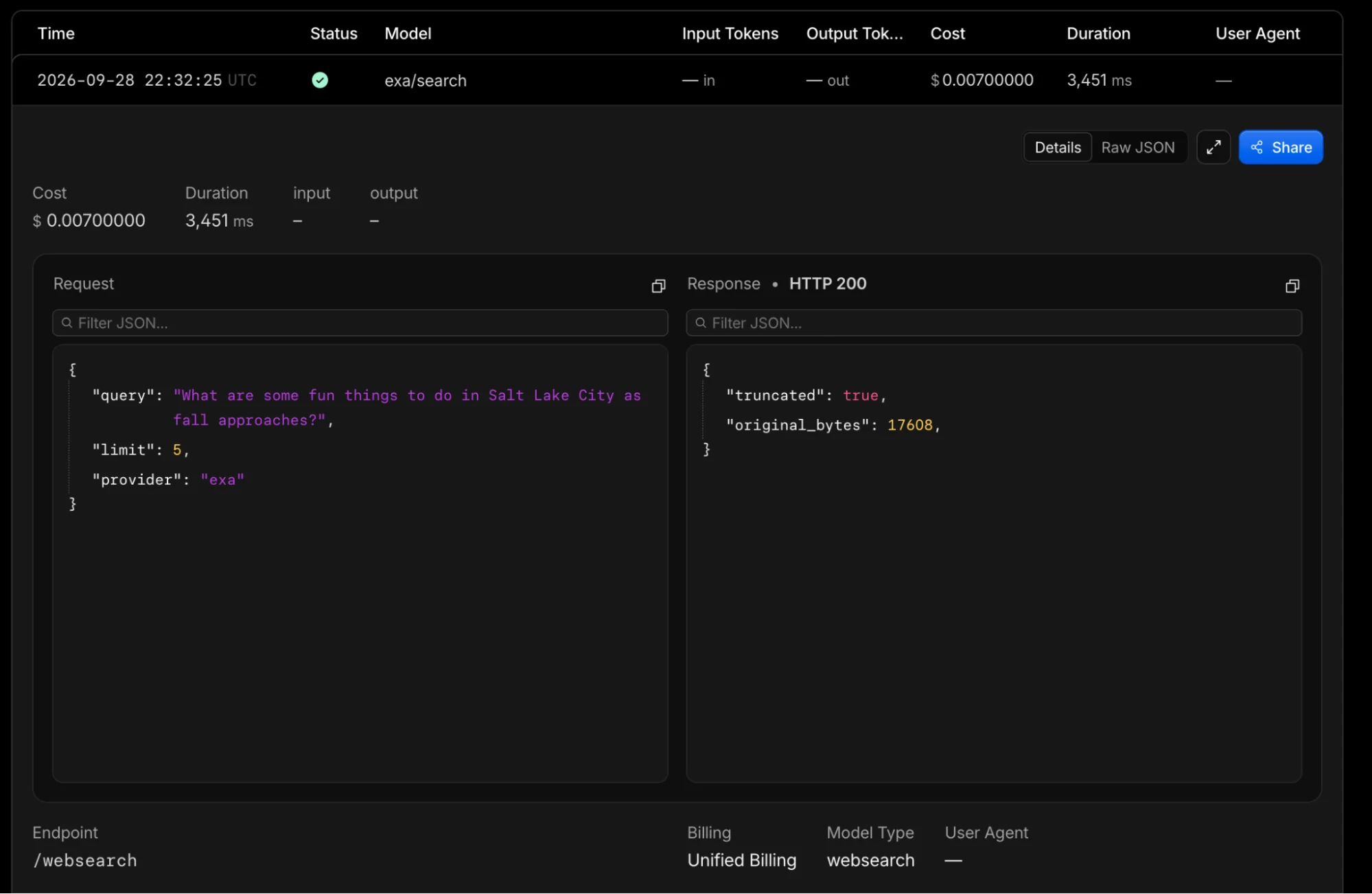
Cloudflare's launch post includes a log screenshot that makes the per-search cost very concrete: a single exa/search call billed at $0.007, which is exactly $7.00 per 1,000.
The "no markup" line, read carefully
Cloudflare says searches are billed "at each provider's list API price, with no additional markup." That is true per search. But AI Gateway credits come from Unified Billing, and that page states that a 5% fee applies to all credits purchased: a $100 top-up is a $105 charge. So if you pay with credits, your effective rate is about 5% above list. If you bring your own key, the provider bills you directly and the credit fee does not apply to those searches.
Here is what that looks like at real volumes, assuming one search per request:
| Searches per month | Ceramic.ai (list / via credits) | Linkup (list / via credits) | Exa (list / via credits) |
|---|---|---|---|
| 10,000 | $2.50 / $2.63 | $50.00 / $52.50 | $70.00 / $73.50 |
| 100,000 | $25.00 / $26.25 | $500.00 / $525.00 | $700.00 / $735.00 |
| 1,000,000 | $250.00 / $262.50 | $5,000.00 / $5,250.00 | $7,000.00 / $7,350.00 |
The 5% is a rounding error next to the provider choice. At a million searches a month, picking Exa over Ceramic is a $6,750 decision at list price; the credit fee on top is $350 at most. Agents rarely search once per task, either. A research loop that fires five searches per user question turns 200,000 questions into a million searches, which is how a "cheap" feature ends up on a finance review. If you want to plug in your own numbers, this calculator does the multiplication:
What Cloudflare normalized, and what it did not
This is the angle I think most coverage misses. Cloudflare made the three providers look identical at the API level. They are not identical in the ways that matter to a product team.
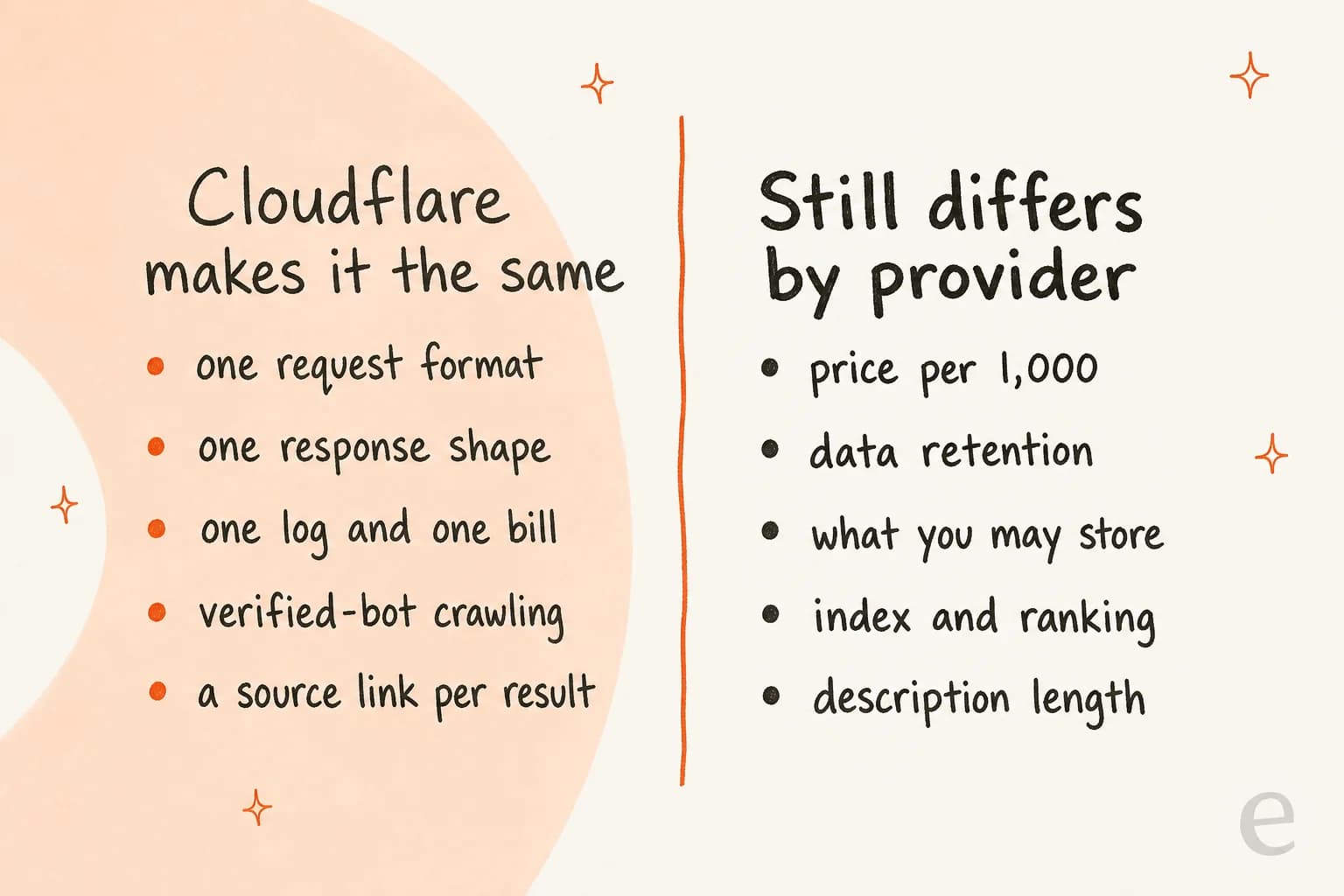
One X post put it better than I can:
"The catch is that a unified endpoint also makes search providers look interchangeable when result quality, coverage, ranking, and failure modes probably won’t be."
Three gaps are worth checking before you ship.
Data retention says two different things
The changelog entry says "all three support Zero Data Retention for requests made through Cloudflare." The providers page, updated the same day, lists Exa as "Zero Data Retention: No." Both pages still said that when I checked on October 8. An HN reader spotted it within hours, and someone from Exa replied:
"Thanks for raising this! We're looking into this discrepancy (I work at Exa)."
Until those match, I would plan as if the providers table is right. If your queries contain customer names, order numbers, or anything from a ticket, that makes Ceramic or Linkup the safer picks. Also note that Unified Billing's ZDR setting does not control AI Gateway logging; that is a separate switch.
What you can store is set by each provider's terms
Cloudflare unified the JSON. It did not unify the license. Simon Willison raised the question that every product with a "share this chat" button should ask:
"My number one question about search APIs is always if they allow you to store and resyndicate results you get from them."
He then quoted Ceramic's terms of service, which bar you from retaining, caching, or storing output beyond what is "reasonably necessary to display such Output to your authorized end users in the ordinary and real-time course of use." If your agent writes search results into a saved transcript, a knowledge base, or a cache, read the terms for the provider you pick. Exa and Linkup link their own terms from the same providers table.
Result quality is not a parameter
The cheapest provider is the default, and the docs frame Ceramic as built for "low-latency, low-cost search." Early testers found its index uneven:
"Tried one query on ceramic.ai (the default provider for cloudflare web search api): "qwen-3.8 flash next and rtx 5090 best inference setup" ... 0 results ... same query on google and ddg both yield proper results."
One anecdote is not a benchmark, and Exa's head of index made the fair point in the same thread that search quality varies by query type. But it is a reminder that an empty result set is a normal outcome your agent has to handle, not an edge case. More on why that matters below.
Web Search API vs the other ways to give an agent search
Cloudflare actually has two things called "web search" now, which confused a few readers. AI Gateway's older web search page, updated in June, covers proxying each model vendor's own search tool. The new API is a separate product.
| Option | Where search runs | Who picks the results | Works with any model? |
|---|---|---|---|
| Cloudflare Web Search API | Ceramic.ai, Exa, or Linkup | You get raw results and decide what to pass in | Yes, including open models |
Native tools via AI Gateway (Anthropic web_search_20250305, OpenAI web_search_preview, xAI web_search, Alibaba enable_search) | Inside the model vendor's call | The model | Only that vendor's supported models |
| Search-first APIs via AI Gateway proxy (Perplexity, Parallel) | The provider | The provider's own endpoint | Separate call, provider-specific format |
| Calling a search provider directly | The provider | You | Yes, with one integration per provider |
If you are on Anthropic's API or OpenAI's API and happy with their built-in search, the native tools are less plumbing. The Web Search API earns its place when you run open models, such as Kimi K3 or the models behind DeepSeek Harness, that have no search partner of their own. One HN commenter guessed at exactly that: the big coding agents come with search partners, and open models need search from somewhere.
Plenty of developers asked "why not call the providers directly?" The honest answer from the thread is procurement and budgets, not technology. One commenter described giving an agent a single Cloudflare token with spending limits instead of building a proxy per service:
"Instead I put my API keys to cloudflare, set limits, and gave the agent the CloudFlare token, and in minutes it could contact tens of services."
That lines up with what Cloudflare documents: spend limits per gateway, scoped by model, provider, or custom metadata. If your team already pays Cloudflare, adding search is a budget line, not a new vendor review. If you do not, a direct integration with Exa or a scraper like Firecrawl may be just as quick. The landscape is also shifting under everyone's feet: Google's Custom Search JSON API is closed to new customers, and existing ones have until January 1, 2027 to move.
Where this fits for a support agent, and where it does not
Here is my bias, stated up front. I have spent two years working in SEO, and the first thing it teaches you is that search intent decides everything. A customer asking "can I return this after 30 days?" is not asking the internet. They are asking you. The right source is your returns policy, not the top 10 results for "30 day return policy."
That matters because of a failure I have seen up close. I have seen paying eesel customers whose bot answered real customers with made-up claims when knowledge base retrieval came back empty; one reply pulled "Oxygen" off the periodic table. The fix was not more search. It was a hard fallback: when your own sources have nothing, hand off to a human instead of letting the model fill the gap from wherever it can. A general web search API makes that gap bigger, not smaller, because now the model has the whole internet to be confidently wrong from. The patterns are written up in eesel's guide to AI hallucinations in support.
So for support, I would rank sources like this:
- Your help center, macros, and past tickets. This is what retrieval-augmented generation for support should mean.
- Your own website and product docs, scoped to your domain.
- The open web, last, for questions that are genuinely about the outside world: a carrier's service outage, a public regulation, a third-party integration's changelog.
The Cloudflare Web Search API is a reasonable tool for that third bucket. It is not a replacement for the first two, and Cloudflare does not pitch it as one.
How eesel fits next to a search API
Web search is infrastructure. eesel is the employee. Cloudflare gives your agent a way to look things up; eesel gives you a ready-to-work teammate that already knows where your answers live. The AI helpdesk teammate joins your existing queue in tools like Zendesk, learns from your help center and past tickets, drafts or sends replies, and escalates when it does not have a grounded answer. The current roster also includes an AI blog writer for content teams.

If you are the kind of team that reads Cloudflare changelogs for fun, you will probably like the eesel CLI. It runs the same teammate from a terminal, and anything you set up there shows up in the dashboard. The commands map neatly onto the "your sources first" idea:
npx @eesel/cli init chat-bubble --site https://your-site.comcreates an agent that starts reading your own site, with no account needed for a 7-day trial workspace.eesel integrations connect website --url ...oreesel integrations connect <platform>adds your helpdesk or docs as knowledge, andeesel files upload ./refund-policy.pdfadds a single policy.eesel chat "what's our refund policy?"tests the answer before a customer ever sees it.eesel approvalslists actions held for a human, so a write the agent wants to make waits for sign-off.
Every command prints JSON and every error comes back with a hint, so a coding agent like Claude Code or Codex can run the whole setup and read its own results. eesel mcp token also turns the workspace into an MCP server, which is how I would connect it to an agent that already uses Cloudflare for search. It is the same pattern I covered in CLI for customer support: a terminal, scripts, and agents all driving one teammate.
Where eesel is not the right fit: if you are building a general research agent that lives on public web data, you want a search API like Cloudflare's, not a helpdesk teammate.
My verdict on the Cloudflare Web Search API
It is a clean, small, honest product. Three things I would do before relying on it:
- Pin the
providerexplicitly, even if you want Ceramic. A default you did not write down is a default someone will change without noticing a 28x bill difference. - Treat the ZDR column as unsettled for Exa until the changelog and providers page agree, and read the storage terms for whichever provider you keep.
- Handle zero results on purpose. Return "I don't know" or hand off, rather than letting the model improvise. That is the single habit that keeps AI grounding from becoming AI hallucination.
If you already build on Cloudflare, it is the easiest way I have seen to give an open model live search with one bill and one log. If you are evaluating search for a customer-facing agent, start with your own knowledge and add the web as the last resort. For more on the Cloudflare agent stack, see my notes on Clef decision models and the Kitesurf alternatives, or browse the wider field of AI search engines.
Try eesel for grounded support answers
If the reason you are looking at a web search API is that your support bot keeps answering from thin air, the fix is usually closer to home. eesel's AI helpdesk teammate learns from your help center, macros, and past tickets, and escalates to your team when it has nothing grounded to say. You can test it against your own knowledge base before it touches a live ticket, and see plans on the pricing page. Try eesel free.
Frequently Asked Questions
What is the Cloudflare Web Search API?
How much does the Cloudflare Web Search API cost?
Which provider does the Cloudflare Web Search API use by default?
provider parameter, every request goes to Ceramic, which is also the cheapest option and runs its own index of more than 40 billion pages. That is a sensible default for cost, but test it on your own queries before you trust it for grounding answers.Does the Cloudflare Web Search API support zero data retention?
Can I bring my own Exa or Linkup API key?
byokAlias in the request. If you set the alias and it is not configured, the request fails with a 400 instead of quietly billing your Cloudflare credits. That is the same pattern Cloudflare uses for model keys, which I touch on in my OpenAI API keys explainer.How many results does the Cloudflare Web Search API return?
limit parameter runs from 1 to 10 and defaults to 10, and the query itself is capped at 1,024 characters. Each result carries a URL and title, plus a description and optional image, favicon, and last-modified date when the provider returns them, which keeps the context window cost predictable.Is the Cloudflare Web Search API good for customer support agents?
How is the Web Search API different from AI Gateway's native web search?
web_search_20250305 and OpenAI's web_search_preview, where search runs inside the model call. The Web Search API is a separate endpoint that returns raw results you control, from a provider you pick, so you can use it with any model, including open models on Workers AI.

Article by
Kurnia Kharisma
Kurnia is a software engineer and writer at eesel AI with two years of SEO experience, writing about AI tools, helpdesk software, and customer support. He pairs a developer's understanding of how these products are built with search-driven research into what actually ranks and resonates with the people searching for them.