
What Exa Agent Ultra actually is
First, the company. Exa is a search API built for AI agents, giving models real-time access to the web plus structured, cited results. It is not a small player either: Exa says 500,000 developers build on it, across an index it puts at 100 billion documents. Cognition's Devin, Cursor, and Firefox all lean on it for retrieval.
Agent Ultra sits on top of that index. The Exa Agent API is Exa's "single API for frontier web research," and effort is the one dial you turn to decide how hard it works. The levels run minimal, low, medium, high, xhigh, auto, and ultra, with auto as the default. Ultra is the top of that ladder, and the changelog dates it to September 24, 2026.
The mental model that helped me: the fixed tiers answer a question, Ultra finishes an investigation. Exa frames it as the mode "built for the hardest research, where completeness and accuracy matter most," meaning deep research, list building, and entity enrichment, any task that needs to run to exhaustion.
Concretely, that means jobs like "every US company that makes browser-automation tooling," or "every Series A to C fintech with a Head of Risk hired in the last 12 months," or enriching a list with a field that needs a judgment call, like "does this company sell to hospitals?", each answer carrying a cited URL as evidence. If you have ever tried to assemble one of those lists by hand, you know exactly which chore Exa is targeting.
How Agent Ultra works under the hood
The interesting part is the orchestration, not any single model. When you send a query, Exa Agent divides the task into subtasks and assigns subagents to research multiple domains at once. Ultra just cranks the number of subagents and the number of sources way up.
Two design choices make it hang together. The first is a model mix: Exa says it puts "frontier intelligence where a task needs it and faster models where they are enough," so you are not paying frontier prices for every trivial sub-step. The second is Exa's token-efficient highlights model, which pulls the most relevant excerpts from a page instead of stuffing the whole thing into context, with claimed reductions of up to 94% in token usage. That is where a lot of the cost advantage comes from.
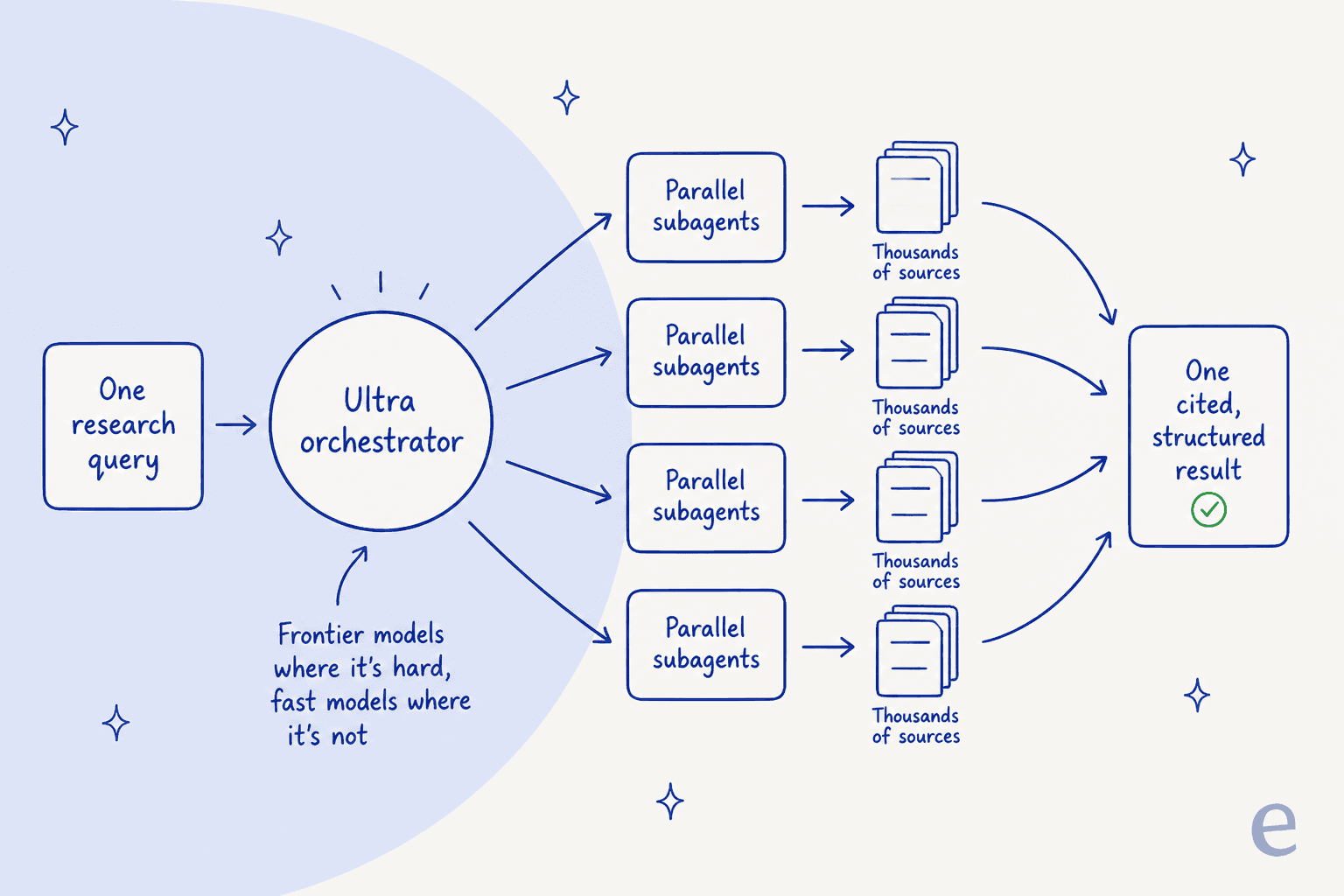
You get the assembled research back as one grounded result instead of orchestrating each /search and /contents call yourself. A completed run carries output.text for a natural-language answer, output.structured for schema-validated JSON when you pass an outputSchema, and output.grounding for the field-level citations. You can also drive the whole thing from Exa's MCP server using the agent_run tool, which means a coding agent like Claude Code or Cursor can call it directly.
The benchmark claims, and how to read them
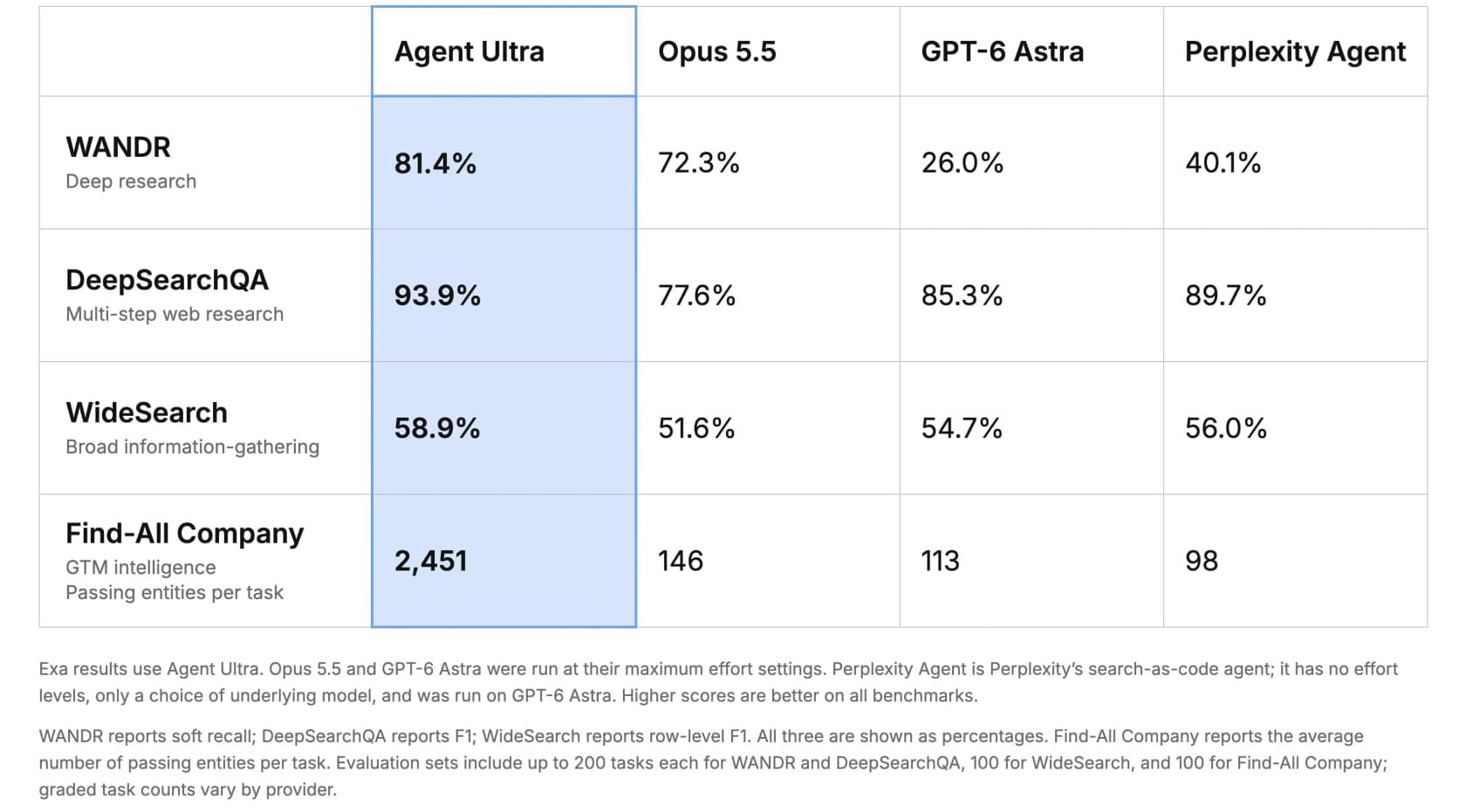
Here is where Exa goes big. Agent Ultra, it says, outperforms Opus 5.5, GPT-6 Astra, and Perplexity Agent on their maximum effort settings across four benchmarks. The raw numbers:
| Benchmark | What it measures | Agent Ultra | Opus 5.5 | GPT-6 Astra | Perplexity Agent |
|---|---|---|---|---|---|
| WANDR | Deep research (soft recall) | 81.4% | 72.3% | 26.0% | 40.1% |
| DeepSearchQA | Multi-step web research (F1) | 93.9% | 77.6% | 85.3% | 89.7% |
| WideSearch | Broad information gathering (row F1) | 58.9% | 51.6% | 54.7% | 56.0% |
| Find-All Company | GTM intelligence (passing entities/task) | 2,451 | 146 | 113 | 98 |
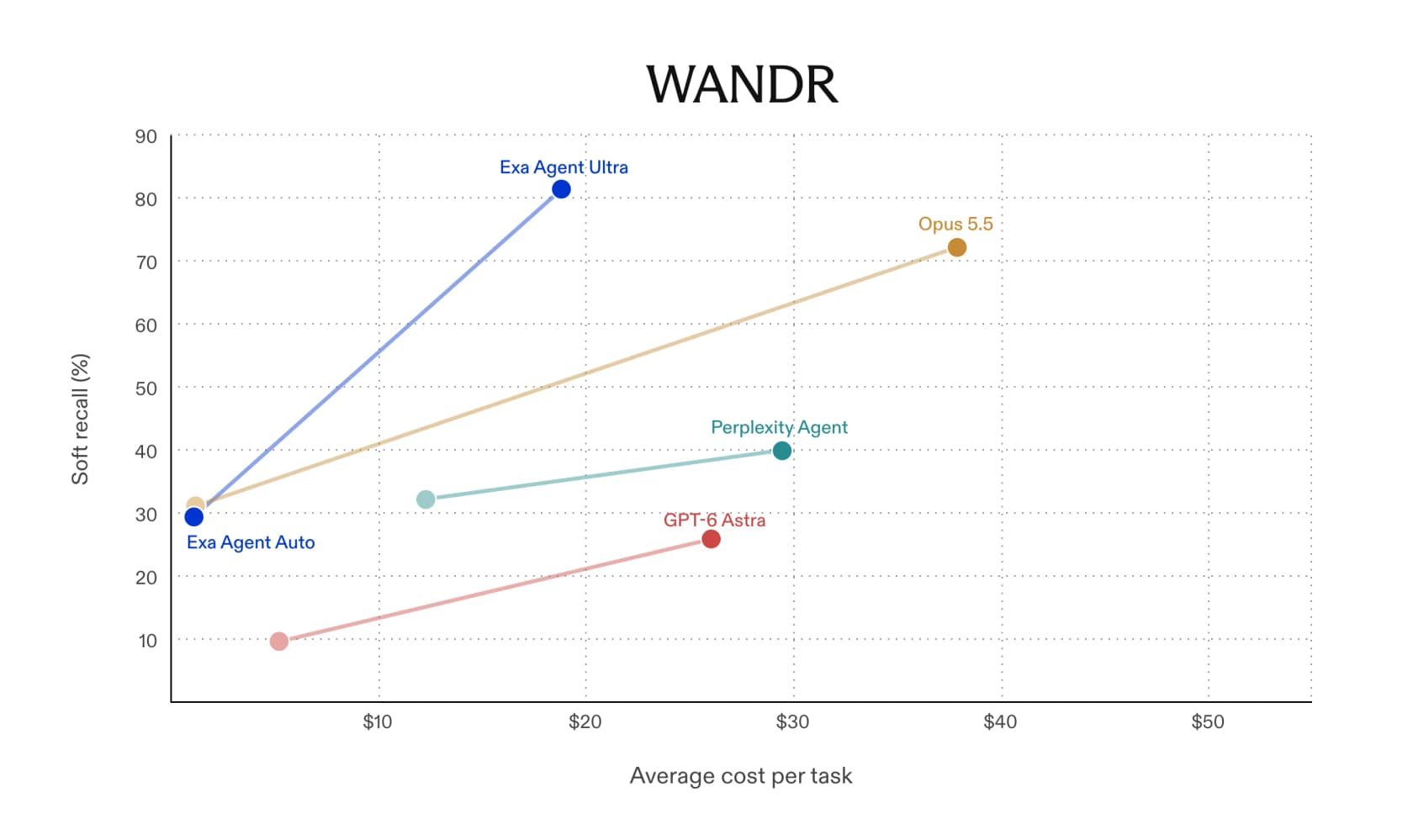
The Find-All Company row is the one that stops you: an average of 2,451 passing entities per task versus 146 for the next-best system. That is the "runs to exhaustion" design showing up as a number. Exa's WANDR chart tells the cost story alongside it, with Ultra landing around 81% soft recall at roughly $18 per task while Opus 5.5 reaches about 72% at nearly $38.
Now the honest read. These are Exa's own benchmark runs, on a harness Exa maintains, judged by a model Exa chose (it uses gpt-6-luna as the grader). Exa is transparent about the methodology, which counts for something, and it reports published competitor figures where they exist. But vendor benchmarks flatter the vendor by construction, so the fair position is: impressive, plausible, and unverified. On the community side, the launch landed loud on X, though mostly as hype rather than hands-on proof.
"So perplexity is dead 2x now"
That reply topped the responses to Exa's launch post, which itself pulled nearly 2,000 likes. A few practitioners noted they were "trying this one out now," which is about where independent verification stands two days in. It is genuinely early, and I would wait for outside tests before treating the leaderboard as settled.
What Exa Agent Ultra costs
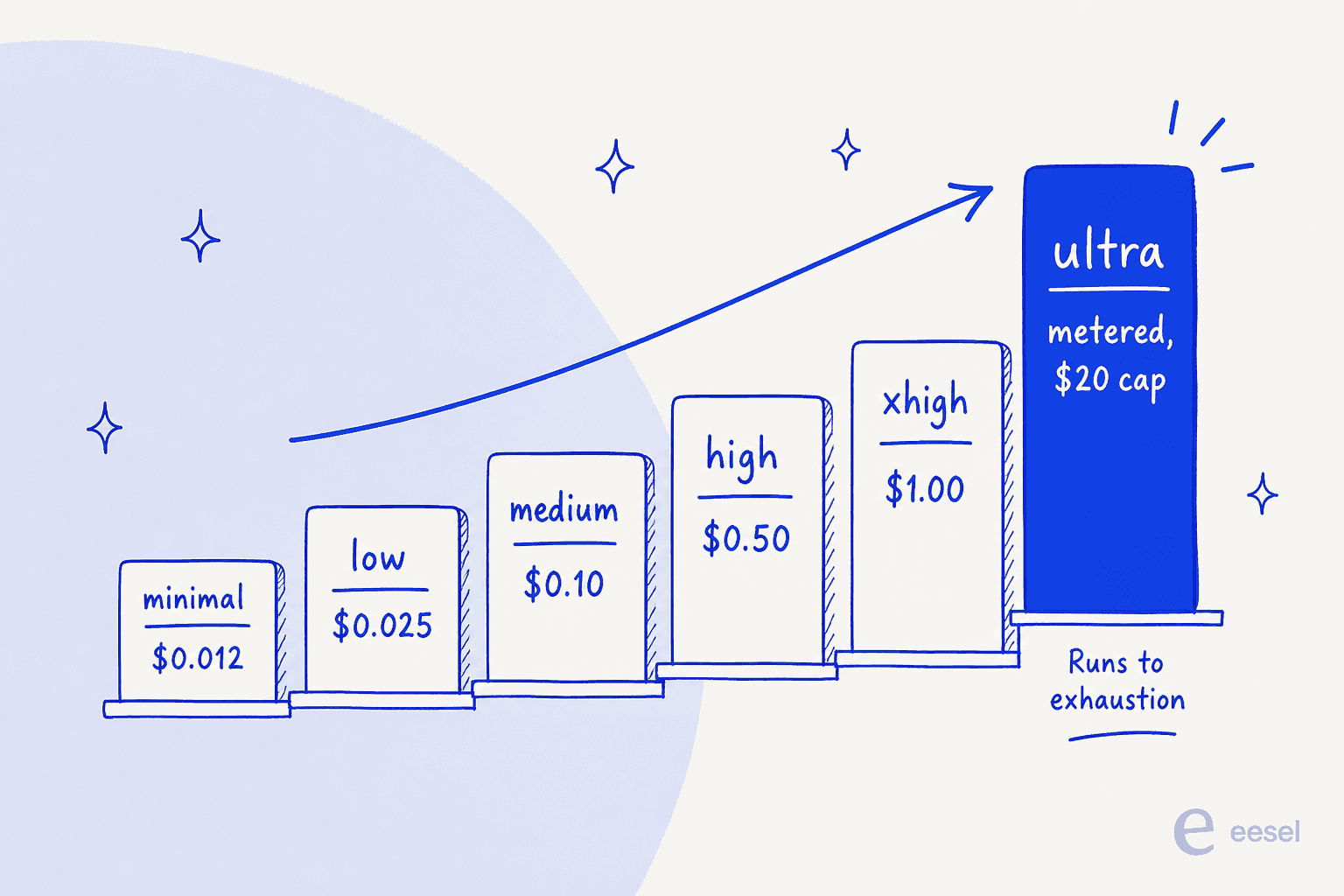
Exa is pay-as-you-go with no seats, and the Agent effort levels map straight to price. The fixed tiers are predictable per request, and Ultra is the metered exception.
| Effort level | Price | Best for |
|---|---|---|
| minimal | $0.012 / request | Lightweight lookups, lowest cost |
| low | $0.025 / request | Simple, narrow factual tasks |
| medium | $0.10 / request | The default starting point |
| high | $0.50 / request | Harder research, stricter completeness |
| xhigh | $1.00 / request | High-value tasks, verification-heavy |
| ultra | Metered, $20 default cap | Exhaustive list building and research |
Underneath the metered runs, Exa bills Agent Compute Units at $0.10 each, search tool calls at $0.005, email enrichment at $0.02, and phone enrichment at $0.07. The budget.maxCostDollars parameter sets the ceiling for auto and ultra runs, accepting anywhere from $1 to $100, and budget.maxDurationSeconds lets you cap runtime from 5 minutes up to 3 hours. A run that finishes early costs less than the cap, and you can stop one mid-flight and keep what it found.
The $20 default cap is the number to sit with. For a genuinely exhaustive market map, $20 for a research task that would take a person a full day is a bargain. For a workflow that fires hundreds of times, that same cap is real money, and it is why Exa gives you the budget dials at all. There is also a free Starter tier with $10 in monthly credits and no card required, so you can pressure-test it on your own tasks before committing.
Where it fits: research infrastructure, not a support hire
This is the part I most want to get across, because the "AI that does research for you" framing invites a wrong assumption. Exa Agent Ultra is infrastructure. It is a fantastic engine for a GTM pipeline that enriches leads, a diligence workflow that maps a market, or a research agent you are building yourself. In every one of those, you write the code, you define the schema, and you own the workflow around the API.
That is a completely different job from putting an AI on your support queue, and the difference trips teams up constantly.
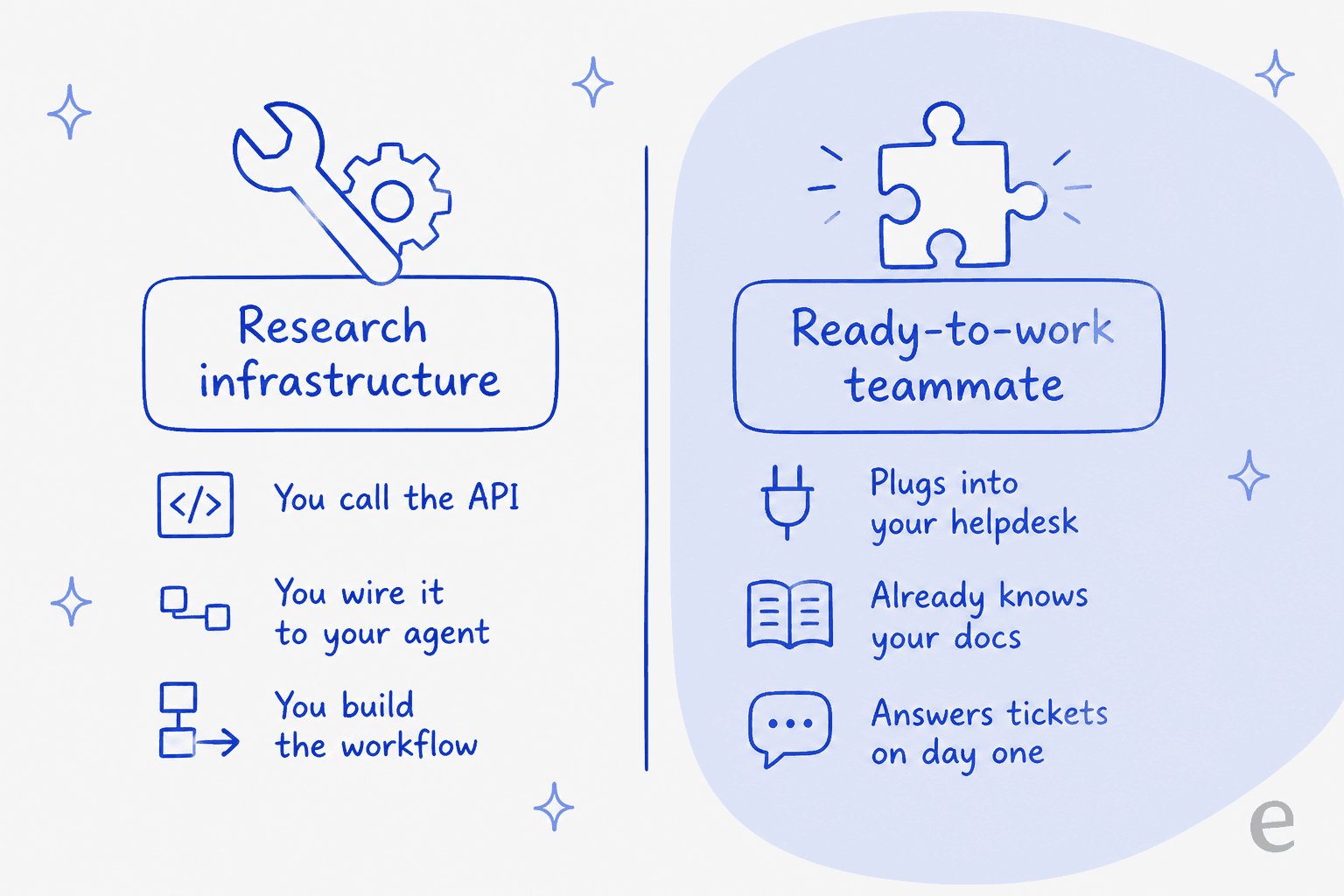
I work on the product side at eesel, and we have spent years putting AI on live support queues, across thousands of real tickets and customer rollouts. The lesson that stuck: raw retrieval quality is not the hard part of support automation. The hard part is trust, the ticket integrations, the internal-knowledge grounding, and knowing when to hand off to a human. A research API, however good, gives you none of that out of the box. You would be building the helpdesk connection, the escalation logic, and the safety checks yourself, on top of it.
That is the line between infrastructure and a teammate, and it is why we think about eesel as an AI teammate platform rather than an API. You hire a teammate for a defined job, and it shows up ready to work.
Try eesel
If the job you actually have is support, not a research pipeline, that is exactly what an eesel AI agent is built for. It plugs into Zendesk, Freshdesk, or Gorgias, learns from your past tickets and help docs, and drafts or sends replies from day one, no API glue required. And because confident bots can be confidently wrong, every rollout gets simulated against your historical tickets first, so you see the resolution rate before a single customer does.

If you liked the idea of driving Exa from a terminal or a coding agent, eesel meets you there too. The eesel CLI operates the same teammate and workspace as the dashboard, and it prints JSON, so a person can run it by hand, a script can automate it, and coding agents like Claude Code, Codex, and Cursor can drive it directly. You can inspect a teammate's instructions, send a fictional test prompt, review the exact response and the sources it used, then propose a narrow instruction change for an owner to approve. It is the same agent-friendly, headless control that draws people to an API like Exa's, pointed at the actual job of running support rather than assembling a research stack. You can try eesel free and see it work on your own tickets.
Frequently Asked Questions
What is Exa Agent Ultra?
Exa Agent Ultra is the highest effort level of the Exa Agent API, a deep research endpoint that splits one request into parallel subagents, reads across thousands of sources, and returns a cited, structured result. It is built for exhaustive list building and entity enrichment rather than quick lookups. If you want that kind of research packaged as a support AI agent instead of raw API calls, that is a different product category.
How much does Exa Agent Ultra cost?
Ultra is metered on Exa's pay-as-you-go pricing, billed at standard Agent usage rates up to a default $20 per run. You can move the cap with budget.maxCostDollars anywhere from $1 to $100. The fixed effort tiers are cheaper and predictable: minimal at $0.012 up to xhigh at $1.00 per request. Support tools like eesel pricing instead bill per resolution, which maps more cleanly to a ticket queue.
How is Agent Ultra different from the other Exa effort levels?
Effort is a single dial on Exa Agent: minimal, low, medium, high, xhigh, auto, and ultra. The fixed tiers have a set per-request price, while ultra is metered and runs a task to exhaustion. Turning the dial up buys more subagents, more sources, and more verification at a higher cost per task.
Is Exa Agent Ultra good for customer support?
It is retrieval infrastructure, so it is excellent at gathering web-cited research, but it does not join your helpdesk, learn your internal docs, or send replies on its own. For frontline support you want a teammate that connects to your ticket queue and answers with your own knowledge, which is what an eesel AI agent does.
What are the benchmark results for Exa Agent Ultra?
Exa reports Agent Ultra beating Opus 5.5, GPT-6 Astra, and Perplexity Agent on four research benchmarks: 81.4% soft recall on WANDR, 93.9% F1 on DeepSearchQA, 58.9% row-level F1 on WideSearch, and an average of 2,451 passing entities per task on Find-All Company. These are Exa's own benchmark runs, so treat them as vendor numbers until independent tests land. For any AI agent you deploy, testing it on your own data matters more than the leaderboard.


Article by
Rama Adi Nugraha
Rama is a software engineer at eesel AI with two years of experience writing about B2B SaaS, AI tools, and customer support technology. Based in Bali, Indonesia, he brings a developer's perspective to product comparisons — cutting through marketing copy to what the integrations and APIs actually do.