What Town is, and what you're paying for
Town is a personal AI assistant. You get a "Townie" with its own @town.com email address, and it works across your email, calendar, Slack, WhatsApp and docs. It triages your inbox, preps you for meetings, researches people, and also runs "routines", which are scheduled or triggered jobs that you set up one time, a bit like a Zapier automation you describe in plain English.
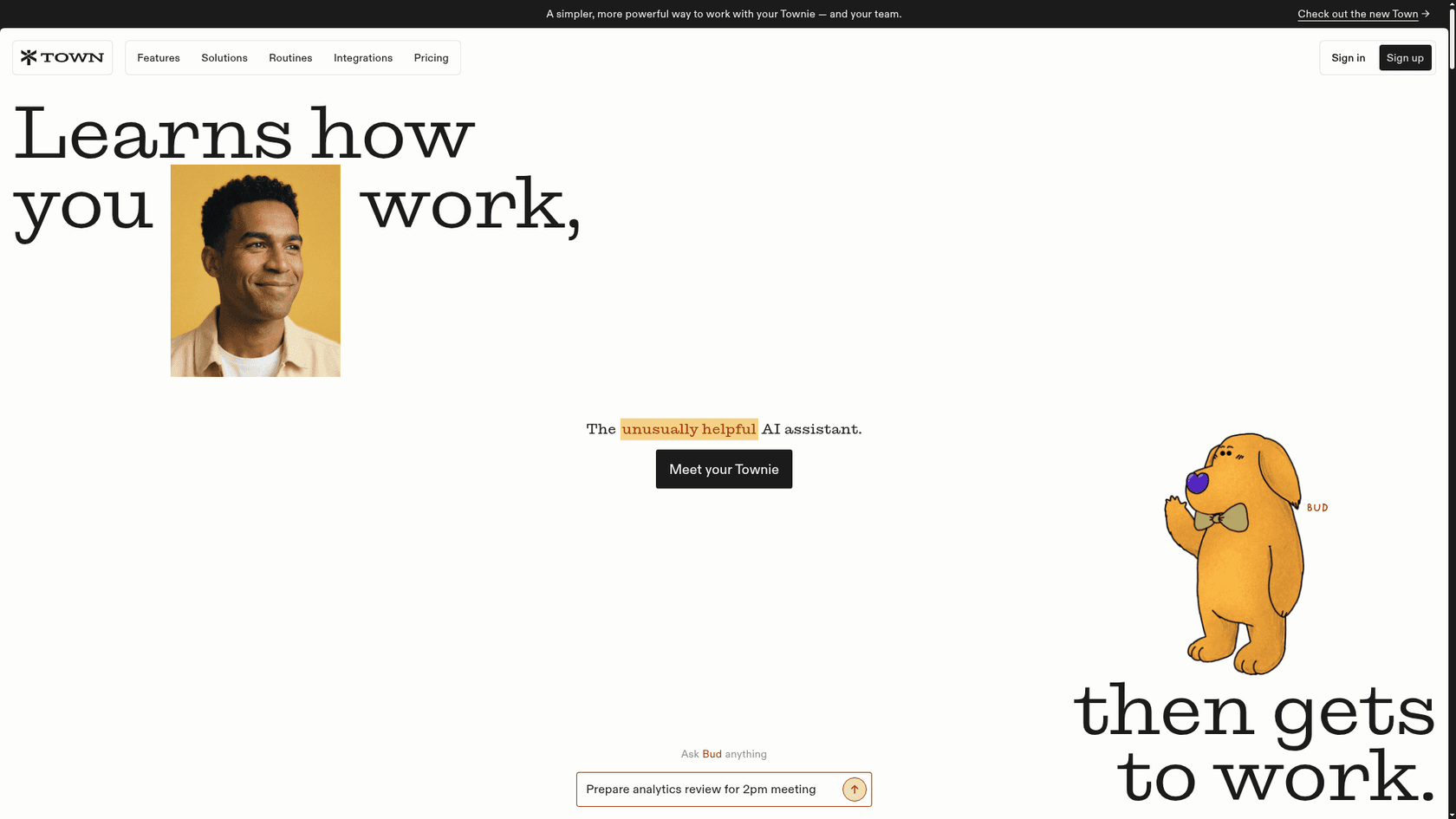
The company is based in San Francisco and was founded by Jean-Denis Greze, formerly CTO of Plaid, and Tony Vincent, formerly at Google. Town left beta on June 3, 2026 alongside a $55M Series A led by a16z, and shipped a redesign on September 30.
I build and run AI agents at eesel, and the thing I always look at first in a pricing page is the meter, not the sticker. What does one unit of usage actually buy, and what makes it spike? With Town, this question matters more than the plan names. It's in the same family as Lindy, where the monthly price is really a credit allowance with features attached. My Tasklet pricing breakdown found the same pattern.
The early users who love it are vocal about it:
"I've become a DAU of Town and it's surprising that I find it more valuable than Claude. I think Town is the only reason I stay on top of my email inbox."
How much does Town AI cost?
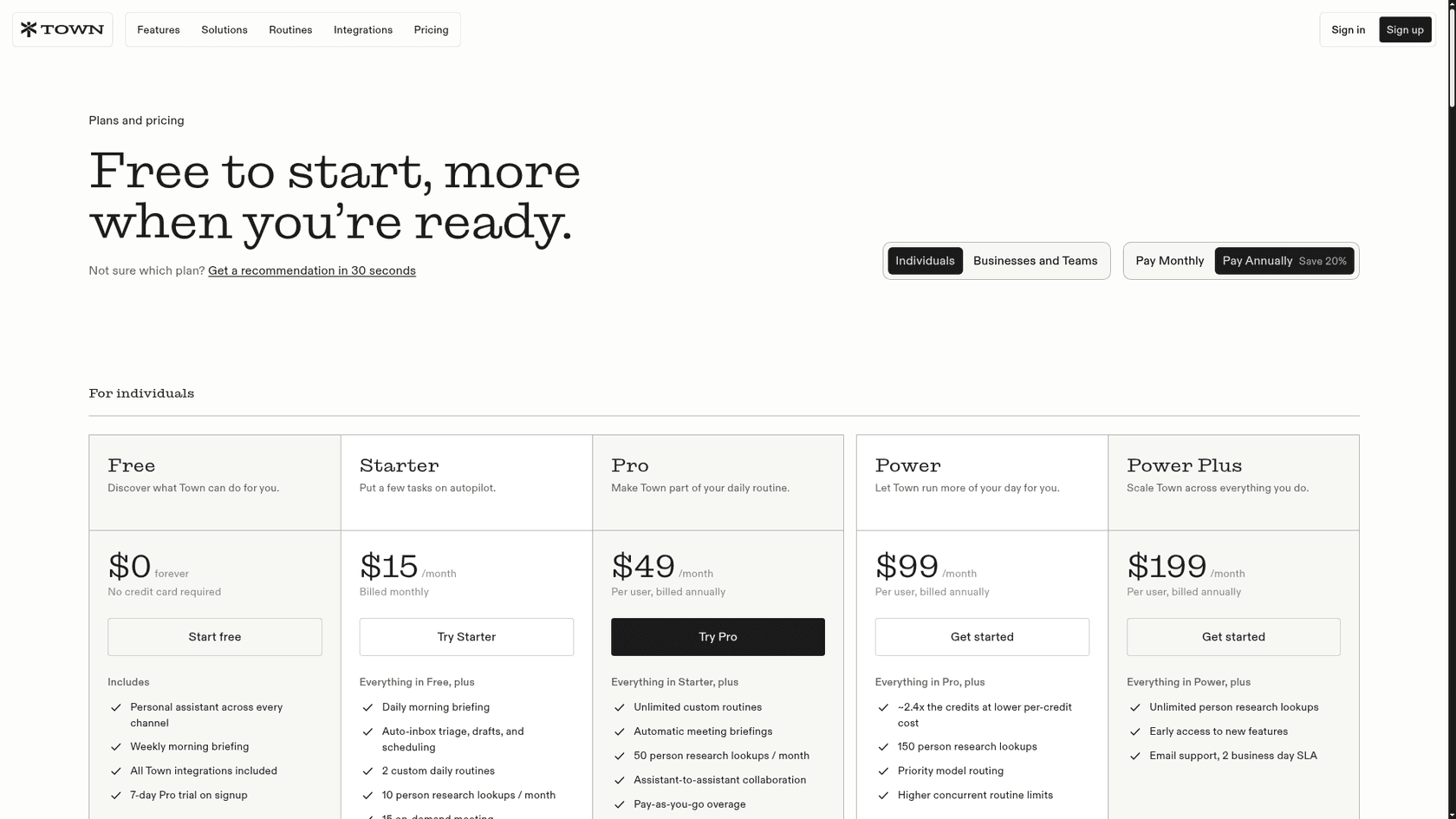
Town splits pricing into individual plans and team plans. Annual billing saves 20%, and Starter is monthly only.
Individual plans
| Plan | Monthly billing | Annual billing | Credits / month | Person research | Overage | Key additions |
|---|---|---|---|---|---|---|
| Free | $0 | $0 | None (30 chat messages) | None | None | Weekly briefing, all integrations, 7-day Pro trial |
| Starter | $15 | Not offered | 1,250 | 10/month | None, prompted to upgrade | Daily briefing, Auto-inbox, 2 custom routines, 15 meeting briefings |
| Pro | $59 | $49 | 5,000 | 50/month | $0.044/credit | Unlimited routines, all triggers, automatic meeting briefings |
| Power | $119 | $99 | 12,000 | 150/month | $0.038/credit | Priority model routing, higher concurrent routines |
| Power Plus | $239 | $199 | 40,000 | Unlimited | $0.032/credit | Early access, email support with 2 business day SLA |
All figures come from Town's pricing page, checked on October 6, 2026. Pro, Power and Power Plus prices are per user.
Team plans
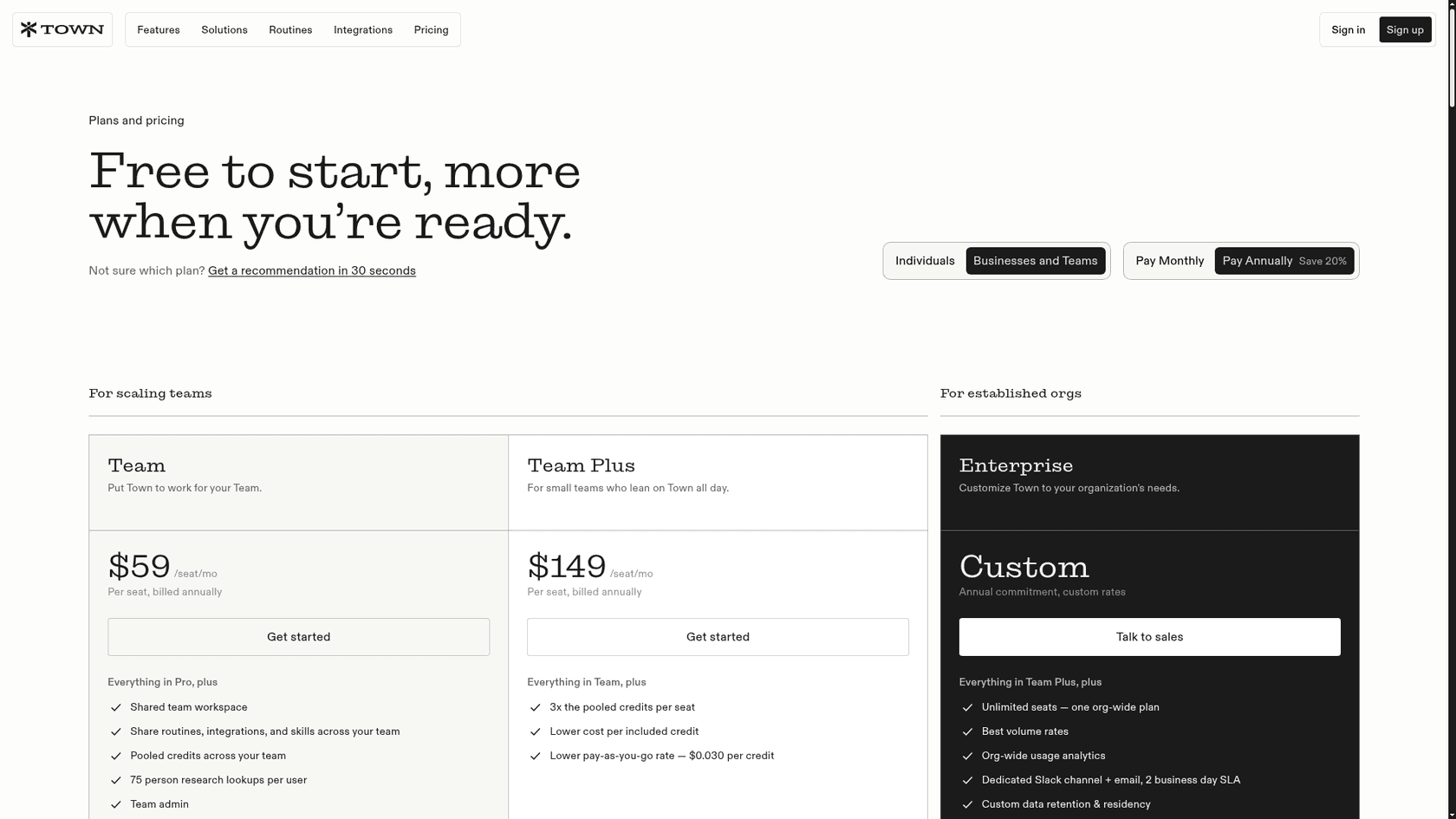
| Plan | Monthly billing | Annual billing | Pooled credits | Person research | Overage |
|---|---|---|---|---|---|
| Team Free | $0 | $0 | None | Members use their own plans | None |
| Team | $71/seat | $59/seat | 6,000 per seat | 75/user/month | $0.038/credit |
| Team Plus | $179/seat | $149/seat | 18,000 per seat | 75/user/month | $0.030/credit |
| Enterprise | Custom | Annual commitment | Sized to usage | Custom | Custom rates |
Team adds a shared workspace, shared routines and skills, pooled credits, team admin and 10 email accounts. Enterprise adds unlimited seats, a dedicated Slack channel, custom data retention and residency, and a security review with a custom MSA, per the teams pricing tab.
One quirk in the comparison table: Team doesn't include priority model routing, but Power does. Team Plus gets it back.
What does a Town credit actually buy?
This is the part of Town AI pricing that the plan cards don't answer. Credits are "the usage unit consumed when the assistant does work for you, chats, workflow runs, and more," per the pricing FAQ. The credits docs add that a quick question "uses very little" and work that reads a lot, researches and takes several actions "uses more."
That's honest, and it's also all you get. Town publishes no per-action credit cost: nothing for a chat, a routine run, a meeting briefing or a person lookup. As someone who builds AI employees for a living, I get why, because a routine that reads three emails and one that reads three hundred is not the same amount of model work, so the flat price per action would be a fiction. But it means that you can't price your usage from the pricing page alone.
What the docs do tell you is the order of cost:
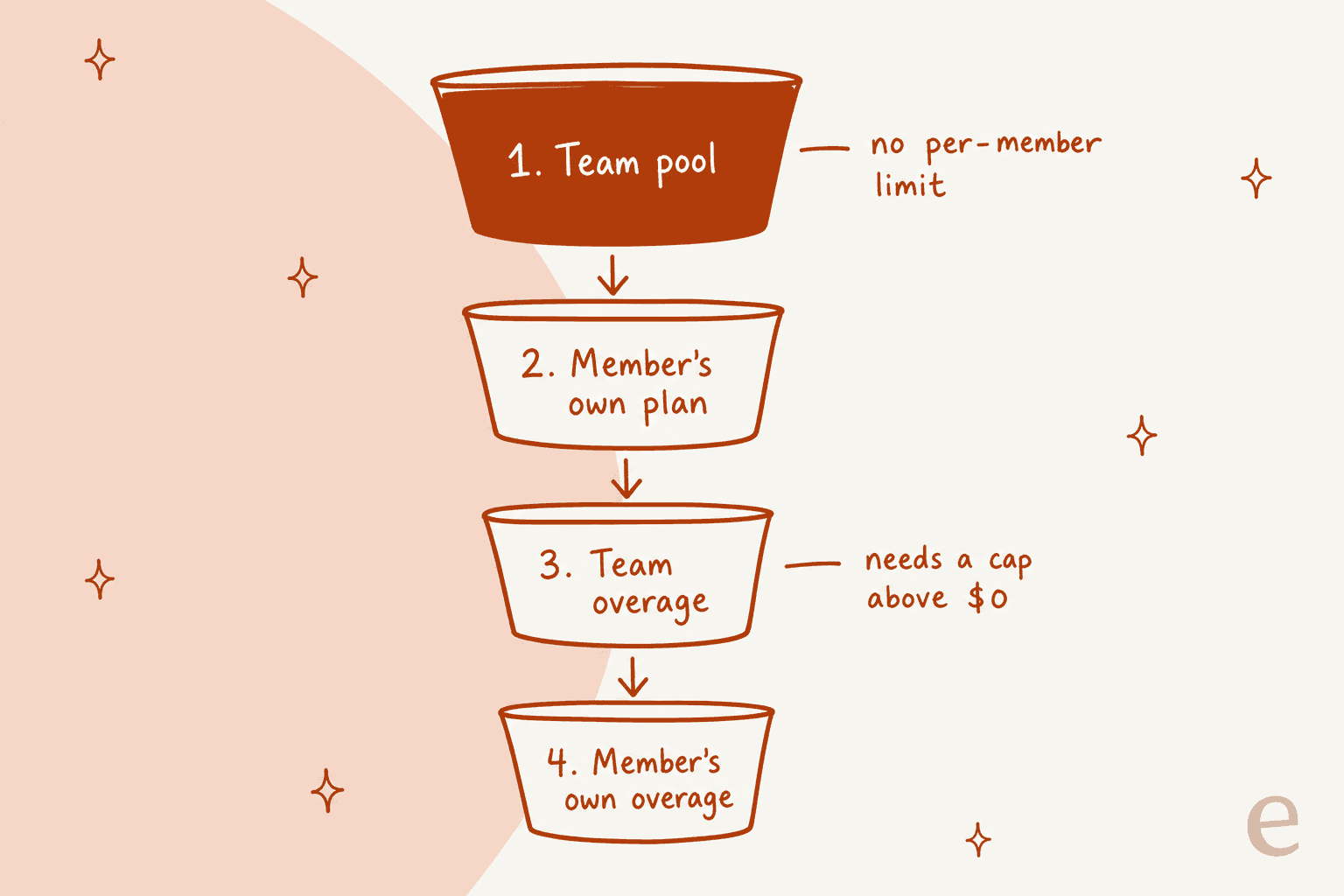
- Per-email routines are the most expensive pattern. The docs call a routine that starts a run on each incoming email "the heaviest setup there is."
- Drafting costs more than labeling. If you want Town to sort mail but not write back, label-only is the cheaper setting.
- Filters are free. The smart email trigger checks sender, domain and subject filters before a run starts, without spending credits.
- The Wiki is free. Reading and editing Town's Wiki, plus its nightly upkeep, don't use credits.
Town also gives you tools to watch the meter. Settings, then Plan, shows a usage chart split by type and a per-routine credit table, which is refreshed daily. Emails arrive at 80%, 90% and 100% of your plan's credits, and an "Optimize credit usage" button added on August 4 lets the assistant audit your usage for you. It's a better set of controls than what most tools in this category ship.
Why Starter is cheaper than it looks
Here is where I would push back on the obvious read of the pricing page. Starter at $15 looks like the "just try it" plan, and its headline feature is Auto-inbox triage, drafts and scheduling.
But Auto-inbox runs on the incoming-email trigger, which fires on every email. It labels each message, drafts a reply when one seems needed, then proposes meeting times. That is exactly the setup the credits docs name as the heaviest, and stock routines can't use the cheaper smart trigger yet. There's also a tension in Town's own docs: the plans page says new-email triggers need Pro or higher, while the pricing page lists Auto-inbox on Starter.
Put that next to the other Starter limits:
- 1,250 credits, a quarter of Pro's allowance.
- No overage at all. When you run out, routines and chats pause until the month resets or you upgrade.
- Two custom routines, daily or scheduled only.
So the $15 plan pairs the most credit-hungry feature with the smallest bucket, and no way to keep going. If your inbox is light that's fine, but when it is busy you should expect to land on Pro. My AI email assistants roundup lists tools that price inbox triage differently.
Town's own pricing calculator points the same way. At its default 3,000 credits a month it recommends Pro and marks Starter "Doesn't fit," and it says about 8 in 10 paid users use less than Pro's 5,000 credits. I'd treat Pro at $49 as the real entry price for anyone who wants Town working their inbox every day.
How overage works (and why the default is $0)
On Pro and above, you can keep working past your monthly credits and pay a flat per-credit rate. Each step up the ladder has cheaper credits included, while overage costs a lot more than the credits your plan includes.
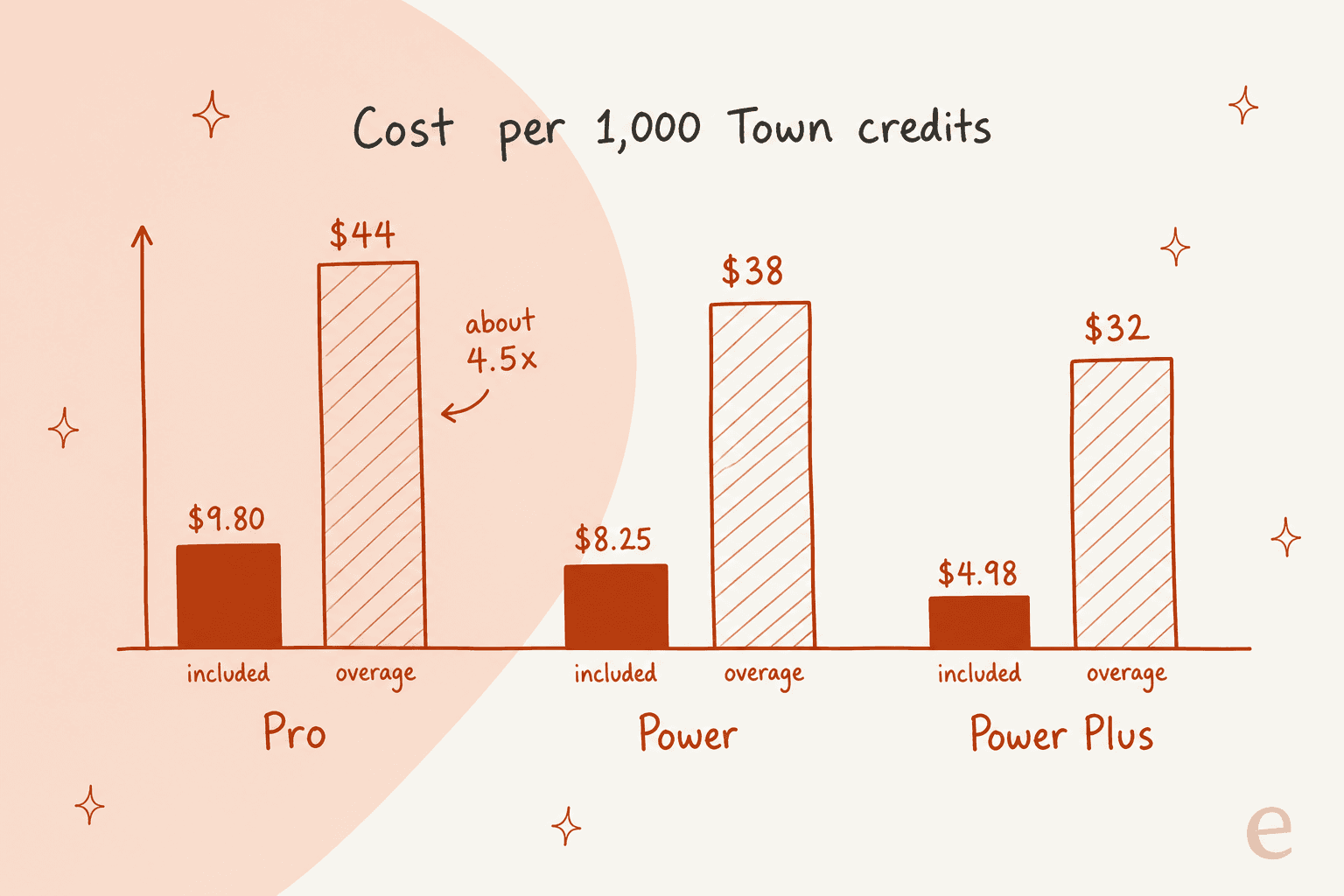
The included-credit math is mine, from annual prices: Pro's $49 for 5,000 credits works out to $9.80 per 1,000, while Pro overage is $44 per 1,000. That's about 4.5x the included rate. On Power Plus the gap is even wider, $4.98 included against $32 overage.
Three rules from the credits docs worth knowing before you hit the limit:
- The spend cap defaults to $0. Overage only happens after you raise it in Settings. Until then, Town just pauses at zero. That protects you from surprise bills, but it also means a routine you rely on can quietly stop in the middle of the month.
- Overage is charged in $10 steps to your card as you go, each with its own receipt, separate from the plan invoice.
- Credits don't roll over, can't be topped up à la carte, and can't move between accounts.
The practical upshot is a breakeven you can plan around. On annual billing, Pro plus overage passes Power's $99 at about 6,100 credits a month. Power plus overage passes Power Plus's $199 at about 14,600. If your usage chart sits above either line for two months running, the upgrade is cheaper than paying overage.
How much does Town cost for a team?
Team plans pool credits across seats. A 10-person team on Team pays $590 a month on annual billing ($710 monthly) and shares 60,000 credits. On Team Plus the same team pays $1,490 a month for 180,000 credits.
The pool is convenient, and also it is the part I would plan for. Per the team billing docs, the pool has no per-member limits, so one heavy user can drain it for everyone. When it runs dry, work draws from other buckets in a set order:
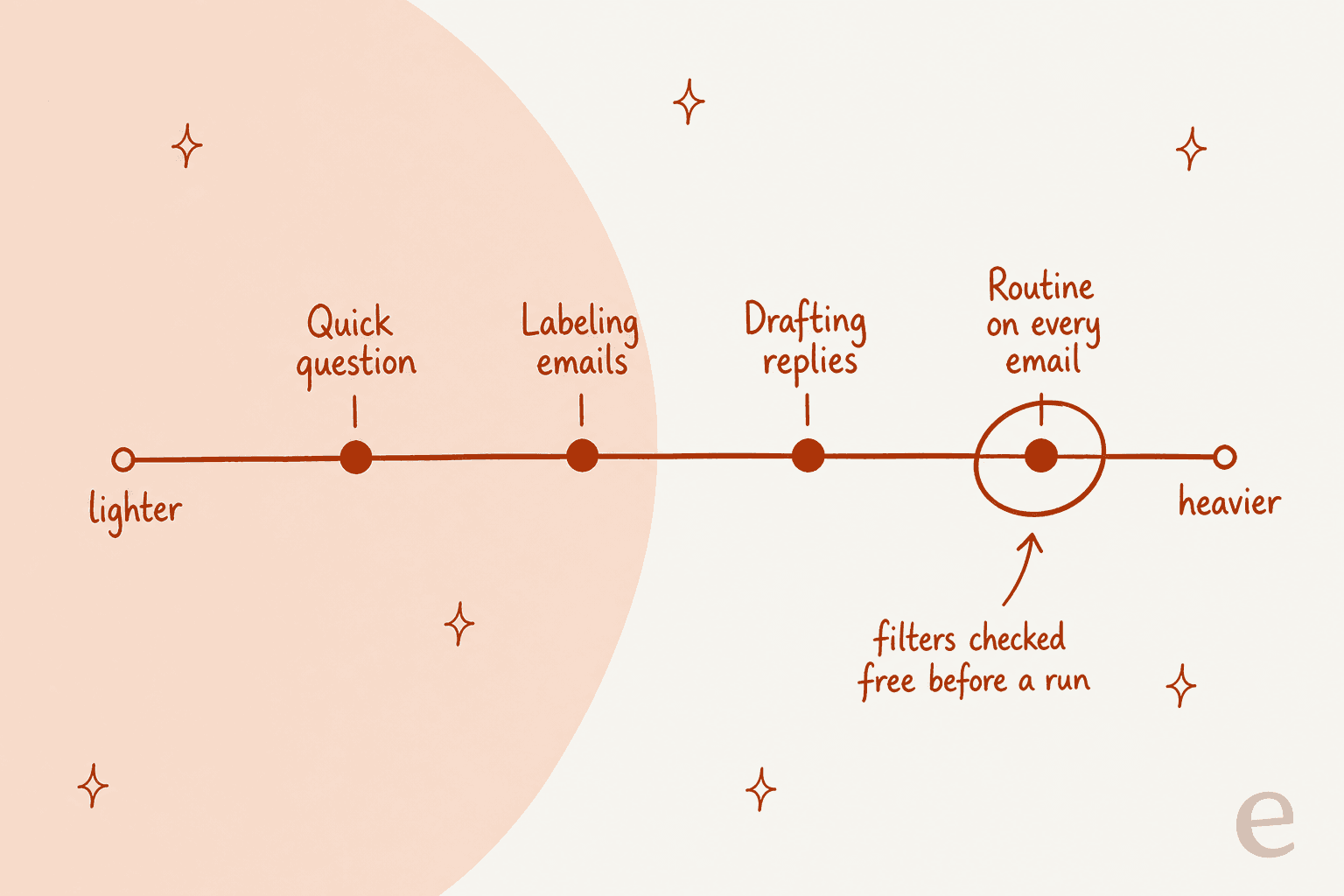
A few more team details that affect the bill:
- Team Free is where every team starts. It covers sharing features, but it has no shared credits and can't run team background routines.
- Adding a seat is charged right away and grants that person their full credit allotment. Removing a seat gives no mid-cycle refund.
- Only Owners and Admins can change plans, seats or the overage cap.
Is Team worth it over everyone buying Pro? (If you're weighing a shared chat assistant instead, ChatGPT Team bills per seat with no credit meter.) Ten people on individual Pro plans pay $490 a month for 50,000 credits that can't be shared. Team costs $100 more for 60,000 pooled credits, a lower overage rate ($0.038 against $0.044), and the shared workspace. If usage is uneven across the team, pooling alone usually covers the gap. Between the two team tiers, the math says Team Plus gets cheaper once your team averages about 8,400 credits per seat.
The spread inside a team is the part people underestimate. swyx described Town spreading through his company on its own:
"i brought it into our company one day and a few weeks later was shocked to hear that it had just organically spread to @liamcbride and the rest of our team with no further hyping or enablement from me."
That's great for adoption, and it is exactly how a shared pool gets drained faster than planned. Set the overage cap on purpose, then check the per-routine table after the first month.
Estimate your Town bill
Plug in your expected monthly credits and team size. The widget prices every plan that fits, including overage, and flags the cheapest. Town's own calculator covers individuals well; this one adds per-seat team math.
Hidden costs and fine print
The sticker prices are clear. These are the terms I would read before paying:
| Term | What it means for your bill |
|---|---|
| No refunds | Cancel anytime, but you keep access only to the end of the paid cycle, per the cancellation docs |
| Trial ends early | The 7-day Pro trial ends at 7 days or when trial credits run out, whichever comes first |
| Credits expire | Monthly credits don't roll over, and promotional credits may expire |
| Downgrades wait | Downgrades take effect at renewal; upgrades are immediate |
| Pause at zero | With the default $0 cap, routines and chats stop when credits run out |
| Paused features on Free | Custom workflows, automations and meeting briefings switch off (saved, not deleted) if you cancel or a payment fails |
| Checkout limits | Some non-US cards fail (India is the docs' example), and VAT numbers aren't supported at checkout |
On security, Town says it's SOC 2 Type 2 certified, hosts data in the US, and doesn't train models on your Gmail, Calendar or Drive data. Anthropic is listed as its primary model provider. Custom data residency is an Enterprise-only line item.
Is Town worth the money?
For one person drowning in email and meetings, Pro at $49 is a fair price. You get unlimited routines, automatic meeting briefings and 5,000 credits, which Town says covers most paid users. The approval-first defaults (nothing sends without your OK unless you change it) also make it a low-risk thing to hand your inbox to. It competes with the best AI employees and, more directly, other AI personal assistants. Its edge is that it lives in channels you already use.
Two cases where I'd slow down:
- You want drafts on everything. Drafting is the expensive action, and drafts cost credits whether you send them or not. In one real-traffic trial eesel ran on an e-commerce support inbox, agents sent only 12% of AI drafts as-is; the usual pattern was to glance and rewrite. If that's how you'll use drafts, restrict which emails get one.
- You need a fixed number for finance. Because no per-action cost is published, your first month is the only real forecast. On one of eesel's sales calls, a buyer who had seen a previous vendor's price more than double asked for the price locked in writing. Credit-based tools can't promise that per task, only per plan.
If you're comparing it with general assistants, Claude pricing is the obvious alternative (Claude Cowork included), and Copilot pricing if you live in Outlook.
Other agent tools meter usage the same way. Manus sells credit buckets too, as does Genspark, and Instinct AI is the texting-first take on a personal assistant.
When a support inbox is the real job
Town is built for one person's inbox, or for a team that shares an assistant. A lot of people find it while they try to solve a different problem, which is customer emails piling up in a shared inbox, or a Slack channel where support questions land. Town can watch those, but it's still a personal assistant metering credits on every run.
That's where I'd look at eesel instead. eesel is a set of AI teammates you hire for specific jobs, and the AI helpdesk teammate's job is exactly that queue. It joins your helpdesk, learns from your past tickets and help center, and replies, drafts or routes. Pricing is the difference you'll feel: on the eesel pricing page, a ticket or a chat is 1 credit however many replies it takes, with 500 credits for $299 a month and a free plan with 100 credits to try it. You can forecast that from last month's ticket count, which you can't do with a per-run meter.
If you run a HubSpot service team, my eesel vs HubSpot Breeze comparison covers that setup, and my AI employee pricing guide breaks down the wider market.
Try eesel for your support inbox
If the inbox you want off your plate is your customers', not yours, eesel's AI helpdesk teammate plugs into helpdesks like Zendesk and chat tools like Slack, learns from the tickets your team already answered, and shows every task it handled in its reports, so you always know what you're paying for.

Start free with 100 credits and no card, run it on your real queue for a week, and compare the bill with your ticket count. Try eesel and see how many of last week's tickets it would have handled.
Frequently Asked Questions
How much does Town AI cost?
Town has a free plan, then Starter at $15/month, Pro at $49, Power at $99 and Power Plus at $199 per month billed annually (monthly billing is $59, $119 and $239). Teams pay $59 or $149 per seat per month on annual billing. The full Town AI pricing table is on Town's pricing page, and my AI personal assistants roundup compares it with the rest of the field.
Is Town AI free?
Yes. The Free plan costs $0 forever, needs no credit card, and gives you 30 chat messages a month, a weekly briefing and every integration. New signups also get a 7-day Pro trial first. If you mostly want a chat assistant, compare it with ChatGPT pricing before paying.
What is a Town credit?
A credit is Town's usage unit for chats, routine runs and other work. Town does not publish a fixed credit cost per action; its docs say the more the assistant reads, reasons and acts, the more it uses, and a routine that runs on every incoming email is the heaviest setup. That is a different unit from AI employee pricing models that bill per task.
What happens when I run out of Town credits?
On Free and Starter you are prompted to upgrade. On Pro and above you can keep going with pay-as-you-go overage at $0.030 to $0.044 per credit, but only after you raise your spend cap above its $0 default. Until then, routines and chats pause. If budget control matters, my AI agent cost guide covers other ways vendors handle it.
Which Town plan should I pick?
Town says about 8 in 10 paid users stay under Pro's 5,000 credits, so Pro is the sensible default. Move to Power once you regularly use more than about 6,100 credits a month, since Pro plus overage costs more than Power past that point. For a wider view, see the best AI teammates.
How much does Town cost for a team?
Team is $59 per seat per month billed annually ($71 monthly) with 6,000 pooled credits per seat, and Team Plus is $149 per seat ($179 monthly) with 18,000. A 10-person team on Team pays $590 a month. If your team's shared inbox is really a support queue, an AI helpdesk agent may be the better fit.
Does Town AI offer refunds?
No. Town's pricing FAQ says it does not offer refunds; if you cancel, you keep access until the end of the paid cycle and then drop to Free with your data kept. Use the 7-day Pro trial to test your real inbox volume first, the same way you would with any AI email assistant.


Article by
Kira
Kira is a writer at eesel AI with a Computer Science background and over a year of hands-on experience evaluating AI-powered customer service tools. She focuses on breaking down how helpdesk platforms and AI agents actually work so that support teams can make better buying decisions.