Firecrawl pricing: the full picture
Firecrawl runs on a credit-based subscription model. Every API call consumes a defined number of credits, and plans come in six tiers from Free to Enterprise. You can bill monthly or annually, with roughly 15-22% savings for going yearly.
| Plan | Monthly billing | Annual billing | Credits / month | Concurrent requests | Support |
|---|---|---|---|---|---|
| Free | $0 | $0 | 1,000 | 2 | - |
| Hobby | $16 / mo | ~$13.50 / mo | 5,000 | 5 | Basic |
| Standard (recommended) | $83 / mo | ~$70 / mo | 100,000 | 50 | Standard |
| Growth | $333 / mo | ~$281 / mo | 500,000 | 100 | Priority |
| Scale | $599 / mo | ~$466 / mo | 1,000,000 | 150 | Priority |
| Enterprise | Custom | Custom | Custom | Custom | Dedicated + SLA |
Prices are in USD (display currency may vary by region). Taxes are excluded. See firecrawl.dev/pricing for live rates.
How the credit system works
A credit is Firecrawl's billable unit. The core endpoints - Scrape, Crawl, Map, and Monitor - each cost 1 credit per page. Some endpoints cost more, and that's where the pricing surprises tend to hide.
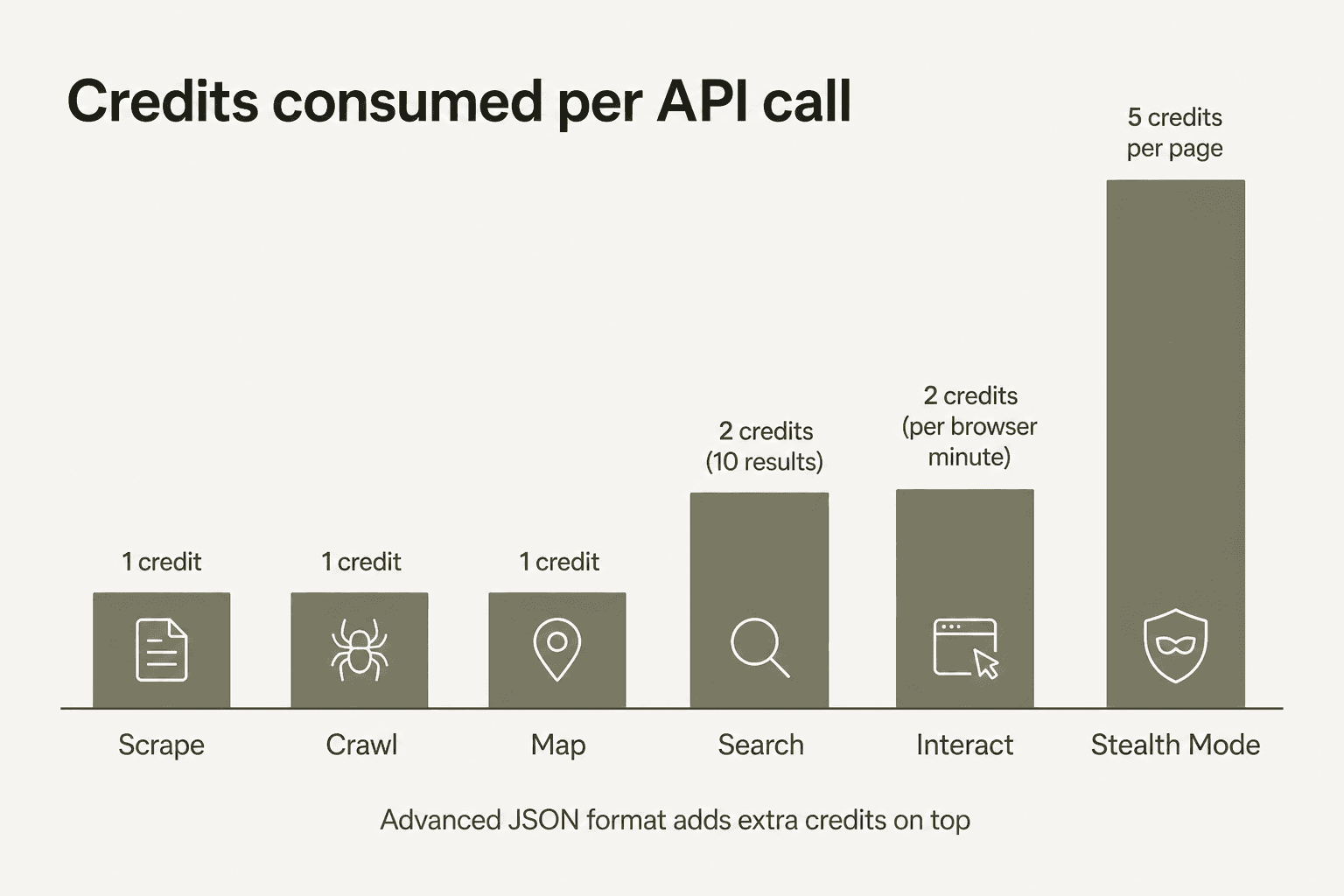
Here's the full rate card from Firecrawl's pricing page and API reference:
| Endpoint | Credits consumed |
|---|---|
/scrape | 1 credit / page |
/crawl | 1 credit / page |
/map | 1 credit / page |
/monitor | 1 credit / page / check |
/search | 2 credits / 10 results |
/interact (browser session) | 2 credits / browser minute |
| FIRE-1 Agent (preview) | 5 free runs / day, then dynamic pricing |
| Enhanced Mode (Stealth) | +4 credits / page (total: 5 per page) |
| Advanced JSON format | Additional credits on top of base rate |
The Stealth Mode multiplier is the number most people miss when they budget. If the sites you're scraping use Cloudflare or similar bot protection and need Enhanced Mode, you're paying 5 credits per page instead of 1. On a Standard plan, that turns a $0.00083/page cost into $0.0042/page - a 5x jump that can blow through your monthly allotment in a fifth of the time you expected.
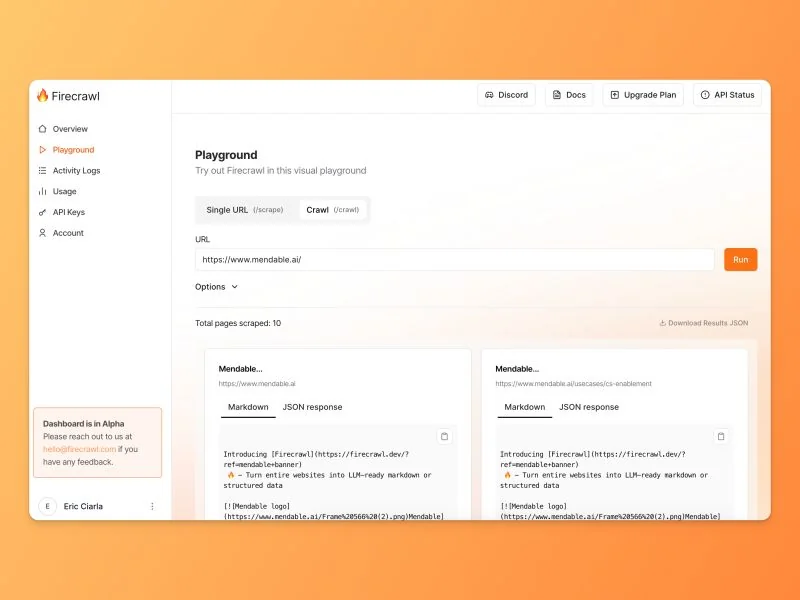
The Firecrawl Playground is the fastest way to test which mode your target URLs actually require before you commit to a plan.
The real cost per page across plans
The jump from Hobby to Standard isn't just 20x more credits - the per-page cost drops nearly 4x.
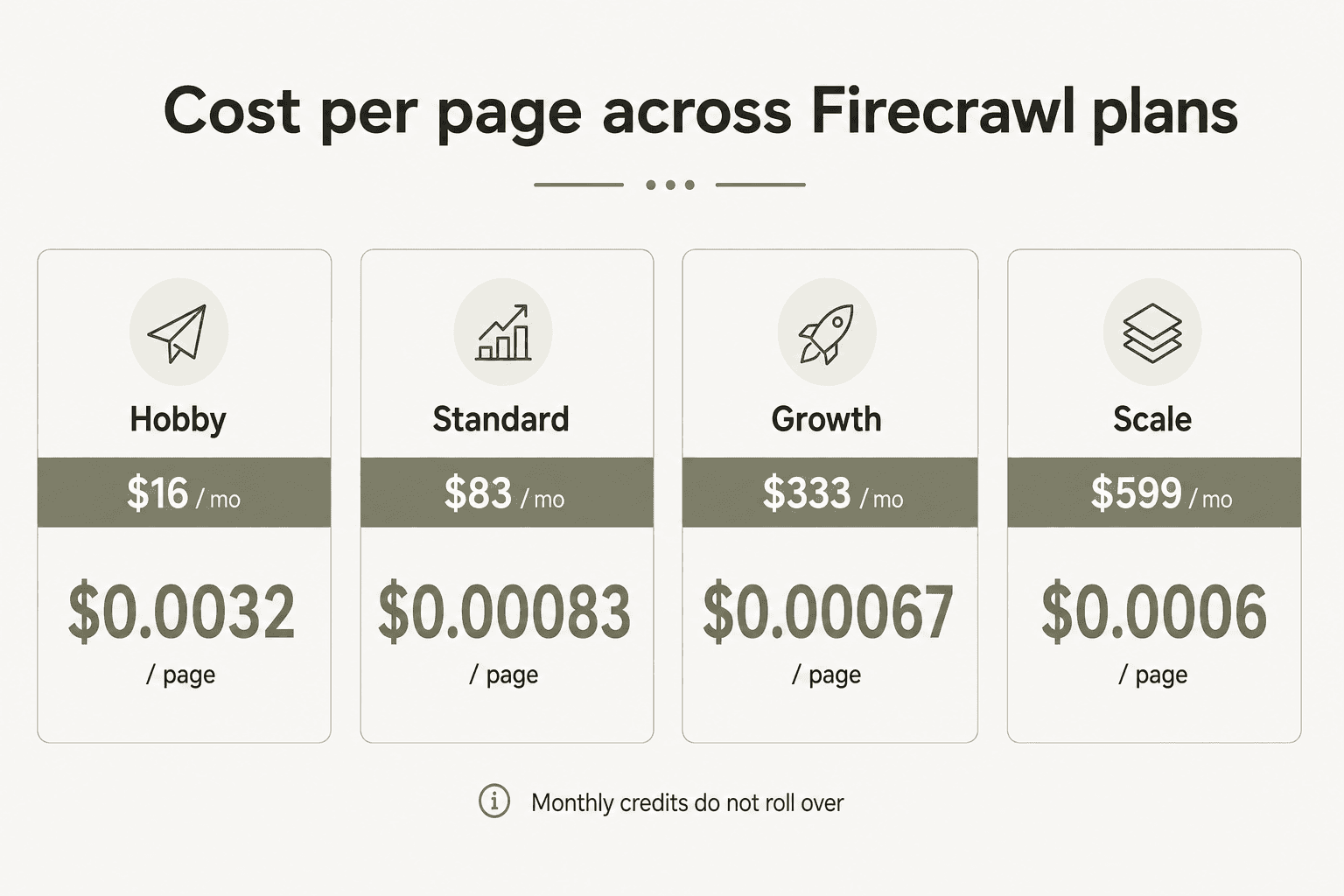
At Standard, $0.00083 per page is roughly what you'd pay running your own headless Chrome setup with a mid-tier proxy provider - except Firecrawl handles the maintenance, rate-limit management, and IP rotation for you. For most AI pipeline workloads, Standard is genuinely the right answer, which is probably why Firecrawl labels it "recommended."
The cost difference between Growth and Scale is tiny on a per-page basis ($0.00066 vs $0.0006). At that point, the real differentiator is concurrency (100 vs 150 parallel requests) and whether you actually use 500K vs 1M pages per month.
What you actually pay: three worked examples
Solo developer - personal project, 800 pages/month:
- Free plan handles this. You'd use 800 of your 1,000 monthly credits with room to spare.
- Cost: $0/month.
Small content team - competitive intelligence + pricing monitoring, ~35,000 pages/month:
- Standard plan: $83/month for 100,000 credits. At 35,000 pages/month you're using 35% of your credits - comfortable even if a product launch doubles your volume for a week.
- Annual: ~$70/month, saving ~$156/year.
AI data company - enrichment pipeline, 800,000 pages/month across 40 parallel workers:
- Growth plan (500K credits, 100 concurrent) covers the baseline but needs auto-recharge top-ups for the remaining 300K pages.
- Scale plan ($599/month, 1M credits, 150 concurrent) fits the full volume without recharge. Annual Scale billing saves ~$1,596/year.
- Stealth Mode caveat: if even 20% of those 800K pages need Enhanced Mode, the effective volume becomes 800K × 80% × 1 + 800K × 20% × 5 = 1.44M credits. That pushes Scale into overage territory.
The free tier: what 1,000 credits actually gets you
Firecrawl's free plan is one of the more useful free tiers in the developer tools space. No credit card required, no artificial time limit - just 1,000 credits per month, refreshed monthly.
At base rates that works out to:
- 1,000 pages scraped per month (one credit per page)
- Up to 5,000 search results (2 credits per 10 results)
- About 8 hours of stateful browser session time with
/interact
The binding constraint for most free-tier projects is the 2-request concurrency limit, not the credit cap. Scraping serially at 2 parallel connections is workable for low-volume use; for anything time-sensitive you'll hit the ceiling quickly.
For testing whether Firecrawl fits your stack before committing, the free tier removes all the risk. And for genuinely low-volume personal tooling, it functions as a practical no-subscription option - the closest thing to pay-as-you-go Firecrawl currently offers.
Annual vs monthly billing: the actual savings
Going annual saves between 15% and 22% depending on tier.
| Plan | Monthly billing (12-month total) | Annual billing (12-month total) | Savings |
|---|---|---|---|
| Hobby | $192 / yr | ~$162 / yr | ~$30 / yr |
| Standard | $996 / yr | ~$840 / yr | ~$156 / yr |
| Growth | $3,996 / yr | ~$3,372 / yr | ~$624 / yr |
| Scale | $7,188 / yr | ~$5,592 / yr | ~$1,596 / yr |
One meaningful perk of annual plans beyond the discount: upfront annual credits roll over, while standard monthly credits don't. If you're on Growth or Scale and going annual, you can bank credits from quieter months against heavier ones - which partially solves the rollover problem that frustrates monthly subscribers.
Enterprise: when it makes sense
Enterprise is the right conversation to have when you need zero data retention (ZDR - pages are processed in memory and never stored on Firecrawl's servers), SSO and advanced security controls for compliance requirements, or a dedicated account manager with SLA guarantees. Bulk discounts on very high volumes are also on the table.
If you're running Scale plan volumes and operate in a regulated industry (GDPR-sensitive data, financial intelligence, healthcare), Enterprise is worth the conversation. Contact Firecrawl sales for custom terms.
The gotchas worth knowing before you sign up
Credits don't roll over. This is the most consistent complaint across the Firecrawl community on Reddit and forums. If you pay for Standard expecting 100K pages this month and only use 40K, those 60K credits disappear. The community calls it "paying the Firecrawl tax."
"I'm on Standard and barely use 30% of my credits most months but then have occasional spikes. The lack of rollover hurts."

The practical fix: use the auto-recharge feature (available on paid plans). Auto-recharge credits do roll over - so the strategy is to subscribe to a plan below your peak volume and let auto-recharge top you up during heavy months rather than paying for peak capacity year-round.
No pay-as-you-go option. Unlike Apify, which offers usage-based billing, Firecrawl requires a subscription. If your scraping is genuinely intermittent - one big monthly batch, then silence - you're paying for credits you'll never use. Firecrawl vs Bright Data and Firecrawl vs Scrapy are worth reading if flexible billing is a hard requirement.
FIRE-1 Agent is billed even on failure. The autonomous AI agent (preview) is charged regardless of whether the run succeeds. Most APIs only charge successful requests - this exception is unusual and easy to miss when you're testing the agent heavily.
Stealth Mode is a 5x cost multiplier. Any page requiring Enhanced Mode costs 5 credits per page. Budget accordingly if your target URLs include Cloudflare-protected sites, e-commerce platforms, or news sites with aggressive bot detection.
Open source vs cloud: the feature gap
Firecrawl is open source - you can self-host it for free. But "self-hosted" and "cloud" are not the same product.
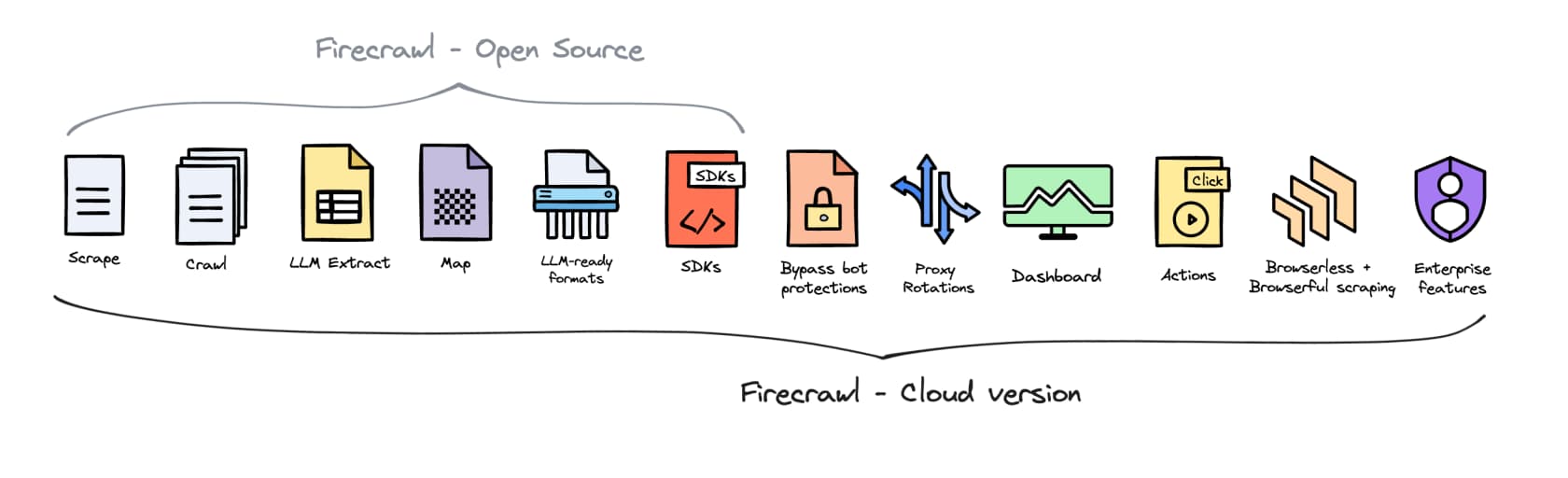
The cloud version adds bot bypass, proxy rotation, the web dashboard, browser Actions, and enterprise features that aren't in the self-hosted build. A Reddit thread about Firecrawl removing desktop browser mode from the open-source version drew strong reactions - some users concluded the self-hosted path is deliberately kept behind cloud to drive subscriptions. Whatever the intent, the gap is real: if your use case requires anti-bot bypass or proxy rotation, you're on the cloud tier.
For workloads that only need basic scraping on public pages without anti-bot challenges, self-hosting is a legitimate free option. For anything more sophisticated, the cloud subscription is the only path.
Which plan fits your use case
Two variables drive the right plan: your expected monthly page volume and whether your usage is steady or bursty.
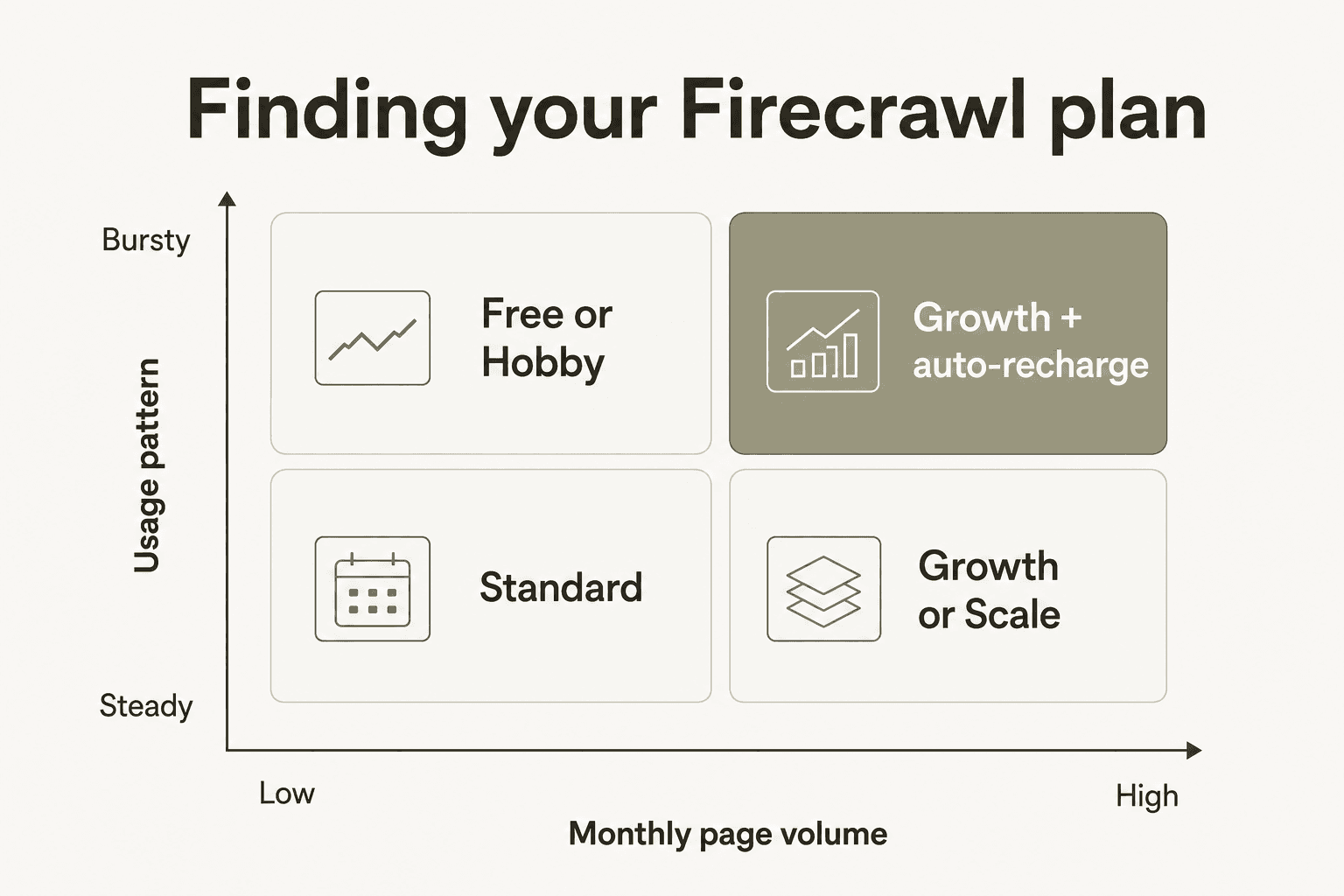
A few clear rules:
- Under 1,000 pages/month: Free. No reason to pay.
- 1,000-5,000 pages/month, steady: Hobby ($16/month). Watch the 5-request concurrency limit.
- 5,000-100,000 pages/month: Standard ($83/month). The per-page cost drops dramatically; this is the plan most AI teams should default to.
- Bursty at any volume: Add auto-recharge credits regardless of tier. Rollover credits are the fix for the non-rollover problem.
- 100,000+ pages/month: Growth or Scale. At this point the per-page cost difference is tiny - the real question is concurrency headroom and whether you need Priority support.
One pattern worth knowing from the community: using Jina AI as the primary scraper for commodity pages and Firecrawl as the fallback for heavily protected or complex sites. Jina's free tier is more generous; Firecrawl's anti-bot handling is better. For pipelines where only a fraction of URLs need Firecrawl-grade scraping, this hybrid approach can cut monthly credit spend significantly without sacrificing quality on the hard pages.
Verdict
Firecrawl pricing works well for teams with predictable, steady scraping needs. Standard at $0.00083 per page is a reasonable price for managed scraping infrastructure that handles anti-bot, proxies, and JavaScript rendering - the total cost of doing that yourself at any reasonable scale isn't cheaper. The Firecrawl-Claude integration and MCP ecosystem have made it a foundational layer for AI agent stacks, and its position as the #1 default integration for agent frameworks reflects real-world developer preference.
The model breaks down when your usage is bursty or unpredictable. The no-rollover rule on standard monthly credits means you either over-pay for quiet months or run out during busy ones. For teams in that pattern, Firecrawl alternatives with usage-based pricing are worth evaluating. Firecrawl vs Apify, Firecrawl vs Zyte, and Firecrawl vs Bright Data are good starting points depending on your use case.
For most AI/ML teams doing steady web data collection - product research, competitive intelligence, content pipelines, RAG knowledge bases - Standard is the right call. Go annual if you know you'll use it for 12 months; the ~$156/year savings on Standard is real money.
Try eesel
We built eesel's AI blog writer on top of Firecrawl - it's how every post gets its product research, pricing page deep-dives, and community sentiment. What Firecrawl handles is the data layer: turning URLs into clean, structured content. What you do with that data is a different question.
eesel is an AI agent platform that deploys autonomous AI teammates directly inside the tools teams already use - Zendesk, Slack, Freshdesk, Gmail, Shopify, and 100+ others. Whether you're feeding scraped web data into a support knowledge base, building competitive monitoring into a Slack bot, or running a content pipeline that publishes to your CMS, eesel handles the layer above the data collection: turning structured information into agents that act, respond, and integrate with your existing workflows.

Frequently Asked Questions
Is Firecrawl free to use?
How much does Firecrawl cost per page?
Do Firecrawl credits roll over?
Does Firecrawl have a pay-as-you-go option?
What does Firecrawl's Enterprise plan include?


Article by
Rama Adi Nugraha
Rama is a software engineer at eesel AI with two years of experience writing about B2B SaaS, AI tools, and customer support technology. Based in Bali, Indonesia, he brings a developer's perspective to product comparisons — cutting through marketing copy to what the integrations and APIs actually do.