

What is TorchNeuron?
TorchNeuron is a native PyTorch backend for AWS Trainium, the custom AI chip family Amazon has built since buying Annapurna Labs in 2015. It was announced on the PyTorch blog on 19 October 2026 and went live as an open-source public beta at PyTorch Conference North America on 20 October. The code lives at aws-neuron/torch-neuronx under Apache 2.0.
I build integrations and APIs for eesel, and "works with a one-line change" is the claim I trust least, mostly because I've written it on our own pages. So I read the docs, the repo and the launch material before believing it. The short version: the claim holds for eager mode, and the real engineering moves to the compile step.
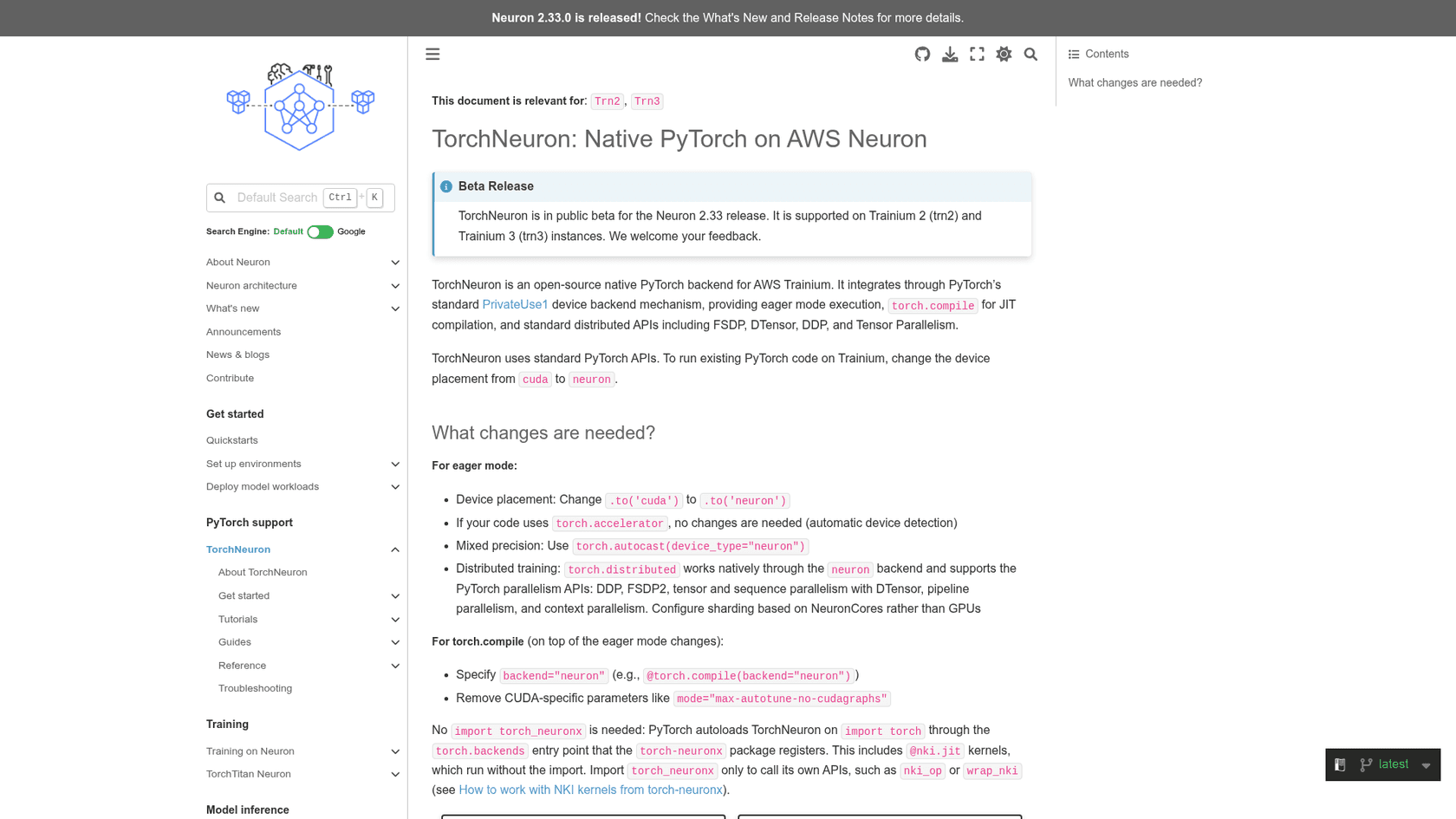
The official docs put it plainly: TorchNeuron is in public beta for the Neuron 2.33 release and runs on Trainium2 (trn2) and Trainium3 (trn3) instances. Amazon's own framing on About Amazon is that 85% of AI researchers and developers write their code in PyTorch, and until now moving that code to new chips meant months of rewriting and revalidating.
Andy Jassy, Amazon's CEO, made the business case on X the same day:
"Trying a new AI chip used to be a lot of work. You often had to rewrite your code, revalidate it, and sink many weeks in, betting this new chip is the right one for your workload."
What's actually new here
Trainium has run PyTorch for years, so it's fair to ask what changed. The answer is the plumbing underneath. Until PyTorch 2.9, Neuron ran PyTorch through PyTorch/XLA, which used lazy tensors: nothing ran until a graph was traced and compiled, so prints, breakpoints and Python control flow behaved oddly. AWS announced that PyTorch 2.9 would be the last XLA-based version, with 2.10 and later moving to native support.
TorchNeuron plugs into PrivateUse1, the official PyTorch extension point for custom hardware. To PyTorch, Trainium becomes just another device next to CPU and CUDA. That's why the launch post can say torch.nn, torch.autocast, torch.distributed and torch.profiler all work on the neuron device as written.
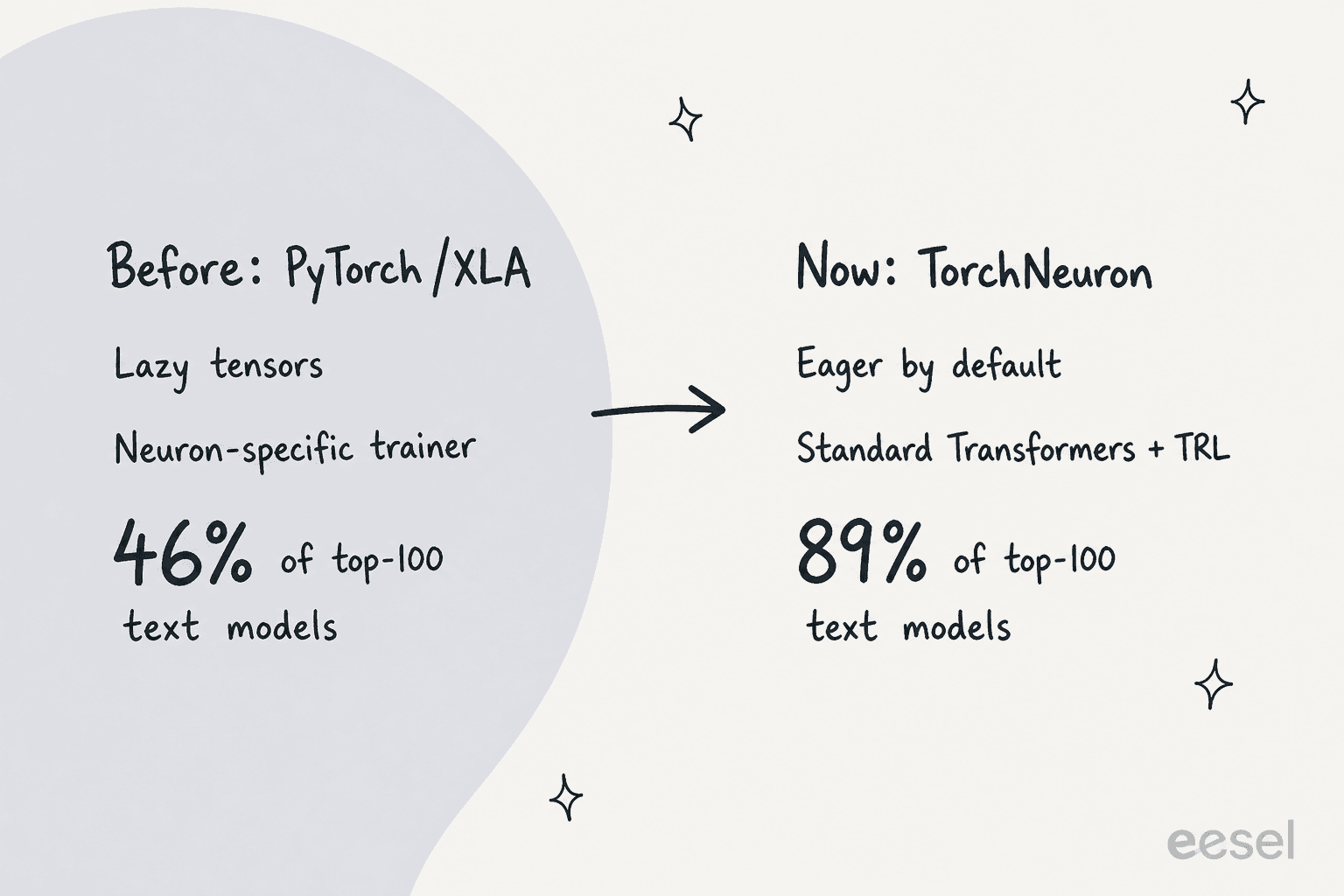
The clearest measure of the change comes from Hugging Face. In its launch post, Hugging Face says 89% of the top 100 text-generation architectures now work out of the box, compared with 46% through its older Optimum Neuron v0.4.5 library. It now recommends using Transformers, Diffusers, Accelerate, PEFT and TRL directly on Trainium instead of going through Optimum Neuron.
Here's the before and after in one table:
| PyTorch/XLA (torch-neuronx before 2.14) | TorchNeuron (torch-neuronx 2.14+) | |
|---|---|---|
| Execution | Lazy tensors, traced graphs | Eager by default, torch.compile optional |
| Debugging | Graph-level, prints delayed | Python prints and breakpoints work |
| Hugging Face path | Optimum Neuron wrapper | Transformers, TRL, Diffusers directly |
| Distributed | Neuron-specific APIs | DDP, FSDP2, DTensor, TP, PP |
| Chips | Trn1, Trn2, Inferentia | Trn2 and Trn3 only |
| PyTorch versions | Up to 2.9 | 2.14 in the current release |
That last row matters more than the launch coverage suggests, and I come back to it in the limits section.
How TorchNeuron works
Under the hood, TorchNeuron has two backends: one registered with the PyTorch dispatcher for eager mode, and one registered with TorchDynamo for torch.compile. Both hand work to the Neuron compiler, which produces NEFF files (Neuron Executable File Format) that the Neuron runtime runs on the chip.
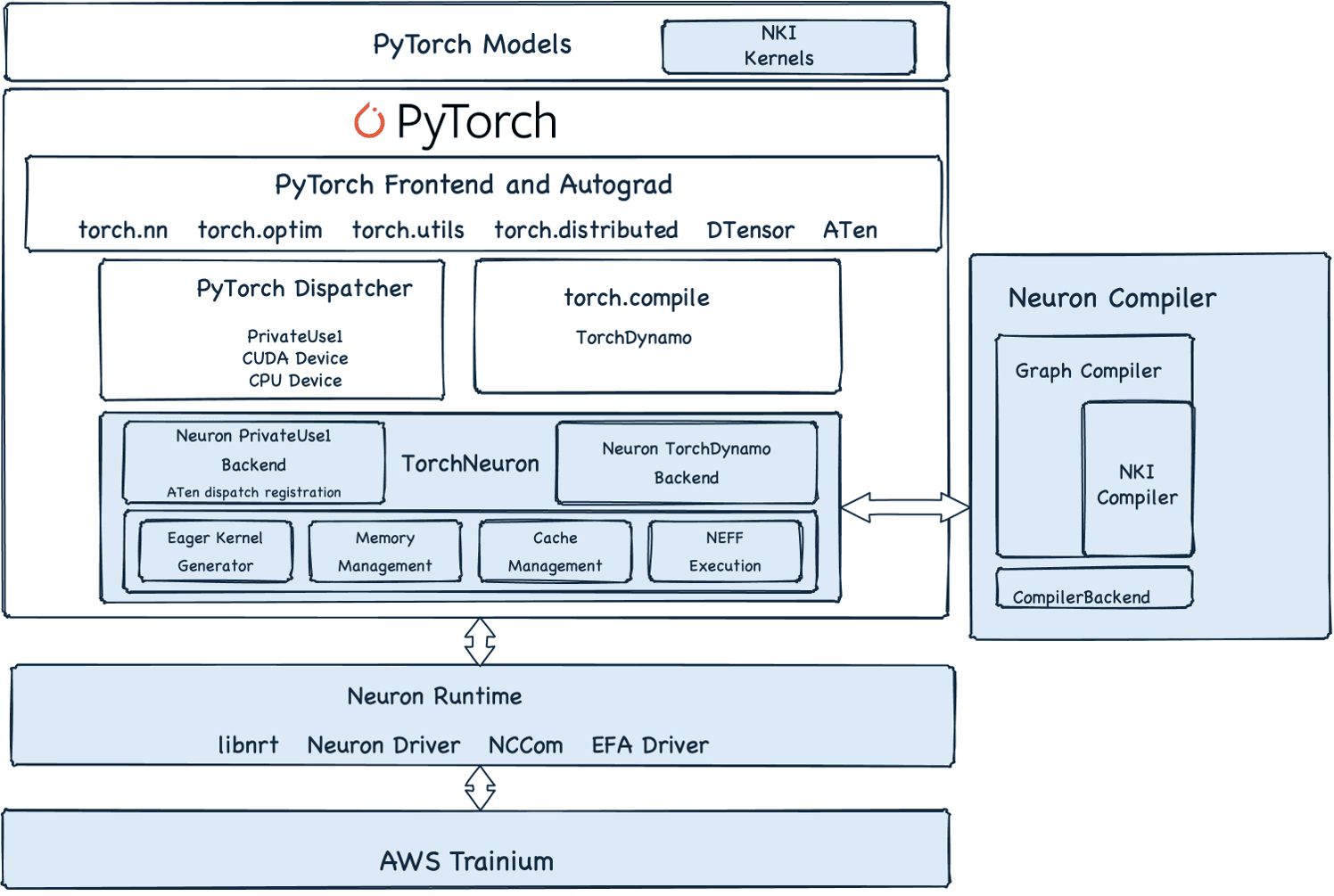
The About TorchNeuron page explains the two paths in detail. They behave differently enough that I'd treat them as two products.
Eager mode runs each operation as soon as you call it. The first time an operator runs, it compiles to its own NEFF and lands in an on-disk cache; after that, it's served from the cache. If an operator has no Neuron implementation, it falls back to the CPU with a warning, so the model still runs. There's also an experimental adaptive eager mode (set TORCH_NEURONX_ENABLE_CONCATENATION=1) that fuses eligible operations to cut launch overhead.
torch.compile captures the model into a graph through TorchDynamo and AOTAutograd, lowers it through Torch-MLIR to StableHLO, and compiles the whole graph into one NEFF. It's the production path. The trade is strictness: per the GitHub README, dynamic must be False, mode only accepts "default", tensors must be contiguous, and every new input shape triggers a fresh compile. A captured operator the backend can't lower makes compilation fail by default.
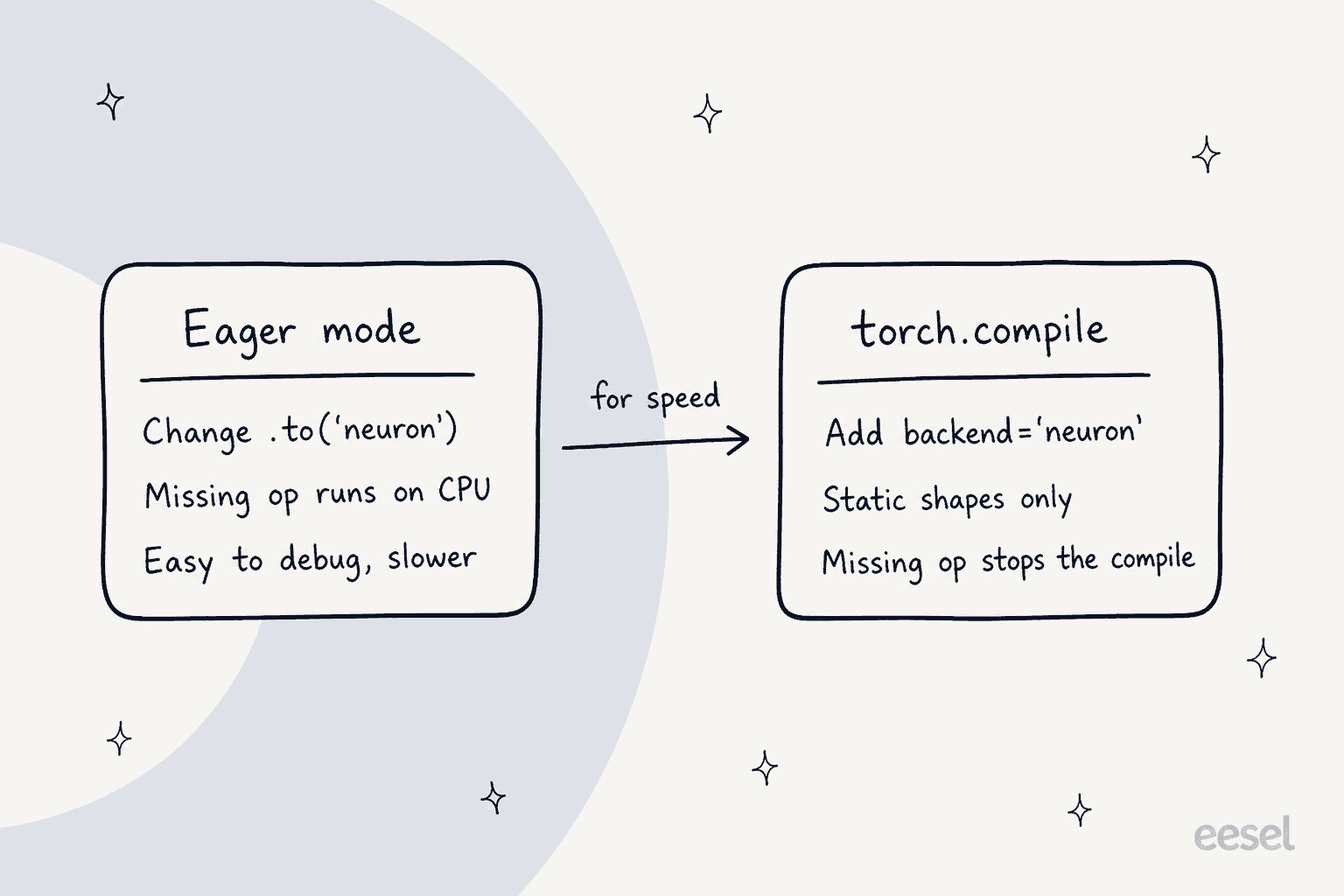
So the honest reading of "one configuration change" is: one change to start, and a second round of work to go fast. In practice that second round is mostly padding or bucketing inputs to a few fixed shapes, and pointing TORCH_NEURONX_NEFF_CACHE_DIR at shared storage (the docs suggest Amazon FSx) so a fleet doesn't recompile the same graphs on every instance.
Above both modes sits NKI, the Neuron Kernel Interface, for writing custom kernels when the compiler isn't enough. You register an NKI kernel as a normal PyTorch operator with nki_op, and it works in eager mode and inside a compiled graph. AWS also open-sourced NKI-lib, a set of tuned kernels including FlashAttention and MoE blockwise kernels.
What the code change looks like
For a training loop, the launch post shows the whole diff as one line:
model = MyModel().to('neuron')   # the only change
optimizer = torch.optim.AdamW(model.parameters())
for batch in dataloader:
    optimizer.zero_grad()
    loss = criterion(model(batch), targets)
    loss.backward()
    optimizer.step()
For the compiled version, you name the backend once with torch.compiler.set_default_backend("neuron"), or per call with torch.compile(model, backend="neuron"). Code written against torch.accelerator, PyTorch's device-agnostic API, needs no change at all. You don't even need import torch_neuronx: the package registers itself through the torch.backends entry point and loads on import torch.
The full list of edits from the docs is short:
- Change
.to('cuda')to.to('neuron'), or rely ontorch.accelerator. - Use
torch.autocast(device_type="neuron")for mixed precision. - Configure sharding by NeuronCores rather than GPUs for distributed jobs.
- For
torch.compile, addbackend="neuron"and remove CUDA-only settings likemode="max-autotune-no-cudagraphs".
For Hugging Face models it's even shorter. Loading a model with device_map="neuron" puts the weights on Trainium, and device_map="auto" finds the device on its own. The Hugging Face example fine-tunes with a standard TRL SFTTrainer script on 8 Trainium2 chips (half a trn2.48xlarge), with one Neuron-specific setting: HF_DEACTIVATE_ASYNC_LOAD=1, because async weight loading isn't supported yet. The checkpoint it saves is a normal Transformers checkpoint you can load on any hardware.
This is the kind of mechanical port that coding agents are good at. If you're moving a repo, a tool like Claude Code or OpenAI Codex can find the CUDA-specific calls and swap them, as long as you check the compile logs yourself.
How much does TorchNeuron cost?
The library is free. TorchNeuron is Apache 2.0, installs with pip install torch-neuronx from the Neuron pip repository, and comes preinstalled in the Neuron Deep Learning AMI and Deep Learning Containers. The cost is the Trainium time.
AWS publishes Trainium prices on its Capacity Blocks pricing page, where you reserve accelerator capacity for a fixed window. These are the effective hourly rates listed on 20 October 2026, and AWS says the next scheduled price update is January 2027:
| Instance | Accelerators | Per instance-hour | Per chip-hour | Works with TorchNeuron? |
|---|---|---|---|---|
| trn2.48xlarge (US East, Ohio) | 16 x Trainium2 | $35.7608 | $2.235 | Yes |
| trn2.3xlarge (select regions) | 1 x Trainium2 | $2.235 | $2.235 | Yes |
| trn1.32xlarge | 16 x Trainium | $9.532 | $0.596 | No |
| p5.48xlarge | 8 x H100 | $47.757 | $5.970 | GPU, not Neuron |
| p5e.48xlarge | 8 x H200 | $54.924 | $6.866 | GPU, not Neuron |
| p5en.48xlarge | 8 x H200 | $63.158 | $7.895 | GPU, not Neuron |
Linux carries no extra operating system fee on these blocks. Trn3 UltraServers, which scale to 144 Trainium3 chips, have no public per-hour rate on that page.
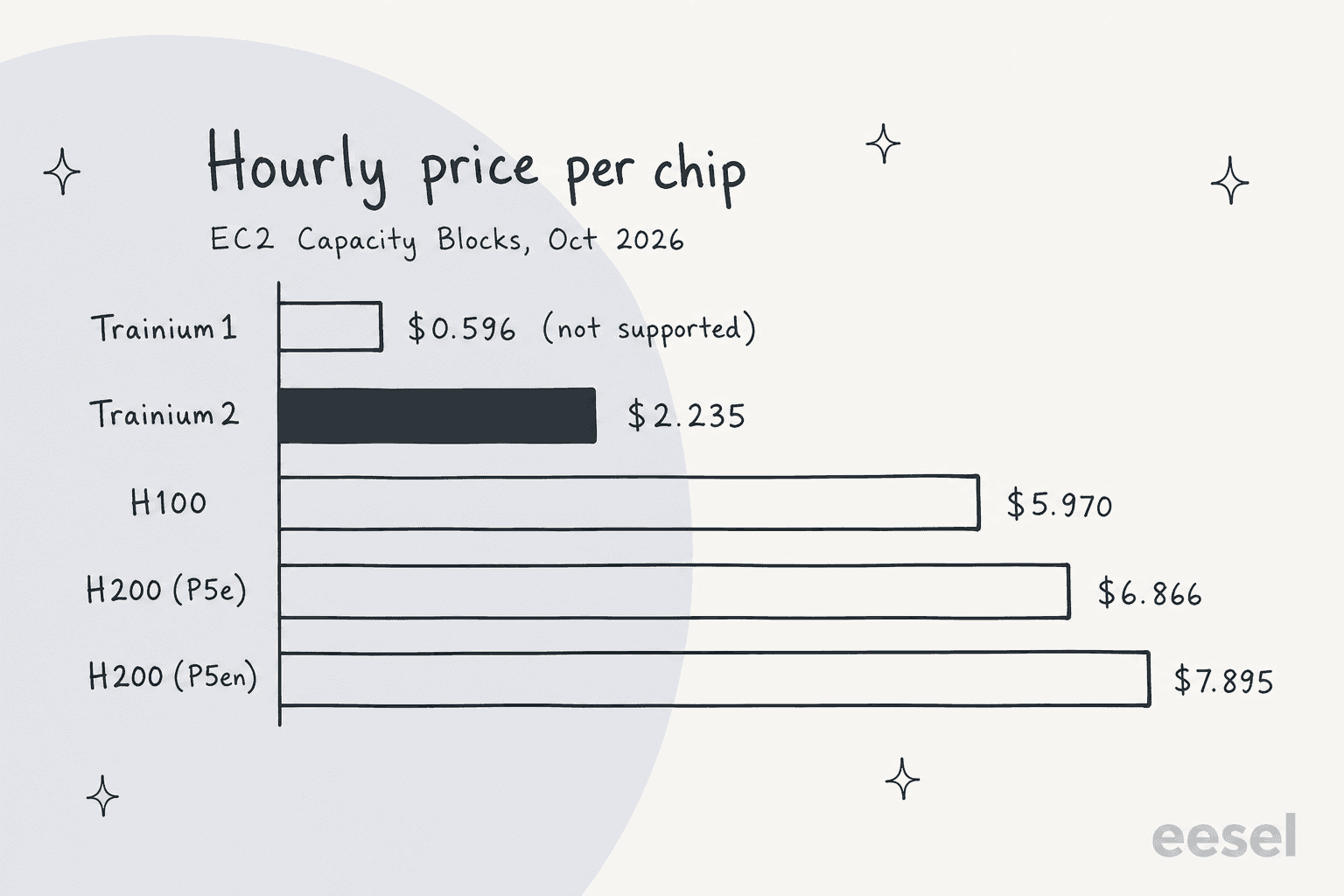
Per chip, a Trainium2 hour costs about 37% of an H100 hour. That doesn't mean your job costs 37% as much, because a Trainium2 chip and an H100 do different amounts of work. AWS's own claim on the Trn2 page is narrower: Trn2 instances offer "30-40% better price performance than GPU-based EC2 P5e and P5en instances." A trn2.48xlarge carries 16 Trainium2 chips, 1.5 TB of HBM and up to 20.8 FP8 petaflops.
The one customer number from the launch is from Deepgram, the speech recognition company:
"In the benchmarks we evaluated, Trainium processes about 60% more input audio seconds per dollar than our existing GPU baselines, which helps us bring better models to customers at lower prices."
Adam Sypniewski, CTO of Deepgram, on the PyTorch blog
Note the setup behind that number: Deepgram ported its model over a multi-month engagement with the AWS Generative AI Innovation Center. That's a real result, but it's a supported migration, not a weekend switch. For comparison shopping across GPU clouds, my breakdowns of CoreWeave pricing and Lambda pricing cover the other side of the table, and the AWS pricing guide covers the rest of the bill.
Benchmarks and test coverage
AWS didn't publish a model-speed leaderboard with the launch. What it did publish is coverage testing, which I think is the more useful number for a beta. Per the launch post, AWS continuously runs about 100,000 Hugging Face models, picked to cover 99.9% of real-world usage by download count, in a reduced configuration on Trainium. Each run checks whether the model loads, whether forward and backward passes run, and whether it compiles.
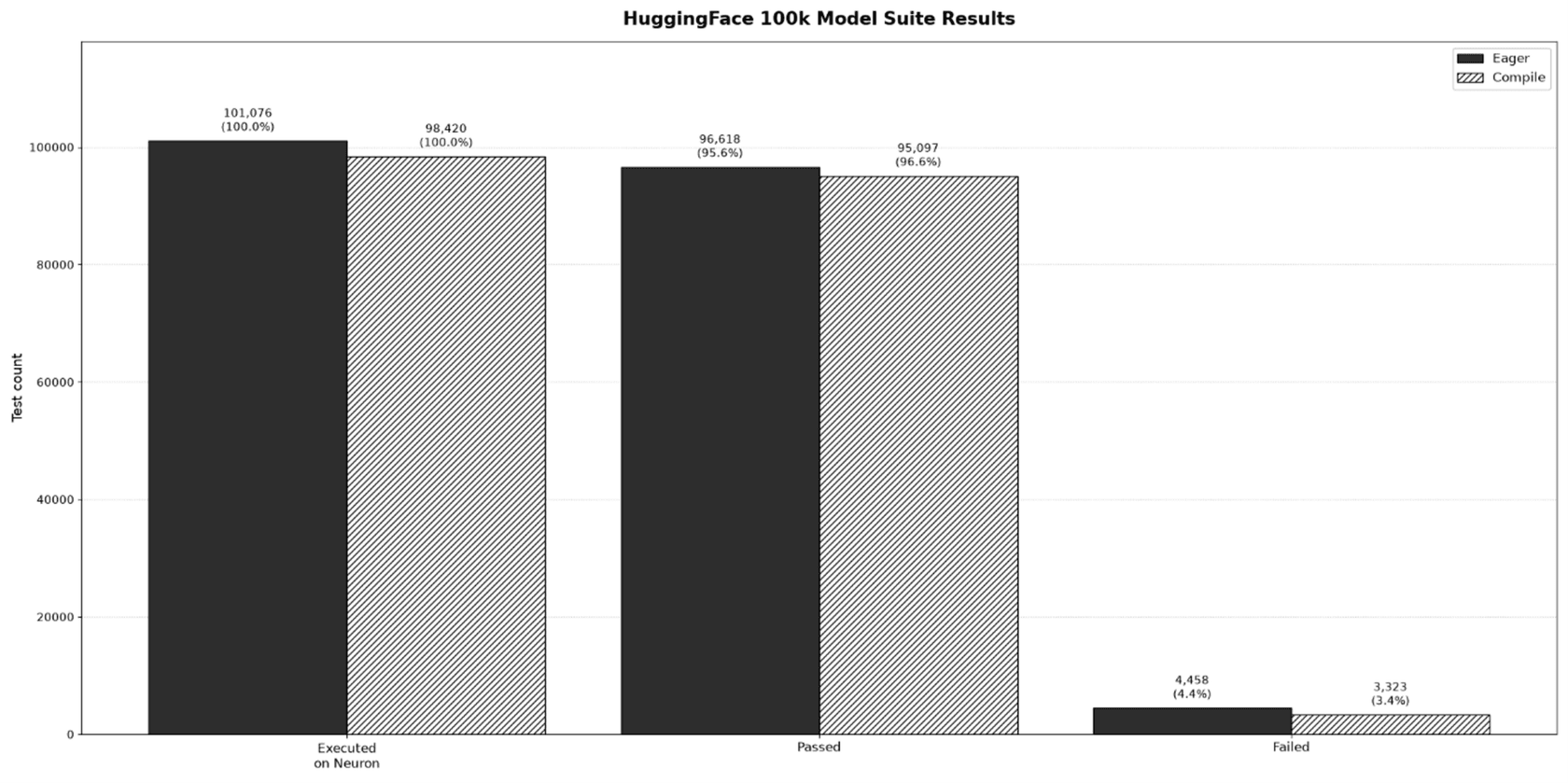
The September 2026 results: 95.6% pass in eager mode and 96.6% under torch.compile, with 4,458 and 3,323 failures respectively. That's a strong beta number, and it's the right kind of test. At eesel, I learned the same lesson from the other direction: a support agent that looks great in a demo can still give confident wrong answers on live tickets, which is why we simulate every rollout against a customer's historical tickets before it goes live. A sweep across 100,000 real models is AWS doing the equivalent for a compiler.
The upstream PyTorch test suite tells you where the gaps are. The August 2026 run produced about 154,000 test outcomes, of which about 69,000 were skipped. Roughly 30,000 were skipped by PyTorch's own eligibility checks (CUDA-only and CPU-only tests). The other ~39,000 were deliberate Neuron skips, the largest group being ~22,000 tests for operators that don't yet have a native Neuron lowering.
On hardware, the Trn3 page claims Trn3 UltraServers deliver up to 4.4x the performance and 4x the performance per watt of Trn2 UltraServers, with up to 362 MXFP8 petaflops across 144 chips. Those are AWS's numbers for the chip, not TorchNeuron results, and I haven't seen independent benchmarks of either yet.
What TorchNeuron doesn't do yet
This is a first release, and AWS is unusually direct about what it left out. From the launch post and the README:
- Older chips. Only Trn2 and Trn3 are supported. Trainium1, at $0.596 per chip-hour the cheapest accelerator in the table above, and Inferentia stay on the XLA-based torch-neuronx line (versions before 2.14).
- Dynamic shapes.
torch.compileneeds static shapes. Variable-length inputs mean padding or bucketing, and every new shape recompiles. - Precision. float64 runs as float32, which can change results that need 64-bit precision. int64 support depends on the operation.
- Features skipped on purpose. Sparse tensors, NestedTensor, forward-mode autograd, arbitrary attention masks in native multi-head attention (no-mask and causal work), per-channel quantization and bilinear/bicubic upsampling aren't in this release.
- FP8 and TorchAO. These are in private beta, with general availability planned for the next release. FlexAttention support is limited.
- First-run compile time. The first call of an operation or compiled graph includes compilation, which "can be significant for a large model," per the README.
The community reaction so far is mostly cautious optimism from people who've done this kind of port before. Replying to Jassy, one engineer put it this way:
"Big if this works flawlessly. I have been on the other end, it's not been pretty."
Another reply under AWS CEO Matt Garman's post named the longer-term test: whether AWS keeps upstreaming its changes into PyTorch itself.
"Open sourcing is the easy half, upstreaming is the harder promise."
AWS has started on that: the launch post lists 26 pull requests to PyTorch and TorchTitan, raised to improve test quality and remove hard-coded CUDA assumptions.
Before you book a Capacity Block, it's worth running your codebase against that list. Tick anything that applies:
Tick what your workload uses to see the fix for each blocker, drawn from the TorchNeuron docs and README.
How TorchNeuron compares to other ways to run models
TorchNeuron's real rival is the GPU. The choice for a team training or serving its own models looks like this:
| Option | What you manage | Code changes | Best for |
|---|---|---|---|
| TorchNeuron on Trainium | Instances, compile cache, shapes | Device name, static shapes for compile | AWS-committed teams with steady, large jobs |
| NVIDIA GPUs on AWS (P5, P5e, P5en) | Instances | None for CUDA code | Code with custom CUDA kernels, fastest start |
| GPU clouds (CoreWeave, Lambda) | Instances or clusters | None for CUDA code | GPU capacity outside the big clouds |
| Serverless GPUs (Modal, Baseten) | Your model code | Small wrappers | Bursty inference without capacity planning |
| Hosted model APIs (Together AI, Groq) | Nothing | API calls only | Open models without touching hardware |
The interesting shift is that the first row used to have "rewrite your training stack" in the code changes column. Now it's closer to the GPU rows, which is the whole point of the launch. AWS lists partners already building on it, including Anyscale, Modular and Nota AI, and Hugging Face support means most of the open models covered in my posts on Kimi K3 or DeepSeek V4 Flash are a device_map away from Trainium.
On serving, TorchNeuron feeds the same torch.compile backend into vLLM Neuron, a plugin that adds an OpenAI-compatible server, continuous batching and a paged KV cache. If your end goal is a managed agent on AWS rather than your own serving stack, Bedrock Managed Agents sits a layer above all of this.
Getting started
You need a Trn2 or Trn3 instance and Python 3.12, 3.13 or 3.14. On the Neuron Deep Learning AMI, TorchNeuron is already installed. On another Linux instance, the README has you install the Neuron driver and runtime, then pin versions:
pip install torch==2.14.0 --index-url https://download.pytorch.org/whl/cpu
pip install "torch-neuronx==2.14.*" "neuronx-cc==2.*" "nki>=0.6" --extra-index-url https://pip.repos.neuron.amazonaws.com
python -m torch_neuronx.collect_env
Keep the pins: earlier torch-neuronx versions are the XLA-based product with the same package name, which is an easy way to install the wrong thing. The collect_env check should report the device as usable from torch.
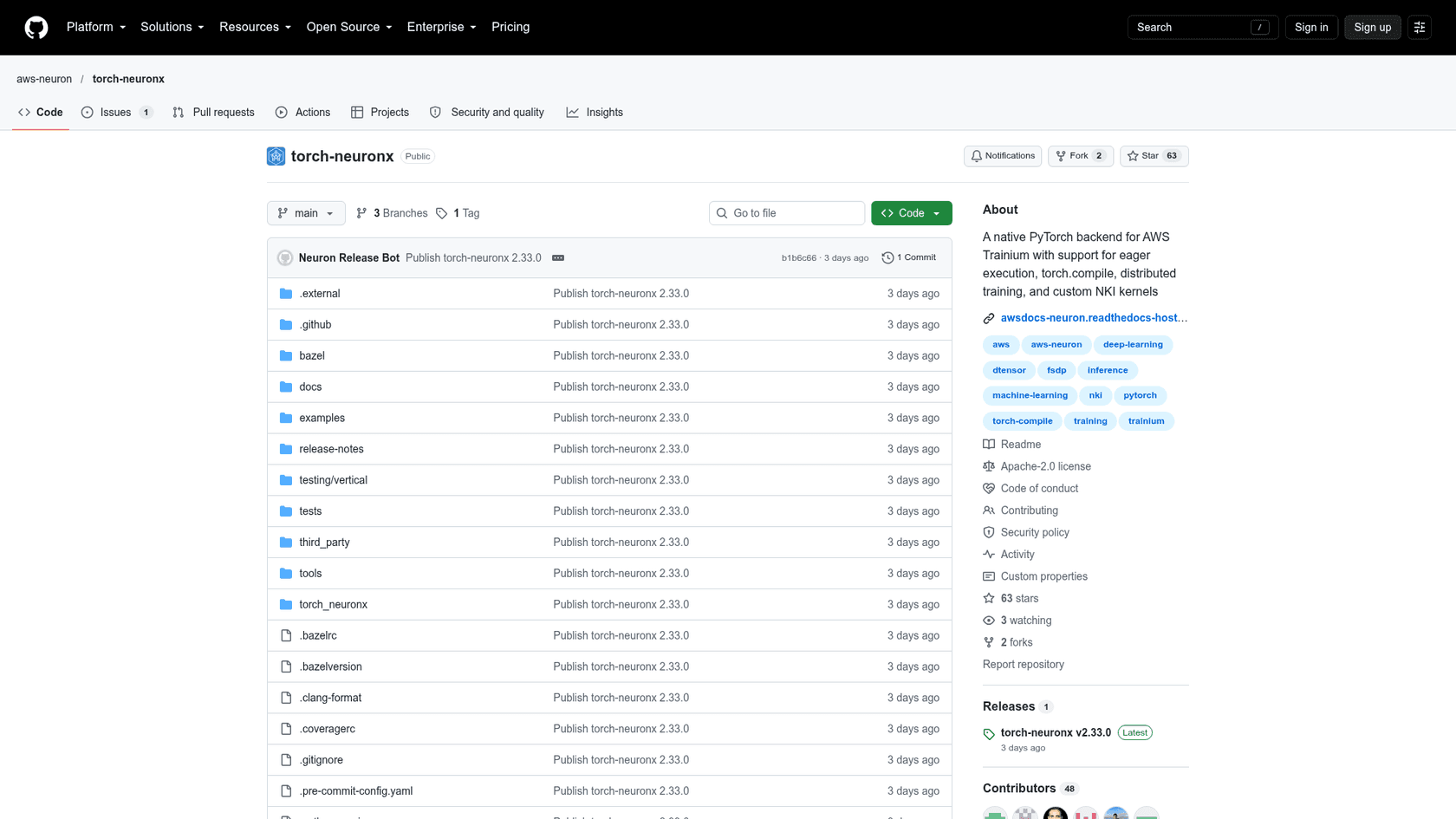
The repo had 63 stars and 48 contributors when I captured it on launch day, with examples covering Llama, Whisper, Qwen2, a mixture-of-experts model, GPT-2 training and multi-node runs. For large-scale training, torchtitan-neuron carries Trainium-tuned TorchTitan recipes. The launch post walks through training Llama 3 8B with SimpleFSDP and torch.compile on a single trn2.48xlarge.
My suggested order for a pilot:
- Run your model in eager mode on a trn2.3xlarge or trn2.48xlarge and read every CPU-fallback warning.
- Fix shapes, then move the hot path to
torch.compilewithfullgraph=True. - Share the NEFF cache across instances before you scale out.
- Compare cost per training step or per token against your current GPUs, not cost per hour.
Who TorchNeuron is for
TorchNeuron is for teams that train or serve their own PyTorch models, already run on AWS, and spend enough on accelerators that a 30-40% price-performance gap is worth an engineering sprint. Research teams get the most from eager mode, since debugging finally works like it does on any other device. Production teams get the most from the cost side, once shapes and caching are sorted.
It's not for you if your code leans on custom CUDA kernels you can't rewrite yet, if you need Trainium1 or Inferentia, or if you never touch model weights at all. Most companies using AI, including most of the ones I talk to at eesel, are in that last group: they want the AI to do a job, and the chip it runs on is someone else's problem.
Where eesel fits: this is infrastructure, eesel is the employee
TorchNeuron makes the hardware layer cheaper and easier to switch. That's good news for everyone building models, and over time it pushes down the cost of the AI products built on them. But it doesn't answer a ticket, draft a reply or write a blog post. Those are jobs, and jobs need context: your help center, your past conversations, your rules about refunds.
That's the layer eesel works at. eesel is an AI teammate platform: you hire ready-to-work teammates for specific jobs, today an AI helpdesk teammate and an AI blog writer. The helpdesk teammate joins your existing queue, learns from your help center and past tickets, and gets simulated against your historical conversations before it answers a real customer.
SE Ranking is a good example for a technical audience. It runs one eesel agent per product for SE Ranking, Planable and SE Visible on Zendesk, and between 8 August and 8 September 2026 eesel handled about 4,650 conversations, including about 2,100 live chats. API and Looker Studio questions get routed to a Tier 2 group with the evidence collected first, instead of the bot guessing.
If you're the kind of reader who just installed a PyTorch backend from a pinned pip index, you'll probably prefer setting this up from a terminal too. The eesel CLI operates the same teammate and workspace as the dashboard, so anything you set up there shows up in the UI and the other way round. npx @eesel/cli init chat-bubble --site https://your-site.com creates an agent, adds a website chat bubble and starts reading your site, with no account needed; eesel login keeps the workspace afterwards. From there, eesel chat talks to the agent, eesel files upload adds knowledge, eesel integrations connect wires up your helpdesk, eesel automations sets what it does on its own, and eesel approvals lets you approve held actions.
Every command prints JSON, errors come back as {error, hint, retryable}, and --dry-run shows the exact server call a write would make. That's what makes it usable by coding agents like Claude Code or Cursor: the agent can run the setup and read its own results. Every workspace is also an MCP server, and eesel mcp token prints a ready-to-paste config line.

The same log you see above in the dashboard is what eesel activity prints in the terminal, newest first.
Try eesel
TorchNeuron lets you pick the cheapest chip for your models. eesel lets you skip that decision for support work: a helpdesk teammate that plugs into Zendesk, Freshdesk or Gorgias, trains on your past tickets, and proves itself on historical conversations before it touches a live one. For SaaS teams with API-heavy questions, the AI helpdesk API and the CLI mean you can script the whole setup. Try eesel free, or start from the terminal with npx @eesel/cli.
Frequently Asked Questions
What is TorchNeuron?
neuron device to standard PyTorch, so eager mode, torch.compile and torch.distributed run on Trainium2 and Trainium3. It launched in public beta on 20 October 2026. If you want AI that does a job rather than a chip to run models on, an AI teammate is the other end of the stack.Is TorchNeuron free?
Does TorchNeuron really need only one line of code changed?
.to('cuda') to .to('neuron'), or change nothing if your code already uses torch.accelerator. For production speed you also add backend="neuron" to torch.compile, use static shapes and drop CUDA-only options. Agentic tools like Claude Code can handle that kind of mechanical port well.