What Google actually shipped
I read a lot of model announcements for a living, and most of them are a single capability wearing new marketing. Gemini Omni Flash is a genuinely different shape: it's Google's attempt at an any-to-any model where video is the current output, not the only one planned. The pitch from DeepMind CTO Koray Kavukcuoglu's announcement is that Omni is where "Gemini's ability to reason meets the ability to create."
Concretely, that means you can feed the model a mix of text, image, video, and (voice-only, for now) audio, and it generates high-resolution video with audio grounded in Gemini's broader world knowledge, physics, history, and cultural context, rather than just plausible-looking frames. Google's own demo prompts lean into that: a marble rolling through a chain-reaction track that respects momentum and gravity, an alphabet video where each letter is an unusual themed object, a claymation explainer of protein folding.
The part worth sitting with is the editing model. Ask for a change, and the next instruction builds on the last one instead of regenerating the whole scene: characters stay put, physics hold, and the model remembers what it already did. Google's demo walks a violinist through three compounding edits, changing the environment, making the violin invisible, then swapping the camera angle, without losing the original shot's thread.
The any-to-any workflow
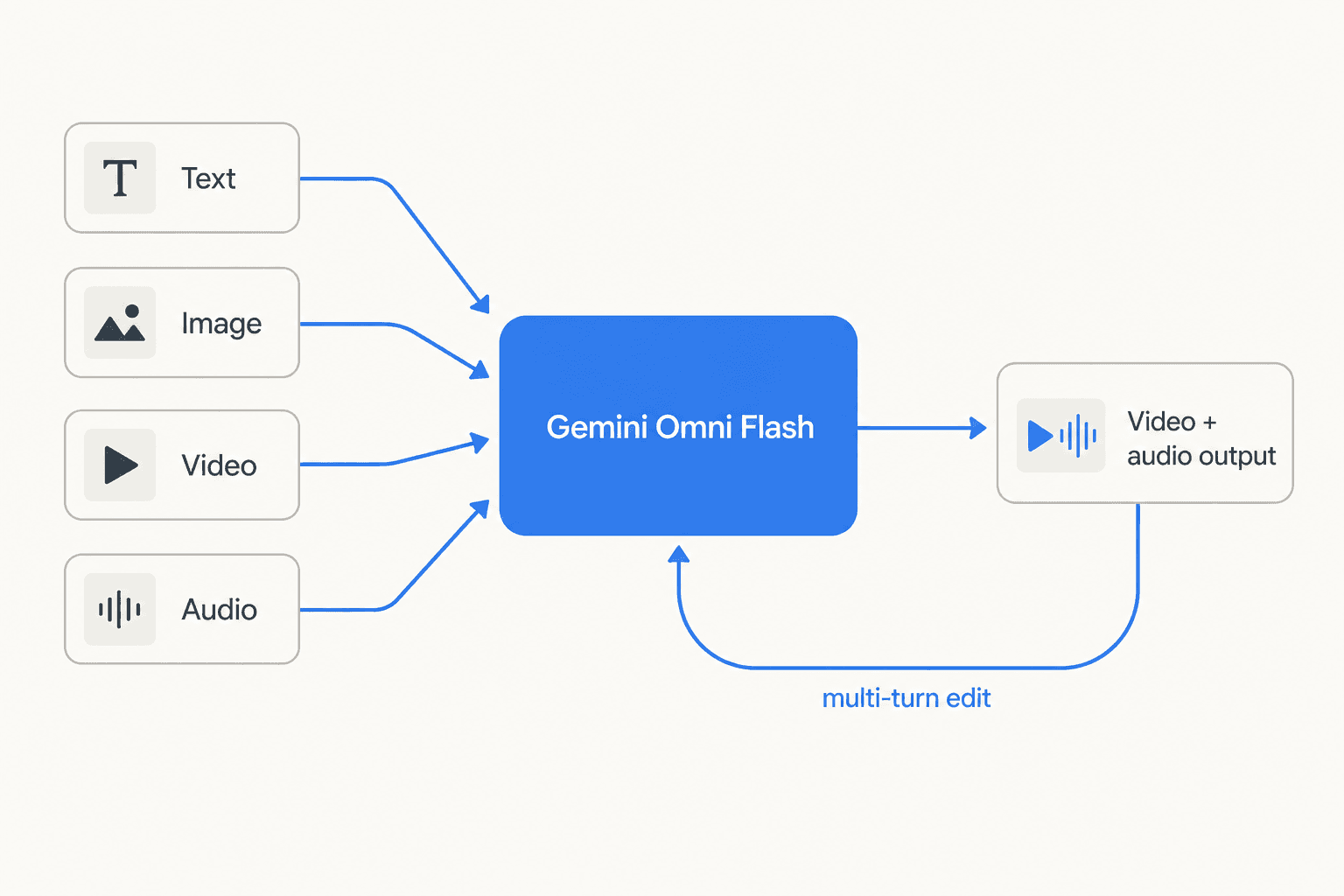
The official model card confirms the architecture is a transformer with native multimodal support across text, vision, video, and audio. Inputs go in as any combination of those four; the only output modality shipped so far is video with audio, though Google says image and audio output are coming "in time." That's the "any-to-any" framing: one model, multiple input types, one connected creative loop instead of separate tools for generation and editing.
Rollout followed a now-familiar Google pattern: consumers first, developers later. Gemini Omni Flash went out to Google AI Plus, Pro, and Ultra subscribers globally through the Gemini app and Google Flow, plus free to creators on YouTube Shorts and the YouTube Create app, all on day one. Developer and enterprise API access followed weeks later, landing in public preview on June 30, 2026, through Google AI Studio, the Gemini API, and the Gemini Enterprise Agent Platform.
Paired with Nano Banana 2 Lite: one workflow, not two products
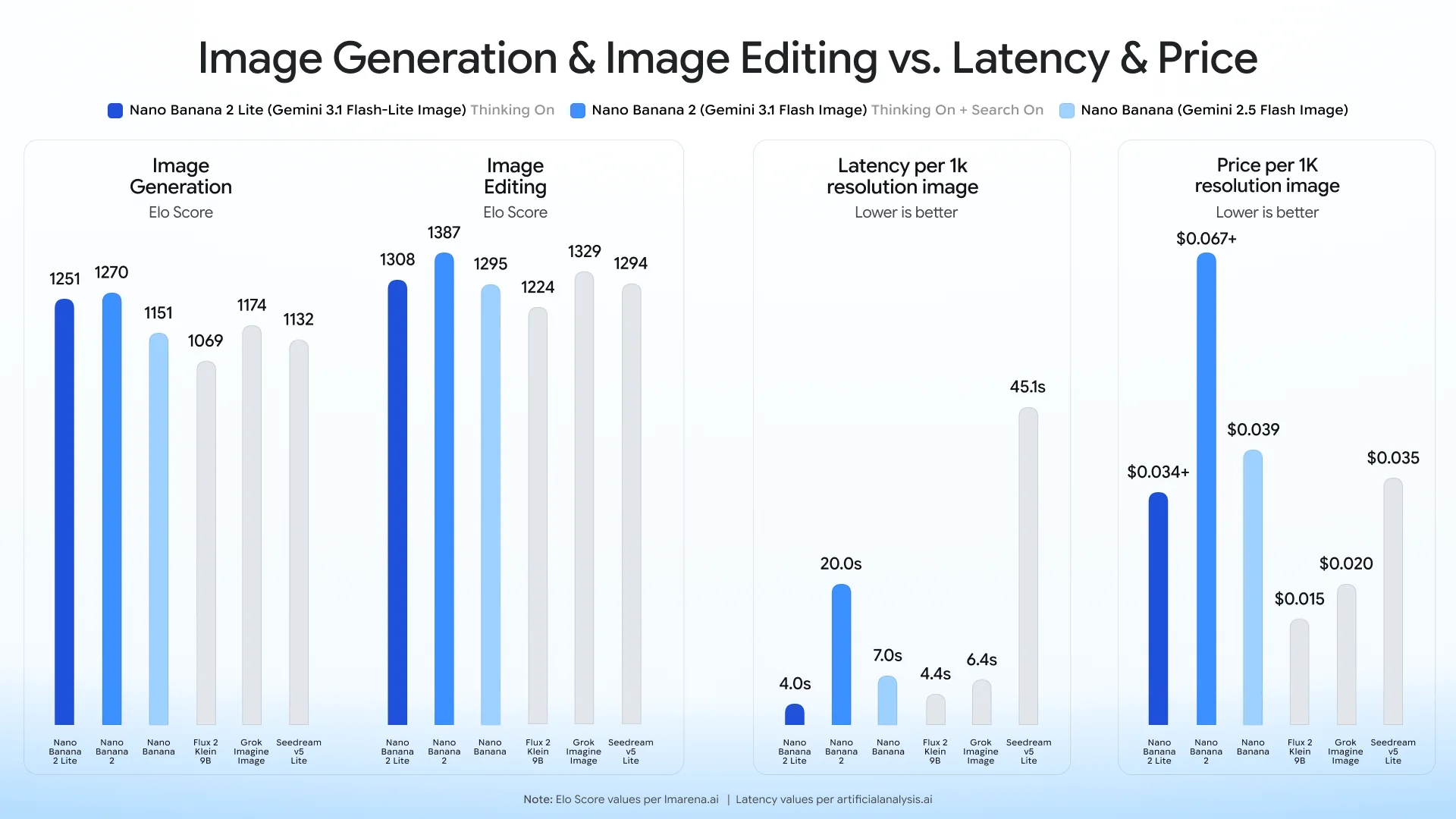
Omni Flash didn't ship alone. Google announced it alongside Nano Banana 2 Lite (model id gemini-3.1-flash-lite-image), the fastest, cheapest model in the Nano Banana image-generation family: text-to-image in under 4 seconds for $0.034 per 1K-resolution image, replacing the original Nano Banana as the recommended default. On its own that's a solid, if unremarkable, speed-and-cost upgrade.
What makes it interesting is that Google built three official demo apps that chain the two models together rather than treating them as separate products:
- Anywhere - takes a selfie, uses Nano Banana 2 Lite to place you at a landmark, then Omni Flash animates the still into a clip.
- Space Lift - reimagines a room photo across design styles, then turns the chosen look into a cinematic walkthrough.
- Omni product studio - converts static product photos into e-commerce video.
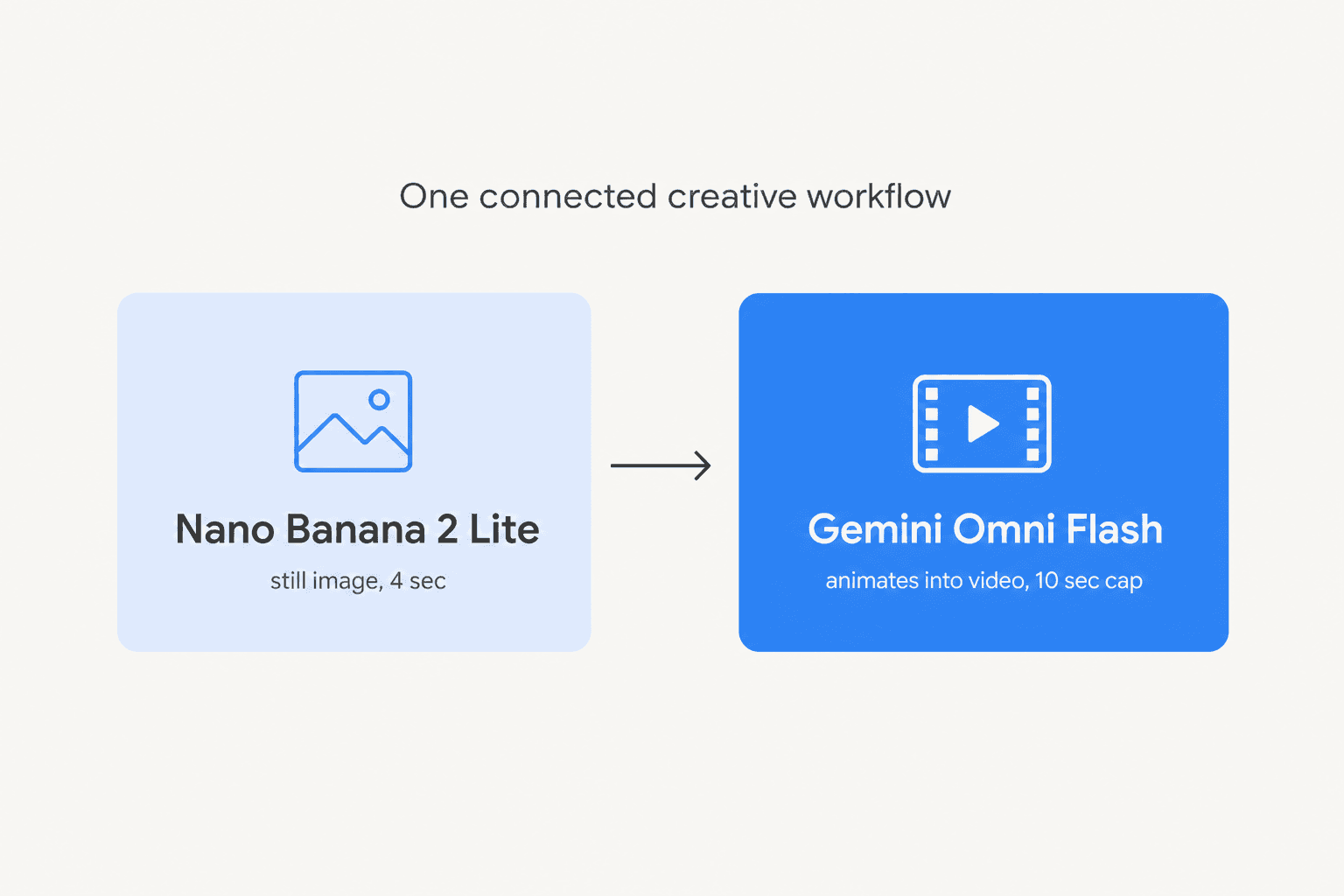
Independent AI-news account Rohan Paul read the launch the same way I did, that the pairing is the actual product:
"Chaining both models is the real product shape, not either model alone. Nano Banana 2 Lite makes reference images, then Gemini Omni Flash animates them."
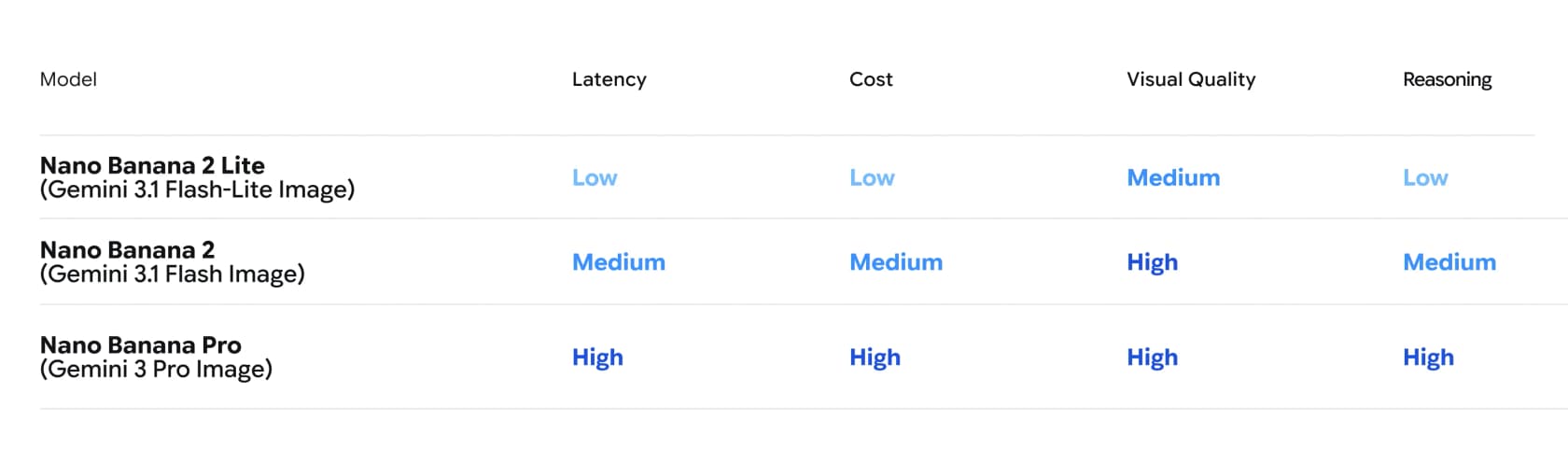
The Nano Banana family now has four tiers, from the announcement's own model comparison chart:
| Model | Positioning |
|---|---|
| Nano Banana 2 Lite | Fastest tier, built for near-real-time and high-volume workflows |
| Nano Banana 2 | Generalist workhorse, best balance of quality, latency, and cost |
| Nano Banana Pro | Complex, professional-grade control and reasoning |
| Nano Banana (legacy) | Superseded by Nano Banana 2 Lite |
Google's own benchmark chart backs the speed claim: Nano Banana 2 Lite lands well ahead of the pack on the latency-versus-price curve.
What a clip actually costs
Gemini Omni Flash's Gemini API pricing is unusually simple for a Google model, mostly because there's only one tier. Unlike most Gemini 3.x models, there's no Batch, Flex, or Priority option here, just Standard, and no free tier at all.
| Price | |
|---|---|
| Input (text, image, video, audio - one flat rate) | $1.50 / 1M tokens |
| Output - text | $9.00 / 1M tokens |
| Output - video | $17.50 / 1M tokens |
| Effective video rate | ≈ $0.10 / second of 720p video |
| Free tier | None |
Google's pricing page spells out the math directly: billing runs on total output tokens, at 5,792 tokens per second of 720p video, which nets out to roughly $0.10 a second. Run that to the current 10-second ceiling and a single clip lands at just over $1, before whatever it costs to feed in your prompt or reference media.
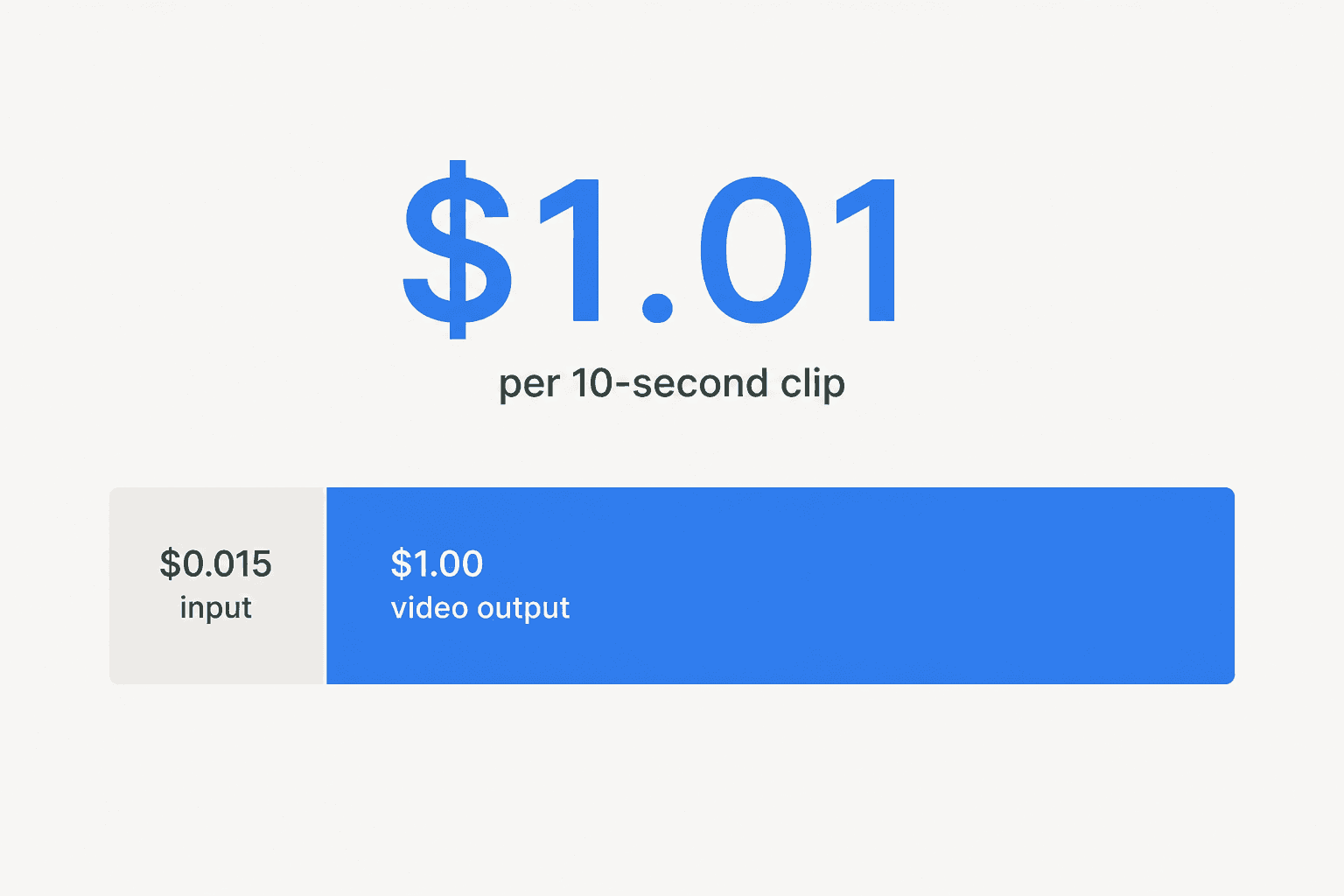
Google isn't hiding that the price matches a direct competitor. Gemini API dev-relations lead Logan Kilpatrick announced it in those exact terms:
"Omni Flash is SOTA at video editing at $0.10 / sec, same as Veo 3.1 Fast!"
One quirk buried in the pricing footnotes: Gemini Omni Flash Preview is marked "Yes" for content being used to improve Google's products, even on the paid tier, where most other paid-tier Gemini models say "No." Worth knowing before you feed it anything sensitive.
Where it still falls short
The official model card is unusually candid about what doesn't work yet, three specific challenges named outright: maintaining full consistency across edits, generating scenes with complex motion, and rendering accurate on-screen text. Google also flags that character consistency "has some limitations" specifically around scene changes and camera pans, exactly the kind of edit its own demos lean on hardest.
The API has rougher edges too. Audio-reference uploads and scene extension aren't supported yet, and video references up to 3 seconds are accepted by the schema but not correctly processed by the model. And there's no published benchmark data: DeepMind's model card explicitly defers evaluation scores for text-to-video, image-to-video, reference-to-video, and editing until the model reaches broader API availability.
A practitioner on LinkedIn pushed back on the polish question directly, commenting on the original Gemini Omni announcement from I/O:
"It's not completely true though! It works on certain resolutions only, and the character constancy still not fully developed. It's nice for you tubers, it's fun. But not at all at professional production level."

Google's own model card backs up part of that read in its most striking disclosure: the model can already change what someone is saying in a video, and Google is deliberately restricting that "while it works to understand how to safely and responsibly bring it to users." That's a real capability being held back on purpose, not a limitation Google is apologizing for.
Another commenter, on Google Cloud's own LinkedIn announcement, put a finer point on why the editing claim matters more than the generation claim:
"Conversational editing on video generation is the harder problem than initial generation quality, since maintaining consistency across edit turns requires tracking scene state, not just producing a good single frame."
And a second reader on that same thread flagged the question that follows any fast-moving enterprise AI launch:
"As increasingly capable AI agents become embedded within business services, technical performance alone won't demonstrate that an organisation is ready to operate them safely."
That last line is the one I'd underline. It's not really about video models. It's about any AI capability landing in a live business workflow faster than the org around it can build the guardrails to run it safely, and it's the exact problem I think about every day building support automation.
Where this fits, and where it doesn't
Gemini Omni Flash is a strong, honestly-documented step toward Google's any-to-any vision, and if your job involves producing marketing clips, product videos, or creative content, it's worth a serious look, especially chained with Nano Banana 2 Lite for the image-to-video workflow. For an SEO team or content shop already inside eesel's world, that's a real adjacent tool: I build eesel's blog writer agent for research and drafting, and a fast video layer on top of a written piece is a genuinely useful pairing, not a competitor to it.
But it's still a generative-media model, not a support system. It doesn't know your refund policy, it doesn't have a queue of real tickets to learn from, and nothing about "10-second video clips" touches the actual job most of the people reading this post have: an inbox or a Zendesk queue that's backing up while every headline is about video AI. I've spent years watching confident-sounding AI give a wrong answer to a real customer, which is exactly why the boring parts, simulating against your historical tickets before anything goes live, escalating instead of guessing when it isn't sure, matter more than a flashy demo.
Try eesel for the queue that video AI won't touch
If the actual problem on your plate is a growing backlog of support tickets, not a shortage of video content, that's what I build eesel for. It's an AI teammate that plugs into Zendesk, Freshdesk, Intercom, or whatever helpdesk you're already running in minutes, learns from your past tickets and help docs from day one, and drafts, triages, or resolves tier-1 requests without a new stack to babysit.
Before it ever touches a live customer, eesel simulates against your historical tickets so you see exactly what it would have said and how much it would have resolved, the same guardrail-first instinct the LinkedIn commenters above were reaching for in a different context. It's how Gridwise resolved 73% of tier-1 requests in its first month, and how Smava runs a fully automated agent across 100,000+ tickets a month. Pricing is $0.40 per resolved ticket, no seat fees, and the first $50 of usage is free.

Google's Omni Flash and Nano Banana 2 Lite are a genuinely good answer to "how do I make video content faster." If your actual answer is "how do I stop drowning in tickets," a purpose-built AI helpdesk agent is the tool for that job, and you can try eesel free.
Frequently Asked Questions
What is Gemini Omni Flash?
How much does Gemini Omni Flash cost?
How is Gemini Omni Flash different from Veo?
What can't Gemini Omni Flash do yet?
Can Gemini Omni Flash help with customer support content?


Article by
Rama Adi
Rama is a software engineer at eesel AI with two years of experience writing about B2B SaaS, AI tools, and customer support technology. Based in Bali, Indonesia, he brings a developer's perspective to product comparisons — cutting through marketing copy to what the integrations and APIs actually do.