

What Google actually shipped, and when
This launched in two steps, five months apart, and most coverage blurs them together.
| Date | What changed | Source |
|---|---|---|
| 19 May 2026 | Build mode gets an Android option: prompt to Kotlin project, browser emulator, USB install, one-click publish to Play internal testing | Google I/O post |
| 25 May 2026 | 250,000+ Android apps built since launch, per Google | Logan Kilpatrick on X |
| 18 Aug 2026 | Android docs updated: Firebase, GitHub export, Wear OS and TV still unsupported | AI Studio Android docs |
| 13 Oct 2026 | Google Play runs AI Studio apps on your own phone with a standard Google account | New on Google Play |
The May launch made the build part free and browser-only. The October update fixes the awkward bit: before it, getting the app onto your phone meant turning on developer options and plugging in a cable, or paying for a Play developer account. Sam Bright, VP and GM of Google Play, framed it as going "from 'there's an app for that' to 'there's an app for me.'" The May I/O release also let the Build agent generate custom images with Nano Banana, so your app's icons and illustrations don't have to be placeholders.
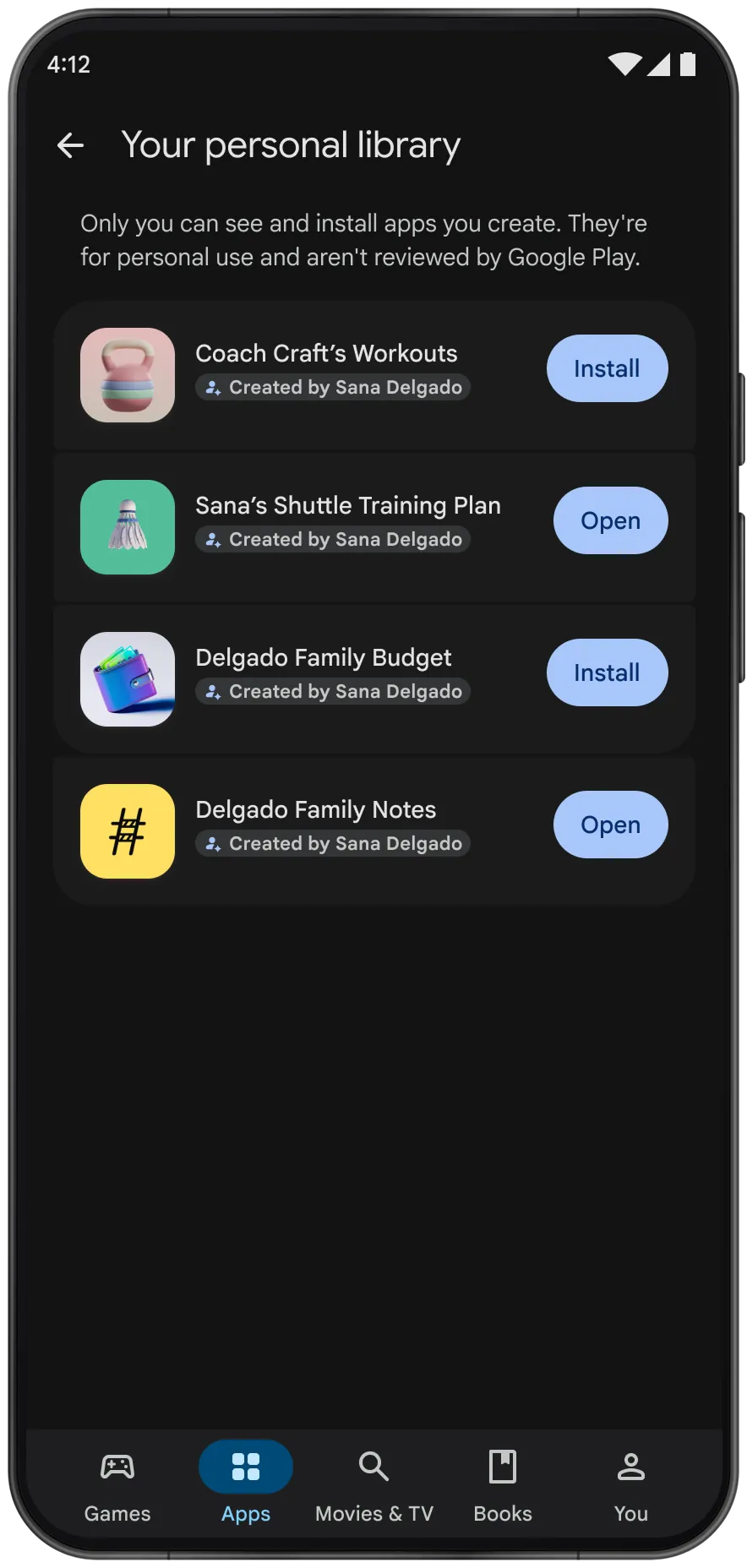
Look at the small print on that screen: personal apps "aren't reviewed by Google Play." That is the trade. You skip the review because nobody but you can install the app. Google says the apps stay "private, secure, and separate from the public store catalog."
How the build-to-phone flow works, step by step
If you have used vibe coding tools for web apps, the first half will feel familiar. The difference is what comes out the other end: an Android project, not a web page.
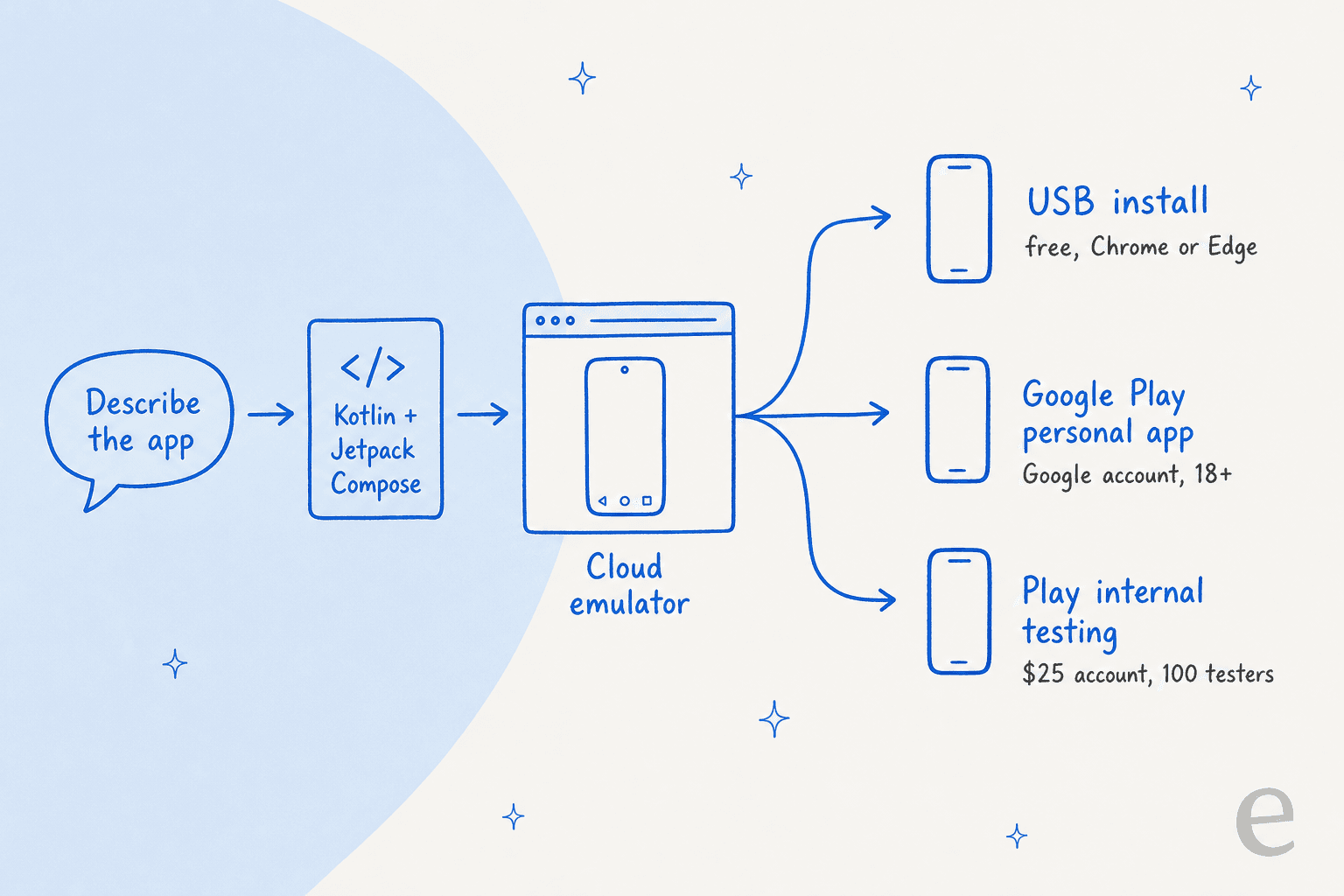
1. Open Build mode and pick Android. In Google AI Studio, go to Build in the left menu and choose Android from the platform picker (the chip reads "Build an Android app"). Skip this and you get a web app, which is the most common first-day mistake.
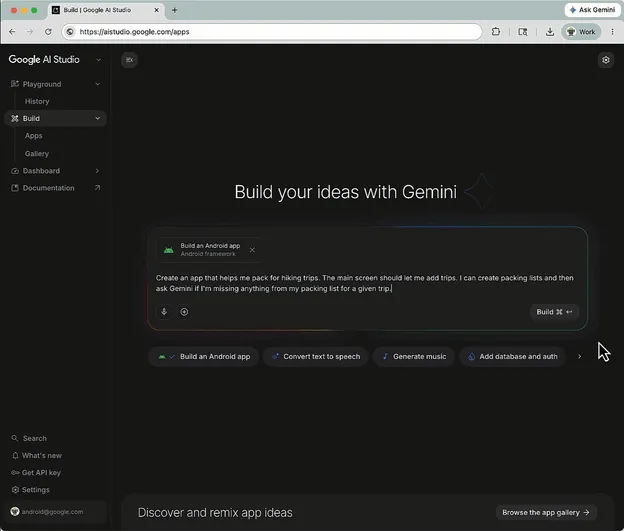
2. Describe the app. Google's own examples are small on purpose: "Create a daily task tracker with local storage" or "Build a simple calculator." The Antigravity Agent, the same agent harness behind Google Antigravity, writes the project and manages files across it.
3. Iterate in the browser emulator. The emulator runs in Google's cloud and streams to your browser, so there is no Android SDK to install. You can tap, scroll and rotate, and it rebuilds when the agent changes code. Camera, NFC, Bluetooth, real GPS and Google Play services (like Sign-In and Maps) don't work in the emulator, only on a real phone.
4. Get it onto a phone. You have three routes today, and they need different things. That is what the picker in the next section is for.
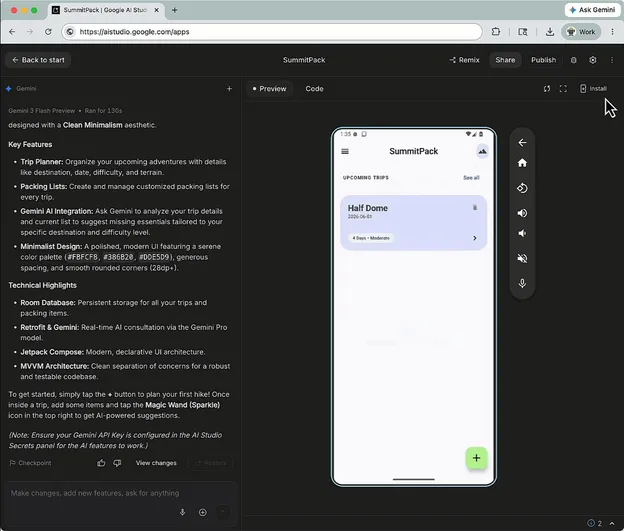
The USB route is the most documented. You need Chrome or Edge (they support WebUSB), a phone with USB debugging on, and a cable. Click Install on Device, pick the phone from the browser's USB list, and the app installs and opens. Google's docs don't yet describe the click path for the new Play personal-app route, so expect the first few weeks of the rollout to be a little rough around the edges.
Which install route do you need?
Each route answers a different question: who needs to run the app, and what are you willing to set up? Pick the one that matches your situation.
Who needs to run your app?
Route: Install on Device over USB
- You need: Chrome or Edge, USB debugging on the phone, a cable
- Cost: $0
- Available: since 19 May 2026
- Watch for: you reinstall from AI Studio to get each new build onto the phone
Route: Google Play personal app
- You need: a standard Google account, age 18+, a supported market (the US is one)
- Cost: $0, no developer account
- Available: rolling out from 13 October 2026
- Watch for: only you can see and install it, and Google Play doesn't review it
Route: not here yet
- Google's plan: share personal apps with "a close circle of friends and family" in the coming months
- Today's workaround: the 100-tester internal track, which needs a developer account
- Cost today: $25 one time for that account
- Watch for: no date has been announced for the sharing feature
Route: Play Console internal testing
- You need: a Google Play developer account and a completed developer profile
- Cost: $25 one-time registration
- Available: since 19 May 2026, via Settings, then Publish, in AI Studio
- Watch for: AI Studio signs the app with a managed keystore and sends testers a link; it only targets the internal track
Route: graduate to a public listing
- You need: a professional developer account; the app goes through Play's Trust and Safety review and quality standards
- Cost: $25 one time, plus your time on the listing
- Available: through the Play Console, not from AI Studio's publish button
- Watch for: public users bring support questions, reviews and refund requests
The pattern worth noticing: the free routes are for one person, and every route that reaches other people still runs through a $25 developer account. Google is lowering the bar for building, not for distribution. For a personal habit tracker that is fine. For anything you hope will become a product, budget for the developer account early.
What the generated code actually is
This is the part I care about most, because I've shipped enough integration code to know that "production quality" in a launch post can mean anything. Here is what Google's Android docs say comes out of Build mode:
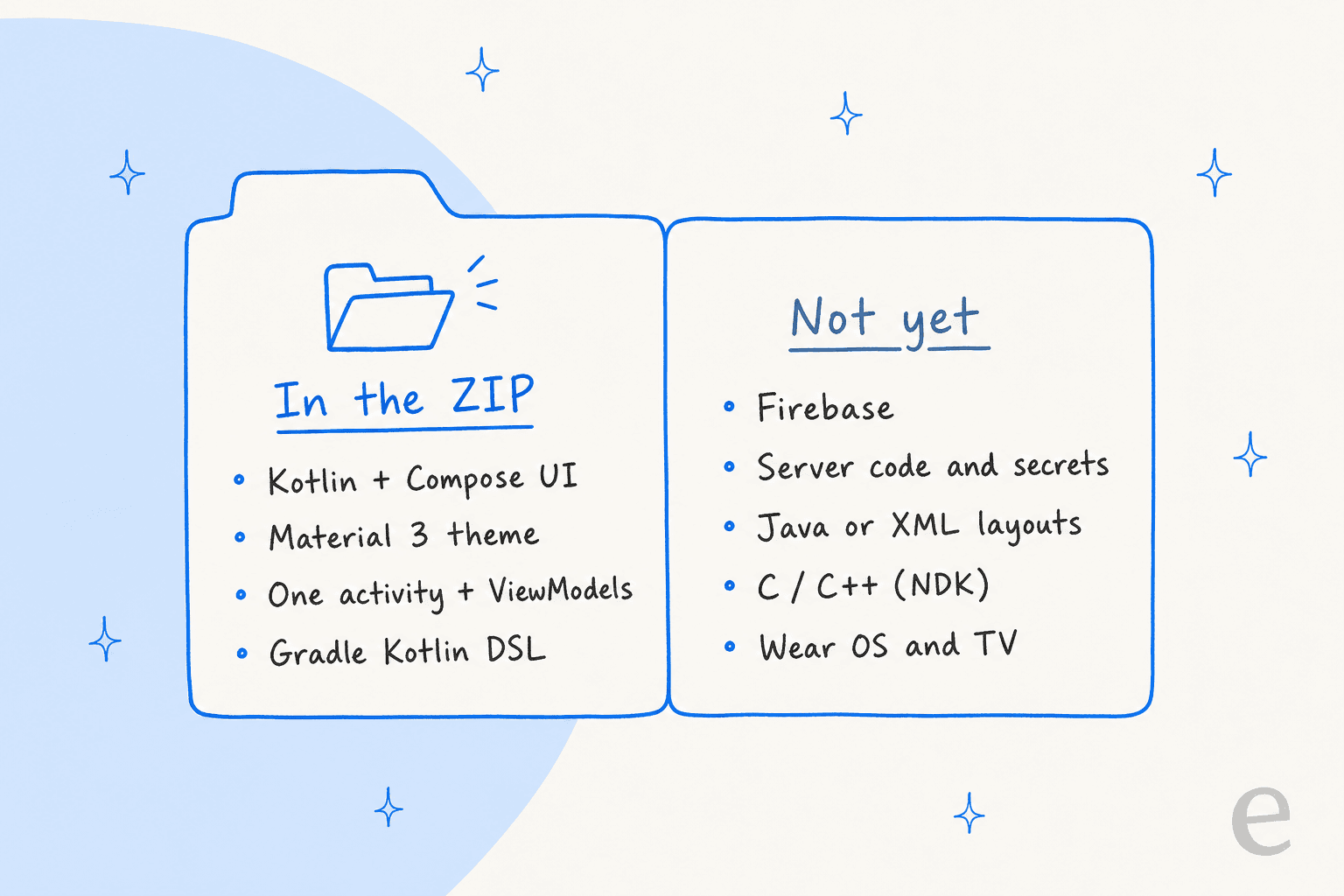
| Layer | What AI Studio generates |
|---|---|
| Build config | build.gradle.kts at project and app level, Kotlin DSL |
| UI | Jetpack Compose with Material 3 theming |
| Architecture | Single activity, ViewModels and data classes |
| Resources | AndroidManifest.xml, drawables, strings |
| Dependencies | Managed by the agent from Maven and Google repositories |
That is a sensible, current Android stack. It is roughly what you would get from the new-project wizard in Android Studio with Gemini, which Google says is the technology it moved into AI Studio. In Google's own SummitPack demo, the agent's summary lists a Room database for local storage, Retrofit for calling Gemini, and an MVVM structure. Those are the libraries an Android developer would reach for by hand.
So yes, it is real code. The ZIP is a project you can open in Android Studio and keep building, with whatever coding assistant you prefer.
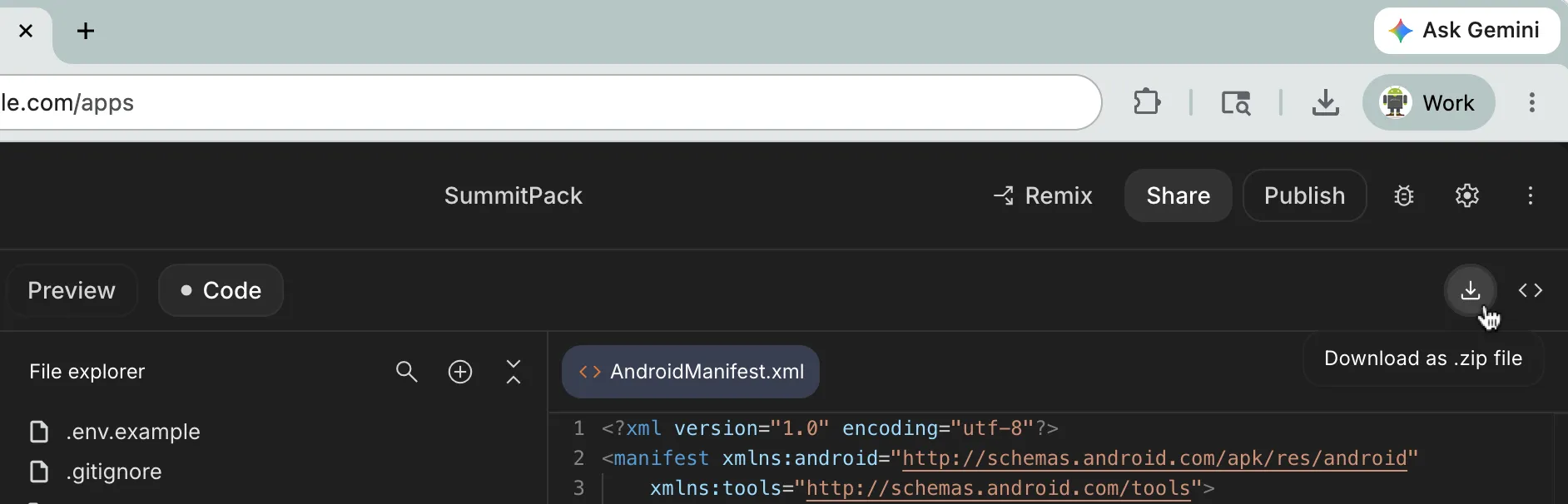
Two things I would check before the app leaves my own phone. First, the API key. The SummitPack summary tells you to put your Gemini key in AI Studio's Secrets panel, but the Android docs list secrets management as a server-side feature Android projects don't get. Web apps in AI Studio keep the key on the server; a client-side Android app that calls Gemini needs its own plan for where that key lives. Second, the structure. Single activity, single module is fine for a utility. It is a refactor waiting to happen if the app grows into ten screens and a login.
Limits and gotchas, as of 14 October 2026
Google's May post and the current docs disagree in a few places. When they do, I've gone with the docs, which were updated in August.
| Question | Answer today |
|---|---|
| Firebase (Firestore, Auth, App Check)? | Not for Android. Announced as "coming soon" in May; docs still say no, because Android projects are client-side only |
| Server code, secrets, multiplayer, Workspace APIs? | Web apps only |
| Export to GitHub? | Not for Android yet. ZIP download only (the May post mentioned GitHub; the docs say it isn't available) |
| Watch, TV, foldables? | Phones and tablets only. No Wear OS or Android TV, despite a Pixel Watch demo in the May post |
| Java, XML layouts, C/C++? | No. Kotlin and Compose only, no NDK |
| Hardware in the emulator? | No camera, NFC, Bluetooth, real GPS or Play services. They work once installed on a phone |
| Play personal-app install? | Rolling out to select markets including the US, 18+ only |
The Firebase gap is the big one. It is the difference between "my own tool" and "an app with accounts and synced data." Until it lands, any app that needs a backend gets exported and finished elsewhere. If your idea is really a web app with a database, a web-first builder such as Lovable will get you further today.
What it costs to build and run
Building is free, within limits. The bill starts when your app calls a model or you want more daily quota.
| Item | Cost | Source |
|---|---|---|
| AI Studio Build, free tier | $0, "modest quota"; free-tier content can be used to improve Google's products | Google AI plans, pricing |
| Google AI Pro | Higher AI Studio quota, premium models like Gemini Pro; no Gemini 4 Argon | Google AI plans |
| Google AI Ultra | Highest quota, includes Gemini 4 Argon | Google AI plans |
| Gemini 3.8 Flash calls from your app (paid tier) | $0.75 in / $3.75 out per 1M tokens to 31 Dec 2026; $1.50 / $7.50 from 1 Jan 2027 | Gemini API pricing |
| Play personal-app install | $0 | Google blog |
| Play developer account | $25 one time | AI Studio docs |
If you haven't picked a model provider yet, my OpenAI vs Gemini API comparison covers the trade-offs for app builders.
Two notes on that table. Subscription benefits apply only inside the AI Studio web interface; direct API use from your app is billed separately. And the Gemini 3.8 Flash price doubles on 1 January, so an AI-powered app that looks cheap in November will cost twice as much per call in January. My Gemini pricing breakdown covers the other models, and Google AI Ultra covers the top plan.
What builders are saying
The loudest signal is Google's own number. Logan Kilpatrick posted this a week after launch:
"We just launched the ability to build native Android apps directly in Google AI Studio for free! Since launch last week, people have created more than 250,000 Android apps. Likely >99% of these folks never built an Android app before, everyone can now build, no coding required!"
The top reply asked the question the October update partly answers, since in May the only way to share an app went through Play's developer track:
"how many of the 250k Android apps have been submitted to Google Play store and how many of that got approved?"
On Hacker News, the launch-day thread had a more practical complaint, which matches step 1 above:
"I actually tried to test it out and created an app in aistudio but its still giving html css javascript project basically rather than kotlin."

That is the platform picker. Build mode defaults to web, and you have to choose Android before you prompt.
AI Studio vs Android Studio vs other vibe-coding builders
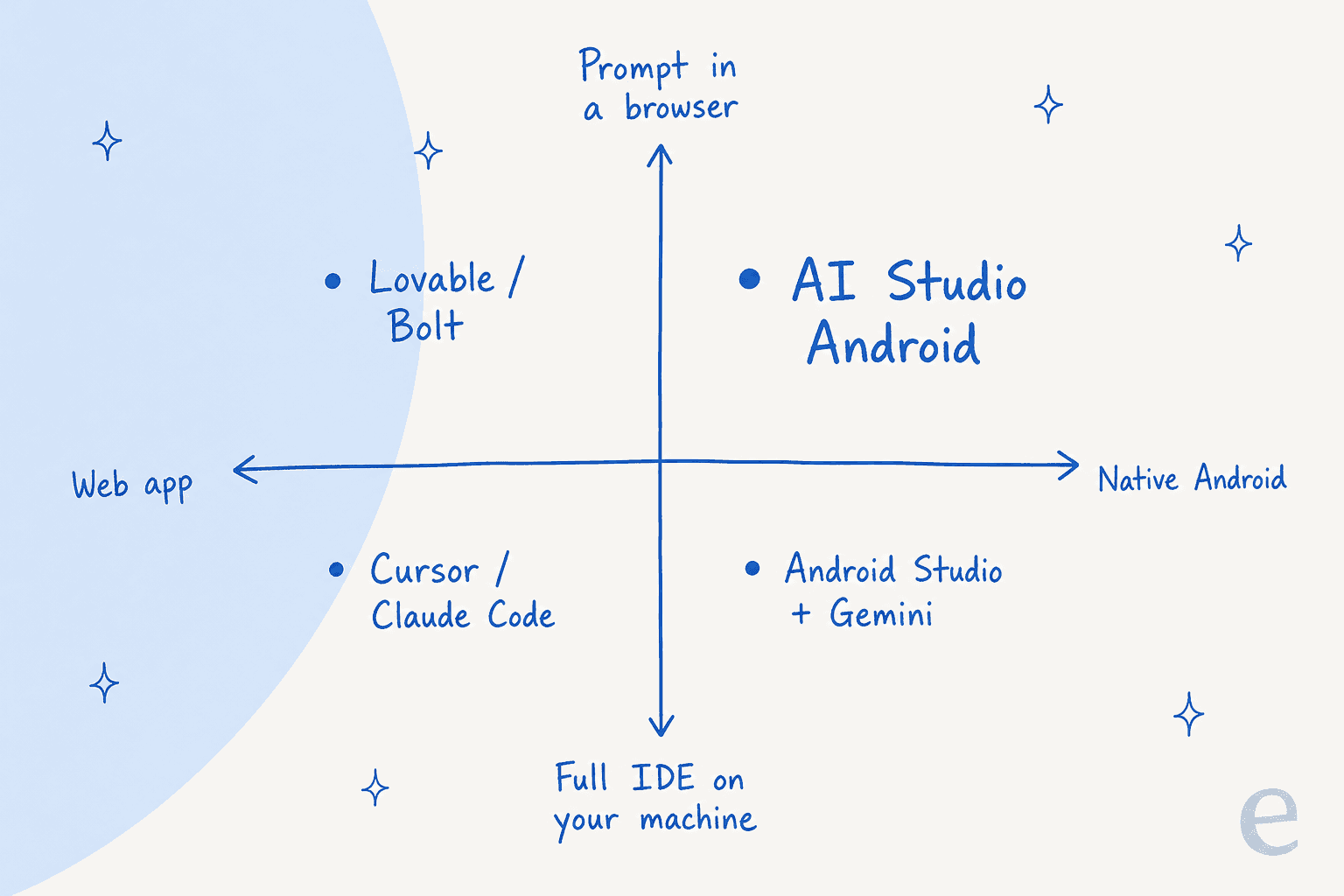
The useful way to place AI Studio is on two questions: does it write native Android code, and does it run in a browser or on your machine?
| Tool | Output | Where it runs | Best for |
|---|---|---|---|
| Google AI Studio (Android) | Native Kotlin + Compose | Browser, cloud emulator | Personal Android tools, quick native prototypes |
| Android Studio + Gemini | Native Android, any architecture | Your machine | Real apps, teams, anything with a backend |
| Lovable | Web apps | Browser | Web products with data and sign-in |
| Replit | Web apps and services | Browser | Full-stack prototypes you deploy fast |
| Cursor or Claude Code | Any code | Your machine | Developers editing a real codebase |
AI Studio sits alone in the top-right corner: the only browser-based builder here that hands you a native Android project. Lovable and Replit produce web apps, which you can wrap for phones but which aren't Kotlin. Android Studio produces the same kind of code with no limits on architecture, but you install it, plus the SDK, on a capable machine.
The handoff between them is the real workflow. Start in AI Studio, prove the idea on your own phone, then download the ZIP when you hit the single-activity or no-Firebase wall. From there, any local agent works. If you are weighing the browser builders against each other, my Lovable alternatives and Replit alternatives posts go deeper, and vibe coding for non-developers covers the habits that keep a prompt-built app from falling over.
Who should use it
Use it if you want a personal Android tool (a packing list, a budget tracker, a study quiz) and don't want to install anything. With the October update, you can now get it onto your phone without a cable or a $25 account, which makes it the shortest path from idea to home screen I know of.
Use it as a starting point if you're an Android developer prototyping a screen or a feature. The generated Compose code is a clean first draft, and the ZIP drops straight into Android Studio.
Skip it for now if your app needs accounts, synced data or a server, or if you need GitHub in the loop from day one. Those are exactly the gaps the docs list. A web-first builder or a local IDE fits better until Firebase support ships for Android.
Your app has users now. Who answers them?
Here is the part the launch posts skip. The moment your app reaches people beyond you, through the testing track today or friends-and-family sharing later, it gets questions. Why won't it sync? How do I reset my data? Can I get a refund? A vibe-coded app with a hundred testers still produces support email, and the person who built it in an afternoon is now the support team.
I've spent years building the integrations that connect eesel's AI to live support queues, and the pattern is always the same: building the product got easier much faster than answering for it did. You could prompt your way to a homemade support bot too. Most teams I talk to decide the same way this engineering lead at a crypto-hardware company did:
"We could try to write our own LLM application but we didn't want to invest our time into that. We wanted something that we would not have to maintain."
Karel, GENERAL BYTES (eesel customer)
If your app has an in-app chat, a support inbox or store reviews to answer, the useful setup is an assistant that answers from your own docs and hands anything uncertain to you. Customer support for startups covers the basics, and best AI for startup support compares the tools.
If you'd rather embed a full helpdesk inside the Kotlin app, Zendesk's Android SDK is one well-documented route, and an AI chatbot for SaaS covers the lighter options. Either way, the questions land somewhere a person has to watch.
Try eesel
AI Studio gives you a builder; eesel gives you a teammate. The AI helpdesk teammate joins the support inbox or helpdesk your app's users already write to, learns from your help docs, FAQs and past replies, and answers the questions you'd otherwise answer at midnight. Anything it isn't sure about goes to you with a summary, and you can test it against your past conversations before it replies to a real user.

If you live in a terminal the way your coding agent does, the eesel CLI lets you, a script, or an agent like Claude Code read and change the teammate's rules and review what it did, the same way you manage the app's code. And if the app needs a launch blog, the same roster includes an AI blog writer.
Shipped something people actually use? Try eesel and let it handle the first wave of "how do I..." emails while you keep building.