What are Gemini skills?
A Gemini skill is basically a named bundle of instructions, with optional reference files on top, and it teaches Gemini how to do one recurring task in your way. Google's own help center calls it "a set of reusable instructions and additional context" that "teaches Gemini how to do a specific task and what tools to use" (Create and manage skills).
You can use one in two ways: type / in any chat and pick it, or you let Gemini apply it by itself when your prompt matches what the skill is for. Stacking several in one chat is also possible, for example a writing-style skill plus a brand-guidelines skill, which is the exact pairing Google uses in its September 30 release notes.
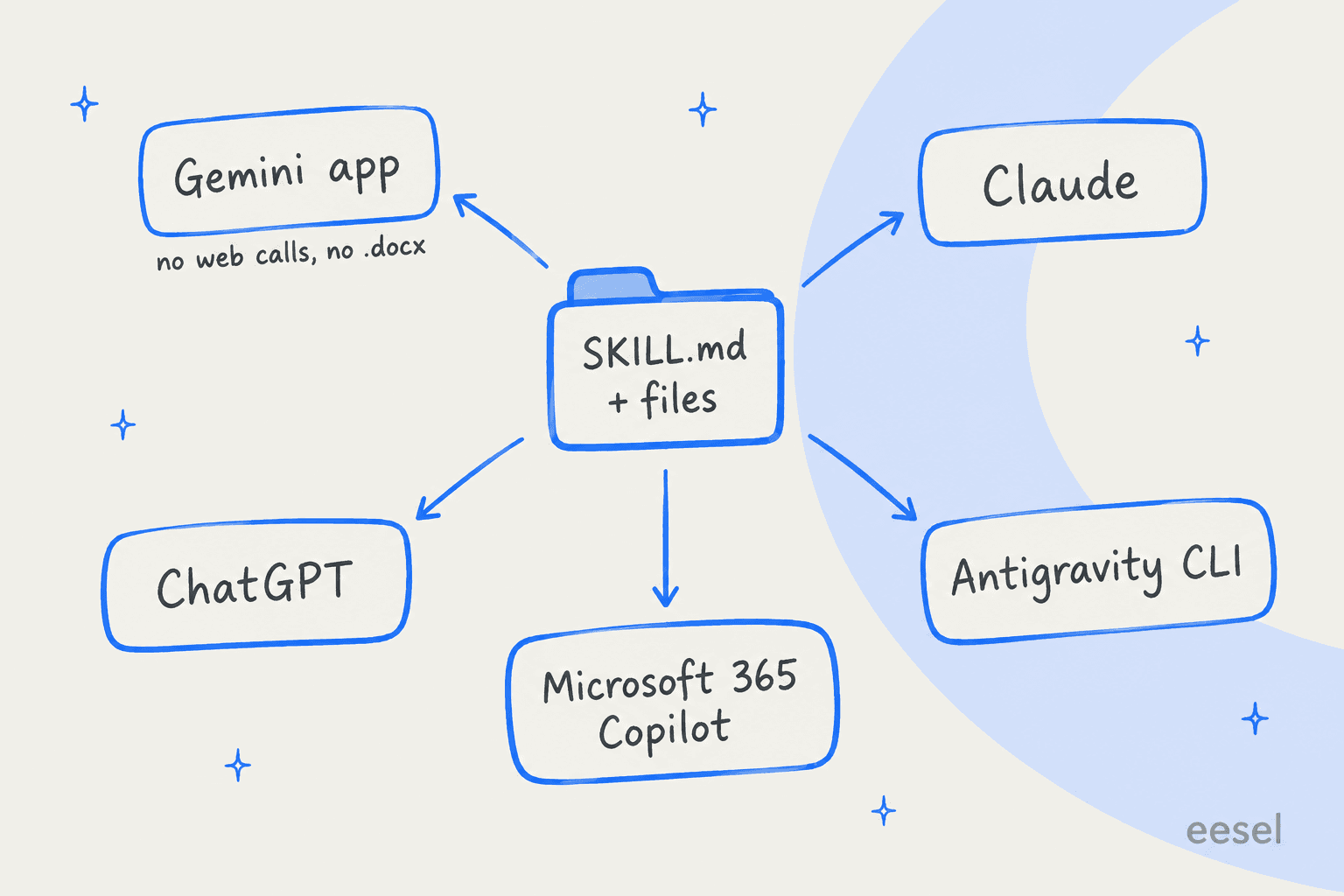
I work on the agent side of eesel, where skills are something I ship, not just something I read about. So the first thing I went to check was if Google's version is only a renamed prompt box, or the real format. It is the real format. Google's import instructions accept a SKILL.md file "made in other platforms" (transition FAQ), which is the open standard Anthropic started and now publishes at agentskills.io. That one detail changes quite a lot how much effort a skill is worth putting in.
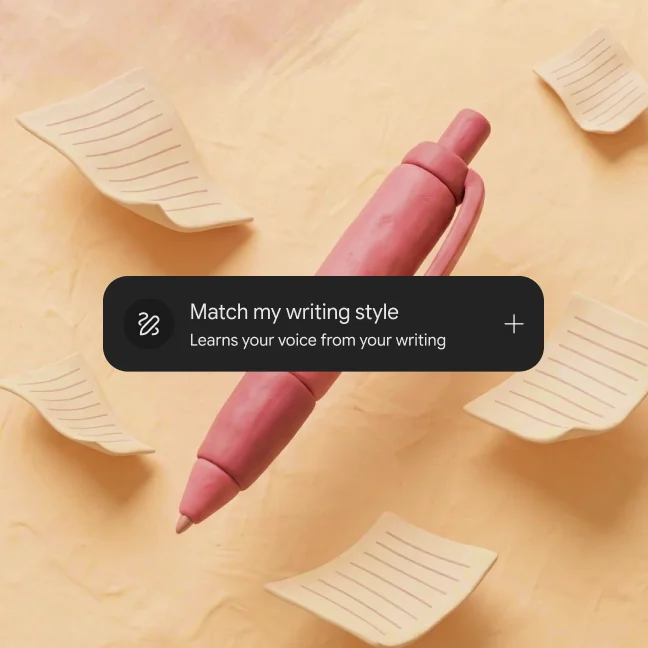
Two premade skills ship on day one: /prep-for-meetings, which builds a brief from your Calendar and other Workspace apps, and /match-my-writing-style, a lighter cousin of brand voice training, which "learns from your real writing across Workspace apps to create a custom voice card" (Gemini skills overview).
How do Gemini skills work under the hood?
This is the part that most coverage skips, which is a shame, because it's what decides whether your skill ever fires at all.
Gemini does not read every skill you own on each prompt, it is more selective than that. Google's skill-writing guide spells out a three-step load:
- Check relevance. Gemini looks at each skill's name and description only.
- Read and follow. If a skill matches, Gemini reads its full instructions.
- Open files if needed. Templates, style guides or spreadsheets attached to the skill only get opened when the current step needs them.
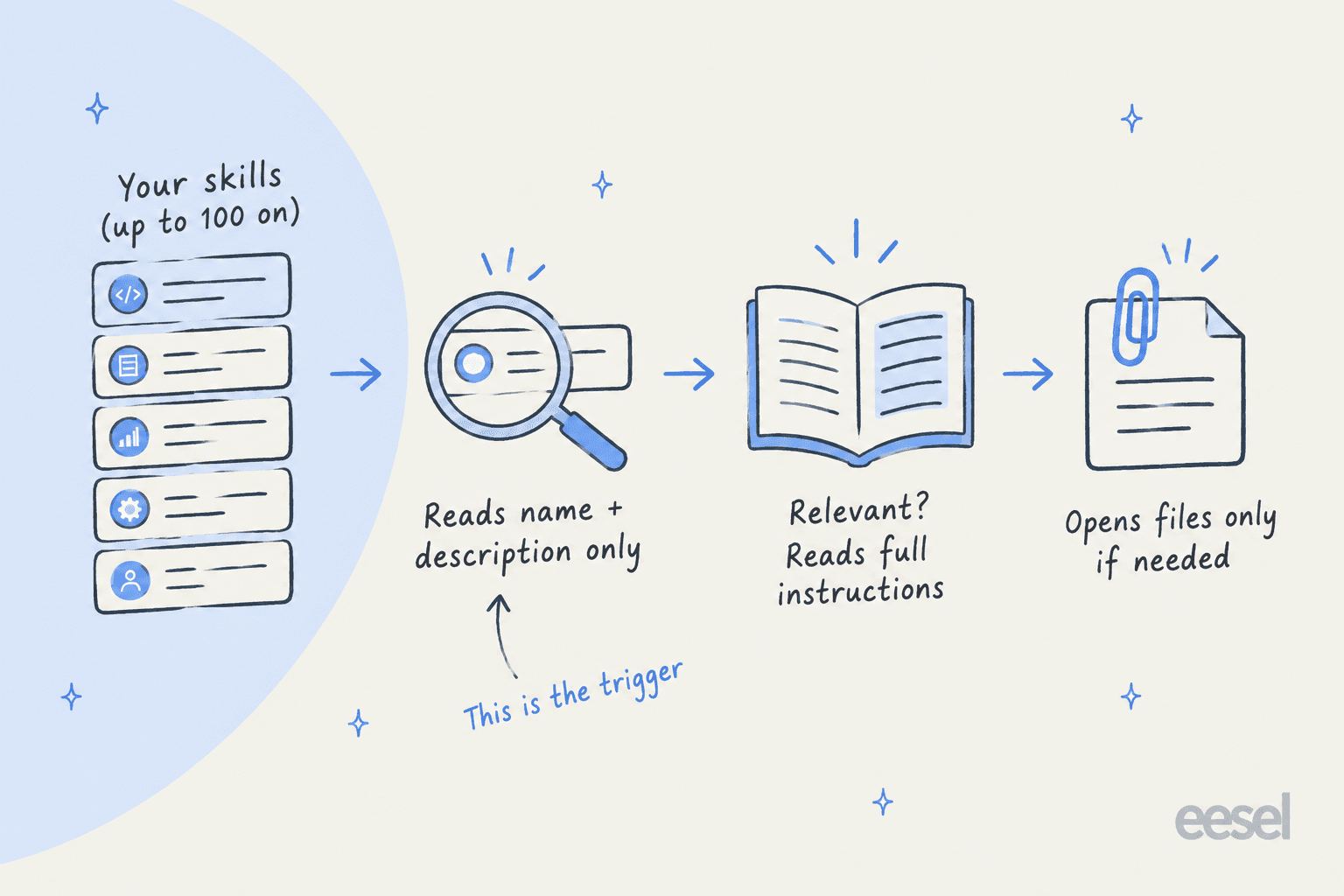
It is the same progressive loading that Claude uses, and there's one big consequence from it: the description is the trigger. You get 1,024 characters for it. Google advises writing it in the third person and starting the "when" part with "Use when…", then listing the concrete situations that should set it off. Its own example reads: Categorizes recipes, scales ingredient portions, and generates grocery lists from selected meals. Use when saving a new recipe, adjusting the serving size for a meal, or creating a shopping list from a meal plan.
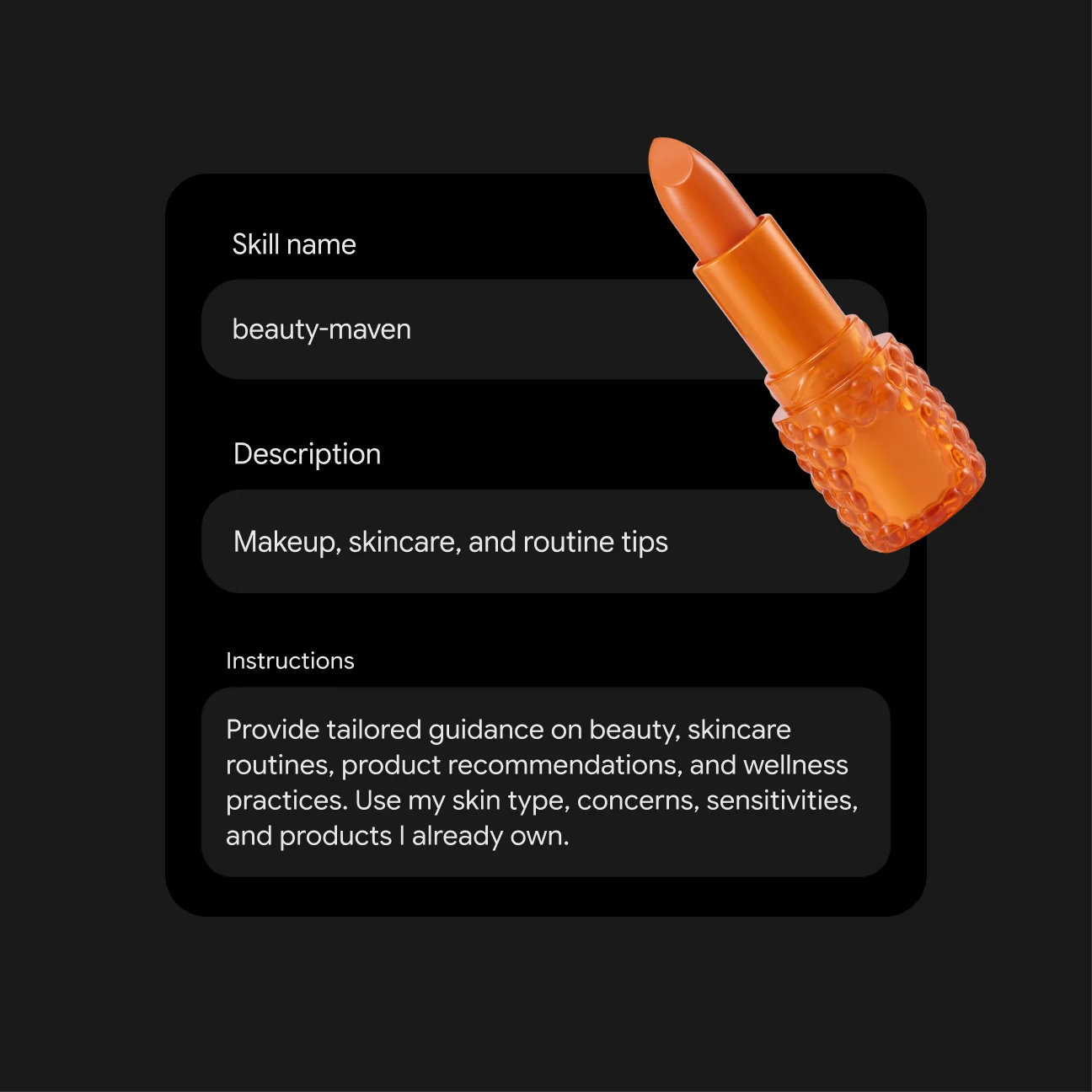
Names have their own rules too. Everything is lowercase with words joined by hyphens, and Google suggests you start with a verb, so plan-meal-from-recipe rather than recipe-data.
Most people will port their Gem's instructions over and leave a one-line description, which is backwards. A Gem was picked by hand, so its description never really mattered; a skill gets picked by Gemini, so if you've ever wondered why the subagent vs skill debate keeps circling back to descriptions, this is why.
Gemini skills vs Gems: what actually changes?
Gems were like separate chat rooms that you opened before starting, much like a custom GPT chatbot. Skills, on the other hand, are instructions you pull into whatever chat you are already in. One Reddit user explained it more clearly than any press release I have read:
"Say you have a "holiday planner" gem and a "budgeting" gem today, you'd have to run one and manually bring the output over to get the other gem to work on it. With skills you could simply run the "holiday planner" skill first, and when you are happy with the output, you simply call the "budgeting" skill in the same chat to have it work up the budget for the trip."

Here's the side-by-side, built from Google's Gems help page and the skills transition FAQ:
| Gems | Gemini skills | |
|---|---|---|
| How you start it | Open the Gem before the chat | Type / in any chat (Google says "soon to be @"), or Gemini applies it automatically |
| Use several at once | No, one Gem per chat | Yes, stack multiple skills |
| Minimum age | 13+ | 18+ |
| Account types | Personal and Workspace | Personal only, for now |
| Files | Knowledge files, including live-synced Google Drive files and NotebookLM notebooks | Uploaded files only (text, code, PDF, images); Drive and Gemini Notebook "in the coming weeks" |
| Sharing | Yes, since September 2025 | Not yet, "in the coming weeks" |
| Works with Canvas, Deep Research, Create video, Create music, Guided learning | Yes | Not yet |
| Chat history | Dedicated page per Gem | Chats sit in the normal side panel |
| Format | Google-only | SKILL.md, importable from other platforms |
The row that is going to bite people is the files one. A Gem with a Drive file uses the latest version of that file every time (Use Gems). A skill only carries files you uploaded with it, and "to update files in a skill, you need to upload the entire skill with its reference files again" (Create and manage skills). So if your Gem pointed at a living price sheet or a policy doc, that file quietly turns into a snapshot.
The upside is real as well, though. One user who migrated early said the output "is much better across the board", and pinned the old problem on Gems themselves:
"The main issue with Gems, which I am sure everyone has experienced, is that the underlying model treats the damn Gem as optional."
Who can use Gemini skills right now?
It's fewer people than the word "globally" in Google's release note suggests. The footnote on that same entry reads "currently available to 18+ and coming to more users soon" (release notes), and the help center lists three hard requirements (Create and manage skills):
- You're 18 or over. Gems only needed 13+.
- You're signed in with a personal Google Account. Work and school accounts are excluded for now.
- Keep Activity is on.
Skills work in the Gemini mobile app, the Gemini app on Mac, and gemini.google.com, whichever model you run, from Gemini 3.8 Flash up. The rollout is gradual, so even a personal account meeting every rule may not see them for a few days yet.
Pick your account type to see where you stand:
Do Gemini skills cost anything?
No. This is the wrong claim I saw repeated the most in the threads, so it's worth being blunt about it. One commenter wrote that "skills are paywalled while gems were available to everyone" (Reddit). That was close to true back in the beta, when skills lived inside Gemini Spark, the agent bundled with paid plans, but it isn't true anymore. Google's help center says plainly: "Skills are available without a Google AI subscription and can be used in your chats" (Create and manage skills).
What the paid plans change is how much you can use Gemini overall, per the subscriptions page:
| Plan | Price (USD) | Usage vs Free | Skills |
|---|---|---|---|
| Free | $0 | Baseline | Yes |
| Google AI Plus | $4.99/month | 2x | Yes |
| Google AI Pro | $19.99/month ($199.99/year) | 4x, 1 million token context | Yes |
| Google AI Ultra 5x | $99.99/month | 5x Pro | Yes |
| Google AI Ultra 20x | $199.99/month | 20x Pro | Yes |
Where a subscription does matter is Gemini Spark, along with tasks and schedules. If you downgrade below a plan that includes Spark, your schedules pause, but your skills keep working in normal chats. My Gemini pricing breakdown and Workspace pricing guide go deeper on the plan math.
How to create a Gemini skill
Google gives you four ways in, all from Settings > Skills on the web, or straight from a chat (Create and manage skills):
- Ask Gemini in a chat. Type something like
Create a skill based on these instructions:followed by what you want. Edit it by describing changes in the same chat. - Start from a premade template under "Recommended", then change the name, description and instructions.
- Use a blank template. Fill in name, description and instructions, then click Create.
- Upload a
SKILL.mdfile, or a folder or.zipwithSKILL.mdin its main folder plus reference files.
For anything simple I'd start with option 1, and for anything you care about I would go straight to option 4. Writing the SKILL.md yourself means the file is yours and you can version it, plus you can drop it into Claude or ChatGPT later with no retyping.
There are two current bugs worth knowing about before you start, and both come from Google's own known-issues box:
- Skills you create manually won't save in the Gemini mobile app. Create them in a chat or on the web instead.
- Skills with uploaded files can't be edited on mobile or Mac. Edit those on the web.
What a Gemini skill can't do yet
These are the limits I'd plan around, all from the help center and transition FAQ:
- 100 active skills. You can create unlimited skills, but only 100 can be on at once.
- 100 MB per upload, across all files in the skill.
- No
.docx,.docor.xlsx. Plain-text formats (.md,.csv,.json,.py,.html, and more), PDFs and images are fine. Convert Word and Excel files first. - Scripts can't touch the internet. "Scripts can't perform actions or requests on external websites."
- No GitHub files in migrated Gems.
- No Canvas, Deep Research, Create video, Create music or Guided learning inside a skill yet.
The script limit matters more than it seems at first. A Claude skill that calls an API to fetch live data will import fine and then quietly do nothing useful in Gemini, because the bundled script can't reach out. So read through a skill's scripts/ folder before you import it.
How to move a Gem to a skill before November
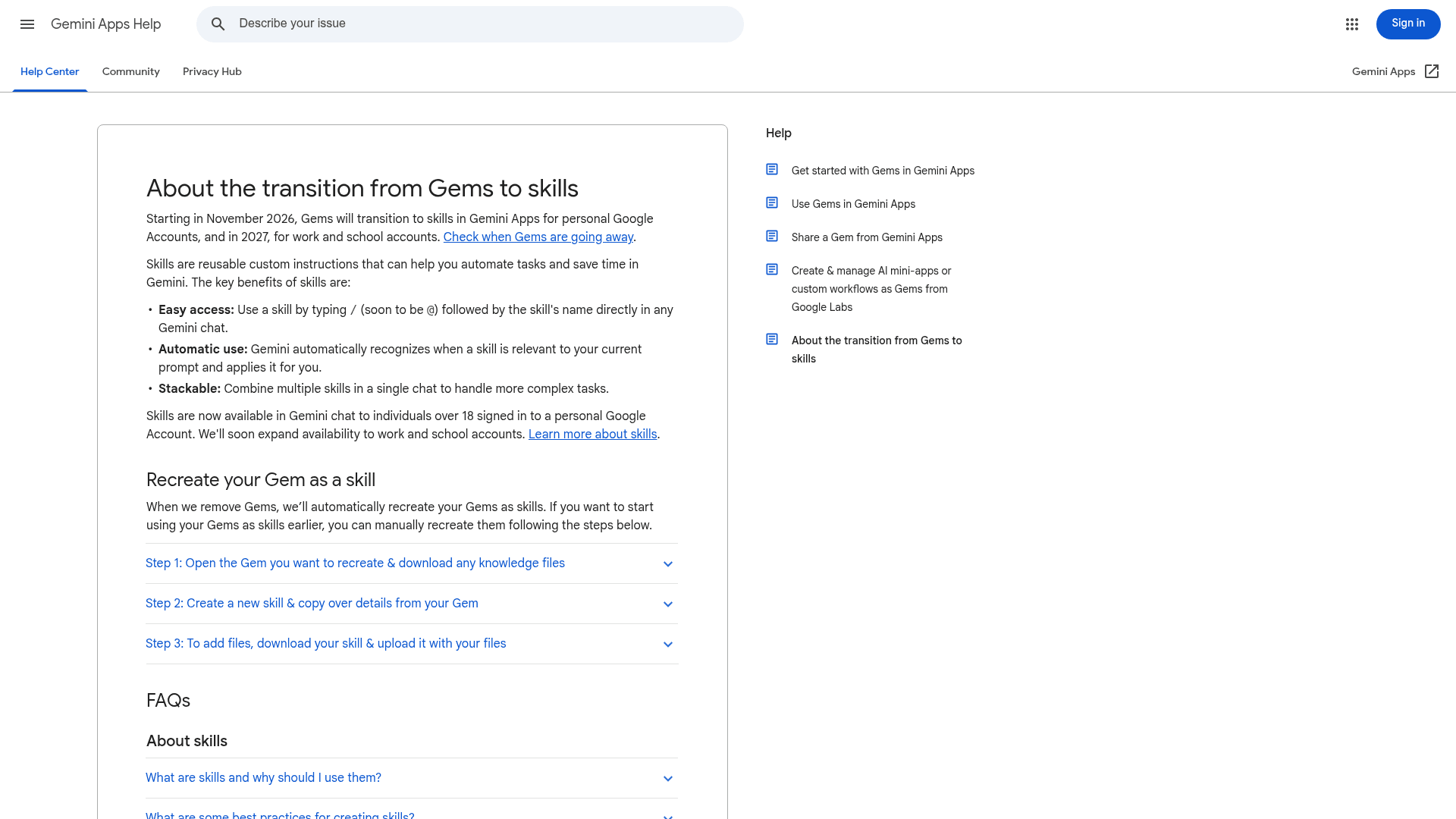
Technically you don't have to do anything. "When we remove Gems, we'll automatically recreate your Gems as skills," along with supported files (transition FAQ). But if you'd like to start now, or you want control over what the description says, this is Google's manual route:
- Download the Gem's files. On gemini.google.com, open the sidebar, go to Gems, click Edit next to the Gem, and download each knowledge file one at a time.
- Make a folder named like the skill, lowercase with hyphens (
weekly-status-report), and put the files in it. - Create the skill. In a new tab, go to Settings > Skills > Create manually, then paste the Gem's name, description and instructions. Click Create.
- Download the new skill. Hover over it, open Skill actions, choose Download. You get a
.zipwith aSKILL.mdinside. - Re-upload with files. Move
SKILL.mdinto your folder, then on the same skill choose Skill actions > Replace skill and upload the folder. The folder name has to match the skill name.
Step 3 is the one where I'd spend the extra five minutes. Rewrite the description as a "Use when…" trigger instead of pasting the Gem's old one-liner, since, like I covered above, that's what Gemini reads when it decides whether to use it.
The worry in the community is real, and mostly it comes from people who put months into a single setup:
"Oh that really sucks. I actually use an extensive gem for my job that I tweaked over the period of 6 months to get to the point where I feel it's perfect."
If that's you, export the instructions to a text file today. The automatic migration should carry them over, but having a copy you control costs you nothing.
The Gems retirement timeline
Google is retiring Gems in three waves, by account type (transition FAQ):
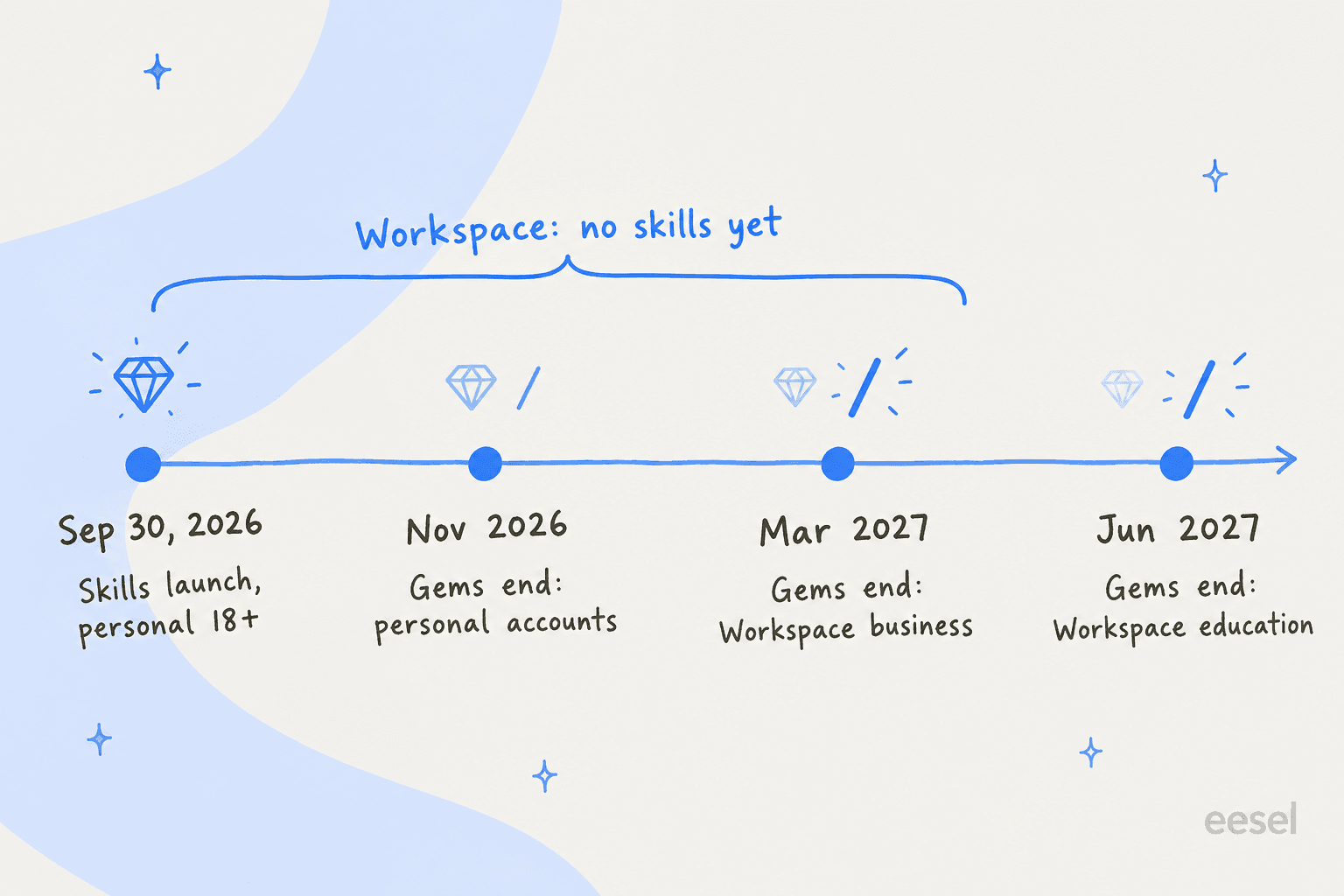
- November 2026: personal Google accounts. Opal, Google's mini-app experiment, and Gems by Google Labs also go away.
- March 2027: Workspace business, enterprise and nonprofit accounts.
- June 2027: Workspace education accounts.
Notice the gap here: Workspace teams can't use skills today, yet they're also the ones keeping Gems the longest. If your company runs on Google Workspace with Gemini, nothing breaks this year (and if you'd rather switch Gemini off for some users, that still works the same), and you have time to rewrite your shared Gems as SKILL.md files before the switch.
"Gemini skills" means four different things at Google
If you search for Gemini skills, you'll hit four products that share the word, and only one of them is the Gemini app feature above. So here's the map:
| Surface | What a skill is | Who gets it | How it runs |
|---|---|---|---|
| Gemini app skills | SKILL.md folder with instructions and files | Personal accounts, 18+, free | / or automatic |
| Skills in Chrome | A saved name plus a prompt | Personal accounts, 13+, Chrome in English (US) on Mac, Windows, ChromeOS | / or + in Gemini in Chrome, on the current page and any tabs you pick |
| Agent Skills in Gemini CLI and Antigravity CLI | SKILL.md folder with optional scripts/, references/, assets/ | Developers | The model calls activate_skill, you approve |
| Skill Registry in Gemini Enterprise Agent Platform | Private store of agent skills on Google Cloud | Google Cloud customers | Agents search and load from the registry |
Skills in Chrome is kind of the odd one out. It launched on April 14, 2026, and it's closer to a saved-prompt button than the SKILL.md format. You save a prompt and then run it on whatever page you happen to be reading. It also asks for confirmation before actions like sending an email (Chrome Help). If you liked Chrome's auto browse, this is its quick-command sibling.
On the developer side there's a wrinkle of its own. Gemini CLI stopped serving free, Google One, AI Pro and Ultra users on June 18, 2026, when they moved to Antigravity CLI, which "keeps the most critical features of Gemini CLI: Agent Skills, Hooks, Subagents, and Extensions" (Google Developers Blog). Gemini CLI still works on paid API keys and Gemini Code Assist Standard or Enterprise licenses.
The best proof that skills actually work comes from that same developer side. Google built a gemini-api-dev skill to teach coding agents its current SDK and tested it on 117 prompts. Without the skill, Gemini 3.1 Pro passed 28% of them. With it, the GitHub README reports 96% for 3.1 Pro and 87% for Gemini 3 Flash (Google Developers Blog).
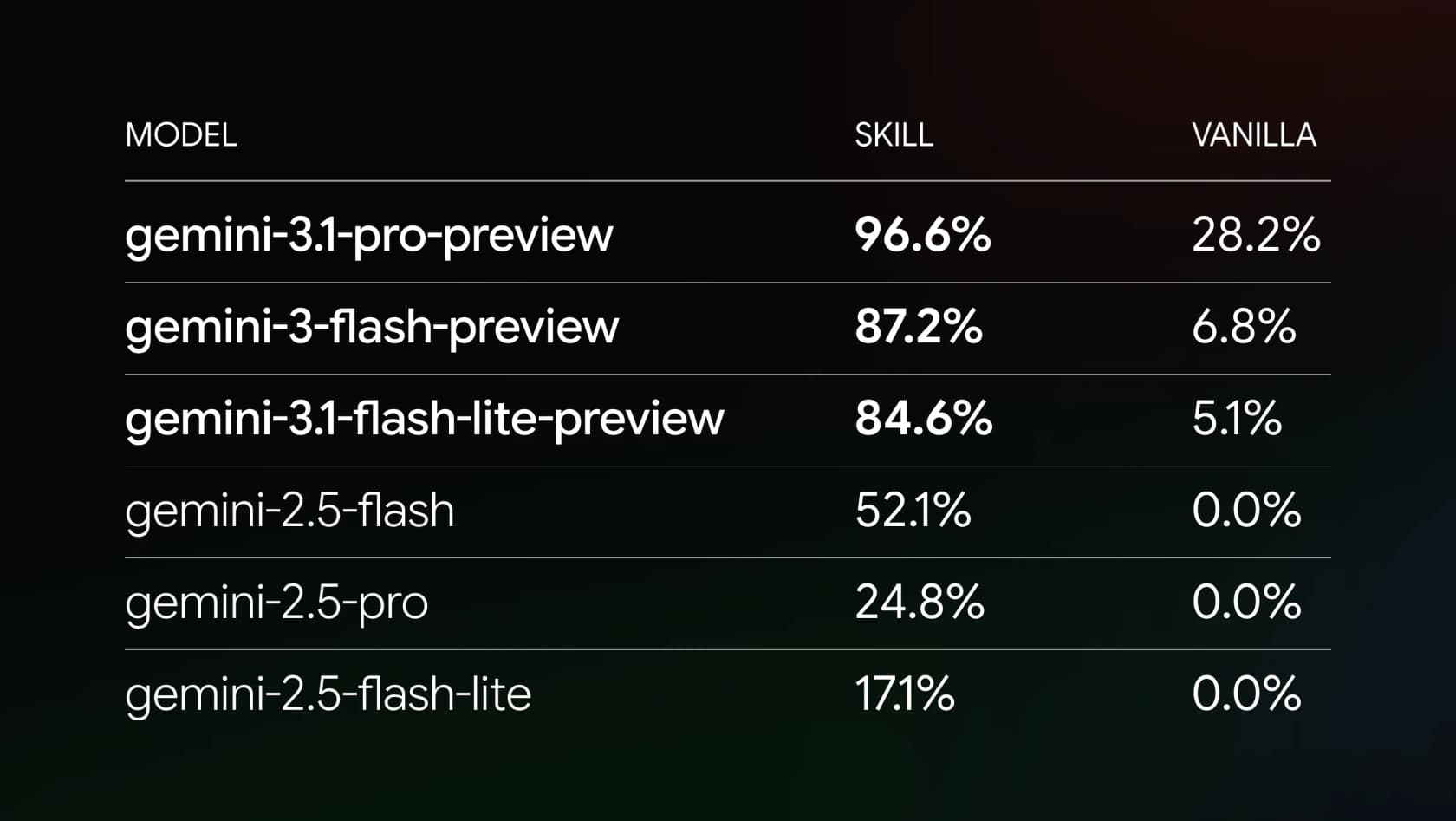
Keep in mind that's a coding benchmark, run on models older than Gemini 4 Argon, and not a chat one, so don't expect a 3x jump on your meal planner. Still, it's the cleanest number I've found for the idea behind all of this: a short, specific skill can beat a much bigger model working blind.
Gemini skills vs Claude skills vs ChatGPT skills
Every big assistant has been moving to the same idea. OpenAI is retiring custom GPTs, Atlassian ships Rovo agent skills, and now Google is retiring Gems. One Reddit user summed the mood up like this:
"i find it bizarre how every ai model chose to copy claude with skills, and not chatgpt with custom GPTs. it's just so weird to me."
The reason for it is portability, since a SKILL.md folder is one file format that several hosts can read:
Here's how the three consumer versions compare today, from each vendor's own help pages:
| Gemini skills | Claude skills | ChatGPT skills | |
|---|---|---|---|
| Plans | All, including Free | Free, Pro, Max, Team, Enterprise | Business, Enterprise, Healthcare, Edu |
| Runs bundled code | Yes, but no internet access | Yes, with code execution on (Claude Cowork plugins bundle them too) | Yes |
| How it's invoked | / or automatic | Automatic | Automatic, or @ mention / + (bundled in plugins) |
| Sharing | Not yet | Team and Enterprise admins can provision to everyone | People, groups, links, or workspace library |
| Replaces | Gems (Nov 2026 onward) | Nothing; Claude started the format | Custom GPTs (retire December 11, 2026) |
| Work accounts | Not yet | Yes | Yes, work plans only |
Two things jump out from this. Gemini is the only one of the three where a free personal account gets everything, while ChatGPT keeps skills for paid workspace plans (OpenAI's GPT retirement FAQ). And Gemini is the only one where work accounts are locked out. Those are opposite bets: Google is starting with consumers, while OpenAI starts with businesses.
If you're weighing the assistants overall, or looking at Gemini alternatives, my Gemini vs Claude and ChatGPT vs Gemini comparisons cover far more than skills.
For Microsoft's version, see Gemini vs Copilot; Copilot's skills docs describe "a directory with a required SKILL.md file", the same shape again.
What users are saying about Gemini skills
The threads split into two camps. The first camp likes that the slash finally fixes the clunky menu Gems had:
"It's worse now that they removed pinned gems, but the UI for them has always been terrible. You always needed to click the menu then scroll past the massive UI elements for their premade examples and then find them in a list. Not being able to @ them or something really killed it. I'll be happy with skills if they don't take 15 seconds of navigation to invoke."
The second camp doesn't trust Gemini to pick the right skill on its own:
"At that point, our only choices are praying it picks the right skill, spamming slash commands, or turning off auto-routing altogether."
Both camps are right, and the fix ends up the same for both: a sharp description, plus turning off automatic use on any skill you only want on demand. Google lets you switch a skill off so Gemini stops using it automatically, and if you then ask for it by name, Gemini asks whether to turn it back on (Create and manage skills). Another commenter's practical tip was to name a frequent skill "t" and type /t.
Over on Hacker News the reaction was a quieter one. Steaglsz asked "what will happened to our saved Gems or how to convert them before they get deleted" and noted Gems "seemed to hallucinate a lot less when a notebook was linked" (Hacker News). That second point is the Drive and Gemini Notebook gap once more, and it is the one I'd keep watching in the coming weeks.
Where Gemini skills stop
Here's the shift I'd want any reader to leave with, and it's the same one behind the rise of AI teammates. A Gemini skill makes Gemini better at a task while you're sitting in a chat. It doesn't do the task while you're not there. Every skill starts with you typing a prompt, and every result lands back in your chat, where you then copy it somewhere else.
For personal work that's exactly right, and it's also why Gemini remains one of the strongest personal AI chatbots. For a business job that runs all day, like answering support tickets or keeping a blog publishing, it's the wrong shape, and it's where an AI employee earns its keep. Nobody is typing /reply-to-refund 400 times a day.
That's the line I work on at eesel. eesel's skills, like Simulation, Support Analytics and Blog Writer, are attached to an AI teammate that already sits inside your helpdesk or content stack. It handles the core job from integrations and one set of instructions, and runs a skill when that job calls for a separate workflow with its own output. I've watched the opposite design fail. When you split a support agent's rules across five skills, the refund policy ends up in one and the escalation rules in another. Teams want one place to say how their tickets get handled, and skills on top for the separate jobs.
On eesel's sales calls, skills tend to land well. One B2B telematics evaluator called eesel's AI reporting and Skills feature "really promising." The bigger lesson from those calls, though, was pretty much the opposite of a slash command: buyers don't want to wait for a monthly report or a manual run, they want the AI working on live tickets as they arrive.
eesel for teams that want the skill to run itself
If you've built Gemini skills for your own prompts, eesel is the version that works without you in the chat. You hire a ready-made teammate, the AI helpdesk agent for your support queue or the AI blog writer for content, and it gets started on real work, with your help center and past tickets as its context.
It plugs into Zendesk, Freshdesk, Gorgias or Slack in minutes. Before it touches a live customer, the Simulation skill runs it against your past tickets and scores the answers, which is why I'd rank it among the best AI teammates for repeat work.
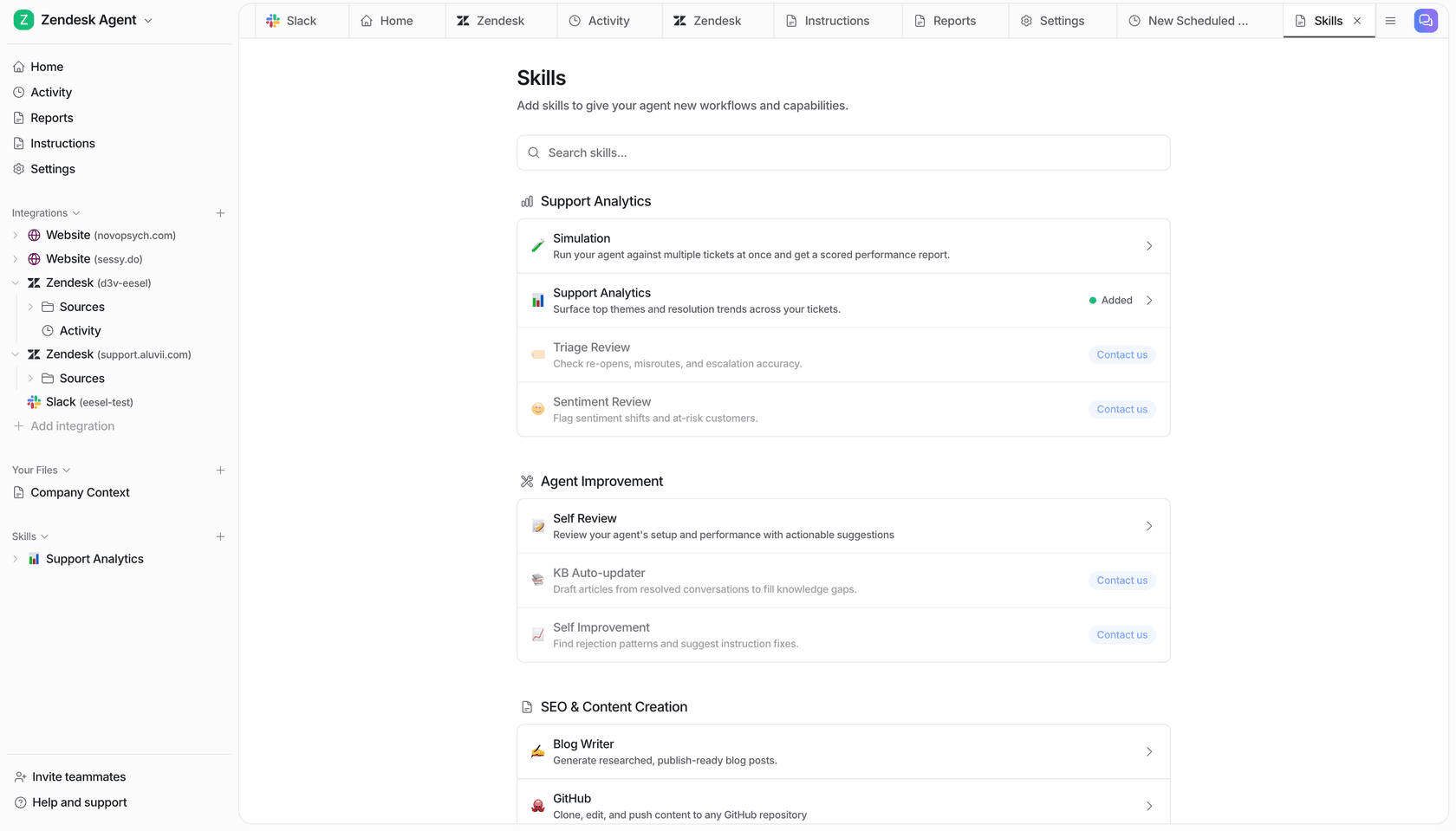
And if you like the terminal side of skills, the eesel CLI drives the same teammate from a shell. Commands like eesel instructions edit its standing rules, eesel approvals handles anything waiting on a human, and eesel activity shows what it did and why. Every command prints JSON and supports --dry-run, so Claude Code, Codex or a CI script can operate it too, and npx @eesel/cli mcp token hands any MCP client a ready connection.
You can start free with 100 credits and no card on the pricing page. Try eesel on your own queue and see what it does with last week's tickets.
Frequently Asked Questions
What are Gemini skills?
Are Gemini skills free?
When do Gemini Gems go away?
Can I use Gemini skills with a Google Workspace account?
How do I turn a Gem into a Gemini skill?
Can I import a Claude or ChatGPT skill into Gemini?
How many Gemini skills can I have?
Can Gemini skills answer my customers or run my support queue?


Article by
Kira
Kira is a writer at eesel AI with a Computer Science background and over a year of hands-on experience evaluating AI-powered customer service tools. She focuses on breaking down how helpdesk platforms and AI agents actually work so that support teams can make better buying decisions.