Why people look past Claude Dashboards
I build AI agents at eesel, and a lot of my week goes into making an agent's work inspectable: what it read, what it did, why. So the first thing I liked about Claude Dashboards was the same instinct. In Anthropic's words, "Claude writes a SQL query for each chart and runs it against your data source," and each chart shows that query plus when it last refreshed. It connects to Amazon Redshift, BigQuery, ClickHouse, Databricks and Snowflake, and it's in beta on Pro, Max, Team and Enterprise, but not Free.
The gaps show up once a dashboard has to outlive the conversation that made it:
- Metric definitions drift. Every chart gets its own SQL. Nothing stops two prompts from defining "revenue" two ways. One reply to Anthropic's launch post put it plainly:
"Can teams pin an approved metric definition across dashboards? Two valid SQL queries can still disagree on what “revenue” means."
- Sharing follows the viewer, not you. Anthropic's share artifacts guide says "Viewers use their own access," and if a viewer can't reach a data source, "that part of the artifact shows an error instead of your data." Connected artifacts also "can't use 'Anyone with the link'."
- No published refresh schedule or alerts. Each chart shows when it last refreshed, but there's no documented schedule, row limit or alerting.
- Admin hurdles on Enterprise. Dashboards are off by default for Enterprise until an owner enables them, and the artifacts admin guide notes artifact templates aren't covered under the HIPAA BAA.
None of this makes Claude Dashboards bad. Anthropic itself says "Dashboards work alongside your BI and analytics tools," and you can send a dashboard to Hex, Omni or Sigma from the Share menu. The question is which tool should own the dashboards that have to stay right.
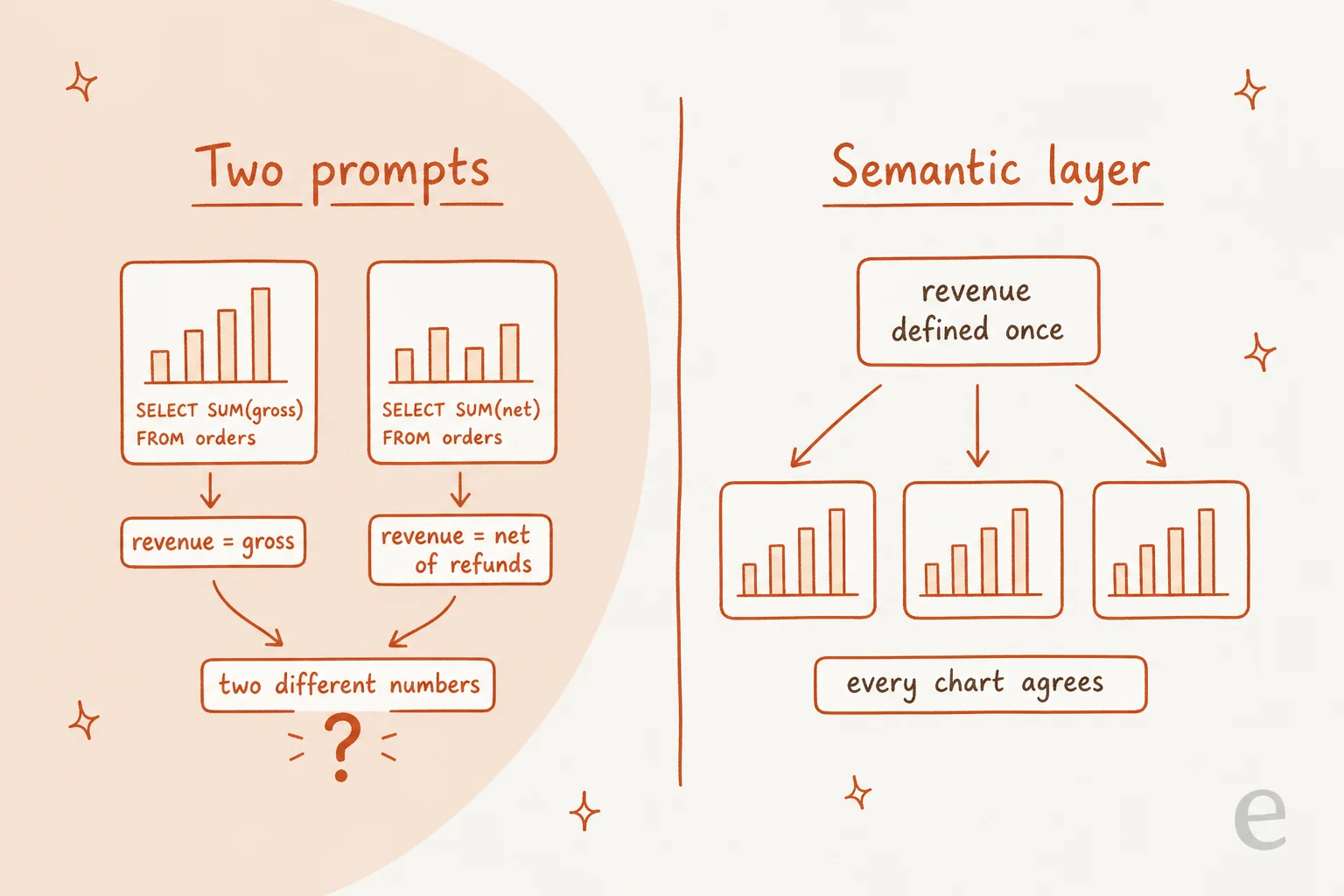
That picture is the whole argument for a semantic layer, a shared set of metric definitions the AI has to use instead of writing its own. A Senior Data Engineer made the same point under Omni's launch-partner post:
"The semantic layer point is the key one here because a dashboard generated from a question is only trustworthy if the metrics behind it are defined once."

How I picked these alternatives
I read each vendor's own pricing page, product docs and help center, then checked G2 and X for what users say. I kept tools that do the same core job, a plain-language question in, a chart or dashboard out, on live company data. Four questions decided the ranking:
- Does the AI show its query? If I can't read the SQL (or DAX), I can't trust the number.
- Are metrics defined once? A semantic layer is the direct fix for the drift problem above.
- Which warehouses does it reach? Some tools work anywhere; others only inside their own platform.
- How is the AI part billed? Seats, credits, tokens and capacity units all behave differently at scale.
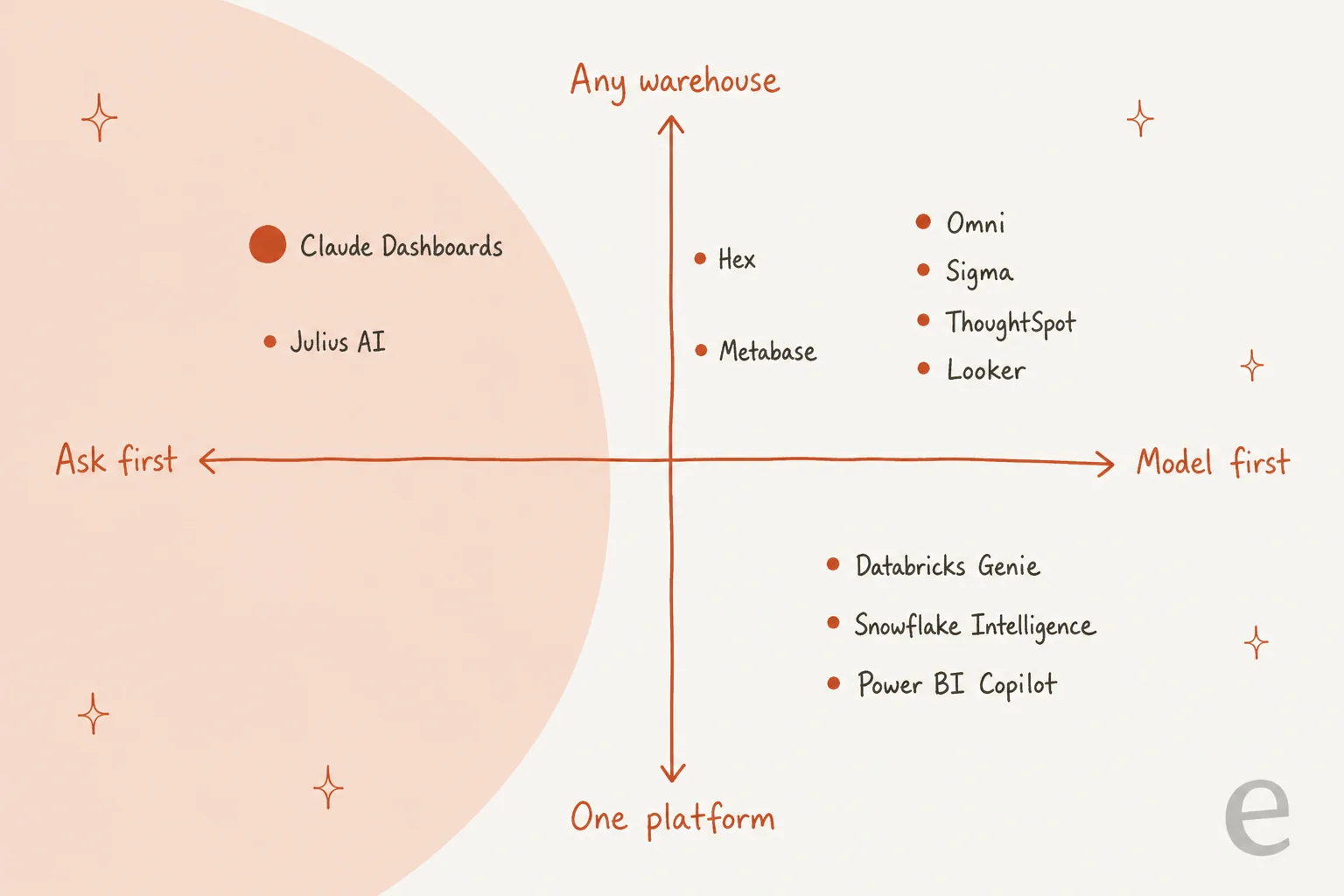
"Ask first" means you can start with a question and no setup. "Model first" means someone defines tables, joins and metrics before the AI gets good. Claude Dashboards sits firmly on the ask-first side, which is both its charm and its limit.
Claude Dashboards alternatives at a glance
| Tool | Best for | AI feature | Shows query | Metrics defined once | Warehouses | Starting price | Free option | Security | Claude link |
|---|---|---|---|---|---|---|---|---|---|
| Omni | Prompt-built dashboards with governance | Omni Agent, Dashboard Builder | Yes, every tile | Yes, semantic model | Snowflake, BigQuery, Databricks, Redshift, Postgres | Quote only | Free trial | ISO 27001, SOC 2 Type II, HIPAA, GDPR | Hand-off partner + connector |
| Hex | Analysts who also want self-serve | Threads, Notebook Agent | Yes, agent tool calls + SQL | Optional semantic models | BigQuery, Databricks, Postgres, Redshift, Snowflake + more | $36/editor/mo | Community plan | SOC 2 Type II, GDPR, HIPAA add-on | Hand-off partner + connector |
| Sigma | Spreadsheet-minded business teams | Sigma Assistant, Sigma Agents | Yes, View SQL | Yes, data models | 11 platforms incl. Snowflake, Databricks, BigQuery | Quote only | Free trial | SOC 2 Type II, HIPAA, GDPR | Hand-off partner + connector |
| Databricks Genie | Teams already on Databricks | Genie One, Genie Agents | Yes, read-only SQL | Yes, knowledge store + metric views | Databricks only | Free until Jan 31, 2027 | Yes | ISO 27001, SOC 2, HIPAA, GDPR, FedRAMP | Connector |
| Snowflake Intelligence | Teams already on Snowflake | Snowflake CoWork, Cortex Analyst | Yes, traceable queries | Yes, YAML semantic model | Snowflake only | Per-token AI credits | Trial | ISO 27001, SOC 2 Type 2, HIPAA | Connector |
| Looker + Gemini | Companies with a LookML model | Conversational Analytics | Looker composes it from LookML | Yes, LookML | BigQuery, AlloyDB, Redshift, Snowflake, Databricks | Quote only | Studio Pro 30-day trial | Not checked | MCP server (preview) + plugin |
| Power BI Copilot | Microsoft 365 shops | Copilot in Power BI | Yes, DAX query | Yes, semantic model | Power BI semantic models | $14/user + F2 capacity | No (Copilot not on Free) | Not checked | Custom MCP only |
| ThoughtSpot | Search-style self-serve at scale | Spotter, Spotter 3 | Search tokens, not plain SQL | Yes, semantic layer | Cloud-warehouse agnostic | $25/user/mo | Free trial | ISO 27001, SOC 1/2/3, GDPR | Connector |
| Metabase | Budget-conscious teams | Metabot | Yes, editable | Yes, Data Studio models | 20+ sources | Free (self-host) | Open Source | SOC 2 Type II, SOC 1, GDPR | Connector |
| Julius AI | Solo analysts and small teams | AI workspace, Custom Agents | Not confirmed | Semantic schema learning | Snowflake, BigQuery, Postgres, MySQL, SQL Server | $20/mo | Free plan | SOC 2 Type II | None |
"Not checked" means the vendor page I read didn't list certifications, not that they're missing. Microsoft and Google publish theirs in separate trust centers.
Which one fits your setup?
Click through the questions below. Each path ends on the tool I'd try first in that situation.
1. Omni
Best for: data teams who want Claude-style "describe it, get a dashboard" with metric definitions that can't drift.
Omni calls itself "the business intelligence platform that combines the consistency of a shared data model with the freedom of SQL." Its Dashboard Builder, launched June 11, 2026, is the closest thing on this list to Claude Dashboards: you tell the Omni Agent what you want, and it plans the queries, picks the charts and lays out the dashboard.
How it answers a question. The difference is where the queries go. Omni says "Queries route through your Topics, metric definitions, and joins that are already in the model," and "Permissions apply to every viewer the same way they would on a hand-built dashboard." You can start from a prompt, an existing chat, or even an uploaded image of a dashboard you want to copy, and "every tile, filter, and query is inspectable and editable." Omni is also a named Claude hand-off partner, and its founder noted that a Claude dashboard footer named "our Total Revenue measure, as defined in Omni's semantic layer."
Pros:
- Prompt-built dashboards that reuse your governed metrics, which is exactly the gap Claude leaves open
- Switch into point-and-click, SQL or a spreadsheet view at any point
- The broadest certification list here: ISO/IEC 27001:2022, SOC 2 Type II, HIPAA and GDPR, per Omni security
Cons:
- No public pricing; the pricing page returned an error when I checked
- AI is credit-metered with caps and optional overage, and credit prices aren't published
- You need a semantic model first, so day one is slower than Claude's
Pricing: quote only. Omni's AI usage docs say AI features "consume credits each time they process a request," pooled at account level, with admin controls for hard caps, cheaper models or overage billing.
My take: if your Claude dashboards keep getting "is that number right?" replies, Omni is the upgrade. Skip it if nobody on the team will own the semantic model, because that model is the whole point.
2. Hex
Best for: teams where analysts do deep work in notebooks and everyone else wants to ask questions without filing a ticket.
Hex is a data workspace where SQL, Python and no-code cells live in one notebook, and published projects become data apps. The AI layer has four names: Hex agent, Notebook Agent, Threads and Context Studio. Threads is the Claude Dashboards equivalent.
How it answers a question. Threads lets "users can ask natural language questions and get AI-powered insights based on semantic models and warehouse tables." It shows "the agent's thinking text and the tools the agent is calling," including "generating and executing SQL," and "Every Thread is backed by an unlisted project," so an editor can open the notebook underneath and check the logic. An Endorsed Mode restricts the agent to approved data only. Threads also works from Slack, a CLI, and an MCP server for Claude and Cursor (my explainer on MCP apps covers how those connect).
Pros:
- Analysts and business users work on the same object, so a question can graduate into a real analysis
- Threads is available on all plans, per Hex's docs
- One G2 reviewer: "What used to take me two or three days can now be done in about half a day," on Hex's G2 page (4.5/5 from 404 reviews)
Cons:
- AI is capped by monthly credits that "refresh monthly and don't roll over"
- Sharing wide is awkward; a G2 reviewer says with link sharing on "everyone in the workspace is then able to find the project"
- HIPAA is an Enterprise add-on
Pricing:
| Plan | Price | AI credits |
|---|---|---|
| Community | Free | 5 per editor/month |
| Professional | $36 per editor/month | 30 per editor/month |
| Team | $75 per editor/month (14-day trial) | 40 per editor, 10 per explorer |
| Enterprise | Custom | Premium credits |
Per the credits docs, a simple "How many customers do we have?" costs about 1 credit, a retention line chart about 2, and a full data app about 10. Auto top-up buys 50 credits for $25. Prices from Hex pricing.
My take: pick Hex when your bottleneck is analyst throughput as much as stakeholder questions. Skip it if nobody on the team writes SQL or Python, since the notebook is where Hex earns its price.
3. Sigma
Best for: business teams who think in spreadsheets and want AI answers that stay inside IT-approved models.
Sigma is cloud BI with a spreadsheet interface on live warehouse data. Its AI features are Sigma Assistant, Sigma Agents, AI Query and an MCP server. (If you remember "Ask Sigma," the current docs call the chat Sigma Assistant.)
How it answers a question. You can "click View SQL to review the exact query Assistant sent to your data platform." Answers are "grounded in your IT-approved semantic models," and "Sigma Assistant inherits your permissions." In a workbook, Assistant has plan and build modes to "build dashboards with charts, tables, KPIs, and filters," and you can edit the plan before it builds. It also checks whether an existing workbook already answers your question, which cuts down on duplicate dashboards.
Pros:
- Sigma Assistant messages cost 0 credits, per the billable events doc
- View SQL on every answer, plus an editable plan before a dashboard is built
- A named Claude hand-off partner with its own Claude connector
Cons:
- No public pricing; credits and plans go through an account executive
- Sigma agent messages start using credits on November 1, 2026
- Live querying can be slow; a G2 reviewer says uncached reports "can take a long time to load"
Pricing: quote only. The /pricing URL redirects to Contact us. Usage is billed in credits for events like input-table rows, exports and agent messages, and "All AI processing runs on your cloud data warehouse compute," so your warehouse bill grows too.
"Sigma’s AI assistant has become a complete game-changer for ad-hoc requests."

My take: Sigma is the one I'd hand to a finance or ops team that lives in spreadsheets. Skip it if you need a price on a webpage before talking to sales.
4. Databricks Genie
Best for: companies whose data already lives in Databricks and who don't want to buy another BI seat.
Databricks AI/BI pairs AI/BI Dashboards with Genie. The Genie docs now split it into Genie One (chat for business users), Genie Agents (formerly Genie spaces, where data teams configure trusted data and rules) and Genie Code.
How it answers a question. Genie converts questions "to an equivalent SQL query" and "responds with the generated query and results table," and "Generated queries are always read-only." It draws on an author-curated knowledge store of descriptions, synonyms, joins and SQL expressions, plus "Trusted assets," parameterized queries "whose exact logic has been verified." Dashboards add AI-assisted authoring. There are Genie apps on iOS and Android.
Pros:
- No seat-based or user-based fees, and Genie One and Genie Agents are free until January 31, 2027
- Unity Catalog permissions carry over automatically
- Biggest compliance list here, including FedRAMP and HITRUST, per Databricks compliance
Cons:
- Databricks only; data must be registered to Unity Catalog
- Genie needs SQL Pro or Serverless compute, billed separately
- One G2 reviewer on the wider platform: "Too many products to address similar problems at times creates confusion"
Pricing:
| Product | Now | From February 1, 2027 |
|---|---|---|
| Genie One | Free | 150 DBUs free per user/month, then $0.070/DBU |
| Genie Agents | Free | 150 DBUs free per user/month, then $0.070/DBU |
| Genie Code | 25% off | 150 DBUs free per user/month, then $0.070/DBU |
| SQL Serverless compute | $0.70/DBU | Billed separately |
Databricks says 150 DBUs equals $10.50 in US East, per the Genie pricing page. For the full compute picture, see my Databricks pricing breakdown.
My take: if you're on Databricks, try Genie before anything else on this list, since it costs nothing extra until 2027. Skip it if half your data sits outside Databricks. My Databricks review covers the platform itself, and Databricks alternatives covers the exits.
5. Snowflake Intelligence (now Snowflake CoWork)
Best for: Snowflake customers who want a chat-first analyst that respects row-level security.
Heads up on the name: the product page now reads "Snowflake Intelligence is now Snowflake CoWork," pitched as "the personal agent for every knowledge worker." Underneath, Cortex Analyst does the text-to-SQL.
How it answers a question. Cortex Analyst "uses a semantic model to bridge the gap between business users and databases," written as a YAML file. CoWork "provides traceability to source data and queries," and data teams can add Verified Answers. Charts can be saved as Artifacts, and Automations re-run a question on a schedule and email the result, which covers the refresh gap Claude leaves. It "Automatically inherits and respects all existing Snowflake data governance controls, including row-access policies and column-level security."
Pros:
- Scheduled Automations deliver results by email
- Governance comes along with no extra setup
- iOS app with chat, agents and voice input
Cons:
- Snowflake only
- A chat-and-artifact model; I found no drag-and-drop dashboard builder in the docs, and "Geographic map charts are not supported"
- A G2 reviewer flagged cost: "cortex analyst was pretty expensive so cost sometimes is a downside"
Pricing: consumption-based, no seat price. From Snowflake's credit consumption table:
| Item | Price |
|---|---|
| Platform credit, Standard (AWS US East) | $2.00 |
| Platform credit, Enterprise | $3.00 |
| AI credit, on demand | $2.00 |
| Claude Sonnet 5 inside CoWork | 1.30 / 6.50 AI credits per million input/output tokens |
| Cortex Analyst API | 67 platform credits per 1,000 messages |
Warehouse compute for the SQL it runs is billed on top. My Snowflake pricing guide walks through that part.
My take: for Snowflake shops, this is the lowest-friction way to give people an analyst they can chat with. Skip it if you need a polished, shareable dashboard rather than a chat thread with saved charts. If you're reconsidering the warehouse itself, see Snowflake alternatives.
6. Looker with Gemini
Best for: companies that already maintain a LookML model and want natural-language questions on top of it.
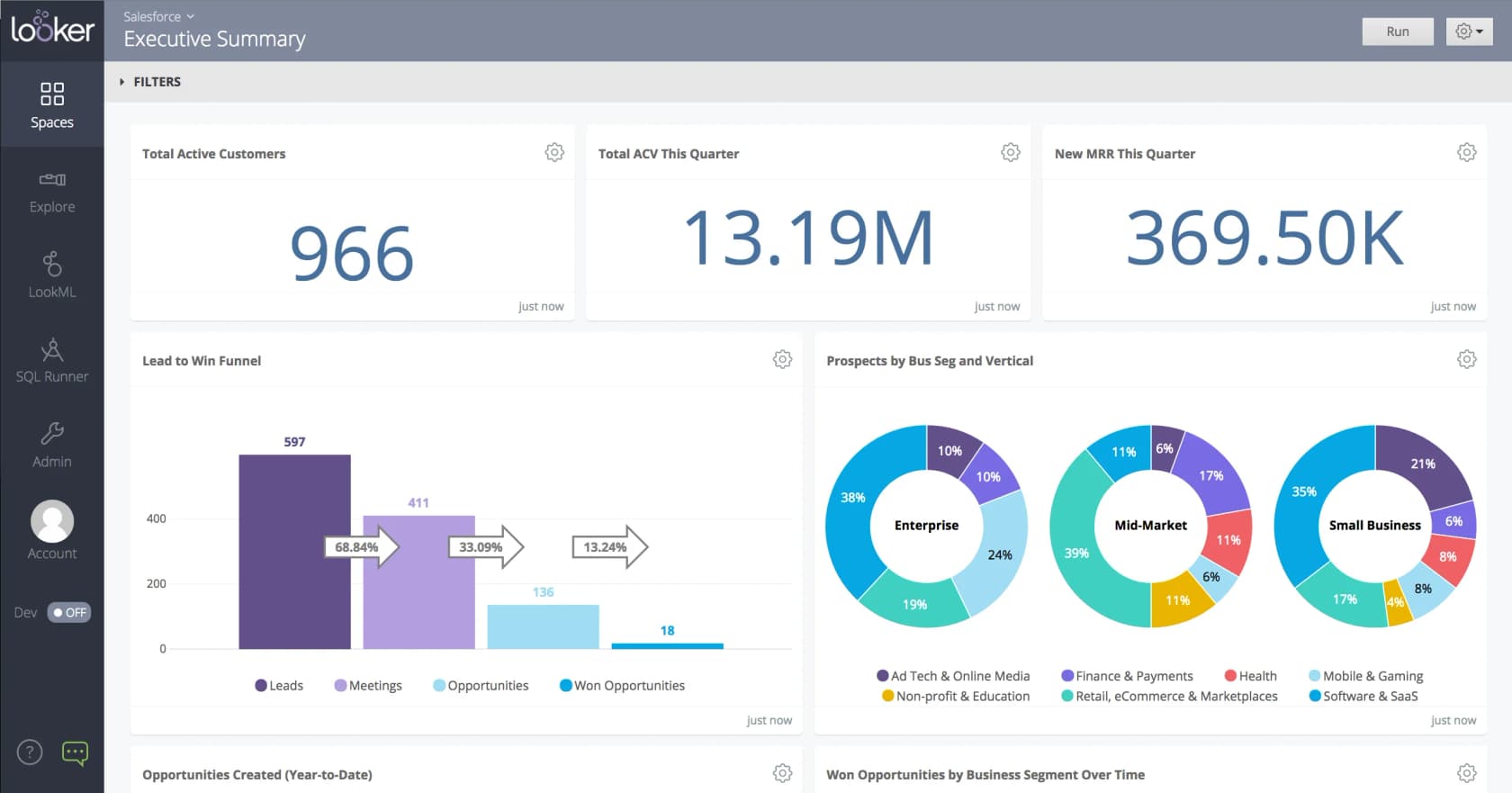
Looker is Google Cloud's governed BI platform, built on the LookML semantic layer. Conversational Analytics is "a chat-with-your-data feature that is powered by Gemini for Google Cloud."
How it answers a question. Looker takes the opposite approach to Claude. "Instead of querying your database directly, Conversational Analytics determines which fields, filters, sorts, and limits should be used in the query. Looker then composes and executes the query by using the underlying LookML model." The model never writes the full SQL, so it can't invent a join. Data agents can span up to five Explores with glossaries and verified queries. Looker is also on Anthropic's "coming soon" hand-off list.
Pros:
- The model picks fields; LookML writes the SQL, so definitions can't drift
- Multi-cloud through LookML: BigQuery, AlloyDB, Redshift, Snowflake and Databricks
- A managed Looker MCP server (preview) and a Looker plugin in Claude's marketplace
Cons:
- Nothing works until a developer builds the LookML model
- Every edition is "Call sales"
- A G2 reviewer: "There is very little to no AI functionality out of the box, which feels like a miss"
Pricing: sales-led, annual. Each edition includes 10 Standard and 2 Developer users. Conversational Analytics has a shared token pool per instance, per Looker pricing:
| Edition | Included input tokens/month | Included output tokens/month |
|---|---|---|
| Standard | 60M | 1.2M |
| Enterprise | 300M | 6M |
| Embed | 1.2B | 24M |
Overage is $3 per million input and $20 per million output tokens, but Google currently offers "promotional access without quota limits or overage fees," with at least 90 days' notice before billing starts.
My take: if you already pay for Looker, turn on Conversational Analytics before buying anything else. If you don't, building LookML just to get AI answers is a long road.
7. Power BI Copilot
Best for: Microsoft 365 companies that already run Power BI on Fabric or Premium capacity.
Copilot in Power BI covers "on-the-fly analysis for business users to data analysis expression (DAX) generation for advanced creators." A standalone Power BI agent is in preview.
How it answers a question. Copilot "can answer questions by using existing measures and columns in your semantic model." It can "Provide the underlying DAX query and data table used to generate a response," and you can switch between a visual, a table or the DAX query. Note it's DAX, not SQL. Microsoft is blunt about prep: "Without preparation, Copilot can misinterpret the data and return generic or inaccurate results."
Pros:
- Works in Power BI Mobile and Power BI Embedded
- Shows the DAX behind each answer
- G2 rates Power BI 4.5/5 from 1,661 reviews, per G2
Cons:
- Copilot needs "Paid Fabric capacity (F2 or higher) or Power BI Premium (P1 or higher). Trial capacities and free SKUs aren't supported"
- Every Copilot call draws down Fabric capacity, so cost scales with use
- No Claude directory connector; Microsoft's hosted MCP servers (preview) need your own Entra app registration
Pricing:
| Plan | Price | Copilot? |
|---|---|---|
| Free | $0 | No |
| Power BI Pro | $14/user/month | Only on F2+ or P1+ capacity |
| Premium Per User | $24/user/month | Only on F2+ or P1+ capacity |
| Fabric capacity | Separate Azure pricing | Yes, F2 and up |
Per Power BI pricing. Viewers need no per-user license at F64 and above. If you're exporting helpdesk data into Power BI today, my guides on Zendesk to Power BI and the Freshdesk Power BI integration cover the plumbing.
My take: if you're already on Fabric capacity, Copilot is the natural move and your people already know the interface. If you're on Pro licenses only, the capacity requirement is the real price of entry.
8. ThoughtSpot
Best for: larger organizations that want search-style self-serve analytics with an AI analyst coached by the data team.
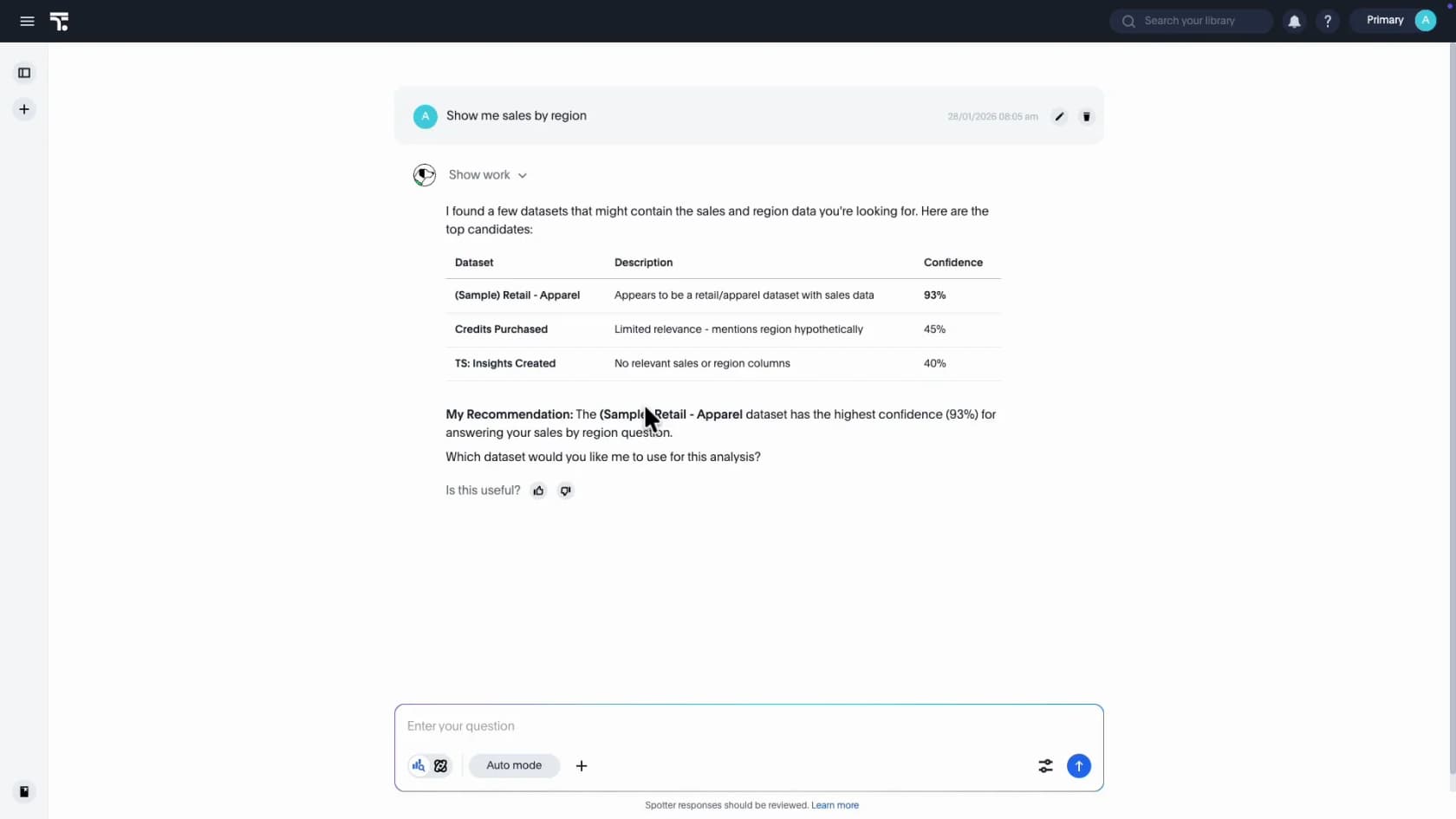
ThoughtSpot built its name on search-based analytics, and Spotter is "your personal AI analyst, delivering business-ready insights with enterprise-grade trust." Spotter 3 "can plan, reason, iterate, and execute complex analysis like a human analyst."
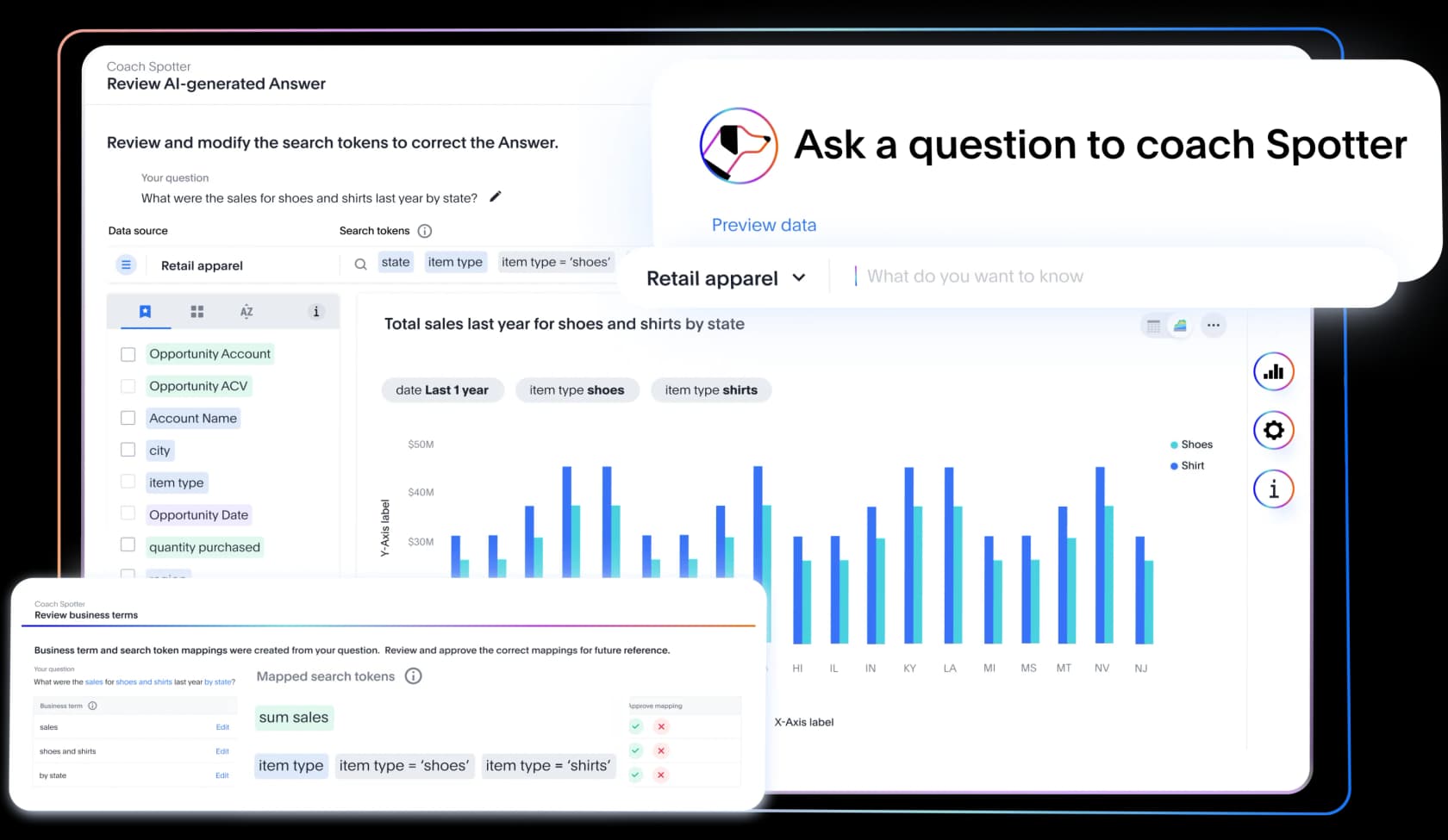
How it answers a question. Spotter works through ThoughtSpot's relational search model rather than raw SQL, translating your question into search tokens on a modeled dataset. It learns from corrections: "if you edit the information that Spotter provides after it interprets a question inappropriately, Spotter learns from your edit." The Spotter FAQ is refreshingly honest that "Most of Spotter's success is based on how well your data model is set up," and recommends coaching it on "20 to 50 questions" first.
Pros:
- A coaching loop that lets the data team correct the AI's interpretation, then reuse it
- Usage plans include "Unlimited LLM tokens"
- A Claude connector, "Spotter by ThoughtSpot," that can create dashboards
Cons:
- Pro seats cap Spotter at 25 queries per user per month
- No plain-SQL view that I could find
- A G2 reviewer: "The pricing/ROI is also a bit steep for smaller teams"
Pricing:
| Plan | User pricing | Usage pricing |
|---|---|---|
| Essentials | From $25/user/month, annual, 5 to 50 users | n/a |
| Pro | From $50/user/month, Spotter 25 queries/user/month | From $0.10/credit, unlimited LLM tokens |
| Enterprise | Custom | Custom |
| Embedded Developer | Free for 1 year, up to 10 users | n/a |
From ThoughtSpot pricing. G2 rates it 4.4/5 from 343 reviews.
My take: ThoughtSpot makes sense when you'll roll analytics out to hundreds of people and can afford a few weeks of coaching. Skip it for a 10-person team that wants answers this afternoon.
9. Metabase
Best for: startups and lean data teams who want AI on their warehouse without a five-figure BI contract.
Metabase is open-source BI with 49.6k GitHub stars that also runs as a managed cloud. Metabot "helps you analyze your data by creating charts from natural language, generating SQL queries, fixing query errors, and analyzing existing visualizations."
How it answers a question. "Every AI-generated answer links to the underlying query. See exactly which models and metrics were used, open it in the notebook editor or SQL, and edit if needed. No black boxes." Metabot uses the definitions and verified models in Data Studio, follows existing permissions, and "doesn't ingest, store, or sync your data." You choose the model: Claude, GPT, Bedrock or Mistral.
Pros:
- Open Source is free with unlimited users and AI included
- Bring your own model and pay the provider directly, "with no markup"
- Claude connector that can create questions and dashboards
Cons:
- Row and column permissions and AI auditing need Pro
- The docs themselves say "you'll always need to double-check results"
- A G2 reviewer wrote that "Metabase's native AI and intelligent analytics features currently feel more limited than those offered by some newer analytics platforms"
Pricing:
| Plan | Price | Users |
|---|---|---|
| Open Source | Free | Unlimited, self-hosted |
| Starter (cloud) | $100/month ($90 yearly) | 5 included, then $6/user |
| Pro | $575/month ($517.50 yearly) | 10 included, then $12/user |
| Enterprise | From $20,000/year | Custom |
Managed AI on Metabase Cloud is $3.75 per million tokens, first million each month included, per Metabase pricing.
"Metabase offers excellent value, especially when compared with more expensive BI tools."
My take: Metabase is what I'd set up for a seed-stage company tomorrow. Skip it if you need enterprise governance on day one without paying for Pro.
10. Julius AI
Best for: solo analysts and small teams who want a chat-first AI workspace that can also connect to a warehouse.
Julius has grown into an "AI workspace" that analyzes data and also makes presentations, reports, websites, images and video. Dashboards are one output among many.
How it answers a question. For warehouse questions, "Julius builds a semantic layer of your schema to avoid having to tackle thousands of tables at a time." You can upload a data dictionary, train Custom Agents on your schemas, or add dbt connection details. I couldn't confirm from Julius's own pages whether it shows SQL per chart, so check that in a trial.
Pros:
- Cheapest paid entry here at $20/month
- Native Snowflake, BigQuery, MySQL, PostgreSQL and SQL Server connectors
- SOC 2 Type II and TX-RAMP, per Julius security
Cons:
- The pricing page conflicts on which plan unlocks warehouse connectors (feature cards say Business, the comparison table says Plus)
- No Claude connector or MCP server
- Only 4 reviews on G2, so there's little independent signal yet
Pricing:
| Plan | Monthly | Yearly (per month) | Credits |
|---|---|---|---|
| Free | $0 | $0 | Daily credits |
| Plus | $20 | $16 | 2,000/month |
| Pro | $45 | $37 | 5,000/month |
| Max | $200 | $166 | 25,000/month |
| Business | $450 | $375 | 60,000/month, up to 50 seats |
| Enterprise | Contact | Contact | Unlimited |
From Julius pricing. My Julius AI pricing post goes deeper on credits, and Julius AI alternatives covers its own competitors.
My take: Julius suits one person who wants charts, a deck and a report from the same chat. Skip it if you need governed, shared dashboards for a team.
How the AI part is actually billed
The sticker prices above hide the bigger difference: what happens to your bill when people start asking a lot of questions.
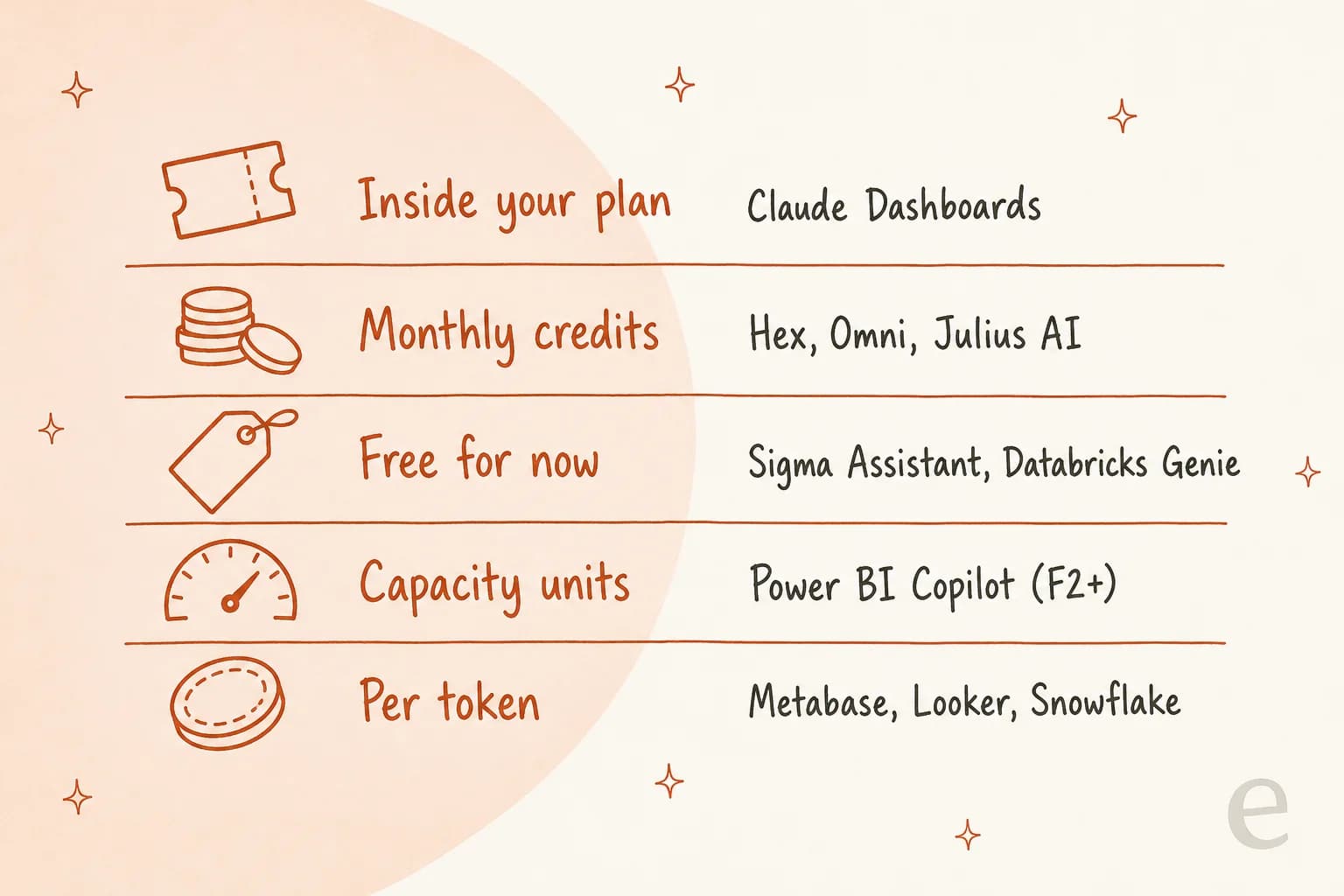
Claude Dashboards counts toward your normal Claude plan usage limits, so the marginal cost of one more question is zero until you hit the limit. (Team Standard is $20 per seat annual, per Claude pricing; my Claude pricing guide has every tier.) Credit tools like Hex and Omni cap you monthly. "Free for now" tools, Sigma Assistant and Genie, are the best deal today, with dates attached: November 1, 2026 for Sigma agent messages and February 1, 2027 for Genie.
Every tool on this list, Claude included, also runs its queries on your warehouse, so compute shows up on a second bill. If that's BigQuery, see BigQuery pricing; BigQuery vs Snowflake compares the two most common setups.
What people are saying about Claude Dashboards vs BI tools
The loudest reaction to the launch came from the Power BI community:
"Claude Dashboards. It was inevitable."
The sharper replies were about the same two gaps this post keeps coming back to, editing and permissions:
"Love that the query is exposed on every chart. Two things I'm curious about: can I edit the query and have the dashboard respect my change on refresh, and how does it handle row-level permissions when a teammate opens a shared dashboard?"
And the BI-tool side had its own view of what changes:
"eh i think the onus on the analyst now to really do analysis. but yeah for sure. changing times."
My read: Claude Dashboards is the new front door for one-off questions, much like Claude Docs became the default first draft for documents, and the tools above are where the answers go once they need to stay right every Monday morning.
Which Claude Dashboards alternative should you pick?
Keep Claude Dashboards for quick questions if you already pay for Pro, Max, Team or Enterprise. Then pick one place for the dashboards that matter:
- Want prompt-built dashboards with governed metrics: Omni
- Analysts and stakeholders in one tool: Hex
- Spreadsheet-minded business teams: Sigma
- All-in on Databricks or Snowflake: Genie or Snowflake Intelligence, both with no seat fees
- Tight budget: Metabase Open Source
If you're still weighing other Claude artifact tools, my Claude Cowork alternatives roundup follows the same format. So does the one on Claude Slides alternatives.
Try eesel when the numbers you need live in the support queue
Every tool above assumes your data has already reached a warehouse. Support data usually hasn't: it lives in Zendesk, Freshdesk or Gorgias, and getting it into BigQuery or Snowflake is a project of its own. The helpdesks' own reporting, like Gorgias analytics, only tells you what already happened. The same goes for the built-in Freshdesk analytics. A version of this came up on eesel sales calls, where a CX lead running about 7,000 tickets a month on Gorgias and Shopify pushed back on retrospective reporting because their customers couldn't wait for a monthly report to fix things.
That's the job the eesel AI helpdesk teammate does instead of a dashboard. It plugs into Zendesk, Freshdesk or Gorgias, learns from your past tickets and help center, drafts or sends replies, and reports on every task it ran, what triggered it and which actions a human approved.

Every eesel rollout starts with a simulation against your historical tickets, so you see the resolution numbers before a customer does. Here's how one Zendesk team described its first month:
"In the first month, eesel is resolving 73% of our tier 1 requests. eesel offers easy Zendesk implementation and setup."
Kim Simpson, Gridwise
For the metrics side, my guide to support ticket analysis shows what to track, and this AI support dashboard template shows how to lay it out. The customer service KPIs list is a good starting set.
If you'd rather keep Claude in the loop, Claude for Zendesk covers that route, and so does my guide to MCP for customer support.
Try eesel free, or check eesel pricing first.
Frequently Asked Questions
What is the best Claude Dashboards alternative?
For most data teams it's Omni, because it builds a dashboard from a prompt like Claude does but routes every query through metric definitions your team already wrote. If you live in one warehouse, Databricks Genie or Snowflake Intelligence is the cheaper path. My Claude Dashboards review covers when Claude itself is enough.
Is there a free alternative to Claude Dashboards?
Yes. Metabase Open Source is free with Metabot included, Hex has a free Community plan, and Databricks Genie is free to use until January 31, 2027 (you still pay for warehouse compute). Claude Dashboards itself isn't on Claude's Free plan, as the Claude pricing breakdown shows.
Why look for Claude Dashboards alternatives if it's included in my Claude plan?
Three reasons come up most: Claude writes fresh SQL per chart instead of reusing governed metric definitions, connected dashboards can't be shared with "Anyone with the link", and there's no published refresh schedule. Those matter for recurring reporting more than for quick questions. For support metrics specifically, see AI customer service metrics.
Which Claude Dashboards alternative works with Snowflake?
Omni, Hex, Sigma, ThoughtSpot, Looker, Metabase and Julius AI all connect to Snowflake, and Snowflake Intelligence (now Snowflake CoWork) runs inside it. If cost is the deciding factor, check Snowflake pricing first, since every tool here runs its queries on your warehouse compute.
Can I send a Claude dashboard to another BI tool?
Yes. Anthropic lists Amplitude, Grafana, Hex, Mixpanel, Omni, Perplexity, PostHog and Sigma as hand-off destinations, with Looker, monday.com and Tableau coming soon. That makes Claude a fast first draft and one of the Claude Dashboards alternatives the place the dashboard lives long term. The Claude Motion launch shipped alongside it.
How much do Claude Dashboards alternatives cost?
The range is wide: Metabase Starter is $100 a month for 5 users, Hex Professional is $36 per editor, ThoughtSpot starts at $25 per user, Power BI Pro is $14 per user but Copilot needs F2 capacity or higher, and Omni, Sigma and Looker are quote-only. Warehouse compute is billed on top in every case; see Databricks pricing for one example.
Which alternative is best for customer support dashboards?
If your ticket data is already in a warehouse, any tool here works. If it still lives in your helpdesk, a BI tool is a long detour: the eesel AI helpdesk teammate reports on the tickets it handles inside Zendesk or Freshdesk, and Zendesk's analytics dashboard covers the rest.
Do Claude Dashboards alternatives show the SQL behind each chart?
Most do. Sigma has a View SQL button, Databricks Genie returns the generated query (always read-only), Metabase links every AI answer to its query, and Power BI Copilot shows the DAX query instead of SQL. Looker composes the SQL from LookML rather than letting the model write it. More on that in my AI for data analytics roundup.


Article by
Kira
Kira is a writer at eesel AI with a Computer Science background and over a year of hands-on experience evaluating AI-powered customer service tools. She focuses on breaking down how helpdesk platforms and AI agents actually work so that support teams can make better buying decisions.