


Here is the thing almost nobody says out loud: there is no Anthropic product called "Claude Docs." When people search for it, what they actually want is Claude's file creation feature, which turns a chat prompt into a real, downloadable Word document, Excel spreadsheet, PowerPoint deck, or PDF.
It works by giving Claude a private, sandboxed computer where it writes and runs code to build the file, then hands it to you. It is now on every plan, including Free, though it eats more of your usage limit than a normal chat.
Two things to keep straight before you lean on it. First, this is a generate-and-download tool, not a live collaborative editor like Google Docs, and it does not do versioning or remixing. Second, Anthropic itself flags a prompt-injection risk worth reading before you point it at sensitive data. If what you really want is finished, on-brand content rather than a raw file to wrangle, a purpose-built writer like eesel AI is a different, and often better, fit.
So what is "Claude Docs", really?
I spend a lot of time watching what people type into search, and "Claude Docs" is one of those phrases that exists in searchers' heads before it exists as a product. People assume Anthropic shipped a Google-Docs-style app. It didn't. What it shipped, on September 9, 2025, is a capability Anthropic markets as "file creation" and labels inside the app as "Upgraded file creation and analysis."
The distinction matters because it sets your expectations correctly. You are not opening a blank canvas and typing. You are describing what you want in the chat, and Claude produces a finished file. Anthropic's own framing is that this moves Claude "from an advisor into an active collaborator. You bring the context and strategy; Claude handles the technical implementation behind the scenes," per the launch announcement.
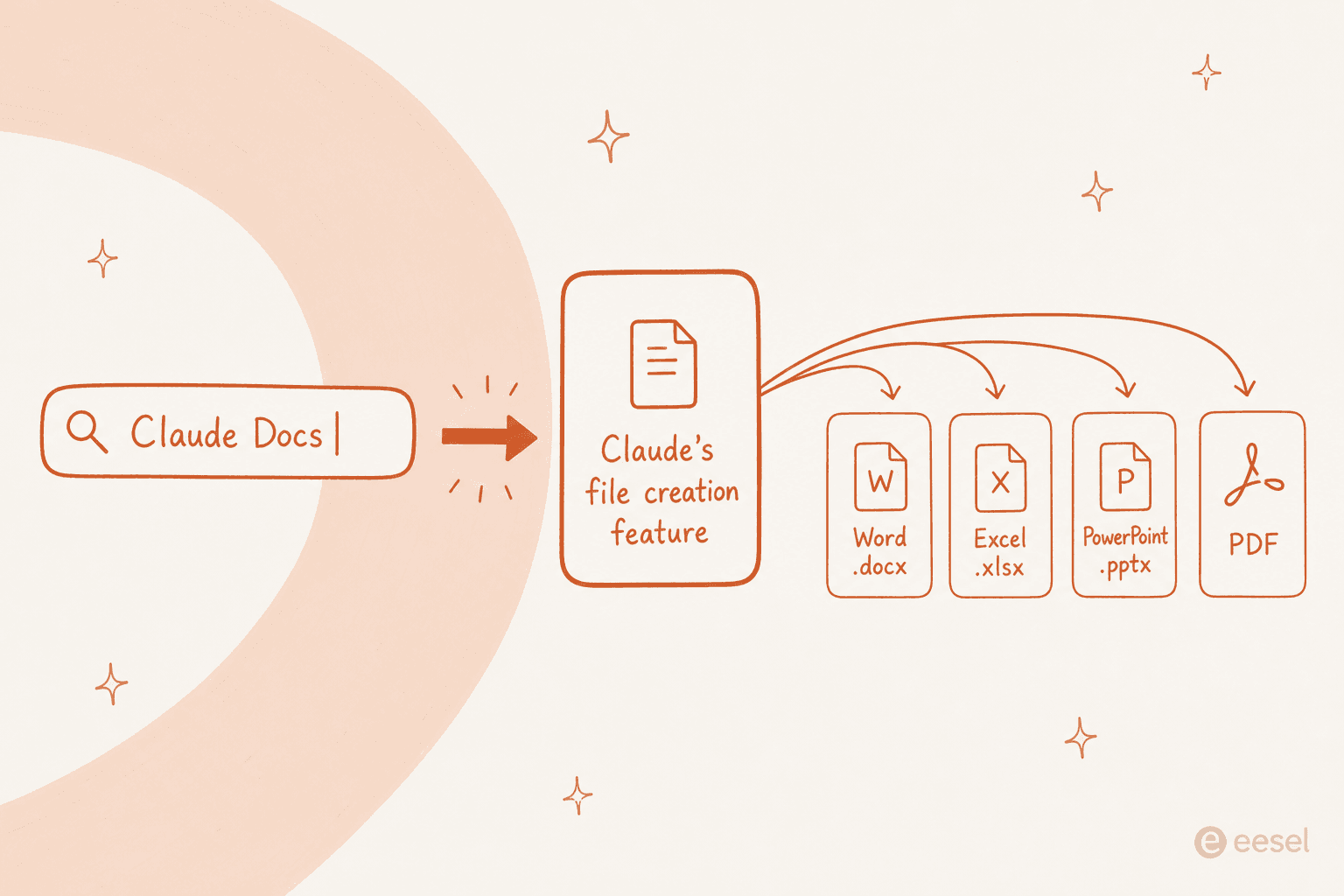
So for the rest of this post I will use "Claude Docs" the way you probably searched it, as shorthand for that file creation feature. Just know that if you go hunting for a product page by that name, you will not find one.
What Claude can actually make
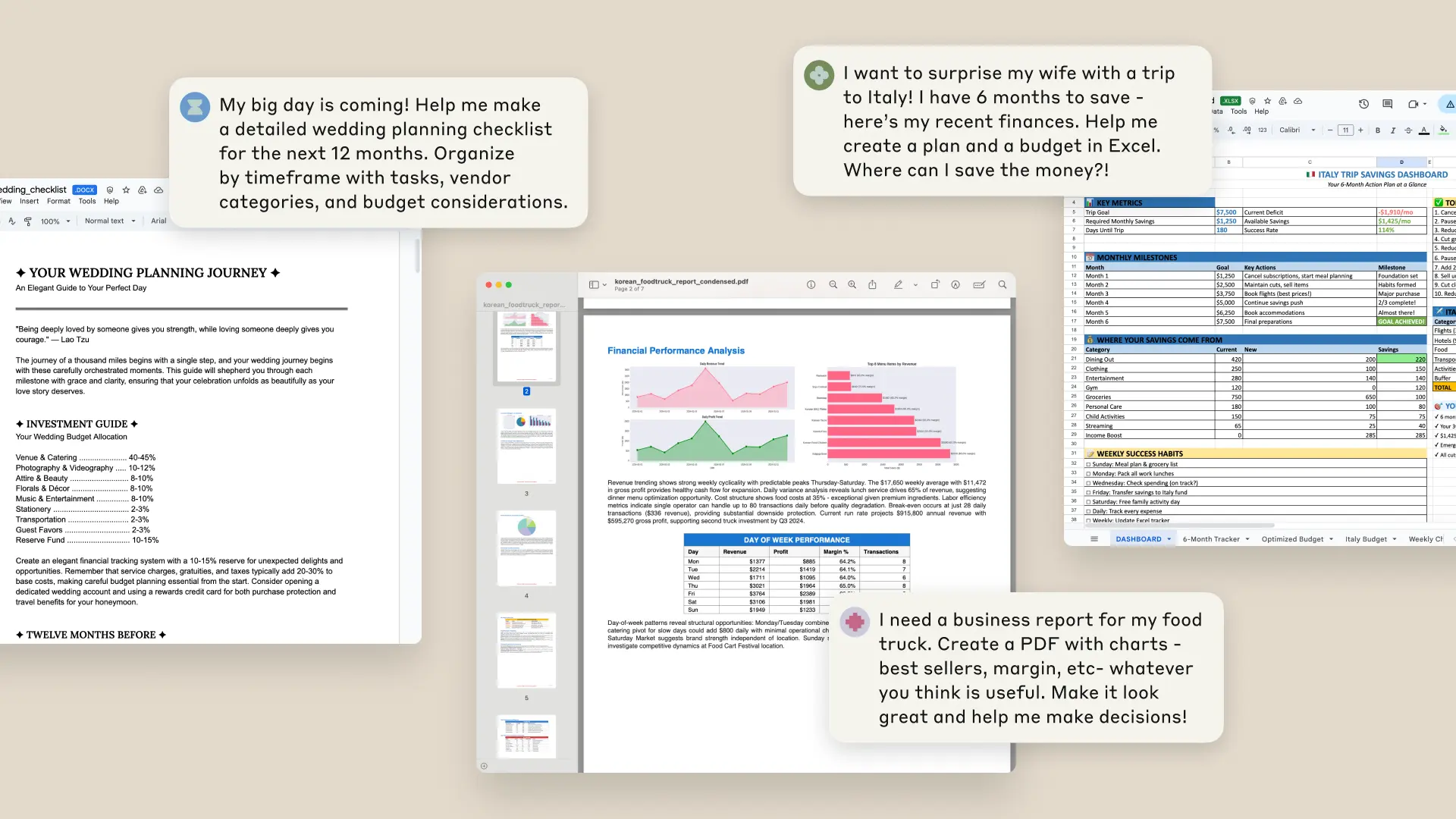
This is the part that surprised me. It is not limited to text documents. Claude can build Excel spreadsheets (.xlsx), PowerPoint presentations (.pptx), Word documents (.docx), and PDF files, all as real files you download, not screenshots or previews.
It goes further than static documents too. The same environment runs Python scripts, produces data visualizations as PNG images, processes uploaded CSV and TSV files, and can even build machine learning models. Anthropic's pitch for it is blunt: "File creation turns projects that normally require programming expertise, statistical knowledge, and hours of effort into minutes of conversation," per the announcement.
The classic Artifacts still exist alongside this, so HTML and React apps, markdown docs, mermaid diagrams, and SVGs all keep working. The difference now is that Claude renders them through the same code-running environment, so the whole experience feels a little more like handing a task to a colleague with a laptop than talking to a chatbot.
How Claude Docs works under the hood
Here is the mechanism, because it explains both the magic and the caveats. Anthropic gave Claude a private computer environment where it can write code and run programs. When you ask for a spreadsheet, Claude does not "imagine" an Excel file; it writes actual Python or Javascript code that generates a genuine .xlsx, runs it in the sandbox, and returns the output.
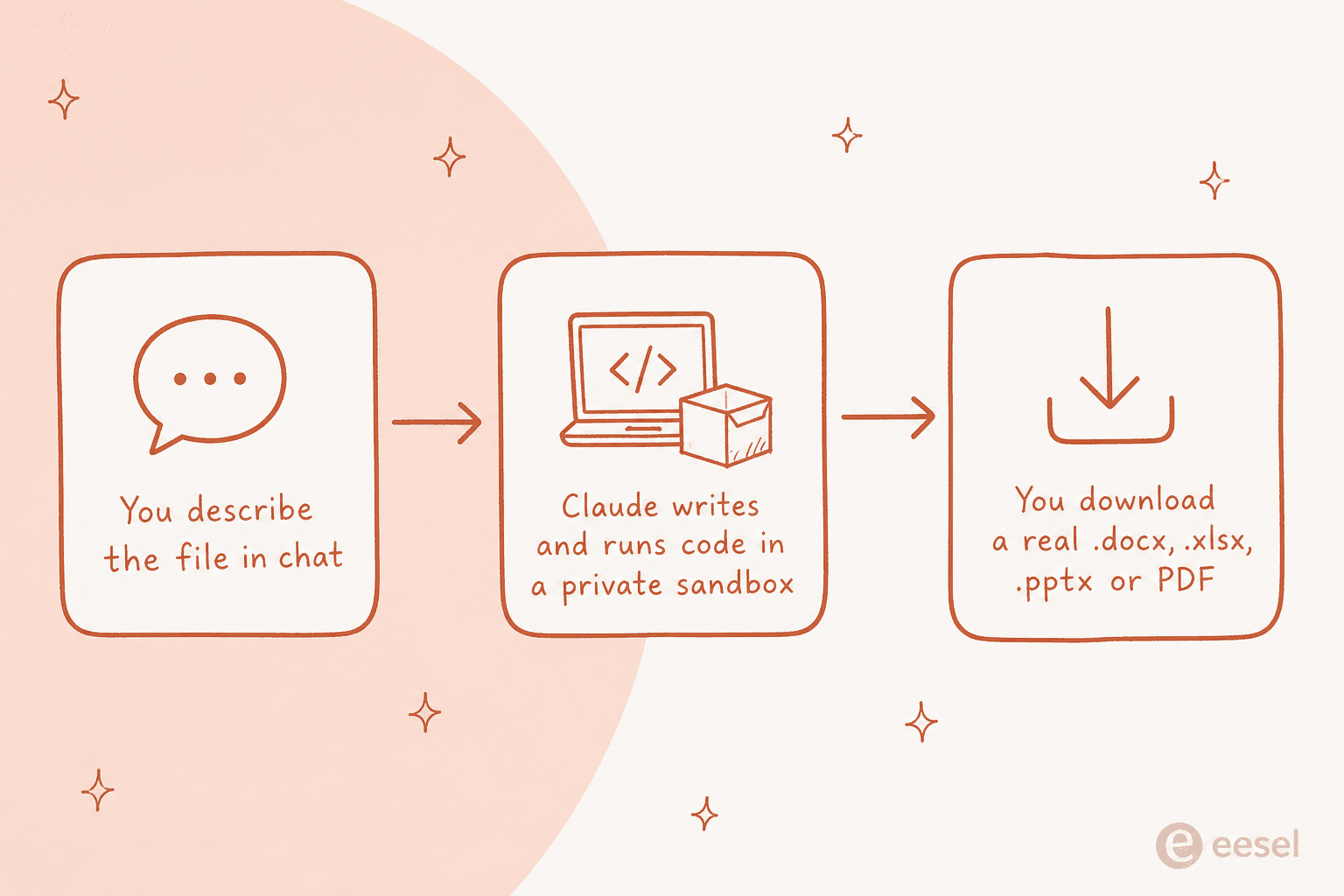
The flow is simple from your side. You describe what you need, Claude builds it, and you download it straight from the conversation or save it to Google Drive. It can juggle multiple files in a single chat, and your project files are now reachable from that computing environment while staying in context. Anthropic also expanded the context window so longer, multi-step file jobs do not fall over halfway.
The mental model I would keep is: this is Claude with a laptop, not Claude with a word processor. That framing predicts almost every quirk below.
How to turn it on
By default the feature is on for Free, Pro, and Max users, but it is worth checking. You will find it under Settings > Capabilities as "Upgraded file creation and analysis."
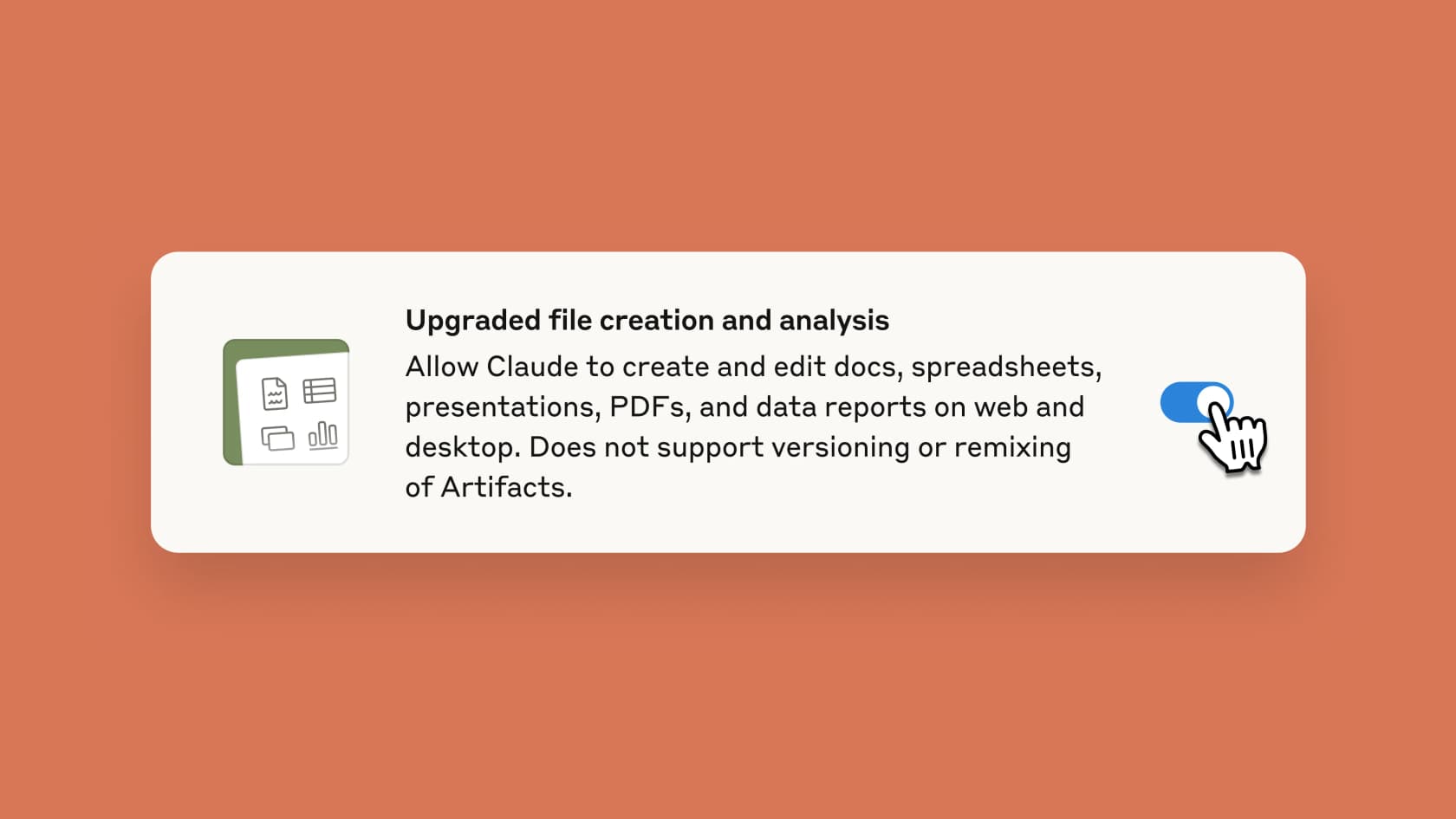
Notice the small print in that toggle: it "does not support versioning or remixing of Artifacts." That is a real limitation dressed up as a footnote, and I will come back to it. Once it is on, you just ask, for example "create an Excel spreadsheet to track monthly expenses" or "convert this document into a PowerPoint presentation," and Claude gets to work.
Which plans have it
At launch this was a paid perk. It is not anymore. Per Anthropic's support documentation, file creation is available across every plan, with the main differences being defaults and network access rather than whether you get it at all.
| Plan | File creation | Network access default | Admin controls |
|---|---|---|---|
| Free | Enabled by default | On (approved package sources) | Individual toggle |
| Pro | Enabled by default | On (approved package sources) | Individual toggle |
| Max | Enabled by default | On (approved package sources) | Individual toggle |
| Team | Enabled by default | Off/restricted by default, owner can enable | Owner can disable org-wide |
| Enterprise | Enabled by default (new orgs) | Off by default, domain whitelisting | Owner network + on/off controls |
The one number to hold onto: the feature draws from the same usage limits as your plan, and creating files uses more of your limit than a normal chat. On a Free or Pro plan, a few heavy spreadsheet builds can burn through your allowance faster than you would expect, so it is not quite the "free forever" story the availability makes it sound.
The limits worth knowing
None of these are dealbreakers, but they are the difference between using the feature well and getting frustrated.
- 30MB per file. That is the ceiling for both uploads and downloads. For PDFs larger than 30MB, Claude can still process them through the computing environment without pulling the whole thing into context.
- No versioning or remixing. Unlike Artifacts, the files it creates are one-shot outputs. Want a change? You ask again and get a new file, rather than editing a living version with history.
- It is download-first, not collaborate-first. There is no shared cursor, no comment threads, no real-time co-editing. This is the biggest gap between "Claude Docs" and an actual Google Docs or Microsoft Word workflow, and it is why I would not call it a document platform.
- It uses more of your usage limit than a plain chat, as noted above.
Put simply, this is a brilliant way to go from data or notes to a finished artifact in one step. It is not where a document then lives and evolves with your team.
The security caveat you should actually read
I almost never tell people to read a vendor's security section, because it is usually boilerplate. This one is not. Anthropic is unusually direct that file creation carries a real data-exfiltration risk, and the exact wording is worth quoting:
"It is possible for a bad actor to inconspicuously add instructions via external files or websites that trick Claude into: 1. Downloading and running untrusted code in the sandbox environment for malicious purposes 2. Reading sensitive data from a connected knowledge source (for example, Remote MCP, projects) and using the sandbox environment to make an external network request to leak the data"
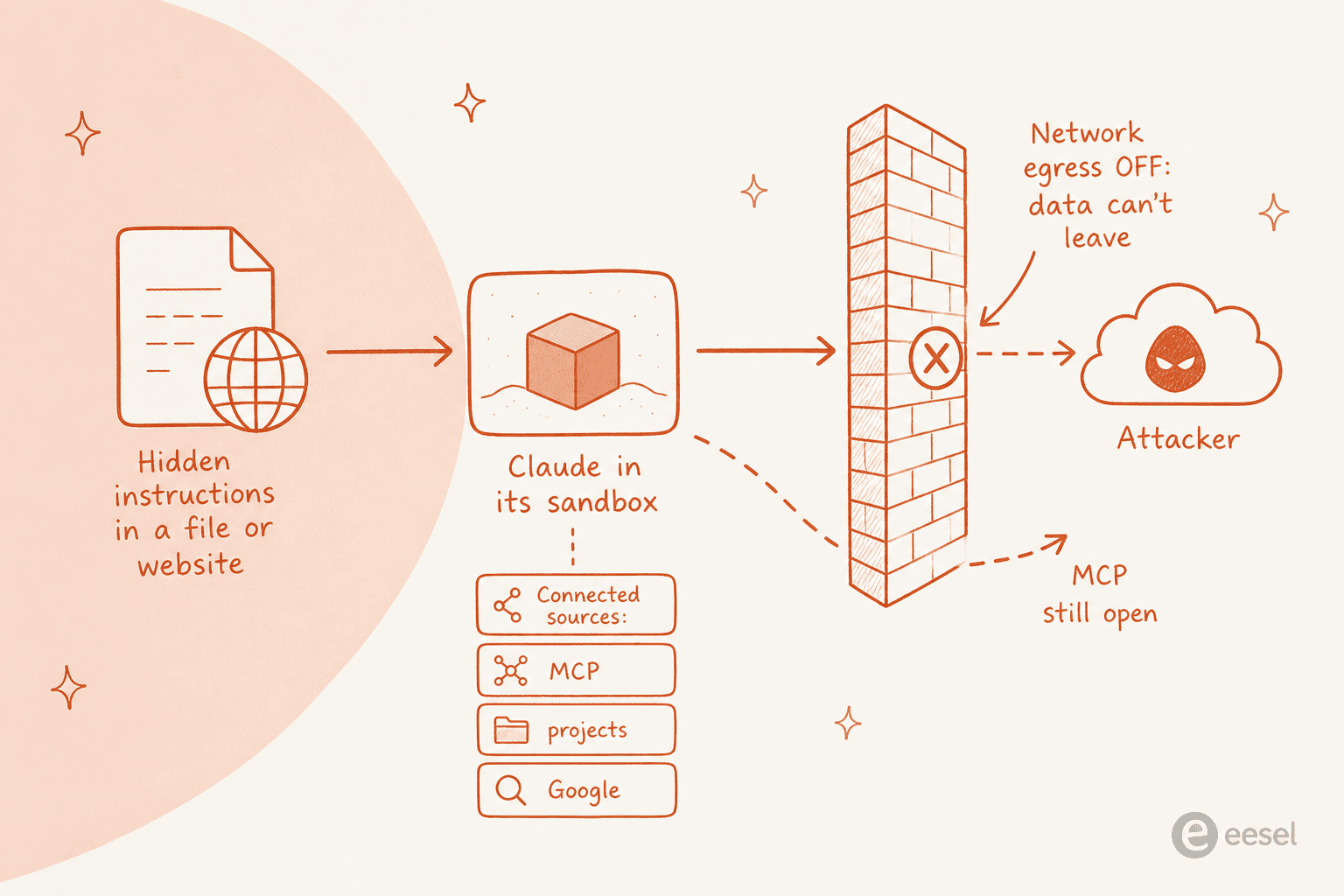
To Anthropic's credit, the mitigations are real: a prompt-injection classifier that halts execution when it detects manipulation, per-user sandbox isolation, limited container lifetimes, and disabled public sharing of conversations that contain file artifacts for Free, Pro, and Max users. Turning off network access is the strongest lever, because it stops data leaving the sandbox even if something goes wrong.
But note the one exception that undercuts that lever: if you have MCP integrations enabled, network communication stays possible through those connections regardless of the egress setting. Anthropic's own advice is to monitor Claude while it works and stop it if it starts accessing data unexpectedly. That is sensible for a personal spreadsheet. It is a harder ask for anything running against real customer data at scale.
What people are saying
The reaction I found in the wild splits cleanly into three camps: genuine awe at the time saved, a reality check on how finished the output really is, and real nerves about security.
On the awe side, the numbers people report are eye-catching. One practitioner described the kind of compression that makes this feature feel like a step change:
"A few days ago, I built an eleven-tab financial model in ten minutes. Two weeks of work compressed into the time it takes to make coffee."

Developer Simon Willison cut through the marketing name entirely, pointing out what the feature actually is under the hood:
"Anthropic are massively burying the lede here - they've called this "Upgraded file creation and analysis" (that really does seem to be the official name) but it's actually.... Claude Code Interpreter! It's sandboxed server-side Python/Node.js code execution for Claude"
The reality check is the one I would weigh most. That eleven-tab model is impressive, but plenty of people hit what one writer called the 70% problem:
"Claude built the model quickly and got about 70% of the way there. But I spent as much time debugging the output as it would have taken me to build from scratch. Several cells were randomly blank, formulas had fundamental errors, and it misunderstood key calculations."
And on security, the crowd is not shy. Anthropic's own "monitor Claude while using this feature" line drew a sharp response on Hacker News:
"The security concerns here are really significant... they write "we recommend you monitor Claude while using this feature." This borders on irresponsible IMO. Monitor what exactly? How should we monitor? What logs and metrics are exposed for security monitoring?"

Where Claude Docs fits, and where it doesn't
Having sat with it, here is my honest read. For a solo knowledge worker, "Claude Docs" is genuinely useful: turning a messy pile of numbers into a clean Excel model, or a rough outline into a passable PowerPoint, really does compress an afternoon into a few minutes. If that is your job to be done, turn it on and enjoy it.
Where I would pump the brakes is anything that needs to be repeatable, on-brand, and safe to run against company data. A one-shot file with no version history is fine for personal work and awkward for team work. And the security caveat above is exactly the kind of thing that makes a customer-support or content team nervous, because their data is the sensitive kind.
That is the line I would draw. Claude Docs is a superb general-purpose "make me a file" button. It is not a system of record, and it is not a specialist that already knows your brand, your customers, or your guardrails.
Try eesel for finished content, not just files
If what you are really after is finished, on-brand content rather than a raw file to then edit yourself, that is a different tool. eesel AI is an AI teammate platform: you hire ready-to-work teammates for specific jobs, and each one arrives with the skills, integrations, and company context for its role.
For the "Claude Docs" use case, the relevant teammate is the eesel AI blog writer. Instead of handing you a generic .docx you have to rewrite into your voice, it researches, drafts, and SEO-optimizes a full long-form piece in one run, trained on your own knowledge rather than a blank prompt. There is also a suite of free SEO tools if you just need a quick meta description or keyword list.

And on the point that makes Claude's own security section twitchy: eesel teammates run inside your existing tools with 1000+ integrations, and you can simulate them on your real history before they touch anything live. That is the difference between an open sandbox you have to babysit and a teammate you can actually trust with the work. It is free to try, no credit card or sales call.