What Grok Bot actually is
I've spent the last couple of years getting AI to write blog posts that actually rank, and the fastest way to waste a week is to point a general-purpose tool at a specialist job. So before we talk about content, it's worth being precise about what Grok Bot is, because it's not a writing tool.
Grok Bot is xAI's AI teammate app, announced on 11 August 2026 and labelled "Early beta" on its own page. Each Bot is a persistent, named worker that gets its own cloud computer, signs into the apps you already use, and operates them through their normal interfaces. It runs on the same Grok model family as xAI's other products, and it sits alongside things like the Grok voice agent builder in xAI's wider agent push.
The strategic claim is coverage. Because a Bot drives a UI like a logged-in human, xAI says it works across apps and websites "including platforms with no clean API or MCP". That design is the whole story, both the reason it can reach your niche CMS and the reason every caveat later in this post exists. It puts Grok Bot in the same category as Manus AI and Claude Cowork: a general agent that acts on a computer, not a product tuned for one job.
The eight named Bot roles that ship tell you where xAI's head is at: Sales Outbound, Talent Scout, Paid Media, Expense Manager, Product Performance, Bug Reproduction, Account Health, and Chief of Staff. Not one is a writer or content role. If you want Grok Bot to write your blog, you're building that from scratch.
Can Grok Bot write blog posts? How you'd actually set it up
Yes, it can produce a draft. Here's the honest version of what that takes, because it's more assembly than "click a button".
You'd start with a Routine, which xAI calls "Teach a task". You record yourself doing the job once, and the Bot saves the steps. There are real limits baked in: routines are browser-only, capped at 10 minutes of recording, capture no microphone audio, and the docs say the output is explicitly "a draft". So you're teaching a short, silent, browser-based version of your process, then relying on the Bot to generalise from it.
From there, the loop for a single post looks like this:
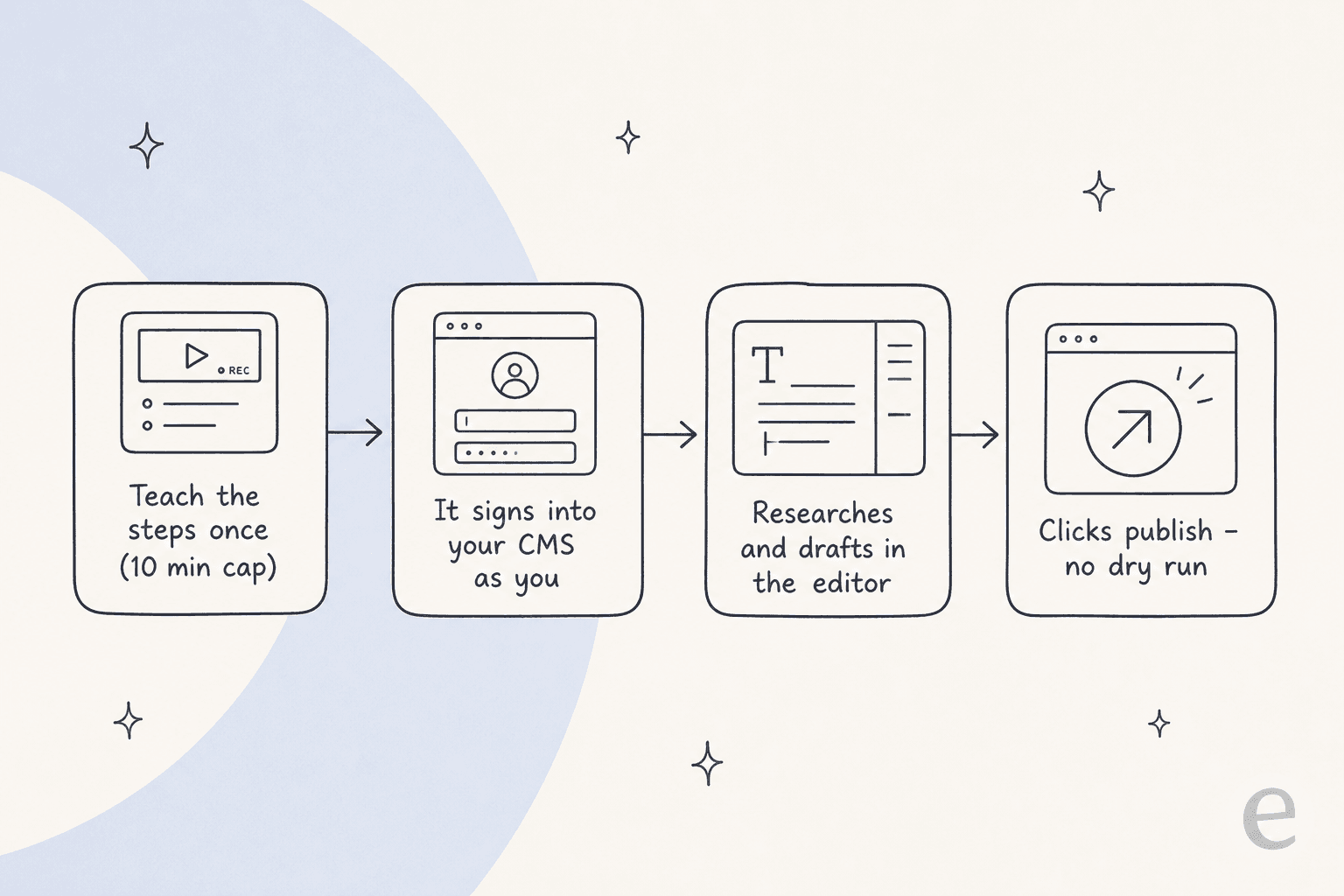
One early tester described chaining Bots for exactly this kind of work:
"I set up a researcher bot and a writer bot, then made a Chief of Staff bot and asked it to get the other two working together on a project. I checked in fully expecting that to fall apart... It worked out of the box."
Worth reading in context: that's a pre-release, early-access account, so treat it as a promising demo rather than a review. The multi-Bot coordination is real and pretty neat. But notice what's missing from the workflow above versus what a writer actually needs: keyword research, a citation discipline, brand-voice matching, and a safe preview before anything goes live. You supply all of that, or it doesn't happen.
Where it bites for content work
This is the part that surface-level roundups skip. A UI-driving agent is a great fit for some jobs and a risky one for publishing. Four things stand out for writers.
There is no dry-run mode
Straight from xAI's docs: "A test run performs real work. It can navigate websites, change files, and call connected tools." There's no preview mode that simulates the run without touching anything. For blog writing that's a specific hazard, because the last step of the workflow is publish. Approvals help, but the docs are clear about their limit too: "An approval controls the proposed action. It does not reverse work already completed." If the Bot publishes a half-finished draft to your live blog, an approval after the fact doesn't unpublish it.
This is exactly why tools built for content lean on a real preview or staged step. The whole point of a dry run before go-live is to see what the agent would do before it does it.
Every Bot shares one signed-in computer
xAI states it twice in its own documentation: "Do not use separate Bots as a security boundary." All your Bots share one cloud computer, and "the browser session persists on your shared Grok Bot computer, so other Bots can use the same signed-in session when appropriate." For a solo blogger that's mostly a shrug. For a marketing team where the Bot is logged into your CMS, your analytics, and your social accounts, it's a bigger surface than it looks. The sharpest framing came from Hacker News:
"By hijacking a real person's credentials, that person becomes the accountability sink. Very neat. Very deliberate."

One correction, in fairness to xAI: you don't upload your passwords to Elon's servers. You type them yourself in a screen handoff. The accurate objection is session inheritance and reuse, not credential upload. It's also worth noting Grok Bot ships with zero compliance certifications claimed (no SOC 2, ISO, GDPR, or HIPAA), which matters if you handle anything sensitive. If compliance is a gate for you, SOC 2 and GDPR are the baseline to ask any vendor about.
You don't choose the model
The same early tester flagged this: "You don't choose a model for your Grok Bot. It's all done automatically on the backend." A backend router is great for casual users and frustrating for anyone who wants a consistent voice across a content calendar. When the model can silently change between posts, so can the tone.
It has no idea what "your voice" is
This is the quiet dealbreaker. Grok Bot keeps memory across sessions and can pick things up over time, but it starts with no notion of your brand voice, your style guide, or which sources you trust. Compare that to a purpose-built AI blog writer whose entire job is voice-matching from the first draft. You can get there with Grok Bot, but it's a training project, not a setting.
Which setup are you actually in?
Before you commit a week to teaching a Bot, it's worth being honest about what you're optimising for. Pick the row that sounds like you:
The cost reality
There's no free tier and no published trial length. The two self-serve plans are named after Cursor, not xAI: Cursor Ultra at $200/month and Cursor Premium Teams at $120/seat/month, with Grok Bot included on SuperGrok Heavy. (A quirk worth knowing: the team plan is cheaper per seat than the solo plan.) You can dig into the wider xAI pricing picture if you want the full ladder, or weigh the xAI alternatives if the number is a dealbreaker.
The thing to notice is what you're paying for. Seats price access to a worker. They don't price the work done. If you publish four posts a month, you pay the same $200 as someone publishing forty, and you're carrying the cost of a general agent to do a specialist task.
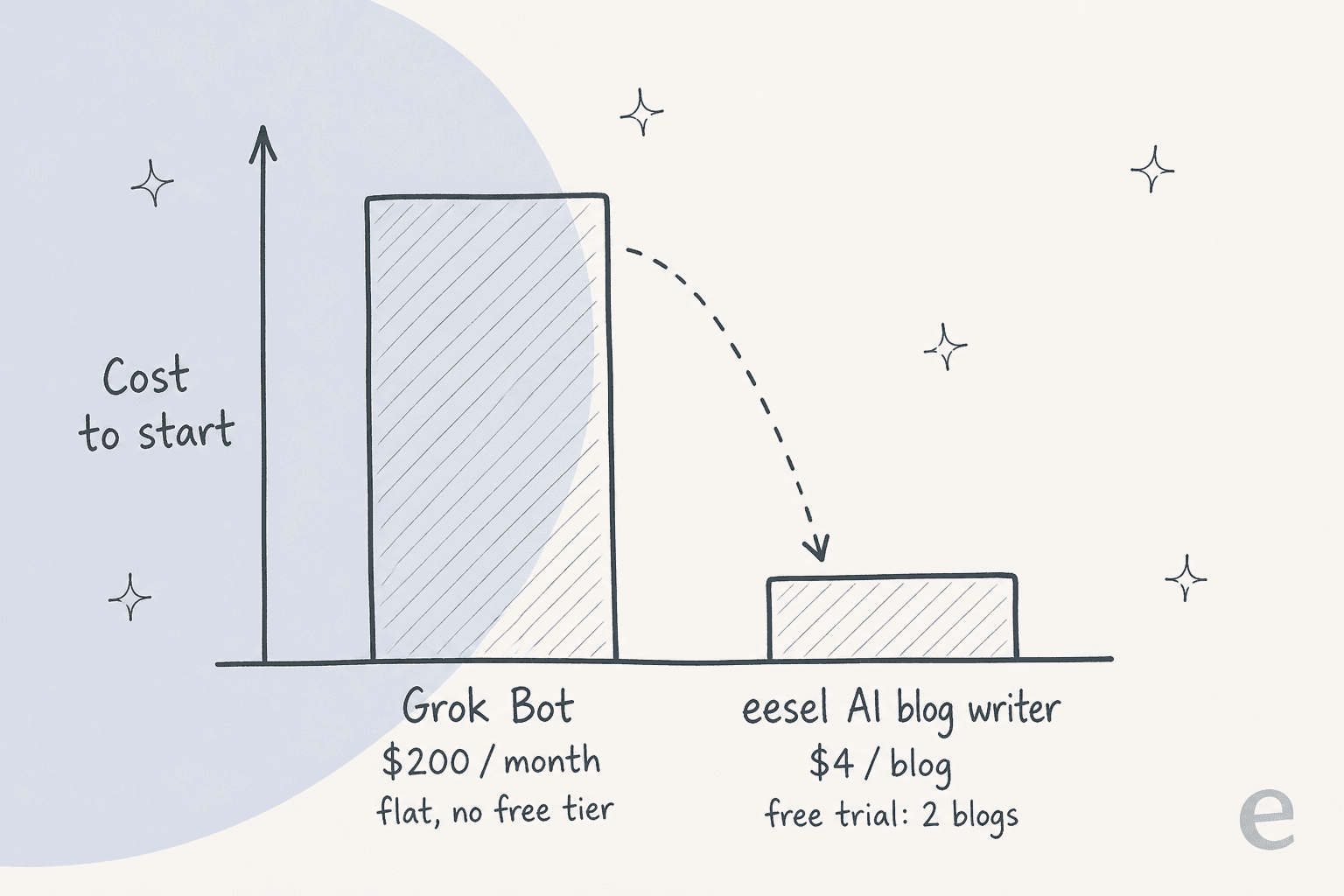
For a content workflow specifically, I'd rather pay per output. eesel's AI blog writer bills a full post as a single task and gives you two free blog generations to start, so the cost tracks the work rather than the number of seats sitting idle.
Where a purpose-built writer pulls ahead
Here's the way I think about it. Grok Bot is a general-purpose labourer you have to teach the whole job to. A content teammate arrives already knowing it.
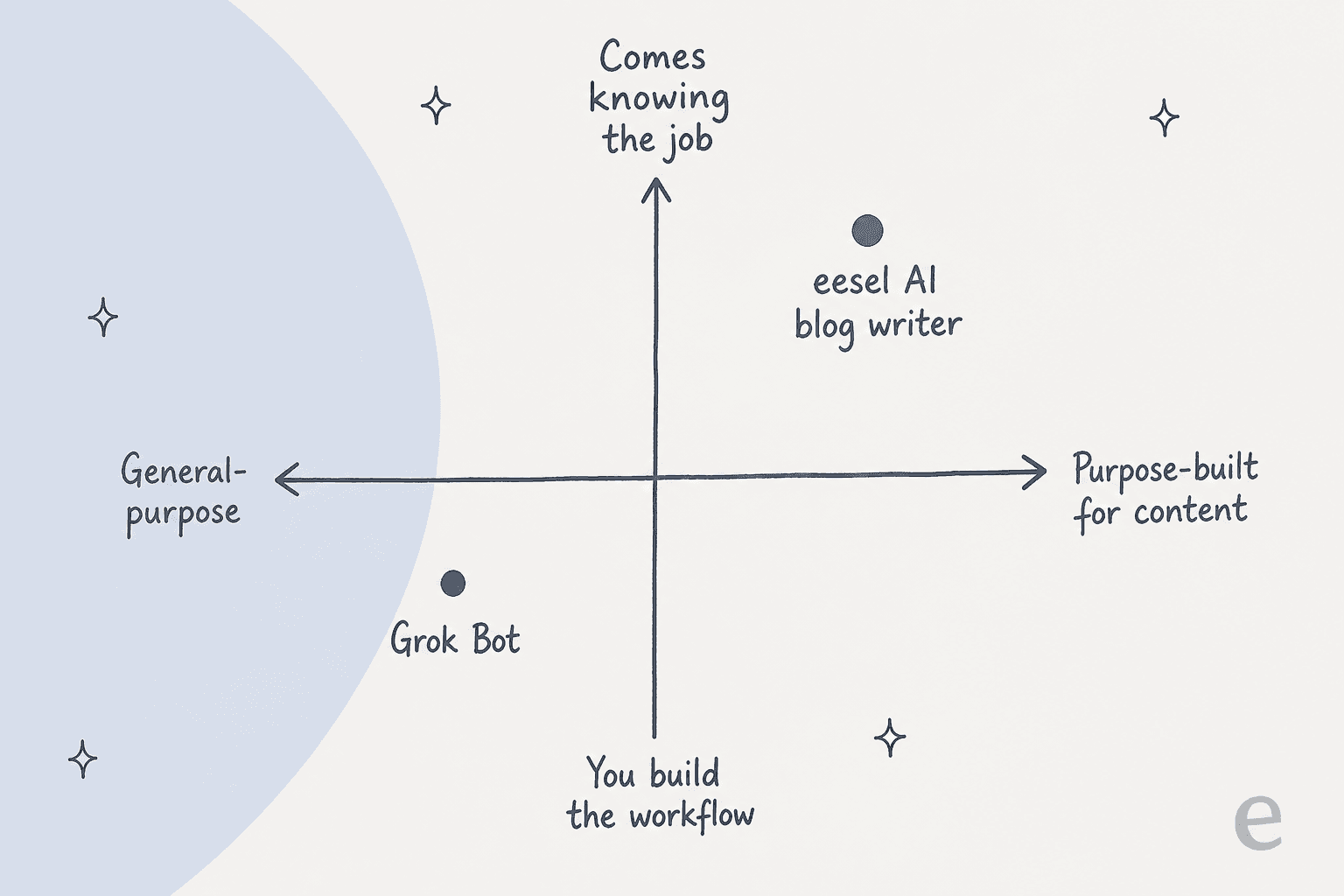
That "comes knowing the job" difference shows up in the steps Grok Bot leaves to you:
- Finding what to write. Keyword research, competitor gap analysis, and trending topics are core to a content tool and absent from a generalist. When an AI blog writer isn't ranking on Google, it's usually because the topic selection was never grounded in search demand.
- Researching and citing. A good AI blog generator reads primary sources and cites every claim, instead of improvising from training data. That grounding is the difference between a post that gets cited and one that gets skipped.
- Matching your voice. Voice-match from the first draft is table stakes for AI writing and a training project for Grok Bot.
- Making the visuals. Diagrams, feature graphics, and header images are part of a finished post, not a separate errand.
None of this means Grok Bot is bad. It means it's aimed elsewhere. Where its UI-driving design really wins is workflow automation across tools with no API, the honest descendant of call center RPA. If that's your problem, it's a strong pick. Blog writing just isn't that problem.
Try eesel for blog writing
If what you actually want is researched, on-brand posts that publish on a schedule, that's exactly what eesel's AI blog writer is built to do. It's positioned as a teammate, not a prompt box: it finds topics through keyword research and competitor gap analysis, reads Reddit threads and primary sources with every claim cited, generates diagrams and header images, and matches your voice from day one across 80+ languages. You chat to iterate, the same way you would with a colleague.
It also comes with the pieces Grok Bot leaves to you. There's a built-in SEO audit that flags broken links and missing metadata. There's a free meta description generator that keeps every description inside the SERP limit. There's a SEO keyword generator for topic ideas, and an AI humanizer for when a draft reads too much like a robot. You get two free blog generations to try it, no credit card. This post you're reading came out of that same workflow. You don't prompt it, you hire it.
Frequently Asked Questions
Can Grok Bot write blog posts?
How much does Grok Bot cost for blog writing?
Is Grok Bot good for SEO content?
What are the risks of using Grok Bot to publish blogs?
What's a better alternative to Grok Bot for blog writing?


Article by
Kurnia Kharisma Agung Samiadjie
Kurnia is a software engineer and writer at eesel AI with two years of SEO experience, writing about AI tools, helpdesk software, and customer support. He pairs a developer's understanding of how these products are built with search-driven research into what actually ranks and resonates with the people searching for them.