
Claude Slides is a real product now, but it is only one of three ways Claude makes a presentation. The named Claude Slides tool builds a deck on an editable canvas you can present and export. Separately, Claude's file creation feature writes a real .pptx file you download, and the Claude for PowerPoint add-in edits slides inside the app you already use.
I build AI features for a living, so here is the part that actually matters. Under the hood, Claude does not "imagine" a deck. It writes and runs real code in a private sandbox and hands you the output, which is why the results can be good and also why the caveats are real.
Two things to keep straight before you lean on it. The named Claude Slides tool is beta and paid-only, and the file route uses more of your usage limit than a normal chat. And the honest verdict from people using it daily is that a Claude deck is a strong starting point, not a finished one. If what you actually want is finished, on-brand content instead of a file to wrangle, a purpose-built writer like eesel AI is a different, and often better, fit.
So what is "Claude Slides", exactly?
Here is the small confusion worth clearing up first. For a long time there was no product literally called "Claude Slides," so the phrase became one of those search terms that lived in people's heads before it matched anything real. That changed. As of 2026 there is a named tool called Claude Slides, and it grew out of Claude Design, the Anthropic Labs product that launched on April 17, 2026 alongside Opus 4.7 for making "designs, prototypes, slides, and one-pagers." Decks turned out to be one of the most common things people built there, so they got their own starting point.
But the name still covers more ground than the tool. When you type "Claude Slides," you might be after any of three different things, and they behave differently enough that picking the wrong one is where the frustration comes from. So for the rest of this post I will treat "Claude Slides" the way you probably searched it, as shorthand for "getting Claude to make me a presentation," and then split it into the three routes that phrase actually points at.
The three ways Claude makes a deck
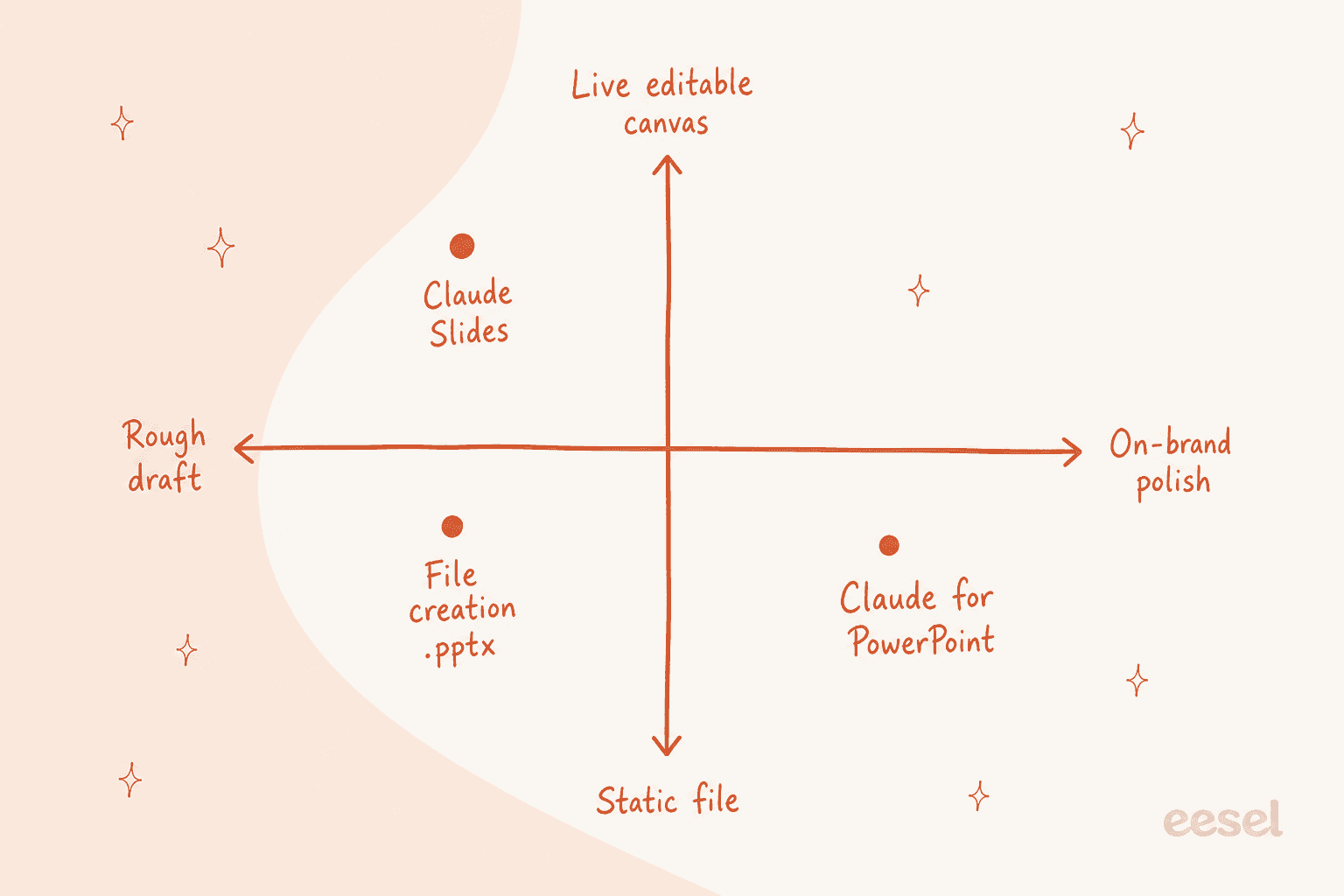
This is the mental model I would burn into memory before touching any of it. There is the canvas tool, the file, and the add-in. Same underlying model, three very different products around it.
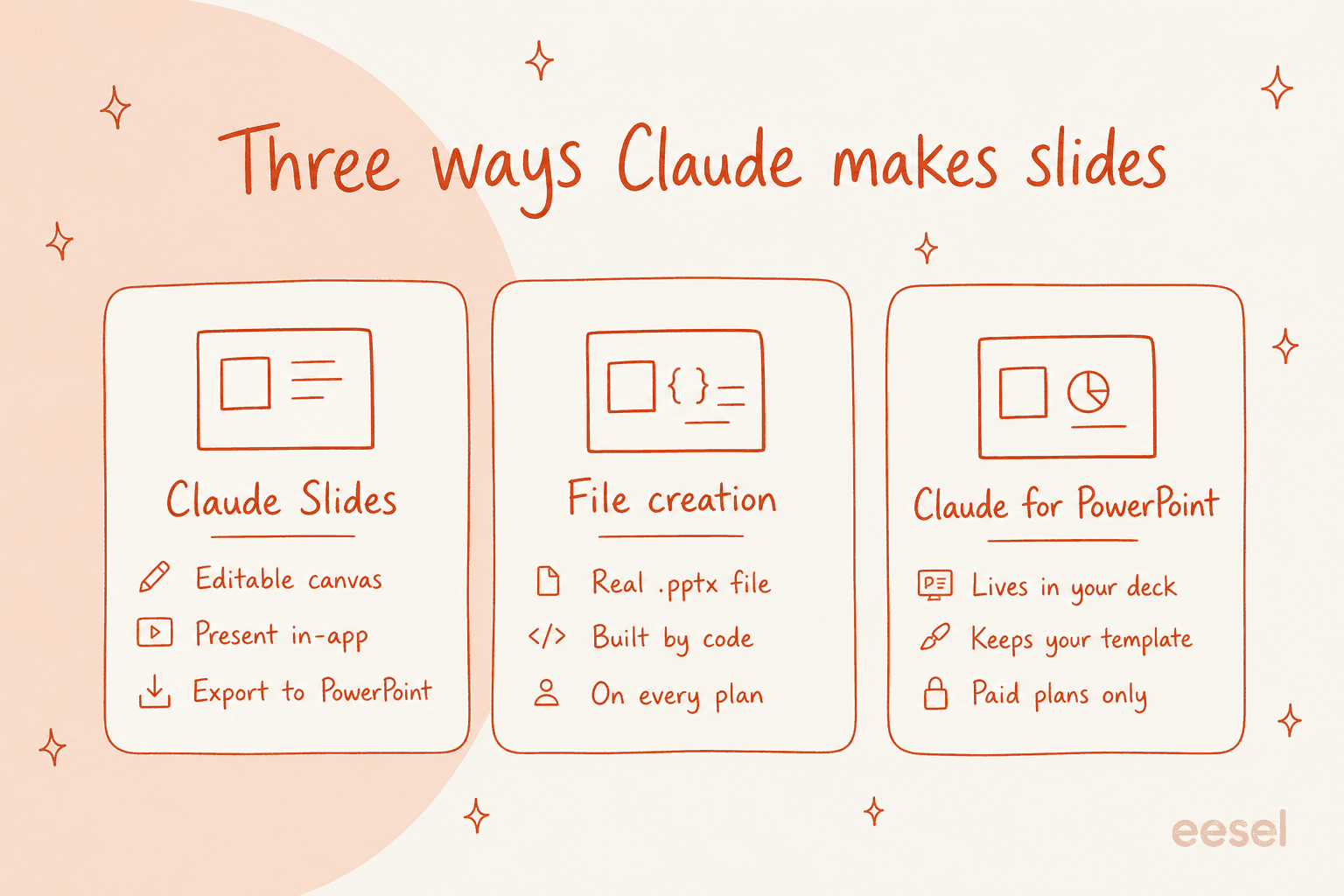
They differ on the two questions that actually decide which one you want: does it give you a live, editable thing or a finished file, and does it happen inside Claude or inside the app you already work in.
Claude Slides: the canvas tool
This is the one that owns the name. On the Artifacts help page, Anthropic describes it as "presentations built from your notes, reports, or the work already in your conversation. Edit any slide directly, present without leaving Claude, and export to PowerPoint or PDF," and the feature page pitch is blunt: "turn rough notes into polished decks in minutes." You ask for a deck in any conversation, or pick a template in the Artifacts tab, and you can edit the canvas three ways: on the slide directly, by commenting on an element, or by asking in the chat.
The catch to know up front: the named Claude Slides tool is in beta and available on paid plans only. It is on by default for Pro, Max, and Team, and off by default on Enterprise until an owner turns it on. One more wrinkle worth catching: artifacts no longer work at all unless "Code execution and file creation" is enabled, so the canvas tool quietly depends on the same engine as the file route below.
File creation: a real .pptx
This is the "just give me a PowerPoint file" path, and it is the one most people actually mean. Per Anthropic's support docs, Claude can create Excel spreadsheets (.xlsx), PowerPoint presentations (.pptx), Word documents (.docx), and PDFs, all as real files you download or save to Google Drive.
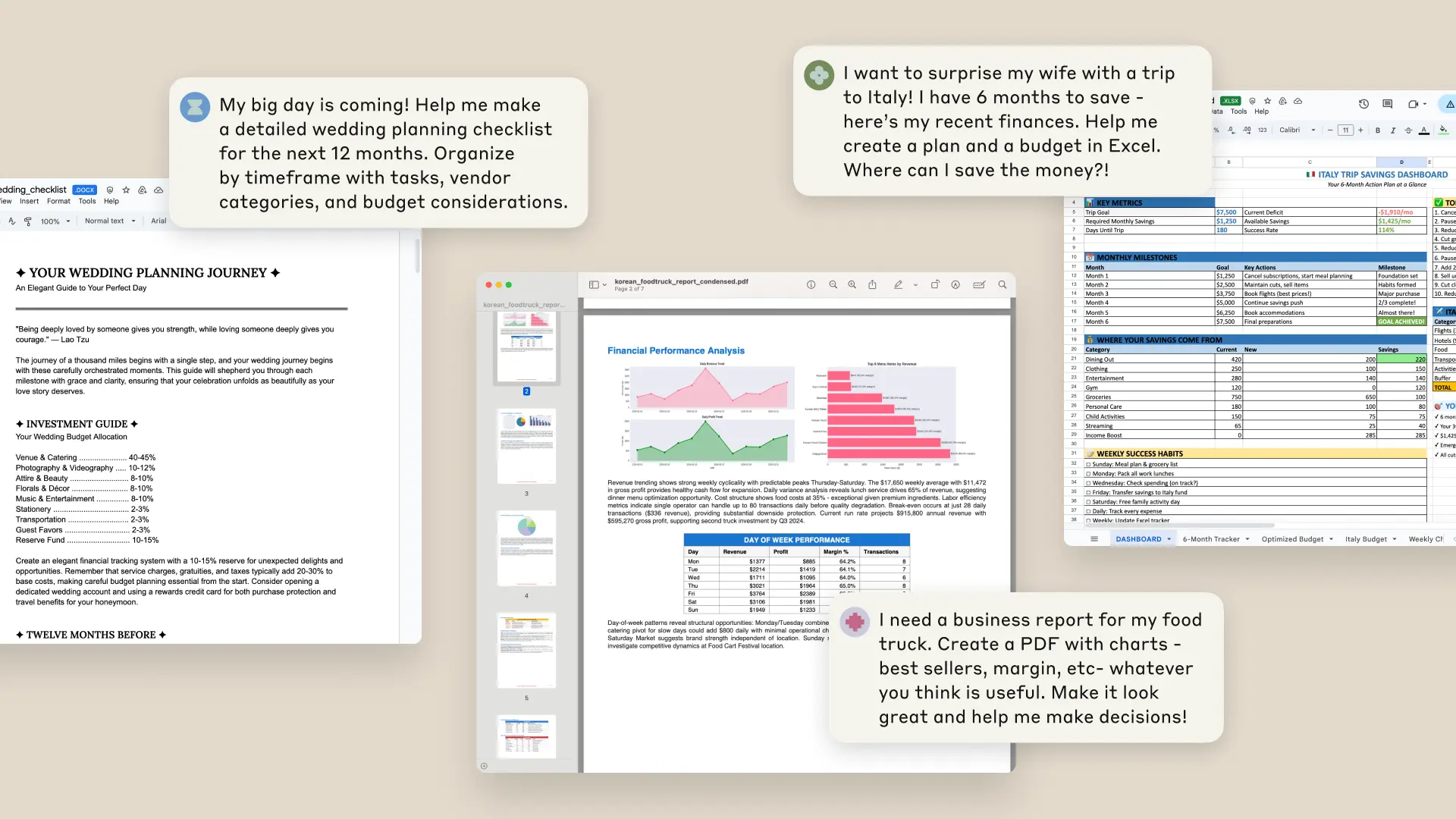
The move I reach for most here is conversion. The support article gives the exact prompt, "convert this Word document to a presentation," and Anthropic's own example chains formats together: you can "upload a CSV file and prompt Claude to create a financial model, write a memo summarizing it, and generate a PowerPoint to share the results." Unlike the beta canvas tool, this route is available on every plan, including Free.
Claude for PowerPoint: the add-in
The third route puts Claude inside PowerPoint itself, as a Microsoft 365 add-in. The selling point is template awareness, which is exactly the thing the other two routes are weakest at. It reads your slide master, layouts, fonts, and color scheme, then reuses them when it generates or edits slides, so a new slide is supposed to land on-brand rather than off in its own visual world. It can also make pinpoint slide edits without regenerating the whole deck and turn bullets into native charts, not static images.
It is generally available to Pro, Max, Team, and Enterprise plans, not Free, and installs from the Microsoft AppSource listing. It is also the route with the sharpest live-user gripe, which I will get to in the sentiment section.
How Claude actually builds a slide file
This is the mechanism, and it explains both the magic and every caveat below. When you ask for a deck, Claude is not filling in a template in its head. Anthropic gave it a private computing environment where it can "write and run code (for example Python or Javascript)" and "uses common code packages to create documents, spreadsheets, and slides." So a request for a .pptx becomes actual code that generates a genuine PowerPoint file, run in a sandboxed container kept separate from your systems.
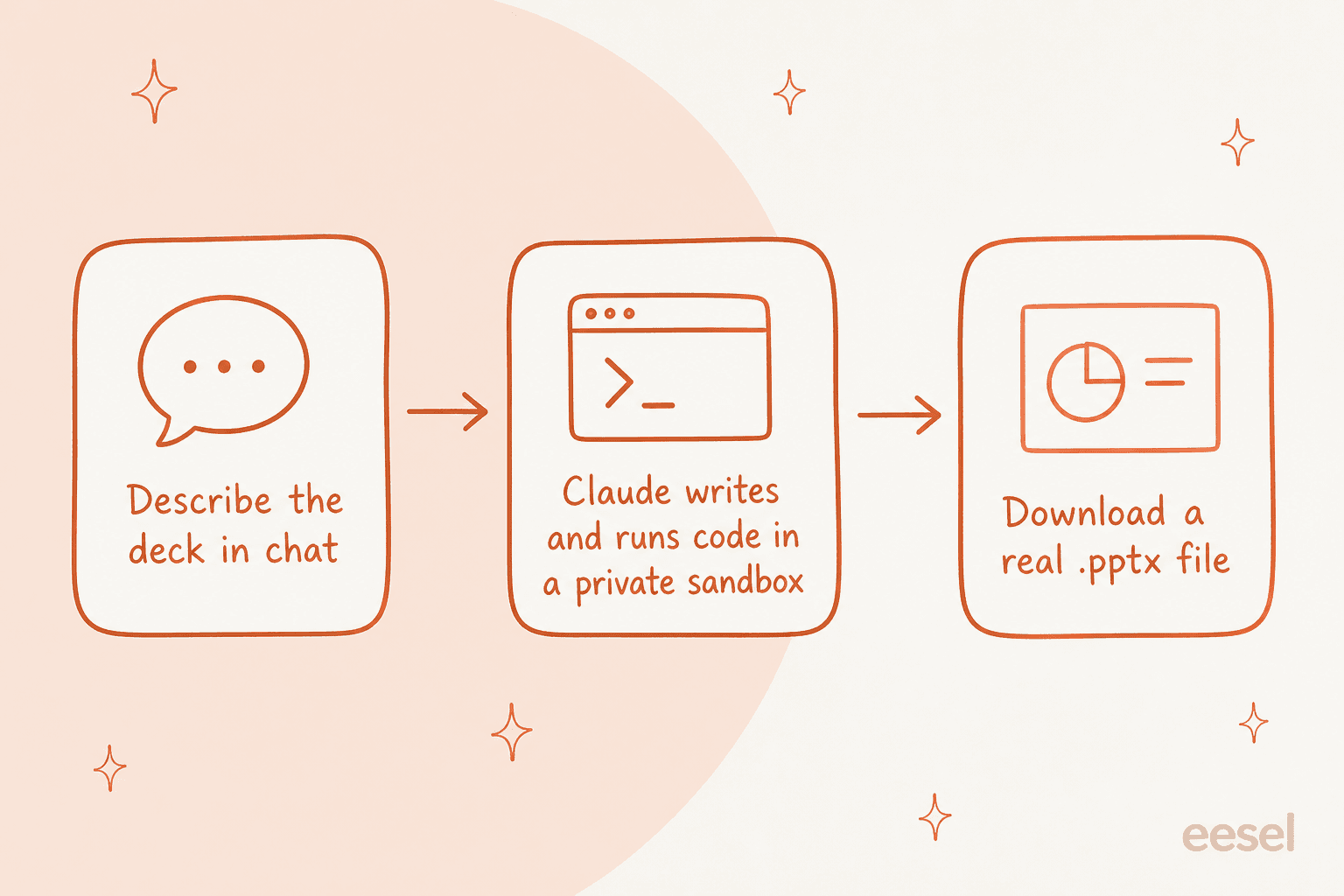
The part I actually like is that Claude checks its own work visually. One heavy user described the loop:
"I have had a lot of experience creating and editing PowerPoint slides with Claude recently. It always converts the file to a PDF using LibreOffice and then renders the PDF into images to see if everything went right and that no text has overflowed."

The mental model to keep is: this is Claude with a laptop, not Claude with a slide template. That framing predicts almost everything, the good output and the 30MB cap and the security warning alike.
How to turn it on
For the file route on Free, Pro, and Max, you flip one switch. It lives under Settings, as the file creation toggle, labelled either "Upgraded file creation and analysis" or "Code execution and file creation" depending on which build you are on.
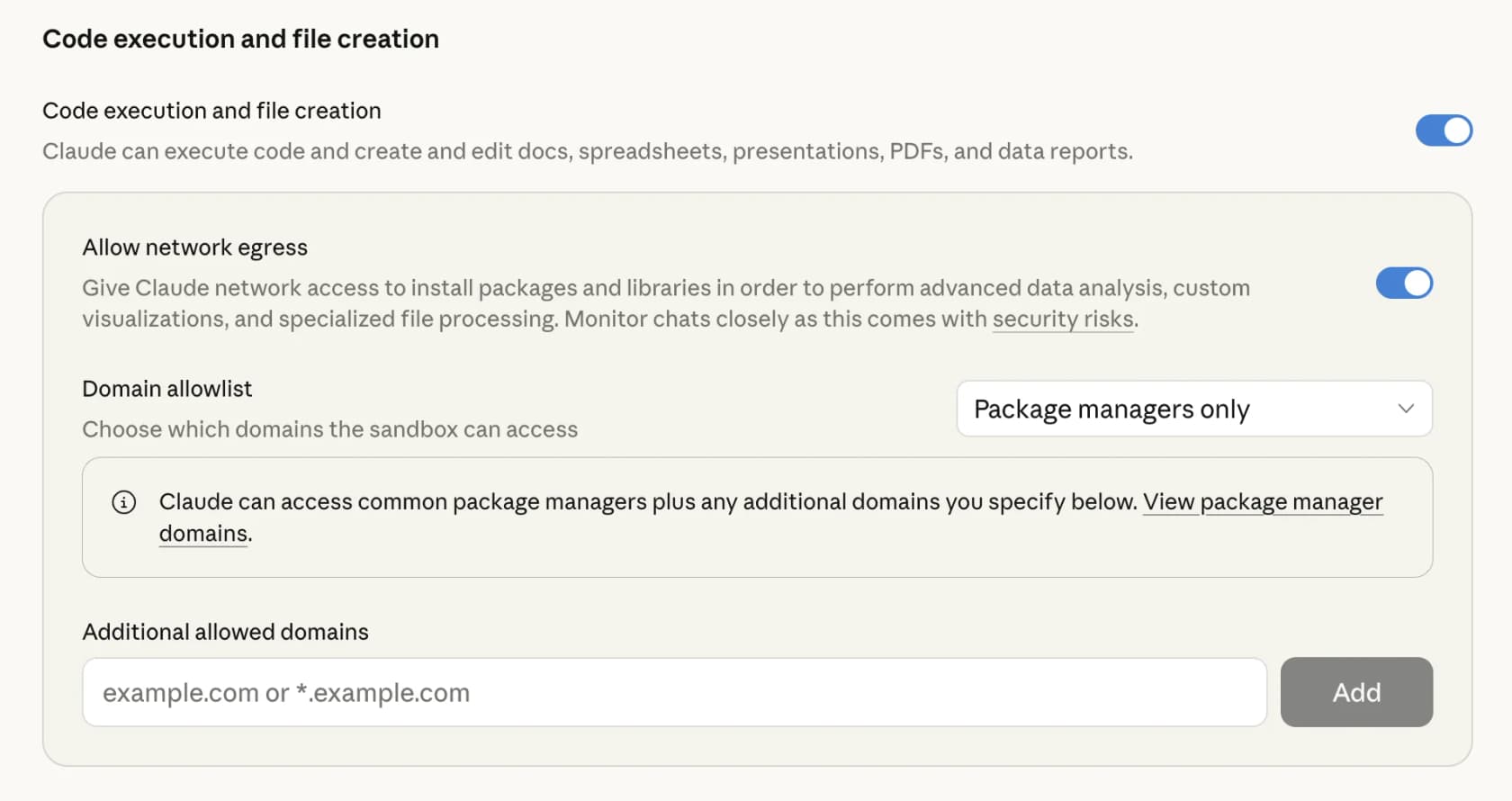
Read the small print in that toggle, because it is a real limitation dressed up as a footnote: file creation "does not support versioning or remixing of Artifacts," per the Artifacts docs. The named Claude Slides and Claude Docs tools are turned on in a separate place, under Organization settings then Artifacts, and the PowerPoint add-in installs from Microsoft AppSource. Once the file toggle is on, you just ask, for example "build me a five-slide deck on our Q3 numbers," and Claude gets to work.
Which plans have it
Availability is the single most confusing thing about "Claude Slides," precisely because the three routes do not line up. Here is the whole picture in one place.
| Route | What you get | Plans | Default state |
|---|---|---|---|
| Claude Slides (canvas tool) | Editable deck, present in-app, export to PowerPoint or PDF | Paid only, beta (Pro, Max, Team) | On for Pro/Max/Team, off for Enterprise |
| File creation | Real downloadable .pptx (and .xlsx, .docx, PDF) | All plans, including Free | On for Free/Pro/Max, owner-controlled for Team/Enterprise |
| Claude for PowerPoint | Edits inside the PowerPoint app, template-aware | Pro, Max, Team, Enterprise | Installed via Microsoft AppSource |
The one number to hold onto for the file route: it draws from your plan's usage limits, and creating files uses more of that limit than a normal chat. On Free or Pro, a few heavy deck builds burn through your allowance faster than you would expect, so "on every plan" is not quite "free forever."
The limits worth knowing
None of these are dealbreakers, but they are the gap between using this well and getting annoyed.
- The named tool is beta and paid. Claude Slides is not on Free, and it is still labelled beta, so expect rough edges.
- 30MB per file. That is the ceiling for both uploads and downloads on the file route.
- No versioning or remixing on the file route. The files it creates are one-shot outputs. Want a change? You ask again and get a new file, rather than editing a living version with history.
- It uses more of your usage limit than a plain chat, as above.
- Public sharing is disabled for conversations that contain file artifacts on Free, Pro, and Max, which is a security choice rather than a bug.
The security caveat you should actually read
I almost never tell people to read a vendor's security section. This one earns it, because Anthropic is unusually direct that the file feature carries a real data-exfiltration risk. The exact wording:
"This means Claude can be tricked into sending information from its context (for example, prompts, projects, data via MCP, Google integrations) to malicious third parties. To mitigate these risks, we recommend you monitor Claude while using the feature and stop it if you see it using or accessing data unexpectedly."
To Anthropic's credit the mitigations are real: a prompt-injection classifier that halts execution when it detects manipulation, per-user sandbox isolation, and a network egress control. Turning network access off is the strongest lever, because it stops data leaving the sandbox even if something slips through.
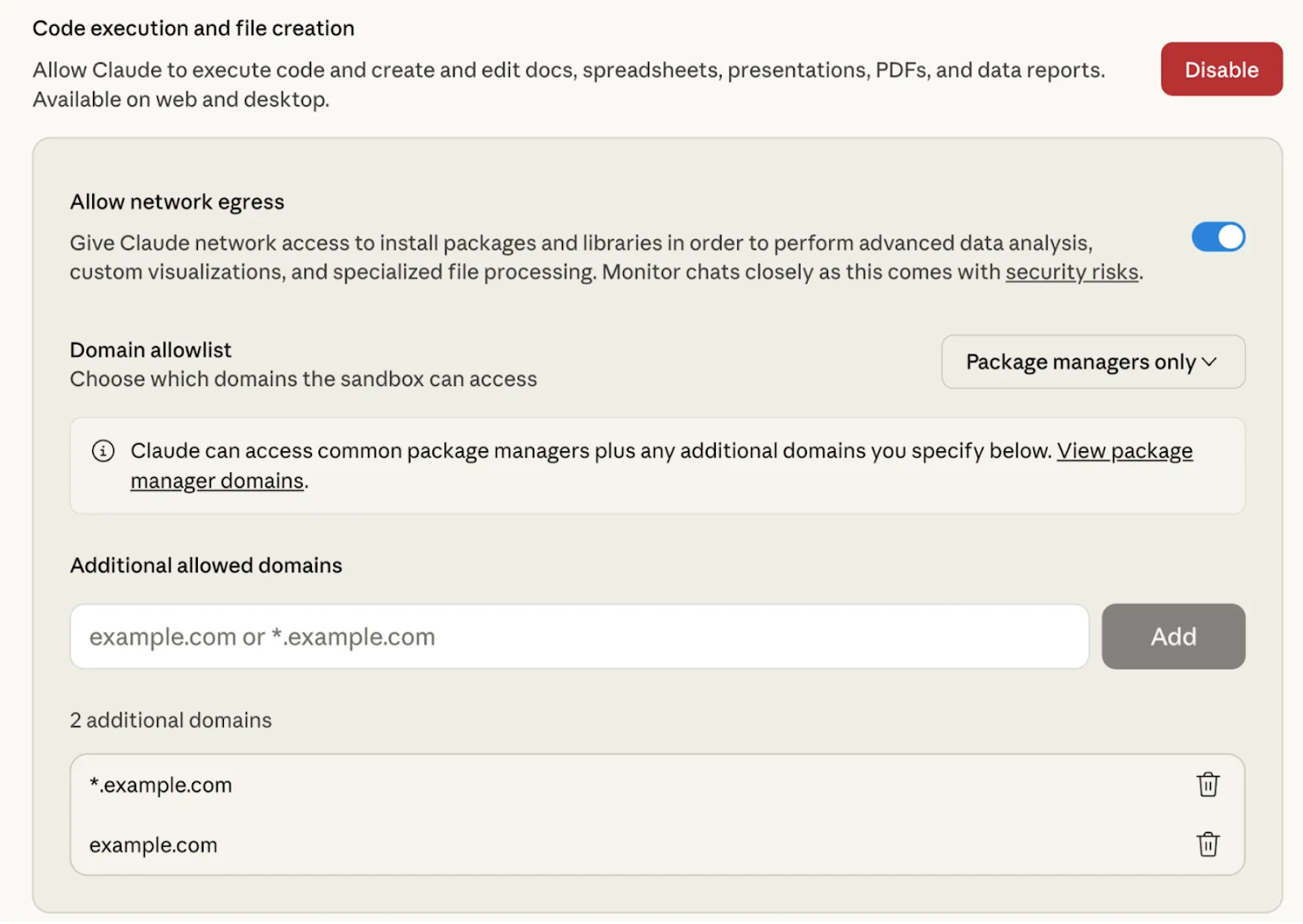
Note the exception that undercuts that lever, though: if you have MCP integrations enabled, network communication stays possible through those connections regardless of the egress setting. Monitoring one deck by hand is fine. It is a much harder ask for anything running against real customer data at scale.
What people are saying
The reaction I found in the wild splits into three clean camps: real awe at the design quality, a reality check on how finished the output is, and specific gripes about the add-in.
On the awe side, the head-to-head-with-Copilot praise is striking:
"I recently tried Claude Cowork for PowerPoint and I was stunned by the content as well as design quality of the deck it produced. That's a threat for Microsoft because now you don't need the editing tools of PowerPoint, AI replaces it, so all you need is the presentation mode of PowerPoint."
The most-amplified take, at nearly 6,000 likes, is the thesis behind the whole approach, that a model writing code beats a template engine:
"I created a Claude Skill that make beautiful slides on the web. The world hasn't woken up to the fact that code can create much better slides than most PPT tools."
The reality check is the quote I would weigh most heavily, because it matches my own experience: the ideas are good, the default formatting is not, and you fix the difference.
"I don't really like the way Claude tends to format slides (too much marketing speak and flowcharts), but it has good ideas often enough that it's still worth it to me. So I treat this as a starting point and replace the bad parts."
And the add-in has a concrete, unglamorous problem that shows up when you actually depend on it:
"The AI bot often crashes and fails mid generation, so you need to redo the whole thing. There is no history, so you can't go back or undo the changes."
Plotting the three routes against each other, the trade-off is the same one every time: the more finished and on-brand you want the result, the further you move out of the chat and into your own tools.
Which route should you use
If you only remember one thing, make it this decision. Pick the situation that sounds like yours and use the route it points at.
Where Claude Slides fits, and where it doesn't
Having sat with all three routes, here is my honest read. For a solo knowledge worker turning a messy report into a passable deck before a meeting, "Claude Slides" earns its place, and the design quality of that first draft is better than the cynical take would have you believe. If that is your job to be done, turn it on and enjoy it.
Where I would pump the brakes is anything that has to be repeatable, on-brand, and safe to run against company data. A beta tool, a one-shot file with no version history, and a security caveat Anthropic wrote itself are all fine for personal work and awkward for team work. And even the fans admit the output is a starting point you then fix, which is a very different promise from "done."
That is the line I would draw. Claude Slides is a superb general-purpose "make me a deck" button. It is not a system that already knows your brand, your data, or your guardrails.
Try eesel for finished content, not just files
If the real job behind "make me a deck" is producing content in your voice rather than a file you then rewrite, that is a different tool. eesel AI is an AI teammate platform: you hire ready-to-work teammates for specific jobs, and each one arrives with the skills, integrations, and company context for its role.
For the "I need content, not a blank file" case, the relevant teammate is the eesel AI blog writer. Instead of handing you a generic file you have to pour your voice into, it researches, drafts, and SEO-optimizes a full long-form piece in one run, trained on your own knowledge rather than a blank prompt. There is also a set of free SEO tools if you just need a quick meta description or keyword list to start from.