


Claude can now turn a pile of notes into a polished deck in a couple of minutes, and the design quality of that first draft is good. The thing to know before you start: there is no single "Claude Slides," there are three overlapping routes, and picking the wrong one wastes half your time.
My honest read after putting all three through their paces: the named Claude Slides tool is the nicest for a deck you present from Claude itself, file creation is the route when you actually need a real .pptx on disk, and the PowerPoint add-in is for editing inside a corporate template. All three share one strength and one weakness: the design is impressive, but the default formatting is marketing-heavy and you will be fixing it. Treat the output as a strong starting point, not a finished deck.
The place it stops being the right tool is repeating work. A chat feature starts from an empty box every time and needs you to bring the context. If your goal is content that runs continuously and already knows your company, that is a teammate's job, which is where something like the eesel AI blog writer fits instead of a chat window.
What "Claude Slides" actually is
Let me clear up the name first, because it saves real confusion. Search "Claude Slides" and you will land on one of three different things, and Anthropic ships all of them:
- Claude Slides, a named artifacts tool that builds an editable slide canvas you present in-app and export.
- File creation, the engine that writes and runs code to hand you a real, downloadable
.pptxfile. Launched September 9, 2025. - Claude for PowerPoint, a Microsoft 365 add-in that puts Claude inside the PowerPoint app itself.
They overlap enough to be confusing and differ enough to matter. Here is the one-glance version.
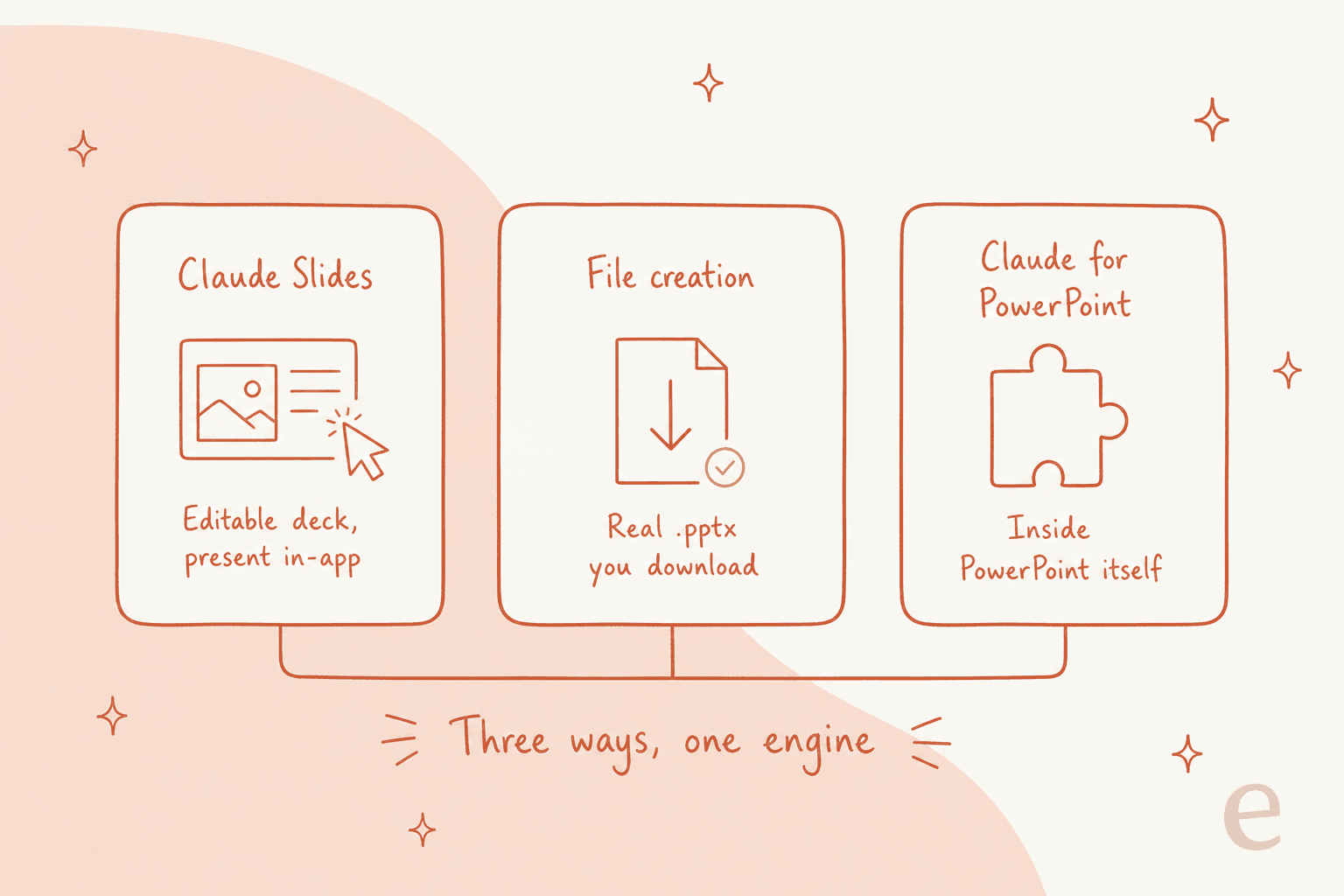
The quick rule I settled on: if you want to build and present without leaving Claude, use Slides. If you need a file to email or drop into a shared drive, use file creation. If your deck has to obey a company template that already exists, use the add-in.
Route 1: the Claude Slides artifact tool
This is the one most people mean now. Anthropic lists Claude Slides as one of three artifact tools, alongside Claude Design and Claude Docs, and describes it plainly:
"Claude Slides: Presentations built from your notes, reports, or the work already in your conversation. Edit any slide directly, present without leaving Claude, and export to PowerPoint or PDF."
The pitch on the feature page is "turn rough notes into polished decks in minutes," and in my testing that is roughly accurate for the first draft. You ask for a deck in any conversation, or pick "Output" in the message box, or start from a template in the Artifacts tab.
The reason it exists as its own tool is telling: it grew out of Claude Design because decks became one of the most common things people made there, so they got a dedicated starting point. Claude Design itself only launched April 17, 2026.
Editing is the part I liked most. You can change a slide three ways: edit directly on the canvas, leave a comment on the exact element you want changed, or just ask in the chat, and it updates live with a version selector to jump between drafts. When you are done, you export to PowerPoint, PDF, or HTML, or present straight from Claude.
Route 2: file creation, when you need a real .pptx
This is the "give me an actual PowerPoint file" path, and it works completely differently under the hood. Instead of a canvas, Claude writes and runs code in a private sandbox and uses common code packages to produce a real .xlsx, .pptx, .docx or PDF you download or save to Google Drive.
The headline use case for slides is conversion. Anthropic's example prompt is blunt:
"Convert this Word document to a presentation."
You can upload a PDF report and get PowerPoint slides back, or chain formats, feeding it a CSV and asking for a model, a memo, and a deck summarizing the results in one go. It is the same underlying engine behind Claude's file creation, which developer Simon Willison memorably called a code interpreter rather than a document tool.
How Claude checks its own slides
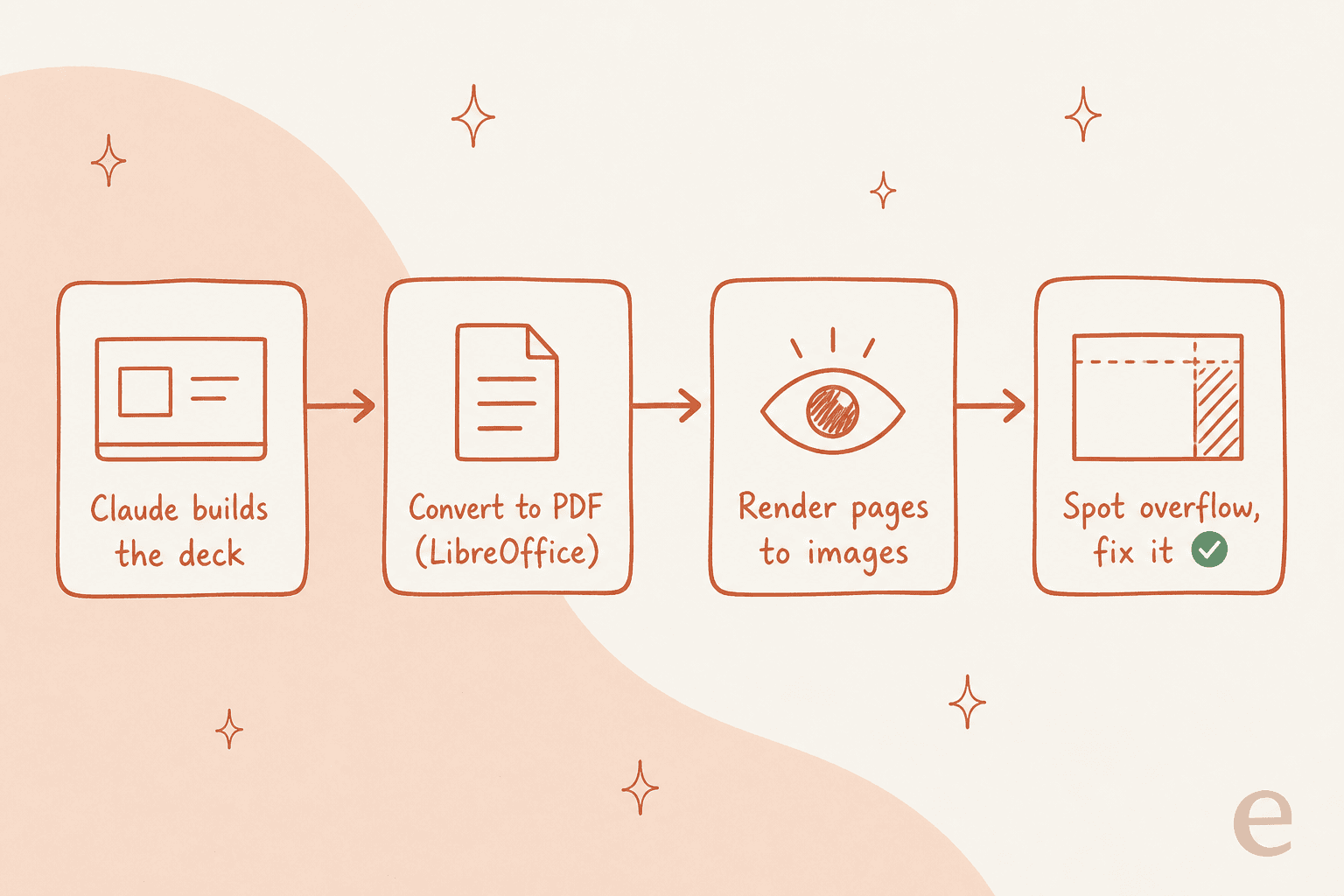
One detail that surprised me is how much verification happens behind a single prompt. A heavy user described the loop precisely:
"It always converts the file to a PDF using LibreOffice and then renders the PDF into images to see if everything went right and that no text has overflowed."

That render-and-check loop is why the output usually looks intentional rather than broken, and it is a clever bit of engineering for something you never see.
Two limits to keep in mind here. Files are capped at 30MB each, and creating a file uses more of your plan's usage limit than a normal chat, so a long deck-building session eats through your allowance faster than you would expect.
Route 3: Claude for PowerPoint, for template-locked decks
If your problem is not "make me a deck" but "make me a deck that matches our corporate template," this is the route. Claude for PowerPoint is a Microsoft 365 add-in that works inside the app, and template awareness is its whole reason to exist. It reads the slide master, layouts, fonts, and color scheme in your deck and uses them when generating or editing, aiming to stay on-brand.
It can build from existing templates, make pinpoint edits to specific slides without regenerating the whole deck, generate a full deck structure from a description, and convert bullets into editable native charts rather than static images. It is generally available on Pro, Max, Team, and Enterprise, not Free, and installs from the Microsoft AppSource listing.
The add-in is also where the sharpest reliability complaint shows up:
"The AI bot often crashes and fails mid generation, so you need to redo the whole thing. There is no history, so you can't go back or undo the changes."
That is worth weighing before you lean on it for a deck due in an hour. When it works it is the most template-faithful of the three; when it doesn't, there is no version history to fall back on.
What it is good at
Credit where it is due, because the good parts are real. The strongest praise I found was from someone comparing it head-to-head with Microsoft Copilot:
"I recently tried Claude Cowork for PowerPoint and I was stunned by the content as well as design quality of the deck it produced. That's a threat for Microsoft because now you don't need the editing tools of PowerPoint, AI replaces it, so all you need is the presentation mode of PowerPoint."
A second user put the output quality even more bluntly, saying Claude will generate legitimately beautiful decks and that the chat app makes them as artifacts too. My experience matched: the first draft looks like a designer touched it, which is not something I can say about most AI slide tools.
There is also a deeper insight worth stealing from the community. The most-amplified take, near 6,000 likes, is that code beats slide tools for design, and several users independently found Claude's HTML-first deck output cleaner than the markdown or .pptx path, saving a round of design tweaks. If you are comfortable exporting to HTML, that is often the highest-quality route.
Where it falls short
Now the honest half. The single most useful reality-check I read is that the default formatting is off, and you should plan to fix it:
"I don't really like the way Claude tends to format slides (too much marketing speak and flowcharts), but it has good ideas often enough that it's still worth it to me. So I treat this as a starting point and replace the bad parts."
That "starting point, not finished deck" framing is the right expectation to walk in with. The ideas land more often than not, but the marketing-speak default is real, and a skeptic of AI decks put the ceiling plainly, arguing the output can read as flattened, boring documents with no depth for a deck you actually have to stand up and present.
Stack that on top of the beta caveats, the paid-only gating, the higher usage burn, the crash-with-no-undo add-in, and the pattern is clear. It is excellent for accelerating a draft and weak as a hands-off "make my final deck" button.
The security catch worth knowing
One thing that does not show up in the demos: the file-creation engine carries a real, documented risk. Anthropic itself warns that a bad actor can add instructions via external files or websites that trick Claude into reading sensitive data from a connected source and using the sandbox to leak it.
Their recommended mitigation is to start with network egress off and monitor Claude while it works. That is fine for a personal deck. It is a harder sell the moment you are pointing it at connected company data, and it is one of the clearest reasons a general chat feature is not the same thing as a tool built to run on your business's information with proper controls.
Pricing and plan access
There is no standalone Claude Slides price. Everything runs on your existing Claude plan and draws from the same usage limits, so the real question is which route each plan unlocks.
| Plan | Claude Slides (artifact tool) | File creation (.pptx) | Claude for PowerPoint add-in |
|---|---|---|---|
| Free | Not available (ordinary artifacts only) | Available, on by default | Not available |
| Pro | On by default | On by default | Available |
| Max | On by default | On by default | Available |
| Team | On by default | On by default | Available |
| Enterprise | Off by default until an owner enables it | Enabled by default, egress off by default | Available |
Two things to flag. The named Slides tool is beta and paid-only, and artifacts now require "code execution and file creation" to be enabled at all. And because file creation uses more of your usage limit than a plain chat, heavy deck-building is one of the faster ways to hit your plan's ceiling.
When to reach for a teammate instead
Here is the line I keep drawing. Claude Slides is excellent for a deck you sit down and drive yourself, one time. It is the wrong shape for work that repeats, because a chat window starts from an empty box on every new conversation and needs you to bring the context each time.
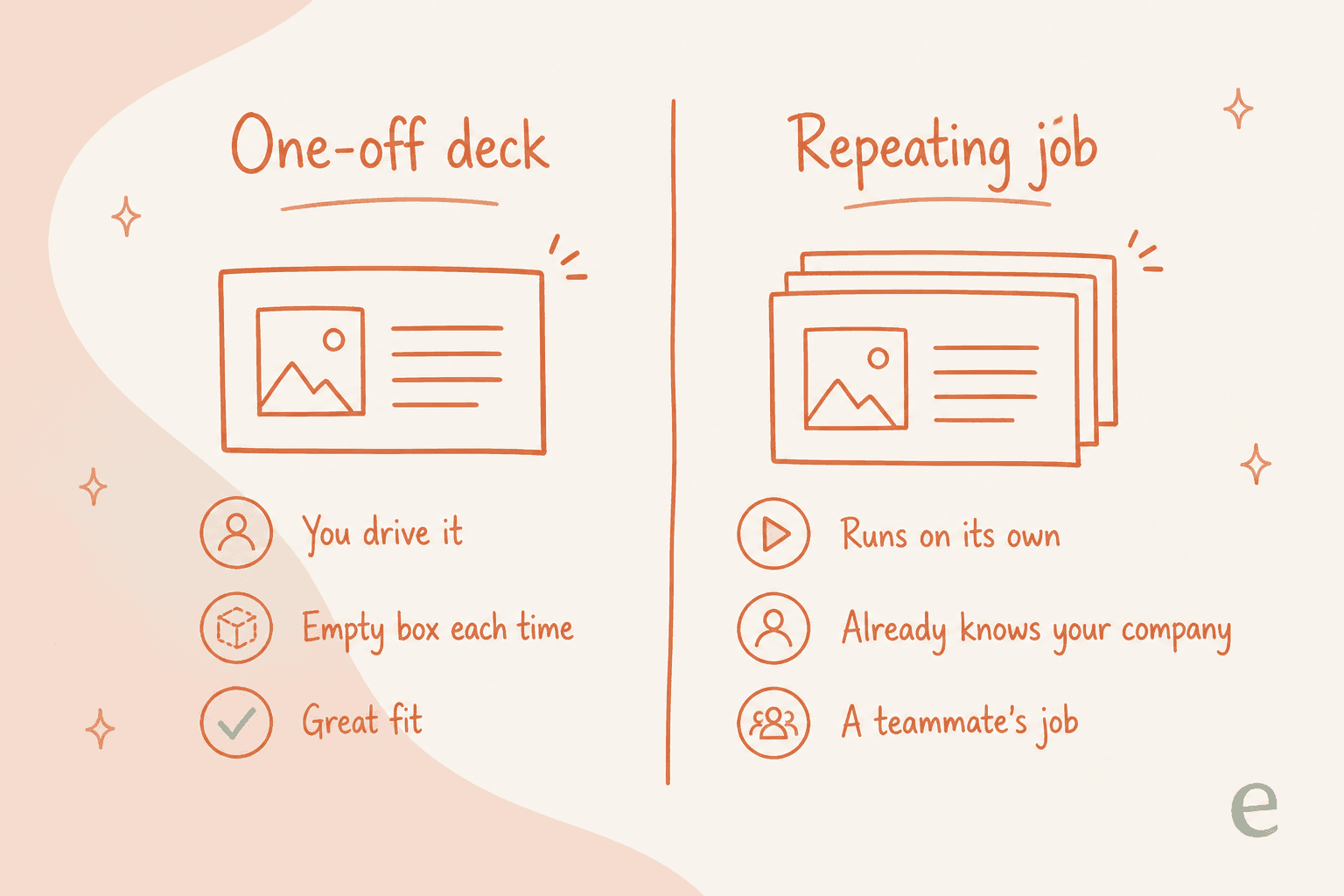
If what you actually need is a weekly report deck, or on-brand content produced on a schedule that already knows your product and your voice, that is a job, and jobs belong to a teammate that owns the whole thing, not a feature you re-brief from scratch. That is the difference between a tool and an AI employee.
Try eesel for content that runs itself
I spend a lot of my time thinking about what buyers actually search for and where AI-made content wins or falls flat, and the pattern is consistent: a great one-off draft is a different problem from work that has to happen every week. Claude Slides nails the first. For the second, the eesel AI blog writer is built as a teammate that already knows your company, researches, drafts, and publishes long-form content on its own, instead of starting from an empty prompt each time.
The concrete difference: eesel teammates train on your existing knowledge, run under one account alongside your helpdesk teammate, and can be simulated before they go live so you know what you are getting. It is free to try, no credit card and no sales call. If your slide problem is really a "this happens every week" problem, that is where I would start.