


Claude can now build real Excel, Word, PowerPoint and PDF files right inside a chat, and it is one of the more useful things Anthropic has shipped this year. The catch worth knowing before you dig in: almost nobody calls it "Claude Docs" except us searchers, and under the hood it is a sandboxed code interpreter, not a document editor. That framing explains both why it is so capable and where it trips.
My honest read after living in it: it is brilliant for one-off documents you drive yourself, shaky on complex spreadsheets you cannot eyeball, and it ships with a real prompt-injection risk you have to actively manage. It is free on every plan now, which makes it easy to try.
The place it stops being the right tool is repeating work. A chat feature starts from an empty box every time and needs you to bring the context. If your goal is a document job that runs continuously and already knows your company, that is a teammate's job, not a chat window's, which is where something like the eesel AI blog writer fits instead.
What "Claude Docs" actually is
Let me clear up the name first, because it matters. Search for "Claude Docs" and you will find people talking about the feature that makes Claude spit out real files. But that is not Anthropic's name for it. The official label is file creation, and inside the app the toggle reads "code execution and file creation." There is no product literally called Claude Docs.
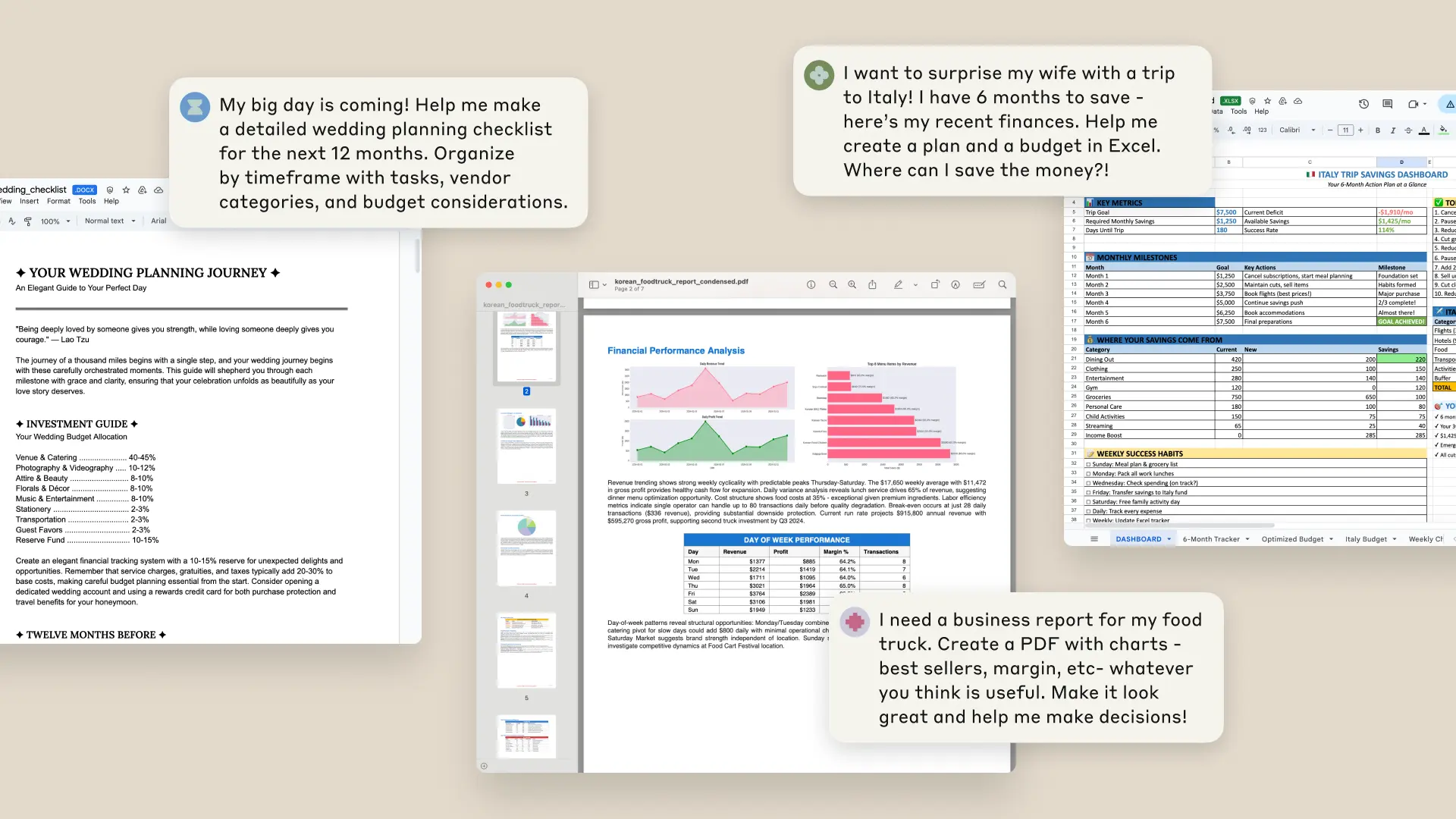
What it does is straightforward and, honestly, a little magic the first few times. You describe what you need, and Claude hands back a finished, downloadable file instead of a wall of text. Anthropic frames it as moving Claude "from an advisor into an active collaborator": you bring the strategy, it handles the implementation. The supported outputs are Excel, PowerPoint, Word and PDF, and it can save straight to Google Drive.
The sharpest description of it came from developer Simon Willison on X, who cut right through the marketing:
"Anthropic are massively burying the lede here - they've called this "Upgraded file creation and analysis" (that really does seem to be the official name) but it's actually.... Claude Code Interpreter! It's sandboxed server-side Python/Node.js code execution for Claude"
That is exactly right, and it is the single most useful thing to understand before you use it. This is the same idea as ChatGPT's Code Interpreter, arriving in Claude. Knowing that reframes everything else about how it behaves.
How it works under the hood
Anthropic gave Claude a private computer environment where it can write code and run programs. When you ask for a spreadsheet, Claude does not "type out a spreadsheet." It writes Python (or JavaScript), runs that code in an isolated, sandboxed container, and the code produces a genuine .xlsx file that you download.
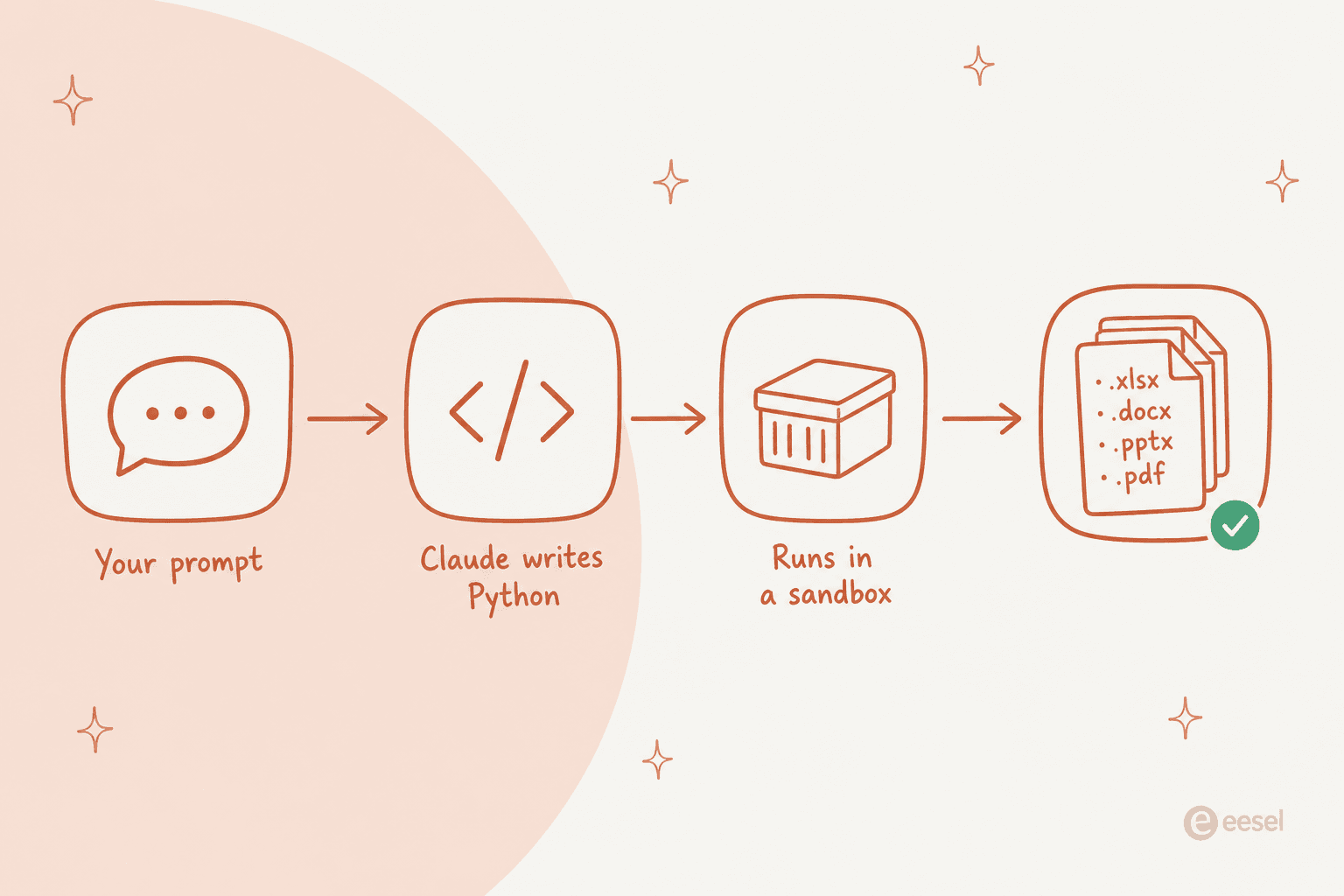
This is why the feature is powerful and why it is quirky in equal measure. Because it is real code hitting real file libraries, the formatting is legitimate: formulas that calculate, native PowerPoint objects, proper PDF layout. But because it is a model writing that code, the logic inside the file is only as correct as the code Claude wrote, and you cannot see the code unless you go looking. The sandbox itself is deliberately limited too, with capped task duration and single-container lifetime to stop runaway loops.
If you have followed Anthropic's other releases, this is the same engine family behind Claude Code. The document feature is that agentic, code-running capability pointed at Office files instead of a codebase.
What you can actually make with it
The range is wide. Beyond the four headline formats, Claude can produce Python scripts, build data visualizations as PNGs, process uploaded CSV and TSV files, and even build simple machine learning models. Regular Artifacts (HTML, React, mermaid diagrams, SVGs) still work alongside it.
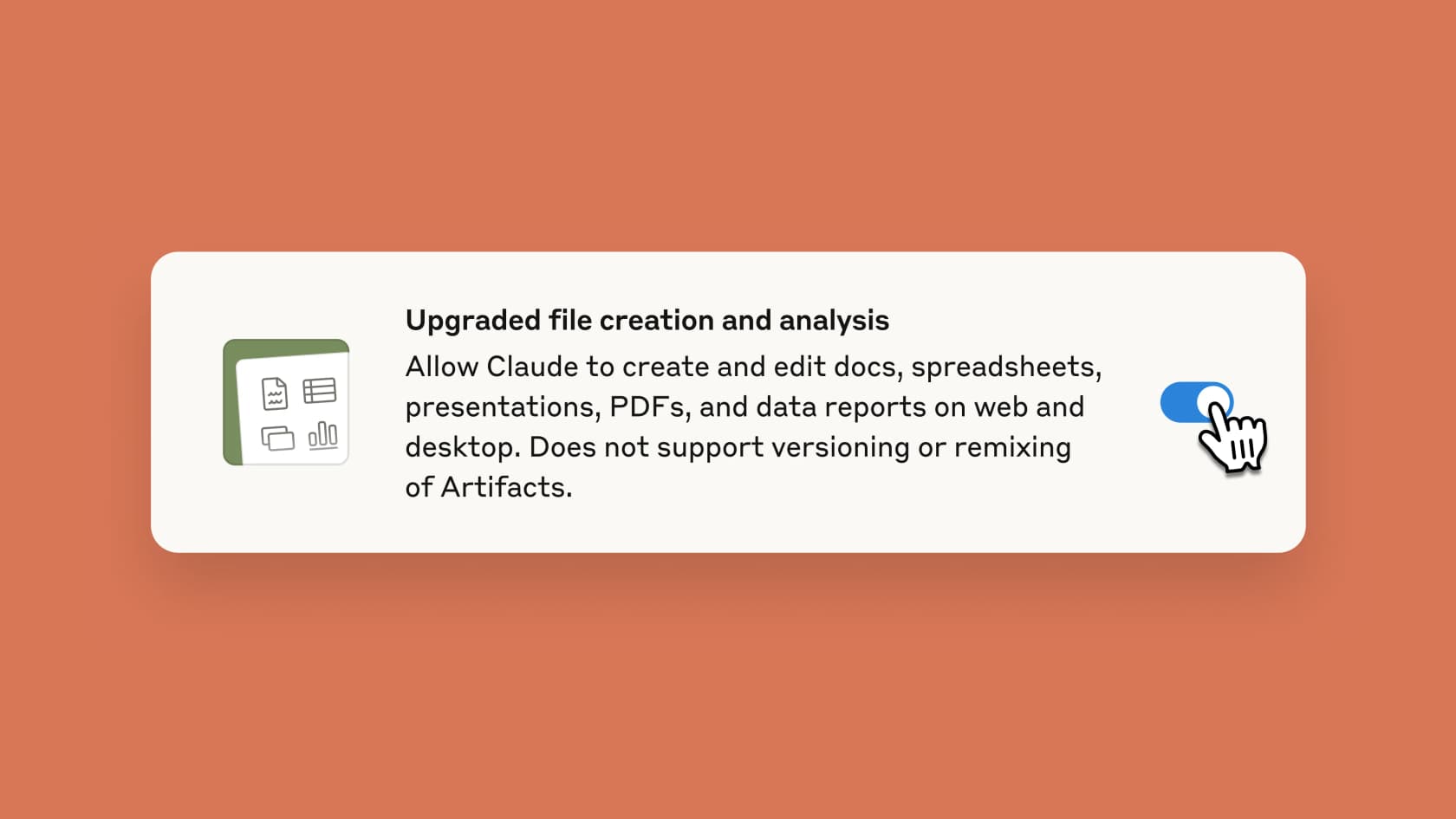
One limitation worth catching early, because it is printed right on the toggle: file creation does not support versioning or remixing of Artifacts. So this is not a living-document workspace with history and branches. It is a generator: you ask, you get a file, you download it. If you want the next version, you ask again.
Where it really shines
For a big, structured, one-shot document, this thing can save you a full afternoon. The clearest example I have seen came from Nate B. Jones on LinkedIn:
"A few days ago, I built an eleven-tab financial model in ten minutes. Two weeks of work compressed into the time it takes to make coffee."

That matches my experience on the tasks it is best at: turning a messy CSV into a formatted report, converting a document into a slide deck, or standing up a tracker from a plain-English description. Anthropic's own pitch is that it turns projects that normally need programming and hours of effort into minutes of conversation, and for these particular shapes of work, that is fair rather than hype.
Where it falls short
Here is the honest other half. The more complex and less checkable the output, the more the code-interpreter reality bites. Khe Hy on LinkedIn put it well after testing it on a real model:
"Claude built the model quickly and got about 70% of the way there. But I spent as much time debugging the output as it would have taken me to build from scratch. Several cells were randomly blank, formulas had fundamental errors, and it misunderstood key calculations."
That 70% number is the one to internalize. On anything where a wrong formula is buried three tabs deep, you own the debugging, and the time you save on the build you can lose on the audit. There has also been pushback on Hacker News that new features land while the underlying service strains under load. And in the launch demo, one commenter noticed on Hacker News that the output opened in Google Sheets rather than Excel, though others clarified the file was in fact a real .xlsx, which is a fair thing to note in both directions. The takeaway is not "avoid it," it is "trust it for what you can verify at a glance, verify what you cannot."
The security catch you can't skip
This is the part I would not gloss over, because Anthropic did not either. Giving a model a sandbox that can run code and reach the network opens a specific door. The support doc's security section says it plainly:
"It is possible for a bad actor to inconspicuously add instructions via external files or websites that trick Claude into: 1. Downloading and running untrusted code in the sandbox environment for malicious purposes 2. Reading sensitive data from a connected knowledge source (for example, Remote MCP, projects) and using the sandbox environment to make an external network request to leak the data"
In plain terms: a prompt injection hidden in a file or webpage can make Claude quietly read data from your projects or connected MCP servers and send it out.
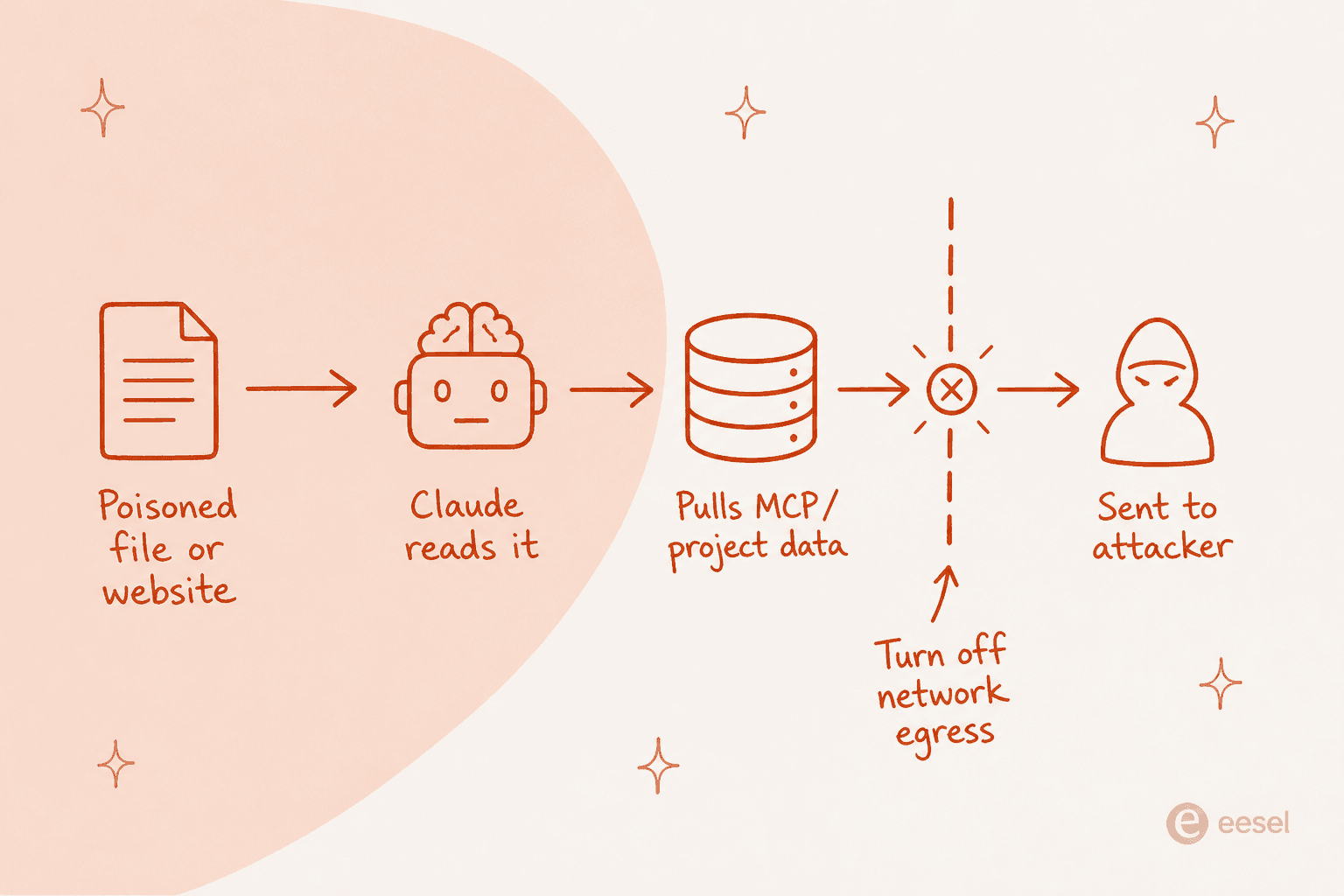
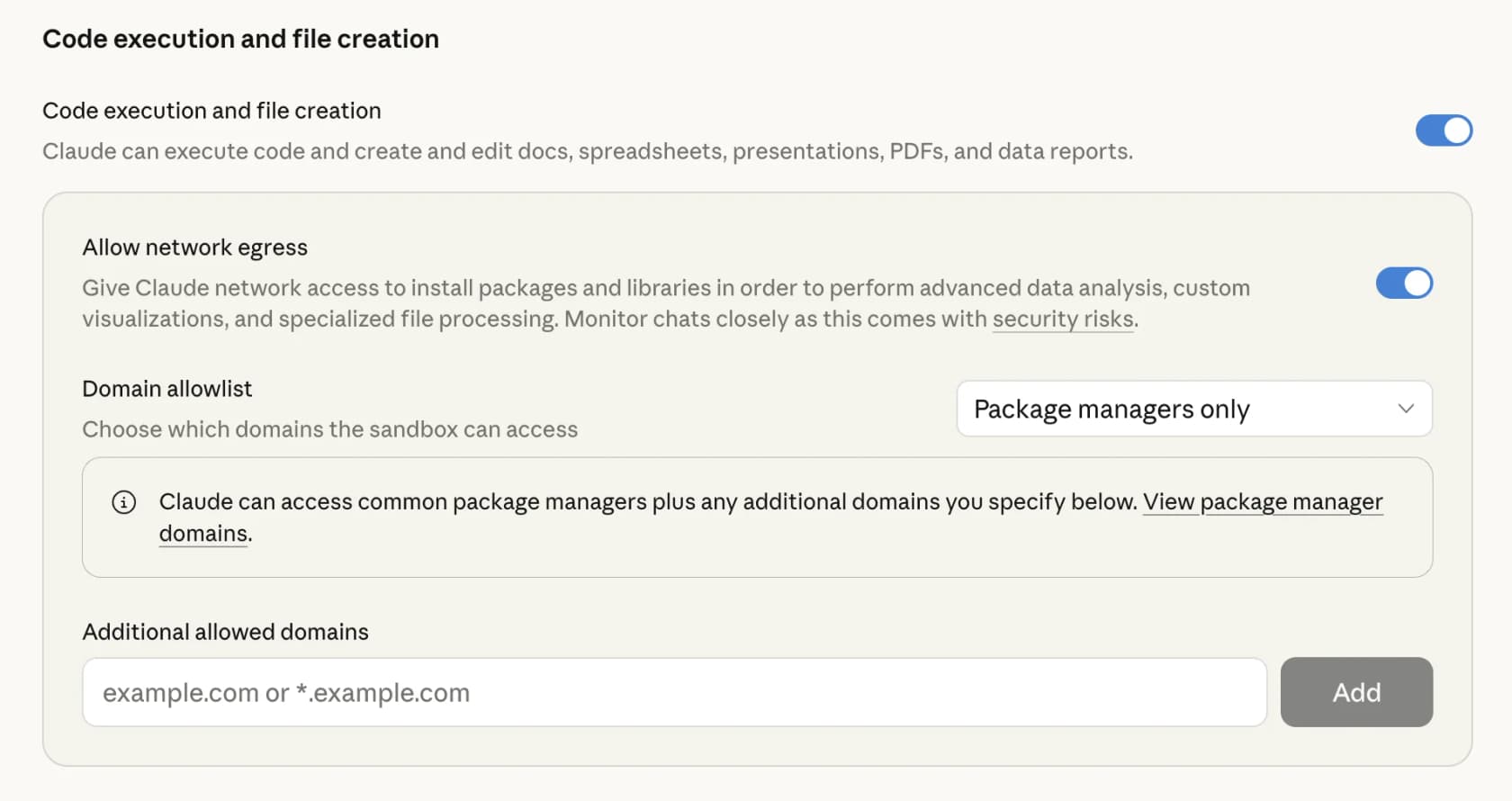
Anthropic ships real defenses: a prompt injection classifier, per-user sandbox isolation, and the option to disable network egress entirely. Turning egress off is the strongest single control, because it stops data leaving the sandbox even if something slips through. You manage all of this from the file creation controls in settings.
The advice to "monitor Claude while using this feature" drew a sharp and fair response on Hacker News:
"The security concerns here are really significant. In the section on security, they write "we recommend you monitor Claude while using this feature." This borders on irresponsible IMO. Monitor what exactly? How should we monitor?"

That is the crux. The controls are there, but the day-to-day burden of watching for a leak sits on you. One important gotcha: if MCP integrations are enabled, network communication stays possible through those connections regardless of the egress setting. So "egress off" is not a complete seal when MCP is in play.
Pricing and plan access
Good news here: access is broad. As of September 2026 the feature is available on every plan, Free included. What differs is the defaults for network access and who can turn things off. It also draws from your plan limits, and creating files uses more of that limit than a normal chat, so heavy use eats into your allowance faster.
| Plan | File creation | Network egress default | Admin controls |
|---|---|---|---|
| Free | Enabled | Enabled (approved sources) | Individual toggle in Settings |
| Pro | Enabled | Enabled (approved sources) | Individual toggle in Settings |
| Max | Enabled | Enabled (approved sources) | Individual toggle in Settings |
| Team | Enabled by default | Disabled by default, owners can enable | Owners can disable org-wide |
| Enterprise | Enabled for new orgs | Disabled by default | Domain whitelisting and network controls |
The pattern is sensible: individuals get it on and open, organizations get it on but locked down, with admins holding the keys. If you are on Team or Enterprise and file creation seems limited, that is almost certainly your admin's network egress setting, not a bug.
Claude Docs vs a teammate that owns the job
Here is the reframe I would leave you with, and it is less a criticism of Claude Docs than a boundary around what it is for. Claude Docs is a tool you drive. It is superb when you are sitting there, one document at a time, bringing the context and checking the output. But every chat starts from an empty box, and it does not know your company, your brand, or your past work unless you feed it in again.
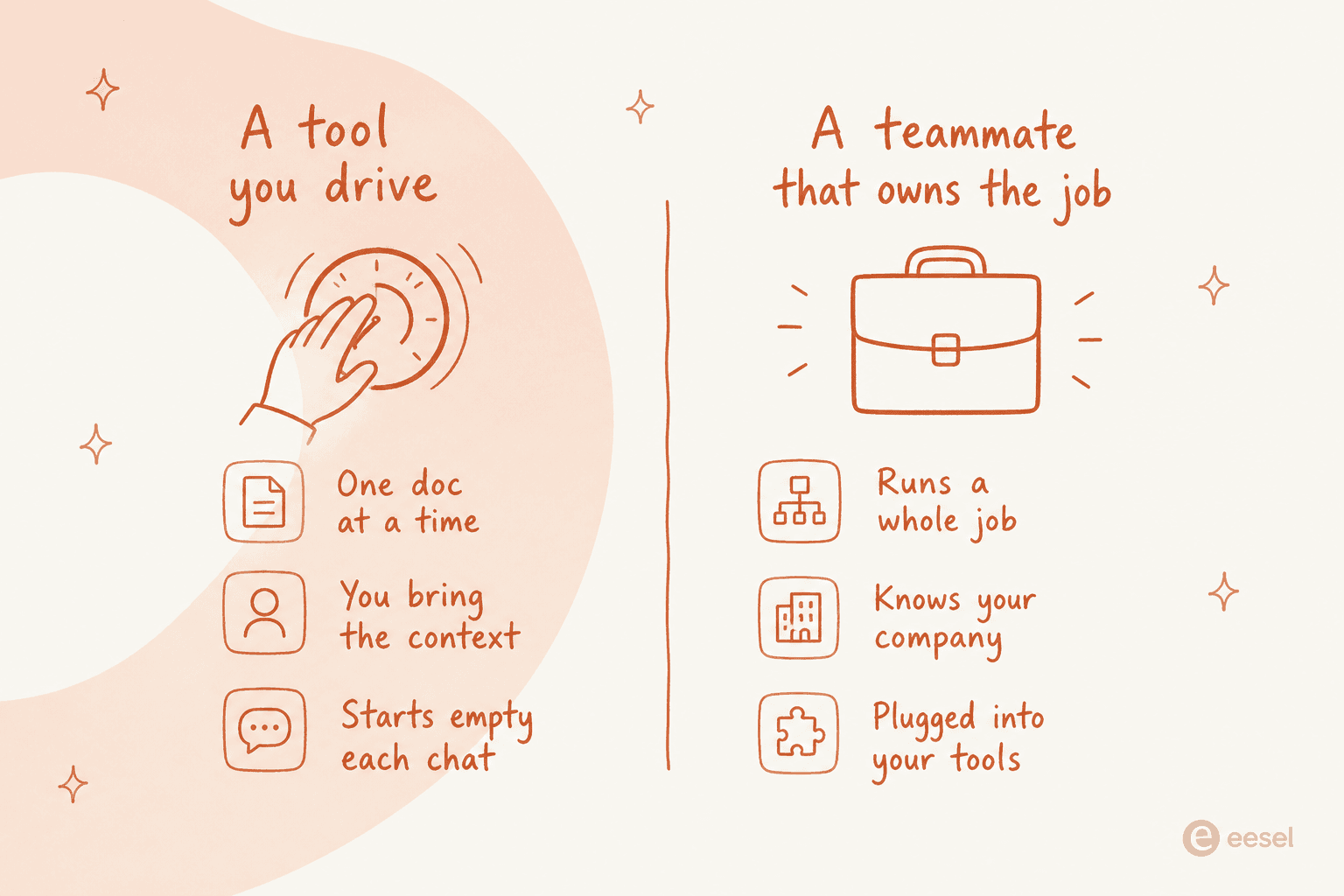
That distinction is the whole game once your document work stops being one-off. A quarterly report, a support macro library, a stream of blog posts: those are not one file, they are a repeating job. Driving a chat window through that by hand, every time, is the expensive way to do it. The model most people are moving toward is an AI employee or AI teammate that owns a defined job end to end, already carries your company's knowledge, and plugs into the tools where the work lives. That is a different thing from a code interpreter in a chat, and it is worth knowing which one your problem actually needs.
Try eesel
If your document work is a repeating job rather than a one-off, that is exactly what eesel is built for. eesel is an AI teammate platform: instead of a blank chat you drive, you hire ready-to-work teammates for specific jobs, each arriving with the skills, integrations and company context the role needs. The current roster is an AI helpdesk teammate that joins your support queue, and an AI blog writer that researches, drafts and publishes content that sounds like you.

The difference from Claude Docs is the one from the section above: the blog writer does not start empty. It knows your product, pulls its own research, generates its own images, and ships the finished post, rather than waiting for you to prompt each step. And if you would rather drive it like code, eesel has a public CLI plus MCP, so you can run the same teammate from a terminal, wire it into scripts, or let a coding agent like Claude Code operate it, the headless way to run the same workspace. It is free to try.