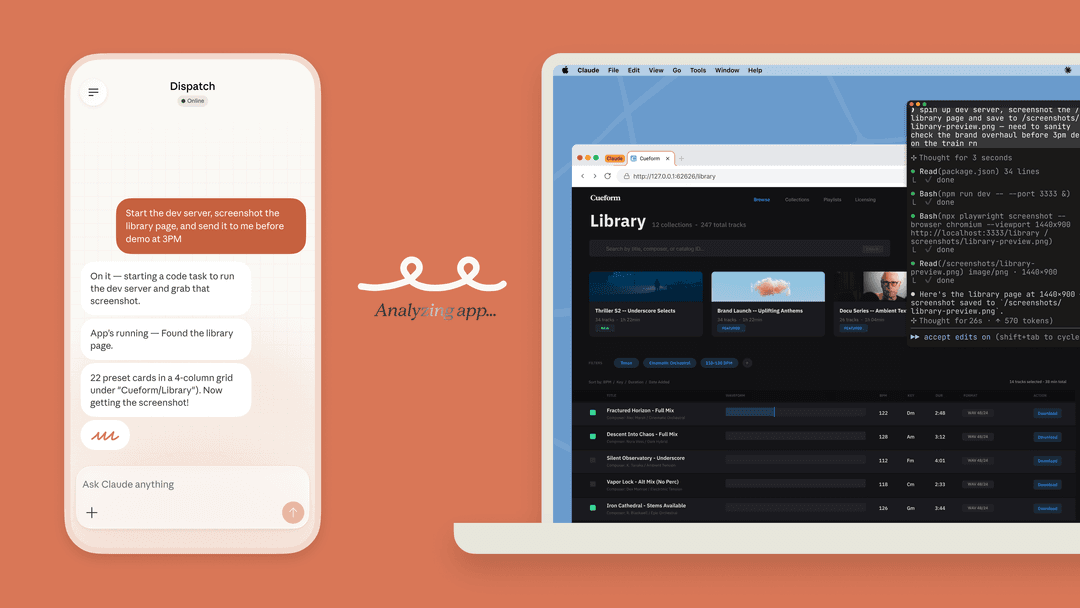
Claude Desktop on Mac: quick help without leaving the app
Quick Entry lets a Mac user open Claude from any app. The default shortcut is a double-tap of Option. You can type a question, drag to capture part of the screen, click an application window to attach it, or dictate a message with Caps Lock if voice input is enabled.
It is available on Free, Pro, Max, Team, and Enterprise plans. Quick Entry needs macOS 12 or later; voice dictation needs macOS 14 or later. Claude Desktop must be running, but it can stay in the background.
The key permission detail is easy to overlook. Screen recording is required for screenshots and app-window sharing; Accessibility is required for Quick Entry; Speech Recognition is required for voice dictation. Review or revoke those permissions in System Settings > Privacy & Security. A screenshot is useful context, but it can also expose customer details, API keys, or private conversations. Capture the error, not the entire desktop.
Cowork is for a bounded task, not unrestricted Mac access
Claude Cowork is available on paid Claude plans. It is designed for longer tasks such as sorting files, synthesizing research, or producing a document. It can keep working while you monitor the same session from another Claude surface.
For file-based work, connect a narrow folder with only the material needed for the task. Review writes and deletion requests, and keep a recoverable original. Network egress settings do not cover every tool: Anthropic documents exceptions for web fetch, web search, and MCP connections. Review those tools and connected services separately. Cowork's cloud sessions can continue remotely, but access to local files or your Mac's screen still requires the desktop connection to remain available.
Computer use is a separate beta capability documented for Pro and Max. Claude Desktop asks before accessing each app. On macOS 15 or later it can work in background windows by default, but still needs permission. Anthropic warns that safeguards are imperfect and recommends avoiding sensitive apps. Read the computer-use guidance before granting app control.
Claude Code is the Mac choice for repository work
Claude Code can inspect a repository, propose edits, run commands, and use connected tools. Its permissions system has Allow, Ask, and Deny rules. Inspect the active mode and /permissions; do not assume every installation asks before edits. For example, the VS Code extension documents Auto as the built-in starting mode for Pro, Max, and Team. Choose Manual when you want to review proposed edits and tool requests, while checking any existing allow rules.
Mac developers can also use the official Claude Code extension for VS Code. Open Extensions with Command-Shift-X, find Claude Code, install it, and sign in. It supports file mentions, plan review, and visual diffs. A paid Claude subscription or Console account can provide access; supported third-party providers have separate setup. The extension bundles its own CLI for the chat panel, but using claude in the integrated terminal requires the standalone CLI too.

Anthropic's documentation shows Claude Code inside VS Code. This is an editor interface, distinct from Quick Entry and Cowork.
The practical default for a new codebase is to start in a read-focused mode, ask Claude to explain the relevant files and tests, then approve the smallest change that addresses the problem. Do not confuse “it found the likely cause” with “it has verified the fix.” Let a person review the diff and run the appropriate test.
A concrete Mac support handoff: validate a knowledge answer after an app error
Imagine a support lead is on a Mac and sees an error in a customer-facing app: the knowledge answer says an integration is connected, while the app reports that the source is still indexing. The right response is not to paste the whole screen into a general chat and ask Claude to guess.
First, use Quick Entry to capture only the error message, source name, and timestamp. Ask Claude to turn that into a concise investigation note: what was observed, what it does not prove, and the questions for the support workspace. Do not include a customer’s private ticket text or credentials.
Next, the support lead opens the existing eesel teammate in the dashboard. They check the connected knowledge source, the agent’s standing instructions, and whether the source has finished downloading. The coding agent can make the same checks through the CLI, so the handoff does not rely on a screenshot or a memory of which agent was selected.
Compare three cases against evidence supplied by the owner:
- The source is still downloading: the draft should acknowledge incomplete knowledge rather than confirm the answer.
- The source is ready but the app still reports an error: the draft should flag the conflict and request missing evidence.
- The owner verifies that the error is resolved: the teammate can draft an explanation for review without treating source readiness alone as proof of resolution.
This is a behavioral test, not a claim that Claude or eesel diagnosed the app. The support lead checks the app, source status, and final wording. If the evidence changes, the team updates the instruction or knowledge source before using the result again.
Use the eesel CLI with Claude Code, Codex, or Cursor
The eesel CLI needs Node.js 18.17 or later. It prints JSON and operates the same agent and workspace as the dashboard. That means a person can work in the eesel UI while a script, Claude Code, Codex, or Cursor checks the current setup from a Mac terminal.
For the error handoff, authenticate first and replace Support below with the intended existing non-production teammate's actual name or ID from agents. Login stores credentials; the following commands read current state:
npx @eesel/cli login
npx @eesel/cli whoami
npx @eesel/cli agents
npx @eesel/cli status --agent "Support"
npx @eesel/cli integrations download list --agent "Support"
npx @eesel/cli instructions --agent "Support"
npx @eesel/cli activity --agent "Support"
npx @eesel/cli billing --agent "Support"
Use the agent name or ID returned by agents; do not assume the terminal default is the teammate the support lead meant. The results let the coding agent record the signed-in workspace, selected agent, source status, instructions checked, and activity reviewed. If a change is needed, use --dry-run on the write command first: it previews that server request but does not test how the agent answers an error.
Supply the approved observation note to the teammate; the Quick Entry conversation does not transfer automatically. After reviewing billing and authorizing paid work, the owner can ask a coding agent to use npx @eesel/cli chat to compare that note with the source status and approved troubleshooting instructions. Check all three cases before using the wording. Setup and observation commands are free; chat is billed.
For these non-production tests, the owner sets customer replies and consequential actions to Disabled on the dashboard's Actions page. A task prompt is not an access control. If the owner later chooses Needs approval for production replies, verify that workflow separately. The eesel approvals guide explains the per-action settings and authorized reviewers.

If you want one support workspace that people can manage in the dashboard and coding agents can inspect from a Mac terminal, sign up for eesel. Keep the handoff specific: the observed error, the source and instructions checked, the test cases, and the human decision still required.
Frequently Asked Questions
Does Claude Desktop have Quick Entry on Mac?
Yes. Quick Entry is available to Claude Desktop users on macOS. Its default shortcut is a double-tap of Option; it can capture a screenshot, attach an app window, or take voice dictation when the required macOS permissions are enabled.
What macOS version does Quick Entry need?
Quick Entry needs macOS 12 or later. Voice dictation needs macOS 14 or later. Claude Desktop must be installed and running, although it may run in the background.
What is Claude Cowork on a Mac?
Cowork is Claude's multi-step task environment for paid plans. It can work with folders you connect, configured network access, and approved connectors. Review the planned work and permissions before granting it access to sensitive material.
How should I limit Cowork file access?
Connect only the working folder the task needs, review proposed changes, and keep recoverable originals. Connected services and computer use have separate access boundaries; do not treat a folder choice as a guarantee for every tool.
How do Claude Code permissions work?
Inspect the active mode and Allow, Ask, and Deny rules with /permissions. Manual mode lets you review proposed edits and tool requests, subject to configured rules. Do not assume every surface starts in Manual; the VS Code extension documents Auto as the built-in starting mode for Pro, Max, and Team.