


On September 12, 2026, Microsoft started adding xAI's Grok models to Microsoft Copilot, beginning inside Word, Excel, and PowerPoint. It is the latest move in Microsoft's plan to make Copilot a multi-model product instead of an OpenAI-only one.
Here is the part the headlines skip: "Grok in Copilot" is not one thing. It is three separate rollouts, on three different Grok models, at three different stages. GitHub Copilot has had Grok 4.6 since August, Copilot Studio runs Grok 4.1 Fast, and the new Office preview is admin-gated, off by default, and not available in the EU, EFTA, or the UK yet.
And here is the thing I keep coming back to as someone who builds AI products for a living: picking a different model inside a chat box is not the same as getting a job done. Grok in Copilot gives you a smarter assistant to drive. It does not give you a teammate that already knows your company and finishes the work. That distinction is the whole point of this post.
What Microsoft actually shipped
The primary source here is Microsoft's own Copilot blog post, published September 12, 2026. Its first line: "We are expanding model choice in Copilot with the addition of Grok models from SpaceXAI." One naming note up front, because it trips people up: Microsoft's copy calls the vendor "SpaceXAI." That is Elon Musk's xAI. Same company.
The rollout lands first in Word, Excel, and PowerPoint, delivered through the Microsoft Frontier Program, which Microsoft frames as "a focused release to gather customer feedback." So this is a preview aimed at eligible Frontier customers, not a switch that flips for everyone with a Copilot license.
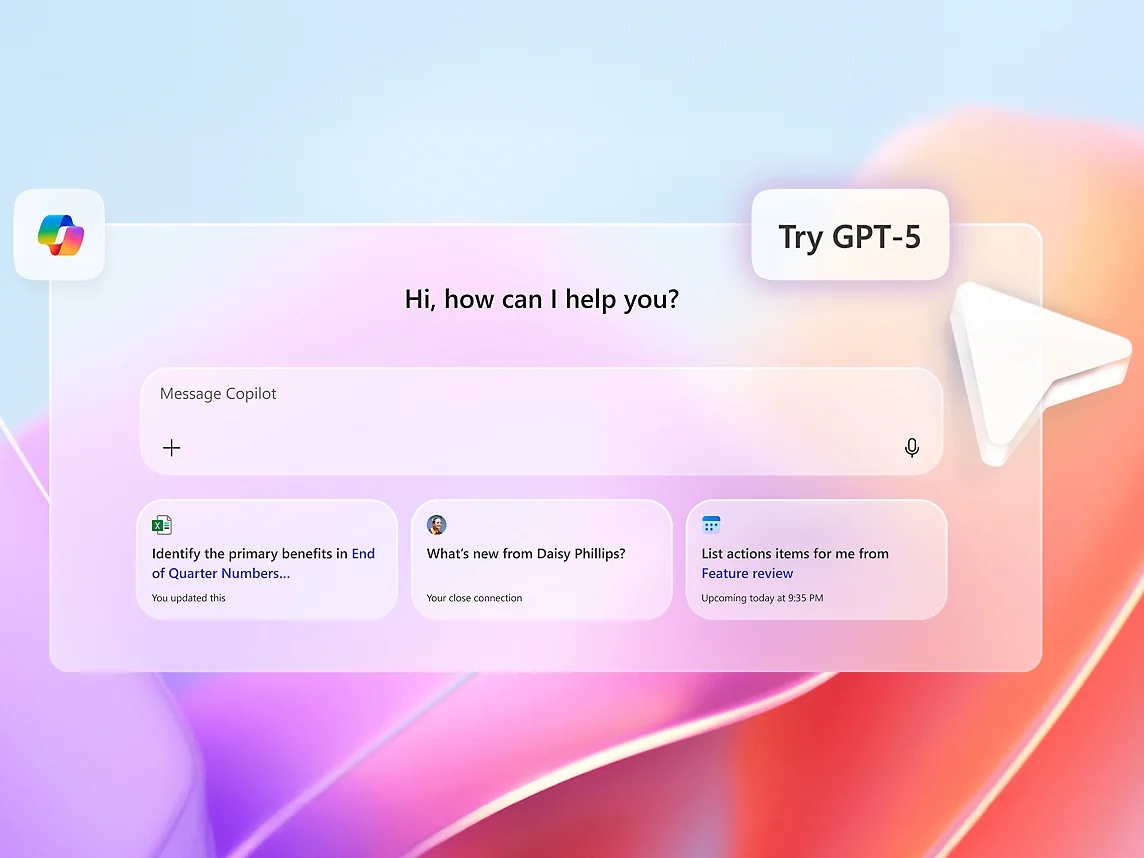
Satya Nadella marked the moment on X with a short line that tells you exactly how Microsoft wants this read:
More model choice coming to Copilot. Welcome Grok!
The strategic framing in the post is consistent with that: "Our multi-model strategy gives customers access to leading AI models while maintaining the trusted Copilot experience." Copilot used to mean "OpenAI, wrapped in Microsoft's apps." Now it means a menu, and Grok is the newest item on it, sitting next to OpenAI's models, Anthropic's, and Microsoft's own MAI family.
Three Copilots, three Grok models
This is the part I wish more coverage made clear. When someone says "Grok is in Copilot," they could mean any of three products, and the details differ in ways that matter if you are the one enabling it.
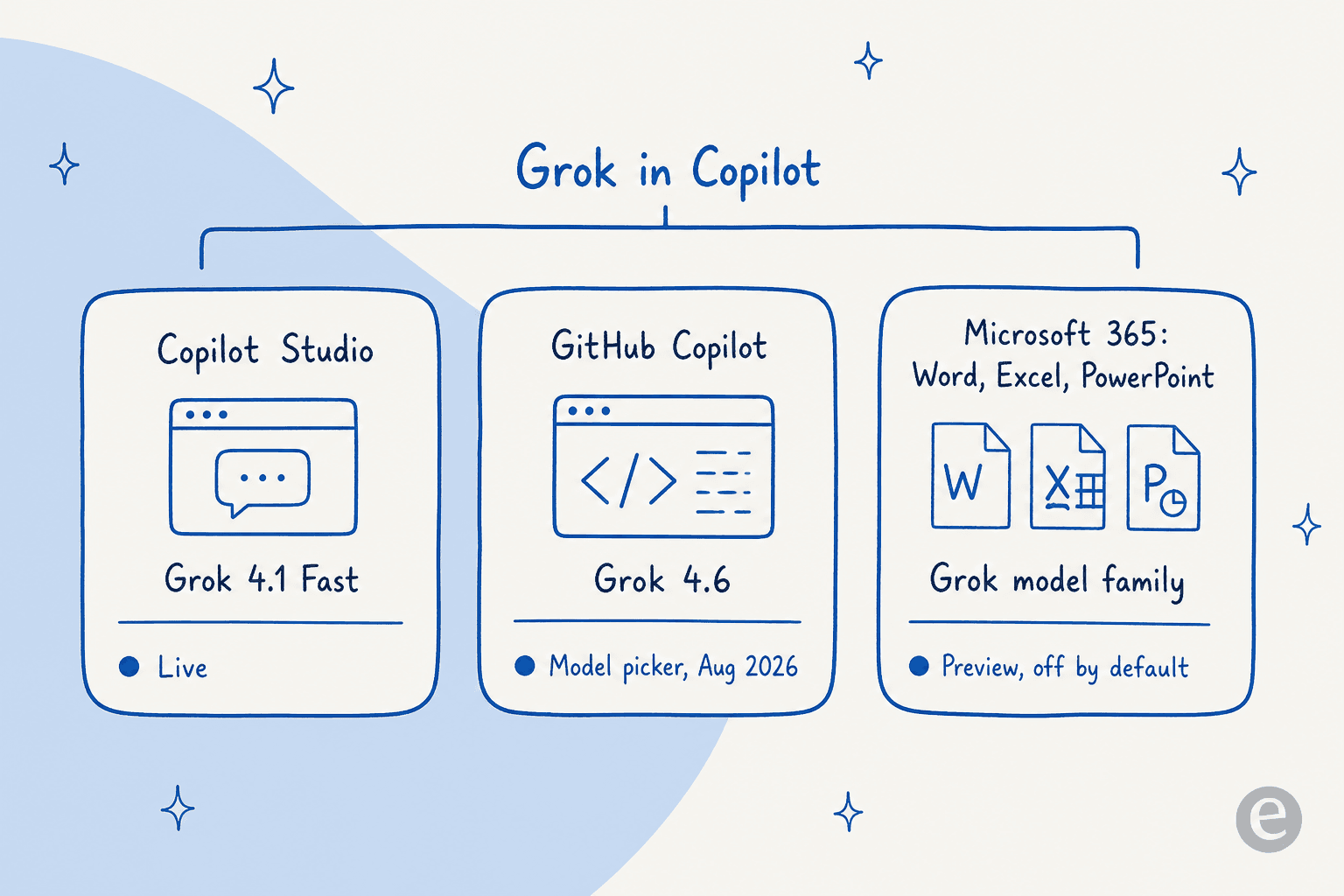
GitHub Copilot got there first. Per the GitHub changelog, "Grok 4.6, our latest coding model, is now available in GitHub Copilot" as of August 14, 2026. You pick it from the model picker across cloud agents, the Copilot CLI, and the VS Code IDE. Some businesses have to enable it from Copilot settings first. As someone who lives in these tools, the model picker is the cleanest of the three integrations: it is opt-in per request, and you can A/B a coding task against another model in seconds.
Copilot Studio, Microsoft's agent-building surface, already carried Grok too. Nadella noted adding Grok 4.1 Fast to the multi-model lineup there. That is the model Microsoft's own safety review later flagged, which I will come back to.
Microsoft 365 Copilot in Word, Excel, and PowerPoint is the new one, and the most cautious. The Office post does not name a version number, describing it only as "the model family from SpaceXAI available as a preview to eligible Frontier customers." So if you want a specific Grok version behind your spreadsheet formulas today, GitHub Copilot is the surface that tells you exactly what you are getting.
There is also a fourth door that predates all of this: Azure AI Foundry has hosted Grok since September 2025, currently Grok 4 plus three faster variants (Grok 4 Fast Reasoning, Grok 4 Fast Non-Reasoning, and Grok Code Fast 1). That is the developer path, where you deploy Grok as a raw model and build your own app on top, rather than using it inside a finished Copilot.
What Grok is, and why Microsoft wanted it
Grok is the frontier model family from xAI, Elon Musk's AI company. The current flagship is Grok 4.6, a 500k-token model that xAI pitches on "agentic tool calling, minimal hallucinations, configurable reasoning," with a knowledge cutoff of February 1, 2026.
Two things make Grok different rather than just another model on the menu. The first is real-time knowledge. Grok has first-party access to X, so its X Search tool can pull live posts, profiles, and threads in a way no other frontier lab can match. The second is raw scale: xAI runs Colossus, which it calls the world's largest supercluster at 150,000 GPUs, and reports processing more than 300 million queries a day.
For Microsoft, the appeal is less about any single benchmark and more about not being dependent on one lab. When Grok 4 landed on Azure, Microsoft was blunt that a frontier model is not a deploy-and-forget model, and turned on Azure AI Content Safety by default. That caution is a tell: Microsoft wants the model choice, but it is hedging on the model's behavior.
What it costs
For most people, the honest answer is that Grok inside Copilot does not add a separate bill. It is part of the Copilot plan you already pay for. But "Copilot" spans three price ladders, so here is the full picture.
| Product | Plan | Price | What you get |
|---|---|---|---|
| Consumer Copilot | Free | $0 | AI chat, voice, image generation, web-grounded |
| Consumer Copilot | Microsoft 365 Premium | $19.99/mo or $199.99/yr | Copilot in Office apps + M365 apps + storage. Replaces the retired $20 Copilot Pro |
| Microsoft 365 Copilot | Chat | $0 (with eligible M365) | Web-grounded chat + IT controls; custom agents metered |
| Microsoft 365 Copilot | Enterprise add-on | $30/user/mo yearly ($31.50 monthly) | Copilot in Word, Excel, PowerPoint, Outlook, Teams + agents + Copilot Studio |
| GitHub Copilot | Free / Pro / Pro+ / Max | $0 / $10 / $39 / $100 per mo | Coding assistant; unlimited completions; chat and agents draw AI Credits |
A couple of things worth flagging, because they are easy to get wrong. The standalone $20 Copilot Pro is retired: consumers now get paid Copilot through Microsoft 365 Premium, and legacy Pro support ends August 1, 2026. And since June 1, 2026, GitHub Copilot meters chat, agents, and CLI usage with AI Credits at 1 credit = $0.01, though code completions stay free of credits.
If you go the developer route instead and call Grok directly, the xAI rate card is where the real numbers live. Grok 4.6 is $2.00 per million input tokens and $6.00 per million output tokens, with cached input at $0.50. The gotcha most write-ups miss: once a prompt crosses 200k tokens, every token in the request bills at the doubled long-context rate of $4.00 in and $12.00 out. Grok 4 on Azure AI Foundry is priced higher again at $5.50 in and $27.50 out, because that figure bundles Azure's content-safety layer. On the consumer side, SuperGrok is $30/month and SuperGrok Plus is $100/month.
The catch nobody puts in the headline
Here is where I would slow down if I were the admin being asked to turn this on. The exciting framing is "more model choice." The operational reality is a governance decision with real edges.
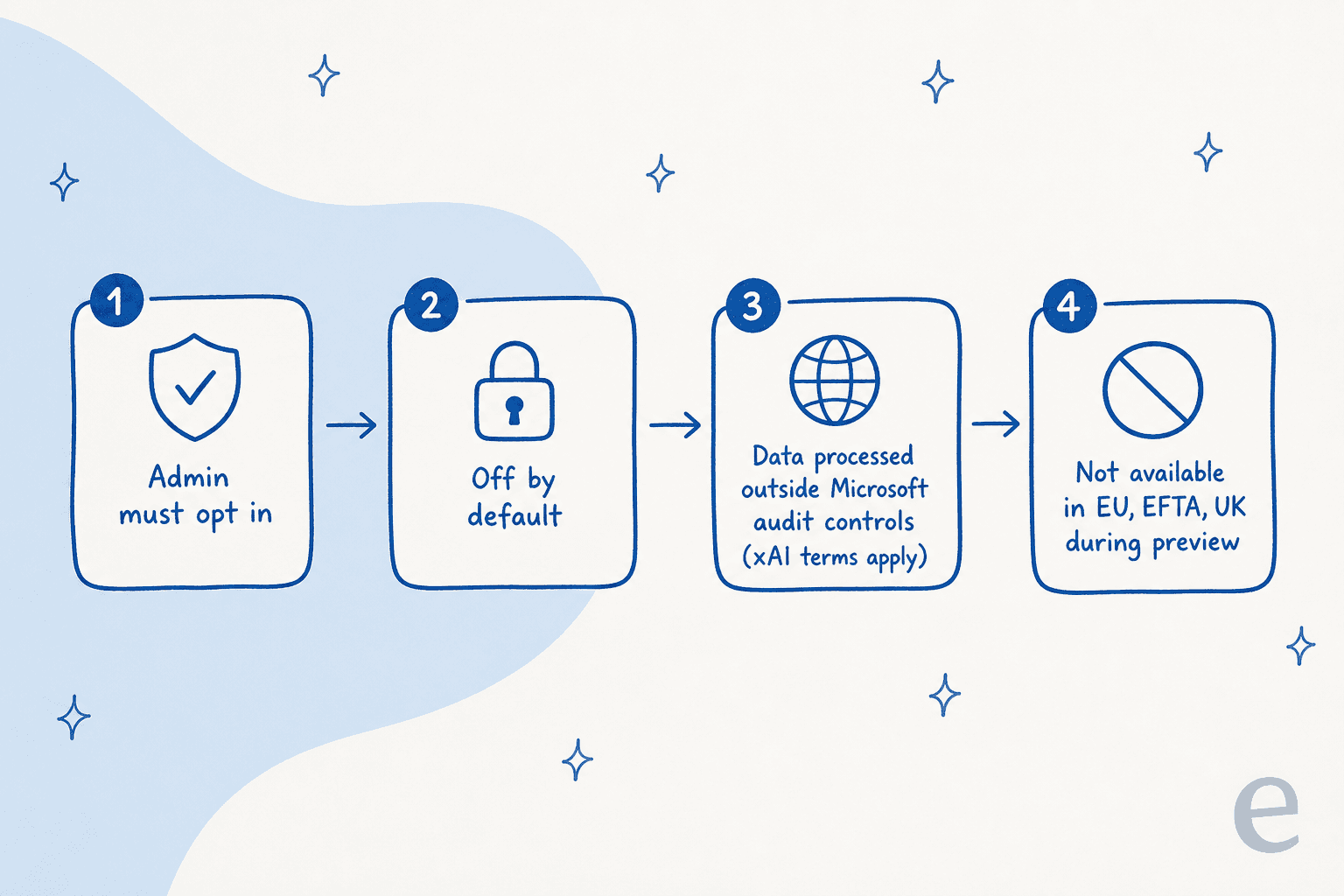
Start with the defaults. Microsoft says access to SpaceXAI models is managed through an admin setting that is disabled by default. IT has to opt in, deliberately. Then there is geography: Grok is not available in the EU, EFTA, or UK during the preview.
The one that deserves the most attention is data handling. Per Microsoft Learn, when an organization uses a Grok model, the data "is processed outside all Microsoft managed environments and audit controls," so Microsoft's own customer agreements do not apply. Instead, use is governed by xAI's Enterprise Terms of Service and Data Processing Addendum. SpaceXAI was added to Microsoft's subprocessor list to make that possible. None of that is a scandal, but it means enabling Grok is a data-residency and vendor-terms question, not a UI toggle.
There is one more wrinkle from Microsoft's own testing. Coverage of Copilot Studio reported that Microsoft's safety evaluation flagged Grok 4.1 Fast as less aligned than the other Copilot models, with a higher risk of harmful content. Microsoft still shipped it, behind the admin gate. That is a reasonable call for an opt-in preview. It is also exactly why the gate exists.
What people are actually saying
The reaction split roughly three ways, and it is more interesting than "everyone loves it."
The Grok fans are loud and excited. Elon Musk's own confirmation post cleared 8,000 likes, and replies were full of enthusiasm about Grok reaching Office.
But the most-engaged replies under Nadella's announcement were not celebrating Grok. They were people who would rather have a different model:
One of the worst parts of my job is being forced to use copilot. At least but Fable and Astra in it.
That is the real "why Grok?" debate in one line. This user wants Anthropic's Claude Fable or OpenAI's GPT-6 Astra in the picker, not Grok. More model choice only helps if it includes the models people actually trust for their work.
The third camp is the one I have the most sympathy for as a builder: can you steer it reliably enough to put in a document workflow? The top comment on the Hacker News thread about Grok 4.6 poked at exactly this:
Looks like the SpaceXAI api is adding a default system prompt to all requests. Annoyingly, the line about not mentioning these guidelines is superseding any instructions in the system prompt, causing the model to often refuse discussion regarding system prompts.

A model that overrides your instructions with its own hidden ones is a real problem when you are trying to make it do a specific, repeatable job. Which brings me to the bigger point.
More model choice, or a teammate that does the job?
Everything above is about swapping the engine inside an assistant. That is useful. But step back and notice what it does not change: you are still the one driving. You still open Copilot, pick a model, write the prompt, check the output, and paste it where it needs to go. Grok makes the engine potentially better. It does not make the assistant finish the work for you.
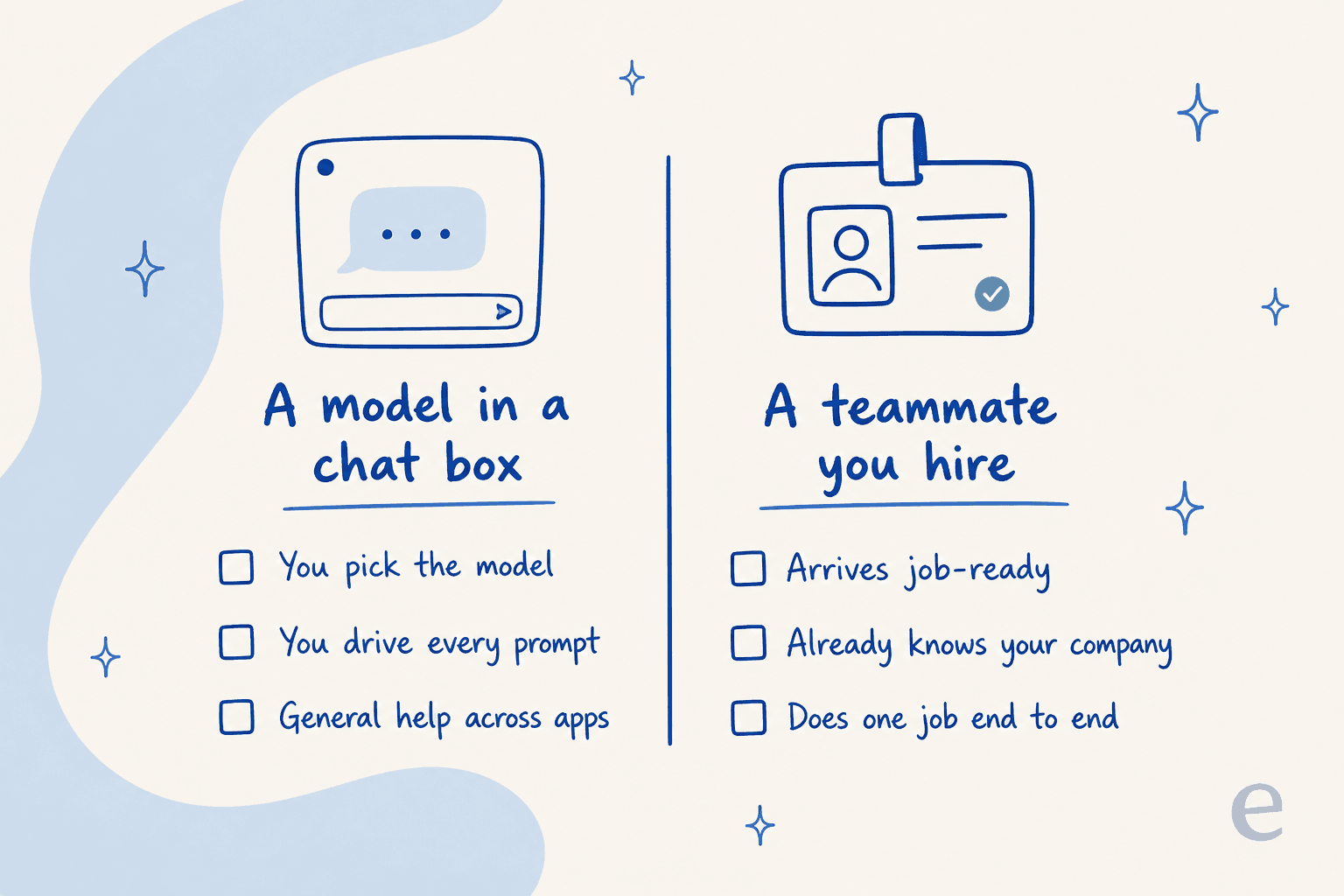
This is the distinction I would draw between a general assistant and a hired teammate. Copilot with a model picker is infrastructure with a nice UI: a horizontal helper across every app, powered by whichever model you choose. That is real value for ad-hoc work. But for a defined, repeatable job, most teams do not want to babysit a model picker. They want the job done.
That is the gap eesel is built for. Instead of selling you a model to drive, eesel gives you a ready-to-work AI teammate for a specific role: today, an AI helpdesk teammate that resolves support tickets, and an AI blog writer. Each one arrives with the skills, integrations, and company context for its job, rather than a blank chat box waiting for prompts. Having spent the last few years putting AI on live support queues, I can tell you the hard part was never the model. It was making the thing reliable enough to trust on real customer conversations, which is why eesel simulates every rollout against your own past tickets before it answers a single live one.
The model-versus-employee line matters for developers too. If your interest in Grok-in-Copilot is the CLI and the API, note that eesel is built the same agent-first way. The eesel CLI (@eesel/cli) drives the same teammate and workspace you would use in the dashboard, from a terminal or a script, and its docs say plainly that everything on the site can be done from the command line. A person can run eesel chat, eesel activity, or eesel approvals by hand; a script can automate them; and a coding agent like Claude Code, Codex, or Cursor can drive them, with every command able to print JSON and a --dry-run flag that shows the exact call a write would make before it sends. Every workspace is also an MCP server. So the same "operate it from the terminal" workflow that draws people to GitHub Copilot exists here, pointed at a teammate that does a job instead of a model you prompt.
Try eesel
If the Grok news has you rethinking what you actually want from AI at work, it is worth being clear about the two shapes on offer. Microsoft Copilot with Grok gives you a stronger general assistant to drive across Office. eesel gives you an AI teammate that already knows your company and finishes a defined job.

For support teams, that means an AI that joins your existing helpdesk queue, answers from your own knowledge, and takes real actions, not a chatbot you have to supervise. You can connect it, point it at your help center, and simulate it on your past tickets to see exactly what it would have resolved before it goes live. It is free to try, and you can start without talking to sales.
Frequently Asked Questions
Is Grok available in Microsoft Copilot?
Yes. As of September 12, 2026, Grok models from xAI (named "SpaceXAI" in Microsoft's own copy) are rolling into Microsoft 365 Copilot inside Word, Excel, and PowerPoint through the Microsoft Frontier Program. Grok 4.6 also arrived in GitHub Copilot in August, and Grok 4.1 Fast is in Copilot Studio.
How much does Grok in Microsoft Copilot cost?
Grok is part of your existing Copilot plan, so there is no separate Grok bill for most users. The Microsoft 365 Copilot add-on is $30/user/month billed yearly, GitHub Copilot runs from $0 to $100/month, and consumer Copilot is free with a paid tier via Microsoft 365 Premium at $19.99/month.
Is Grok in Copilot turned on by default?
No. Microsoft states that access to SpaceXAI models is managed through an admin setting that is disabled by default, and it is not available to Frontier customers in the EU, EFTA, or UK during the preview.
Is Grok in Copilot safe for enterprise data?
It needs a real governance review. Per Microsoft Learn, when a Grok model is used your data is processed outside Microsoft's managed environments and audit controls, governed by xAI's terms instead. If you want AI that keeps company knowledge and actions inside a controlled workspace, an AI teammate like eesel is a different model of ownership.