
What Exa Agent Ultra actually is
Exa started life as Metaphor, a YC S21 company building embeddings-based web search, and grew into a web search and crawling API that AI products call under the hood. Cursor, for one, leans on Exa to pull the latest docs into its coding agent. The Exa Agent is the layer above raw search: an async endpoint that takes a natural-language query plus an output schema, then fans out its own searches, reads the pages behind them, verifies candidates, and hands back structured, cited JSON.
Ultra is not a separate product. It is the top rung of Exa Agent's effort dial. Set effort: "ultra" and the agent coordinates many subagents across thousands of sources, putting frontier models where the task is hard and faster ones where they are enough. Exa positions it for the jobs that need to run to exhaustion: building a complete market map, enriching every row in a list, or verifying a hard-to-check criterion across filings, press, and regulator sites.
The launch framing was blunt: "frontier quality at a fraction of the cost." That is a pricing claim as much as a quality one, which is exactly why the metering matters.
So what does Exa Agent Ultra cost?
Here is the honest answer that Exa's marketing page compresses into a range: the Agent API has seven effort levels, and only five of them have a fixed price. auto and ultra are metered.
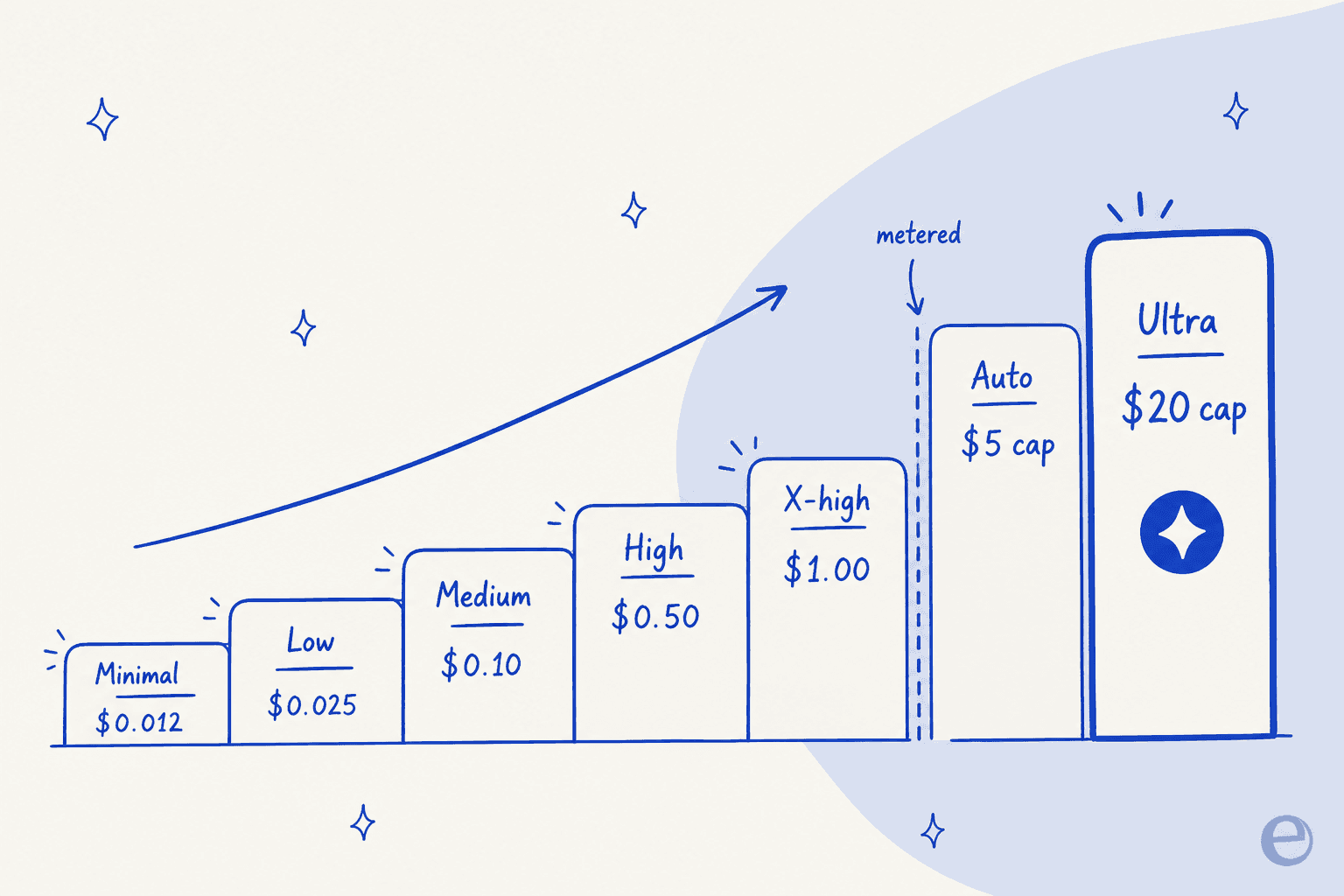
| Effort level | Price | Best for |
|---|---|---|
minimal | $0.012 / request | Narrow factual lookups, short answers |
low | $0.025 / request | Simple lookups, light research |
medium | $0.10 / request | Default for standard research |
high | $0.50 / request | Harder research, stricter completeness |
xhigh | $1.00 / request | High-value tasks, complex schemas |
auto | Metered, up to a $5 default cap | Variable-scope work when you do not know the difficulty |
ultra | Metered, up to a $20 default cap | Large list-building, exhaustive research |
So the honest headline for Ultra is "metered, capped at $20 per run by default". The cap is a ceiling, not a fixed charge: a run that finishes early costs less, and you set your own limit with budget.maxCostDollars (accepted range $1 to $100). The Agent docs confirm the same numbers, so this is not marketing rounding.
The design choice here is worth calling out. Every other effort level bills a flat fee whether the task was trivial or gnarly. Ultra, like auto, only charges for the compute and tools a run actually burns. For the exhaustive tasks Ultra targets, where one query might spawn dozens of subagents, that usage-based model is the difference between predictable and painful.
The metered part, in plain numbers
When a run is metered, two components drive the bill, with enrichment as a third optional line.
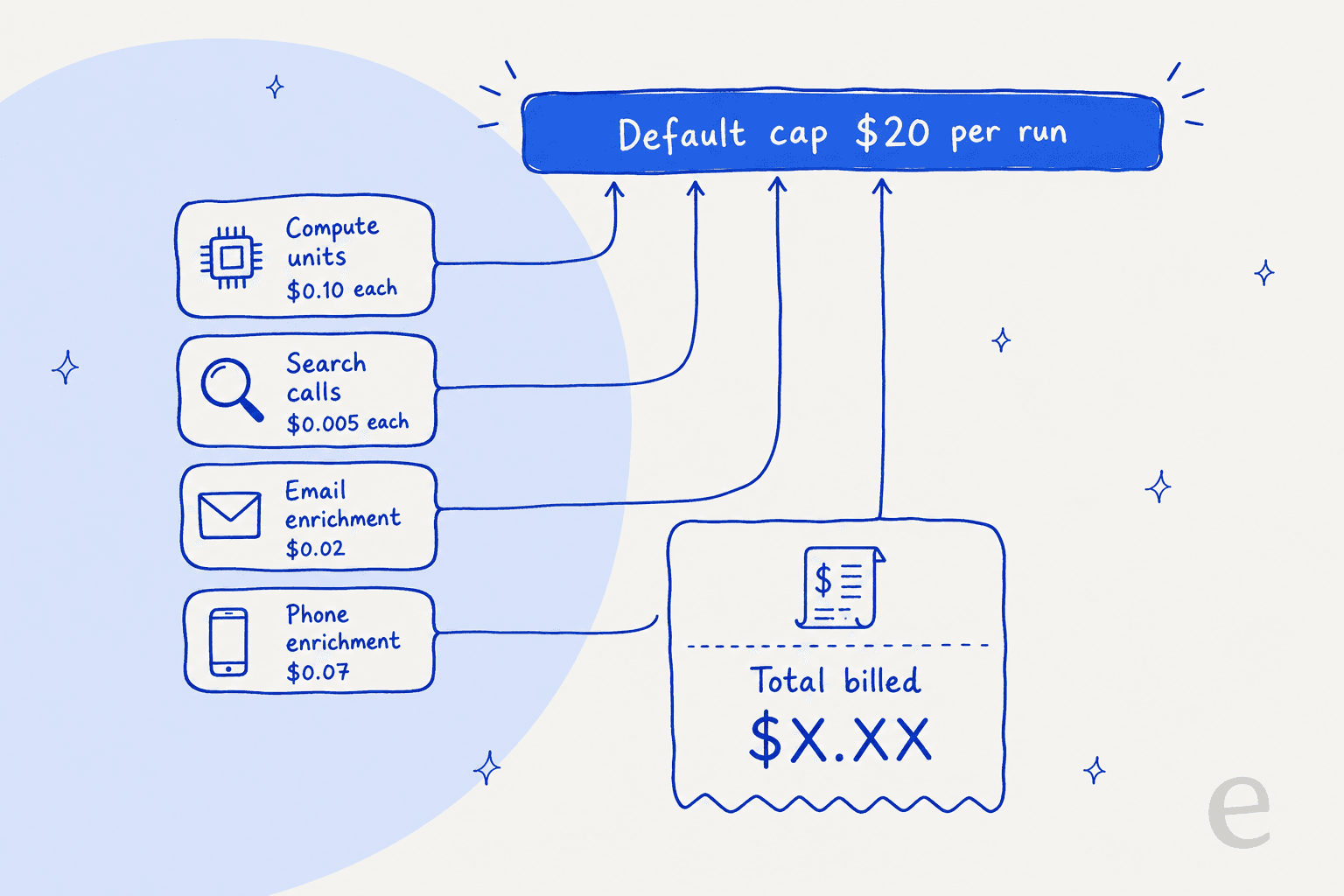
| Component | Rate | What it measures |
|---|---|---|
| Agent Compute Units (ACU) | $0.10 / ACU | Model computation across the full run |
| Search tool calls | $0.005 / search | Each web search the agent fires |
| Email enrichment | $0.02 / email | Contact email lookups |
| Phone enrichment | $0.07 / phone number | Contact phone lookups |
The load-bearing metric is usage.agentComputeUnits. Exa is explicit that complex queries, especially ones with a large input.data field, need more reasoning steps and consume more ACUs. So a broad, judgment-heavy enrichment ("does this company sell to hospitals, with a cited URL as evidence") will burn far more than a tight factual lookup.
A couple of worked examples to make it concrete:
- A moderate Ultra run that uses 60 ACUs and 80 searches costs
60 x $0.10 + 80 x $0.005 = $6.40. Well under the $20 cap. - A heavy list-build that hits 150 ACUs and 300 searches costs
150 x $0.10 + 300 x $0.005 = $16.50, still under the cap, before any enrichment. - Add 200 email lookups to that heavy run and you are at
$16.50 + $4.00 = $20.50, so the $20 cap would clip it (enrichment sits outside the core meter, so check your budget settings here).
Plug your own numbers in below.
Where Ultra sits in Exa's wider pricing
Exa Agent is one product on a broader menu. If you are pricing out Ultra, it helps to see the neighbours, because a lot of teams reach for the cheaper Search API and orchestrate their own loop instead of paying for Agent to do it.
| Endpoint | Base price (up to 10 results) | Per extra result | AI page summaries |
|---|---|---|---|
| Search | $7 / 1k requests | $1 / 1k | +$1 / 1k pages |
| Deep Search | $12 / 1k requests | $1 / 1k | +$1 / 1k pages |
| Deep-Reasoning Search | $15 / 1k requests | $1 / 1k | +$1 / 1k pages |
| Contents | $1 / 1k pages | - | +$1 / 1k pages |
| Monitors | $15 / 1k requests | $1 / 1k | - |
| Answer | $5 / 1k requests | - | - |
The trade is the classic build-versus-buy one. Raw Search at $7 per 1,000 requests is cheap, but you write the loop: the searches, the page reads, the verification, the schema validation. Agent Ultra folds all of that into one metered call. You are paying for orchestration, not just retrieval.
On the account side, three plans gate access:
| Plan | Price | Highlights |
|---|---|---|
| Starter | Free | $10 credits/month + $10 onboarding bonus, no card, 10 search QPS, 50 agent concurrency |
| Developer | Pay as you go | Usage-based billing, up to 25 search QPS, SOC 2 Type II |
| Enterprise | Custom | Zero data retention, HIPAA, SSO/SCIM, up to 1,000 results per search |
The free credits are enough to run Ultra a handful of times before you commit, which is the right way to size your own ACU consumption before trusting the estimator above.
Exa Connect: the add-on that stacks on top
One line that is easy to miss: if your Ultra run pulls from premium data partners through Exa Connect, that is billed on top of Agent usage. Self-serve providers include Similarweb, Financial Datasets, and Fiber.ai, with ZoomInfo, Crunchbase, and Harmonic available on request.
For a go-to-market team building an enriched account list, this is where a run's real cost can drift above the base meter, because you are now paying Exa's compute and a third party's data rate. Bring-your-own-key is supported for any provider, so if you already pay ZoomInfo, you are not double-charged for the data itself. Worth modelling before you assume the $20 cap is your ceiling.
Is Ultra worth the spend?
Exa's whole pitch is that the metered model buys you frontier quality cheaper than running a frontier model's own agent. On its WANDR benchmark (Wide And Deep Research, modelled on due-diligence and legal-research enrichment), Ultra claims to set the state of the art.
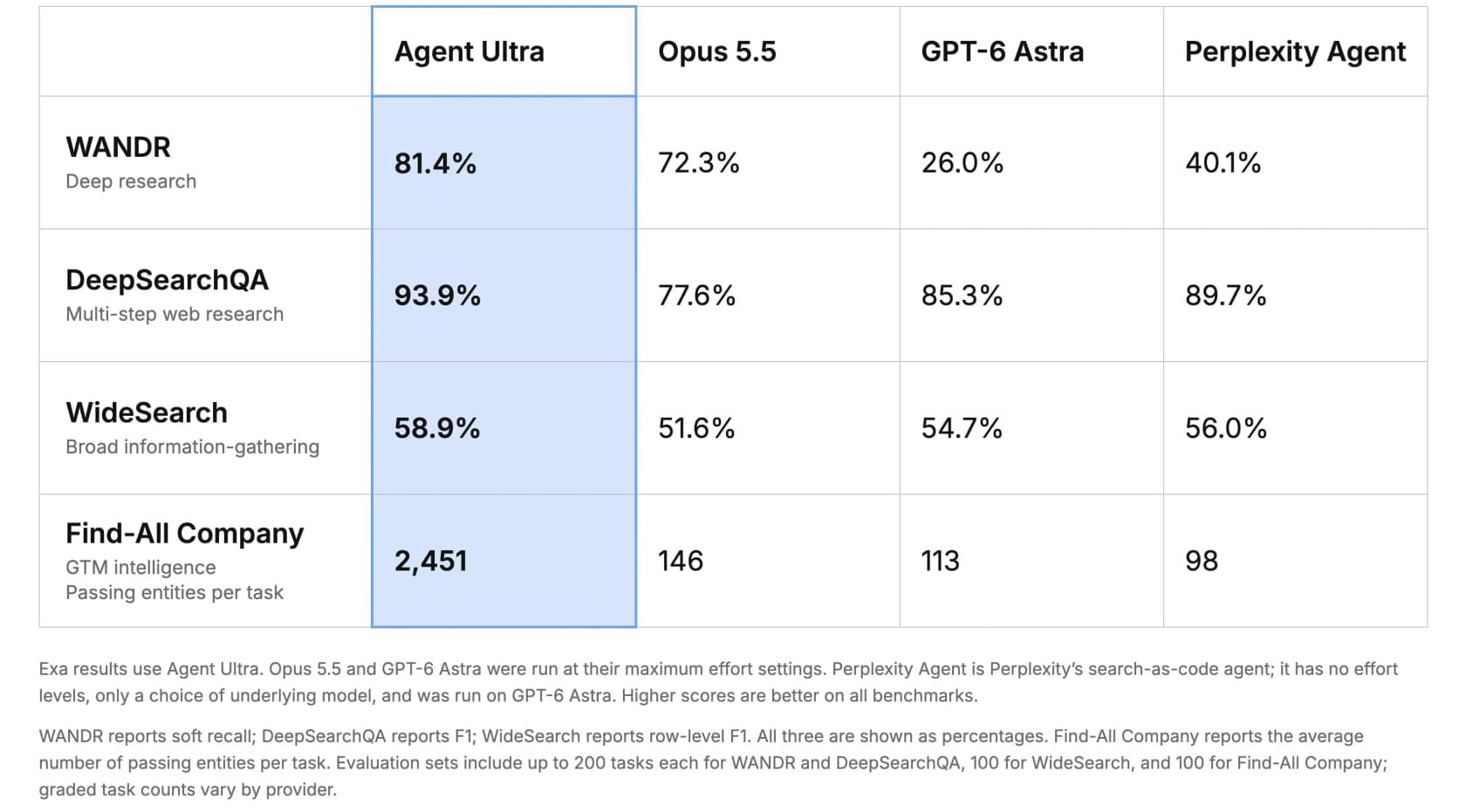
The specific claims, all measured against each competitor's maximum effort setting:
- WANDR: +12.6% over Opus 5.5, at half the cost per task of Opus 5.5.
- DeepSearchQA: +21.0% over Opus 5.5 and +10.1% over GPT-6 Astra, at 46% lower cost per task than GPT-6 Astra.
- WideSearch: +14.1% over Opus 5.5, at the lowest cost per task of the four systems.
- Find-All Company: +1579% over Opus 5.5 on passing entities found, at the lowest cost per entity.
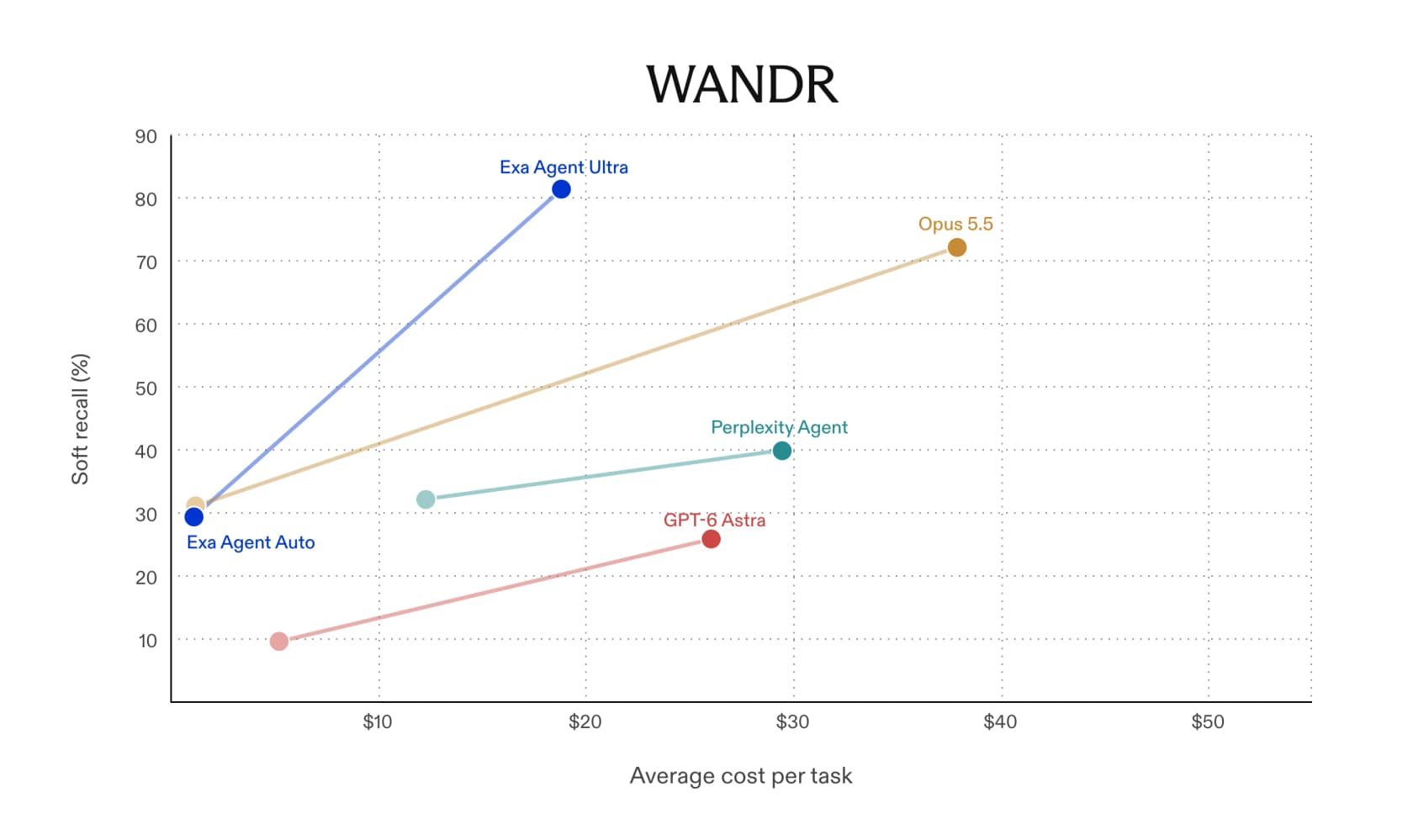
Two honest caveats. These are Exa's own numbers on Exa's own harness. Exa says it reports published figures where competitors had them and ran the benchmark itself otherwise, and it swapped in a cheaper judge model (gpt-6-luna), all of which is reasonable but still vendor-run. The Find-All Company gaps in particular are so large that they say more about how poorly general-purpose agents handle exhaustive list-building than about a like-for-like quality edge. Read them as "Ultra is genuinely built for wide research, and general chat agents are not," which is a fair and useful conclusion.
What builders say about Exa's cost
The pricing debate around Exa predates Ultra. At the company's Launch HN (412 points, 133 comments), founder Will Bryk was candid about why the richer product is gated rather than free:
"we'd love to make the product as accessible and cheap as possible, but as of state of AI costs of 2025, it's a very expensive product to run and so we have it login gated."

That is the useful context for Ultra's meter. Deep, exhaustive web research is expensive to run, and Exa's answer is to expose that cost honestly and cap it, rather than hide it behind a flat fee that either overcharges light users or loses money on heavy ones. The $20 cap is doing a lot of quiet work: it is the promise that "run to exhaustion" will not mean "bill to exhaustion."
eesel: a teammate, not an engine to wire up
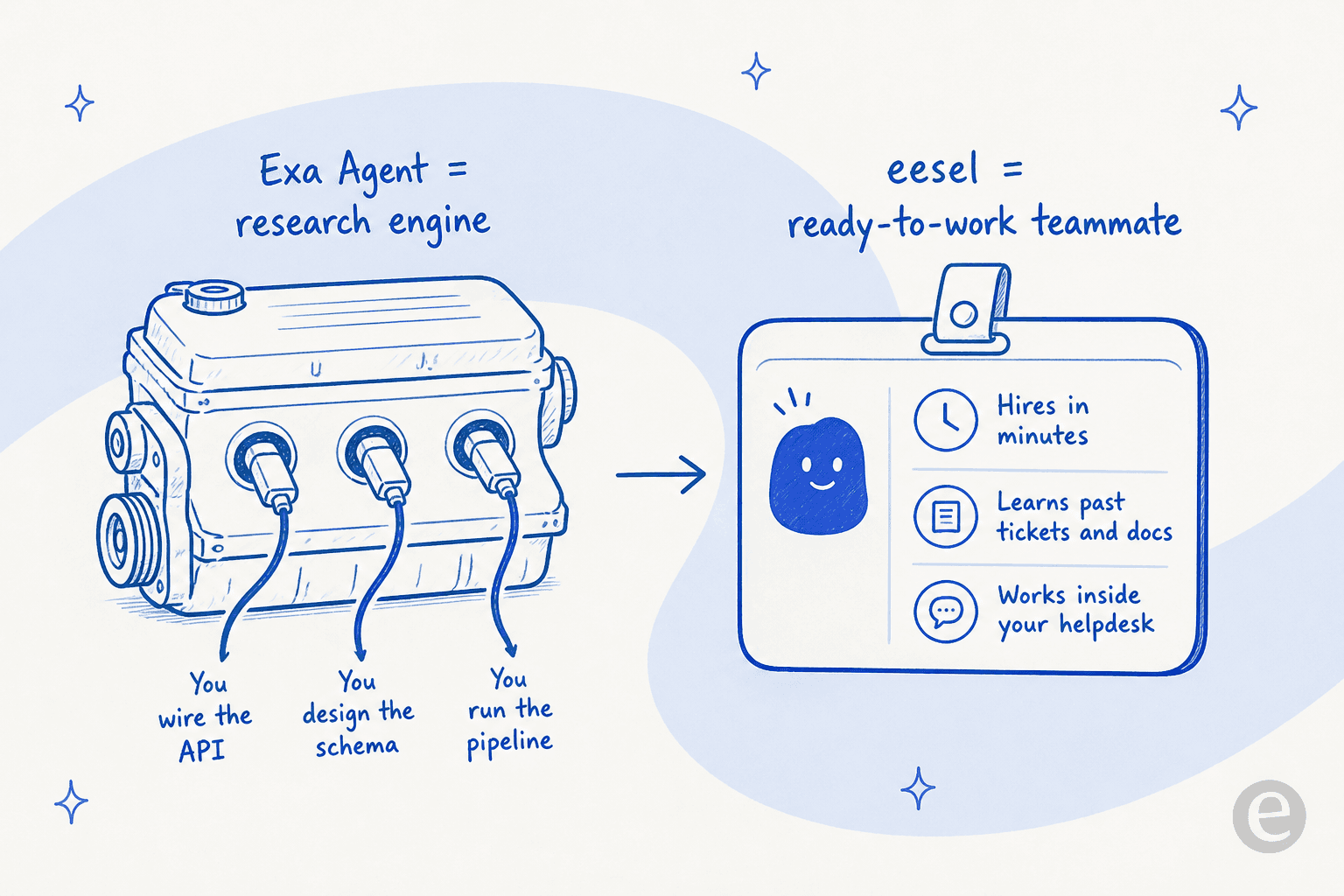
Here is the reframe worth ending on. Exa Agent Ultra is infrastructure. It is a genuinely strong deep-research engine, but it hands you an API and a schema and expects you to build the pipeline, poll the runs, validate the output, and wire it into wherever the work actually happens. That is the right tool if you are a developer building list-building or enrichment into your own product.

If what you actually want is the outcome, eesel sells the other half of that equation: ready-to-work AI teammates you hire for a job, not an engine you assemble. The AI helpdesk teammate joins your existing queue, learns from your past tickets and help center on day one, and drafts or auto-sends replies inside Zendesk, Freshdesk, or Slack. The AI blog writer does the same for content. Each arrives with the skills, integrations, and company context for its role, so there is no schema to design.
And if you do live in a terminal, eesel meets you there too. The eesel CLI drives the same teammate as the dashboard: npx @eesel/cli init chat-bubble --site https://your-site.com spins up a workspace, and every command prints JSON with a hint field telling an agent what to run next. That is what makes it drivable not just by a person but by coding agents like Claude Code, Cursor, and Codex, and every workspace doubles as an MCP server via eesel mcp token. So you get the same agentic, scriptable control Exa's API gives you, except the thing you are scripting is a teammate that already knows your business, not a research pipeline you still have to build. It is free to try, with no card required.
Frequently Asked Questions
How much does Exa Agent Ultra cost per run?
What is the difference between Exa Agent effort levels?
auto and ultra are metered by usage instead, with default caps of $5 and $20 respectively. Ultra is the top setting, built to run a task to exhaustion.Is Exa Agent Ultra more expensive than a frontier model?
Does Exa Agent Ultra have a free tier?
What is the cheapest way to run agentic research over my own tickets?


Article by
Rama Adi Nugraha
Rama is a software engineer at eesel AI with two years of experience writing about B2B SaaS, AI tools, and customer support technology. Based in Bali, Indonesia, he brings a developer's perspective to product comparisons — cutting through marketing copy to what the integrations and APIs actually do.